tire type TOYOTA VERSO S 2011 Owners Manual
[x] Cancel search | Manufacturer: TOYOTA, Model Year: 2011, Model line: VERSO S, Model: TOYOTA VERSO S 2011Pages: 664, PDF Size: 160.56 MB
Page 13 of 664
13Pictorial index
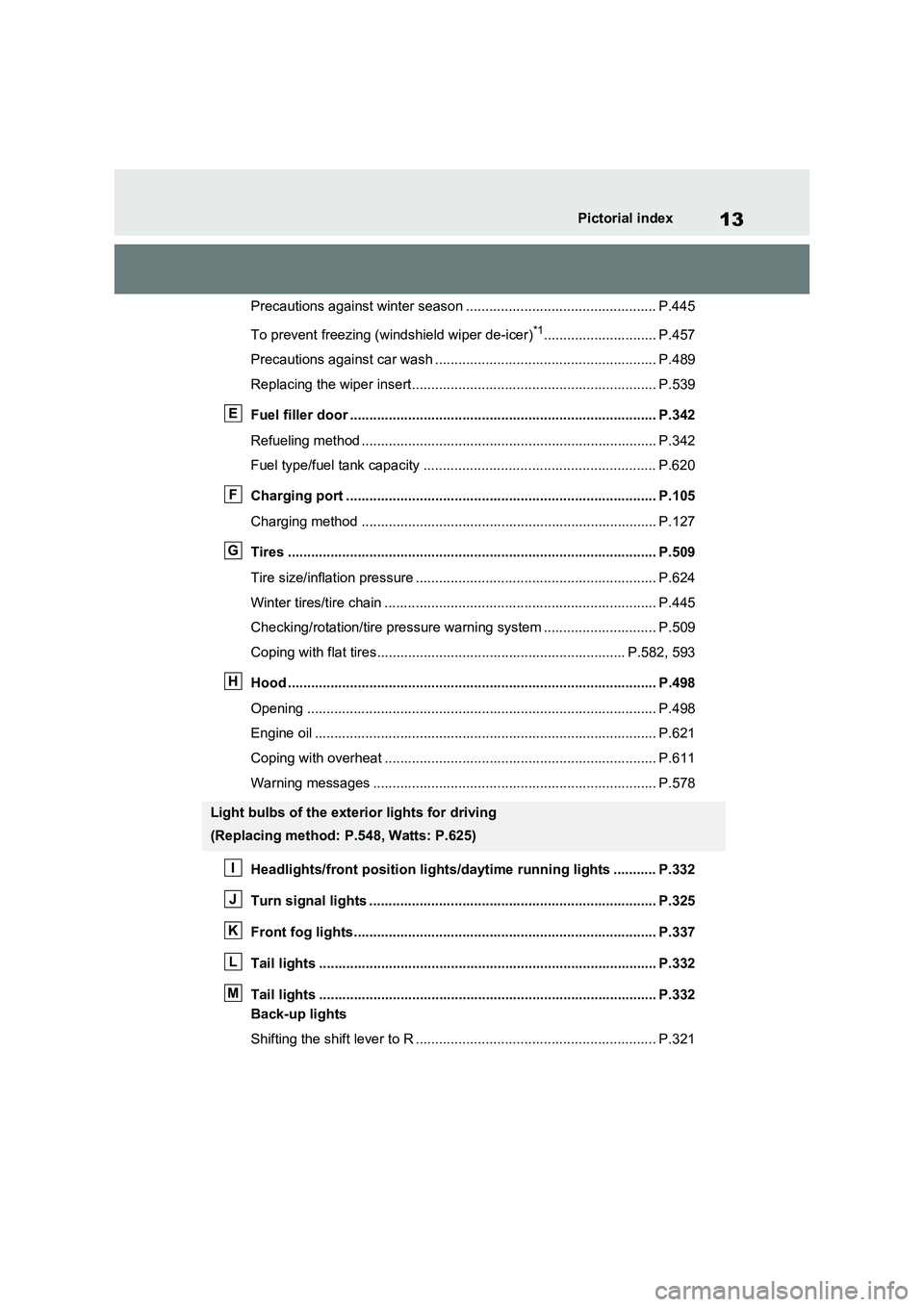
Precautions against winter season ................................................. P.445
To prevent freezing (windshield wiper de-icer)
*1............................. P.457
Precautions against car wash ......................................................... P.489
Replacing the wiper insert............................................................... P.539
Fuel filler door ............................................................................... P.342
Refueling method ............................................................................ P.342
Fuel type/fuel tank capacity ............................................................ P.620
Charging port ................................................................................ P.105
Charging method ............................................................................ P.127
Tires ............................................................................................... P.509
Tire size/inflation pressure .............................................................. P.624
Winter tires/tire chain ...................................................................... P.445
Checking/rotation/tire pressure warning system ............................. P.509
Coping with flat tires................................................................ P.582, 593
Hood ............................................................................................... P.498
Opening .......................................................................................... P.498
Engine oil ........................................................................................ P.621
Coping with overheat ...................................................................... P.611
Warning messages ......................................................................... P.578
Headlights/front position lights/daytime running lights ........... P.332
Turn signal lights .......................................................................... P.325
Front fog lights.............................................................................. P.337
Tail lights ....................................................................................... P.332
Tail lights ....................................................................................... P.332
Back-up lights
Shifting the shift lever to R .............................................................. P.321
Light bulbs of the exterior lights for driving
(Replacing method: P.548, Watts: P.625)
E
F
G
H
I
J
K
L
M
Page 104 of 664
1042-1. Plug-in hybrid system
A pressure level 50 kPa (0.5 kgf/cm
2 or
bar, 7 psi) lower than the specified
value will cause a worsening of several
percentage points.
■When driving on highways,
use the EV/HV mode selection
switch to drive in HV mode
The power consumption will
increase significantly if the vehicle
is driven in EV mode on highways.
■Do not load unnecessary
objects in the vehicle
Driving with objects weighing 100
kg (220 lb.) in the vehicle will
worsen the electrical and fuel effi-
ciency by approximately 3%.
Air resistance also greatly affects
electrical and fuel efficiency.
Remove any exterior accessories
such as a roof luggage carrier when
they are not being used.
The running resistance of snow
tires is high and they will worsen
electrical and fuel efficiency.
Replace them with standard tires
as soon as they are no longer
needed.
■Know your vehicle’s electrical
and fuel efficiency
If you know your vehicle’s daily
electrical and fuel efficiency, you
will understand the benefits of Eco
drive.
Use the Power Consumption/Fuel
Economy, ECO Accelerator Guid-
ance/“Eco Score” and other data
displayed on the multi-information display.
The following indicate that charging
has been carried out properly.
The charging indicator of the
charging port turns off
“Charging Complete” is dis-
played on the multi-information
display when a door is opened
with the power switch off
(P.131)
Regardless of the type of power
source or whether the charging
schedule function is used, charging
is completed if the above can be
confirmed.
Charging-related messages: P.160
Display when charging is
completed
Page 185 of 664
185
3 3-1. Instrument cluster
Vehicle status information and indicators
■Drive information
2 items that are selected using the
“Drive Info Items” setting (average
speed, distance and total time) can
be displayed vertically.
The displayed information changes
according to the “Drive Info Type”
setting (since the system was
started or between resets).
(P.186)
Use the displayed information as a ref-
erence only.
Following items will be displayed.
“Trip”
• “Average Speed”: Displays the aver-
age vehicle speed since hybrid sys-
tem start
*
• “Distance”: Displays the distance
driven since hybrid system start*
• “Total Time”: Displays the elapsed
time since hybrid system start*
*
: These items are reset each time the
hybrid system stops.
“Total”
• “Average Speed”: Displays the aver-
age vehicle speed since the display
was reset
*
• “Distance”: Displays the distance
driven since the display was reset*
• “Total Time”: Displays the elapsed
time since the display was reset*
*
: To reset, display the desired item and
press and hold .
■Energy monitor
P.195
■Tire pressure
P.511
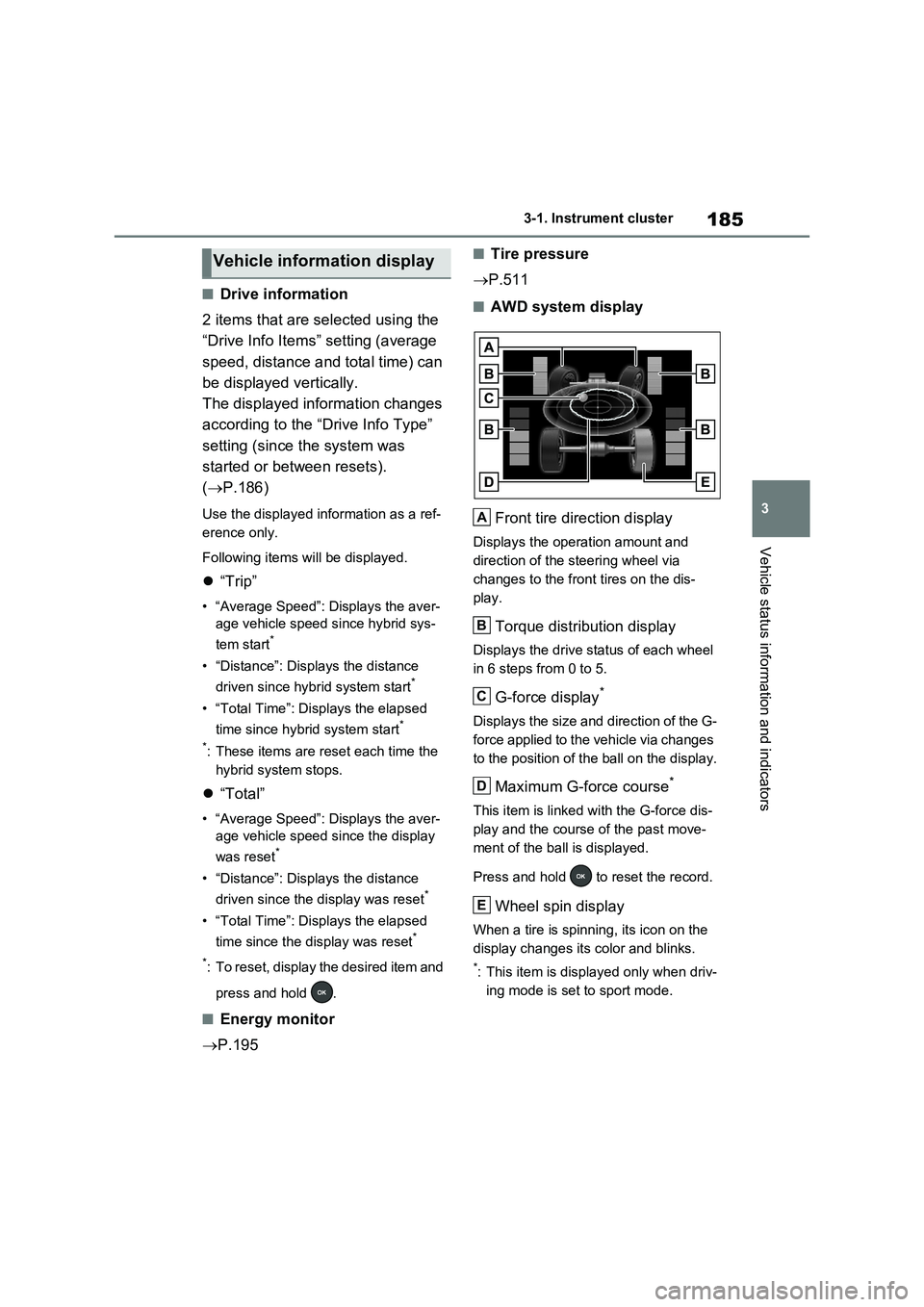
■AWD system display
Front tire direction display
Displays the operation amount and
direction of the steering wheel via
changes to the front tires on the dis-
play.
Torque distribution display
Displays the drive status of each wheel
in 6 steps from 0 to 5.
G-force display*
Displays the size and direction of the G-
force applied to the vehicle via changes
to the position of the ball on the display.
Maximum G-force course*
This item is linked with the G-force dis-
play and the course of the past move-
ment of the ball is displayed.
Press and hold to reset the record.
Wheel spin display
When a tire is spinning, its icon on the
display changes its color and blinks.
*: This item is displayed only when driv-
ing mode is set to sport mode.
Vehicle information display
A
B
C
D
E
Page 188 of 664
1883-1. Instrument cluster
Select to enable/disable the battery
cooler. (P.129)
PBD (Power Back Door) (if
equipped) (P.213)
Select to set up the following items.
•System settings
Select to enable/disable the power
back door system.
•“Hands Free”
*
Select to enable/disable the Hands
Free Power Back Door.
• “Opening Adjustment”
Select the open position when power
back door is fully open.
•“Volume”
Select to set the volume of the buzzer
which sounds when the power back
door system operates.
*: Vehicles with Hands Free Power
Back Door
“TPWS” (Tire Pressure Warning
System) (P.511)
• “Setting Pressure”
Select to initialize the tire pressure
warning system.
• “Identifying Each Wheel & Position”
Select to register the ID codes of the
tire pressure sensors to the tire pres-
sure warning system.
•“Setting Unit”
Select to change the units of measure
displayed.
“Rear Seat Reminder” (P.207)
Select to enable/disable the rear seat
reminder.
■ Settings
“Language”
Select to change the language on the
multi-information display.
“Units”
Select to change the units of measure
displayed.
“Meter Type”
Select to change the speedometer dis-
play.
(EV indicator) (P.90)
Select to enable/disable the EV indica-
tor.
(Driving information display
settings)
Select to set up the following items.
•“Hybrid System”
Select to enable/disable the ECO
Accelerator Guidance (P.182).
• “Fuel Economy”
Select to change the display on Fuel
Economy (P.181).
• “Power Consumption”
Select to change the display on Power
Consumption (P.181).
(Audio settings)
Select to enable/disable screen.
(Vehicle information dis-
play settings)
• “Display Contents”
Select to set up the following items.
“Energy monitor”:
Select to enable/disable the Energy
monitor (P.195)
AWD:
Select to enable/disable the AWD sys-
tem display (P.185).
Page 429 of 664
429
5 5-5. Using the driving support systems
Driving
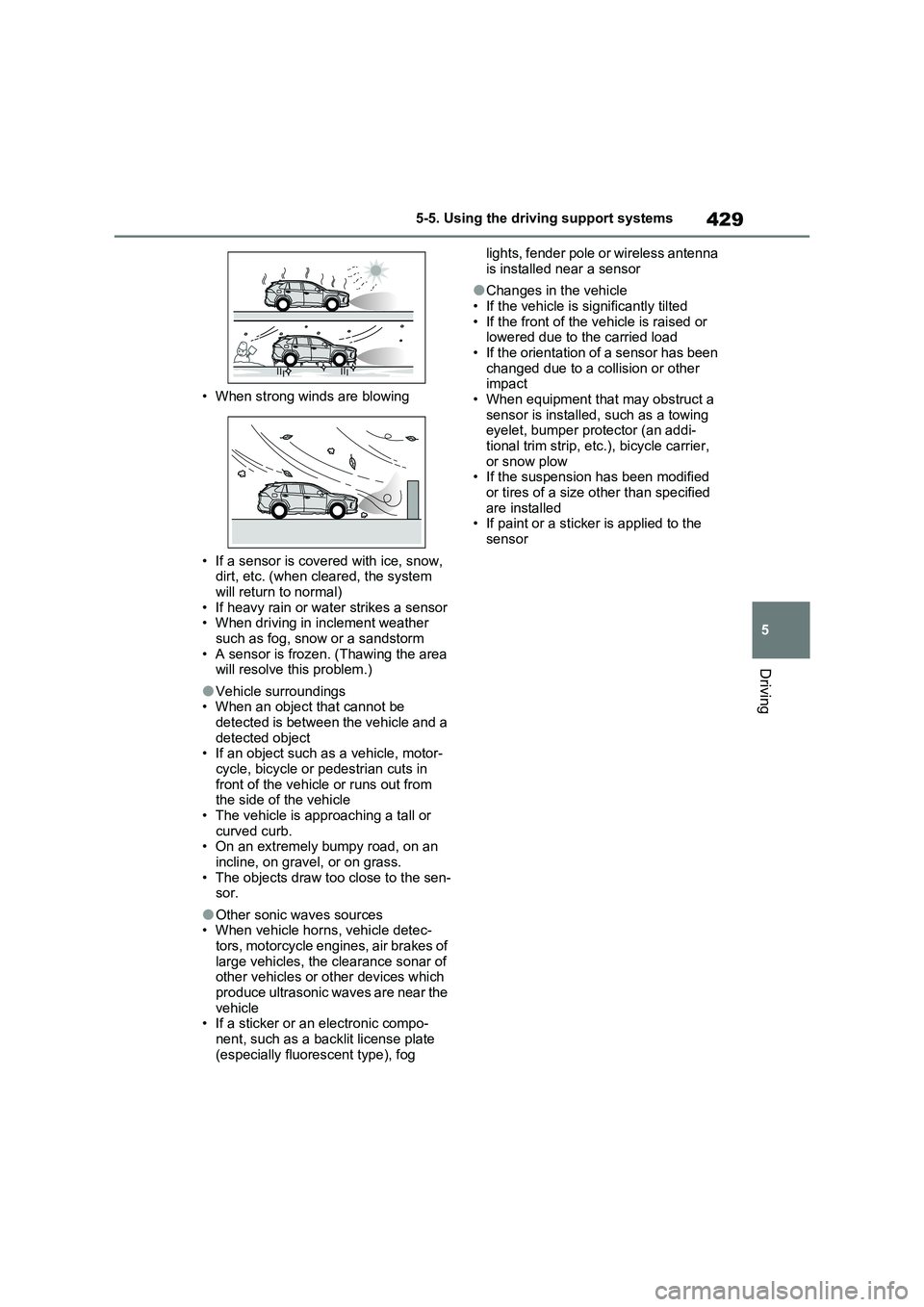
• When strong winds are blowing
• If a sensor is covered with ice, snow,
dirt, etc. (when cleared, the system
will return to normal)
• If heavy rain or water strikes a sensor
• When driving in inclement weather
such as fog, snow or a sandstorm
• A sensor is frozen. (Thawing the area
will resolve this problem.)
●Vehicle surroundings
• When an object that cannot be
detected is between the vehicle and a
detected object
• If an object such as a vehicle, motor-
cycle, bicycle or pedestrian cuts in
front of the vehicle or runs out from
the side of the vehicle
• The vehicle is approaching a tall or
curved curb.
• On an extremely bumpy road, on an
incline, on gravel, or on grass.
• The objects draw too close to the sen-
sor.
●Other sonic waves sources
• When vehicle horns, vehicle detec-
tors, motorcycle engines, air brakes of
large vehicles, the clearance sonar of
other vehicles or other devices which
produce ultrasonic waves are near the
vehicle
• If a sticker or an electronic compo-
nent, such as a backlit license plate
(especially fluorescent type), fog lights, fender pole or wireless antenna
is installed near a sensor
●Changes in the vehicle
• If the vehicle is significantly tilted
• If the front of the vehicle is raised or
lowered due to the carried load
• If the orientation of a sensor has been
changed due to a collision or other
impact
• When equipment that may obstruct a
sensor is installed, such as a towing
eyelet, bumper protector (an addi-
tional trim strip, etc.), bicycle carrier,
or snow plow
• If the suspension has been modified
or tires of a size other than specified
are installed
• If paint or a sticker is applied to the
sensor
Page 447 of 664
447
5
5-6. Driving tips
Driving
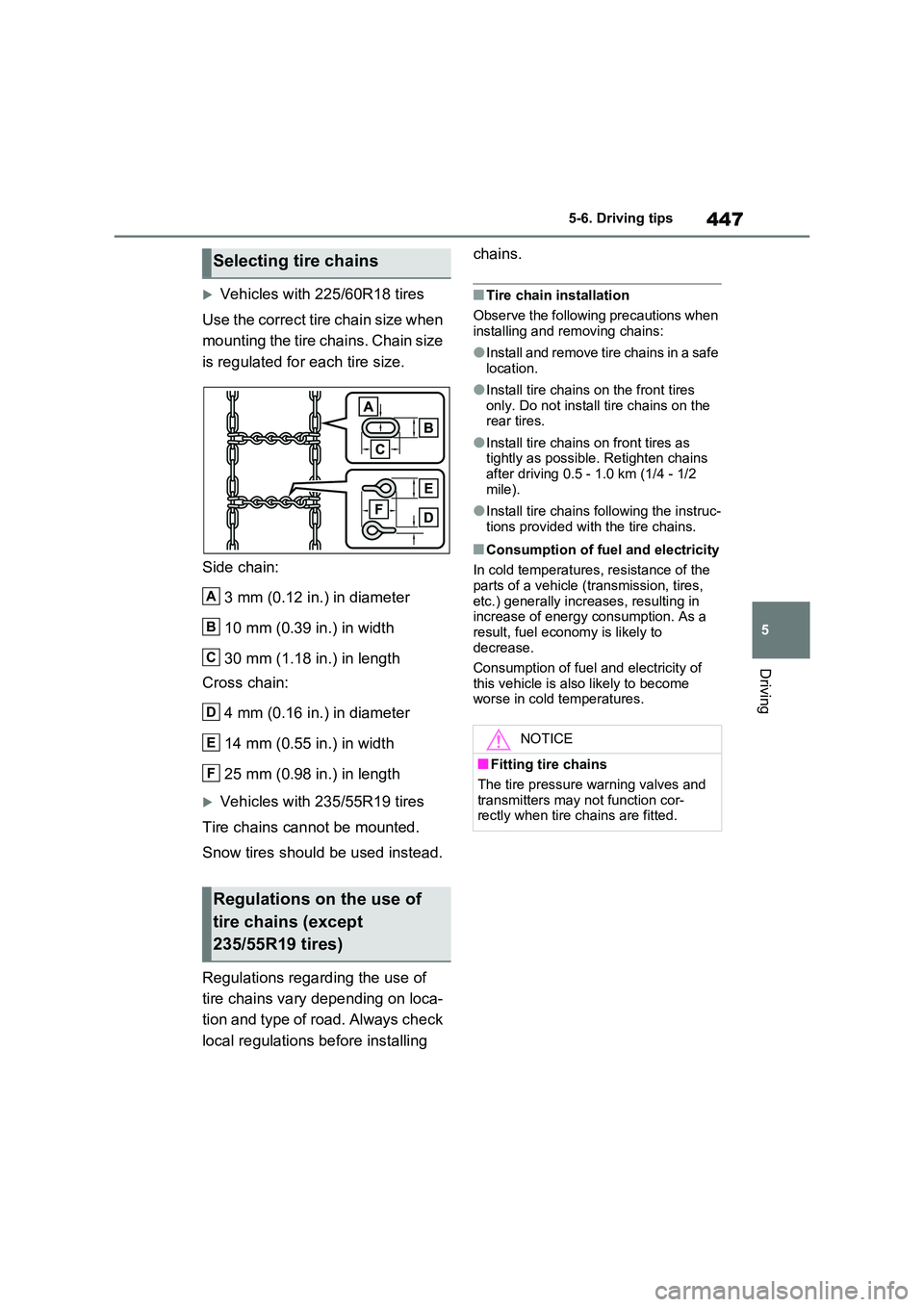
Vehicles with 225/60R18 tires
Use the correct tire chain size when
mounting the tire chains. Chain size
is regulated for each tire size.
Side chain:
3 mm (0.12 in.) in diameter
10 mm (0.39 in.) in width
30 mm (1.18 in.) in length
Cross chain:
4 mm (0.16 in.) in diameter
14 mm (0.55 in.) in width
25 mm (0.98 in.) in length
Vehicles with 235/55R19 tires
Tire chains cannot be mounted.
Snow tires should be used instead.
Regulations regarding the use of
tire chains vary depending on loca-
tion and type of road. Always check
local regulations before installing
chains.
■Tire chain installation
Observe the following precautions when installing and removing chains:
●Install and remove tire chains in a safe location.
●Install tire chains on the front tires only. Do not install tire chains on the rear tires.
●Install tire chains on front tires as tightly as possible. Retighten chains
after driving 0.5 - 1.0 km (1/4 - 1/2 mile).
●Install tire chains following the instruc-tions provided with the tire chains.
■Consumption of fuel and electricity
In cold temperatures, resistance of the
parts of a vehicle (transmission, tires, etc.) generally increases, resulting in increase of energy consumption. As a
result, fuel economy is likely to decrease.
Consumption of fuel and electricity of
this vehicle is also likely to become worse in cold temperatures.
Selecting tire chains
Regulations on the use of
tire chains (except
235/55R19 tires)
A
B
C
D
E
F
NOTICE
■Fitting tire chains
The tire pressure warning valves and transmitters may not function cor-rectly when tire chains are fitted.
Page 511 of 664
511
7 7-3. Do-it-yourself maintenance
Maintenance and care
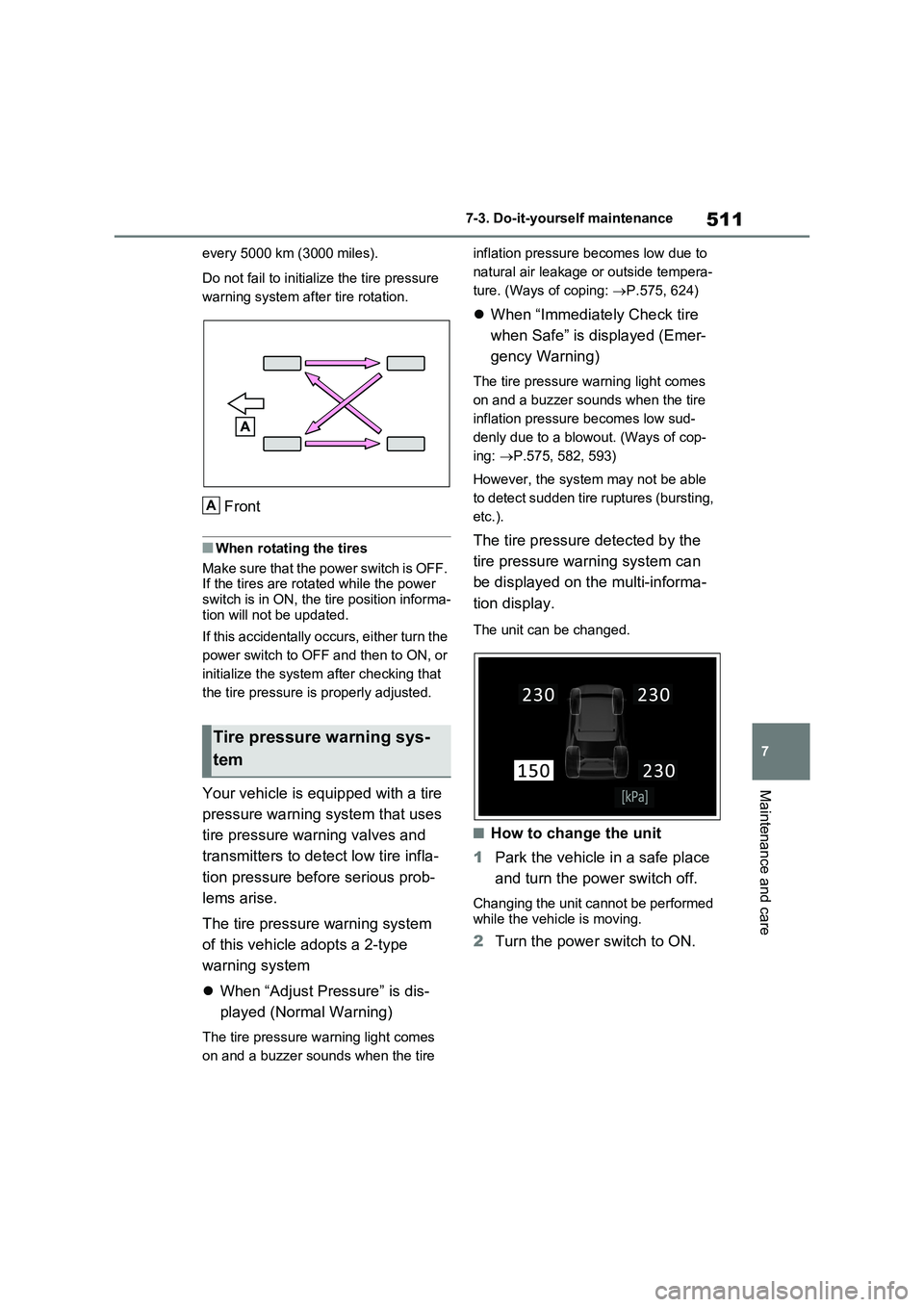
every 5000 km (3000 miles).
Do not fail to initialize the tire pressure
warning system after tire rotation.
Front
■When rotating the tires
Make sure that the power switch is OFF.
If the tires are rotated while the power
switch is in ON, the tire position informa-
tion will not be updated.
If this accidentally occurs, either turn the
power switch to OFF and then to ON, or
initialize the system after checking that
the tire pressure is properly adjusted.
Your vehicle is equipped with a tire
pressure warning system that uses
tire pressure warning valves and
transmitters to detect low tire infla-
tion pressure before serious prob-
lems arise.
The tire pressure warning system
of this vehicle adopts a 2-type
warning system
When “Adjust Pressure” is dis-
played (Normal Warning)
The tire pressure warning light comes
on and a buzzer sounds when the tire inflation pressure becomes low due to
natural air leakage or outside tempera-
ture. (Ways of coping: P.575, 624)
When “Immediately Check tire
when Safe” is displayed (Emer-
gency Warning)
The tire pressure warning light comes
on and a buzzer sounds when the tire
inflation pressure becomes low sud-
denly due to a blowout. (Ways of cop-
ing: P.575, 582, 593)
However, the system may not be able
to detect sudden tire ruptures (bursting,
etc.).
The tire pressure detected by the
tire pressure warning system can
be displayed on the multi-informa-
tion display.
The unit can be changed.
■How to change the unit
1Park the vehicle in a safe place
and turn the power switch off.
Changing the unit cannot be performed
while the vehicle is moving.
2Turn the power switch to ON.
Tire pressure warning sys-
tem
A
Page 530 of 664
5307-3. Do-it-yourself maintenance
should be placed so that the vehicle is
balanced.
When replacing wheels, care
should be taken to ensure that they
are equivalent to those removed in
load capacity, diameter, rim width
and inset*.
Replacement wheels are available
at any authorized Toyota retailer or
Toyota authorized repairer, or any
reliable repairer.
*: Conventionally referred to as offset.
Toyota does not recommend using
the following:
Wheels of different sizes or types
Used wheels
Bent wheels that have been
straightened
■When replacing wheels
The wheels of your vehicle are equipped with tire pressure warning valves and
transmitters that allow the tire pressure warning system to provide advance warning in the event of a loss in tire
inflation pressure. Whenever wheels are replaced, tire pressure warning valves and transmitters must be installed.
( P.511, 531)
WARNING
■Proper inflation is critical to save tire performance
Keep your tires properly inflated. If the tires are not properly inflated, the following conditions may occur
which could lead to an accident resulting in death or serious injury:
●Excessive wear
●Uneven wear
●Poor handling
●Possibility of blowouts resulting
from overheated tires
●Air leaking from between tire and
wheel
●Wheel deformation and/or tire dam-
age
●Greater possibility of tire damage
while driving (due to road hazards, expansion joints, sharp edges in the road, etc.)
NOTICE
■When inspecting and adjusting
tire inflation pressure
Be sure to put the tire valve caps back on.
If a valve cap is not installed, dirt or moisture may get into the valve and cause an air leak, resulting in
decreased tire inflation pressure.
Wheels
If a wheel is bent, cracked or
heavily corroded, it should be
replaced. Otherwise, the tire
may separate from the wheel
or cause a loss of handling
control.
Wheel selection
Page 563 of 664
563
8
8-2. Steps to take in an emergency
When trouble arises
8-2.Ste ps to take in an emerg ency
If your vehicle needs to
be towed
If towing is necessary, we rec-
ommend having your vehicle
towed by any authorized
Toyota retailer or Toyota
authorized repairer, or any reli-
able repairer or commercial
towing service, using a wheel-
lift type truck or flatbed truck.
Use a safety chain system for
all towing, and abide by all
state/provincial and local laws.
If towing your vehicle with a
wheel-lift type truck, use a tow-
ing dolly. ( P.563, 564)
WARNING
Observe the following precautions.
Failure to do so may result in death or serious injury.
■When towing the vehicle
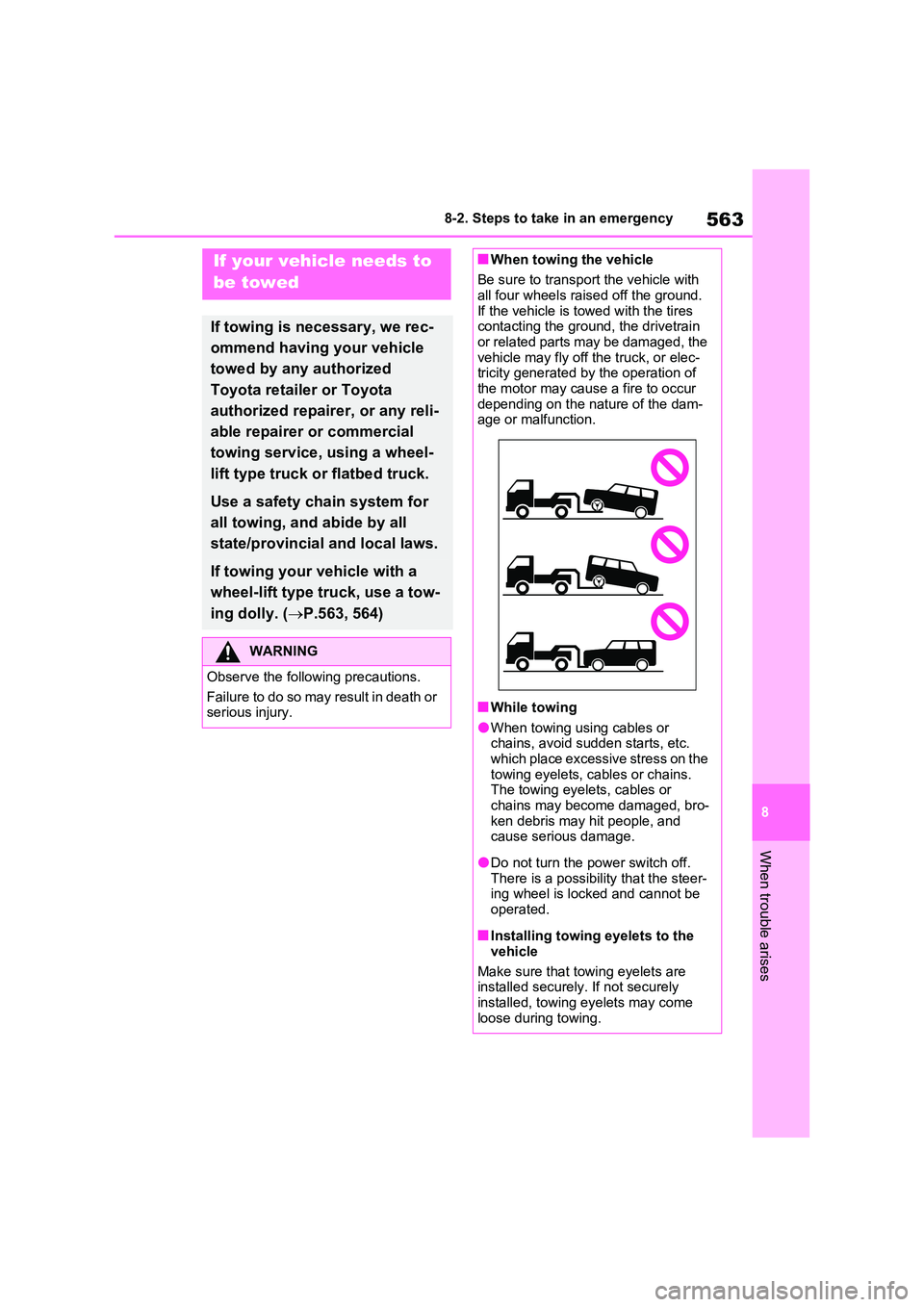
Be sure to transport the vehicle with all four wheels raised off the ground.
If the vehicle is towed with the tires contacting the ground, the drivetrain or related parts may be damaged, the
vehicle may fly off the truck, or elec- tricity generated by the operation of the motor may cause a fire to occur
depending on the nature of the dam- age or malfunction.
■While towing
●When towing using cables or chains, avoid sudden starts, etc. which place excessive stress on the
towing eyelets, cables or chains. The towing eyelets, cables or chains may become damaged, bro-
ken debris may hit people, and cause serious damage.
●Do not turn the power switch off.There is a possibility that the steer-ing wheel is locked and cannot be
operated.
■Installing towing eyelets to the
vehicle
Make sure that towing eyelets are installed securely. If not securely
installed, towing eyelets may come loose during towing.
Page 585 of 664
585
8
8-2. Steps to take in an emergency
When trouble arises
●The kit is exclusively designed for size
and type of tires originally installed on your vehicle. Do not use it for tires that a different size than the original ones,
or for any other purposes.
●If the sealant gets on your clothes, it
may stain.
●If the sealant adheres to a wheel or
the surface of the vehicle body, the stain may not be removable if it is not cleaned at once. Immediately wipe
away the sealant with a wet cloth.
●During operation of the repair kit, a
loud operation noise is produced. This does not indicate a malfunction.
●Do not use to check or to adjust the tire pressure.
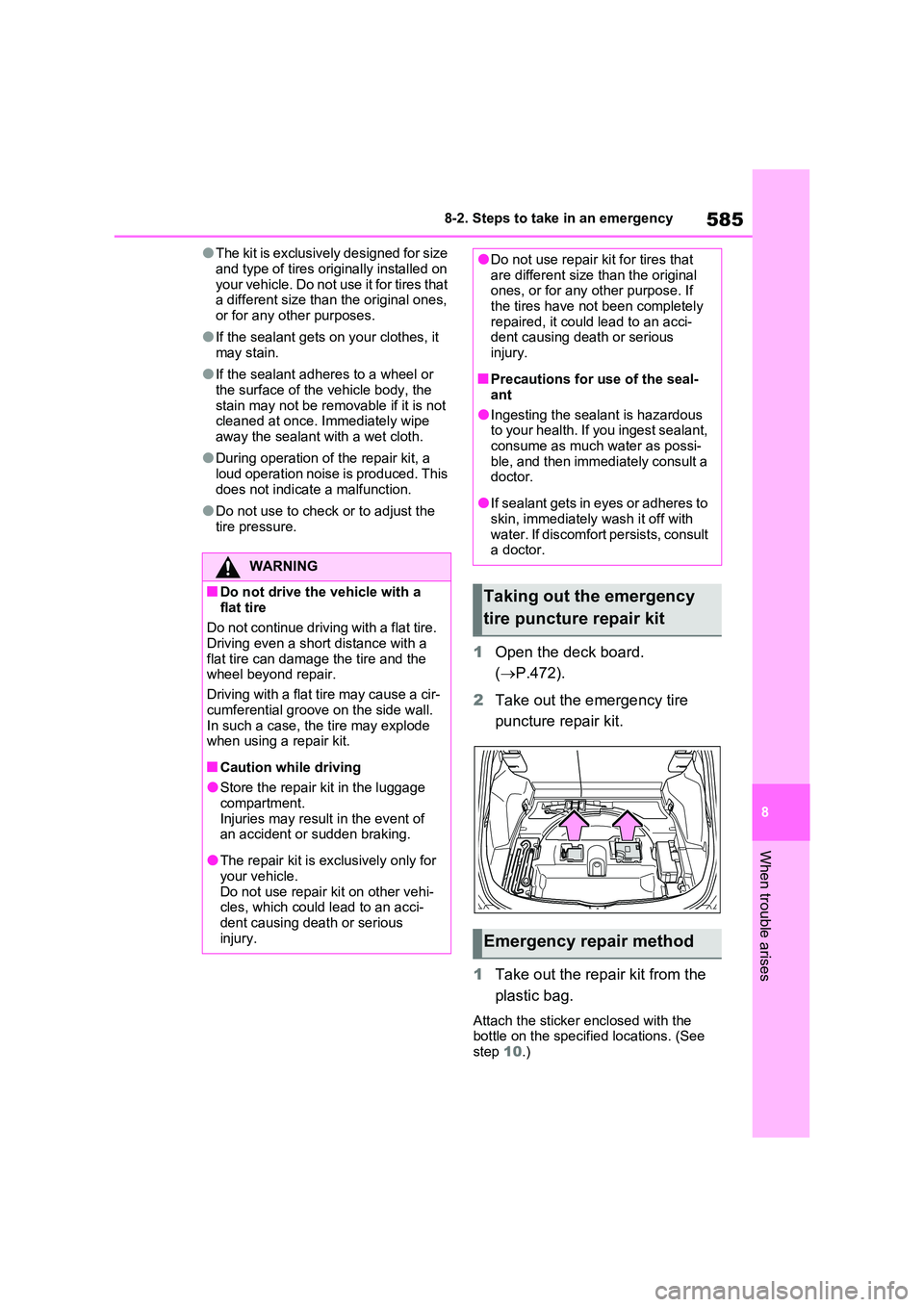
1 Open the deck board.
( P.472).
2 Take out the emergency tire
puncture repair kit.
1 Take out the repair kit from the
plastic bag.
Attach the sticker enclosed with the bottle on the specified locations. (See step 10.)
WARNING
■Do not drive the vehicle with a
flat tire
Do not continue driving with a flat tire. Driving even a short distance with a
flat tire can damage the tire and the wheel beyond repair.
Driving with a flat tire may cause a cir-
cumferential groove on the side wall. In such a case, the tire may explode when using a repair kit.
■Caution while driving
●Store the repair kit in the luggage
compartment. Injuries may result in the event of an accident or sudden braking.
●The repair kit is exclusively only for your vehicle.
Do not use repair kit on other vehi- cles, which could lead to an acci-dent causing death or serious
injury.
●Do not use repair kit for tires that are different size than the original ones, or for any other purpose. If
the tires have not been completely repaired, it could lead to an acci-dent causing death or serious
injury.
■Precautions for use of the seal-
ant
●Ingesting the sealant is hazardous to your health. If you ingest sealant,
consume as much water as possi- ble, and then immediately consult a doctor.
●If sealant gets in eyes or adheres to skin, immediately wash it off with
water. If discomfort persists, consult a doctor.
Taking out the emergency
tire puncture repair kit
Emergency repair method