tow TOYOTA VERSO S 2011 Owners Manual
[x] Cancel search | Manufacturer: TOYOTA, Model Year: 2011, Model line: VERSO S, Model: TOYOTA VERSO S 2011Pages: 664, PDF Size: 160.56 MB
Page 3 of 664
3TABLE OF CONTENTS
1
6
5
4
3
2
8
7
9
Smart entry & start system . 223
4-3. Adjusting the seats
Front seats .......................... 270
Rear seats .......................... 271
Driving position memory ..... 273
Head restraints ................... 276
4-4. Adjusting the steering wheel
and mirrors
Steering wheel .................... 278
Inside rear view mirror ........ 279
Digital Rear-view Mirror ...... 280
Outside rear view mirrors.... 289
4-5. Opening, closing the win-
dows and moon roof
Power windows ................... 291
Panoramic moon roof ......... 294
5-1. Before driving
Driving the vehicle .............. 300
Cargo and luggage ............. 306
Trailer towing ...................... 308
5-2. Driving procedures
Power (ignition) switch ........ 317
Hybrid transmission ............ 321
Turn signal lever ................. 325
Parking brake...................... 326
Brake Hold .......................... 329
5-3. Operating the lights and wip-
ers
Headlight switch.................. 332
AHB (Automatic High Beam)
.......................................... 334
Fog light switch ................... 337
Windshield wipers and washer
.......................................... 338
Rear window wiper and washer
.......................................... 340
5-4. Refueling
Opening the fuel tank cap ... 342
5-5. Using the driving support sys-
tems
Toyota Safety Sense .......... 344
PCS (Pre-Collision System) 355
LTA (Lane Tracing Assist) .. 362
RSA (Road Sign Assist)...... 372
Dynamic radar cruise control
with full-speed range ........ 376
Cruise control...................... 388
Speed limiter ....................... 391
BSM (Blind Spot Monitor) ... 393
Toyota parking assist-sensor
.......................................... 414
PKSB (Parking Support Brake)
.......................................... 420
Parking Support Brake function
(static objects) .................. 424
Parking Support Brake function
(rear-crossing vehicles) .... 430
Driving mode select switch . 434
Trail Mode ........................... 435
GPF (Gasoline Particulate Filter)
system .............................. 437
Driving assist systems ........438
5-6. Driving tips
Winter driving tips ............... 445
Utility vehicle precautions ... 448
5Driving
Page 4 of 664
4TABLE OF CONTENTS
6-1. Using the air conditioning
system and defogger
Automatic air conditioning sys-
tem .................................... 452
Remote Air Conditioning System
.......................................... 460
Heated steering wheel/Front
seat heaters/Front seat heaters
and ventilators/Rear seat heat-
ers..................................... 462
6-2. Using the interior lights
Interior lights list .................. 465
6-3. Using the storage features
List of storage features ....... 468
Luggage compartment features
.......................................... 472
6-4. Using the other interior fea-
tures
Other interior features ......... 476
7-1. Maintenance and care
Cleaning and protecting the
vehicle exterior ................. 488
Cleaning and protecting the
vehicle interior .................. 491
7-2. Maintenance
Maintenance requirements . 494
7-3. Do-it-yourself maintenance
Do-it-yourself service precau-
tions .................................. 496
Hood ................................... 498
Positioning a floor jack ........ 499
Engine compartment........... 501
12-volt battery ..................... 506
Tires .................................... 509
Tire inflation pressure ......... 529
Wheels ................................ 530
Air conditioning filter ........... 532
Cleaning the DC/DC Converter
air intake vent and filter .... 536
Wiper insert replacement .... 539
Electronic key battery ......... 543
Checking and replacing fuses
.......................................... 545
Light bulbs .......................... 548
8-1. Essential information
Emergency flashers ............ 560
If your vehicle has to be stopped
in an emergency ............... 560
If the vehicle is trapped in rising
water ................................. 561
8-2. Steps to take in an emergency
If your vehicle needs to be towed
.......................................... 563
If you think something is wrong
.......................................... 566
If a warning light turns on or a
warning buzzer sounds..... 568
If a warning message is dis-
played ............................... 578
If you have a flat tire (vehicles
without spare tire) ............. 582
If you have a flat tire (vehicles
with spare tire) .................. 593
6Interior features
7Maintenance and care
8When trouble arises
Page 15 of 664
15Pictorial index
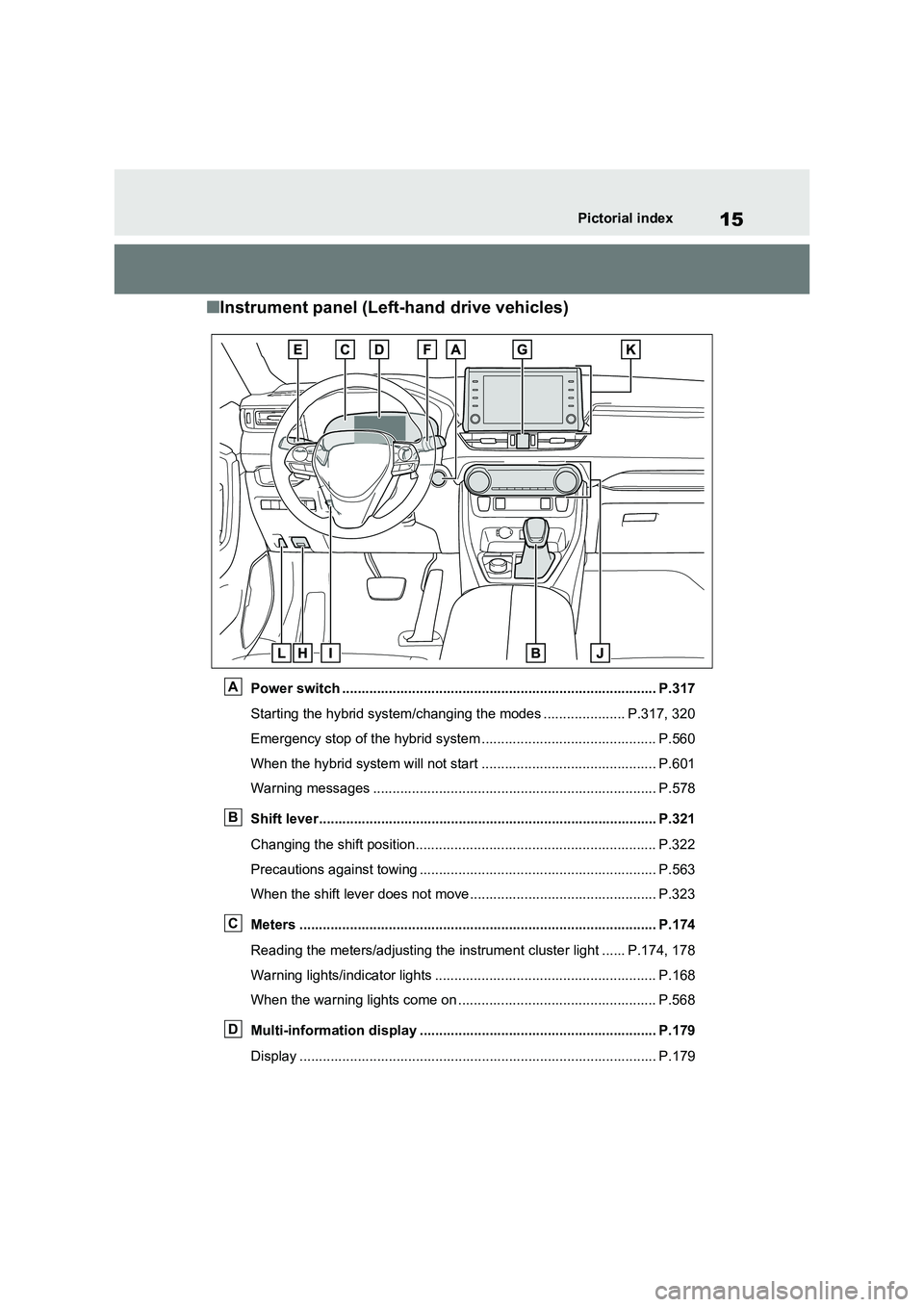
■Instrument panel (Left-hand drive vehicles)
Power switch ................................................................................. P.317
Starting the hybrid system/changing the modes ..................... P.317, 320
Emergency stop of the hybrid system ............................................. P.560
When the hybrid system will not start ............................................. P.601
Warning messages ......................................................................... P.578
Shift lever....................................................................................... P.321
Changing the shift position.............................................................. P.322
Precautions against towing ............................................................. P.563
When the shift lever does not move................................................ P.323
Meters ............................................................................................ P.174
Reading the meters/adjusting the instrument cluster light ...... P.174, 178
Warning lights/indicator lights ......................................................... P.168
When the warning lights come on ................................................... P.568
Multi-information display ............................................................. P.179
Display ............................................................................................ P.179
A
B
C
D
Page 23 of 664
23Pictorial index
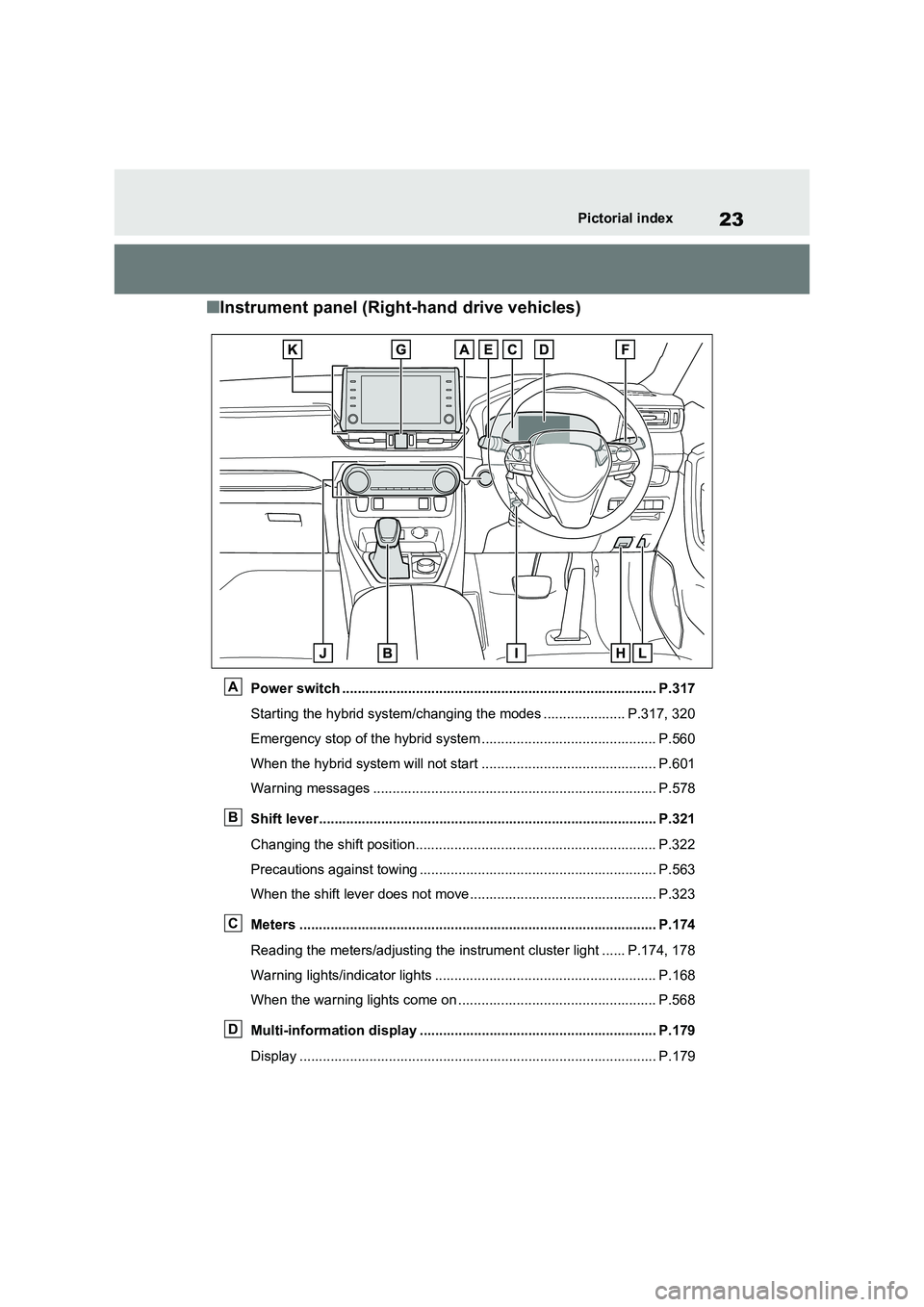
■Instrument panel (Right-hand drive vehicles)
Power switch ................................................................................. P.317
Starting the hybrid system/changing the modes ..................... P.317, 320
Emergency stop of the hybrid system ............................................. P.560
When the hybrid system will not start ............................................. P.601
Warning messages ......................................................................... P.578
Shift lever....................................................................................... P.321
Changing the shift position.............................................................. P.322
Precautions against towing ............................................................. P.563
When the shift lever does not move................................................ P.323
Meters ............................................................................................ P.174
Reading the meters/adjusting the instrument cluster light ...... P.174, 178
Warning lights/indicator lights ......................................................... P.168
When the warning lights come on ................................................... P.568
Multi-information display ............................................................. P.179
Display ............................................................................................ P.179
A
B
C
D
Page 44 of 664
441-1. For safe use
WARNING
●The SRS driver airbag deploys with considerable force, and can cause
death or serious injury especially if the driver is very close to the air-bag.
Since the risk zone for the driver’s air-
bag is the first 50 - 75 mm (2 - 3 in.) of
inflation, placing yourself 250 mm (10
in.) from your driver airbag provides
you with a clear margin of safety. This
distance is measured from the center
of the steering wheel to your breast-
bone. If you sit less than 250 mm (10
in.) away now, you can change your
driving position in several ways:
• Move your seat to the rear as far as
you can while still reaching the ped- als comfortably.
• Slightly recline the back of the seat. Although vehicle designs vary, many drivers can achieve the 250
mm (10 in.) distance, even with the driver seat all the way forward, sim-ply by reclining the back of the seat
somewhat. If reclining the back of your seat makes it hard to see the road, raise yourself by using a firm,
non-slippery cushion, or raise the seat if your vehicle has that feature.
• If your steering wheel is adjustable, tilt it downward. This points the air-bag toward your chest instead of
your head and neck.
The seat should be adjusted as rec- ommended above, while still main-
taining control of the foot pedals, steering wheel, and your view of the instrument panel controls.
●The SRS front passenger airbag also deploys with considerable force, and can cause death or seri-
ous injury especially if the front pas- senger is very close to the airbag. The front passenger seat should be
as far from the airbag as possible with the seatback adjusted, so the front passenger sits upright.
●Improperly seated and/or restrained infants and children can be killed or
seriously injured by a deploying air- bag. An infant or child who is too small to use a seat belt should be
properly secured using a child restraint system. Toyota strongly recommends that all infants and
children be placed in the rear seats of the vehicle and properly restrained. The rear seats are safer
for infants and children than the front passenger seat. ( P.50)
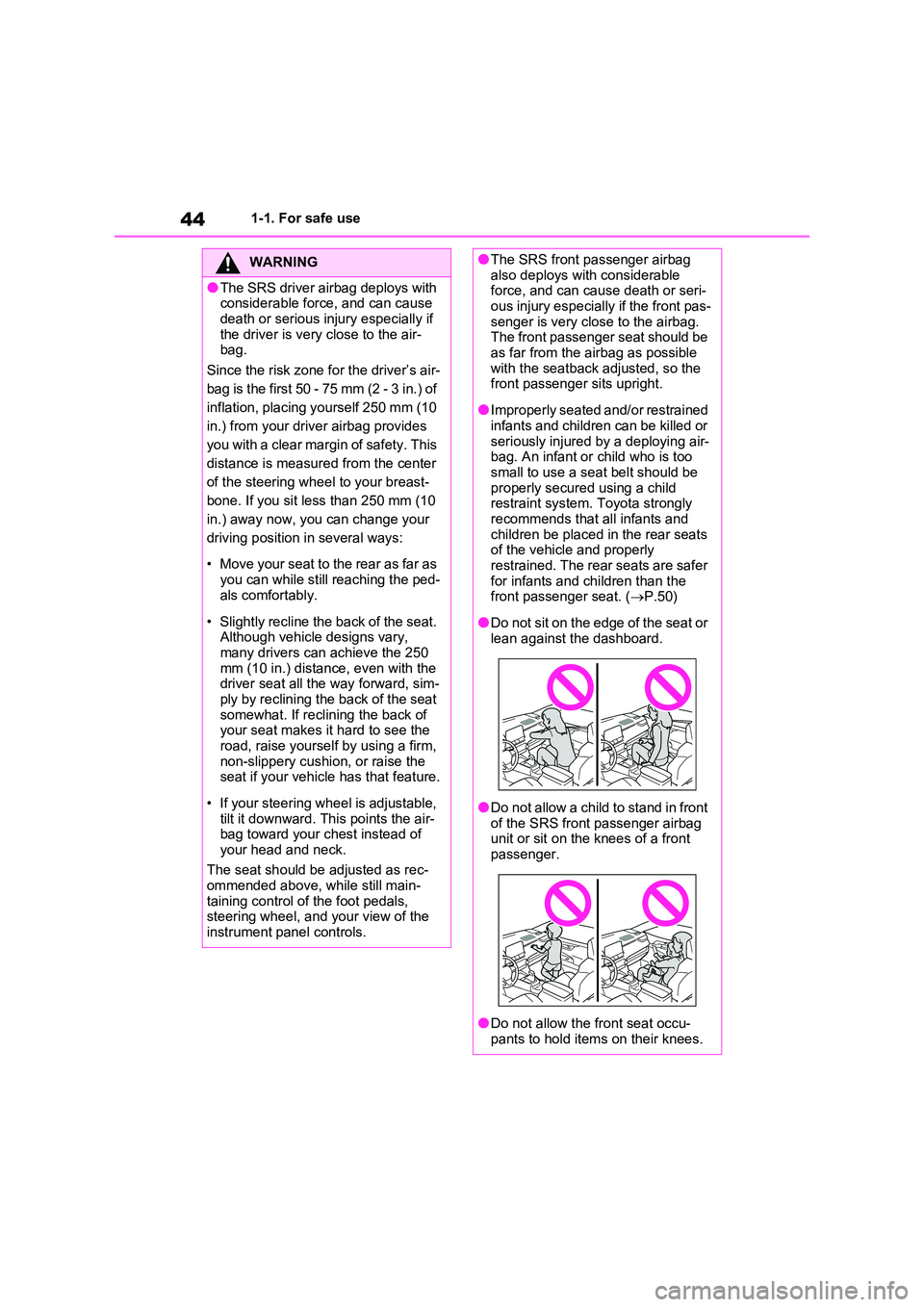
●Do not sit on the edge of the seat or lean against the dashboard.
●Do not allow a child to stand in front of the SRS front passenger airbag unit or sit on the knees of a front
passenger.
●Do not allow the front seat occu-
pants to hold items on their knees.
Page 45 of 664
45
1
1-1. For safe use
For safety and security
WARNING
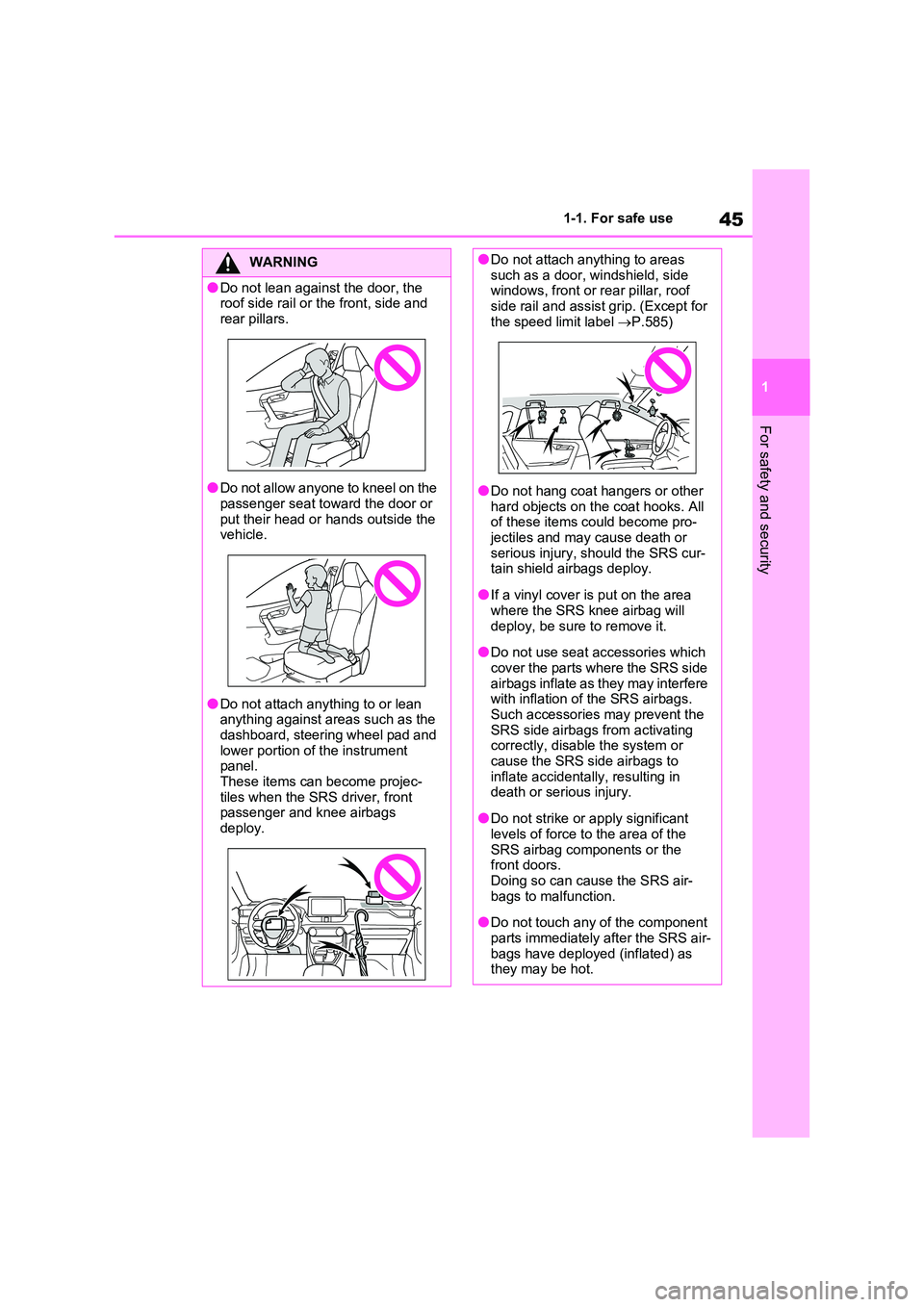
●Do not lean against the door, the roof side rail or the front, side and
rear pillars.
●Do not allow anyone to kneel on the
passenger seat toward the door or put their head or hands outside the vehicle.
●Do not attach anything to or lean anything against areas such as the
dashboard, steering wheel pad and lower portion of the instrument panel.
These items can become projec- tiles when the SRS driver, front passenger and knee airbags
deploy.
●Do not attach anything to areas such as a door, windshield, side windows, front or rear pillar, roof
side rail and assist grip. (Except for the speed limit label P.585)
●Do not hang coat hangers or other hard objects on the coat hooks. All of these items could become pro-
jectiles and may cause death or serious injury, should the SRS cur-tain shield airbags deploy.
●If a vinyl cover is put on the area where the SRS knee airbag will
deploy, be sure to remove it.
●Do not use seat accessories which
cover the parts where the SRS side airbags inflate as they may interfere with inflation of the SRS airbags.
Such accessories may prevent the SRS side airbags from activating correctly, disable the system or
cause the SRS side airbags to inflate accidentally, resulting in death or serious injury.
●Do not strike or apply significant levels of force to the area of the
SRS airbag components or the front doors.Doing so can cause the SRS air-
bags to malfunction.
●Do not touch any of the component
parts immediately after the SRS air- bags have deployed (inflated) as they may be hot.
Page 62 of 664
621-2. Child safety
■Removing a child restraint
system installed with a seat
belt
Press the buckle release button
and fully retract the seat belt.
When releasing the buckle, the child
restraint system may spring up due to
the rebound of the seat cushion.
Release the buckle while holding down
the child restraint system.
Since the seat belt automatically reels
itself, slowly return it to the stowing
position.
■When installing a child restraint system
You may need a locking clip to install the child restraint system. Follow the instructions provided by the manufac-
turer of the system. If your child restraint system does not provide a locking clip, you can purchase the following item
from any authorized Toyota retailer or Toyota authorized repairer, or any reli-able repairer: Locking clip for child
restraint system (Part No. 73119-22010)
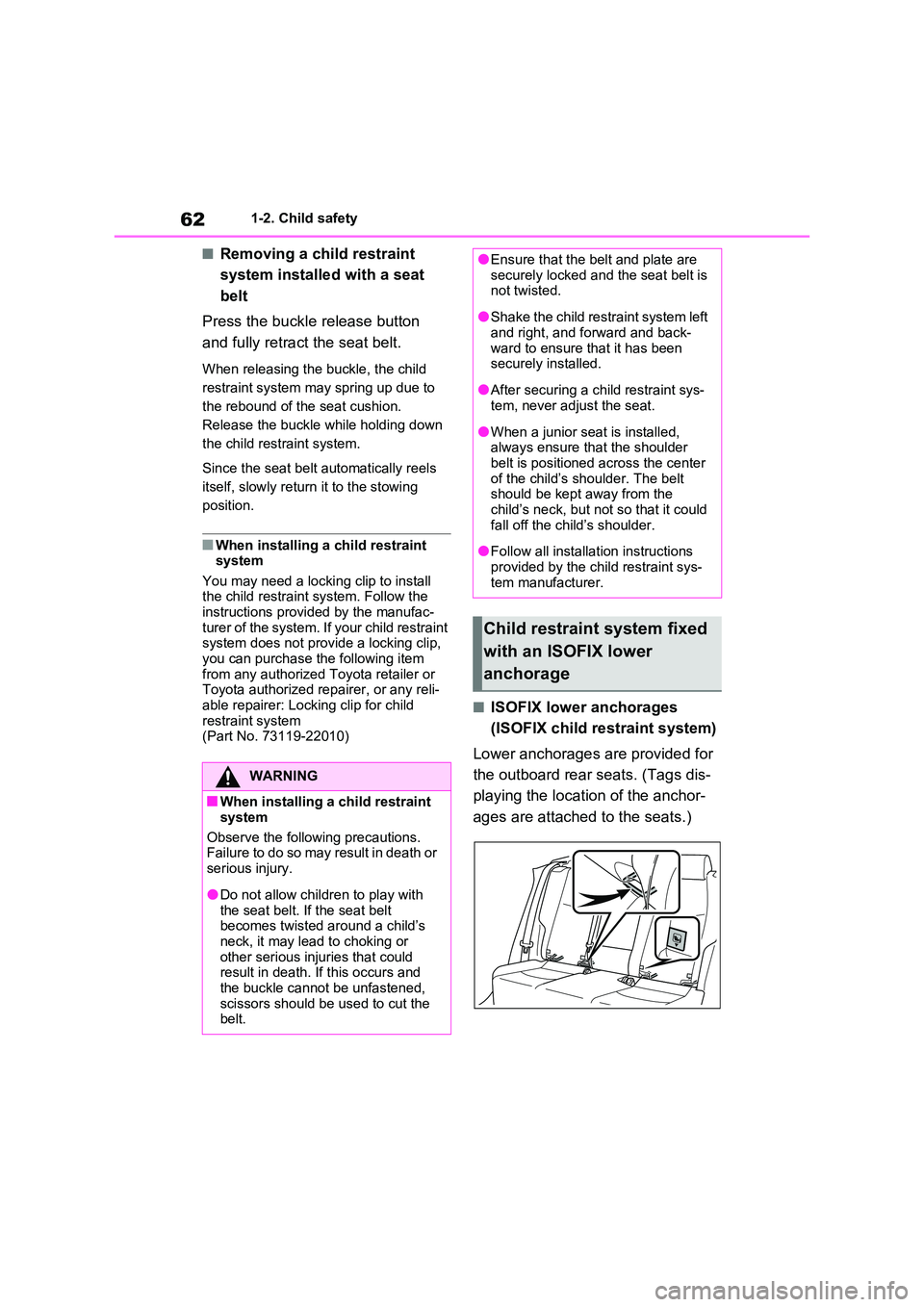
■ISOFIX lower anchorages
(ISOFIX child restraint system)
Lower anchorages are provided for
the outboard rear seats. (Tags dis-
playing the location of the anchor-
ages are attached to the seats.)
WARNING
■When installing a child restraint
system
Observe the following precautions. Failure to do so may result in death or
serious injury.
●Do not allow children to play with
the seat belt. If the seat belt becomes twisted around a child’s neck, it may lead to choking or
other serious injuries that could result in death. If this occurs and the buckle cannot be unfastened,
scissors should be used to cut the belt.
●Ensure that the belt and plate are securely locked and the seat belt is not twisted.
●Shake the child restraint system left and right, and forward and back-
ward to ensure that it has been securely installed.
●After securing a child restraint sys-tem, never adjust the seat.
●When a junior seat is installed, always ensure that the shoulder belt is positioned across the center
of the child’s shoulder. The belt should be kept away from the child’s neck, but not so that it could
fall off the child’s shoulder.
●Follow all installation instructions
provided by the child restraint sys- tem manufacturer.
Child restraint system fixed
with an ISOFIX lower
anchorage
Page 79 of 664
79
1
1-4. Theft deterrent system
For safety and security
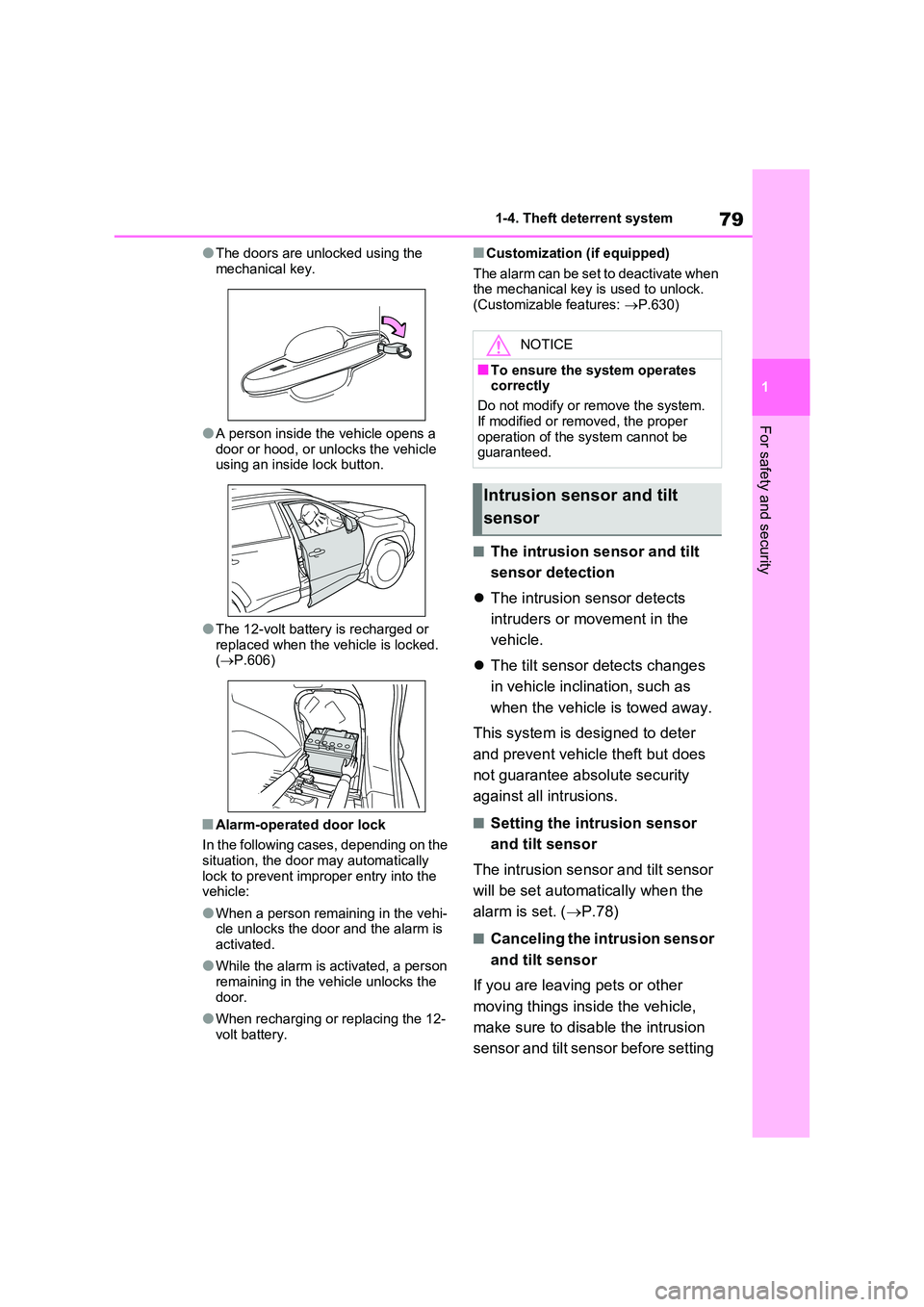
●The doors are unlocked using the
mechanical key.
●A person inside the vehicle opens a
door or hood, or unlocks the vehicle using an inside lock button.
●The 12-volt battery is recharged or replaced when the vehicle is locked. ( P.606)
■Alarm-operated door lock
In the following cases, depending on the
situation, the door may automatically lock to prevent improper entry into the vehicle:
●When a person remaining in the vehi-cle unlocks the door and the alarm is
activated.
●While the alarm is activated, a person
remaining in the vehicle unlocks the door.
●When recharging or replacing the 12-volt battery.
■Customization (if equipped)
The alarm can be set to deactivate when the mechanical key is used to unlock.(Customizable features: P.630)
■The intrusion sensor and tilt
sensor detection
The intrusion sensor detects
intruders or movement in the
vehicle.
The tilt sensor detects changes
in vehicle inclination, such as
when the vehicle is towed away.
This system is designed to deter
and prevent vehicle theft but does
not guarantee absolute security
against all intrusions.
■Setting the intrusion sensor
and tilt sensor
The intrusion sensor and tilt sensor
will be set automatically when the
alarm is set. ( P.78)
■Canceling the intrusion sensor
and tilt sensor
If you are leaving pets or other
moving things inside the vehicle,
make sure to disable the intrusion
sensor and tilt sensor before setting
NOTICE
■To ensure the system operates correctly
Do not modify or remove the system.
If modified or removed, the proper operation of the system cannot be guaranteed.
Intrusion sensor and tilt
sensor
Page 96 of 664
962-1. Plug-in hybrid system
WARNING
●Never touch, disassemble, remove or replace the high voltage parts,
cables or their connectors.
●The hybrid system will become hot
after starting as the system uses high voltage. Be careful of both the high voltage and the high tempera-
ture, and always obey the caution labels attached to the vehicle.
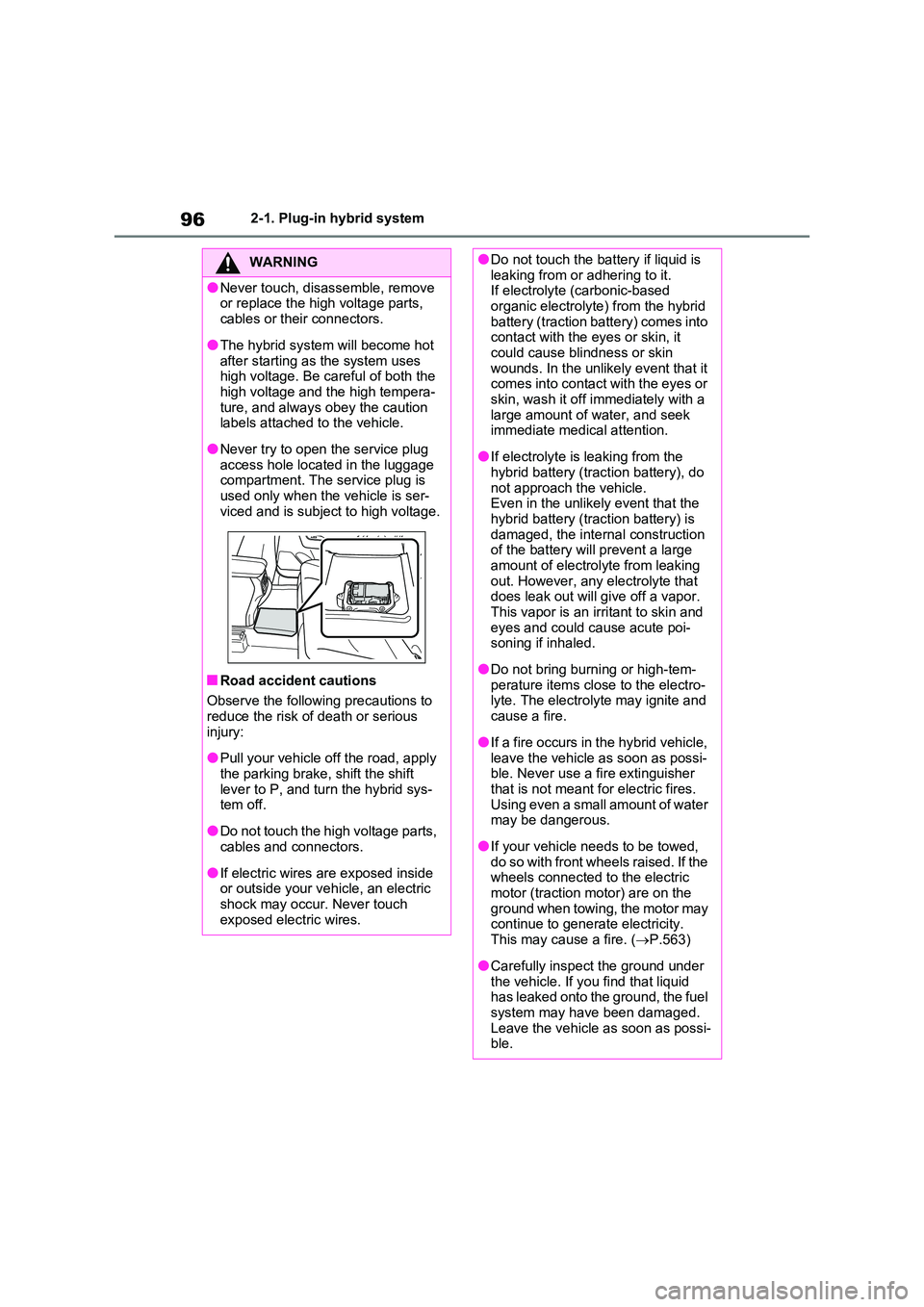
●Never try to open the service plug access hole located in the luggage compartment. The service plug is
used only when the vehicle is ser- viced and is subject to high voltage.
■Road accident cautions
Observe the following precautions to reduce the risk of death or serious
injury:
●Pull your vehicle off the road, apply
the parking brake, shift the shift lever to P, and turn the hybrid sys-tem off.
●Do not touch the high voltage parts, cables and connectors.
●If electric wires are exposed inside or outside your vehicle, an electric
shock may occur. Never touch exposed electric wires.
●Do not touch the battery if liquid is leaking from or adhering to it.If electrolyte (carbonic-based
organic electrolyte) from the hybrid battery (traction battery) comes into contact with the eyes or skin, it
could cause blindness or skin wounds. In the unlikely event that it comes into contact with the eyes or
skin, wash it off immediately with a large amount of water, and seek immediate medical attention.
●If electrolyte is leaking from the hybrid battery (traction battery), do
not approach the vehicle. Even in the unlikely event that the hybrid battery (traction battery) is
damaged, the internal construction of the battery will prevent a large amount of electrolyte from leaking
out. However, any electrolyte that does leak out will give off a vapor. This vapor is an irritant to skin and
eyes and could cause acute poi- soning if inhaled.
●Do not bring burning or high-tem-perature items close to the electro-lyte. The electrolyte may ignite and
cause a fire.
●If a fire occurs in the hybrid vehicle,
leave the vehicle as soon as possi- ble. Never use a fire extinguisher that is not meant for electric fires.
Using even a small amount of water may be dangerous.
●If your vehicle needs to be towed, do so with front wheels raised. If the wheels connected to the electric
motor (traction motor) are on the ground when towing, the motor may continue to generate electricity.
This may cause a fire. ( P.563)
●Carefully inspect the ground under
the vehicle. If you find that liquid has leaked onto the ground, the fuel system may have been damaged.
Leave the vehicle as soon as possi- ble.
Page 142 of 664
1422-2. Charging
If the charging connector is unlocked
during charging (while the charging indicator is illuminated), charging will be interrupted.
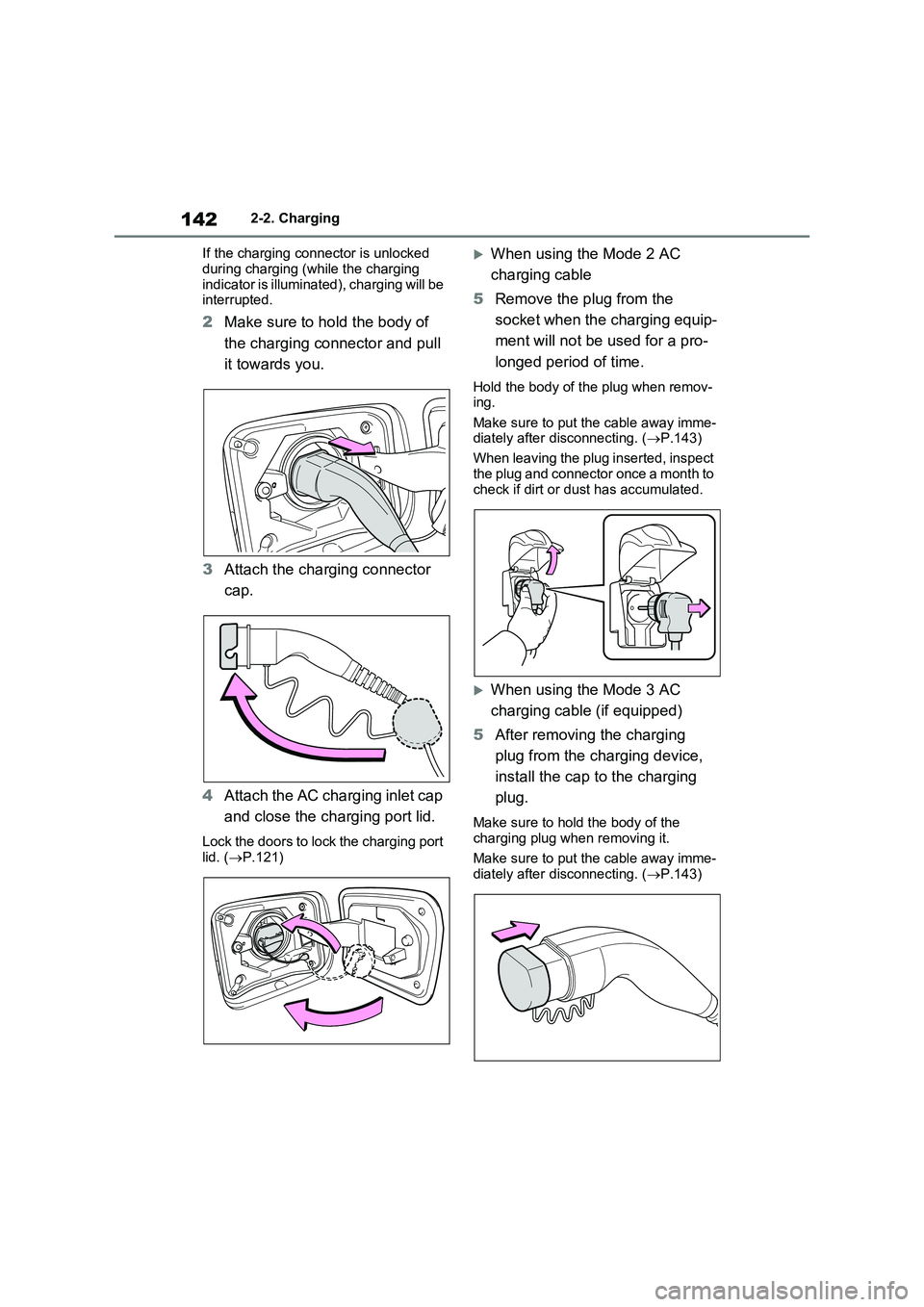
2 Make sure to hold the body of
the charging connector and pull
it towards you.
3 Attach the charging connector
cap.
4 Attach the AC charging inlet cap
and close the charging port lid.
Lock the doors to lock the charging port lid. ( P.121)
When using the Mode 2 AC
charging cable
5 Remove the plug from the
socket when the charging equip-
ment will not be used for a pro-
longed period of time.
Hold the body of the plug when remov- ing.
Make sure to put the cable away imme- diately after disconnecting. ( P.143)
When leaving the plug inserted, inspect
the plug and connector once a month to check if dirt or dust has accumulated.
When using the Mode 3 AC
charging cable (if equipped)
5 After removing the charging
plug from the charging device,
install the cap to the charging
plug.
Make sure to hold the body of the
charging plug when removing it.
Make sure to put the cable away imme- diately after disconnecting. ( P.143)