tow TOYOTA VERSO S 2011 Service Manual
[x] Cancel search | Manufacturer: TOYOTA, Model Year: 2011, Model line: VERSO S, Model: TOYOTA VERSO S 2011Pages: 664, PDF Size: 160.56 MB
Page 416 of 664
4165-5. Using the driving support systems
■The system can be operated when
●The power switch is in ON.
●Toyota parking assist-sensor function is on.
●The vehicle speed is less than about 10 km/h (6 mph).
●The shift lever is in other than P.
■If “Clean Parking Assist Sensor” is displayed on the multi-information
display
A sensor may be covered with ice,
snow, dirt, etc. Remove the ice, snow, dirt, etc., from the sensor to return the system to normal.
Also, due to ice forming on a sensor at low temperatures, a warning message may be displayed or the sensor may not
be able to detect an object. Once the ice melts, the system will return to normal.
If a warning message is displayed even
if the sensor is clean, there may be a sensor malfunction. Have the vehicle inspected by any authorized Toyota
retailer or Toyota authorized repairer, or any reliable repairer.
WARNING
●The area directly under the bum-pers is not detected.
Thin posts or objects lower than the sensor may not be detected when approached, even if they have been
detected once.
■When to disable the function
In the following situations, disable the function as it may operate even though there is no possibility of a colli-
sion.
●The vehicle is equipped with a com- mercial fender pole, wireless
antenna or fog lights.
●The front or rear bumper or a sen-
sor receives a strong impact.
●A non-genuine Toyota suspension
(lowered suspension, etc.) is installed.
●Towing eyelets are installed.
●A backlit license plate is installed.
●When using an automatic car wash
■When using the Toyota parking assist-sensor
In the following situations, the system
may not function correctly due to a sensor malfunction, etc. Have the vehicle checked by any authorized
Toyota retailer or Toyota authorized repairer, or any reliable repairer.
●The Toyota parking assist-sensor operation display flashes or shows continuously, and a beep sounds
when no objects are detected.
●If the area around a sensor collides
with something, or is subjected to strong impact.
●If the bumper or grille collides with something.
●If the display flashes or is displayed continuously and a buzzer does not sound, except when the mute func-
tion has been turned on.
■Notes when washing the vehicle
Do not apply intensive bursts of water or steam to the sensor area.
Doing so may result in the sensor
malfunctioning.
●When using a high pressure
washer to wash the vehicle, do not spray the sensors directly, as doing so may cause a sensor to malfunc-
tion.
●When using steam to clean the
vehicle, do not direct steam too close to the sensors as doing so may cause a sensor to malfunction.
Page 426 of 664
4265-5. Using the driving support systems
■The Parking Support Brake func- tion (static object) will operate
when
The function will operate when the PKSB OFF indicator is not illuminated
( P.170, 171) and all of the following conditions are met:
●Hybrid system output restriction con-trol
• The Parking Support Brake is enabled.• The vehicle speed is approximately 15
km/h (9 mph) or less. • There is a static object in the traveling direction of the vehicle and approxi-
mately 2 to 4 m (6 to 13 ft.) away. • The Parking Support Brake deter-mines that a stronger-than-normal
brake operation is necessary to avoid a collision.
●Brake control• Hybrid system output restriction con-
WARNING
●If the area around a radar sensor is subjected to an impact, the system
may not operate properly due to a sensor malfunction. Have the vehi-cle inspected by any authorized
Toyota retailer or Toyota authorized repairer, or any reliable repairer.
■Handling the suspension
Do not modify the suspension, as changes to the height or inclination of
the vehicle may prevent the sensors from detecting objects correctly or cause the system to not operate or
operate unnecessarily.
■If the Parking Support Brake
function (static objects) operates unnecessarily, such as at a rail-road crossing
In the event that the Parking Support Brake function (static objects) oper-ates unnecessarily, such as at a rail-
road crossing, brake control will be canceled after approximately 2 sec-onds, allowing you to proceed forward
and leave the area, brake control can also be canceled by depressing the brake pedal. Depressing the acceler-
ator pedal after brake control is can- celed will allow you to proceed forward and leave the area.
■Notes when washing the vehicle
Do not apply intensive bursts of water
or steam to the sensor area.
Doing so may result in the sensor malfunctioning.
●When using a high pressure washer to wash the vehicle, do not
spray the sensors directly, as doing so may cause a sensor to malfunc-tion.
●When using steam to clean the vehicle, do not direct steam too
close to the sensors as doing so may cause a sensor to malfunction.
■When to disable the Parking Sup-port Brake
In the following situations, disable the
Parking Support Brake as the system may operate even though there is no possibility of a collision.
●When inspecting the vehicle using a chassis roller, chassis dynamo or
free roller
●When loading the vehicle onto a
boat, truck or other transport vessel
●If the suspension has been modi-
fied or tires of a size other than specified are installed
●If the front of the vehicle is raised or lowered due to the carried load
●When equipment that may obstruct a sensor is installed, such as a tow-ing eyelet, bumper protector (an
additional trim strip, etc.), bicycle carrier, or snow plow
●When using an automatic car wash
Page 428 of 664
4285-5. Using the driving support systems
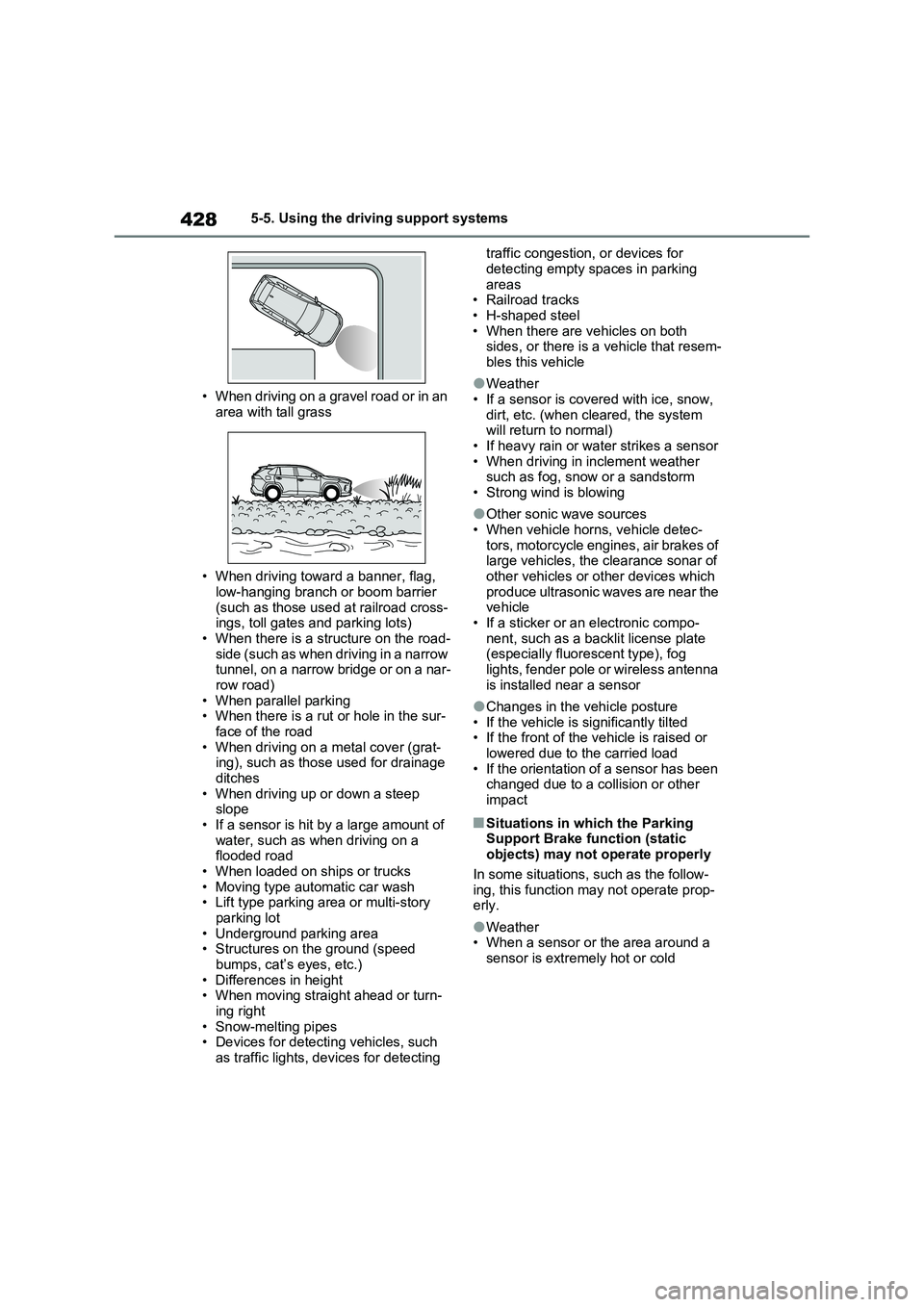
• When driving on a gravel road or in an
area with tall grass
• When driving toward a banner, flag,
low-hanging branch or boom barrier
(such as those used at railroad cross-
ings, toll gates and parking lots)
• When there is a structure on the road-
side (such as when driving in a narrow
tunnel, on a narrow bridge or on a nar-
row road)
• When parallel parking
• When there is a rut or hole in the sur-
face of the road
• When driving on a metal cover (grat-
ing), such as those used for drainage
ditches
• When driving up or down a steep
slope
• If a sensor is hit by a large amount of
water, such as when driving on a
flooded road
• When loaded on ships or trucks
• Moving type automatic car wash
• Lift type parking area or multi-story
parking lot
• Underground parking area
• Structures on the ground (speed
bumps, cat’s eyes, etc.)
• Differences in height
• When moving straight ahead or turn-
ing right
• Snow-melting pipes
• Devices for detecting vehicles, such
as traffic lights, devices for detecting traffic congestion, or devices for
detecting empty spaces in parking
areas
• Railroad tracks
• H-shaped steel
• When there are vehicles on both
sides, or there is a vehicle that resem-
bles this vehicle
●Weather
• If a sensor is covered with ice, snow,
dirt, etc. (when cleared, the system
will return to normal)
• If heavy rain or water strikes a sensor
• When driving in inclement weather
such as fog, snow or a sandstorm
• Strong wind is blowing
●Other sonic wave sources
• When vehicle horns, vehicle detec-
tors, motorcycle engines, air brakes of
large vehicles, the clearance sonar of
other vehicles or other devices which
produce ultrasonic waves are near the
vehicle
• If a sticker or an electronic compo-
nent, such as a backlit license plate
(especially fluorescent type), fog
lights, fender pole or wireless antenna
is installed near a sensor
●Changes in the vehicle posture
• If the vehicle is significantly tilted
• If the front of the vehicle is raised or
lowered due to the carried load
• If the orientation of a sensor has been
changed due to a collision or other
impact
■Situations in which the Parking
Support Brake function (static
objects) may not operate properly
In some situations, such as the follow-
ing, this function may not operate prop-
erly.
●Weather
• When a sensor or the area around a
sensor is extremely hot or cold
Page 429 of 664
429
5 5-5. Using the driving support systems
Driving
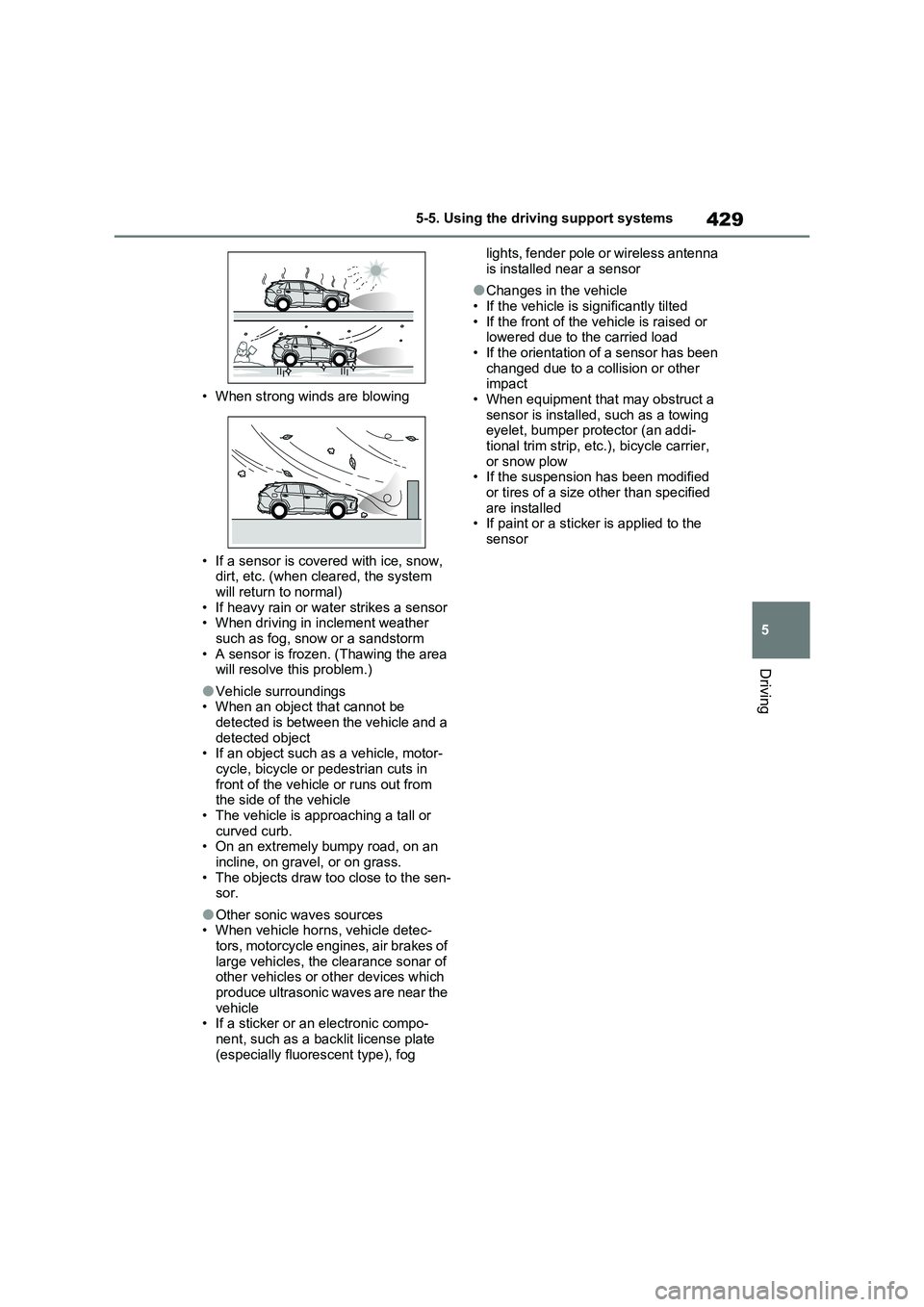
• When strong winds are blowing
• If a sensor is covered with ice, snow,
dirt, etc. (when cleared, the system
will return to normal)
• If heavy rain or water strikes a sensor
• When driving in inclement weather
such as fog, snow or a sandstorm
• A sensor is frozen. (Thawing the area
will resolve this problem.)
●Vehicle surroundings
• When an object that cannot be
detected is between the vehicle and a
detected object
• If an object such as a vehicle, motor-
cycle, bicycle or pedestrian cuts in
front of the vehicle or runs out from
the side of the vehicle
• The vehicle is approaching a tall or
curved curb.
• On an extremely bumpy road, on an
incline, on gravel, or on grass.
• The objects draw too close to the sen-
sor.
●Other sonic waves sources
• When vehicle horns, vehicle detec-
tors, motorcycle engines, air brakes of
large vehicles, the clearance sonar of
other vehicles or other devices which
produce ultrasonic waves are near the
vehicle
• If a sticker or an electronic compo-
nent, such as a backlit license plate
(especially fluorescent type), fog lights, fender pole or wireless antenna
is installed near a sensor
●Changes in the vehicle
• If the vehicle is significantly tilted
• If the front of the vehicle is raised or
lowered due to the carried load
• If the orientation of a sensor has been
changed due to a collision or other
impact
• When equipment that may obstruct a
sensor is installed, such as a towing
eyelet, bumper protector (an addi-
tional trim strip, etc.), bicycle carrier,
or snow plow
• If the suspension has been modified
or tires of a size other than specified
are installed
• If paint or a sticker is applied to the
sensor
Page 432 of 664
4325-5. Using the driving support systems
approximately 24 km/h (15 mph)
*: Depending on the conditions, detec-
tion of a vehicle and/or object may
occur.
■Situations in which the system may
operate even though there is no
possibility of a collision
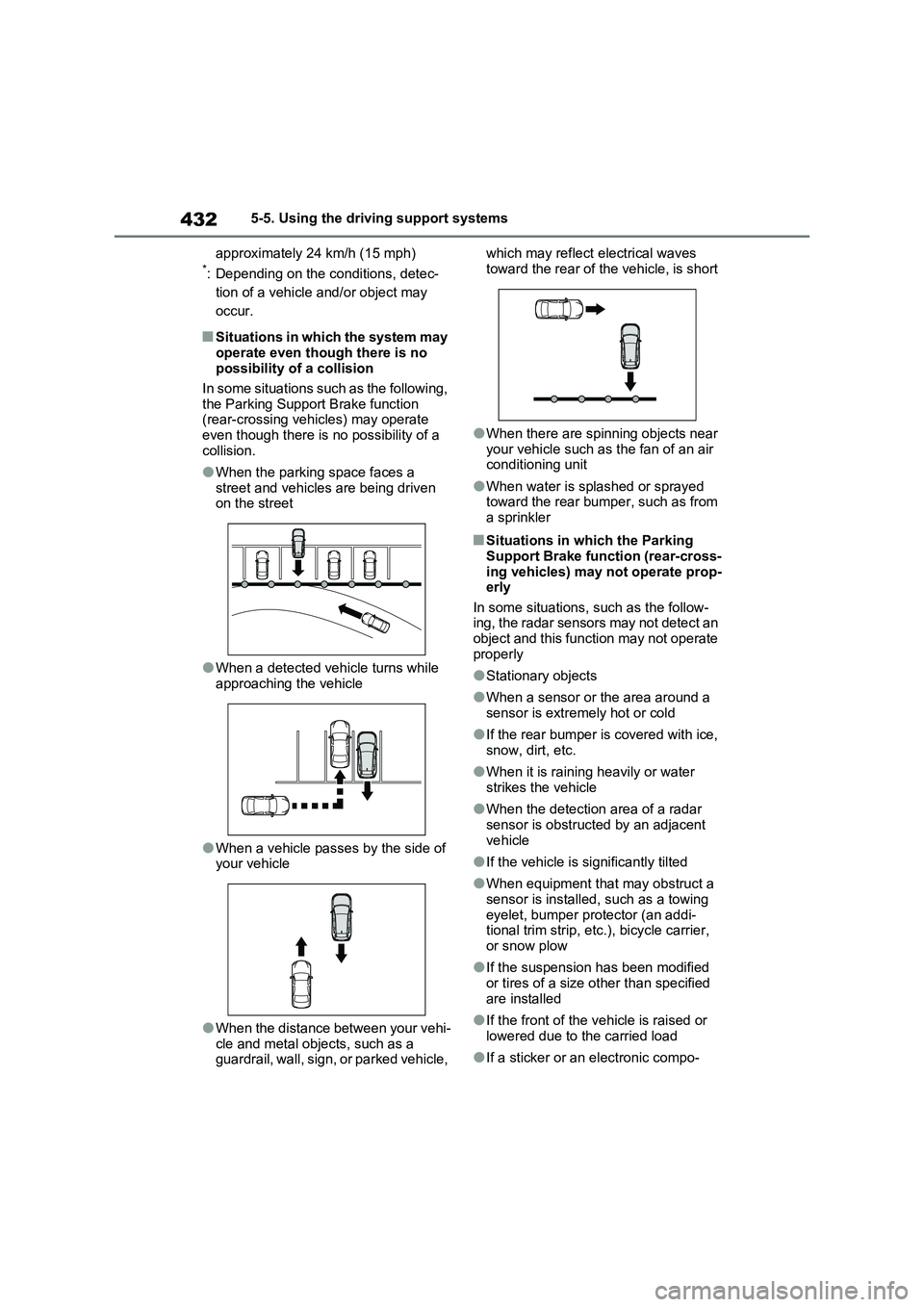
In some situations such as the following,
the Parking Support Brake function
(rear-crossing vehicles) may operate
even though there is no possibility of a
collision.
●When the parking space faces a
street and vehicles are being driven
on the street
●When a detected vehicle turns while
approaching the vehicle
●When a vehicle passes by the side of
your vehicle
●When the distance between your vehi-
cle and metal objects, such as a
guardrail, wall, sign, or parked vehicle, which may reflect electrical waves
toward the rear of the vehicle, is short
●When there are spinning objects near
your vehicle such as the fan of an air
conditioning unit
●When water is splashed or sprayed
toward the rear bumper, such as from
a sprinkler
■Situations in which the Parking
Support Brake function (rear-cross-
ing vehicles) may not operate prop-
erly
In some situations, such as the follow-
ing, the radar sensors may not detect an
object and this function may not operate
properly
●Stationary objects
●When a sensor or the area around a
sensor is extremely hot or cold
●If the rear bumper is covered with ice,
snow, dirt, etc.
●When it is raining heavily or water
strikes the vehicle
●When the detection area of a radar
sensor is obstructed by an adjacent
vehicle
●If the vehicle is significantly tilted
●When equipment that may obstruct a
sensor is installed, such as a towing
eyelet, bumper protector (an addi-
tional trim strip, etc.), bicycle carrier,
or snow plow
●If the suspension has been modified
or tires of a size other than specified
are installed
●If the front of the vehicle is raised or
lowered due to the carried load
●If a sticker or an electronic compo-
Page 443 of 664
443
5
5-5. Using the driving support systems
Driving
WARNING
●When driving over roads with pot- holes or uneven surfaces
■TRC/VSC may not operate effec-tively when
Directional control and power may not be achievable while driving on slip-pery road surfaces, even if the
TRC/VSC system is operating. Drive the vehicle carefully in condi-tions where stability and power may
be lost.
■Active Cornering Assist does not
operate effectively when
●Do not overly rely on Active Corner- ing Assist. Active Cornering Assist
may not operate effectively when accelerating down slopes or driving on slippery road surfaces.
●When Active Cornering Assist fre-quently operates, Active Cornering
Assist may temporarily stop operat- ing to ensure proper operation of the brakes, TRC and VSC.
■Hill-start assist control does not operate effectively when
●Do not overly rely on hill-start assist control. Hill-start assist control may not operate effectively on steep
inclines and roads covered with ice.
●Unlike the parking brake, hill-start
assist control is not intended to hold the vehicle stationary for an extended period of time. Do not
attempt to use hill-start assist con- trol to hold the vehicle on an incline, as doing so may lead to an acci-
dent.
■When the TRC/ABS/VSC/Trailer
Sway Control is activated
The slip indicator light flashes. Always drive carefully. Reckless driving may
cause an accident. Exercise particular care when the indicator light flashes.
■When the TRC/VSC/Trailer Sway Control systems are turned off
Be especially careful and drive at a
speed appropriate to the road condi- tions. As these are the systems to help ensure vehicle stability and driv-
ing force, do not turn the TRC/VSC/Trailer Sway Control sys-tems off unless necessary.
Trailer Sway Control is part of the VSC system and will not operate if VSC is turned off or experiences a
malfunction.
■Replacing tires
Make sure that all tires are of the specified size, brand, tread pattern and total load capacity. In addition,
make sure that the tires are inflated to the recommended tire inflation pres-sure level.
The ABS, TRC and VSC/Trailer Sway Control systems will not function cor-rectly if different tires are installed on
the vehicle. Contact any authorized Toyota retailer or Toyota authorized repairer,
or any reliable repairer for further information when replacing tires or wheels.
■Handling of tires and the suspen-sion
Using tires with any kind of problem or modifying the suspension will affect the driving assist systems, and may
cause a system to malfunction.
■Trailer Sway Control precaution
The Trailer Sway Control system is not able to reduce trailer sway in all situations. Depending on many fac-
tors such as the conditions of the vehicle, trailer, road surface and driv-ing environment, the Trailer Sway
Control system may not be effective. Refer to your trailer owner’s manual for information on how to tow your
trailer properly.
Page 471 of 664
471
6
6-3. Using the storage features
Interior features
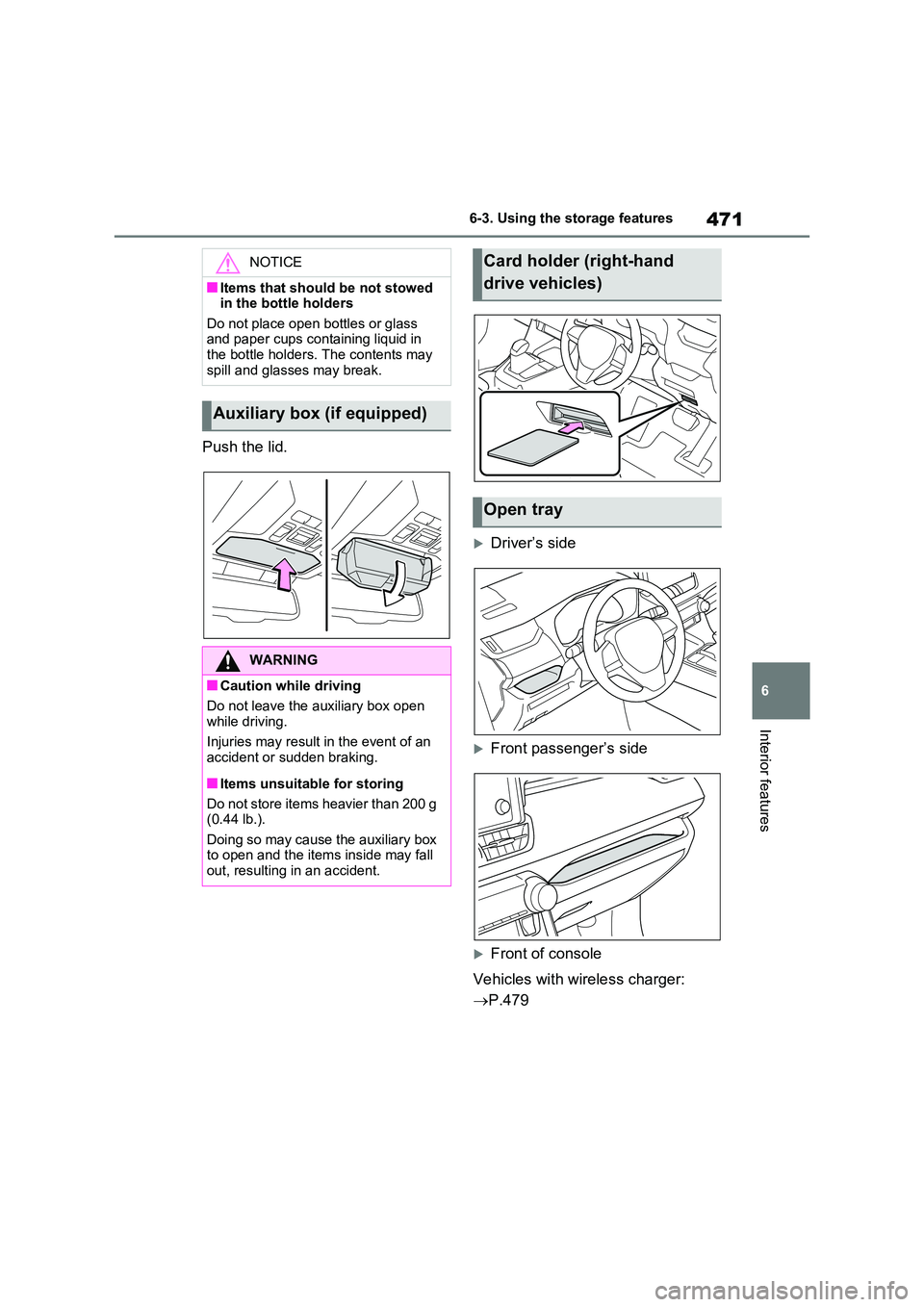
Push the lid.
Driver’s side
Front passenger’s side
Front of console
Vehicles with wireless charger:
P.479
NOTICE
■Items that should be not stowed in the bottle holders
Do not place open bottles or glass and paper cups containing liquid in the bottle holders. The contents may
spill and glasses may break.
Auxiliary box (if equipped)
WARNING
■Caution while driving
Do not leave the auxiliary box open while driving.
Injuries may result in the event of an accident or sudden braking.
■Items unsuitable for storing
Do not store items heavier than 200 g (0.44 lb.).
Doing so may cause the auxiliary box to open and the items inside may fall out, resulting in an accident.
Card holder (right-hand
drive vehicles)
Open tray
Page 472 of 664
4726-3. Using the storage features
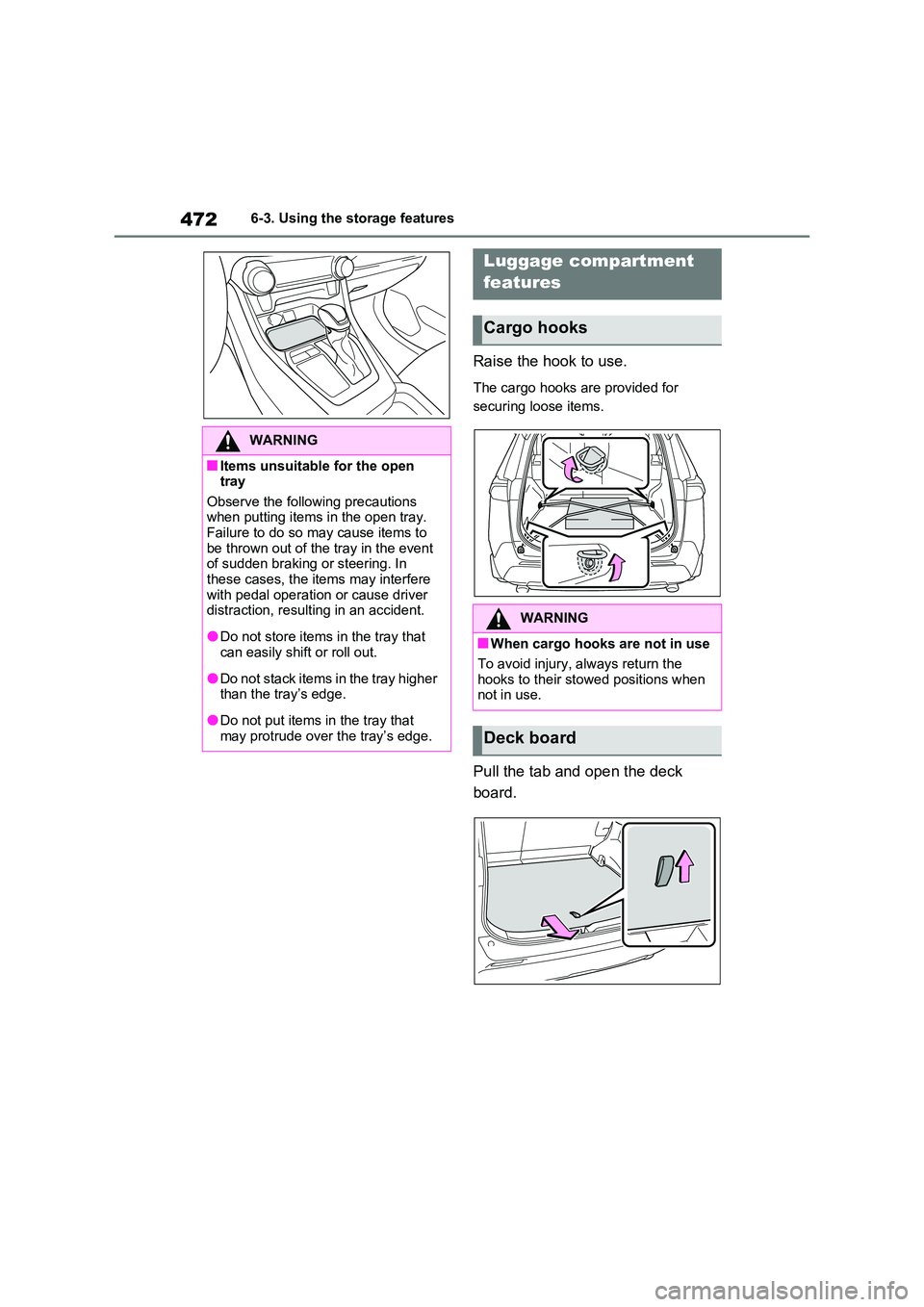
Raise the hook to use.
The cargo hooks are provided for
securing loose items.
Pull the tab and open the deck
board.
WARNING
■Items unsuitable for the open tray
Observe the following precautions when putting items in the open tray. Failure to do so may cause items to
be thrown out of the tray in the event of sudden braking or steering. In these cases, the items may interfere
with pedal operation or cause driver distraction, resulting in an accident.
●Do not store items in the tray that can easily shift or roll out.
●Do not stack items in the tray higher than the tray’s edge.
●Do not put items in the tray that may protrude over the tray’s edge.
Luggage compartment
features
Cargo hooks
WARNING
■When cargo hooks are not in use
To avoid injury, always return the hooks to their stowed positions when not in use.
Deck board
Page 474 of 664
4746-3. Using the storage features
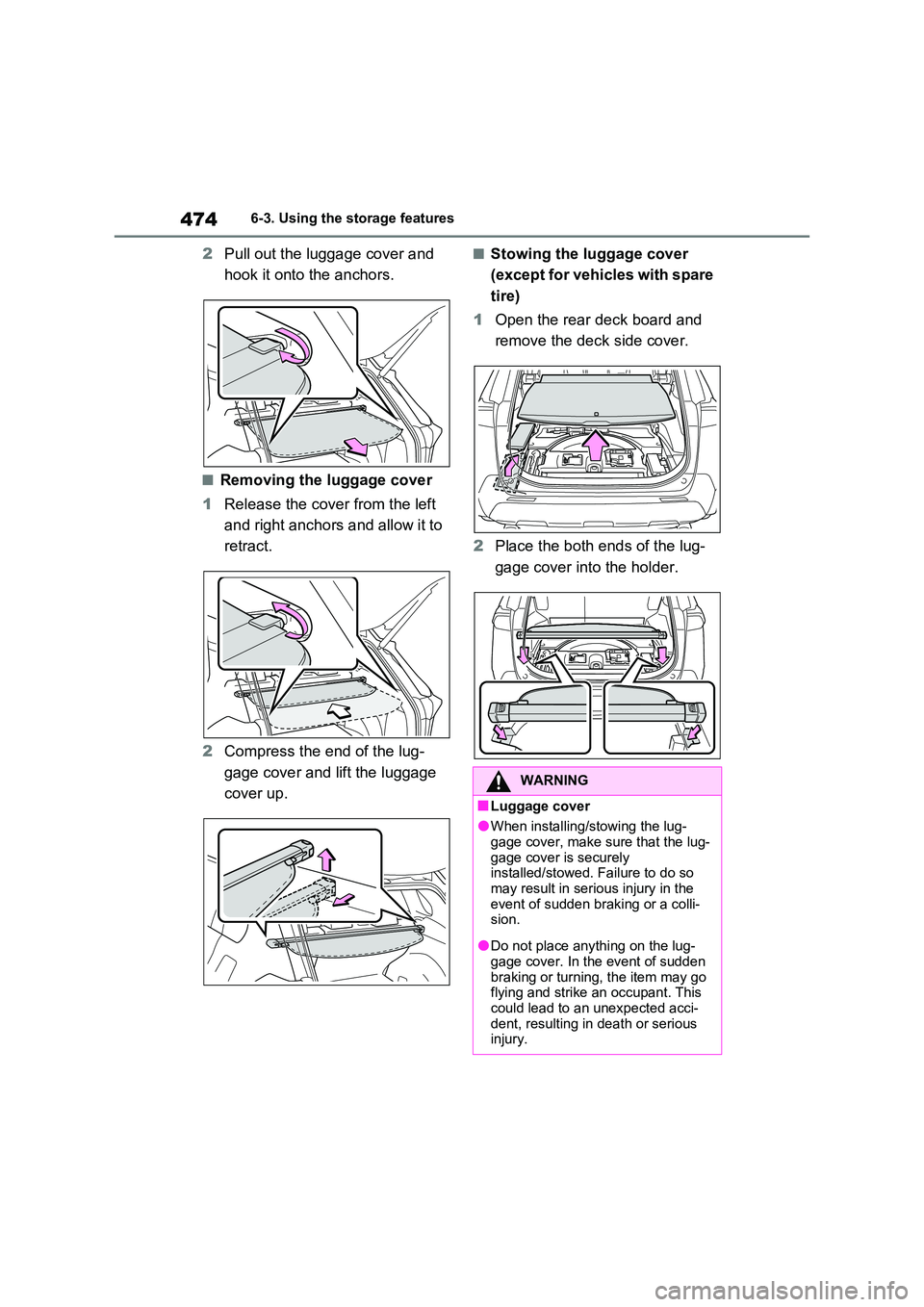
2Pull out the luggage cover and
hook it onto the anchors.
■Removing the luggage cover
1 Release the cover from the left
and right anchors and allow it to
retract.
2 Compress the end of the lug-
gage cover and lift the luggage
cover up.
■Stowing the luggage cover
(except for vehicles with spare
tire)
1 Open the rear deck board and
remove the deck side cover.
2 Place the both ends of the lug-
gage cover into the holder.
WARNING
■Luggage cover
●When installing/stowing the lug-
gage cover, make sure that the lug- gage cover is securely installed/stowed. Failure to do so
may result in serious injury in the event of sudden braking or a colli-sion.
●Do not place anything on the lug-gage cover. In the event of sudden
braking or turning, the item may go flying and strike an occupant. This could lead to an unexpected acci-
dent, resulting in death or serious injury.
Page 483 of 664
483
6
6-4. Using the other interior features
Interior features
WARNING
■Caution while driving
When charging a portable device, for
safety reasons, the driver should not operate the main part of the portable device while driving.
■Caution regarding interference with electronic devices
People with implantable cardiac pace- makers, cardiac resynchronization therapy-pacemakers or implantable
cardioverter defibrillators, as well as any other electrical medical device, should consult their physician about
the usage of the wireless charger. The operations of the wireless char-ger may have an affect on medical
devices.
■To prevent damage or burns
Observe the following precautions. Failure to do so may result in a possi-bility of equipment failure and dam-
age, catch fire, burns due to overheat.
●Do not insert any metallic objects between the charging area and the
portable device while charging
●Do not place containers with liquid
such as water on the wireless char- ger.
●Do not attach stickers, metallic objects, etc., to the charger area or portable device
●Do not cover with cloth, etc., and charge
●Do not charge portable devices other than designated
●Do not attempt to dismantle for dis-assembly or modifications
●Do not hit or apply a strong force
NOTICE
■Conditions in which the function may not operate correctly
In the following conditions, it may not operate correctly
●The portable device is fully charged
●There is foreign matter between the charge area and portable device
●The temperature of the portable device gets higher from charging
●The charging surface of the porta-ble device is facing up
●The placement of the portable device is out of alignment with the
charge area
●Near a TV tower, electric power
plant, gas station, radio station, large display, airport or other facility that generates strong radio waves
or electrical noise
●When the electronic key is in con-
tact with, or is covered by the fol- lowing metallic objects
• Cards to which aluminum foil is
attached
• Cigarette boxes that have alumi- num foil inside
• Metallic wallets or bags
•Coins
• Hand warmers made of metal
• Media such as CDs and DVDs
●When other wireless keys (that emit
radio waves) are being used nearby
In addition, excluding the above-men-
tioned, when the charger does not
perform normally or the operation dis-
play lamp is flashing continuously, it is
considered that the wireless charger
is malfunctioning. Contact authorized
Toyota dealer.