remote control TOYOTA VERSO S 2012 Owner's Manual
[x] Cancel search | Manufacturer: TOYOTA, Model Year: 2012, Model line: VERSO S, Model: TOYOTA VERSO S 2012Pages: 540, PDF Size: 17.43 MB
Page 373 of 540
373 4-3. Do-it-yourself maintenance
4
Maintenance and care
VERSO-S_EEAdd distilled water.
If the “UPPER LEVEL” line cannot be seen, check the fluid level by
looking directly at the cell.
Put the vent plug back on and close it securely.
Before recharging
When recharging, the battery produces hydrogen gas which is flammable
and explosive. Therefore, observe the following before recharging:
If recharging with the battery installed on the vehicle, be sure to discon-
nect the ground cable.
Make sure the power switch on the charger is off when connecting and
disconnecting the charger cables to the battery.
After recharging/reconnecting the battery (vehicles with a smart entry
& start system)
Unlocking the doors using the smart entry & start system may not be
possible immediately after reconnecting the battery. If this happens, use
the wireless remote control or the mechanical key to lock/unlock the
doors.
Start the engine with the “ENGINE START STOP” switch in ACCES-
SORY mode. The engine may not start with the “ENGINE START STOP”
switch turned OFF. However, the engine will operate normally from the
second attempt.
The “ENGINE START STOP” switch mode is recorded by the vehicle. If
the battery is reconnected, the vehicle will return the “ENGINE START
STOP” switch mode to the status it was in before the battery was discon-
nected. Make sure to turn off the engine before disconnect the battery.
Take extra care when connecting the battery if the “ENGINE START
STOP” switch mode prior to discharge is unknown.
If the engine will not start even after multiple attempts, contact any autho-
rized Toyota dealer or repairer, or another duly qualified and equipped pro-
fessional.
STEP2
STEP3
Page 387 of 540
387
4-3. Do-it-yourself maintenance
4
Maintenance and care
VERSO-S_EE
Wireless remote control/electronic key batter y
Replace the battery with a new one if it is depleted.
You will need the following items:
Flathead screwdriver
Lithium battery CR2016 (vehicles without a smart entry & start
system), or CR1632 (vehicles with a smart entry & start sys-
tem)
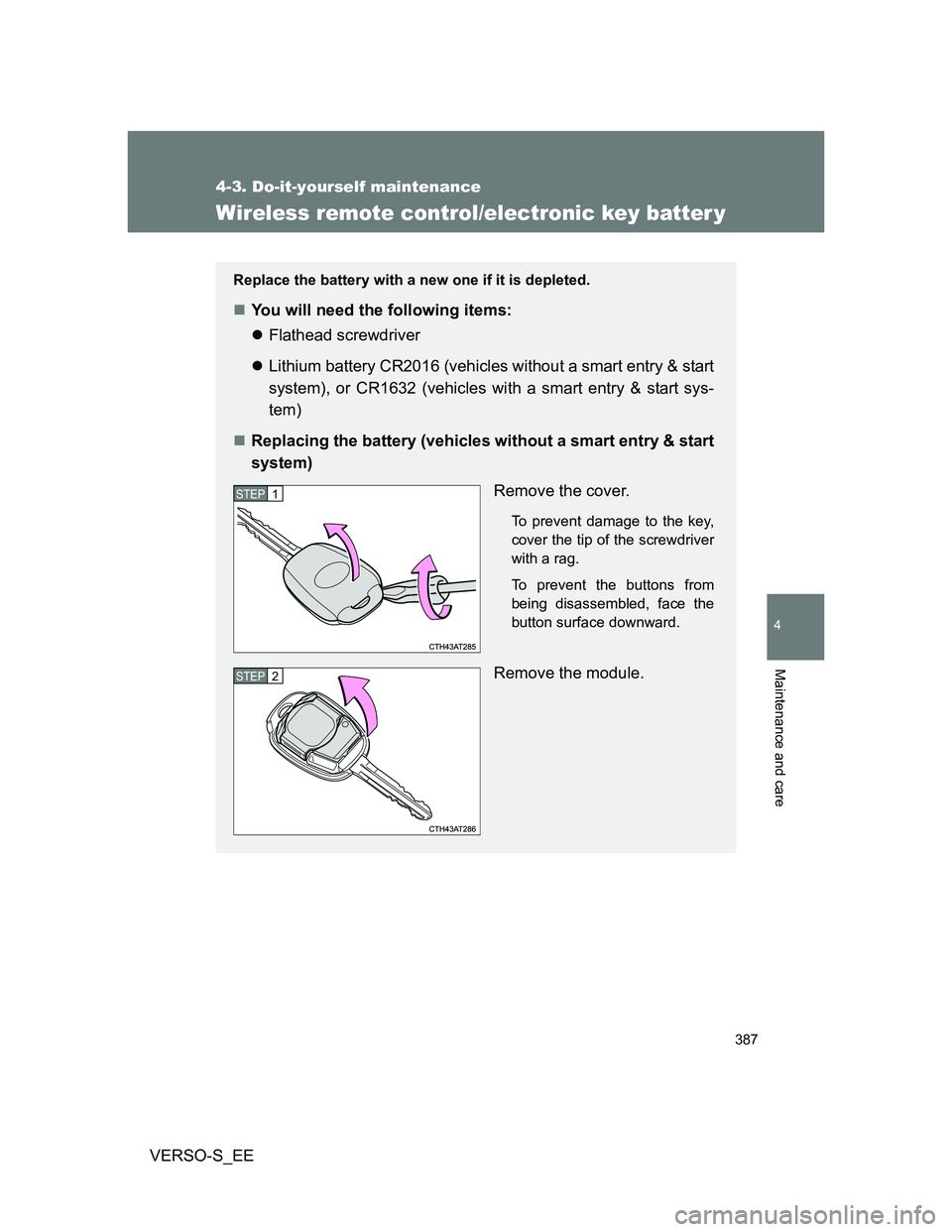
Replacing the battery (vehicles without a smart entry & start
system)
Remove the cover.
To prevent damage to the key,
cover the tip of the screwdriver
with a rag.
To prevent the buttons from
being disassembled, face the
button surface downward.
Remove the module.
STEP1
STEP2
Page 389 of 540
389 4-3. Do-it-yourself maintenance
4
Maintenance and care
VERSO-S_EE
Use a CR2016 (vehicles without a smart entry & start system) or
CR1632 (vehicles with a smart entry & start system) lithium battery
Batteries can be purchased at any authorized Toyota dealer or repairer,
or another duly qualified and equipped professional, local electrical appli-
ance shops or camera stores.
Replace only with the same or equivalent type recommended by the
manufacturer.
Dispose of used batteries according to local laws.
If the key battery is depleted
The following symptoms may occur:
The smart entry & start system (if equipped) and wireless remote control
will not function properly.
The operational range will be reduced.
When replacing the module (vehicles without a smart entry and start
system)
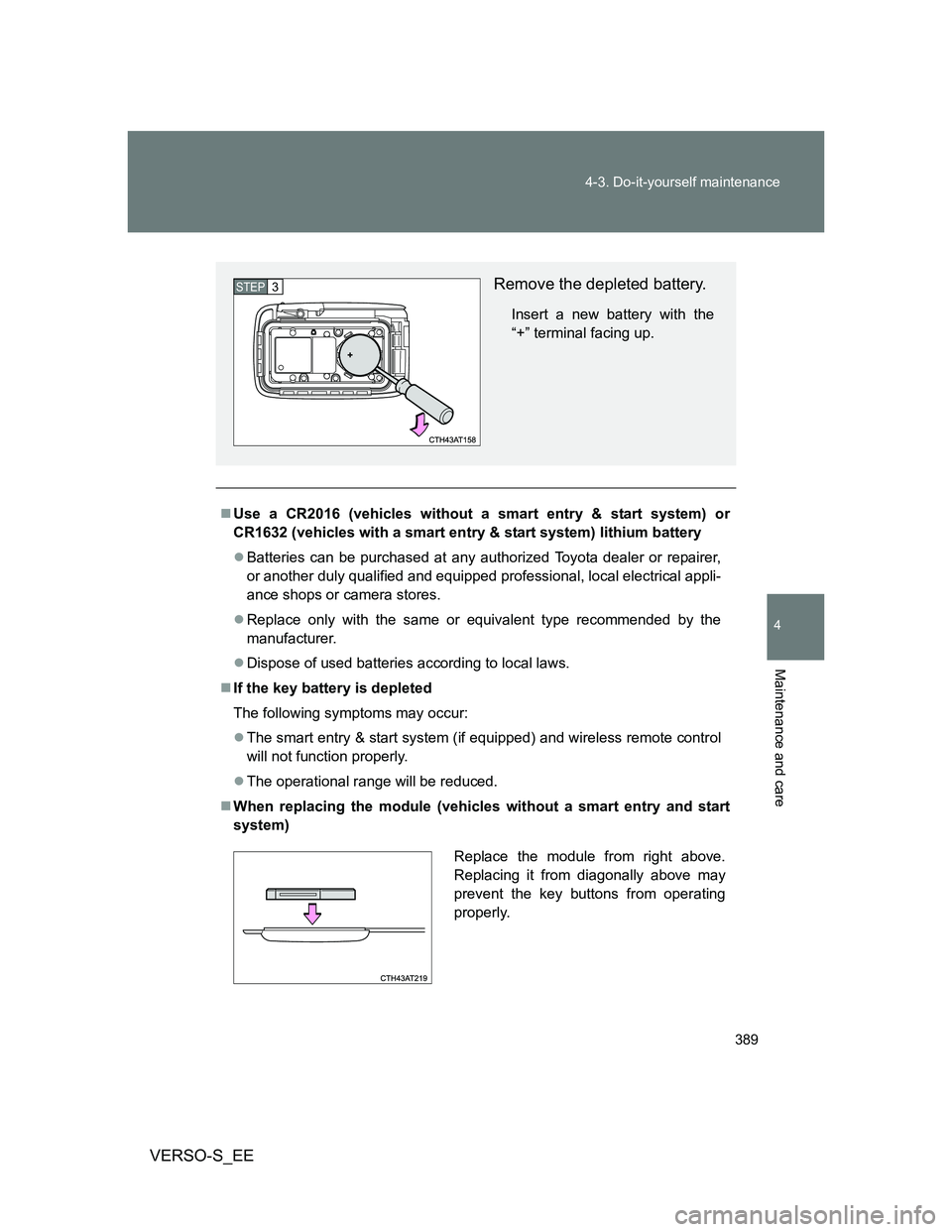
Remove the depleted battery.
Insert a new battery with the
“+” terminal facing up.
STEP3
Replace the module from right above.
Replacing it from diagonally above may
prevent the key buttons from operating
properly.
Page 390 of 540
390 4-3. Do-it-yourself maintenance
VERSO-S_EE
CAUTION
Removed battery and other parts
Keep away from children. These parts are small and if swallowed by a child,
they can cause choking. Failure to do so could result in death or serious
injury.
Certification for the lithium battery
RISK OF EXPLOSION IF BATTERY IS REPLACED BY AN INCORRECT
TYPE. DISPOSE OF USED BATTERIES ACCORDING TO THE INSTRUC-
TIONS
NOTICE
For normal operation after replacing the battery
Observe the following precautions to prevent accidents:
Always work with dry hands.
Moisture may cause the battery to rust.
Do not touch or move any other component inside the remote control.
Do not bend either of the battery terminals.
Page 400 of 540
400 4-3. Do-it-yourself maintenance
VERSO-S_EE
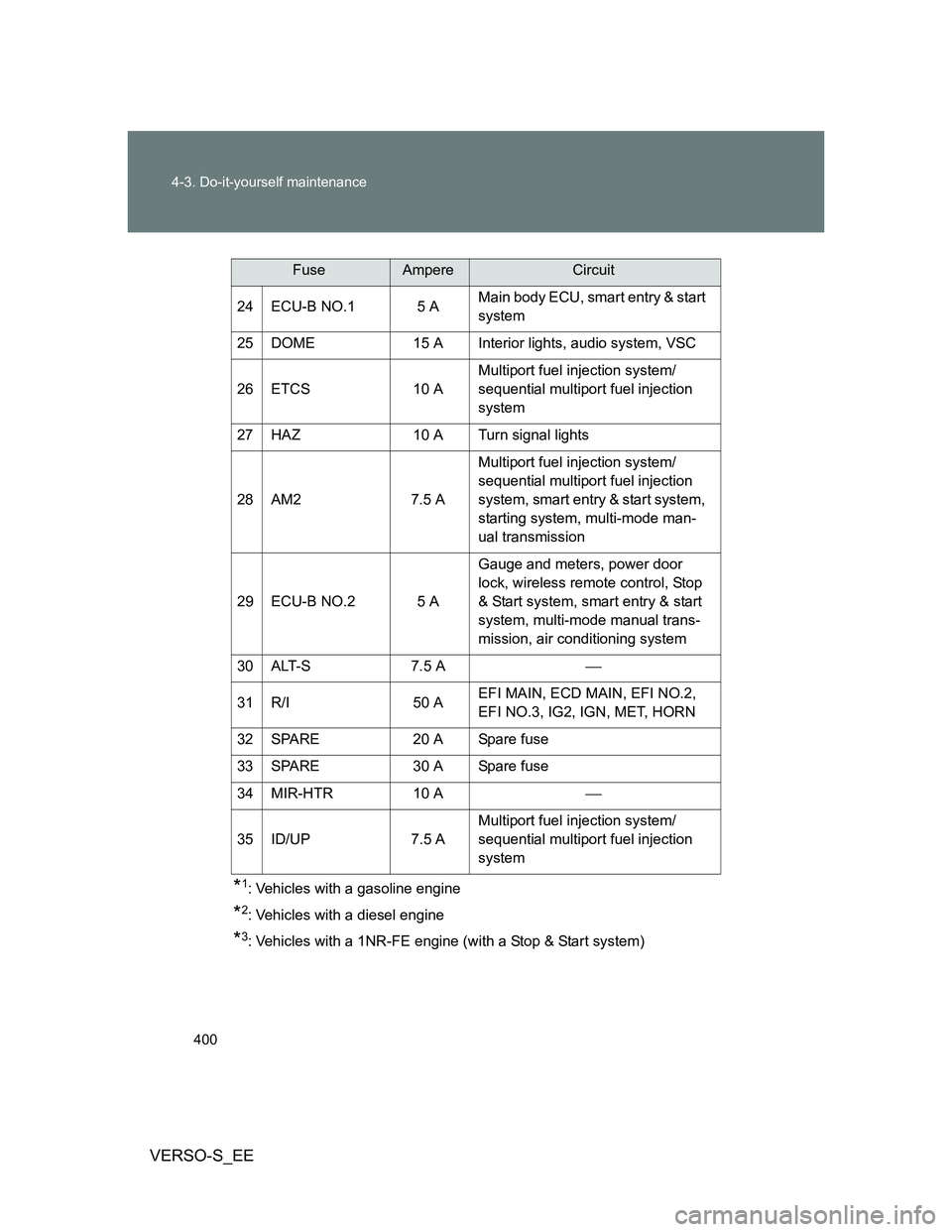
*1: Vehicles with a gasoline engine
*2: Vehicles with a diesel engine
*3: Vehicles with a 1NR-FE engine (with a Stop & Start system) 24 ECU-B NO.1 5 AMain body ECU, smart entry & start
system
25 DOME 15 A Interior lights, audio system, VSC
26 ETCS 10 AMultiport fuel injection system/
sequential multiport fuel injection
system
27 HAZ 10 A Turn signal lights
28 AM2 7.5 AMultiport fuel injection system/
sequential multiport fuel injection
system, smart entry & start system,
starting system, multi-mode man-
ual transmission
29 ECU-B NO.2 5 AGauge and meters, power door
lock, wireless remote control, Stop
& Start system, smart entry & start
system, multi-mode manual trans-
mission, air conditioning system
30 ALT-S 7.5 A
31 R/I 50 AEFI MAIN, ECD MAIN, EFI NO.2,
EFI NO.3, IG2, IGN, MET, HORN
32 SPARE 20 A Spare fuse
33 SPARE 30 A Spare fuse
34 MIR-HTR 10 A
35 ID/UP 7.5 AMultiport fuel injection system/
sequential multiport fuel injection
system
FuseAmpereCircuit
Page 478 of 540
478
5-2. Steps to take in an emergency
VERSO-S_EE
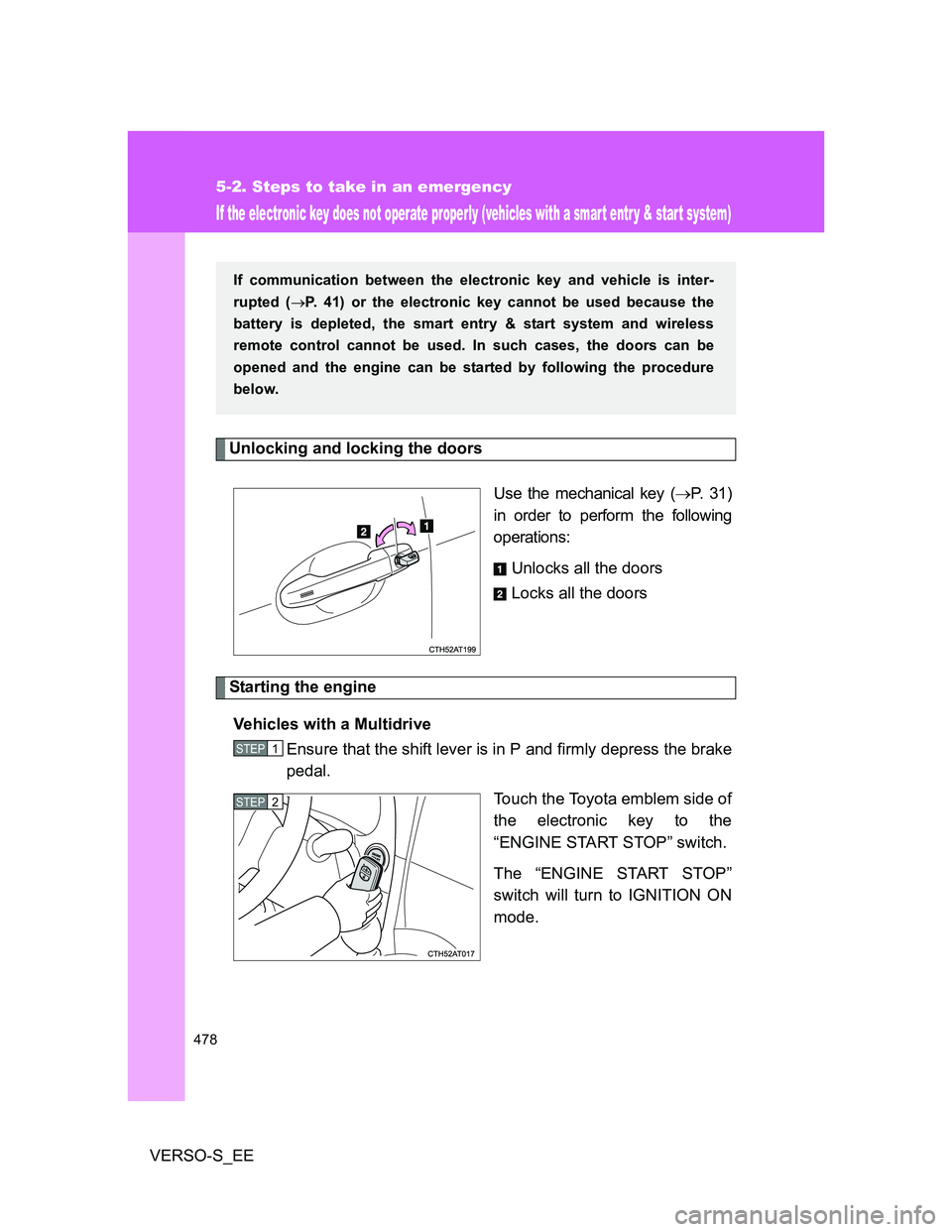
If the electronic key does not operate properly (vehicles with a smart entr y & start system)
Unlocking and locking the doors
Use the mechanical key (P. 31)
in order to perform the following
operations:
Unlocks all the doors
Locks all the doors
Starting the engine
Vehicles with a Multidrive
Ensure that the shift lever is in P and firmly depress the brake
pedal.
Touch the Toyota emblem side of
the electronic key to the
“ENGINE START STOP” switch.
The “ENGINE START STOP”
switch will turn to IGNITION ON
mode.
If communication between the electronic key and vehicle is inter-
rupted (P. 41) or the electronic key cannot be used because the
battery is depleted, the smart entry & start system and wireless
remote control cannot be used. In such cases, the doors can be
opened and the engine can be started by following the procedure
below.
STEP1
STEP2
Page 481 of 540
5
481 5-2. Steps to take in an emergency
When trouble arises
VERSO-S_EE
Stopping the engine
Vehicles with a Multidrive: Shift the shift lever to P and press the “ENGINE
START STOP” switch as you normally do when stopping the engine.
Except vehicles with a Multidrive: Shift the shift lever to N and press the
“ENGINE START STOP” switch as you normally do when stopping the
engine.
Replacing the key battery
As the above procedure is a temporary measure, it is recommended that the
electronic key battery be replaced immediately when the battery is depleted.
(P. 387)
Alarm (if equipped)
Using the mechanical key to lock the doors will not set the alarm system.
If a door is unlocked using the mechanical key when the alarm system is set,
the alarm may be triggered. (P. 107)
If the doors cannot be locked or unlocked by the smart entry & start
system
Lock and unlock the doors by the mechanical key or wireless remote control.
When the electronic key does not work properly
Make sure that the smart entry & start system has not been deactivated in
the customization setting. If it is off, turn the function on.
(Customizable features P. 518)
Page 486 of 540
486 5-2. Steps to take in an emergency
VERSO-S_EE
Starting the engine when the battery is discharged (vehicles with a
Multidrive)
The engine cannot be started by push-starting.
To prevent battery discharge
Turn off the headlights and the audio system while the engine is off.
Turn off any unnecessary electrical components when the vehicle is run-
ning at a low speed for an extended period, such as in heavy traffic.
Charging the battery
The electricity stored in the battery will discharge gradually even when the
vehicle is not in use, due to natural discharge and the draining effects of cer-
tain electrical appliances. If the vehicle is left for a long time, the battery may
discharge, and the engine may be unable to start. (The battery recharges
automatically during driving.)
Precautions when the battery is discharged (vehicles with a smart
entry & start system)
In some cases, it may not be possible to unlock the doors using the smart
entry & start system when the battery is discharged. Use the wireless
remote control or the mechanical key to lock or unlock the doors.
The engine may not start on the first attempt after the battery has
recharged but will start normally after the second attempt. This is not a
malfunction.
The “ENGINE START STOP” switch mode is memorized by the vehicle.
When the battery is reconnected, the system will return to the mode it
was in before the battery was discharged. Before disconnecting the bat-
tery, turn the “ENGINE START STOP” switch off.
If you are unsure what mode the “ENGINE START STOP” switch was in
before the battery discharged, be especially careful when reconnecting
the battery.
Once the engine starts, have the vehicle checked at any autho-
rized Toyota dealer or repairer, or another duly qualified and
equipped professional, as soon as possible.
Page 519 of 540
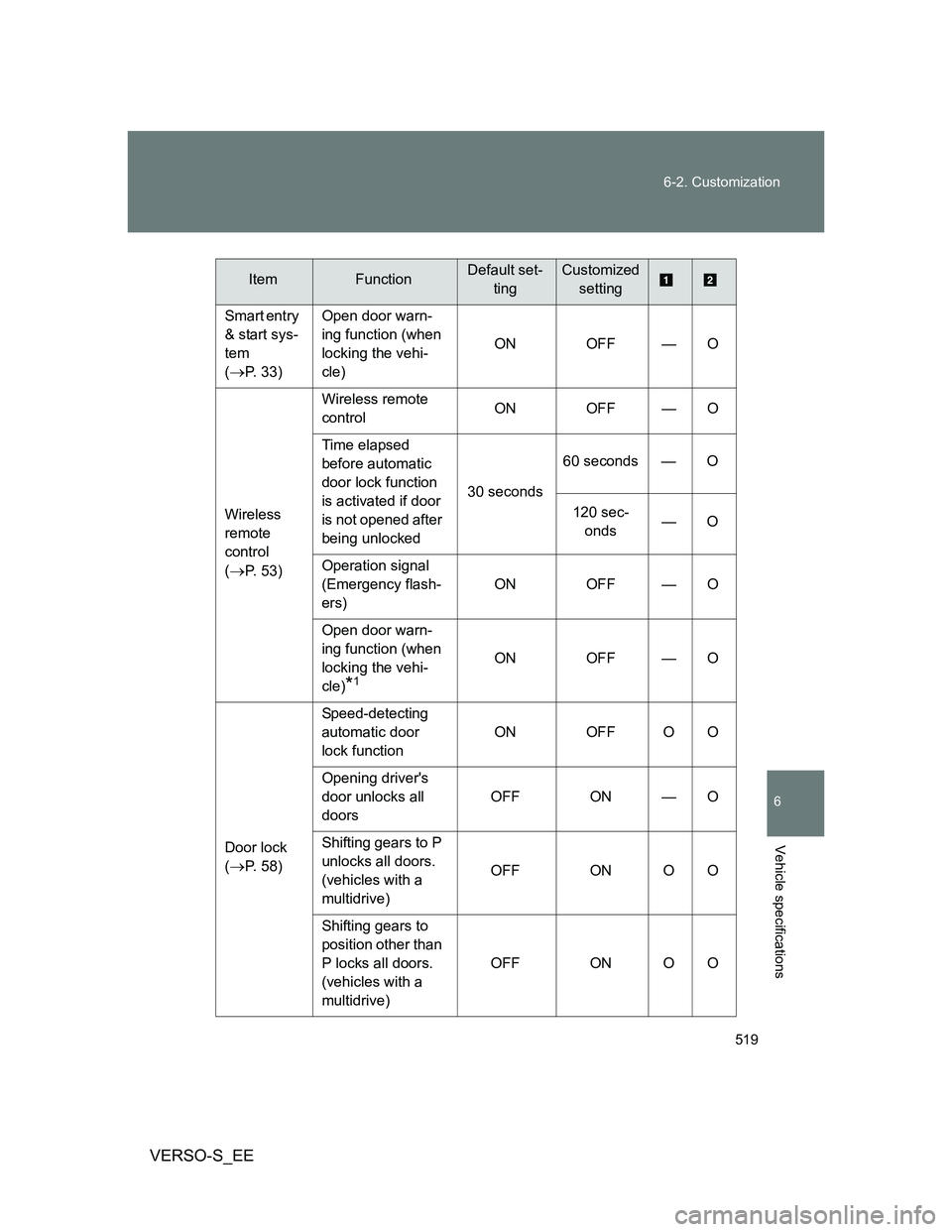
519 6-2. Customization
6
Vehicle specifications
VERSO-S_EE
Smart entry
& start sys-
tem
(
P. 33)Open door warn-
ing function (when
locking the vehi-
cle)ON OFF — O
Wireless
remote
control
(
P. 53)Wireless remote
controlON OFF — O
Time elapsed
before automatic
door lock function
is activated if door
is not opened after
being unlocked30 seconds60 seconds — O
120 sec-
onds—O
Operation signal
(Emergency flash-
ers)ON OFF — O
Open door warn-
ing function (when
locking the vehi-
cle)
*1
ON OFF — O
Door lock
(
P. 58)Speed-detecting
automatic door
lock functionON OFF O O
Opening driver's
door unlocks all
doorsOFF ON — O
Shifting gears to P
unlocks all doors.
(vehicles with a
multidrive)OFF ON O O
Shifting gears to
position other than
P locks all doors.
(vehicles with a
multidrive)OFF ON O O
ItemFunctionDefault set-
tingCustomized
setting
Page 530 of 540
530 Alphabetical index
VERSO-S_EE
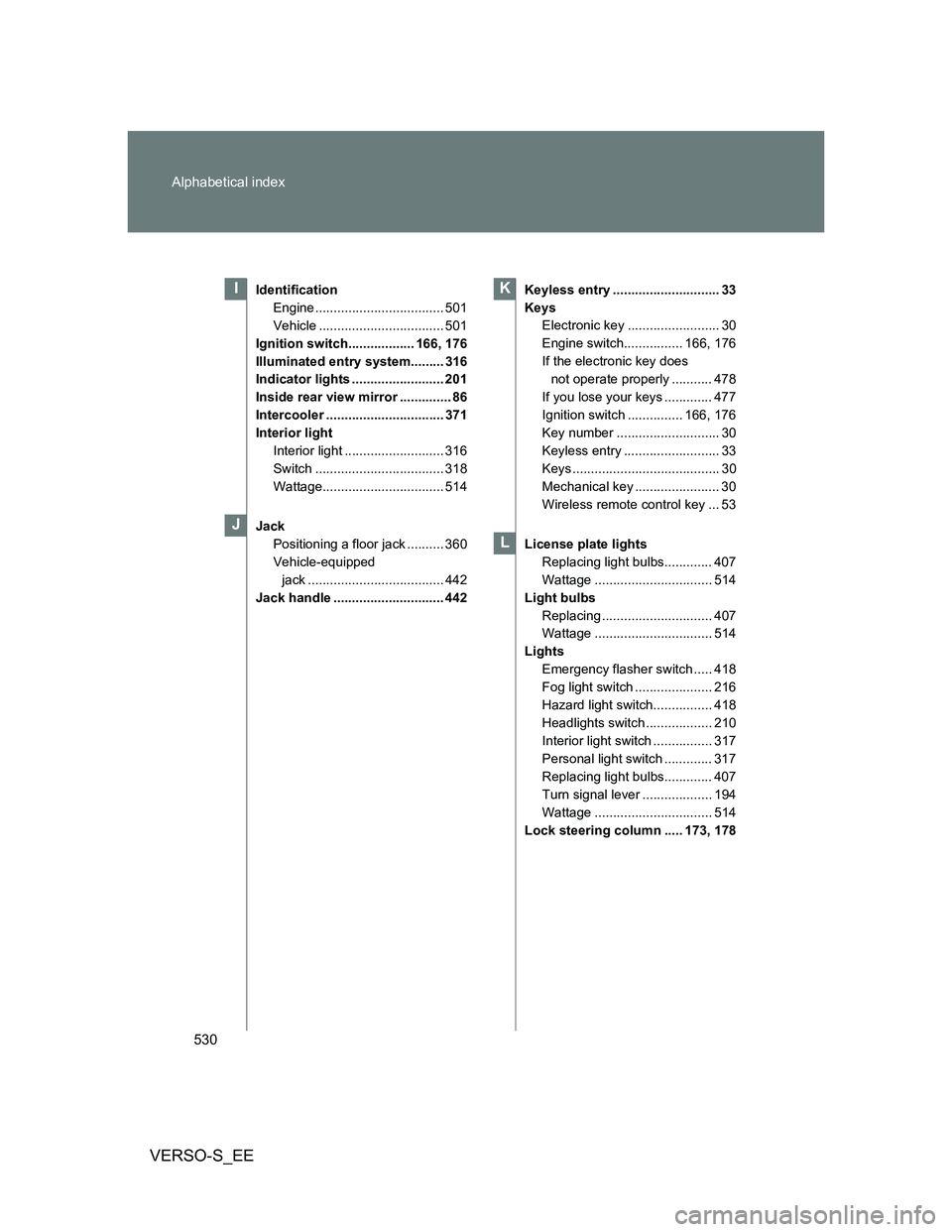
Identification
Engine ................................... 501
Vehicle .................................. 501
Ignition switch.................. 166, 176
Illuminated entry system......... 316
Indicator lights ......................... 201
Inside rear view mirror .............. 86
Intercooler ................................ 371
Interior light
Interior light ........................... 316
Switch ................................... 318
Wattage................................. 514
Jack
Positioning a floor jack .......... 360
Vehicle-equipped
jack ..................................... 442
Jack handle .............................. 442Keyless entry ............................. 33
Keys
Electronic key ......................... 30
Engine switch................ 166, 176
If the electronic key does
not operate properly ........... 478
If you lose your keys ............. 477
Ignition switch ............... 166, 176
Key number ............................ 30
Keyless entry .......................... 33
Keys ........................................ 30
Mechanical key ....................... 30
Wireless remote control key ... 53
License plate lights
Replacing light bulbs............. 407
Wattage ................................ 514
Light bulbs
Replacing .............................. 407
Wattage ................................ 514
Lights
Emergency flasher switch ..... 418
Fog light switch ..................... 216
Hazard light switch................ 418
Headlights switch .................. 210
Interior light switch ................ 317
Personal light switch ............. 317
Replacing light bulbs............. 407
Turn signal lever ................... 194
Wattage ................................ 514
Lock steering column ..... 173, 178I
J
K
L