wheel TOYOTA VERSO S 2012 Workshop Manual
[x] Cancel search | Manufacturer: TOYOTA, Model Year: 2012, Model line: VERSO S, Model: TOYOTA VERSO S 2012Pages: 540, PDF Size: 17.43 MB
Page 255 of 540
255 2-5. Driving information
2
When driving
VERSO-S_EETransmission information
Vehicles with a Multidrive and multi-mode manual transmis-
sion
Select an appropriate gear in M mode to maintain the effectiveness
of engine braking and to maintain charging system performance.
Vehicles with a manual transmission
Refrain from driving in 6th gear to maintain the effectiveness of
engine braking and to maintain charging system performance.
If the engine overheats
Towing a loaded trailer up a long, steep incline in temperatures
exceeding 30C (85F) may result in the engine overheating. If the
high engine coolant temperature warning light flashes or comes
on, turn the air conditioning off immediately, leave the road and
stop the vehicle in a safe place. (P. 489)
When parking the vehicle
Always place wheel chocks under the wheels of both the vehicle
and trailer. Firmly set the parking brake and shift the shift lever to P
for Multidrives, E, M or R for multi-mode manual transmissions,
and 1 or R for manual transmissions.
Page 257 of 540
3Interior features
257
VERSO-S_EE
3-1. Using the air conditioning
system and defogger
Manual air conditioning
system ............................ 258
Automatic air conditioning
system ............................ 264
Power heater .................... 270
Rear window and
outside rear view
mirror defoggers ............. 272
3-2. Using the audio system
Audio system types .......... 274
Using the radio ................. 278
Using the CD player ......... 282
Playing back MP3 and
WMA discs...................... 287
Operating an iPod............. 294
Operating a USB
memory........................... 302
Optimal use of the audio
system ............................ 310
Using the AUX port ........... 312
Using the steering wheel
audio switches ................ 3133-3. Using the interior lights
Interior lights list ................ 316
• Personal lights ................ 317
• Personal/interior lights .... 317
• Interior light ..................... 318
3-4. Using the storage
features
List of storage features ..... 319
• Auxiliary box ................... 320
• Glove box ....................... 320
• Bottle holders.................. 322
• Tray ................................ 323
• Cup holders .................... 324
3-5. Other interior features
Sun visors ......................... 325
Vanity mirrors.................... 326
Clock ................................. 327
Outside temperature
display ............................ 328
Power outlets .................... 329
Seat heaters ..................... 331
Armrests ........................... 333
Panoramic roof shade....... 334
Floor mat........................... 337
Luggage compartment
features........................... 339
Page 274 of 540
274
VERSO-S_EE
3-2. Using the audio system
Audio system types
: If equipped
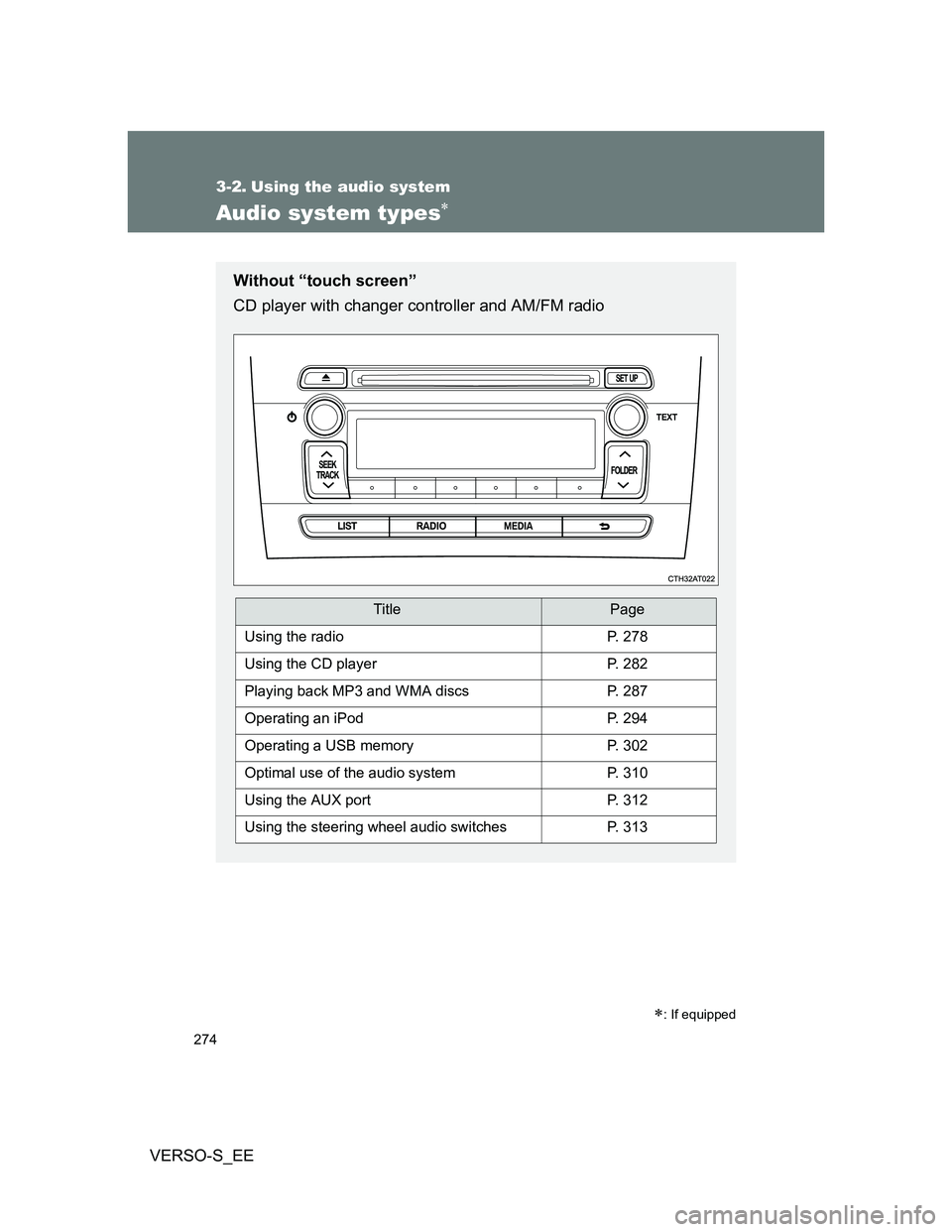
Without “touch screen”
CD player with changer controller and AM/FM radio
TitlePage
Using the radioP. 278
Using the CD playerP. 282
Playing back MP3 and WMA discsP. 287
Operating an iPodP. 294
Operating a USB memoryP. 302
Optimal use of the audio systemP. 310
Using the AUX portP. 312
Using the steering wheel audio switchesP. 313
Page 313 of 540
313
3-2. Using the audio system
3
Interior features
VERSO-S_EE
Using the steering wheel audio switches
Turning on the power
Press when the audio system is turned off.
Changing the audio source
Press when the audio system is turned on. The audio source
changes as follows each time is pressed.
AMFMCD modeiPod or USB memory mode*
AUX*AM
*: If equipped
: If equipped
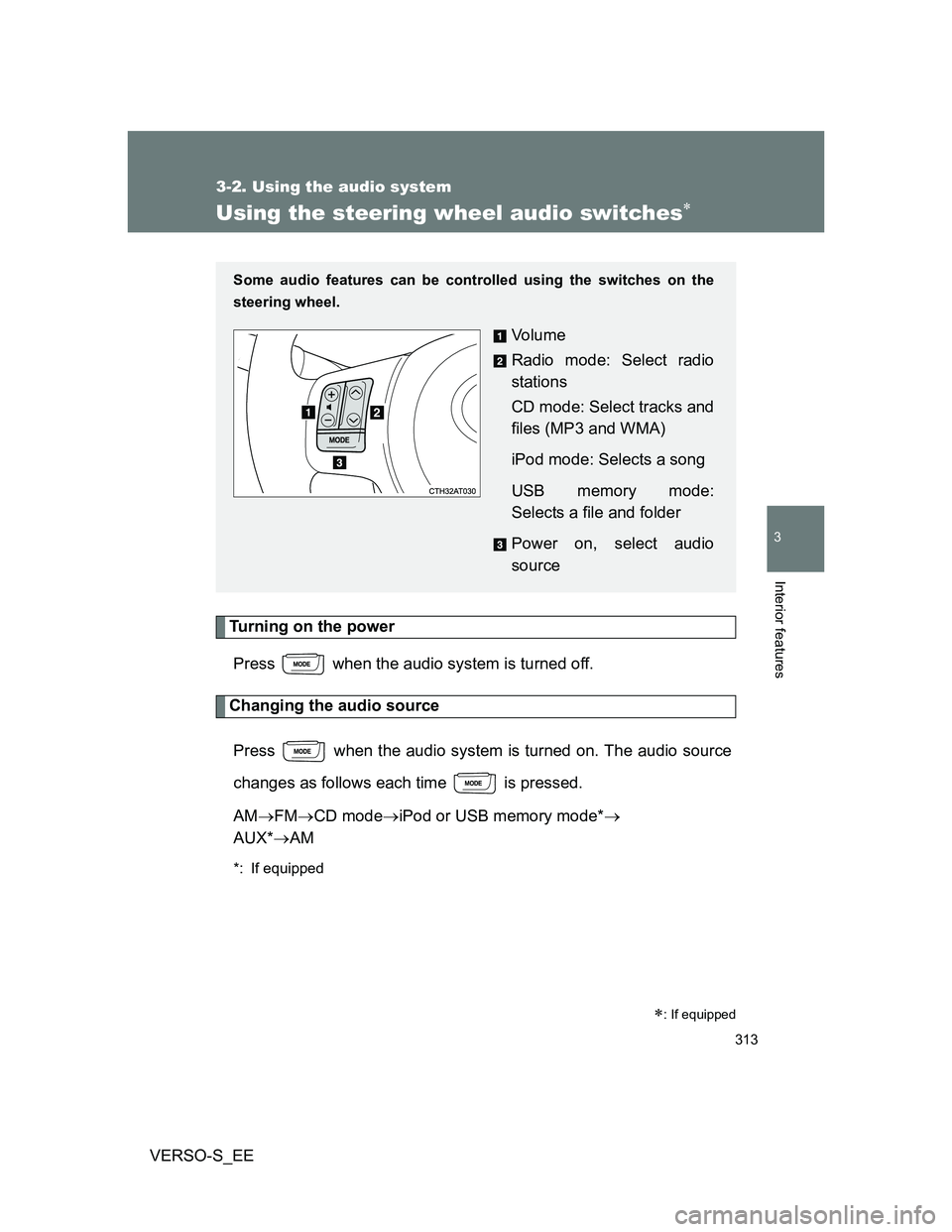
Some audio features can be controlled using the switches on the
steering wheel.
Vo l u m e
Radio mode: Select radio
stations
CD mode: Select tracks and
files (MP3 and WMA)
iPod mode: Selects a song
USB memory mode:
Selects a file and folder
Power on, select audio
source
Page 315 of 540
315 3-2. Using the audio system
3
Interior features
VERSO-S_EE
CAUTION
To reduce the risk of an accident
Exercise care when operating the audio switches on the steering wheel.
Page 345 of 540
4Maintenance and care
345
VERSO-S_EE
4-1. Maintenance and care
Cleaning and protecting
the vehicle exterior ......... 346
Cleaning and protecting
the vehicle interior .......... 350
4-2. Maintenance
Maintenance
requirements................... 353
4-3. Do-it-yourself
maintenance
Do-it-yourself service
precautions ..................... 356
Hood ................................. 359
Positioning a floor jack ...... 360
Engine compartment......... 362
Tires .................................. 377
Tire inflation pressure ....... 380
Wheels .............................. 382
Air conditioning filter ......... 384
Wireless remote control/
electronic key battery...... 387
Checking and replacing
fuses ............................... 391
Light bulbs ........................ 407
Page 346 of 540
346
VERSO-S_EE
4-1. Maintenance and care
Cleaning and protecting the vehicle exterior
Automatic car washes
Fold the mirrors and remove the antenna before washing the vehicle.
Start washing from the front of the vehicle. Make sure to re-install the
antenna and extend the mirrors before driving.
Brushes used in automatic car washes may scratch the vehicle surface
and harm your vehicle’s paint.
In certain automatic car washes, the rear spoiler may interfere with
machine operation. This may prevent the vehicle from being cleaned
properly or result in damage to the rear spoiler.
High pressure car washes
Do not allow the nozzles of the car wash to come within close proximity
of the windows.
Before using the car wash, check that the fuel filler door on your vehicle
is closed properly.
Perform the following to protect the vehicle and maintain it in prime
condition:
Working from top to bottom, liberally apply water to the vehicle
body, wheel wells and underside of the vehicle to remove any
dirt and dust.
Wash the vehicle body using a sponge or soft cloth, such as a
chamois.
For hard-to-remove marks, use car wash soap and rinse thor-
oughly with water.
Wipe away any water.
Wax the vehicle when the waterproof coating deteriorates.
If water does not bead on a clean surface, apply wax when the vehicle
body is cool.
Page 347 of 540
347 4-1. Maintenance and care
4
Maintenance and care
VERSO-S_EE
When using a car wash (vehicles with a smart entry & start system)
If the door handle becomes wet while the electronic key is within the effec-
tive range, the door may lock and unlock repeatedly. Place the key in a posi-
tion 2 m (6 ft.) or more separate from the vehicle while the vehicle is being
washed. (Take care to ensure that the key is not stolen.)
Aluminum wheels (if equipped)
Remove any dirt immediately by using a neutral detergent. Do not use
hard brushes or abrasive cleaners. Do not use strong or harsh chemical
cleaners.
Use the same mild detergent and wax as used on the paint.
Do not use detergent on the wheels when they are hot, for example after
driving for long distance in the hot weather.
Wash detergent from the wheels immediately after use.
Bumpers
Do not scrub with abrasive cleaners.
CAUTION
When washing the vehicle
Do not apply water to the inside of the engine compartment. Doing so may
cause the electrical components etc. to catch fire.
Page 348 of 540
348 4-1. Maintenance and care
VERSO-S_EE
CAUTION
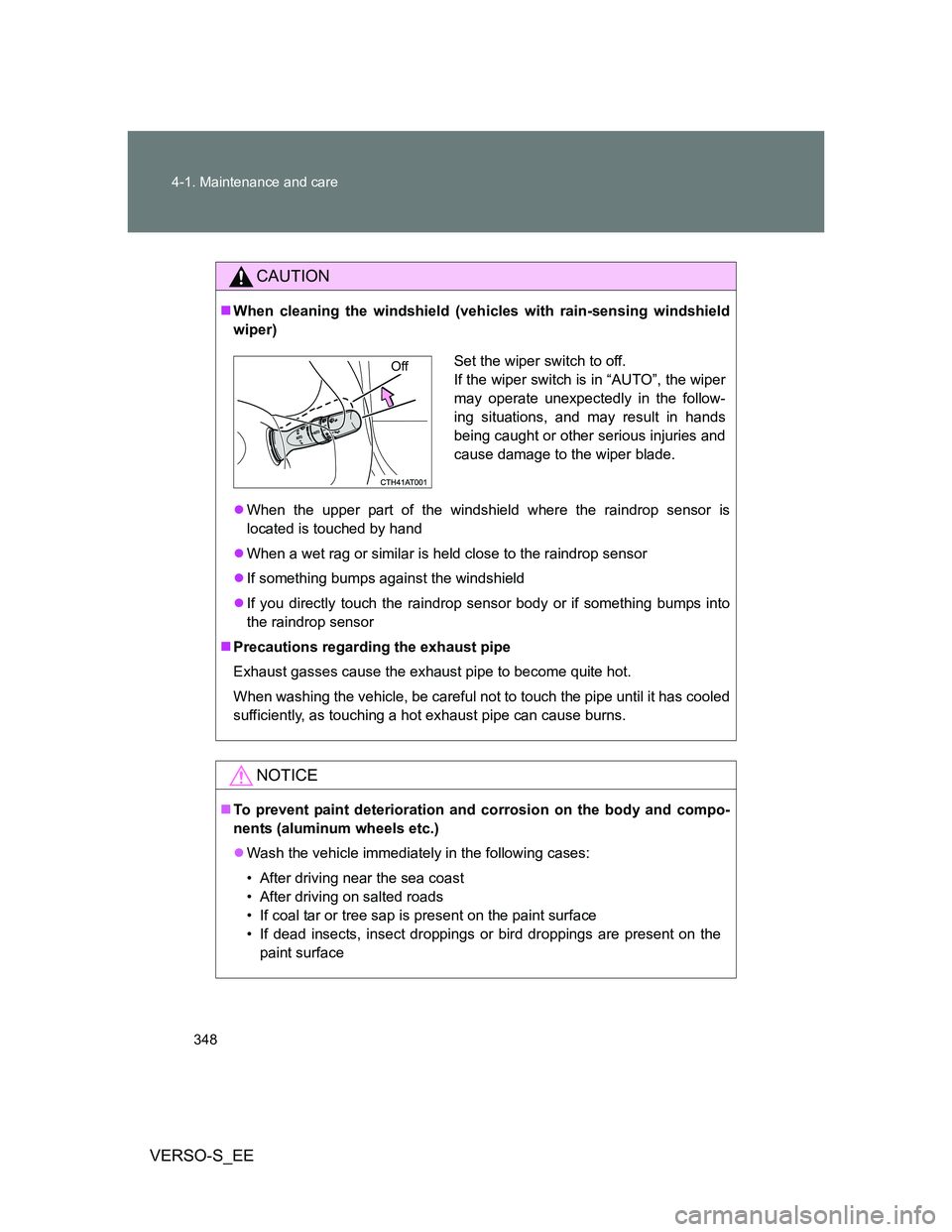
When cleaning the windshield (vehicles with rain-sensing windshield
wiper)
When the upper part of the windshield where the raindrop sensor is
located is touched by hand
When a wet rag or similar is held close to the raindrop sensor
If something bumps against the windshield
If you directly touch the raindrop sensor body or if something bumps into
the raindrop sensor
Precautions regarding the exhaust pipe
Exhaust gasses cause the exhaust pipe to become quite hot.
When washing the vehicle, be careful not to touch the pipe until it has cooled
sufficiently, as touching a hot exhaust pipe can cause burns.
NOTICE
To prevent paint deterioration and corrosion on the body and compo-
nents (aluminum wheels etc.)
Wash the vehicle immediately in the following cases:
• After driving near the sea coast
• After driving on salted roads
• If coal tar or tree sap is present on the paint surface
• If dead insects, insect droppings or bird droppings are present on the
paint surface
Set the wiper switch to off.
If the wiper switch is in “AUTO”, the wiper
may operate unexpectedly in the follow-
ing situations, and may result in hands
being caught or other serious injuries and
cause damage to the wiper blade.Off
Page 349 of 540
349 4-1. Maintenance and care
4
Maintenance and care
VERSO-S_EE
NOTICE
• After driving in an area contaminated with soot, oily smoke, mine dust,
iron powder or chemical substances
• If the vehicle becomes heavily soiled with dust or mud
• If liquids such as benzene and gasoline are spilled on the paint surface
If the paint is chipped or scratched, have it repaired immediately.
To prevent the wheels from corroding, remove any dirt and store in a place
with low humidity when storing the wheels.
Cleaning the exterior lights
Wash carefully. Do not use organic substances or scrub with a hard brush.
This may damage the surfaces of the lights.
Do not apply wax to the surfaces of the lights.
Wax may cause damage to the lenses.
Antenna installation and removal precautions
Before driving, ensure that the antenna is installed.
When the antenna is removed, such as before entering an automatic car
wash, make sure to store it in a suitable place so as not to lose it. Also,
before driving, make sure to reinstall the antenna in its original position.
When using an automatic car wash (vehicles with rain-sensing wind-
shield wiper)
Set the wiper switch to the off position.
If the wiper switch is in “AUTO”, the wiper may operate and the wiper blade
may be damaged.
To prevent damage to the antenna
Remove the antenna in the following situations:
When the antenna will touch the ceiling of a garage or other such places
When a car cover is to be used to cover the vehicle