engine TOYOTA VERSO S 2015 User Guide
[x] Cancel search | Manufacturer: TOYOTA, Model Year: 2015, Model line: VERSO S, Model: TOYOTA VERSO S 2015Pages: 564, PDF Size: 18.47 MB
Page 39 of 564
39 1-2. Opening, closing and locking the doors
1
Before driving
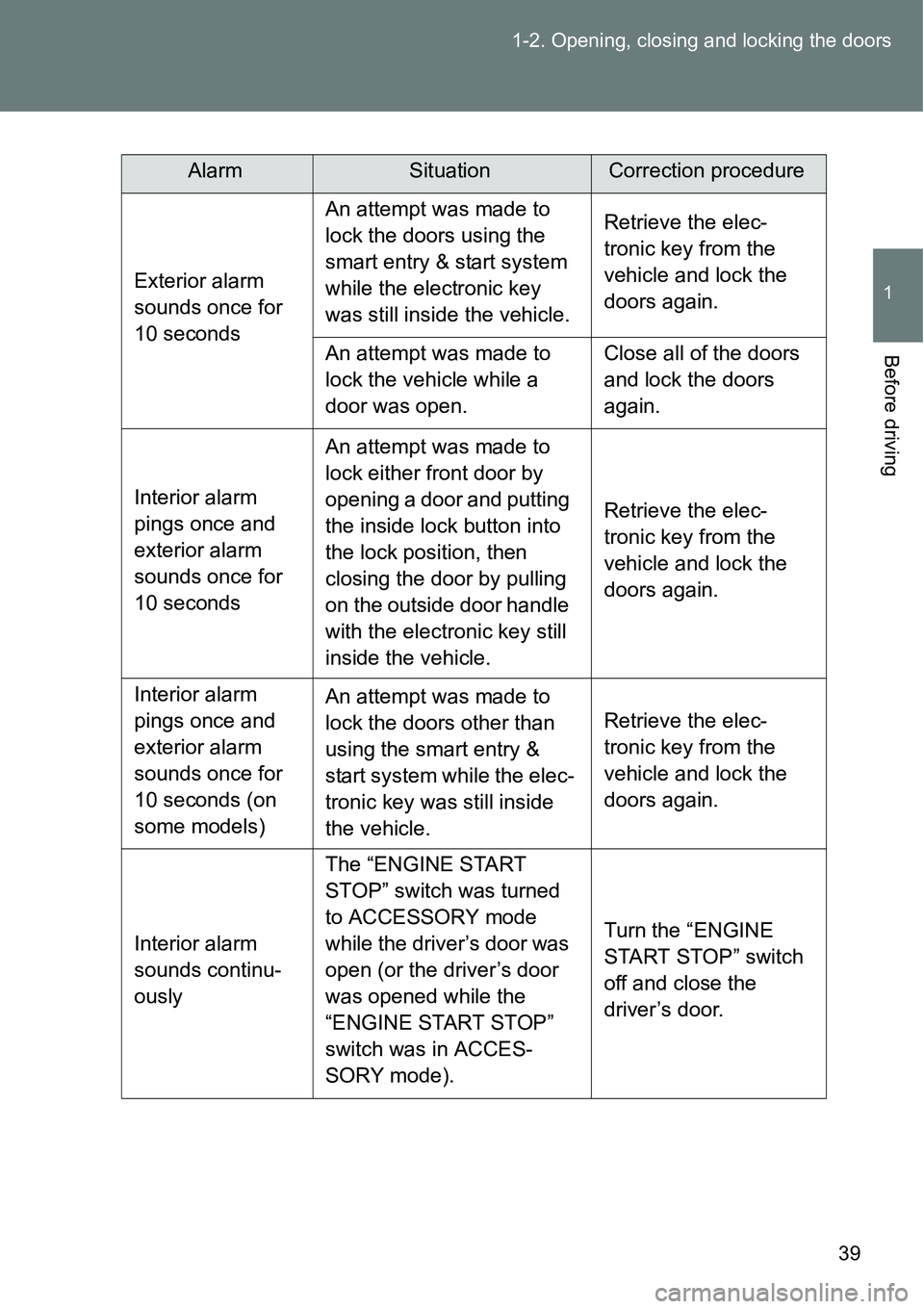
AlarmSituationCorrection procedure
Exterior alarm
sounds once for
10 secondsAn attempt was made to
lock the doors using the
smart entry & start system
while the electronic key
was still inside the vehicle.Retrieve the elec-
tronic key from the
vehicle and lock the
doors again.
An attempt was made to
lock the vehicle while a
door was open.Close all of the doors
and lock the doors
again.
Interior alarm
pings once and
exterior alarm
sounds once for
10 secondsAn attempt was made to
lock either front door by
opening a door and putting
the inside lock button into
the lock position, then
closing the door by pulling
on the outside door handle
with the electronic key still
inside the vehicle.Retrieve the elec-
tronic key from the
vehicle and lock the
doors again.
Interior alarm
pings once and
exterior alarm
sounds once for
10 seconds (on
some models)An attempt was made to
lock the doors other than
using the smart entry &
start system while the elec-
tronic key was still inside
the vehicle.Retrieve the elec-
tronic key from the
vehicle and lock the
doors again.
Interior alarm
sounds continu-
ouslyThe “ENGINE START
STOP” switch was turned
to ACCESSORY mode
while the driver’s door was
open (or the driver’s door
was opened while the
“ENGINE START STOP”
switch was in ACCES-
SORY mode).Turn the “ENGINE
START STOP” switch
off and close the
driver’s door.
Page 40 of 564
40 1-2. Opening, closing and locking the doors
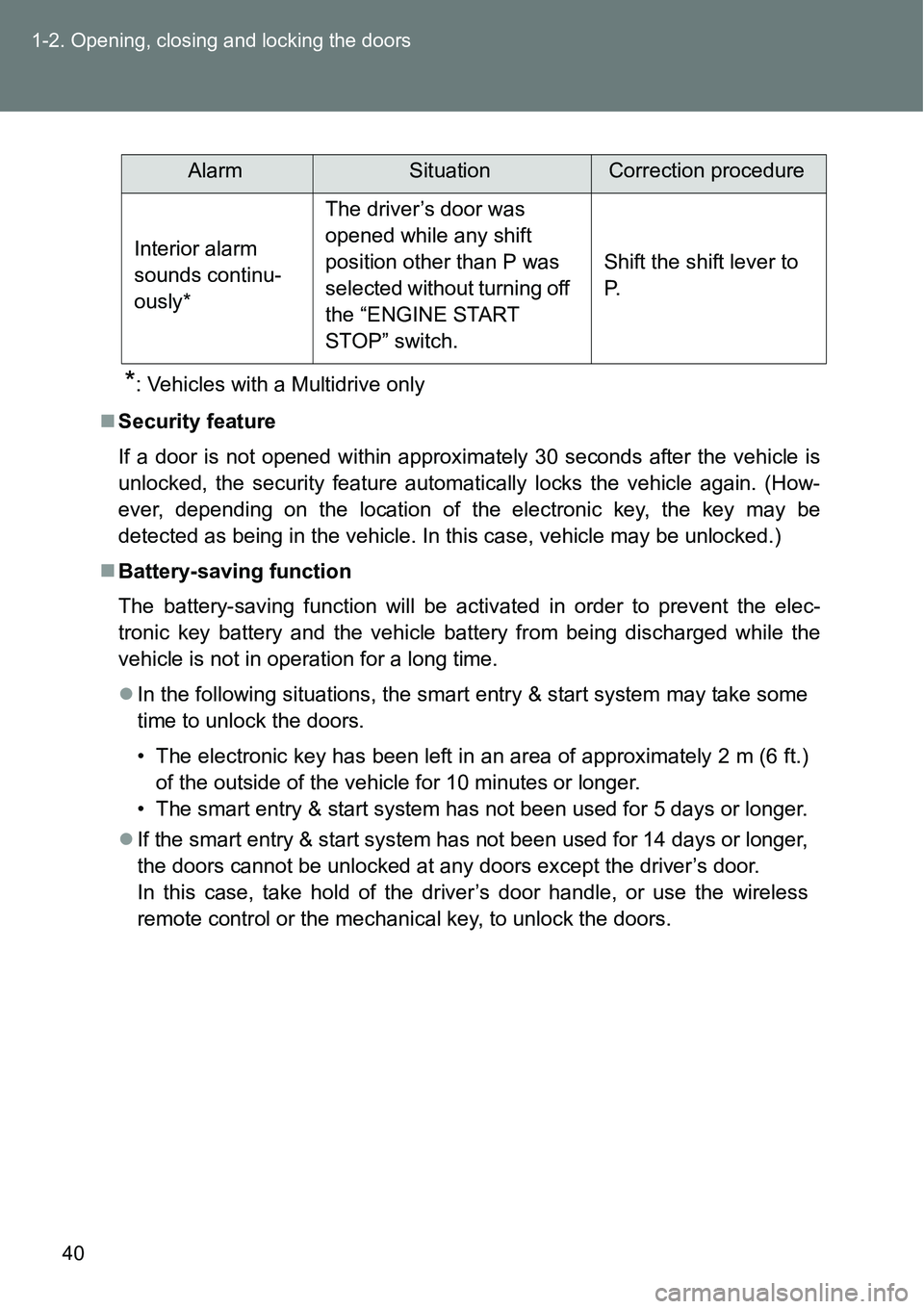
*: Vehicles with a Multidrive only
Security feature
If a door is not opened within approximately 30 seconds after the vehicle is
unlocked, the security feature automatically locks the vehicle again. (How-
ever, depending on the location of the electronic key, the key may be
detected as being in the vehicle. In this case, vehicle may be unlocked.)
Battery-saving function
The battery-saving function will be activated in order to prevent the elec-
tronic key battery and the vehicle battery from being discharged while the
vehicle is not in operation for a long time.
In the following situations, the smart entry & start system may take some
time to unlock the doors.
• The electronic key has been left in an area of approximately 2 m (6 ft.)
of the outside of the vehicle for 10 minutes or longer.
• The smart entry & start system has not been used for 5 days or longer.
If the smart entry & start system has not been used for 14 days or longer,
the doors cannot be unlocked at any doors except the driver’s door.
In this case, take hold of the driver’s door handle, or use the wireless
remote control or the mechanical key, to unlock the doors.
AlarmSituationCorrection procedure
Interior alarm
sounds continu-
ously*The driver’s door was
opened while any shift
position other than P was
selected without turning off
the “ENGINE START
STOP” switch.Shift the shift lever to
P.
Page 41 of 564
41 1-2. Opening, closing and locking the doors
1
Before driving
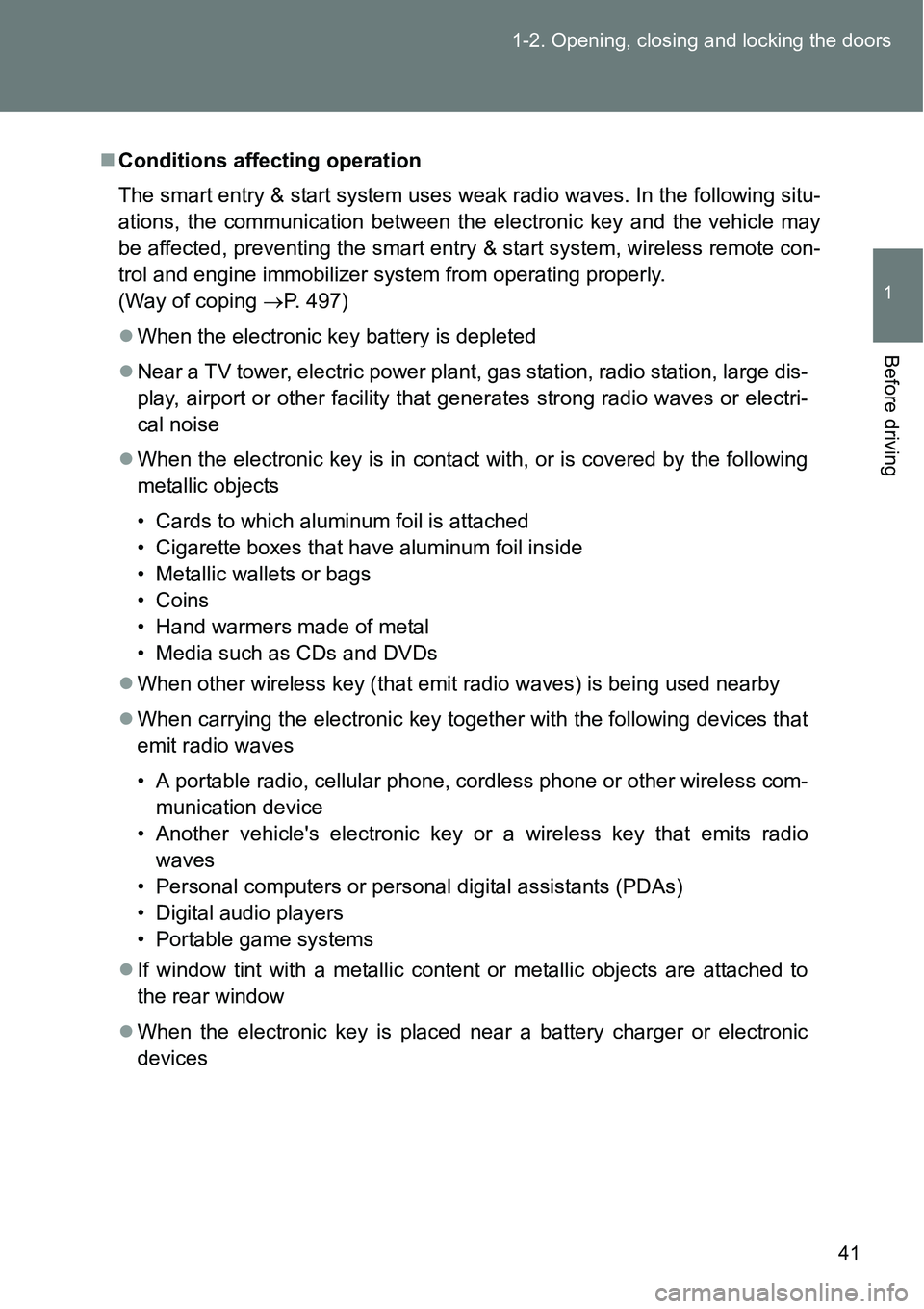
Conditions affecting operation
The smart entry & start system uses weak radio waves. In the following situ-
ations, the communication between the electronic key and the vehicle may
be affected, preventing the smart entry & start system, wireless remote con-
trol and engine immobilizer system from operating properly.
(Way of coping P. 497)
When the electronic key battery is depleted
Near a TV tower, electric power plant, gas station, radio station, large dis-
play, airport or other facility that generates strong radio waves or electri-
cal noise
When the electronic key is in contact with, or is covered by the following
metallic objects
• Cards to which aluminum foil is attached
• Cigarette boxes that have aluminum foil inside
• Metallic wallets or bags
• Coins
• Hand warmers made of metal
• Media such as CDs and DVDs
When other wireless key (that emit radio waves) is being used nearby
When carrying the electronic key together with the following devices that
emit radio waves
• A portable radio, cellular phone, cordless phone or other wireless com-
munication device
• Another vehicle's electronic key or a wireless key that emits radio
waves
• Personal computers or personal digital assistants (PDAs)
• Digital audio players
• Portable game systems
If window tint with a metallic content or metallic objects are attached to
the rear window
When the electronic key is placed near a battery charger or electronic
devices
Page 42 of 564
42 1-2. Opening, closing and locking the doors
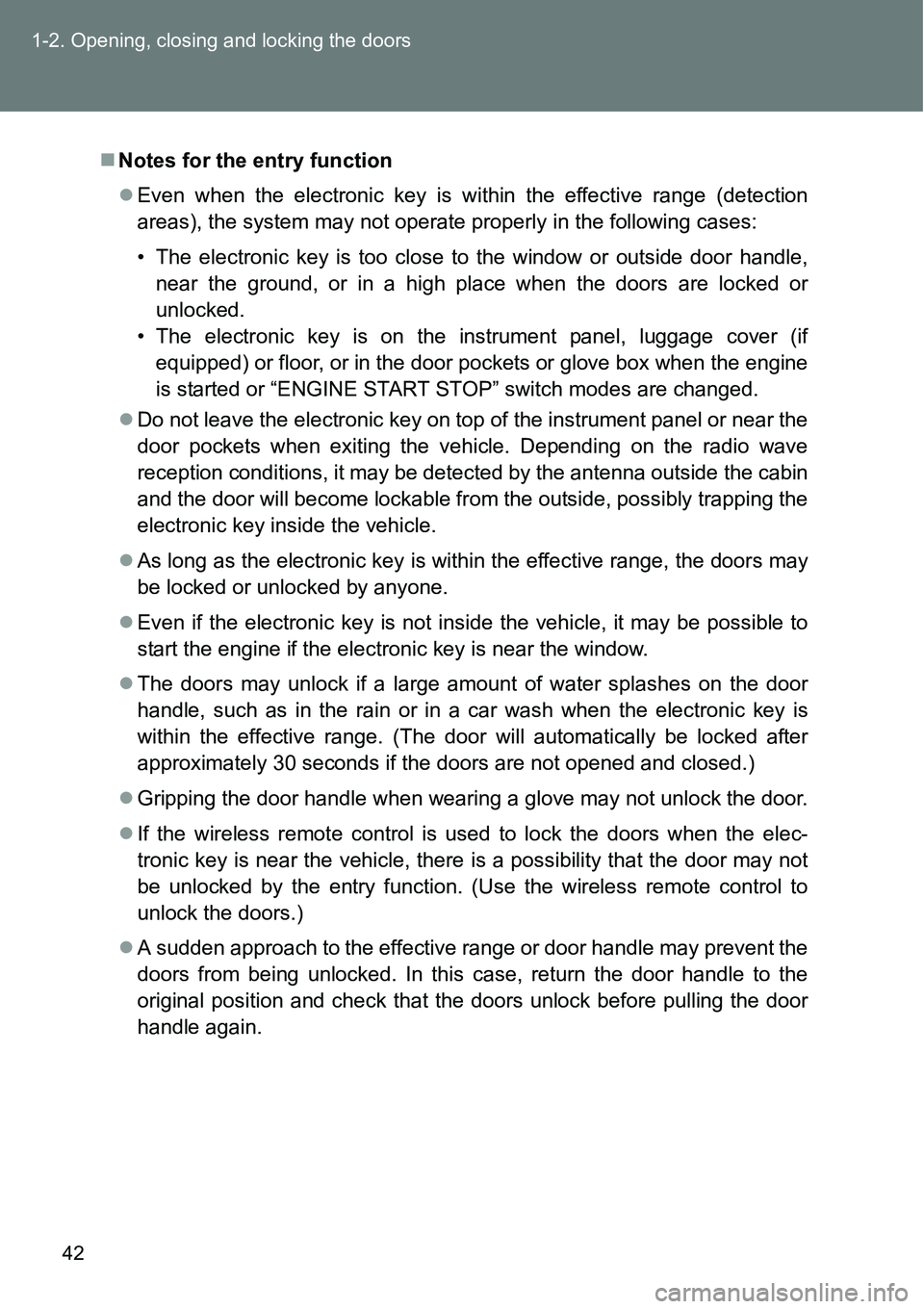
Notes for the entry function
Even when the electronic key is within the effective range (detection
areas), the system may not operate properly in the following cases:
• The electronic key is too close to the window or outside door handle,
near the ground, or in a high place when the doors are locked or
unlocked.
• The electronic key is on the instrument panel, luggage cover (if
equipped) or floor, or in the door pockets or glove box when the engine
is started or “ENGINE START STOP” switch modes are changed.
Do not leave the electronic key on top of the instrument panel or near the
door pockets when exiting the vehicle. Depending on the radio wave
reception conditions, it may be detected by the antenna outside the cabin
and the door will become lockable from the outside, possibly trapping the
electronic key inside the vehicle.
As long as the electronic key is within the effective range, the doors may
be locked or unlocked by anyone.
Even if the electronic key is not inside the vehicle, it may be possible to
start the engine if the electronic key is near the window.
The doors may unlock if a large amount of water splashes on the door
handle, such as in the rain or in a car wash when the electronic key is
within the effective range. (The door will automatically be locked after
approximately 30 seconds if the doors are not opened and closed.)
Gripping the door handle when wearing a glove may not unlock the door.
If the wireless remote control is used to lock the doors when the elec-
tronic key is near the vehicle, there is a possibility that the door may not
be unlocked by the entry function. (Use the wireless remote control to
unlock the doors.)
A sudden approach to the effective range or door handle may prevent the
doors from being unlocked. In this case, return the door handle to the
original position and check that the doors unlock before pulling the door
handle again.
Page 44 of 564
44 1-2. Opening, closing and locking the doors
Alarm (vehicles with an alarm)
Using the smart entry & start system to lock the doors will set the alarm sys-
tem. (P. 117)
To operate the system properly
Make sure to carry the electronic key when operating the system. Do not get
the electronic key too close to the vehicle when operating the system from
the outside of the vehicle.
Depending on the position and holding condition of the electronic key, the
key may not be detected correctly and the system may not operate properly.
(The alarm may go off accidentally, or the door lock prevention function may
not operate.)
If the smart entry & start system does not operate properly
Locking and unlocking the doors: Use the mechanical key. (P. 497)
Starting the engine: P. 498
Electronic key battery depletion
The standard battery life is 1 to 2 years.
If the battery becomes low, an alarm will sound in the cabin each time the
engine starts or stops. (P. 455)
As the electronic key always receives radio waves, the battery will
become depleted even if the electronic key is not used. The following
symptoms indicate that the electronic key battery may be depleted.
Replace the battery when necessary. (P. 403)
• The smart entry & start system or the wireless remote control does not
operate.
• The detection area becomes smaller.
• The LED indicator on the key surface does not turn on.
To avoid serious deterioration, do not leave the electronic key within 1 m
(3 ft.) of the following electrical appliances that produce a magnetic field:
•TVs
• Personal computers
• Cellular phones, cordless phones and battery chargers
• Recharging cellular phones or cordless phones
• Glass top ranges
• Table lamps
Page 45 of 564
45 1-2. Opening, closing and locking the doors
1
Before driving
When the electronic key battery is fully depleted
P. 403
If the smart entry & start system has been deactivated in a customized
setting
Locking and unlocking the doors: Use the wireless remote control or
mechanical key. (P. 57, 497)
Starting the engine and changing “ENGINE START STOP” switch
modes: P. 498
Stopping the engine: P. 175
Customization that can be configured at any authorized Toyota dealer
or repairer, or another duly qualified and equipped professional
Settings (e. g. smart entry & start system) can be changed.
(Customizable features: P. 540)
Page 67 of 564
67 1-2. Opening, closing and locking the doors
1
Before driving
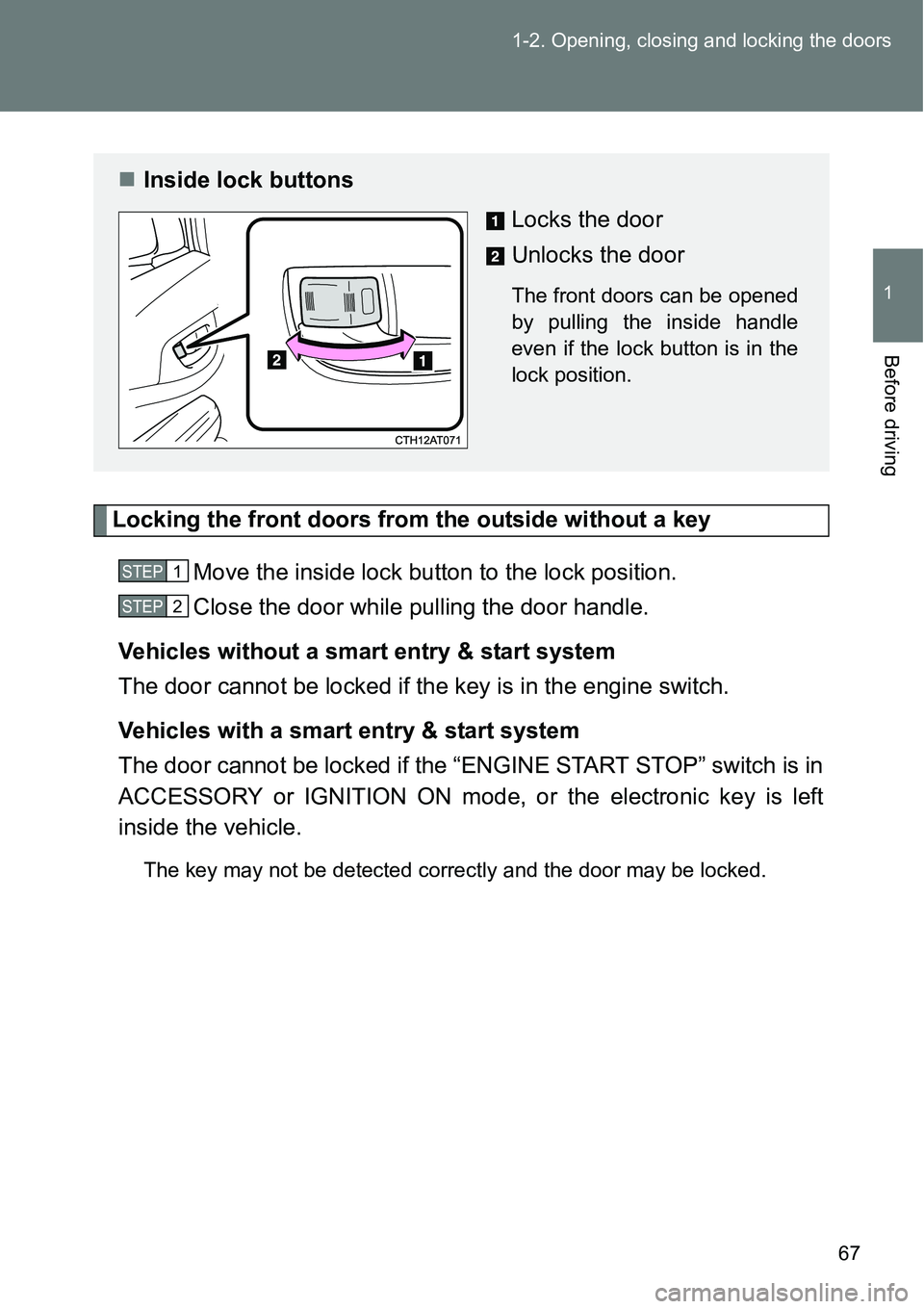
Locking the front doors from the outside without a key
Move the inside lock button to the lock position.
Close the door while pulling the door handle.
Vehicles without a smart entry & start system
The door cannot be locked if the key is in the engine switch.
Vehicles with a smart entry & start system
The door cannot be locked if the “ENGINE START STOP” switch is in
ACCESSORY or IGNITION ON mode, or the electronic key is left
inside the vehicle.
The key may not be detected correctly and the door may be locked.
Inside lock buttons
Locks the door
Unlocks the door
The front doors can be opened
by pulling the inside handle
even if the lock button is in the
lock position.
STEP1
STEP2
Page 69 of 564
69 1-2. Opening, closing and locking the doors
1
Before driving
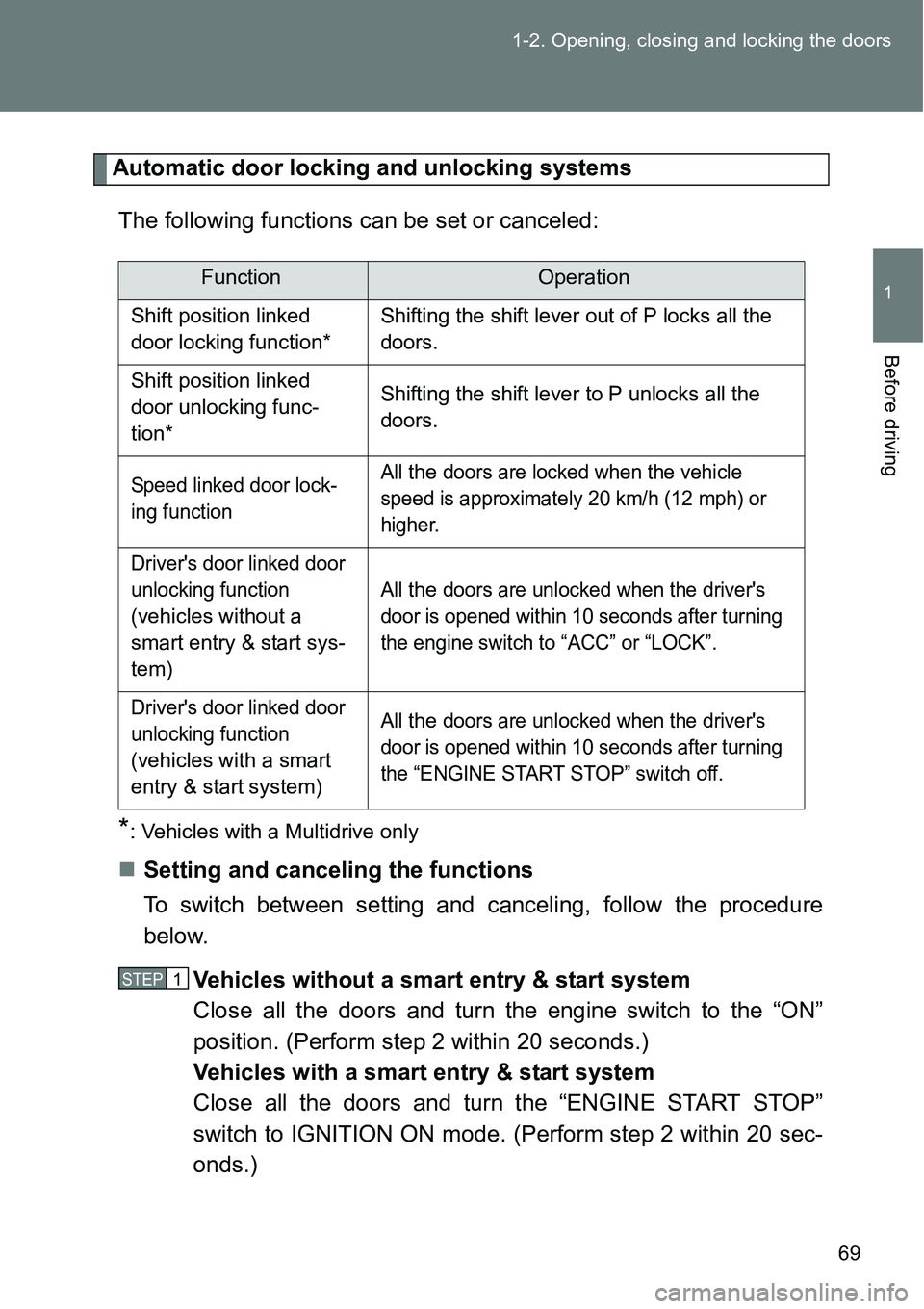
Automatic door locking and unlocking systems
The following functions can be set or canceled:
*: Vehicles with a Multidrive only
Setting and canceling the functions
To switch between setting and canceling, follow the procedure
below.
Vehicles without a smart entry & start system
Close all the doors and turn the engine switch to the “ON”
position. (Perform step 2 within 20 seconds.)
Vehicles with a smart entry & start system
Close all the doors and turn the “ENGINE START STOP”
switch to IGNITION ON mode. (Perform step 2 within 20 sec-
onds.)
FunctionOperation
Shift position linked
door locking function*Shifting the shift lever out of P locks all the
doors.
Shift position linked
door unlocking func-
tion*Shifting the shift lever to P unlocks all the
doors.
Speed linked door lock-
ing functionAll the doors are locked when the vehicle
speed is approximately 20 km/h (12 mph) or
higher.
Driver's door linked door
unlocking function
(
vehicles without a
smart entry & start sys-
tem
)All
the doors are unlocked when the driver's
door is opened within 10 seconds after turning
the engine switch to “ACC” or “LOCK”.
Driver's door linked door
unlocking function
(
vehicles with a smart
entry & start system
)All
the doors are unlocked when the driver's
door is opened within 10 seconds after turning
the “ENGINE START STOP” switch off.
STEP1
Page 94 of 564
94
1-3. Adjustable components (seats, mirrors, steering wheel)
Anti-glare inside rear view mirror
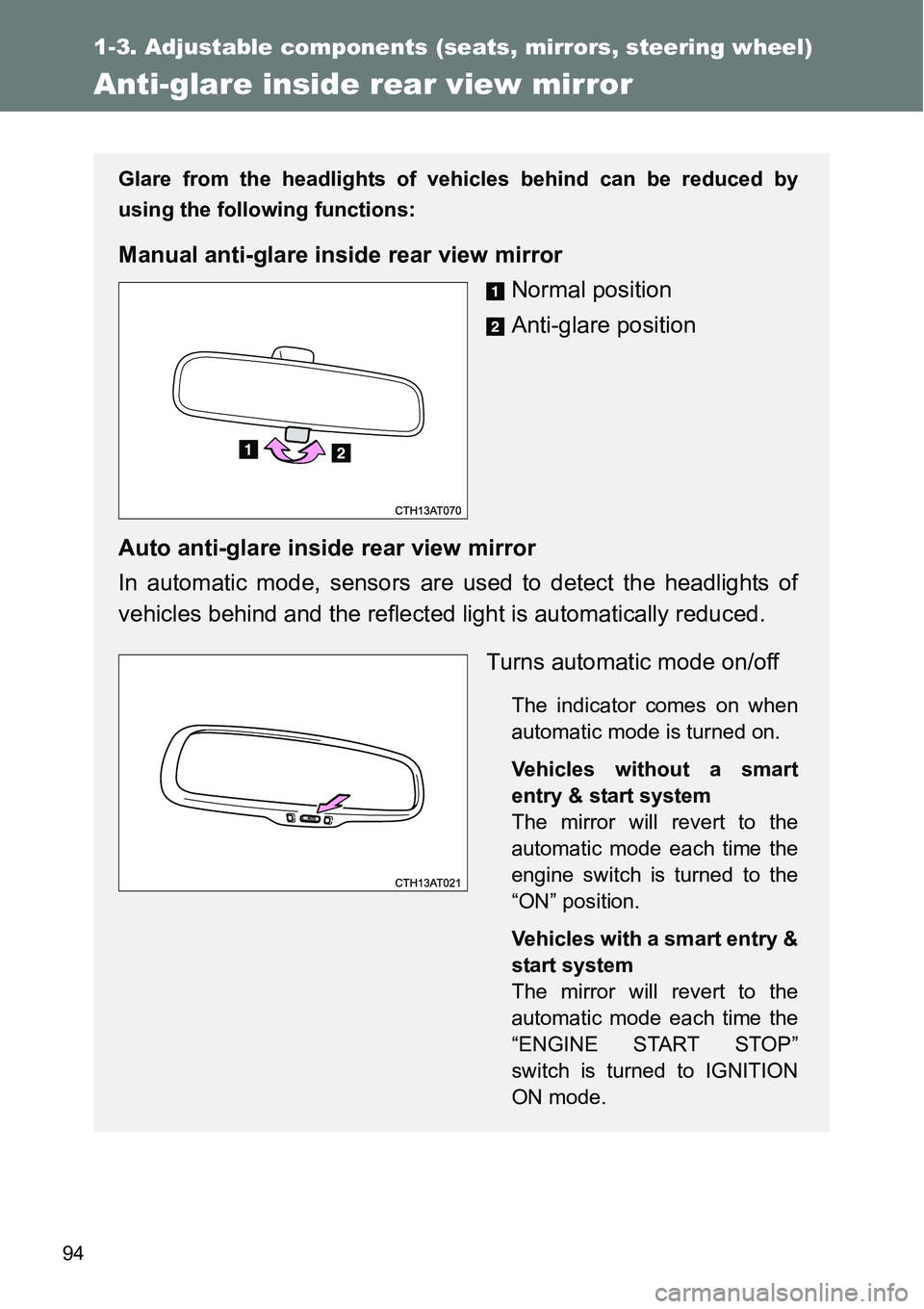
Glare from the headlights of vehicles behind can be reduced by
using the following functions:
Manual anti-glare inside rear view mirror
Normal position
Anti-glare position
Auto anti-glare inside rear view mirror
In automatic mode, sensors are used to detect the headlights of
vehicles behind and the reflected light is automatically reduced.
Turns automatic mode on/off
The indicator comes on when
automatic mode is turned on.
Vehicles without a smart
entry & start system
The mirror will revert to the
automatic mode each time the
engine switch is turned to the
“ON” position.
Vehicles with a smart entry &
start system
The mirror will revert to the
automatic mode each time the
“ENGINE START STOP”
switch is turned to IGNITION
ON mode.
Page 97 of 564
97 1-3. Adjustable components (seats, mirrors, steering wheel)
1
Before driving
Mirror angle can be adjusted when
Vehicles without a smart entry & start system
The engine switch is in the “ACC” or “ON” position.
Vehicles with a smart entry & start system
The “ENGINE START STOP” switch is in ACCESSORY or IGNITION ON
mode.
When the mirrors are fogged up (vehicles with outside rear view mirror
defoggers)
Turn on the mirror defoggers to defog the mirrors. (P. 281)
CAUTION
When driving the vehicle
Observe the following precautions while driving.
Failure to do so may result in loss of control of the vehicle and cause an
accident, resulting in death or serious injury.
Do not adjust the mirrors while driving.
Do not drive with the mirrors folded.
Both the driver and passenger side mirrors must be extended and properly
adjusted before driving.
When a mirror is moving
To avoid personal injury and mirror malfunction, be careful not to get your
hand caught by the moving mirror.
When the mirror defoggers are operating (vehicles with outside rear
view mirror defoggers)
Do not touch the rear view mirror surfaces, as they can become very hot and
burn you.