phone TOYOTA xB 2013 Accessories, Audio & Navigation (in English)
[x] Cancel search | Manufacturer: TOYOTA, Model Year: 2013, Model line: xB, Model: TOYOTA xB 2013Pages: 116, PDF Size: 11.88 MB
Page 65 of 116
65
1. Bluetooth® HANDS-FREE SYSTEM OPERATION
3
Bluetooth
® HANDS-FREE SYSTEM
2. HANDS-FREE SYSTEM
This system supports Bluetooth®.
Bluetooth
® is a wireless data system
by which you can call without your
cellular phone being connected with a
cable or placed on a cradle.
The operating procedure of the system
is explained in this section.
zFor registering and setting of the phone,
see “PHONE SETTINGS” on page 96.
CAUTION
●Use a cellular phone or connect the
Bluetooth® phone only when safe and
legal to do so.
●Your audio unit is fitted with Bluetooth
®
antennas. People with implanted pace-
makers or cardiac defibrillators should
maintain a reasonable distance between
themselves and the Bluetooth
® anten-
nas. The radio waves may affect the
operation of such devices.
●Before using Bluetooth
® devices, users
of any electrical medical device other
than implanted pacemakers and
implanted cardiac defibrillators should
consult the manufacturer of the device
for information about its operation under
the influence of radio waves. Radio
waves could have unexpected effects on
the operation of such medical devices.
NOTICE
●Do not leave your cellular phone in the
car. The temperature inside may be high
and damage the phone.
●If the Bluetooth
® phone is too close to
the system, quality of the sound may
deteriorate and connecting condition
may go down.
INFORMATION
●If your cellular phone does not support
Bluetooth®, this system will not function.
●Depending on the cellular phone mod-
els, some functions may be restricted.
●In the following conditions, the system
may not function.
• The cellular phone is turned off.
• The current position is outside the
communication area.
• The cellular phone is not connected.
• The cellular phone has a low battery.
• When outgoing is controlled, due to
heavy traffic on telephone lines, etc.
• When the cellular phone itself cannot
be used
• When transferring the phonebook
data from the cellular phone
●Even if your cellular phone supports
both hands-free and audio Bluetooth
®
connections, it may not be able to con-
nect to the hands-free connection at the
same time.
●When using Bluetooth
® audio and
hands-free at the same time, the follow-
ing problems may occur.
• The Bluetooth
® connection may be
cut.
• Noise may be heard on the
Bluetooth
® audio playback.
●The Bluetooth® phone battery will be
depleted quickly when it is connected to
Bluetooth
®.
Page 66 of 116
66
1. Bluetooth® HANDS-FREE SYSTEM OPERATION
The Bluetooth® word mark and logos are
registered trademarks owned by Bluetooth
SIG, Inc. and any use of such marks by
Toyota Motor Corporation is under license.
Other trademarks and trade names are
those of their respective owners.
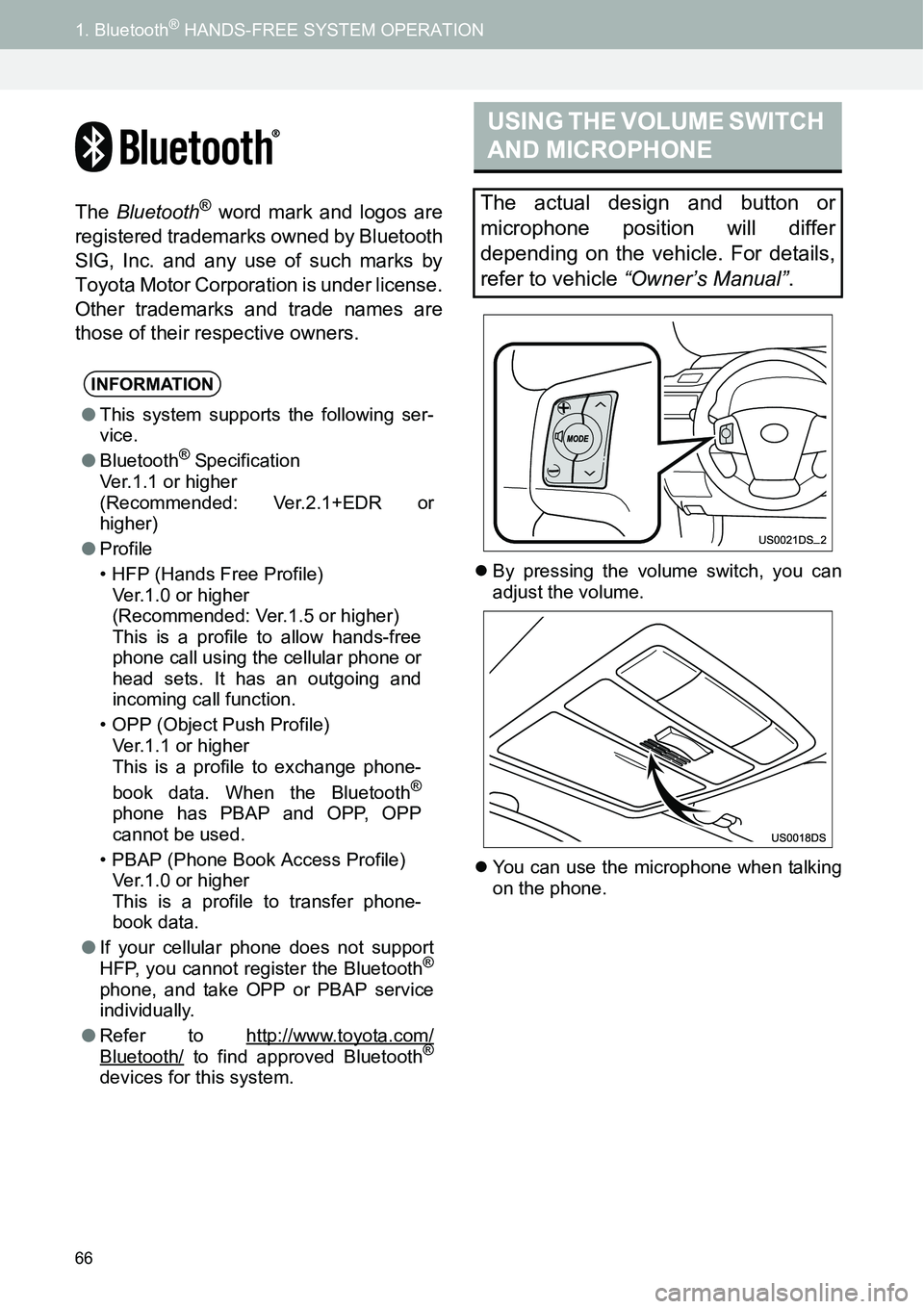
zBy pressing the volume switch, you can
adjust the volume.
zYou can use the microphone when talking
on the phone.
INFORMATION
●This system supports the following ser-
vice.
●Bluetooth
® Specification
Ver.1.1 or higher
(Recommended: Ver.2.1+EDR or
higher)
●Profile
• HFP (Hands Free Profile)
Ver.1.0 or higher
(Recommended: Ver.1.5 or higher)
This is a profile to allow hands-free
phone call using the cellular phone or
head sets. It has an outgoing and
incoming call function.
• OPP (Object Push Profile)
Ver.1.1 or higher
This is a profile to exchange phone-
book data. When the Bluetooth
®
phone has PBAP and OPP, OPP
cannot be used.
• PBAP (Phone Book Access Profile)
Ver.1.0 or higher
This is a profile to transfer phone-
book data.
●If your cellular phone does not support
HFP, you cannot register the Bluetooth
®
phone, and take OPP or PBAP service
individually.
●Refer to http://www.toyota.com/
Bluetooth/ to find approved Bluetooth®
devices for this system.
USING THE VOLUME SWITCH
AND MICROPHONE
The actual design and button or
microphone position will differ
depending on the vehicle. For details,
refer to vehicle “Owner’s Manual”.
Page 67 of 116
67
1. Bluetooth® HANDS-FREE SYSTEM OPERATION
3
Bluetooth
® HANDS-FREE SYSTEM
zThe following data is stored for every reg-
istered phone. When another phone is
connecting, you cannot read the regis-
tered data.
• Phonebook data
• Call history data
• Speed dial data
zYou can initialize the following data in the
system.
• Phonebook data
• Call history data
• Speed dial data
•Bluetooth
® phone data
• Volume setting
• Details setting
INFORMATION
●The other party’s voice will be heard
from the front speakers. The audio sys-
tem will be muted during phone calls or
when hands-free voice commands are
used.
●Talk alternately with the other party on
the phone. If you talk at the same time,
your voices may not reach each other. (It
is not a malfunction.)
●Keep the volume of receiving voice
down. Otherwise, an echo will be heard
and receiving voice can be heard out-
side of the vehicle. When you talk on the
phone, speak clearly towards the micro-
phone.
●In the following situations, your voice
may not reach the other party.
• Driving on an unpaved road. (Due to
traffic noise.)
• Driving at high speed.
• A window is open.
• Turning the air-conditioning vents
towards the microphone.
• The sound of the air-conditioning fan
is loud.
• There is an effect from the cellular
phone network.
ABOUT THE PHONEBOOK IN
THIS SYSTEM
INFORMATION
●When you delete the phone, the above-
mentioned data is also deleted.
WHEN YOU RELEASE YOUR
CAR
A lot of personal data is registered
when you use the Hands-free system.
When you release your car, initialize
your data. (See “DELETE PERSONAL
DATA” on page 84.)
INFORMATION
●If you initialize it, the former state will
never come back again. Pay attention
when initializing the data.
CAUTION
●FCC WARNING: Changes or modifica-
tions not expressly approved by the
party responsible for compliance could
void the user’s authority to operate the
equipment.
Page 68 of 116
68
1. Bluetooth® HANDS-FREE SYSTEM OPERATION
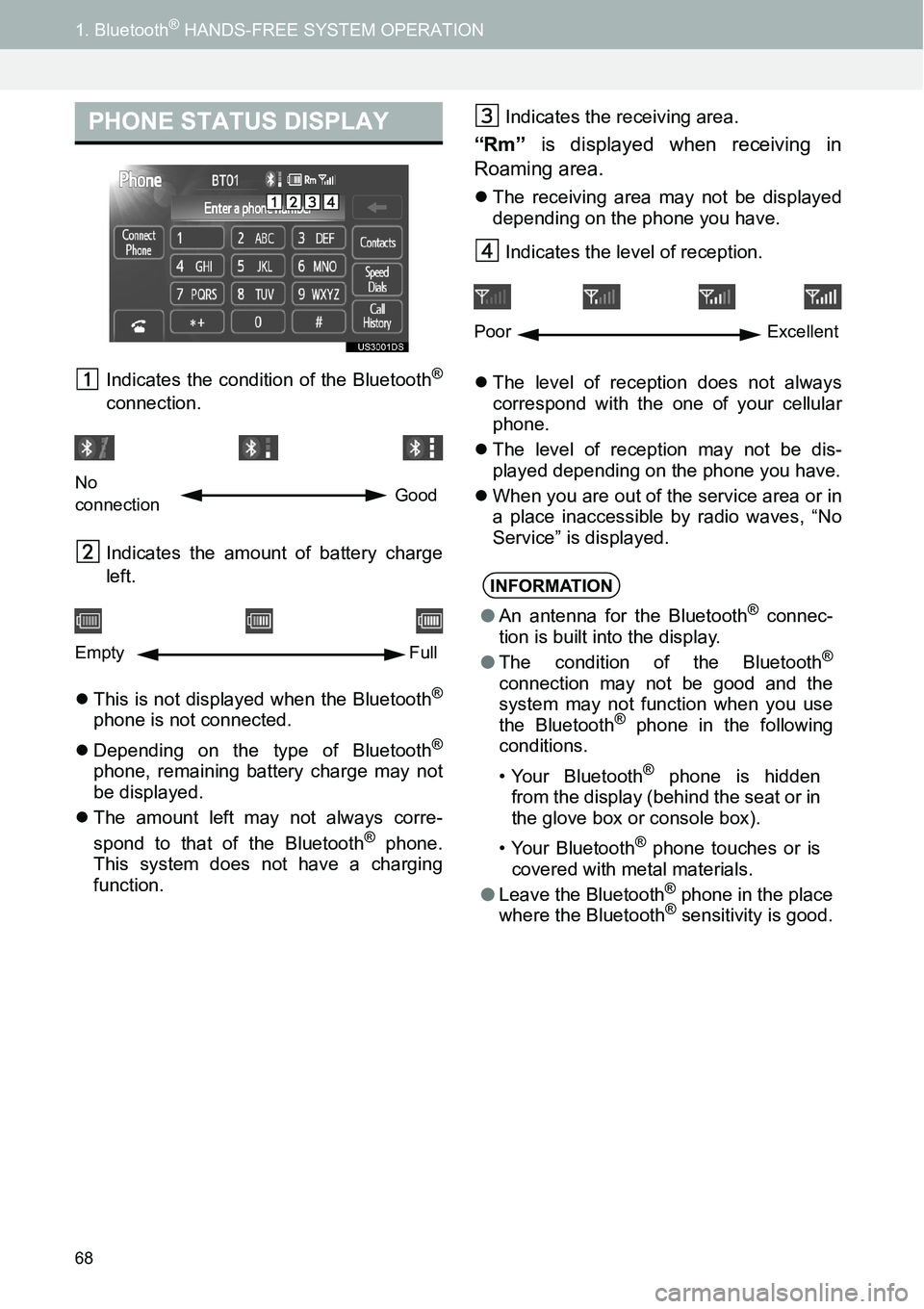
Indicates the condition of the Bluetooth®
connection.
Indicates the amount of battery charge
left.
zThis is not displayed when the Bluetooth
®
phone is not connected.
zDepending on the type of Bluetooth
®
phone, remaining battery charge may not
be displayed.
zThe amount left may not always corre-
spond to that of the Bluetooth
® phone.
This system does not have a charging
function.Indicates the receiving area.
“Rm” is displayed when receiving in
Roaming area.
zThe receiving area may not be displayed
depending on the phone you have.
Indicates the level of reception.
zThe level of reception does not always
correspond with the one of your cellular
phone.
zThe level of reception may not be dis-
played depending on the phone you have.
zWhen you are out of the service area or in
a place inaccessible by radio waves, “No
Service” is displayed.
PHONE STATUS DISPLAY
No
connectionGood
Empty Full
INFORMATION
●An antenna for the Bluetooth® connec-
tion is built into the display.
●The condition of the Bluetooth
®
connection may not be good and the
system may not function when you use
the Bluetooth
® phone in the following
conditions.
• Your Bluetooth
® phone is hidden
from the display (behind the seat or in
the glove box or console box).
• Your Bluetooth
® phone touches or is
covered with metal materials.
●Leave the Bluetooth
® phone in the place
where the Bluetooth® sensitivity is good.
Poor Excellent
Page 69 of 116
69
1. Bluetooth® HANDS-FREE SYSTEM OPERATION
3
Bluetooth
® HANDS-FREE SYSTEM
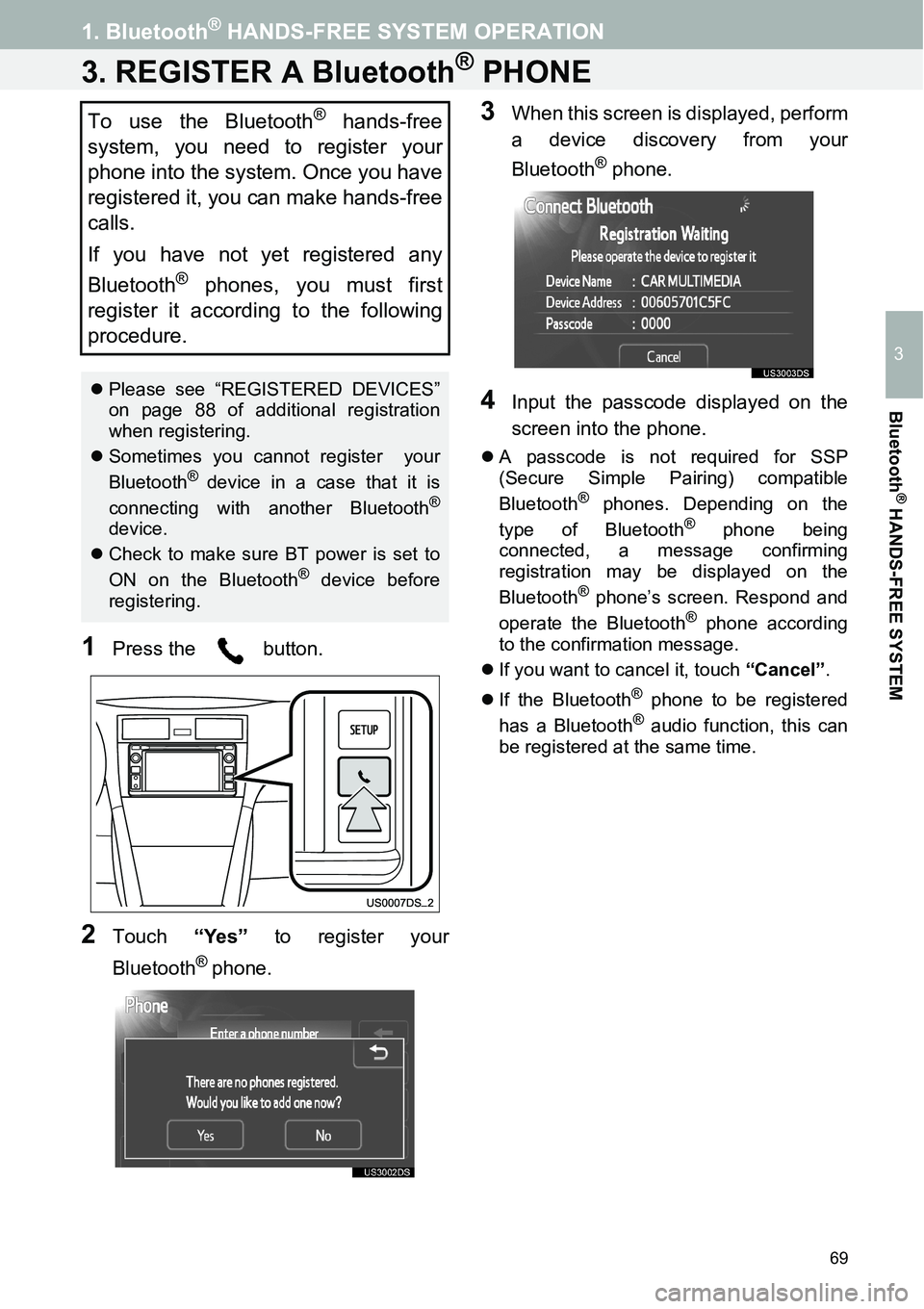
3. REGISTER A Bluetooth® PHONE
1Press the button.
2Touch “Yes” to register your
Bluetooth
® phone.
3When this screen is displayed, perform
a device discovery from your
Bluetooth
® phone.
4Input the passcode displayed on the
screen into the phone.
zA passcode is not required for SSP
(Secure Simple Pairing) compatible
Bluetooth
® phones. Depending on the
type of Bluetooth® phone being
connected, a message confirming
registration may be displayed on the
Bluetooth
® phone’s screen. Respond and
operate the Bluetooth® phone according
to the confirmation message.
zIf you want to cancel it, touch “Cancel”.
zIf the Bluetooth
® phone to be registered
has a Bluetooth® audio function, this can
be registered at the same time.
To use the Bluetooth® hands-free
system, you need to register your
phone into the system. Once you have
registered it, you can make hands-free
calls.
If you have not yet registered any
Bluetooth
® phones, you must first
register it according to the following
procedure.
zPlease see “REGISTERED DEVICES”
on page 88 of additional registration
when registering.
zSometimes you cannot register your
Bluetooth
® device in a case that it is
connecting with another Bluetooth®
device.
zCheck to make sure BT power is set to
ON on the Bluetooth
® device before
registering.
Page 70 of 116
70
1. Bluetooth® HANDS-FREE SYSTEM OPERATION
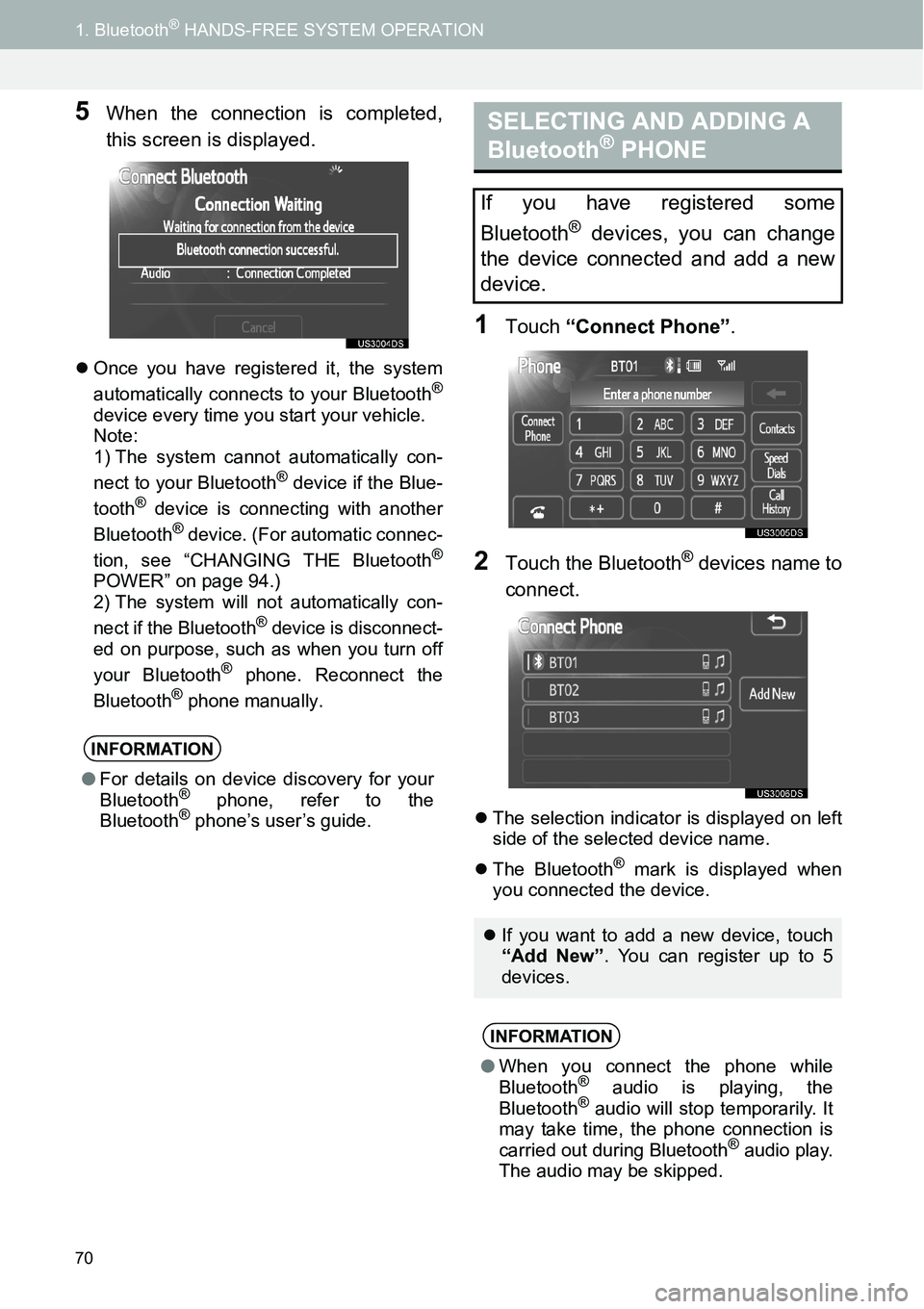
5When the connection is completed,
this screen is displayed.
zOnce you have registered it, the system
automatically connects to your Bluetooth®
device every time you start your vehicle.
Note:
1) The system cannot automatically con-
nect to your Bluetooth
® device if the Blue-
tooth® device is connecting with another
Bluetooth® device. (For automatic connec-
tion, see “CHANGING THE Bluetooth®
POWER” on page 94.)2) The system will not automatically con-
nect if the Bluetooth® device is disconnect-
ed on purpose, such as when you turn off
your Bluetooth
® phone. Reconnect the
Bluetooth® phone manually.
1Touch “Connect Phone”.
2Touch the Bluetooth® devices name to
connect.
zThe selection indicator is displayed on left
side of the selected device name.
zThe Bluetooth
® mark is displayed when
you connected the device.
INFORMATION
●For details on device discovery for your
Bluetooth® phone, refer to the
Bluetooth® phone’s user’s guide.
SELECTING AND ADDING A
Bluetooth® PHONE
If you have registered some
Bluetooth
® devices, you can change
the device connected and add a new
device.
zIf you want to add a new device, touch
“Add New”. You can register up to 5
devices.
INFORMATION
●When you connect the phone while
Bluetooth® audio is playing, the
Bluetooth® audio will stop temporarily. It
may take time, the phone connection is
carried out during Bluetooth
® audio play.
The audio may be skipped.
Page 71 of 116
71
1. Bluetooth® HANDS-FREE SYSTEM OPERATION
3
Bluetooth
® HANDS-FREE SYSTEM
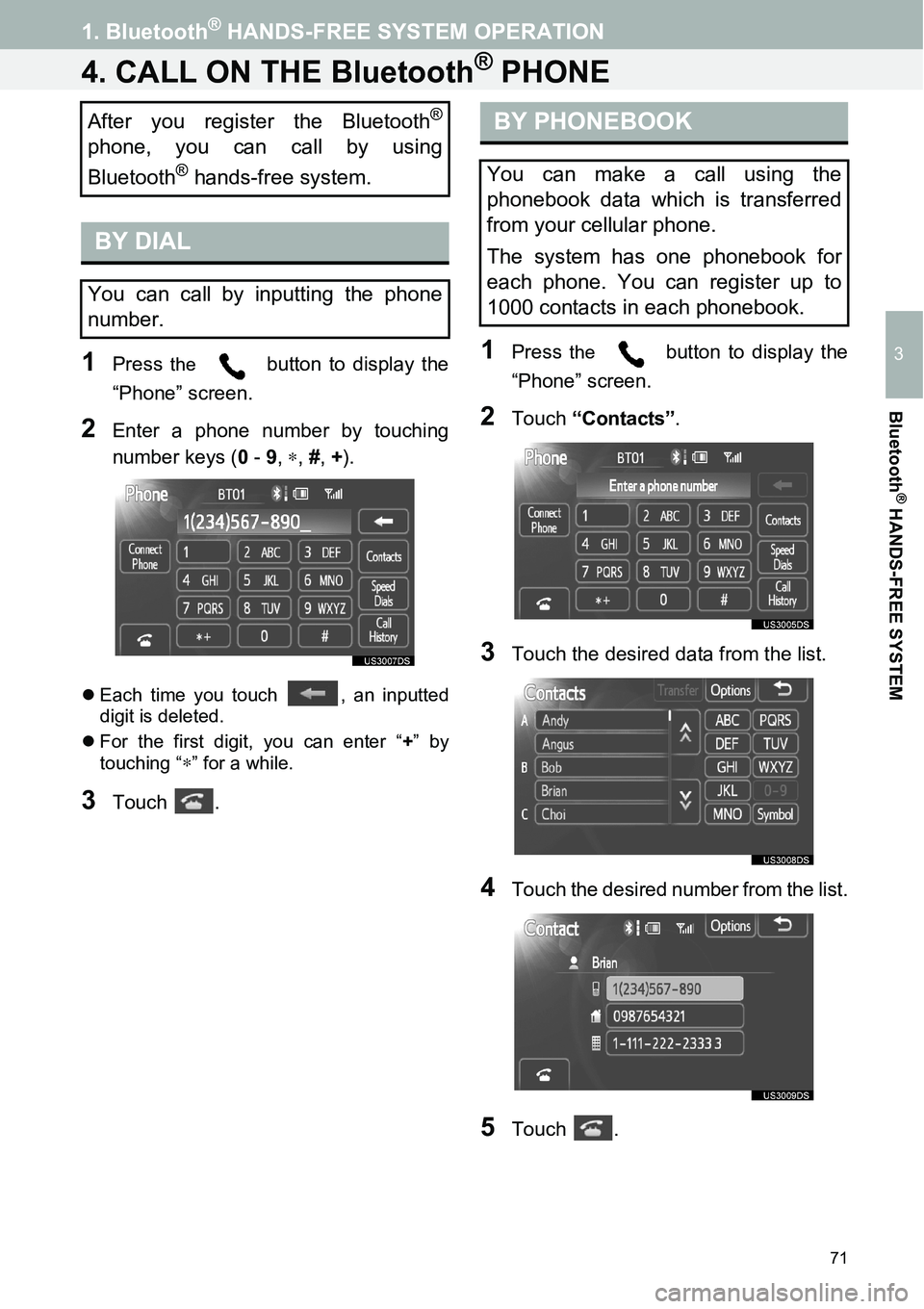
4. CALL ON THE Bluetooth® PHONE
1Press the button to display the
“Phone” screen.
2Enter a phone number by touching
number keys (0 - 9, ∗, #, +).
zEach time you touch , an inputted
digit is deleted.
zFor the first digit, you can enter “+” by
touching “
∗” for a while.
3Touch .
1Press the button to display the
“Phone” screen.
2Touch “Contacts”.
3Touch the desired data from the list.
4Touch the desired number from the list.
5Touch .
After you register the Bluetooth®
phone, you can call by using
Bluetooth
® hands-free system.
BY DIAL
You can call by inputting the phone
number.
BY PHONEBOOK
You can make a call using the
phonebook data which is transferred
from your cellular phone.
The system has one phonebook for
each phone. You can register up to
1000 contacts in each phonebook.
Page 72 of 116
72
1. Bluetooth® HANDS-FREE SYSTEM OPERATION
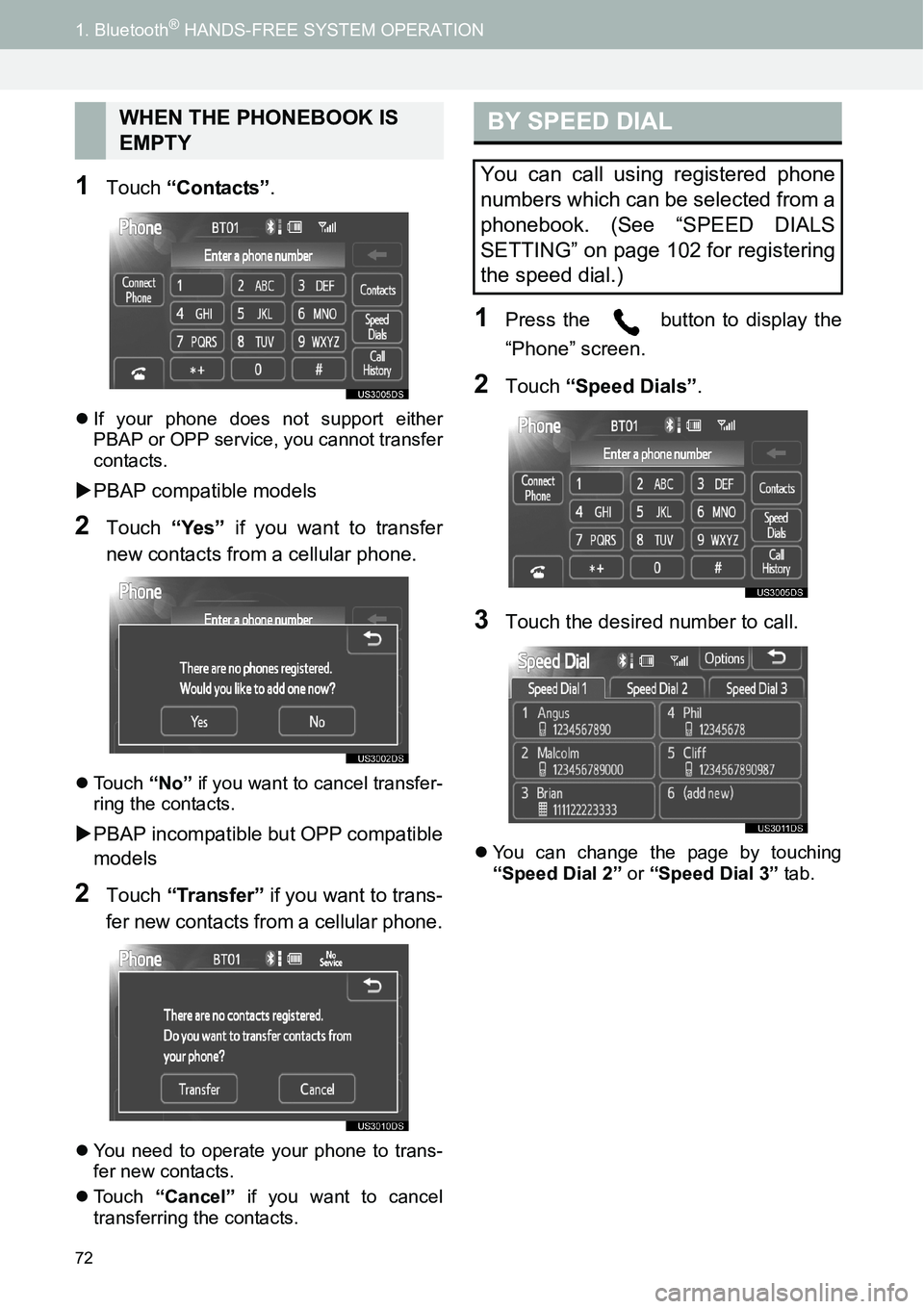
1Touch “Contacts”.
zIf your phone does not support either
PBAP or OPP service, you cannot transfer
contacts.
XPBAP compatible models
2Touch “Yes” if you want to transfer
new contacts from a cellular phone.
zTouch “No” if you want to cancel transfer-
ring the contacts.
XPBAP incompatible but OPP compatible
models
2Touch “Transfer” if you want to trans-
fer new contacts from a cellular phone.
zYou need to operate your phone to trans-
fer new contacts.
zTouch “Cancel” if you want to cancel
transferring the contacts.
1Press the button to display the
“Phone” screen.
2Touch “Speed Dials”.
3Touch the desired number to call.
zYou can change the page by touching
“Speed Dial 2” or “Speed Dial 3” tab.
WHEN THE PHONEBOOK IS
EMPTYBY SPEED DIAL
You can call using registered phone
numbers which can be selected from a
phonebook. (See “SPEED DIALS
SETTING” on page 102 for registering
the speed dial.)
Page 73 of 116
73
1. Bluetooth® HANDS-FREE SYSTEM OPERATION
3
Bluetooth
® HANDS-FREE SYSTEM
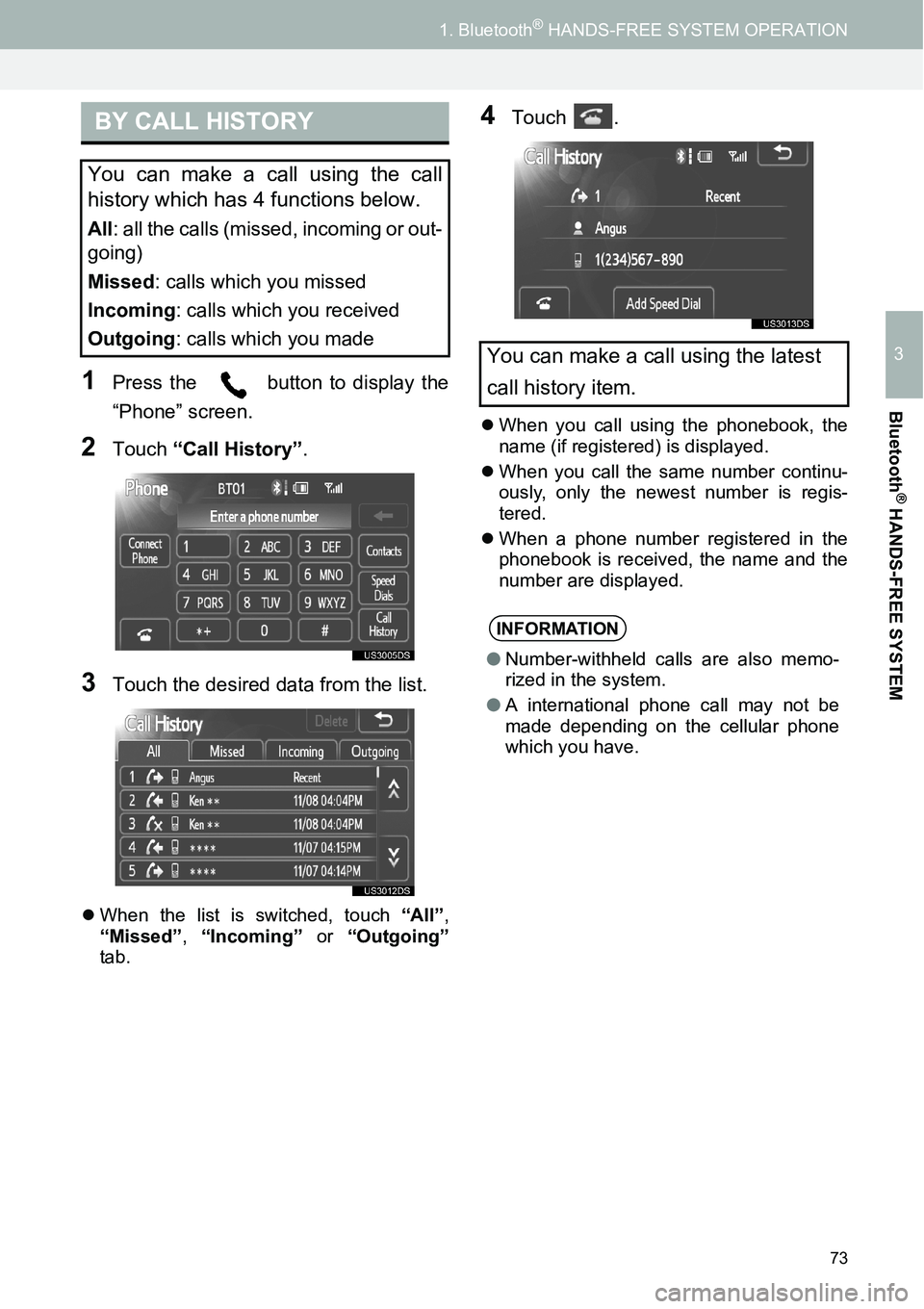
1Press the button to display the
“Phone” screen.
2Touch “Call History”.
3Touch the desired data from the list.
zWhen the list is switched, touch “All”,
“Missed”, “Incoming” or “Outgoing”
tab.
4Touch .
zWhen you call using the phonebook, the
name (if registered) is displayed.
zWhen you call the same number continu-
ously, only the newest number is regis-
tered.
zWhen a phone number registered in the
phonebook is received, the name and the
number are displayed.
BY CALL HISTORY
You can make a call using the call
history which has 4 functions below.
All: all the calls (missed, incoming or out-
going)
Missed: calls which you missed
Incoming: calls which you received
Outgoing: calls which you made
You can make a call using the latest
call history item.
INFORMATION
●Number-withheld calls are also memo-
rized in the system.
●A international phone call may not be
made depending on the cellular phone
which you have.
Page 75 of 116
75
1. Bluetooth® HANDS-FREE SYSTEM OPERATION
3
Bluetooth
® HANDS-FREE SYSTEM
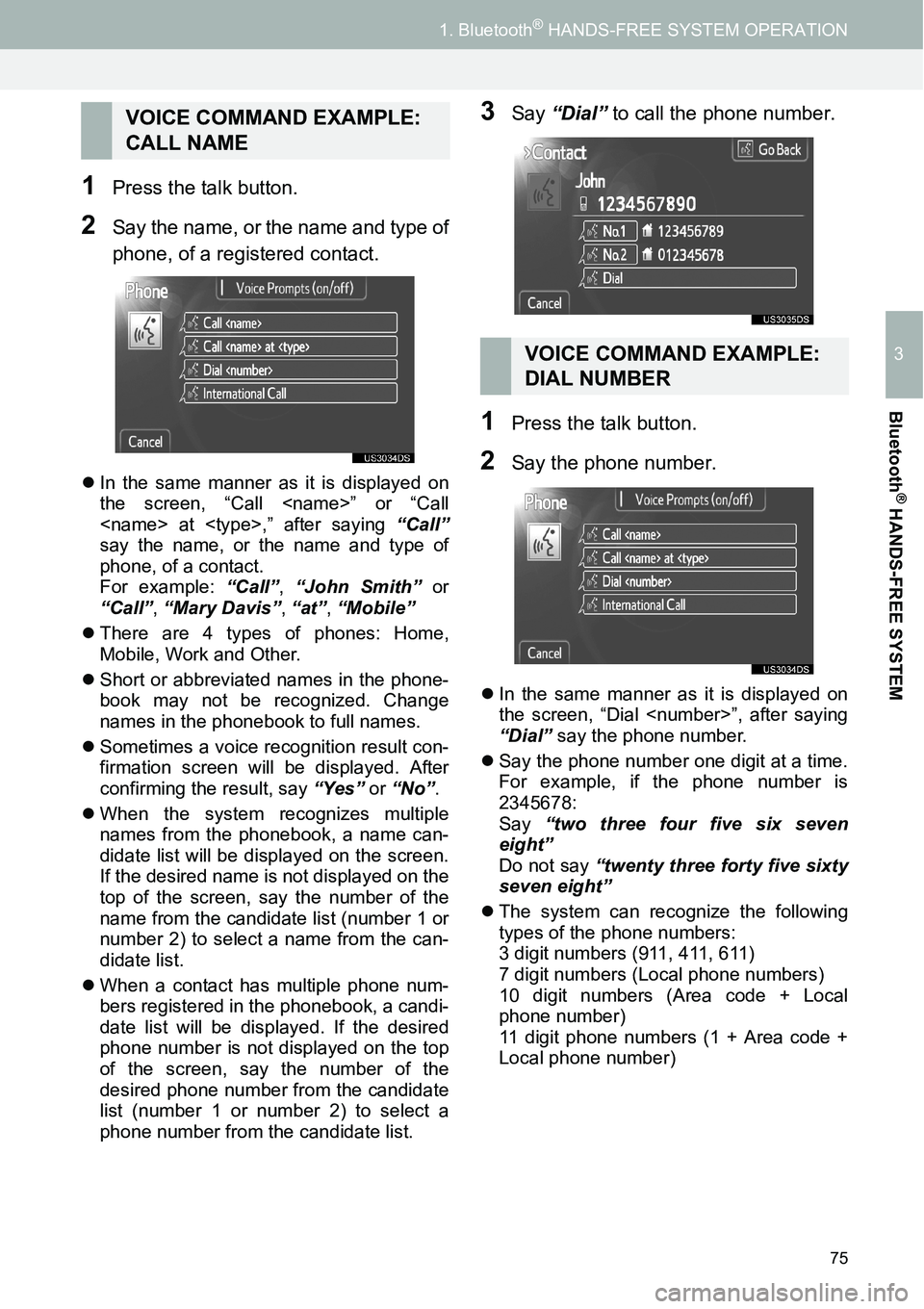
1Press the talk button.
2Say the name, or the name and type of
phone, of a registered contact.
zIn the same manner as it is displayed on
the screen, “Call
say the name, or the name and type of
phone, of a contact.
For example: “Call”, “John Smith” or
“Call”, “Mary Davis”, “at”, “Mobile”
zThere are 4 types of phones: Home,
Mobile, Work and Other.
zShort or abbreviated names in the phone-
book may not be recognized. Change
names in the phonebook to full names.
zSometimes a voice recognition result con-
firmation screen will be displayed. After
confirming the result, say “Yes” or “No”.
zWhen the system recognizes multiple
names from the phonebook, a name can-
didate list will be displayed on the screen.
If the desired name is not displayed on the
top of the screen, say the number of the
name from the candidate list (number 1 or
number 2) to select a name from the can-
didate list.
zWhen a contact has multiple phone num-
bers registered in the phonebook, a candi-
date list will be displayed. If the desired
phone number is not displayed on the top
of the screen, say the number of the
desired phone number from the candidate
list (number 1 or number 2) to select a
phone number from the candidate list.
3Say “Dial” to call the phone number.
1Press the talk button.
2Say the phone number.
zIn the same manner as it is displayed on
the screen, “Dial
“Dial” say the phone number.
zSay the phone number one digit at a time.
For example, if the phone number is
2345678:
Say “two three four five six seven
eight”
Do not say “twenty three forty five sixty
seven eight”
zThe system can recognize the following
types of the phone numbers:
3 digit numbers (911, 411, 611)
7 digit numbers (Local phone numbers)
10 digit numbers (Area code + Local
phone number)
11 digit phone numbers (1 + Area code +
Local phone number)
VOICE COMMAND EXAMPLE:
CALL NAME
VOICE COMMAND EXAMPLE:
DIAL NUMBER