time TOYOTA YARIS 2008 2.G User Guide
[x] Cancel search | Manufacturer: TOYOTA, Model Year: 2008, Model line: YARIS, Model: TOYOTA YARIS 2008 2.GPages: 388, PDF Size: 7.34 MB
Page 129 of 388
129
2
When driving
2-2. Instrument cluster
Gauges and meters
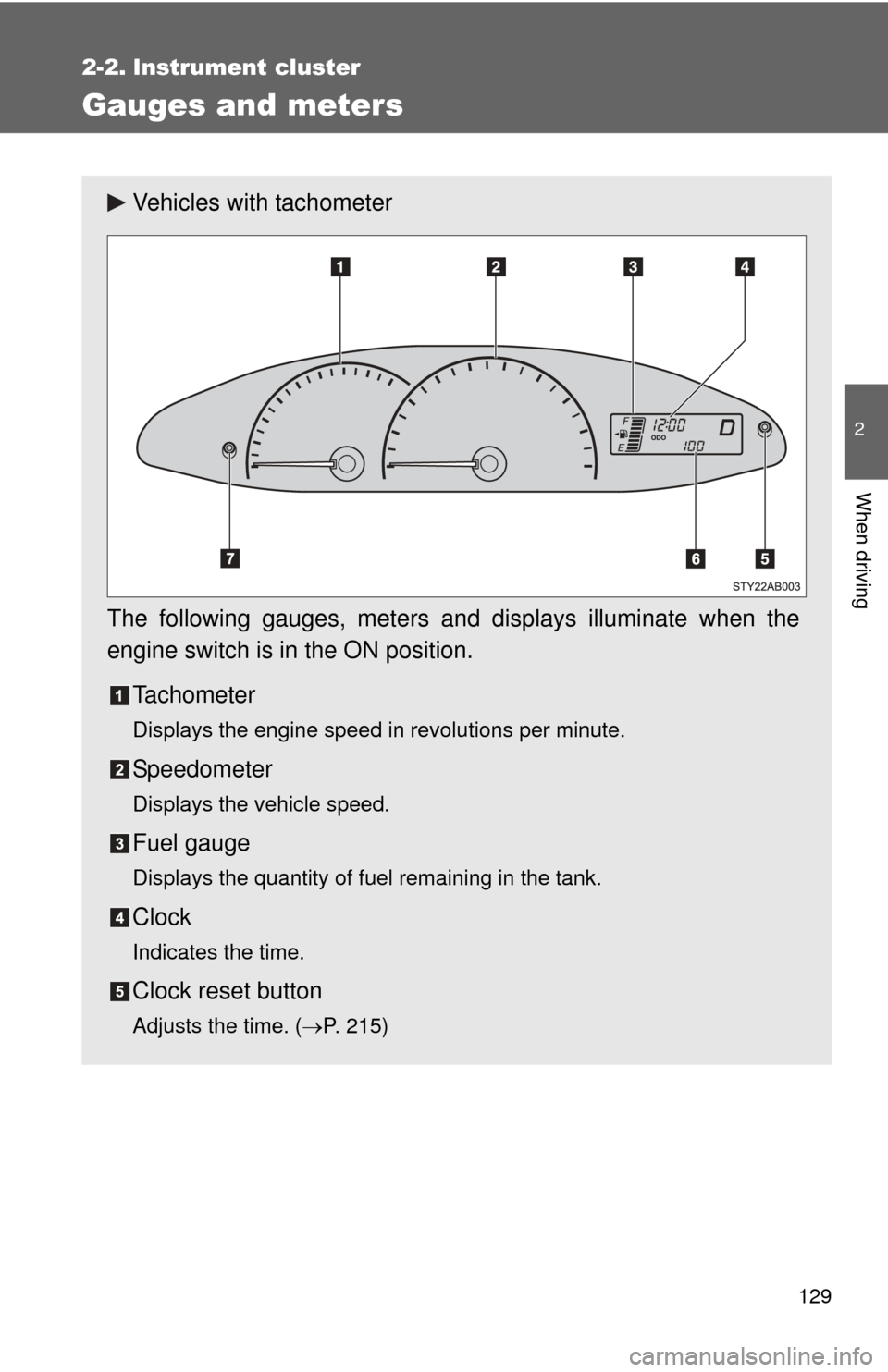
Vehicles with tachometer
The following gauges, meters and displays illuminate when the
engine switch is in the ON position. Tachometer
Displays the engine speed in revolutions per minute.
Speedometer
Displays the vehicle speed.
Fuel gauge
Displays the quantity of fuel remaining in the tank.
Clock
Indicates the time.
Clock reset button
Adjusts the time. (P. 215)
Page 131 of 388
131
2-2. Instrument cluster
2
When driving
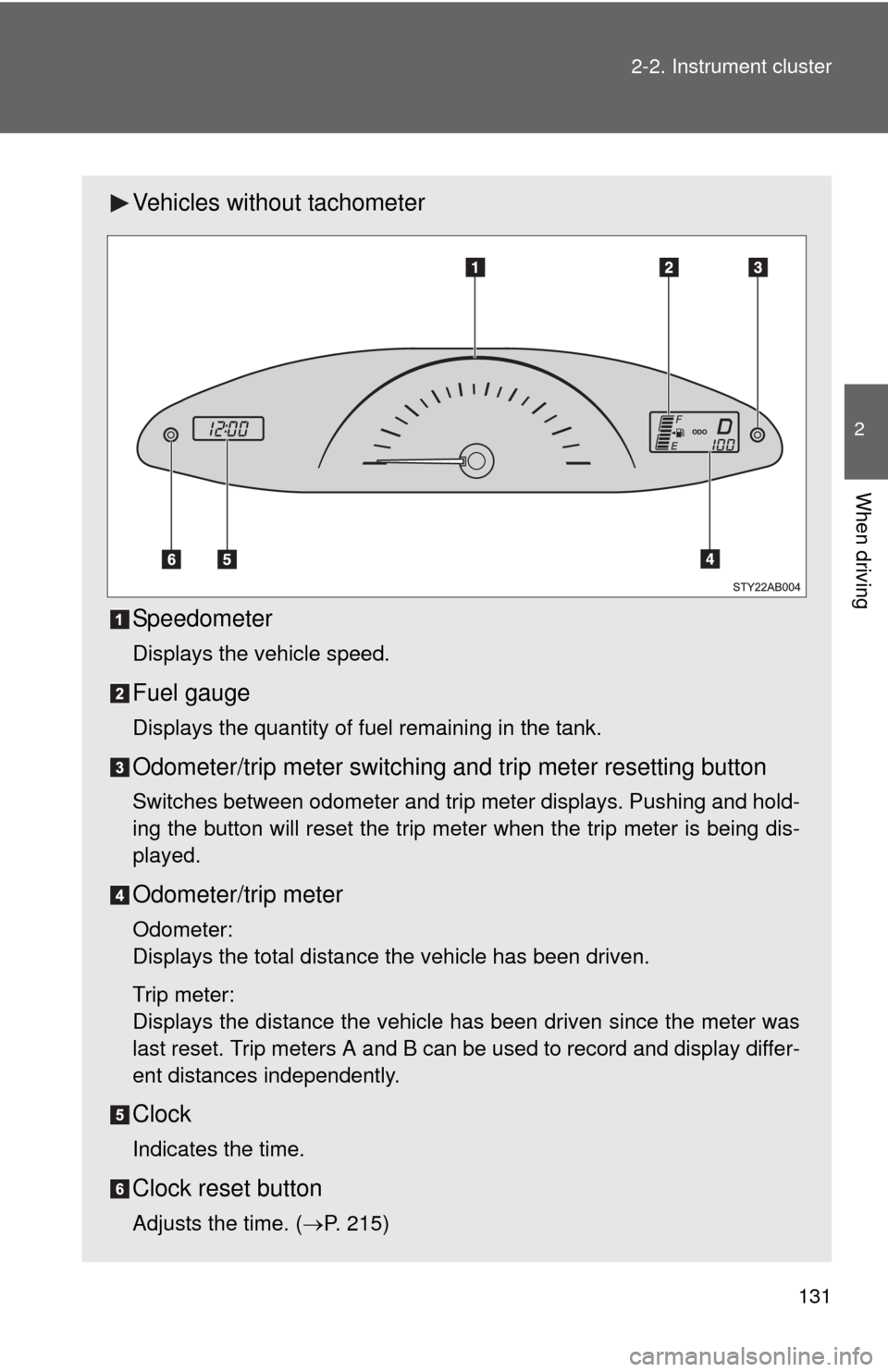
Vehicles without tachometer
Speedometer
Displays the vehicle speed.
Fuel gauge
Displays the quantity of fuel remaining in the tank.
Odometer/trip meter switching and trip meter resetting button
Switches between odometer and trip meter displays. Pushing and hold-
ing the button will reset the trip meter when the trip meter is being dis-
played.
Odometer/trip meter
Odometer:
Displays the total distance the vehicle has been driven.
Trip meter:
Displays the distance the vehicle has been driven since the meter was
last reset. Trip meters A and B can be used to record and display differ-
ent distances independently.
Clock
Indicates the time.
Clock reset button
Adjusts the time. (
P. 215)
Page 140 of 388

140 2-3. Operating the lights and wipers
■Daytime running light system (if equipped)
To make your vehicle more visible to other drivers, the headlights turn on
automatically (at a reduced intensity) whenever the engine is started and the
parking brake is released. Daytime running lights are not designed for use at
night.
■ Light reminder buzzer
A buzzer sounds when the key is removed and the driver's door is opened
while the lights are turned on.
NOTICE
■To prevent battery discharge
Do not leave the lights on longer than necessary when the engine is not run-
ning.
Page 142 of 388
142
2-3. Operating the lights and wipers
Windshield wipers and washer
■The windshield wiper and washer can be operated when
The engine switch must be in the ON position.
■ If no windshield washer fluid sprays
Check that the washer nozzles are not blocked and if there is washer fluid in
the windshield washer fluid reservoir.
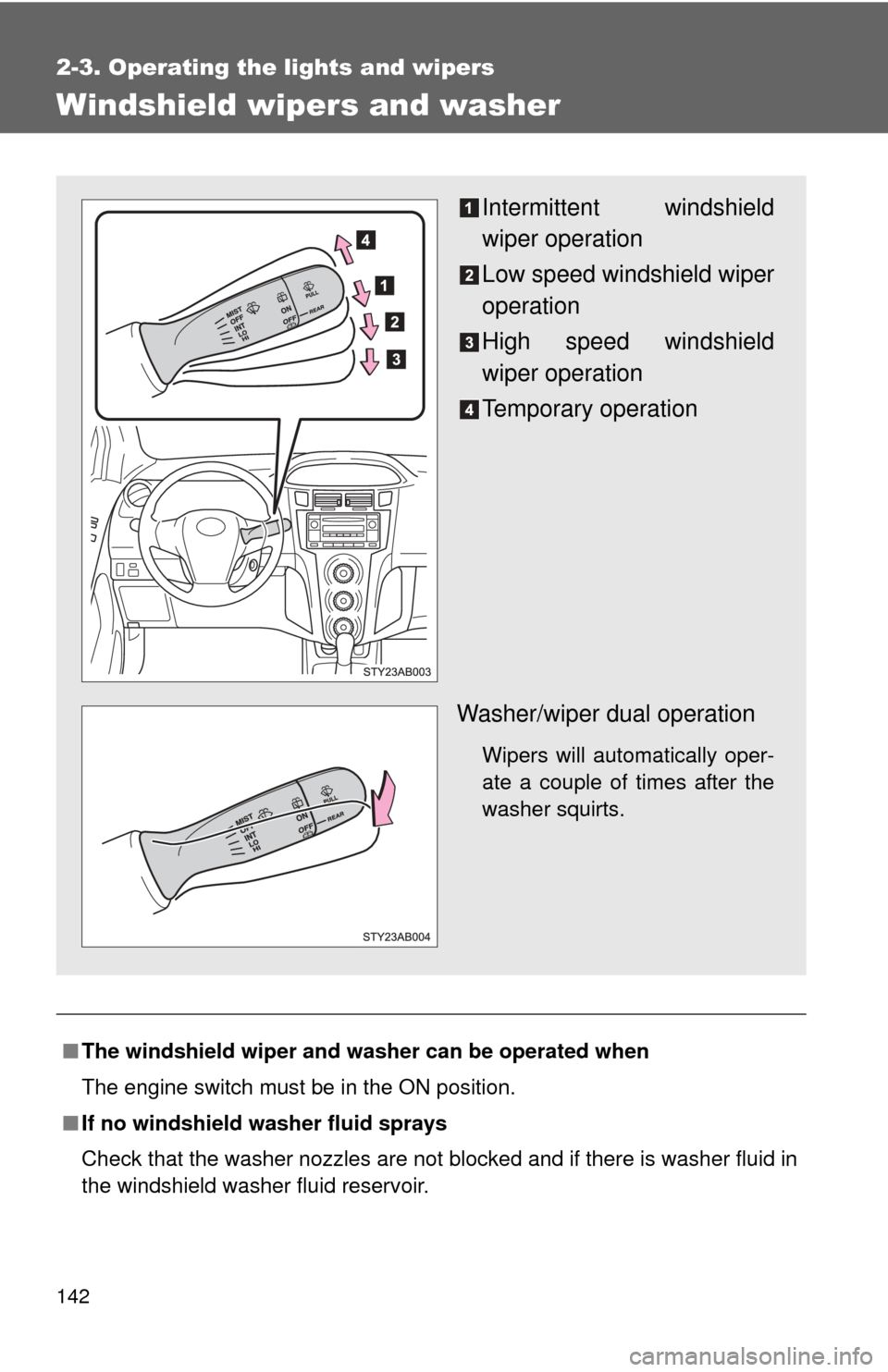
Intermittent windshield
wiper operation
Low speed windshield wiper
operation
High speed windshield
wiper operation
Temporary operation
Washer/wiper dual operation
Wipers will automatically oper-
ate a couple of times after the
washer squirts.
Page 145 of 388
145
2
When driving
2-4. Using other driving systems
Driving assist systems
■Sounds and vibrations caused by the ABS
●A sound may be heard from the engine compartment when the engine is
started or just after the vehicle begins to move. This sound does not indi-
cate that a malfunction has occurred in this system.
● Any of the following conditions may occur when the above systems are
operating. None of these indicates that a malfunction has occurred.
• Vibrations may be felt through the vehicle body and steering.
• A motor sound may be heard after the vehicle comes to a stop.
• The brake pedal may pulsate slightly after the ABS is activated.
• The brake pedal may move down slightly after the ABS is activated.
■ EPS operation sound
When the steering wheel operates, a motor sound (whirring sound) may be
heard.
This does not indicate a malfunction.
■ Reduced effectiveness of EPS
The effectiveness of EPS is reduced to prevent the system from overheating
when there is frequent steering input over an extended period of time. The
steering wheel may feel heavy as a result. Should this occur, refrain from
excessive steering input or stop the vehicle and turn the engine off. The sys-
tem should return to normal within 10 minutes.
To help enhance driving safety a nd performance, the following sys-
tems operate automatically in res ponse to various driving situations.
Be aware, however, that these systems are supplementary and
should not be relied upon too heavi ly when operating the vehicle.
■ABS (Anti-lock Brake System) (if equipped)
The anti-lock brake system is designed to automatically help prevent
lock-up of the wheels during a sudden braking or braking on slippery
road surfaces. This assists in providing directional stability and steering
performance of the vehicle under these circumstances.
■EPS (Electric Power Steering)
Employs an electric motor to reduce the amount of effort needed to turn
the steering wheel.
Page 158 of 388
158 2-5. Driving information
Towing a trailerConsult your Toyota dealer for further information about additional
requirements such as a towing kits, etc.
■ Before towing
Check that the following conditions are met:
●Ensure that your vehicle’s tires are properly inflated. ( P. 345)
● Trailer tires should be inflated according to the trailer manufacturer’s rec-
ommendation.
● All trailer lights work to be legal.
● Confirm all lights work each time you connect them.
● Check that your vehicle remains level when a loaded or unloaded trailer
is hitched. Do not drive if the vehicle is not level, and check for improper
tongue load, overloading, worn suspension, or other possible causes.
● Make sure the trailer cargo is securely loaded.
● Check that your rear view mirrors conform to any federal, state/provincial
or local regulations. If they do not, install rear view mirrors appropriate for
towing purposes.
■ Break-in schedule
●Toyota recommends that you do not use a new vehicle or a vehicle with
any new power train components (engine, transmission, differential,
wheel bearings, etc.) to tow a trailer for the first 500 miles (800 km) of
driving.
■ Maintenance
●If you tow a trailer, your vehicle will require more frequent maintenance
due to the additional load. (See “Scheduled Maintenance Guide” or
“Owner’s Manual Supplement”.)
● Retighten the fixing bolts of the towing ball and bracket after approxi-
mately 600 miles (1000 km).
Page 181 of 388
181
3-2. Using the audio system
3
Interior features
■
When the battery is disconnected
Stations presets are erased.
■ Reception sensitivity
●Maintaining perfect radio reception at all times is difficult due to the con-
tinually changing position of the antenna, differences in signal strength
and surrounding objects, such as trains, transmitters, etc.
● The radio antenna is mounted on the rear roof. The antenna can be
removed from the base by turning it.
NOTICE
■To prevent damage, remove the antenna in the following cases.
●The antenna will touch the ceiling of a garage.
● A cover will be put on the vehicle.
Page 182 of 388
182
3-2. Using the audio system
Using the cassette player
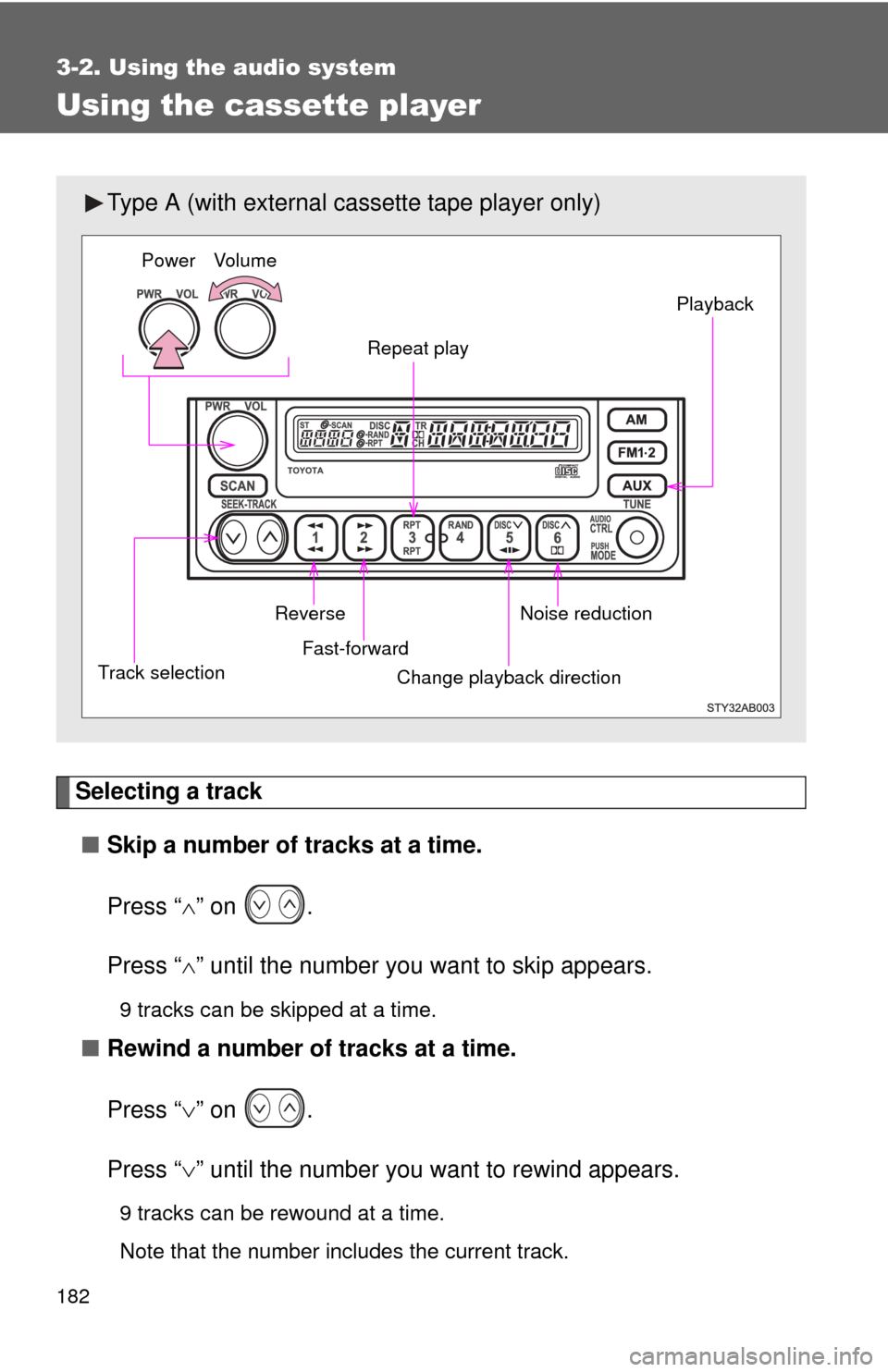
Selecting a track■ Skip a number of tracks at a time.
Press “ ” on .
Press “ ” until the number you want to skip appears.
9 tracks can be skipped at a time.
■ Rewind a number of tracks at a time.
Press “ ” on .
Press “ ” until the number you want to rewind appears.
9 tracks can be rewound at a time.
Note that the number includes the current track.
Type A (with external ca ssette tape player only)
Power Volume
Repeat play Playback
Noise reduction
Change playback direction
Fast-forward
Reverse
Track selection
Page 187 of 388
187
3-2. Using the audio system
3
Interior features
■
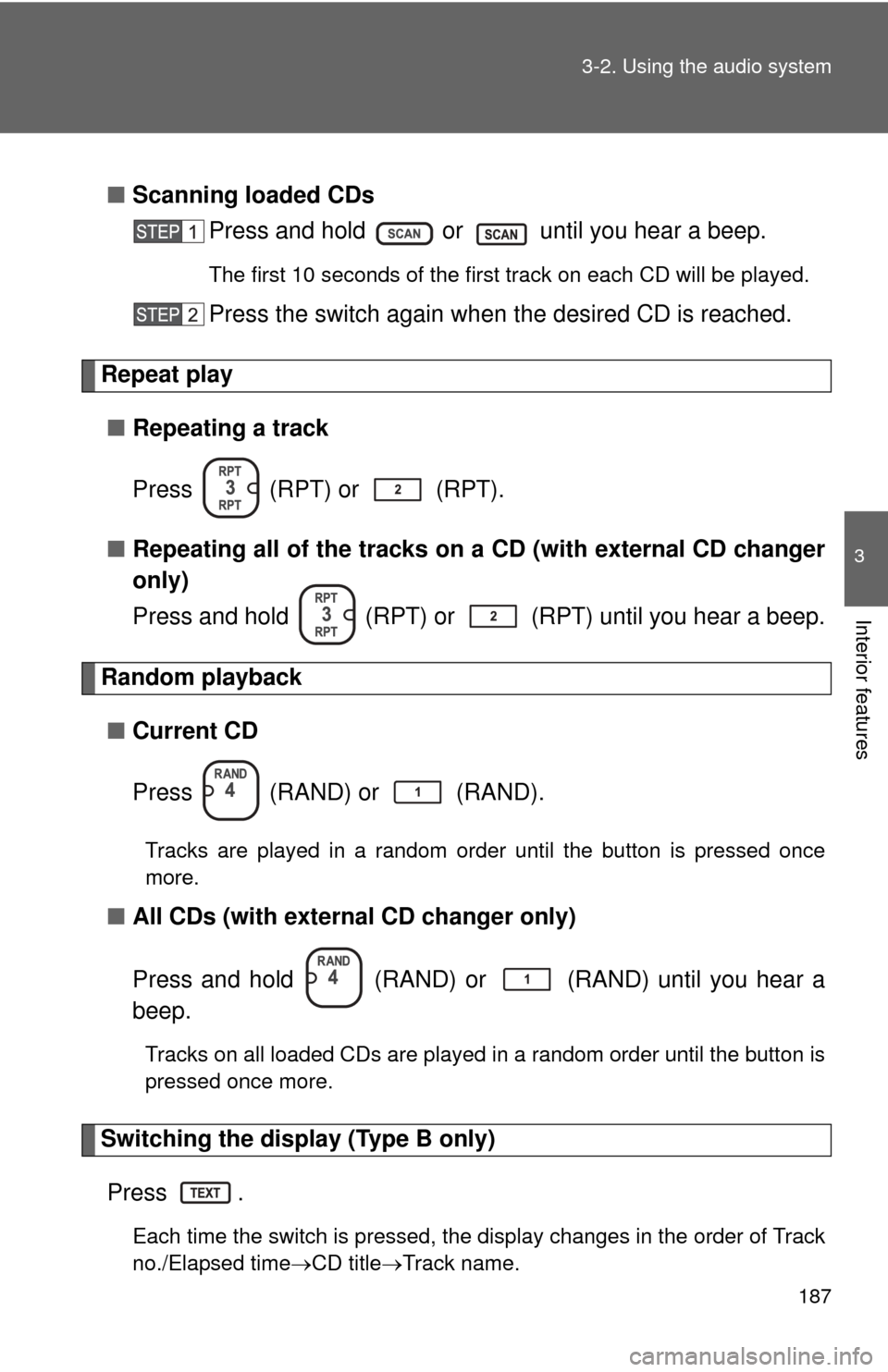
Scanning loaded CDs
Press and hold or until you hear a beep.
The first 10 seconds of the first track on each CD will be played.
Press the switch again wh en the desired CD is reached.
Repeat play
■ Repeating a track
Press (RPT) or (RPT).
■ Repeating all of the tracks on a CD (with external CD changer
only)
Press and hold (RPT) or (RPT) until you hear a beep.
Random playback
■ Current CD
Press (RAND) or (RAND).
Tracks are played in a random order until the button is pressed once
more.
■All CDs (with externa l CD changer only)
Press and hold (RAND) or (RAND) until you hear a
beep.
Tracks on all loaded CDs are played in a random order until the button is
pressed once more.
Switching the display (Type B only) Press .
Each time the switch is pressed, the display changes in the order of Track
no./Elapsed time CD titleTrack name.
Page 188 of 388
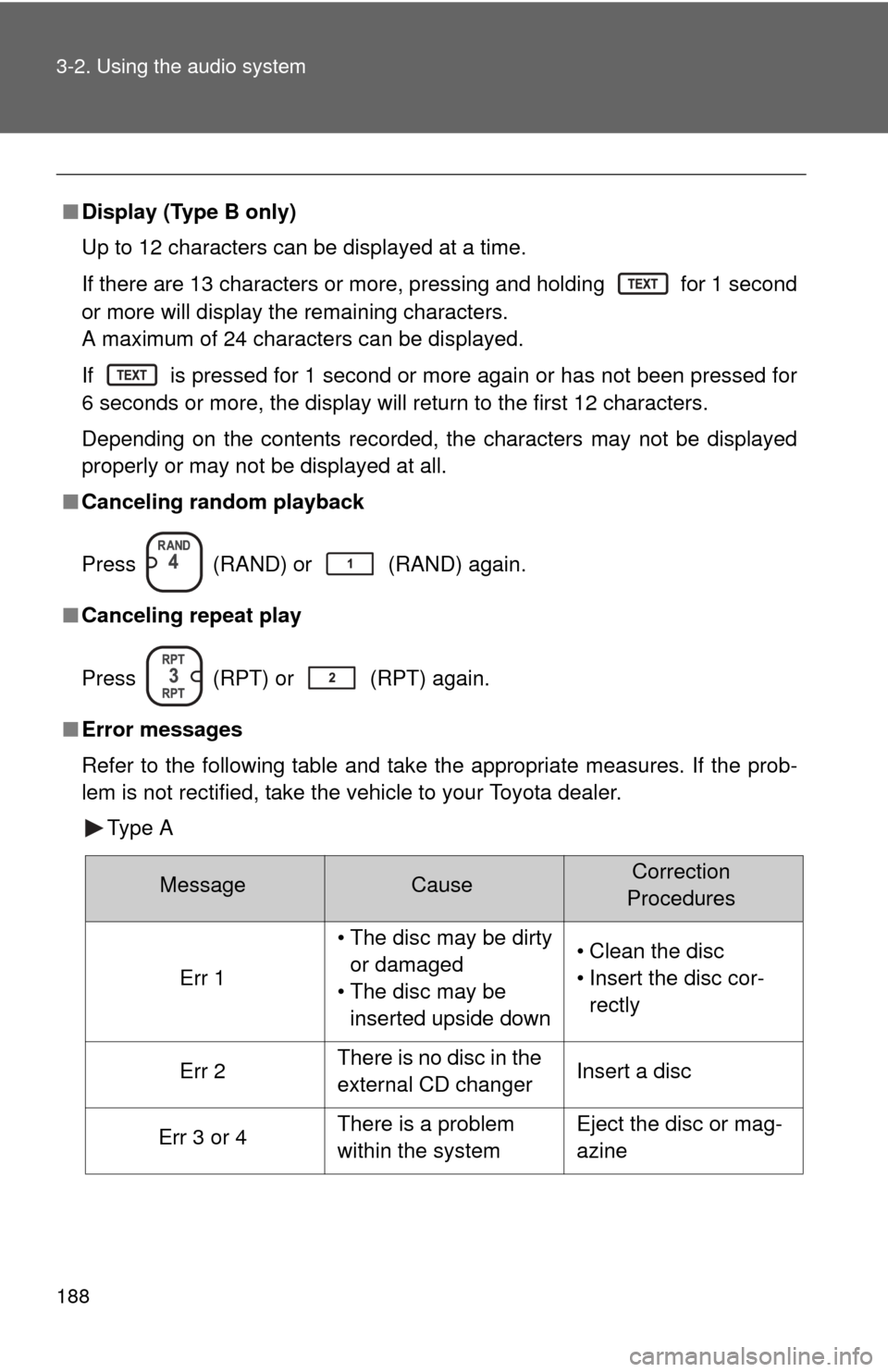
188 3-2. Using the audio system
■Display (Type B only)
Up to 12 characters can be displayed at a time.
If there are 13 characters or more, pressing and holding
for 1 second
or more will display the remaining characters.
A maximum of 24 characters can be displayed.
If
is pressed for 1 second or more again or has not been pressed for
6 seconds or more, the display will return to the first 12 characters.
Depending on the contents recorded, the characters may not be displayed
properly or may not be displayed at all.
■ Canceling random playback
Press
(RAND) or (RAND) again.
■ Canceling repeat play
Press
(RPT) or (RPT) again.
■ Error messages
Refer to the following table and take the appropriate measures. If the prob-
lem is not rectified, take the vehicle to your Toyota dealer.
Type A
MessageCauseCorrection
Procedures
Err 1
• The disc may be dirty or damaged
• The disc may be inserted upside down• Clean the disc
• Insert the disc cor-rectly
Err 2There is no disc in the
external CD changerInsert a disc
Err 3 or 4There is a problem
within the systemEject the disc or mag-
azine