time TOYOTA YARIS 2008 2.G Owner's Manual
[x] Cancel search | Manufacturer: TOYOTA, Model Year: 2008, Model line: YARIS, Model: TOYOTA YARIS 2008 2.GPages: 388, PDF Size: 7.34 MB
Page 192 of 388
192
3-2. Using the audio system
Playing back MP3 and WMA discs
Loading MP3 and WMA discsInsert a disc.
Ejecting MP3 and WMA discsPress and remove the disc.
Selecting a folder■ Selecting folders one at a time
To select the desired folder, press “ ” or “ ” on .
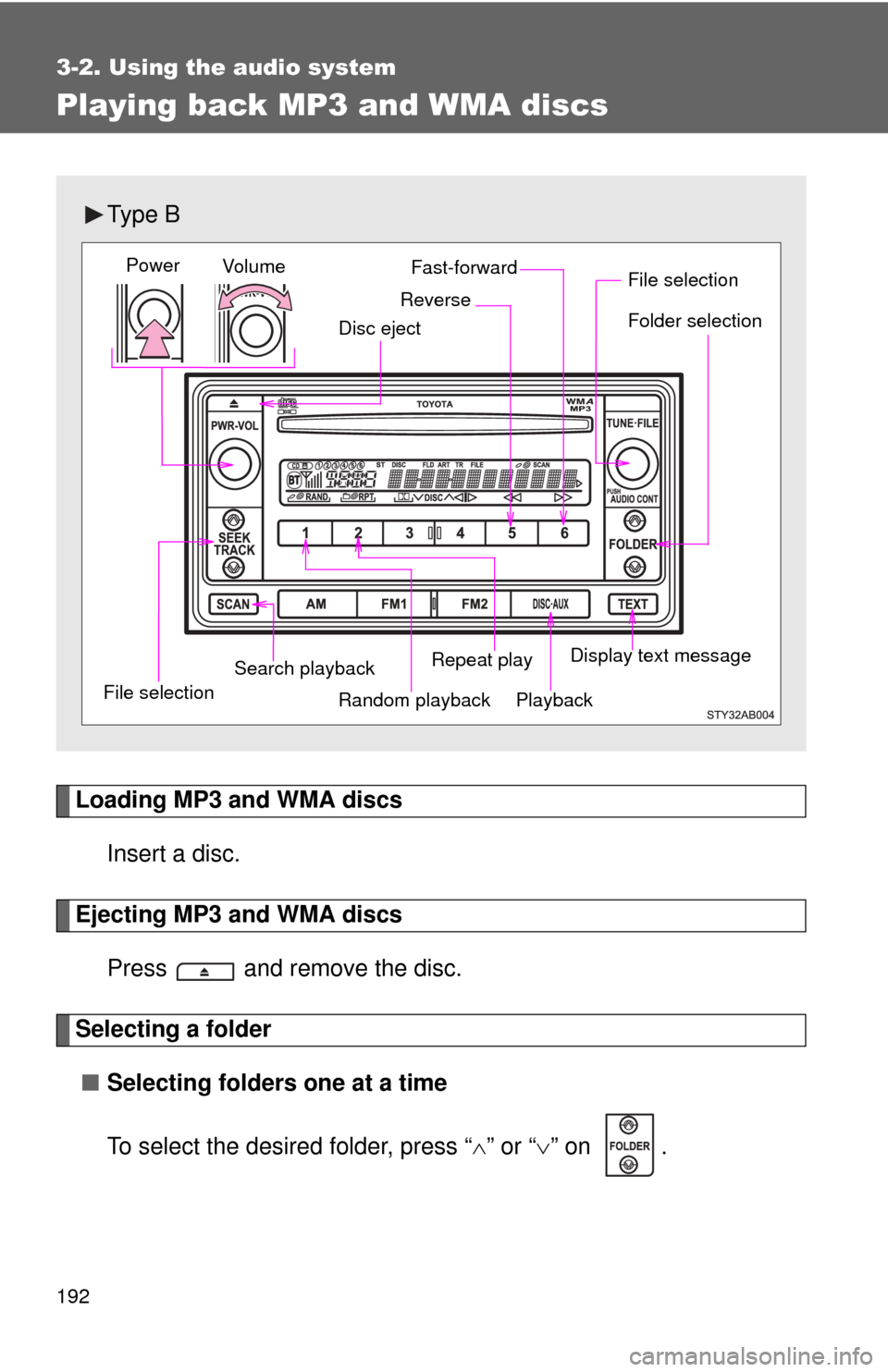
Ty p e B
Vol u m e
Random playback
File selection File selection
Repeat play Playback
Power
Disc eject
Display text message
Folder selection
Search playback
Fast-forward
Reverse
Page 193 of 388
193
3-2. Using the audio system
3
Interior features
■
Selecting the desired folder by cueing the first file of each
folder
Press and hold until you hear a beep.
The first 10 seconds of the first file in the each folder will be played.
When the desired folder is reached, press the switch once again.
■ Returning to the first folder
Press and hold “ ” on until you hear a beep.
Selecting and scanning files
■ Selecting one file at a time
To select the desired file, turn or press “ ” or “ ” on .
■ Selecting the desired file by cueing the files in the folder
Press .
The first 10 seconds of all files in the folder will be played.
When the desired file is reached, press the switch once again.
Fast-forwarding and reversing files
To fast-forward or reverse.
Press and hold ( ) or ( ).
Repeat play■ Repeating a file
Press (RPT).
■ Repeating all of the files in the folder
Press and hold (RPT) until you hear a beep.
Page 194 of 388
194 3-2. Using the audio system
Random playback■ To play files from a partic ular folder in random order
Press (RAND).
■ To play all of the files on a disc in random order
Press and hold (RAND) until you hear a beep.
Switching the display
Press .
Each time the switch is pressed, the display changes in the order of
Folder no./File no./Elapsed time Folder nameFile nameAlbum title
(MP3 only) Track title Artist name.
Page 195 of 388
195
3-2. Using the audio system
3
Interior features
■
Display
Up to 12 characters can be displayed at a time.
If there are 13 characters or more, pressing and holding for 1 second
or more will display the remaining characters.
A maximum of 24 characters can be displayed.
If is pressed for 1 second or more again or has not been pressed for
6 seconds or more, the display will return to the first 12 characters.
Depending on the contents recorded, the characters may not be displayed
properly or may not be displayed at all.
■ Canceling random playback
Press
(RAND) again.
■ Canceling repeat play
Press (RPT) again.
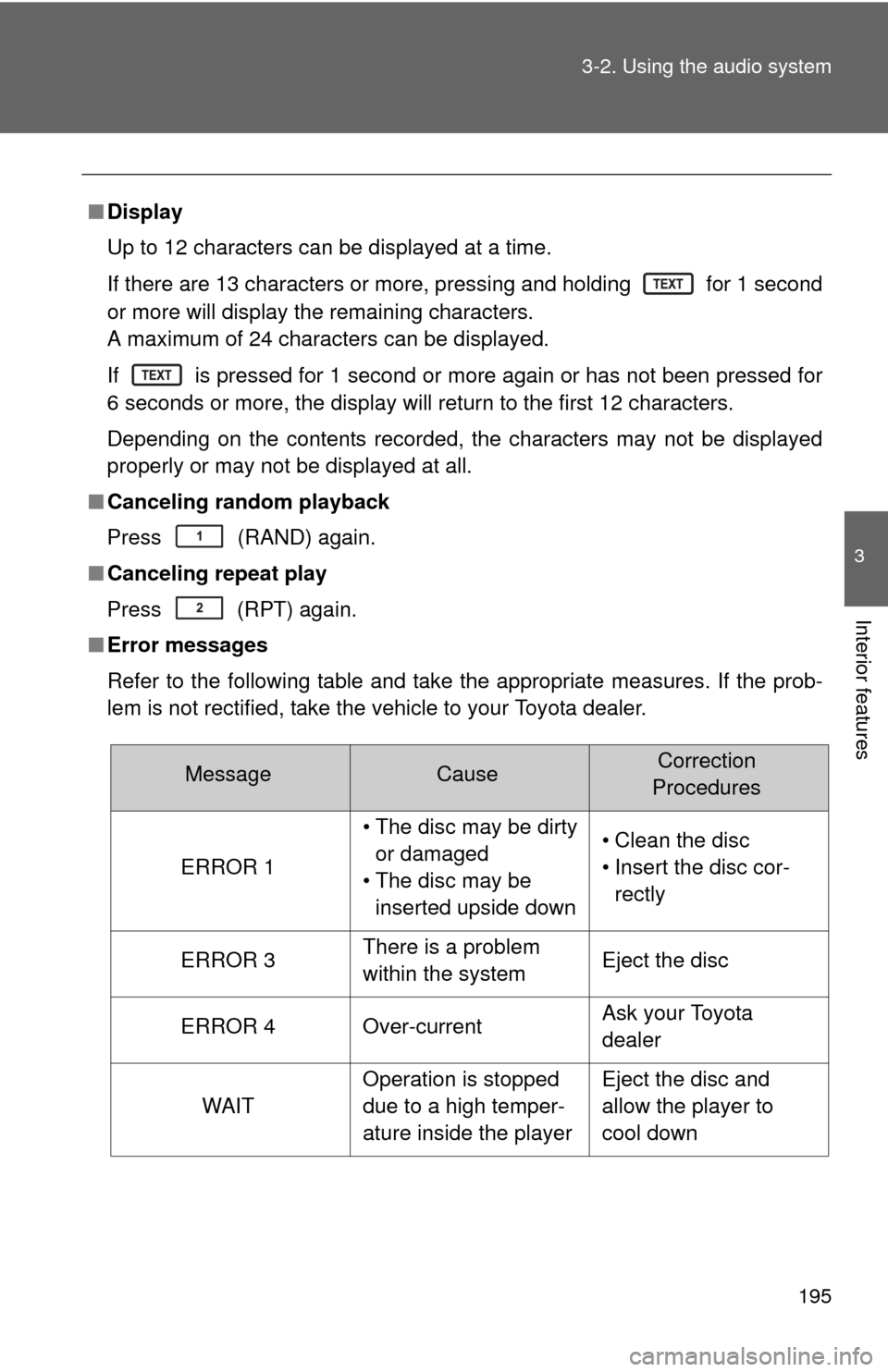
■ Error messages
Refer to the following table and take the appropriate measures. If the prob-
lem is not rectified, take the vehicle to your Toyota dealer.
MessageCauseCorrection
Procedures
ERROR 1
• The disc may be dirty or damaged
• The disc may be inserted upside down• Clean the disc
• Insert the disc cor- rectly
ERROR 3There is a problem
within the systemEject the disc
ERROR 4Over-currentAsk your Toyota
dealer
WAIT
Operation is stopped
due to a high temper-
ature inside the playerEject the disc and
allow the player to
cool down
Page 199 of 388
199
3-2. Using the audio system
3
Interior features
• There is a wide variety of freeware and other encoding software for
MP3 and WMA files on the market, and depending on the status of the
encoding and the file format, poor sound quality or noise at the start of
playback may result. In some cases, playback may not be possible at
all.
• When files other than MP3 or WMA files are recorded on a disc, it may take more time to recognize the disc and in some cases, playback may
not be possible at all.
• Microsoft, Windows, and Windows Media are the registered trade- marks of Microsoft Corporation in the U.S. and other countries.
NOTICE
■ CDs and adapters that cannot be used ( P. 190)
■ CD player precautions ( P. 191)
Page 204 of 388
204
3-3. Using the interior lights
Interior lights list
■Illuminated entry system
When the interior light switch is in the DOOR position, the interior light auto-
matically turns on/off according to whether the doors are locked/unlocked
and whether the doors are open/closed and the engine switch position.
■ To prevent the battery from being discharged
If the interior light remains on when the door is not fully closed and the inte-
rior light switch is in the DOOR position, the light will go off automatically
after 20 minutes.
■ Customization that can be co nfigured at Toyota dealer
Settings (e.g. The time elapsed before lights turn off) can be changed.
(Customizable features P. 363)
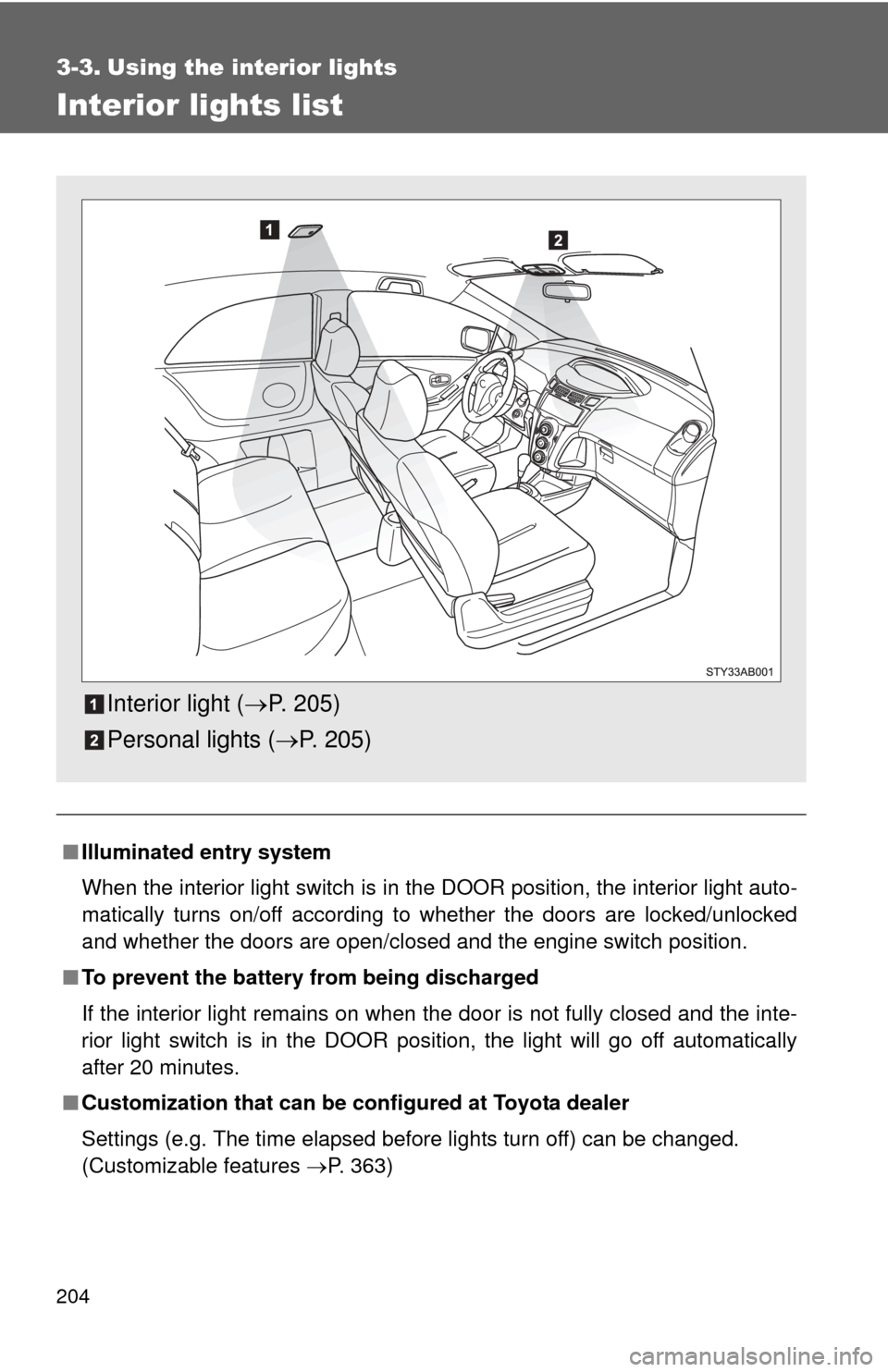
Interior light (P. 205)
Personal lights ( P. 205)
Page 216 of 388
216 3-5. Other interior features
■The clock is displayed when
The engine switch is in the ON position.
■ When disconnecting and reco nnecting battery terminals
The time display will automatically be set to 1:00.
■ Adjusting to a full hour (vehicles without tachometer)
If you press the clock reset button, the minute values will be rounded to the
nearest hour. So, minute values from “:00” to “:29” are rounded down, and
values from “:30” to “:59” are rounded up.*
*: e.g.
1:00 to 1:29 1:00
1:30 to 1:59 2:00
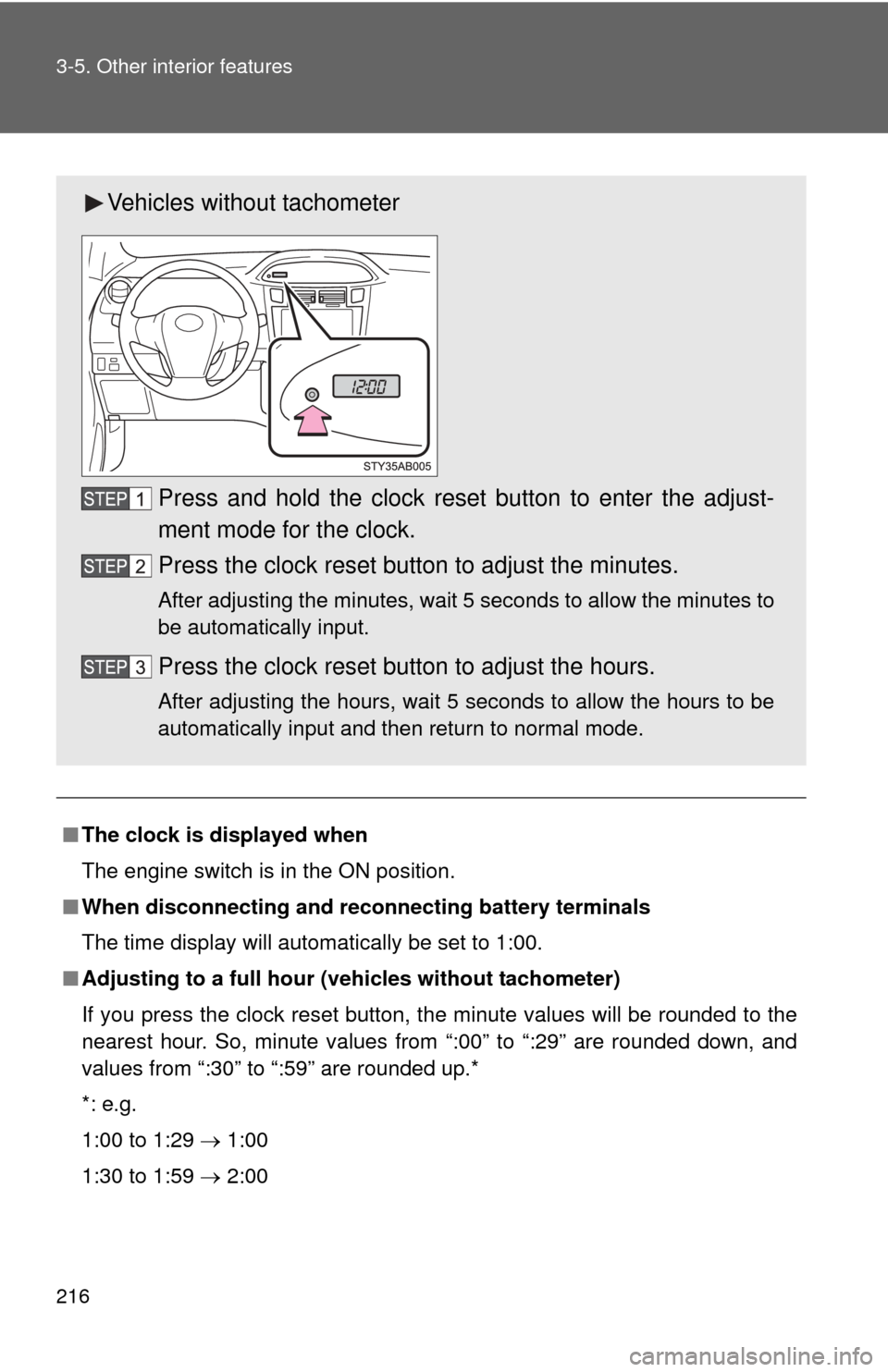
Vehicles without tachometer
Press and hold the clock reset button to enter the adjust-
ment mode for the clock.
Press the clock reset button to adjust the minutes.
After adjusting the minutes, wait 5 seconds to allow the minutes to
be automatically input.
Press the clock reset button to adjust the hours.
After adjusting the hours, wait 5 seconds to allow the hours to be
automatically input and then return to normal mode.
Page 226 of 388
226 4-1. Maintenance and care
NOTICE
■Cleaning detergents
Do not use organic substances such as benzene or gasoline, acidic or alka-
line solutions, dye, bleach or other detergent. Doing so may discolor the
vehicle interior or cause streaks or damage to painted surfaces.
■ Preventing damage to leather surfaces
Observe the following precautions to avoid damage to and deterioration o\
f
leather surfaces.
●Remove any dust or dirt on leather surfaces immediately.
● Do not expose the vehicle to direct sunlight for extended periods of time.
Park the vehicle in the shade, especially during summer.
● Do not place items made of vinyl, plastic, or that contain wax on the uphol-
stery, as they may stick to the leather surface if the vehicle interior heats
up significantly.
■ Water on the floor
Do not wash the vehicle floor with water.
Vehicle systems such as the audio system may be damaged if water comes
into contact with electrical components under the floor of the vehicle, and
may also cause the body to rust.
■ Cleaning the inside of the rear window
Be careful not to scratch or damage the heater wires.
Page 232 of 388
232
4-2. Maintenance
Emission inspection and maintenance (I/M) programs
Some states have vehicle emission inspection programs which
include OBD (On Board Diagnostics) checks. The OBD system moni-
tors the operation of th e emission control system.
■If the malfunction indicator lamp comes on
The OBD system determines that a problem exists somewhere
in the emission control system. Your vehicle may not pass the I/
M test and may need to be repaired. Contact your Toyota dealer
to service the vehicle.
■ Your vehicle may not pass the I/M test:
●When the battery is disconnected or discharged
Readiness codes that are se t during ordinary driving are
erased.
Also, depending on your driving habits, the readiness codes
may not be completely set.
● When the fuel tank cap is loose
The malfunction indicator lamp comes on as a temporary mal-
function and your vehicle may not pass the I/M test.
■ When the malfunction indicator lamp goes off after several
driving trips
The error code in the OBD system will not be cleared unless the
vehicle is driven 40 or more times.
■ If your vehicle does not pass the I/M test
Contact your Toyota dealer to prepare the vehicle for re-testing.
Page 244 of 388
244 4-3. Do-it-yourself maintenance
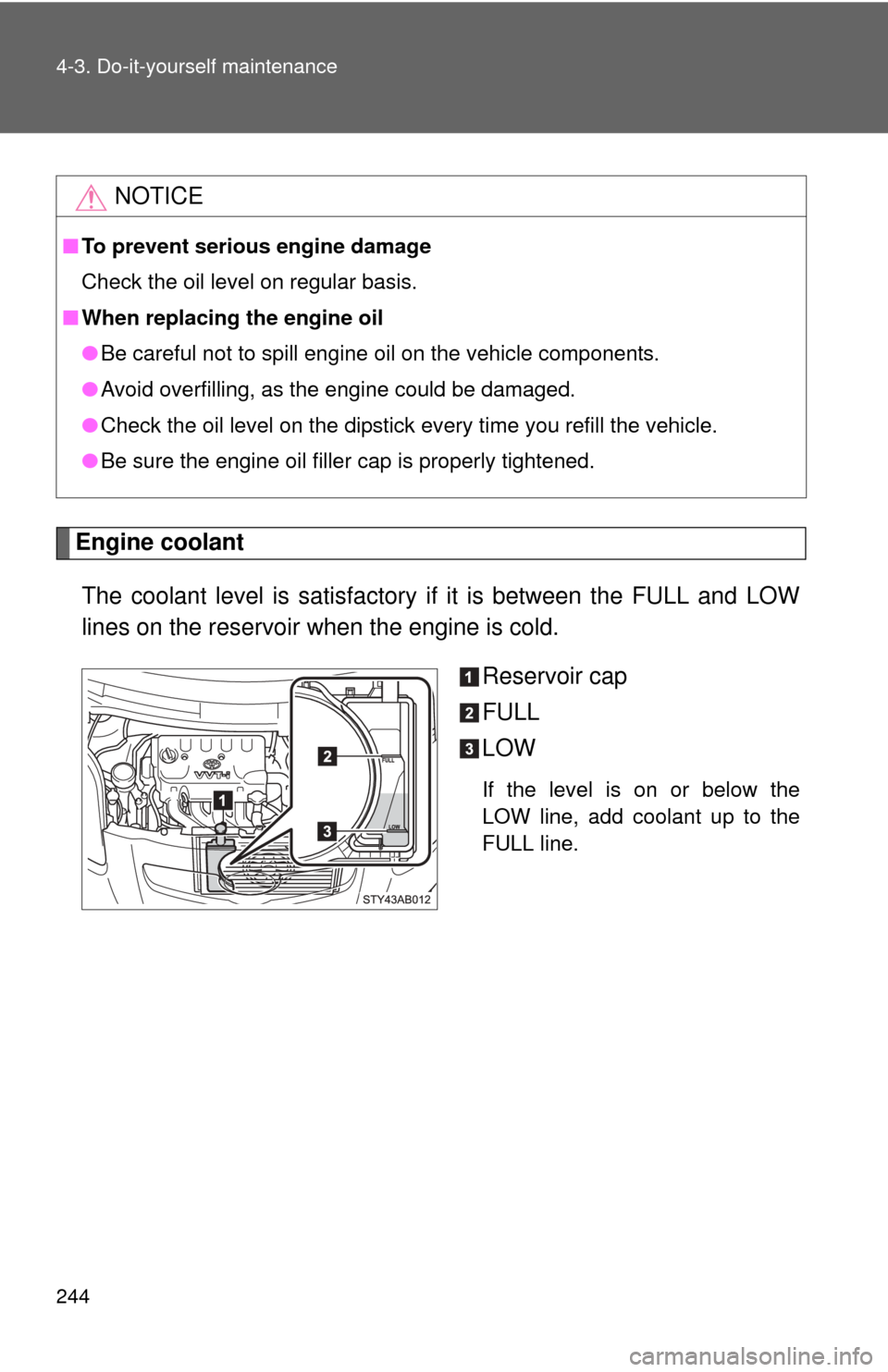
Engine coolantThe coolant level is satisfactory if it is between the FULL and LOW
lines on the reservoir when the engine is cold. Reservoir cap
FULL
LOW
If the level is on or below the
LOW line, add coolant up to the
FULL line.
NOTICE
■To prevent serious engine damage
Check the oil level on regular basis.
■ When replacing the engine oil
●Be careful not to spill engine oil on the vehicle components.
● Avoid overfilling, as the engine could be damaged.
● Check the oil level on the dipstick every time you refill the vehicle.
● Be sure the engine oil filler cap is properly tightened.