tow TOYOTA YARIS 2009 2.G Owners Manual
[x] Cancel search | Manufacturer: TOYOTA, Model Year: 2009, Model line: YARIS, Model: TOYOTA YARIS 2009 2.GPages: 392, PDF Size: 8.52 MB
Page 1 of 392
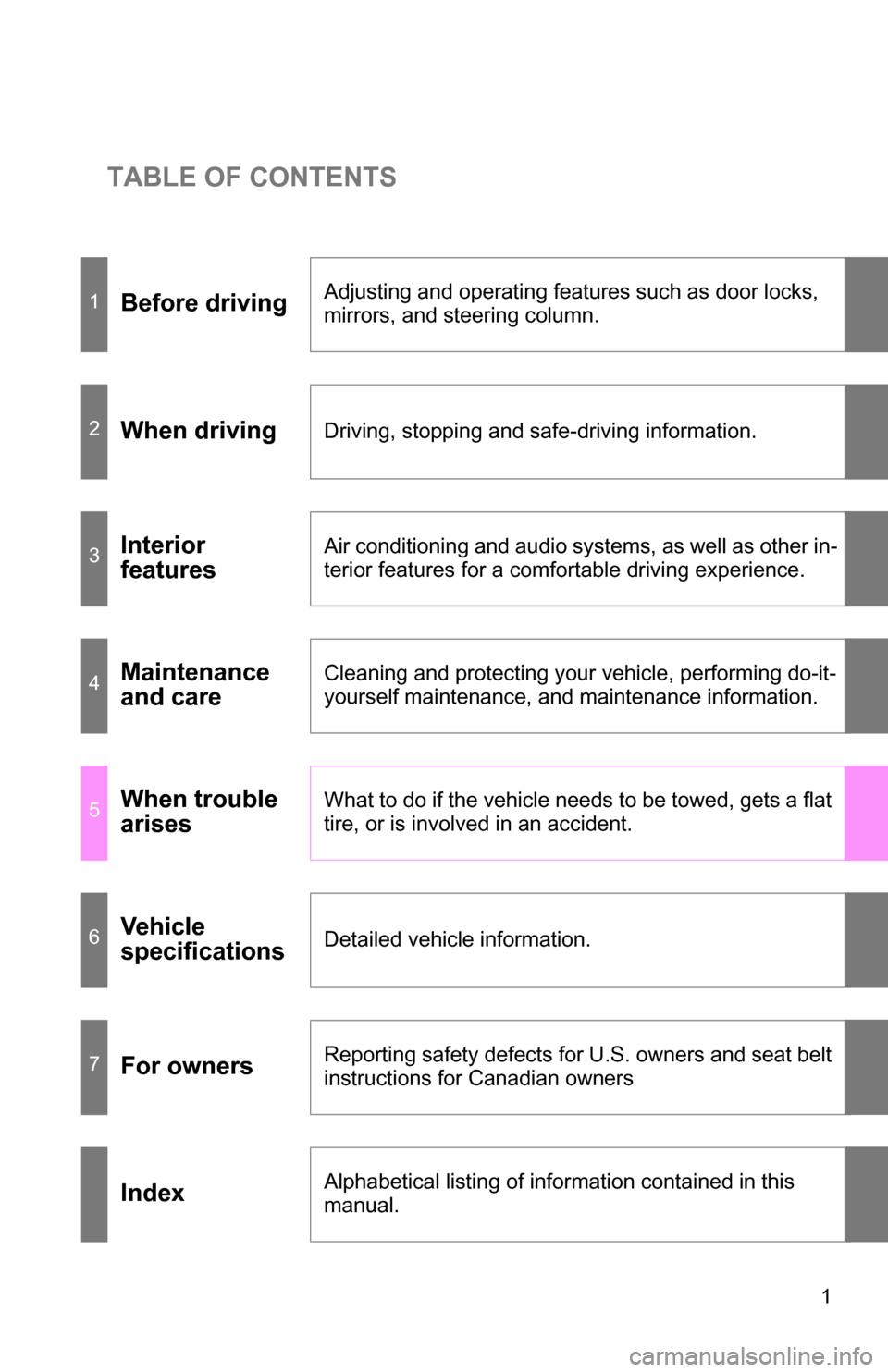
TABLE OF CONTENTS
1
1Before drivingAdjusting and operating features such as door locks,
mirrors, and steering column.
2When drivingDriving, stopping and safe-driving information.
3Interior
featuresAir conditioning and audio systems, as well as other in-
terior features for a comfortable driving experience.
4Maintenance
and careCleaning and protecting your vehicle, performing do-it-
yourself maintenance, and maintenance information.
5When trouble
arisesWhat to do if the vehicle needs to be towed, gets a flat
tire, or is involved in an accident.
6Vehicle
specificationsDetailed vehicle information.
7For ownersReporting safety defects for U.S. owners and seat belt
instructions for Canadian owners
IndexAlphabetical listing of information contained in this
manual.
Page 3 of 392
1
2
3
4
5
6
7
3
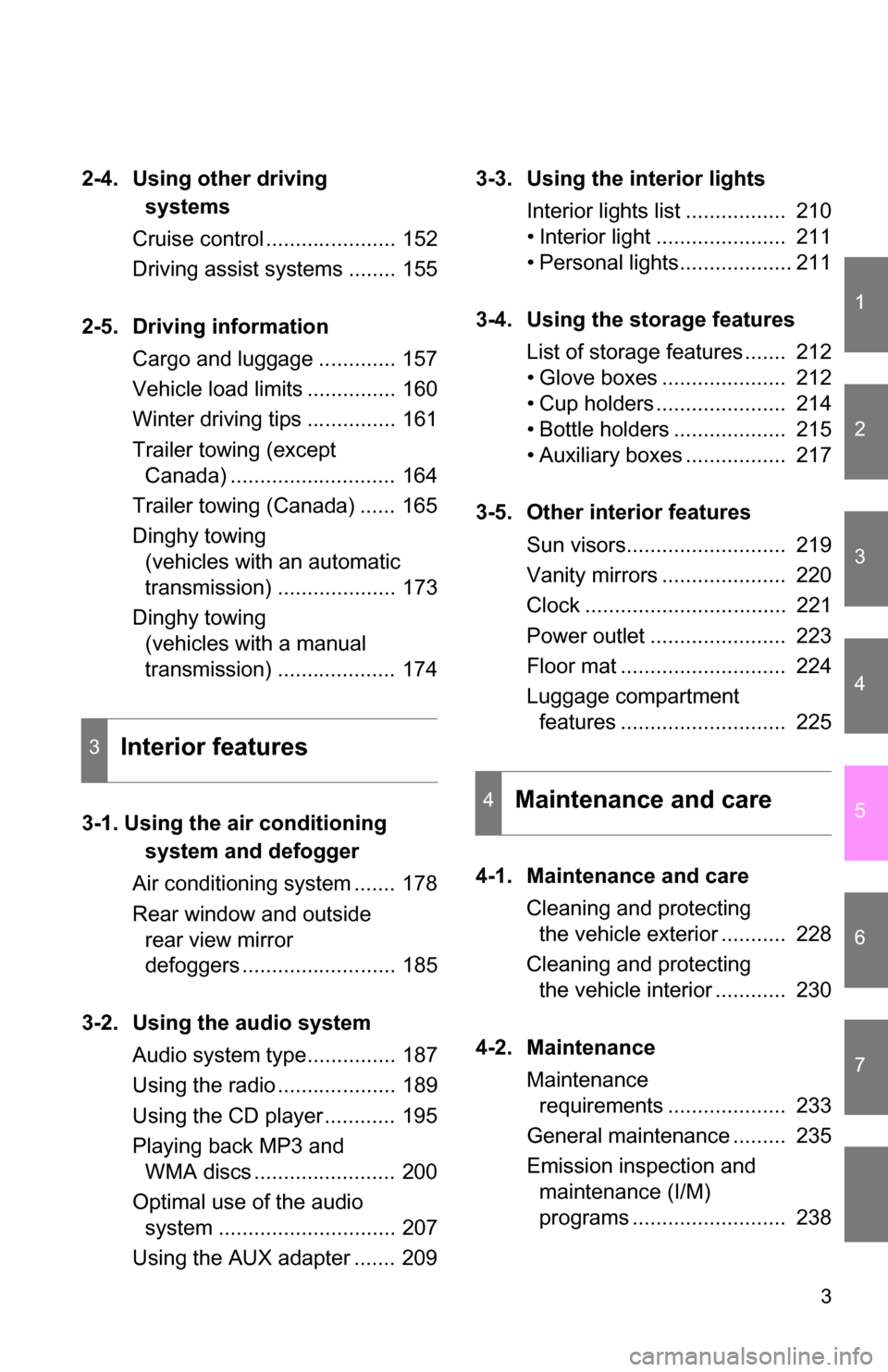
2-4. Using other driving systems
Cruise control ...................... 152
Driving assist systems ........ 155
2-5. Driving information Cargo and luggage ............. 157
Vehicle load limits ............... 160
Winter driving tips ............... 161
Trailer towing (except Canada) ............................ 164
Trailer towing (Canada) ...... 165
Dinghy towing (vehicles with an automatic
transmission) .................... 173
Dinghy towing (vehicles with a manual
transmission) .................... 174
3-1. Using the air conditioning system and defogger
Air conditioning system ....... 178
Rear window and outside rear view mirror
defoggers .......................... 185
3-2. Using the audio system Audio system type............... 187
Using the radio .................... 189
Using the CD player ............ 195
Playing back MP3 and WMA discs ........................ 200
Optimal use of the audio system .............................. 207
Using the AUX adapter ....... 209 3-3. Using the interior lights
Interior lights list ................. 210
• Interior light ...................... 211
• Personal lights................... 211
3-4. Using the storage features List of storage features ....... 212
• Glove boxes ..................... 212
• Cup holders ...................... 214
• Bottle holders ................... 215
• Auxiliary boxes ................. 217
3-5. Other interior features Sun visors........................... 219
Vanity mirrors ..................... 220
Clock .................................. 221
Power outlet ....................... 223
Floor mat ............................ 224
Luggage compartment features ............................ 225
4-1. Maintenance and care Cleaning and protecting the vehicle exterior ........... 228
Cleaning and protecting the vehicle interior ............ 230
4-2. Maintenance Maintenance requirements .................... 233
General maintenance ......... 235
Emission inspection and maintenance (I/M)
programs .......................... 238
3Interior features
4Maintenance and care
Page 4 of 392
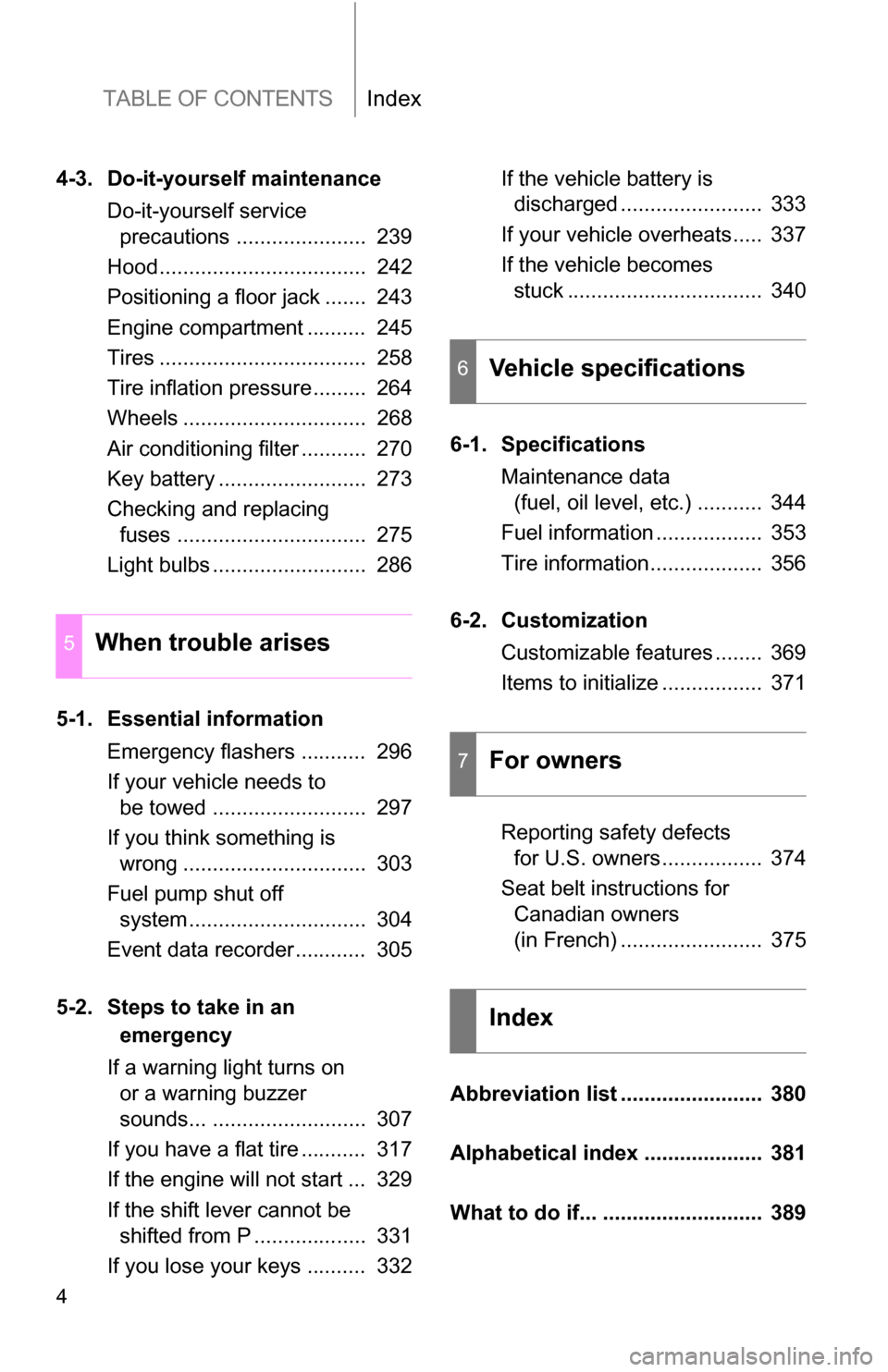
TABLE OF CONTENTSIndex
4
4-3. Do-it-yourself maintenanceDo-it-yourself service precautions ...................... 239
Hood................................... 242
Positioning a floor jack ....... 243
Engine compartment .......... 245
Tires ................................... 258
Tire inflation pressure......... 264
Wheels ............................... 268
Air conditioning filter ........... 270
Key battery ......................... 273
Checking and replacing fuses ................................ 275
Light bulbs .......................... 286
5-1. Essential information Emergency flashers ........... 296
If your vehicle needs to be towed .......................... 297
If you think something is wrong ............................... 303
Fuel pump shut off system .............................. 304
Event data recorder............ 305
5-2. Steps to take in an emergency
If a warning light turns on or a warning buzzer
sounds... .......................... 307
If you have a flat tire ........... 317
If the engine will not start ... 329
If the shift lever cannot be shifted from P ................... 331
If you lose your keys .......... 332 If the vehicle battery is
discharged ........................ 333
If your vehicle overheats..... 337
If the vehicle becomes stuck ................................. 340
6-1. Specifications Maintenance data (fuel, oil level, etc.) ........... 344
Fuel information .................. 353
Tire information................... 356
6-2. Customization Customizable features ........ 369
Items to initialize ................. 371
Reporting safety defects for U.S. owners ................. 374
Seat belt instructions for Canadian owners
(in French) ........................ 375
Abbreviation list ........................ 380
Alphabetical index .................... 381
What to do if... ........................... 389
5When trouble arises
6Vehicle specifications
7For owners
Index
Page 29 of 392
29
1-2. Opening, closing and locking the doors
1
Before driving
■
Conditions affecting operation
The wireless remote control function may not operate normally in the follow-
ing situations.
●Near a TV tower, radio station, elec tric power plant, airport, gas station or
other facility that generates strong radio waves
● When carrying a portable radio, cell ular phone or other wireless commu-
nication device
● When multiple wireless keys are in the vicinity
● When the wireless key has come into contact with, or is covered by a
metallic object
● When a wireless key (that emits radio waves) is being used nearby
● When the wireless key has been left near an electrical appliance such as
a personal computer
■ When riding in an aircraft
When bringing an wireless key onto an aircraft, make sure you do not press
any buttons on the wireless key while inside the aircraft cabin. If you are car-
rying an wireless key in your bag etc., ensure that the buttons are not likely
to be pressed accidentally. Pressing a button may cause the wireless key to
emit radio waves that could interfere with the operation of the aircraft.
■ Customization that can be co nfigured at Toyota dealer
Settings (e.g. wireless remote control system) can be changed.
(Customizable features P. 369)
Page 43 of 392
43
1-3. Adjustable components (s
eats, mirrors, steering wheel)
1
Before driving
Folding down rear seatbacks
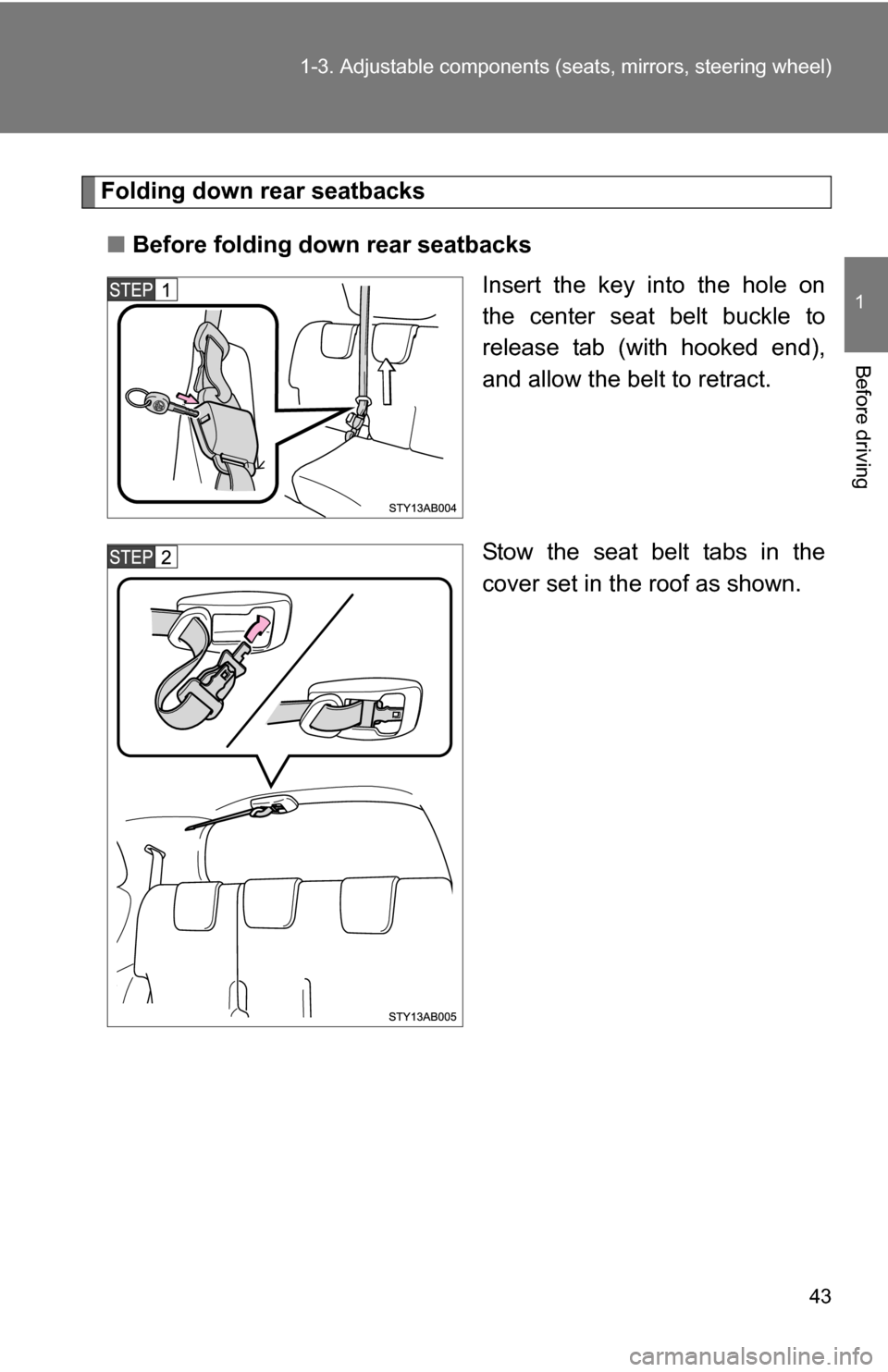
■ Before folding down rear seatbacks
Insert the key into the hole on
the center seat belt buckle to
release tab (with hooked end),
and allow the belt to retract.
Stow the seat belt tabs in the
cover set in the roof as shown.
Page 47 of 392

47
1-3. Adjustable components (s
eats, mirrors, steering wheel)
1
Before driving
CAUTION
■Seat adjustment
●Do not recline the seat more than necessary when the vehicle is in motion
to reduce the risk of sliding under the lap belt. If the seat is too reclined,
the lap belt may slide past the hips and apply restraint forces directly to the
abdomen or your neck may contact the shoulder belt, increasing the risk of
death or serious injury in the event of an accident.
● After adjusting the seat, make sure that the seat is locked in position.
■ After returning the seatback to the upright position
Observe the following precautions. Failure to do so may result in death or
serious injury.
●Make sure that the seatback is securely locked in position by lightly rock-
ing it back and forth.
● Check that the seat belts and buckles are not twisted or caught under the
seat.
● Arrange the seat belts in the proper positions for ready use.
NOTICE
■Stowing the seat belts
The seat belts and the buckles must be stowed before you fold down the
rear seat backs.
■ When returning the seatback to the upright position
Do not pull the pocket that stores the seat belt comfort guide.
Page 51 of 392
51
1-3. Adjustable components (s
eats, mirrors, steering wheel)
1
Before driving
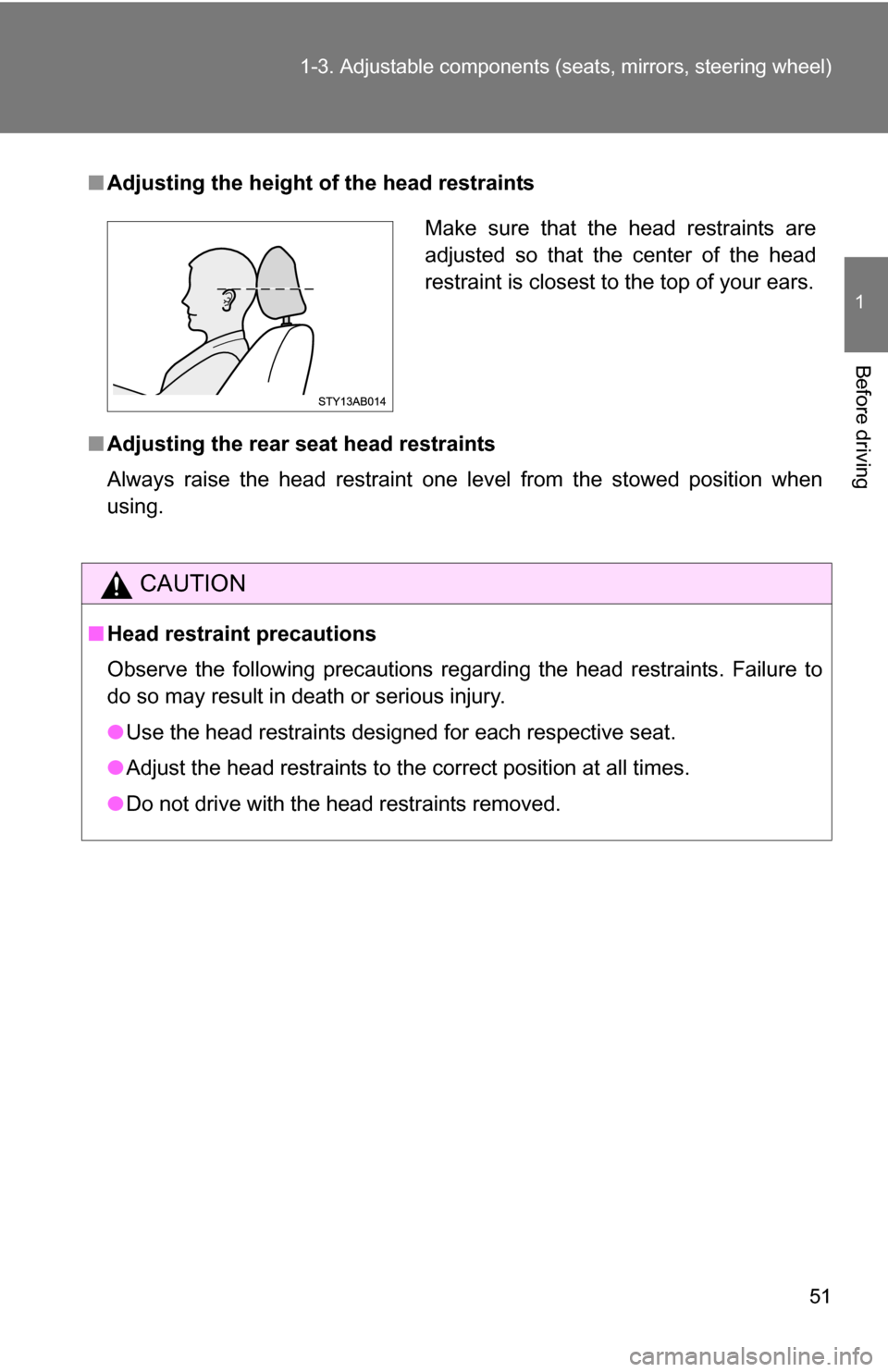
■Adjusting the height of the head restraints
■ Adjusting the rear seat head restraints
Always raise the head restraint one level from the stowed position when
using.
CAUTION
■Head restraint precautions
Observe the following precautions regarding the head restraints. Failure to
do so may result in death or serious injury.
●Use the head restraints designed for each respective seat.
● Adjust the head restraints to the correct position at all times.
● Do not drive with the head restraints removed.
Make sure that the head restraints are
adjusted so that the center of the head
restraint is closest to the top of your ears.
Page 54 of 392
54 1-3. Adjustable components (seats, mirrors, steering wheel)
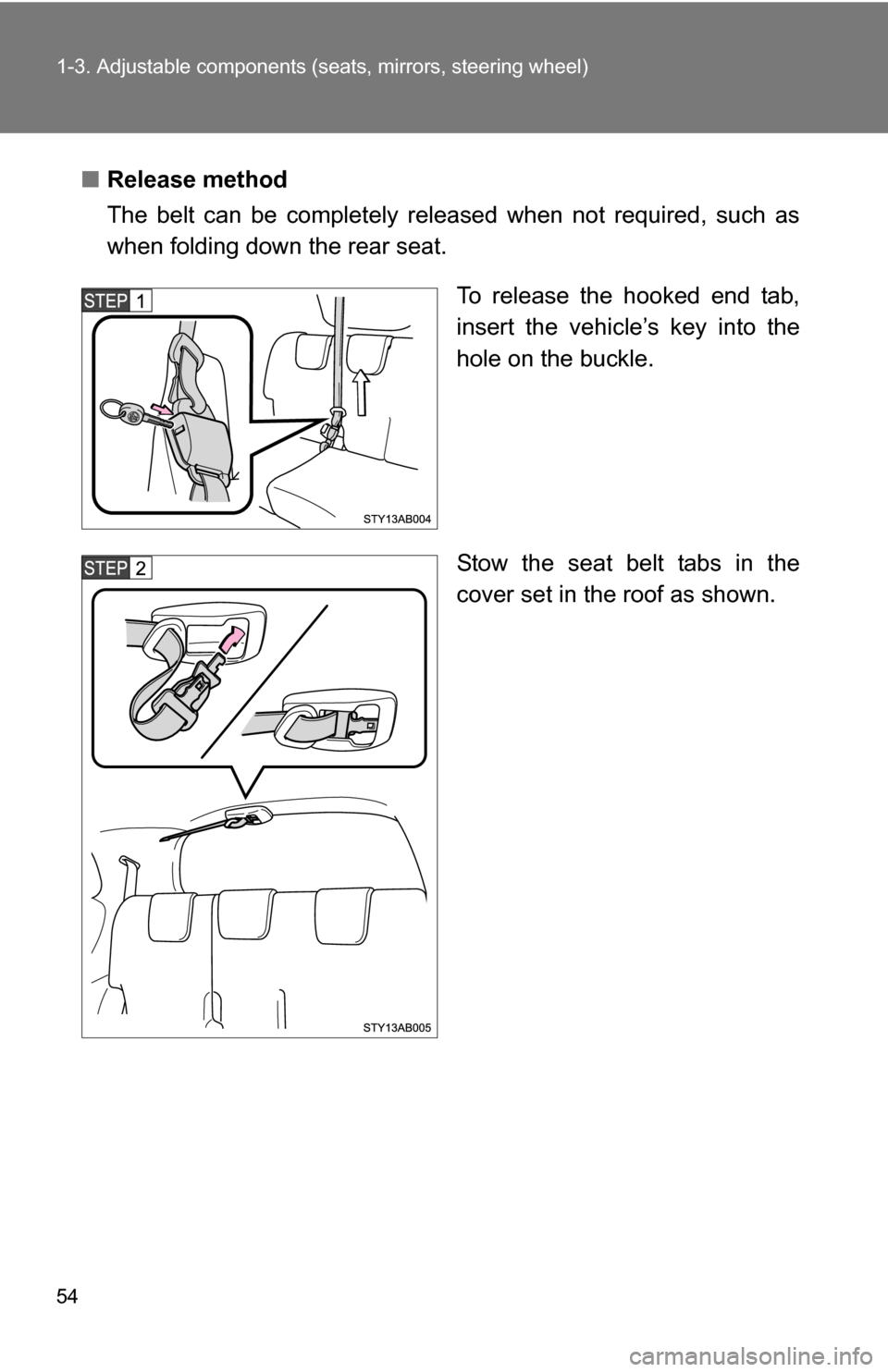
■Release method
The belt can be completely released when not required, such as
when folding down the rear seat.
To release the hooked end tab,
insert the vehicle’s key into the
hole on the buckle.
Stow the seat belt tabs in the
cover set in the roof as shown.
Page 59 of 392
59
1-3. Adjustable components (s
eats, mirrors, steering wheel)
1
Before driving
CAUTION
Observe the following precautions to reduce the risk of injury in the event of
sudden braking or an accident.
Failing to do so may cause death or severe injury.
■Wearing a seat belt
●Ensure that all passengers wear a seat belt.
● Always wear a seat belt properly.
● Each seat belt should be used by one person only. Do not use a seat belt
for more than one person at once, including children.
● Toyota recommends that children be seated in the rear seat and always
use a seat belt and/or an appropriate child restraint system.
● Do not recline the seat any more than necessary to achieve a proper seat-
ing position. The seat belt is most effective when the occupants are sitting
up straight and well back in the seats.
● Do not wear the shoulder belt under your arm.
● Always wear your seat belt low and snug across your hips.
■ Adjustable shoulder anchor
Always make sure the shoulder belt is positioned across the center of your
shoulder. The belt should be kept away from your neck, but not falling off
your shoulder. Failure to do so could reduce the amount of protection in an
accident and cause death or serious injuries in a collision. ( P. 53)
■ Seat belt pretensioners
●Do not place anything, such as a cushion, on the front passenger’s seat.
Doing so will disperse the passenger’s weight, which prevents the sensor
from detecting the passenger’s weight properly. As a result, the seat belt
pretensioner for the front passenger’s seat may not activate in the event of
a collision.
● If the pretensioner has activated, the seat belt becomes locked: it cannot
be further extended, nor will it return to the stowed position. The seat belt
cannot be used again and must be replaced at your Toyota dealer.
Page 88 of 392
88 1-7. Safety information
CAUTION
■SRS airbag precautions
Observe the following precautions regarding the airbags.
Failure to do so may cause death or serious injury.
●The driver and all passengers in the vehicle must wear their seat belts
properly.
The SRS airbags are supplemental devices to be used with the seat belts.
● The SRS driver airbag deploys with considerable force, and can cause
death or serious injury especially if the driver is very close to the airbag.
The National Highway Traffic Safety Administration (“NHTSA”) advises:
Since the risk zone for driver airbag is the first 2 - 3 in. (50 - 75 mm) of infla-
tion, placing yourself 10 in. (250 mm) fr om your driver airbag provides you
with a clear margin of safety. This distance is measured from the center of
the steering wheel to your breastbone. If you sit less than 10 in. (250 mm)
away now, you can change your driving position in several ways:
• Move your seat to the rear as far as you can while still reaching thepedals comfortably.
• Slightly recline the back of the seat. Although vehicle designs vary, many drivers can achieve the 10 in.
(250 mm) distance, even with the driver seat all the way forward, sim-
ply by reclining the back of the seat somewhat. If reclining the back of
your seat makes it hard to see the road, raise yourself by using a firm,
non-slippery cushion, or raise the seat if your vehicle has that feature\
.
• If your steering wheel is adjustable, tilt it downward. This points the air- bag toward your chest instead of your head and neck.
The seat should be adjusted as recommended by NHTSA above, while still
maintaining control of the foot pedals, steering wheel, and your view of the
instrument panel controls.