Start TOYOTA YARIS 2013 3.G User Guide
[x] Cancel search | Manufacturer: TOYOTA, Model Year: 2013, Model line: YARIS, Model: TOYOTA YARIS 2013 3.GPages: 400, PDF Size: 9 MB
Page 125 of 400
125
2-1. Driving procedures
2
When driving
■
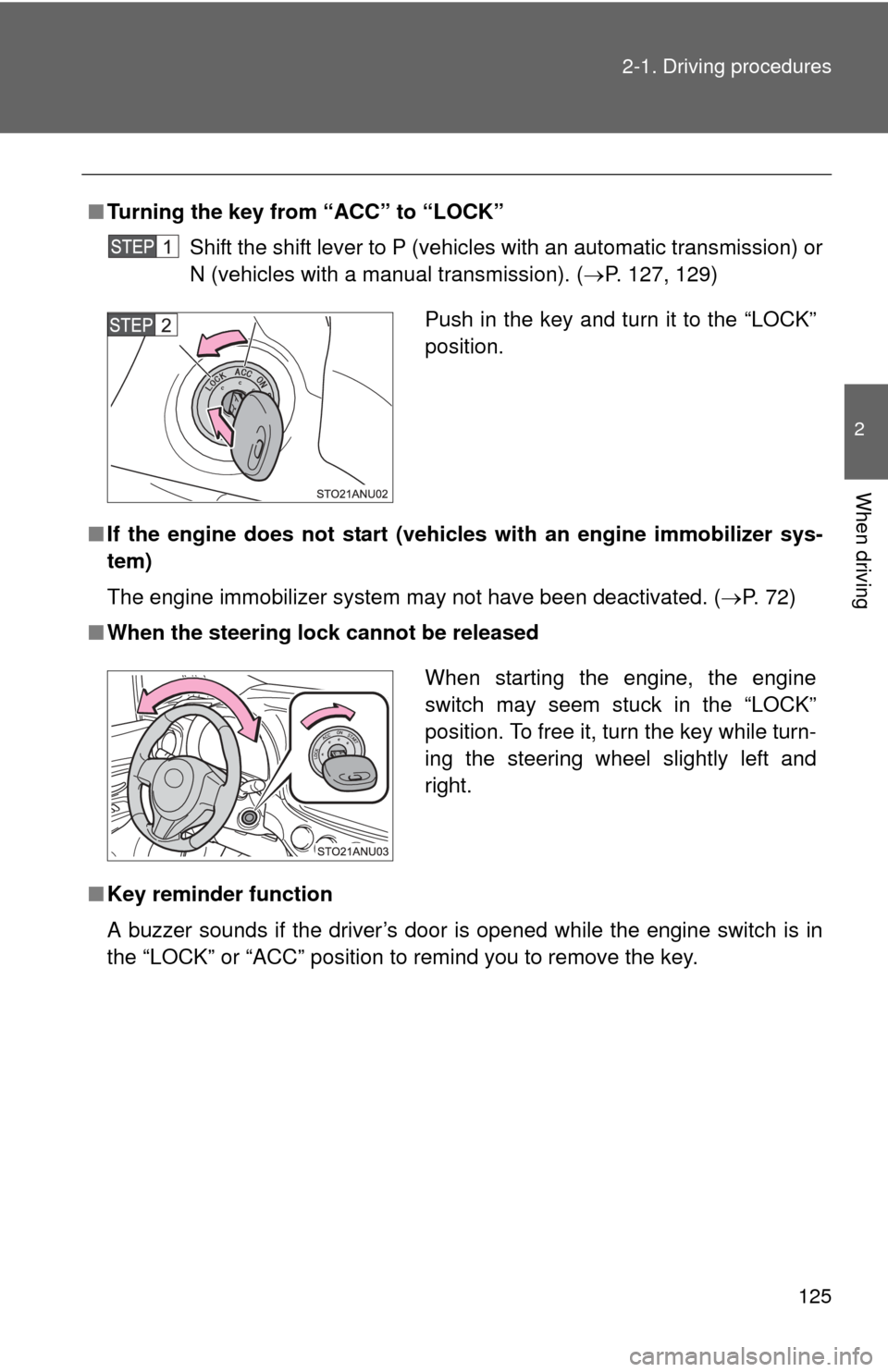
Turning the key from “ACC” to “LOCK”
Shift the shift lever to P (vehicles with an automatic transmission) or
N (vehicles with a manual transmission). ( P. 127, 129)
■ If the engine does not start (vehic les with an engine immobilizer sys-
tem)
The engine immobilizer system may not have been deactivated. ( P. 72)
■ When the steering lock cannot be released
■ Key reminder function
A buzzer sounds if the driver’s door is opened while the engine switch is in
the “LOCK” or “ACC” position to remind you to remove the key\
.
Push in the key and turn it to the “LOCK”
position.
When starting the engine, the engine
switch may seem stuck in the “LOCK”
position. To free it, turn the key while turn-
ing the steering wheel slightly left and
right.
Page 126 of 400
126 2-1. Driving procedures
CAUTION
■When starting the engine
Always start the engine while sitting in the driver’s seat. Do not depress the
accelerator pedal while starting the engine under any circumstances.
Doing so may cause an accident resulting in death or serious injury.
■ Caution while driving
Do not turn the engine switch to the “LOCK” position while driving. If, in an
emergency, you must turn the engine off while the vehicle is moving, turn the
engine switch only to the “ACC” position to stop the engine. An accident may
result if the engine is stopped while driving.
NOTICE
■To prevent battery discharge
Do not leave the engine switch in the “ACC” or “ON” position for long periods
of time without the engine running.
■ When starting the engine
●Do not crank the engine for more than 30 seconds at a time. This may
overheat the starter and wiring systems.
● Do not race a cold engine.
● If the engine becomes difficult to start or stalls frequently, have the engine
checked immediately.
Page 127 of 400
127
2-1. Driving procedures
2
When driving
Automatic transmission
: If equipped
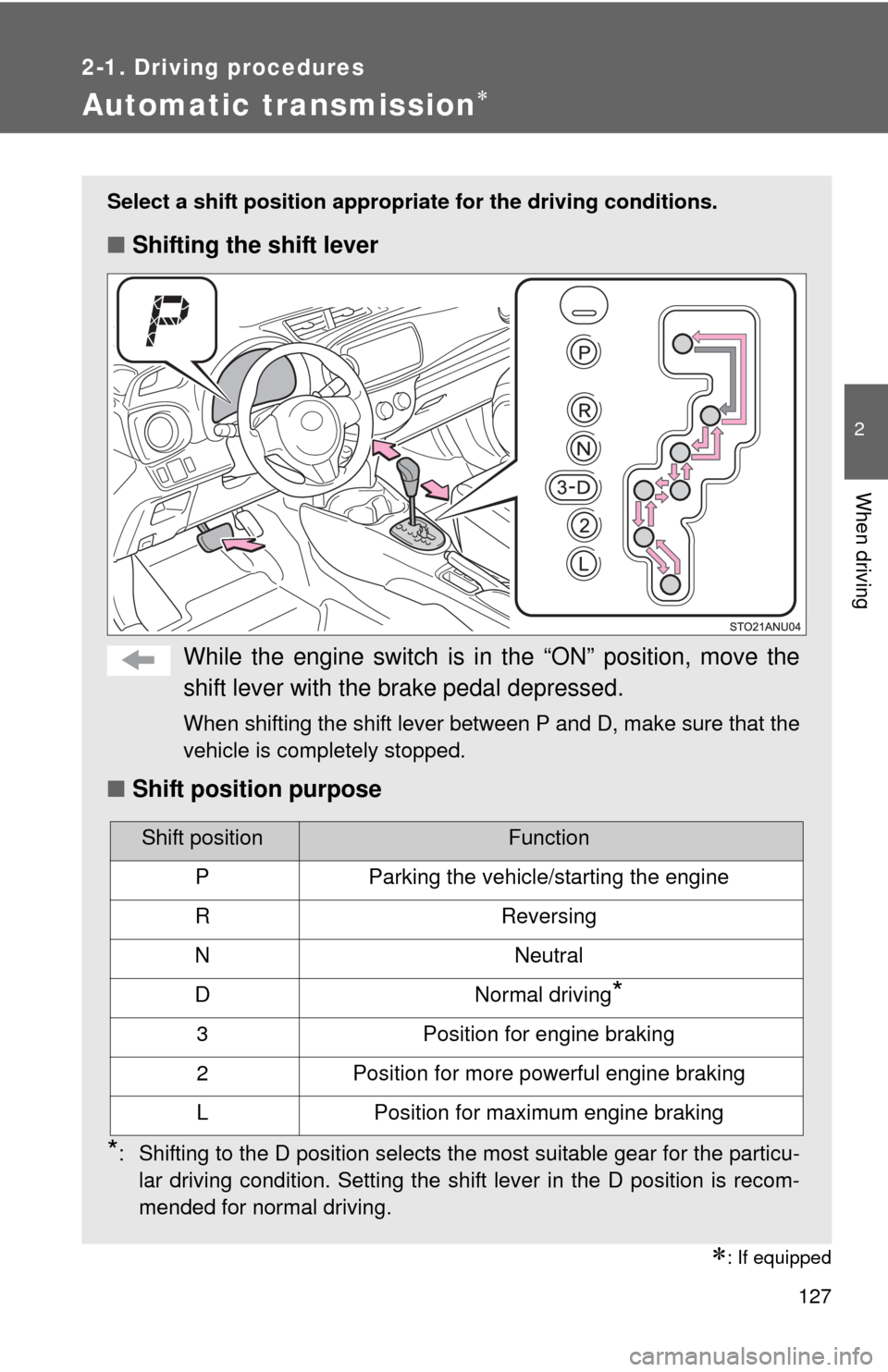
Select a shift position appropriate for the driving conditions.
■Shifting the shift lever
While the engine switch is in the “ON” position, move the
shift lever with the brake pedal depressed.
When shifting the shift lever between P and D, make sure that the
vehicle is completely stopped.
■Shift position purpose
*: Shifting to the D position selects the most suitable gear for the particu-
lar driving condition. Setting the shift lever in the D position is recom-
mended for normal driving.
Shift positionFunction
PParking the vehicle/starting the engine
RReversing
NNeutral
DNormal driving*
3Position for engine braking
2Position for more powerful engine braking
LPosition for maximum engine braking
Page 138 of 400
138 2-2. Instrument cluster
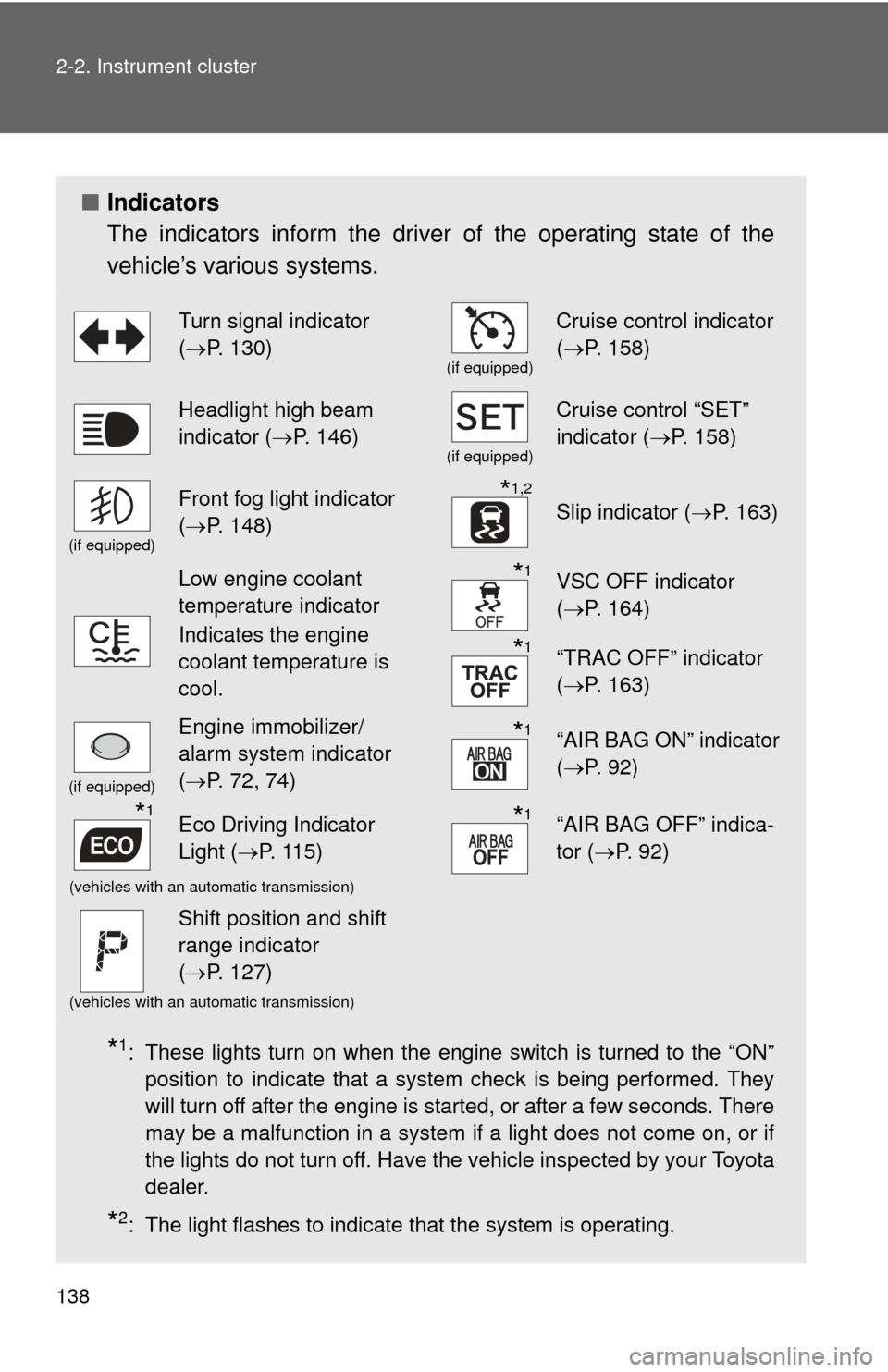
■Indicators
The indicators inform the driver of the operating state of the
vehicle’s various systems.
*1: These lights turn on when the engine switch is turned to the “ON”
position to indicate that a system check is being performed. They
will turn off after the engine is started, or after a few seconds. There
may be a malfunction in a system if a light does not come on, or if
the lights do not turn off. Have the vehicle inspected by your Toyota
dealer.
*2: The light flashes to indicate that the system is operating.
Turn signal indicator
(P. 130)
(if equipped)
Cruise control indicator
( P. 158)
Headlight high beam
indicator ( P. 146)
(if equipped)
Cruise control “SET”
indicator ( P. 158)
(if equipped)
Front fog light indicator
(P. 148)*1,2
Slip indicator ( P. 163)
Low engine coolant
temperature indicator
Indicates the engine
coolant temperature is
cool.*1VSC OFF indicator
(P. 164)
*1“TRAC OFF” indicator
(P. 163)
(if equipped)
Engine immobilizer/
alarm system indicator
(P. 72, 74)*1“AIR BAG ON” indicator
( P. 92)
*1Eco Driving Indicator
Light ( P. 115)*1“AIR BAG OFF” indica-
tor (P. 92)
(vehicles with an automatic transmission)
Shift position and shift
range indicator
(P. 127)
(vehicles with an automatic transmission)
Page 139 of 400
139
2-2. Instrument cluster
2
When driving
CAUTION
■
If a safety system warning light does not come on
Should a safety system light such as the ABS and SRS warning light not
come on when you start the engine, this could mean that these systems are
not available to help protect you in an accident, which could result in death
or serious injury. Have the vehicle inspected by your Toyota dealer immedi-
ately if this occurs.
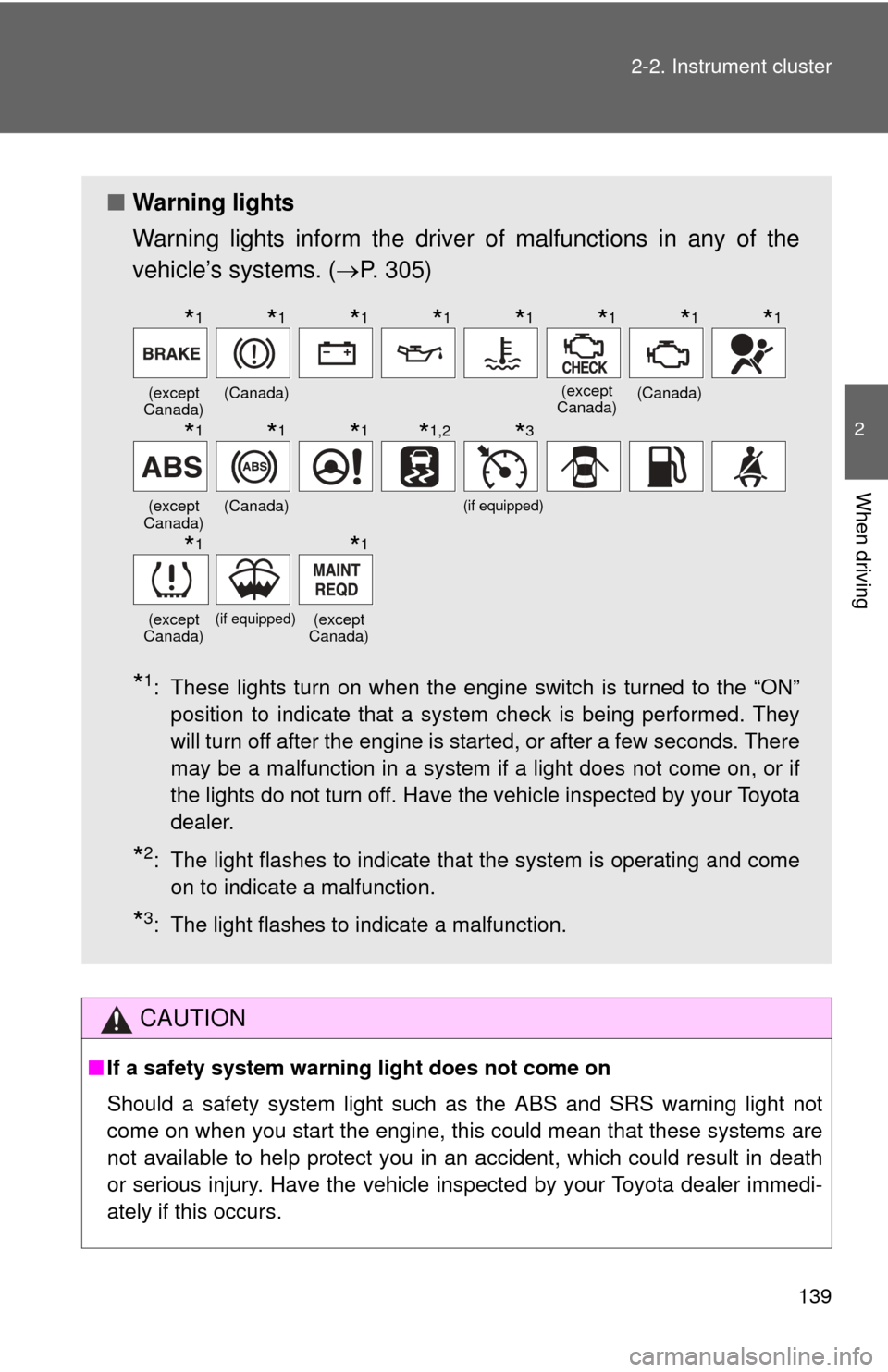
■ Warning lights
Warning lights inform the driver of malfunctions in any of the
vehicle’s systems. ( P. 305)
*1: These lights turn on when the engine switch is turned to the “ON”
position to indicate that a system check is being performed. They
will turn off after the engine is started, or after a few seconds. There
may be a malfunction in a system if a light does not come on, or if
the lights do not turn off. Have the vehicle inspected by your Toyota
dealer.
*2: The light flashes to indicate that the system is operating and comeon to indicate a malfunction.
*3: The light flashes to indicate a malfunction.
(except
Canada)(Canada)(except
Canada)(Canada)
(except
Canada)(Canada)(if equipped)
(except
Canada)
(if equipped)(except
Canada)
*1*1*1*1*1*1*1*1
*1*1*1*1,2*3
*1*1
Page 143 of 400
143
2-2. Instrument cluster
2
When driving
■
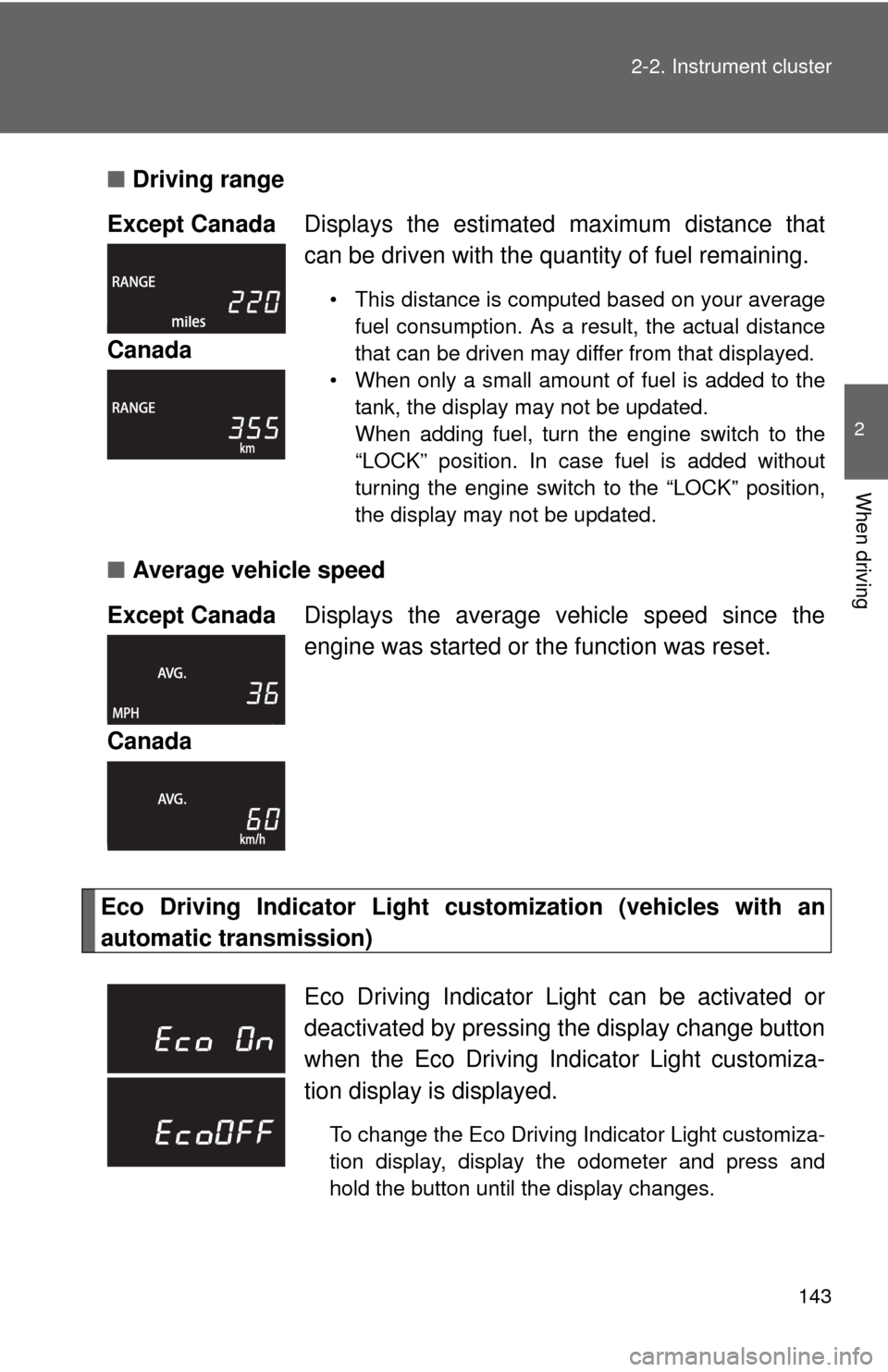
Driving range
■ Average vehicle speed
Eco Driving Indicator Light cu stomization (vehicles with an
automatic transmission) Except Canada
Displays the estimated maximum distance that
can be driven with the quantity of fuel remaining.
• This distance is computed based on your average
fuel consumption. As a result, the actual distance
that can be driven may differ from that displayed.
• When only a small amount of fuel is added to the tank, the display may not be updated.
When adding fuel, turn the engine switch to the
“LOCK” position. In case fuel is added without
turning the engine switch to the “LOCK” position,
the display may not be updated.
Canada
Except Canada Displays the average vehicle speed since the
engine was started or the function was reset.
Canada
Eco Driving Indicator Light can be activated or
deactivated by pressing t he display change button
when the Eco Driving Indicator Light customiza-
tion display is displayed.
To change the Eco Driving Indicator Light customiza-
tion display, display the odometer and press and
hold the button until the display changes.
Page 147 of 400

147
2-3. Operating the lights and wipers
2
When driving
■
Daytime running light system (if equipped)
●To make your vehicle more visible to other drivers, the headlights turn on
automatically (at a reduced intensity) whenever the engine is started and
the parking brake is released. Daytime running lights are not designed for
use at night.
● Compared to turning on the headlights, the daytime running light system
offers greater durability and consumes less electricity, so it can help
improve fuel economy.
■ Light reminder buzzer
A buzzer sounds when the engine switch is turned to the “LOCK” or “ACC”
position and the driver’s door is opened while the lights are turned on.
■ Battery-saving function (vehicles wit h an alarm system or daytime run-
ning light system)
In all following conditions, the headlights and the other remaining lights will
go off automatically after 20 minutes in order to prevent the vehicle battery
from being discharged:
● The engine switch is in the “LOCK” position.
● The headlights and/or tail lights are on.
This function will be canceled in any of the following situations:
● When the engine switch is turned to the “ON” position.
● When the light switch is operated.
● When the door is opened or closed.
NOTICE
■To prevent battery discharge
Do not leave the lights on longer than necessary when the engine is not run-
ning.
Page 162 of 400
162
2-4. Using other driving systems
Driving assist systems
To help enhance driving safety and performance, the following sys-
tems operate automatically in res ponse to various driving situations.
Be aware, however, that these systems are supplementary and
should not be relied upon too h eavily when operating the vehicle.
■ABS (Anti-lock Brake System)
Helps to prevent wheel lock when the brakes are applied suddenly, or if
the brakes are applied while driving on a slippery road surface.
■Brake assist
Generates an increased level of braking force after the brake pedal is
depressed when the system detects a panic stop situation.
■VSC (Vehicle Stability Control)
Helps the driver to control skidding when swerving suddenly or turning
on slippery road surfaces.
■TRAC (Traction Control)
Helps to maintain drive power and prevent the drive wheels from spin-
ning when starting the vehicle or accelerating on slippery roads.
■EPS (Electric Power Steering)
Employs an electric motor to reduce the amount of effort needed to turn
the steering wheel.
Page 164 of 400
164 2-4. Using other driving systems
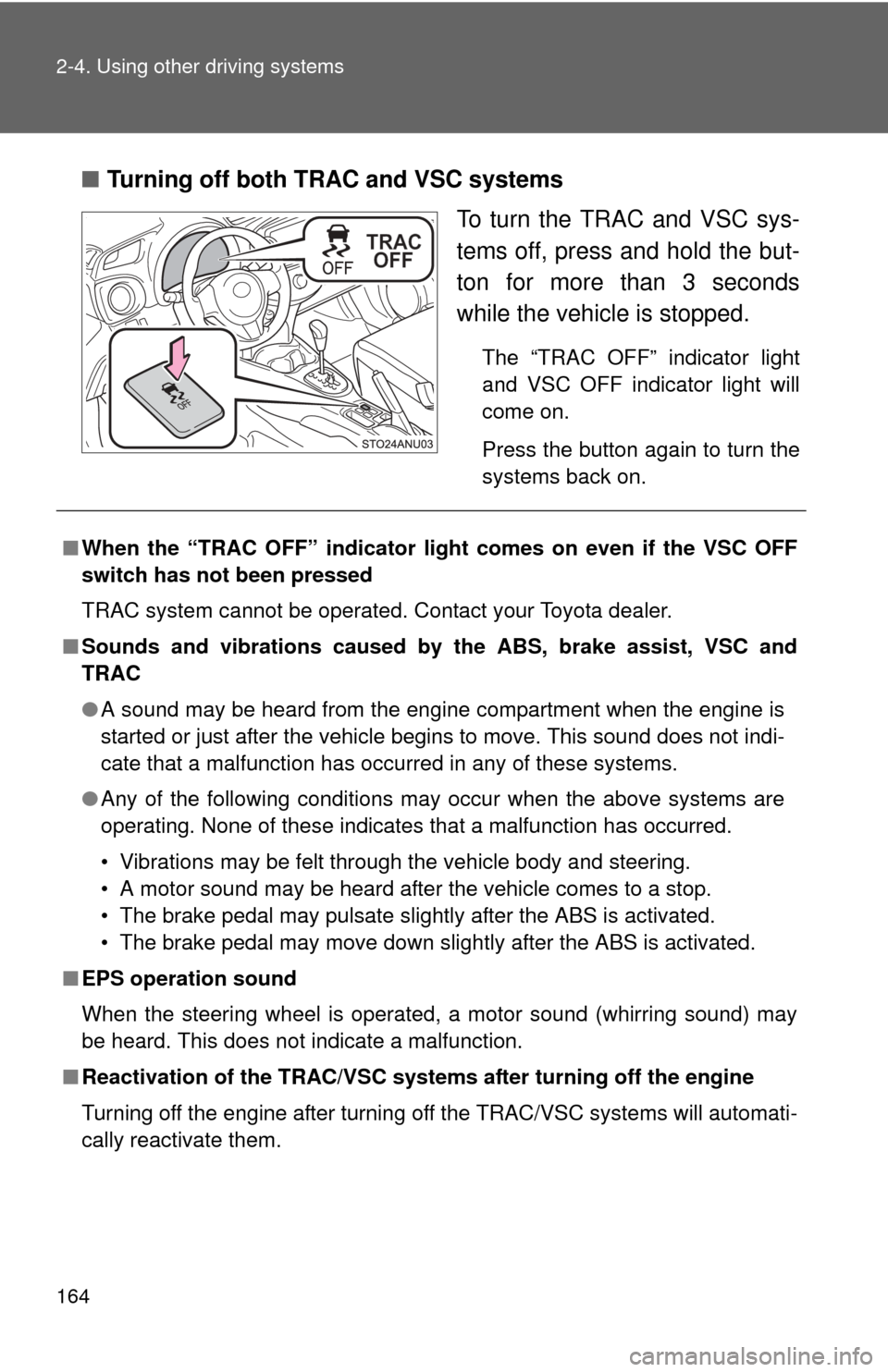
■Turning off both TRAC and VSC systems
To turn the TRAC and VSC sys-
tems off, press and hold the but-
ton for more than 3 seconds
while the vehicle is stopped.
The “TRAC OFF” indicator light
and VSC OFF indicator light will
come on.
Press the button again to turn the
systems back on.
■When the “TRAC OFF” indicator light comes on even if the VSC OFF
switch has not been pressed
TRAC system cannot be operated. Contact your Toyota dealer.
■ Sounds and vibrations caused by the ABS, brake assist, VSC and
TRAC
● A sound may be heard from the engine compartment when the engine is
started or just after the vehicle begins to move. This sound does not indi-
cate that a malfunction has occurred in any of these systems.
● Any of the following conditions may occur when the above systems are
operating. None of these indicates that a malfunction has occurred.
• Vibrations may be felt through the vehicle body and steering.
• A motor sound may be heard after the vehicle comes to a stop.
• The brake pedal may pulsate slightly after the ABS is activated.
• The brake pedal may move down slightly after the ABS is activated.
■ EPS operation sound
When the steering wheel is operated, a motor sound (whirring sound) may
be heard. This does not indicate a malfunction.
■ Reactivation of the TRAC/VSC systems after turning off the engine
Turning off the engine after turning off the TRAC/VSC systems will automati-
cally reactivate them.
Page 180 of 400

180 2-5. Driving information
Trailer towing tipsYour vehicle will handle differently w hen towing a trailer. In order to
avoid accident, death or serious in jury, keep the following in mind
when towing:
● Before starting out, check the trailer lights and the vehicle-trailer
connections. Recheck after driving a short distance.
● Practice turning, stopping and reve rsing with the trailer attached in
an area away from traffic until you become accustomed to the feel
of the vehicle.
● Reversing with a trailer attached is difficult and requires practice.
Grip the bottom of the steering wheel and move your hand to the
left to move the trailer to the left. Move your hand to the right to
move the trailer to the right. (This is generally opposite to reversing
without a trailer attached.) Avoid sharp or prolonged turning. Have
someone guide you when reversing to reduce the risk of an acci-
dent.
● As stopping distance is increased when towing a trailer, vehicle-to-
vehicle distance should be increased. For each 10 mph (16 km/h)
of speed, allow at least o ne vehicle and trailer length.
● Avoid sudden braking as you may skid, resulting in jackknifing and
loss of control. This is especiall y true on wet or slippery surfaces.
● Avoid jerky starts or sudden acceleration. Vehicles with a manual
transmission, prevent excessive cl utch slippage by keeping engine
rpm low and not racing the engine. Always start out in first gear.
● Avoid jerky steering and sharp turns, and slow down before mak-
ing turn.
● Note that when making a turn, th e trailer wheels will be closer than
the vehicle wheels to the inside of the turn. Compensate by making
a larger than normal turning radius.