automatic transmission TOYOTA YARIS 2014 3.G User Guide
[x] Cancel search | Manufacturer: TOYOTA, Model Year: 2014, Model line: YARIS, Model: TOYOTA YARIS 2014 3.GPages: 400, PDF Size: 9 MB
Page 119 of 400

119
2-1. Driving procedures
2
When driving
CAUTION
■
When the vehicle is stopped
●Do not race the engine.
If the vehicle is in any gear other than P (vehicles with an automatic trans-
mission only) or N, the vehicle may accelerate suddenly and unexpectedly,
causing an accident.
● Do not leave the vehicle with the engine running for a long time.
If such a situation cannot be avoided, park the vehicle in an open space
and check that exhaust fumes do not enter the vehicle interior.
● On vehicles with an automatic transmission, in order to prevent accidents
due to the vehicle rolling away, always keep depressing the brake pedal
while the engine is running, and apply the parking brake as necessary.
● If the vehicle is stopped on an incline, in order to prevent accidents caused
by the vehicle rolling forward or ba ckward, always depress the brake pedal
and securely apply the parking brake as needed.
● Avoid revving or racing the engine.
Running the engine at high speed while the vehicle is stopped may cause
the exhaust system to overheat, which could result in a fire if combustible
material is nearby.
■ When the vehicle is parked
●Do not leave glasses, cigarette lighters, spray cans, or soft drink cans in
the vehicle when it is in the sun.
Doing so may result in the following:
• Gas may leak from a cigarette lighter or spray can, and may lead to a
fire.
• The temperature inside the vehicle may cause the plastic lenses and plastic material of glasses to deform or crack.
• Soft drink cans may rupture, causing the contents to spray over the interior of the vehicle, and may also cause a short circuit in the vehi-
cle’s electrical components.
● Do not leave cigarette lighters in the vehicle. If a cigarette lighter is in a
place such as the glove box or on the floor, it may be lit accidentally when
luggage is loaded or the seat is adjusted, causing a fire.
Page 120 of 400

120 2-1. Driving procedures
CAUTION
●Do not attach adhesive discs to the windshield or windows. Do not place
containers such as air fresheners on the instrument panel or dashboard.
Adhesive discs or containers may act as lenses, causing a fire in the vehi-
cle.
● Do not leave a door or window open if the curved glass is coated with a
metallized film such as a silver-colored one. Reflected sunlight may cause
the glass to act as a lens, causing a fire.
● Always apply the parking brake, shift the shift lever to P (vehicles with an
automatic transmission only), stop the engine and lock the vehicle.
Do not leave the vehicle unattended while the engine is running.
● Do not touch the exhaust pipes while the engine is running or immediately
after turning the engine off.
Doing so may cause burns.
● Do not leave the engine running in an area with snow build-up, or where it
is snowing. If snowbanks build up around the vehicle while the engine is
running, exhaust gases may collect and enter the vehicle. This may lead
to death or a serious health hazard.
■ Exhaust gases
Exhaust gases include harmful carbon monoxide (CO), which is colorless
and odorless. Inhaling exhaust gases may lead to death or a serious health
hazard.
●If the vehicle is in a poorly ventilated area, stop the engine. In a closed
area, such as a garage, exhaust gases may collect and enter the vehicle.
This may lead to death or a serious health hazard.
● The exhaust system should be checked occasionally. If there is a hole or
crack caused by corrosion, damage to a joint or abnormal exhaust noise,
be sure to have the vehicle inspected and repaired by your Toyota dealer.
Failure to do so may allow exhaust gases to enter the vehicle, resulting in
death or a serious health hazard.
Page 122 of 400

122 2-1. Driving procedures
NOTICE
■When driving the vehicle
Vehicles with an automatic transmission
●Do not depress the accelerator and brake pedals at the same time during
driving, as this may restrain driving torque.
● Do not use the accelerator pedal or depress the accelerator and brake
pedals at the same time to hold the vehicle on a hill.
Vehicles with a manual transmission
● Do not depress the accelerator and brake pedals at the same time during
driving, as this may restrain driving torque.
● Do not shift gears unless the clutch pedal is fully depressed. After shifting,
do not release the clutch pedal abruptly. Doing so may damage the clutch,
transmission and gears.
● Observe the following to prevent the clutch from being damaged.
• Do not rest your foot on the clutch pedal while driving.
Doing so may cause clutch trouble.
• Do not use any gears other than the 1st gear when starting off and moving forward.
Doing so may damage the clutch.
• Do not use the clutch to hold the vehicle when stopping on an uphill grade.
Doing so may damage the clutch.
● Do not shift the shift lever to R when the vehicle is still moving. Doing so
may damage the clutch, transmission and gears.
■ When parking the vehicle (vehicl es with an automatic transmission)
Always shift the shift lever to P. Failure to do so may cause the vehicle to
move or the vehicle may accelerate suddenly if the accelerator pedal is acci-
dentally depressed.
Page 124 of 400
124
2-1. Driving procedures
Engine (ignition) switch
■Starting the engine
Vehicles with an au tomatic transmission
Check that the parking brake is set.
Check that the shift lever is set in P.
Firmly depress the brake pedal.
Turn the engine switch to the “START” position to start the
engine.
Vehicles with a manual transmission Check that the parking brake is set.
Check that the shift lever is set in N.
Firmly depress the brake pedal and clutch pedal.
Turn the engine switch to the “START” position to start the
engine.
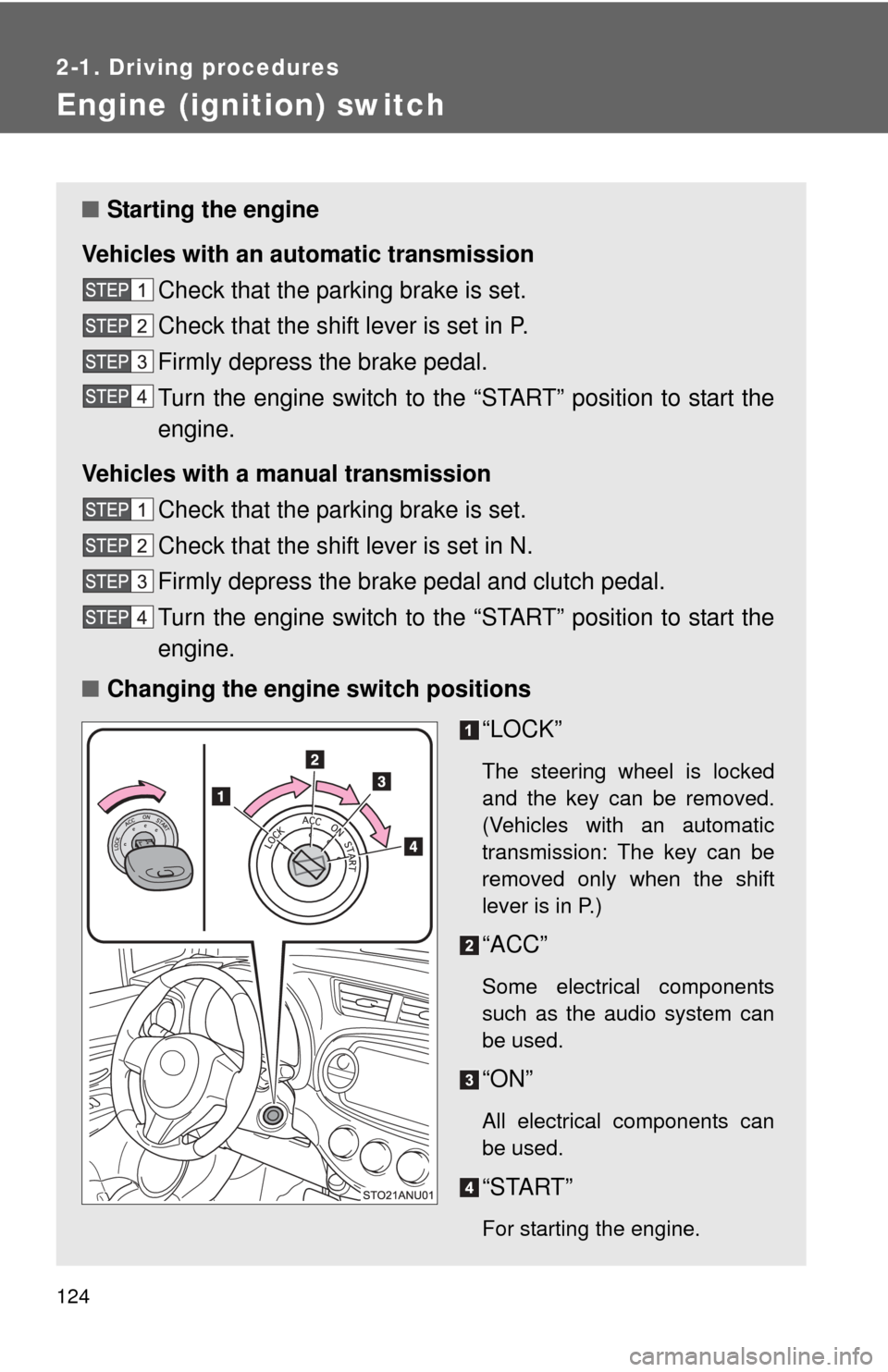
■ Changing the engine switch positions
“LOCK”
The steering wheel is locked
and the key can be removed.
(Vehicles with an automatic
transmission: The key can be
removed only when the shift
lever is in P.)
“ACC”
Some electrical components
such as the audio system can
be used.
“ON”
All electrical components can
be used.
“START”
For starting the engine.
Page 125 of 400
125
2-1. Driving procedures
2
When driving
■
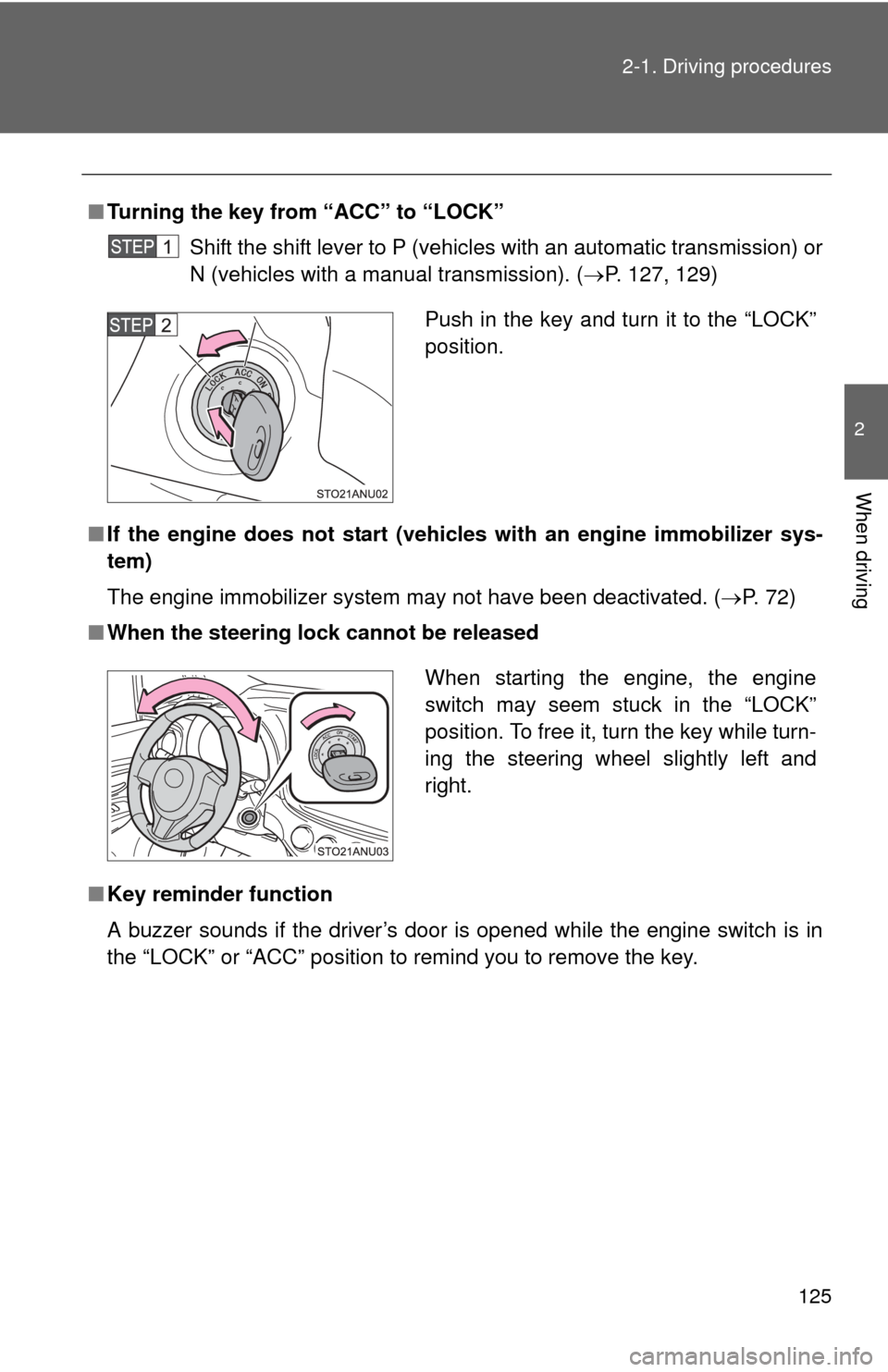
Turning the key from “ACC” to “LOCK”
Shift the shift lever to P (vehicles with an automatic transmission) or
N (vehicles with a manual transmission). ( P. 127, 129)
■ If the engine does not start (vehic les with an engine immobilizer sys-
tem)
The engine immobilizer system may not have been deactivated. ( P. 72)
■ When the steering lock cannot be released
■ Key reminder function
A buzzer sounds if the driver’s door is opened while the engine switch is in
the “LOCK” or “ACC” position to remind you to remove the key\
.
Push in the key and turn it to the “LOCK”
position.
When starting the engine, the engine
switch may seem stuck in the “LOCK”
position. To free it, turn the key while turn-
ing the steering wheel slightly left and
right.
Page 127 of 400
127
2-1. Driving procedures
2
When driving
Automatic transmission
: If equipped
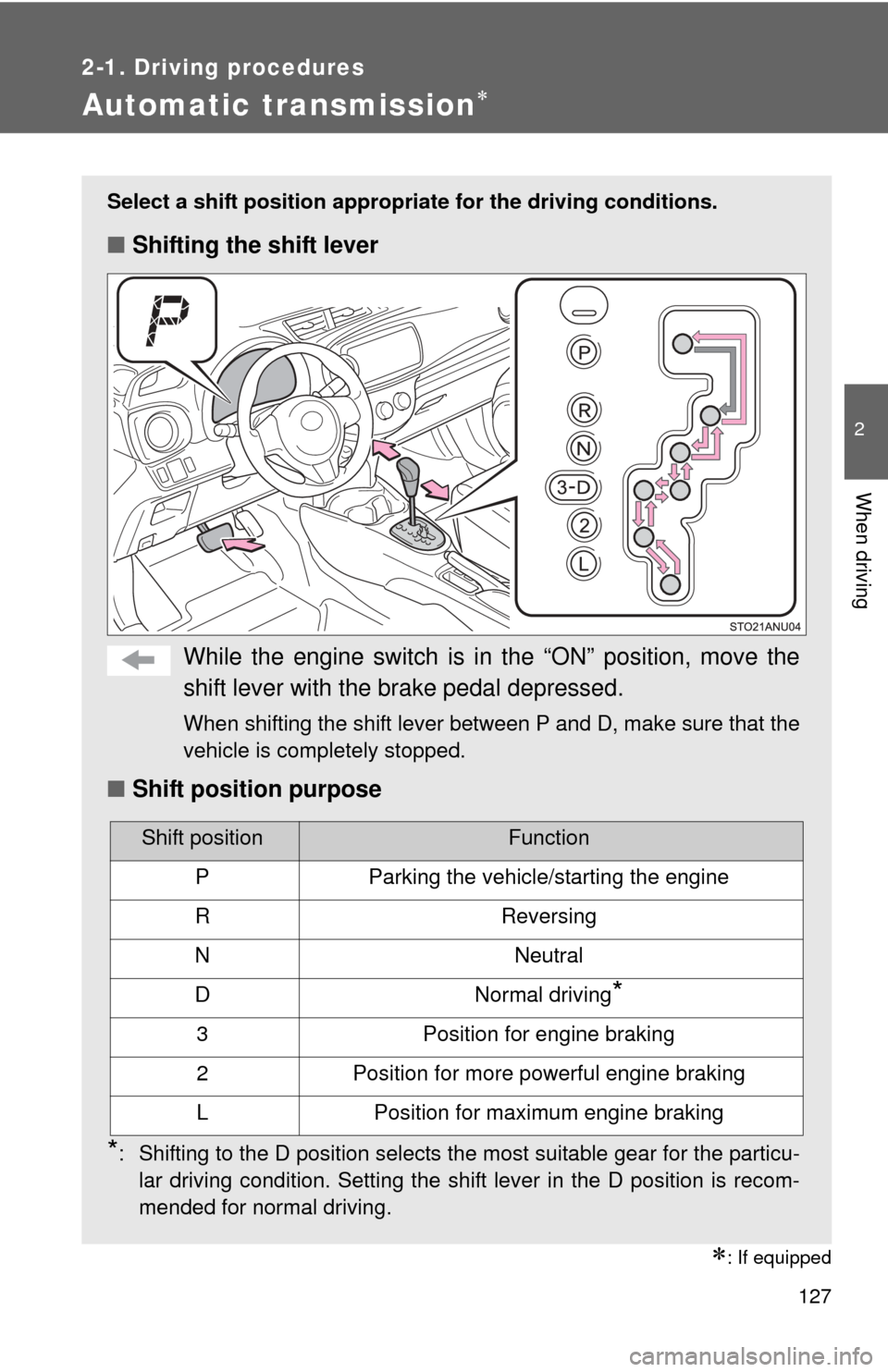
Select a shift position appropriate for the driving conditions.
■Shifting the shift lever
While the engine switch is in the “ON” position, move the
shift lever with the brake pedal depressed.
When shifting the shift lever between P and D, make sure that the
vehicle is completely stopped.
■Shift position purpose
*: Shifting to the D position selects the most suitable gear for the particu-
lar driving condition. Setting the shift lever in the D position is recom-
mended for normal driving.
Shift positionFunction
PParking the vehicle/starting the engine
RReversing
NNeutral
DNormal driving*
3Position for engine braking
2Position for more powerful engine braking
LPosition for maximum engine braking
Page 138 of 400
138 2-2. Instrument cluster
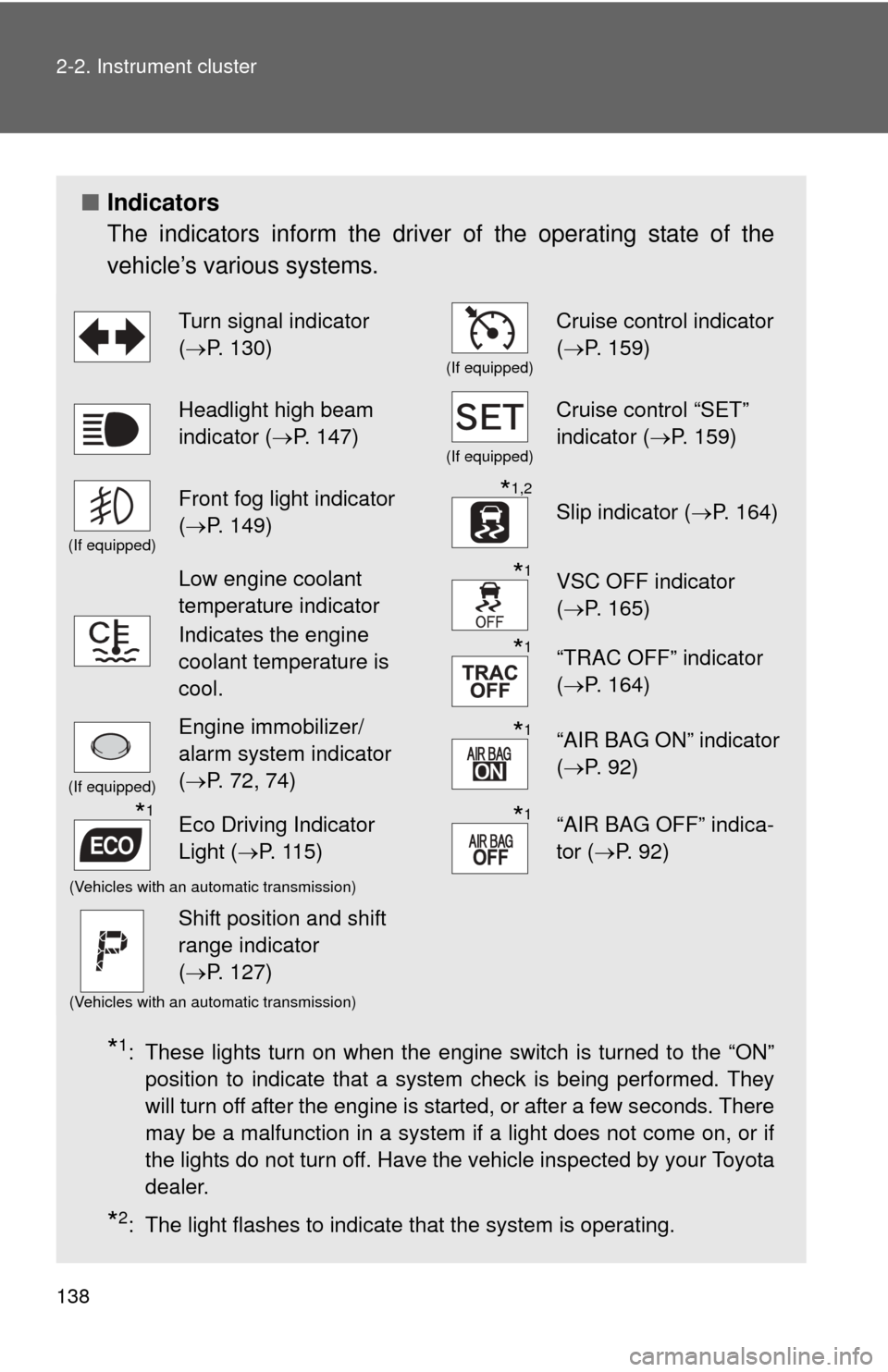
■Indicators
The indicators inform the driver of the operating state of the
vehicle’s various systems.
*1: These lights turn on when the engine switch is turned to the “ON”
position to indicate that a system check is being performed. They
will turn off after the engine is started, or after a few seconds. There
may be a malfunction in a system if a light does not come on, or if
the lights do not turn off. Have the vehicle inspected by your Toyota
dealer.
*2: The light flashes to indicate that the system is operating.
Turn signal indicator
(P. 130)
(If equipped)
Cruise control indicator
( P. 159)
Headlight high beam
indicator ( P. 147)
(If equipped)
Cruise control “SET”
indicator ( P. 159)
(If equipped)
Front fog light indicator
(P. 149)*1,2
Slip indicator ( P. 164)
Low engine coolant
temperature indicator
Indicates the engine
coolant temperature is
cool.*1VSC OFF indicator
(P. 165)
*1“TRAC OFF” indicator
(P. 164)
(If equipped)
Engine immobilizer/
alarm system indicator
(P. 72, 74)*1“AIR BAG ON” indicator
( P. 92)
*1Eco Driving Indicator
Light ( P. 115)*1“AIR BAG OFF” indica-
tor (P. 92)
(Vehicles with an automatic transmission)
Shift position and shift
range indicator
(P. 127)
(Vehicles with an automatic transmission)
Page 140 of 400
140
2-2. Instrument cluster
Multi-information display
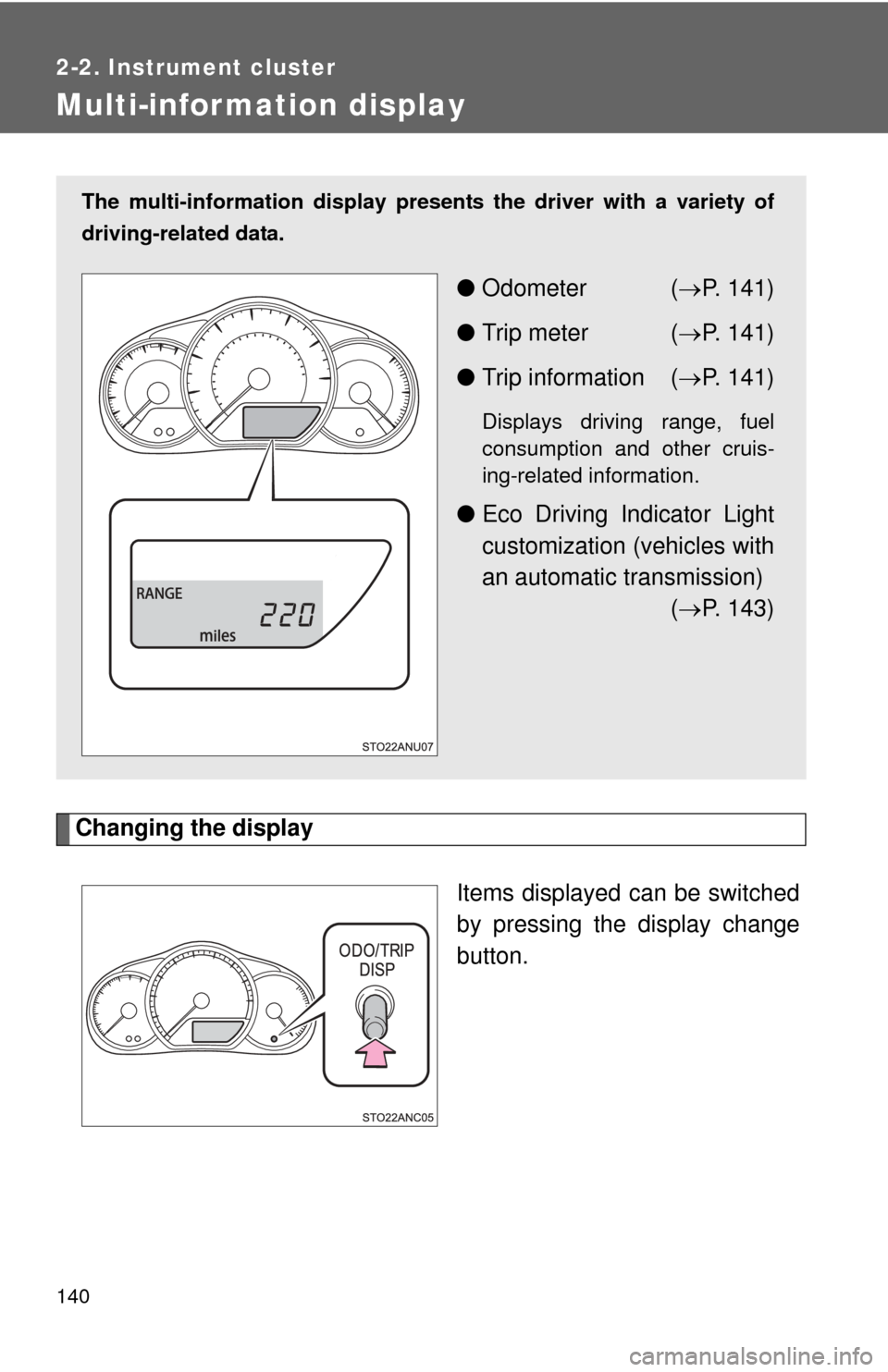
Changing the displayItems displayed can be switched
by pressing the display change
button.
The multi-information display presen ts the driver with a variety of
driving-related data.
● Odometer ( P. 141)
● Trip meter ( P. 141)
● Trip information ( P. 141)
Displays driving range, fuel
consumption and other cruis-
ing-related information.
● Eco Driving Indicator Light
customization (vehicles with
an automatic transmission)
( P. 143)
Page 143 of 400
143
2-2. Instrument cluster
2
When driving
■
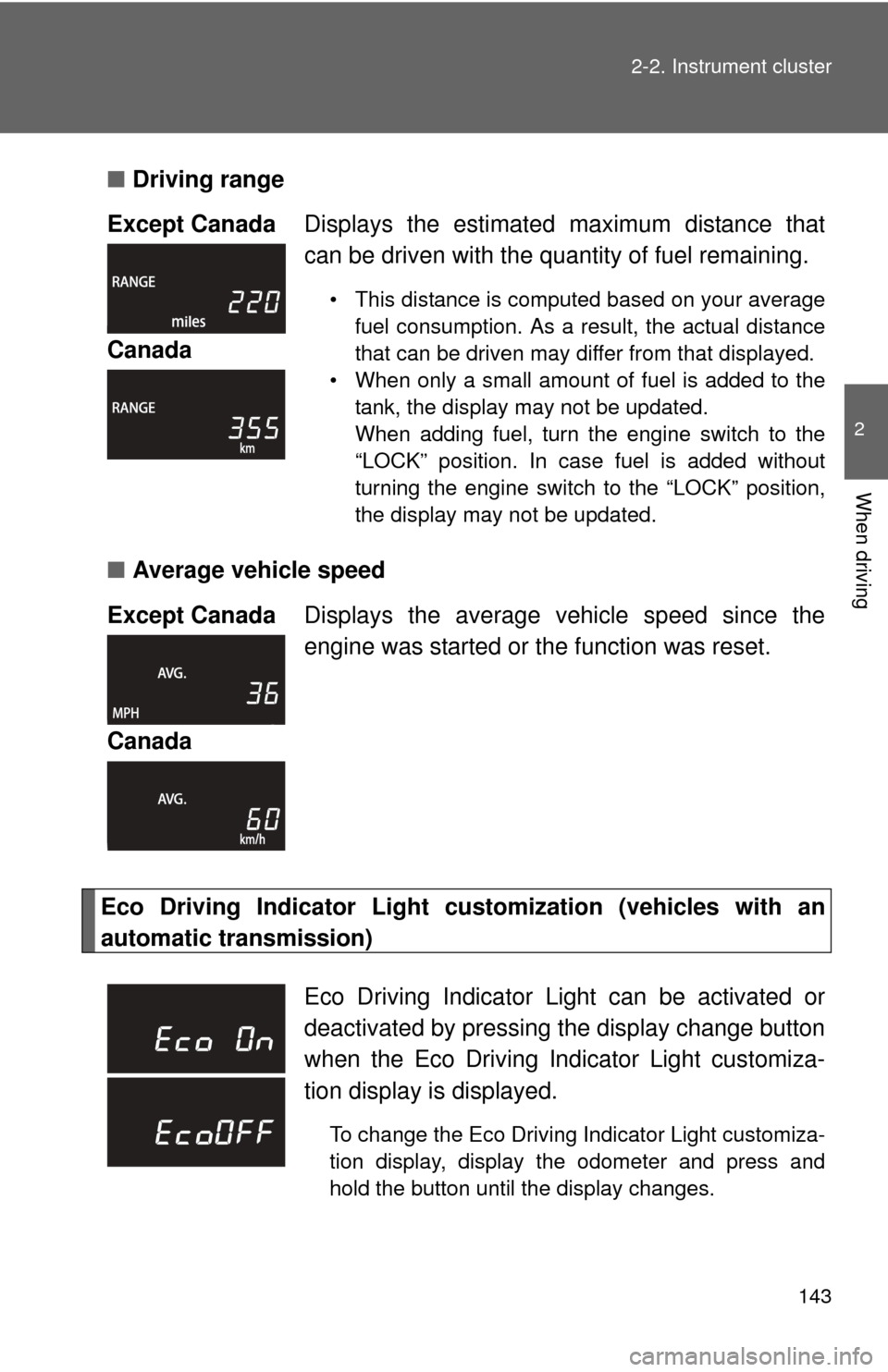
Driving range
■ Average vehicle speed
Eco Driving Indicator Light cu stomization (vehicles with an
automatic transmission) Except Canada
Displays the estimated maximum distance that
can be driven with the quantity of fuel remaining.
• This distance is computed based on your average
fuel consumption. As a result, the actual distance
that can be driven may differ from that displayed.
• When only a small amount of fuel is added to the tank, the display may not be updated.
When adding fuel, turn the engine switch to the
“LOCK” position. In case fuel is added without
turning the engine switch to the “LOCK” position,
the display may not be updated.
Canada
Except Canada Displays the average vehicle speed since the
engine was started or the function was reset.
Canada
Eco Driving Indicator Light can be activated or
deactivated by pressing t he display change button
when the Eco Driving Indicator Light customiza-
tion display is displayed.
To change the Eco Driving Indicator Light customiza-
tion display, display the odometer and press and
hold the button until the display changes.
Page 174 of 400
174 2-5. Driving information
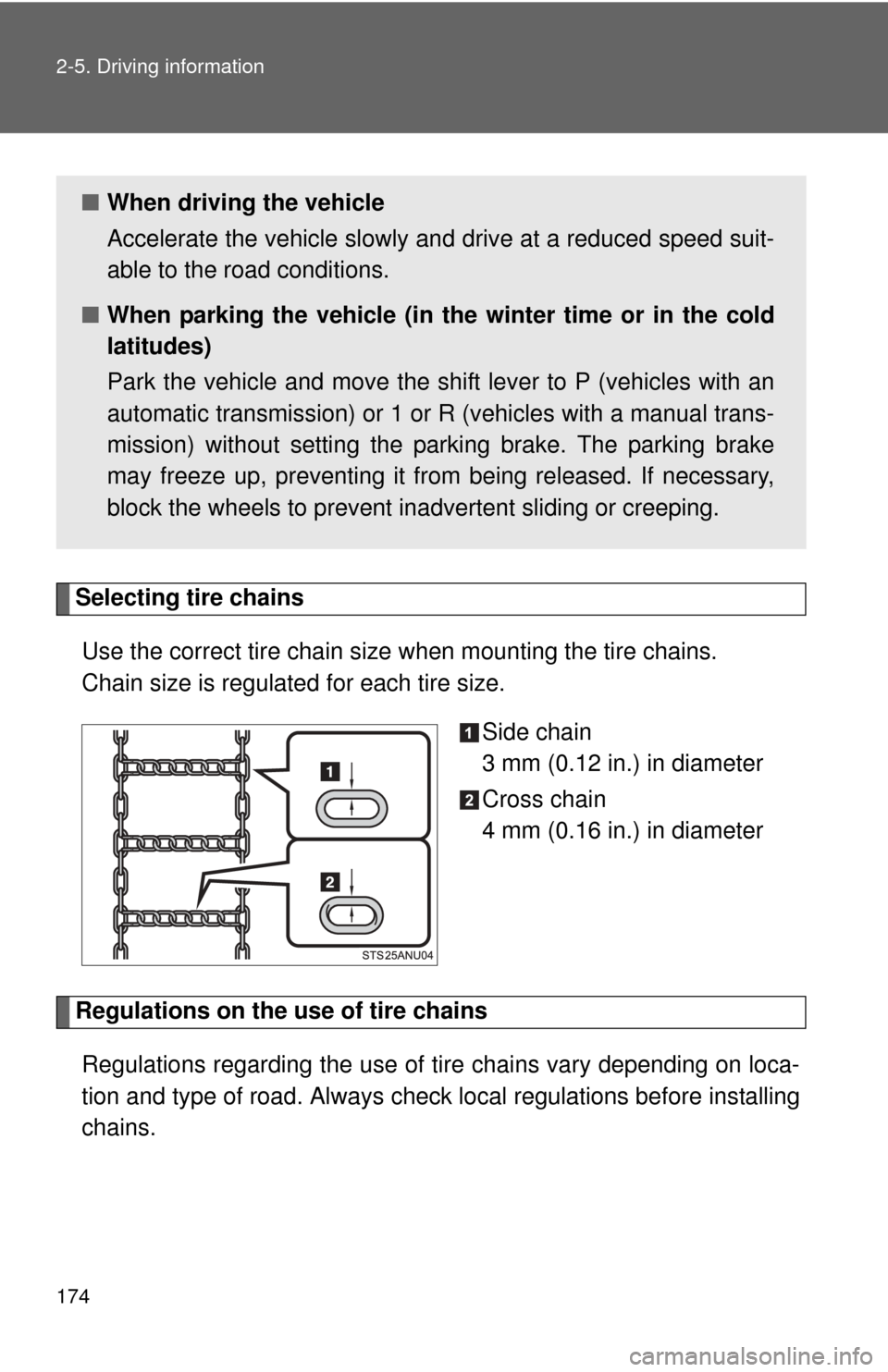
Selecting tire chainsUse the correct tire chain size when mounting the tire chains.
Chain size is regulated for each tire size.
Side chain
3 mm (0.12 in.) in diameter
Cross chain
4 mm (0.16 in.) in diameter
Regulations on the use of tire chains
Regulations regarding the use of ti re chains vary depending on loca-
tion and type of road. Always chec k local regulations before installing
chains.
■ When driving the vehicle
Accelerate the vehicle slowly and drive at a reduced speed suit-
able to the road conditions.
■ When parking the vehicle (in the winter time or in the cold
latitudes)
Park the vehicle and move the shift lever to P (vehicles with an
automatic transmission) or 1 or R (vehicles with a manual trans-
mission) without setting the parking brake. The parking brake
may freeze up, preventing it from being released. If necessary,
block the wheels to prevent in advertent sliding or creeping.