phone TOYOTA YARIS 2016 User Guide
[x] Cancel search | Manufacturer: TOYOTA, Model Year: 2016, Model line: YARIS, Model: TOYOTA YARIS 2016Pages: 592, PDF Size: 10.44 MB
Page 328 of 592
326
YARIS_SEDAN_OM_OM99M18z_(U)
4-3. Bluetooth®
■Microphone (hands-free)
The microphone is used for speaking voice commands or when
making a Hands-free call.
■Talk button, Pick-Up button and Hang-Up button (hands-free)
The basic functions of Bluetooth
® Hands-Free can be used for such
things as making calls or hanging up using the talk, pick-up and
hang-up buttons on the steering wheel.
■Commander switch (Type B)
The commander switch is used for volume adjustment and display
operation. Tilt or turn the commander knob to move the cursor.
Press the commander knob to select the icon.
■Volume adjustment
The power/volume dial of the audio unit
*1 or the volume dial of the
commander switch
*2 is used to adjust the volume. Turn the dial to
the right to increase volume, to the left to decrease it.
The volume can also be adjusted using the volume button on the
steering wheel.
*1Type A
*2Type B
Type B only:
Conversation volume and the volume of the voice guidance and
ringtone can each be set in advance.
Select the icon on the home screen and display the Com-
munication screen.
Select .
Adjust the and the using the slider.
■Volume adjustment
If the volume is lower compared to other audio modes, increase the volume
from the device side.
1
2
3
YARIS_SEDAN_OM_OM99M18z_(U).book Page 326 Monday, June 1, 2015 9:22 PM
Page 329 of 592
YARIS_SEDAN_OM_OM99M18z_(U)
3274-3. Bluetooth®
4
Interior Features
■Bluetooth® Hands-Free Preparation
● Pairing code setting
The 4-digit pairing code setting for registration of your cell phone
(pairing) can be set beforehand.
The initial setting value is “0000”.
Press the pick-up button or talk button with a short press.
Say: [Beep] “Setup”
Prompt: “Select one of the following: Pairing options, confirma-
tion prompts, language, passcode, select phone or select
music player.”
Say: [Beep] “Pairing options”
Prompt: “Select one of the following: Pair, Edit, Delete, List, or
Set Pairing Code.”
Say: [Beep] “Set pairing code”
Prompt: “Your current pairing code is XXXX. Do you want to
change it to a different pairing code?”
Say: [Beep] “Yes”
Prompt: “Please say a 4-digit pairing code.”
Say: [Beep] “YYYY”
Prompt: “YYYY is this correct?”
Say: [Beep] “Yes” or “No”
If “Yes”, go to Step 14. If “No”, the procedure returns to Step 9.
Prompt: “Your new pairing code is YYYY. Use this pairing code
when pairing devices to the Hands free system. Do you want
to pair a device now?”
Say: [Beep] “Yes” or “No”
If “Yes”, the system switches to the device registration mode. If
“No”, the system returns to standby status.
Bluetooth® Preparation (Type A)
1
2
3
4
5
6
7
8
9
10
11
12
13
14
15
16
YARIS_SEDAN_OM_OM99M18z_(U).book Page 327 Monday, June 1, 2015 9:22 PM
Page 330 of 592
328
YARIS_SEDAN_OM_OM99M18z_(U)
4-3. Bluetooth®
●Device pairing
To use Bluetooth
® Hands-Free, the device equipped with
Bluetooth® has to be paired to the Bluetooth® unit using the fol-
lowing procedure.
A maximum of seven devices including hands-free mobile
phones and Bluetooth
® audio devices can be paired to one vehi-
cle.
Activate the Bluetooth
® application of the device.
For the operation of the device, refer to its instruction manual.
Press the pick-up button or talk button with a short press.
Say: [Beep] “Setup”
Prompt: “Select one of the following: Pairing options, confirma-
tion prompts, language, passcode, select phone or select
music player.”
Say: [Beep] “Pairing options”
Prompt: “Select one of the following: Pair, Edit, Delete, List, or
Set Pairing Code.”
Say: [Beep] “Pair”
Prompt: “Start the pairing process on your Bluetooth
® device.
Your pairing code is 0000 (XXXX). Input this on your
Bluetooth
® device when prompted on the device. See device
manual for instructions.”
Using the device, perform a search for the Bluetooth
® device
(Peripheral device).
For the operation of the device, refer to its instruction manual.
1
2
3
4
5
6
7
8
9
YARIS_SEDAN_OM_OM99M18z_(U).book Page 328 Monday, June 1, 2015 9:22 PM
Page 332 of 592
330
YARIS_SEDAN_OM_OM99M18z_(U)
4-3. Bluetooth®
●Registered device read-out
Bluetooth
® Hands-Free can read-out the devices registered to its
system.
Do this function only when parked. It is too distracting to attempt while
driving and you may make too many errors to be effective.
Press the pick-up button or talk button with a short press.
Say: [Beep] “Setup”
Prompt: “Select one of the following: Pairing options, confirma-
tion prompts, language, passcode, select phone or select
music player.”
Say: [Beep] “Pairing options”
Prompt: “Select one of the following: Pair, Edit, Delete, List, or
Set Pairing Code”
Say: [Beep] “List”
Prompt: “XXXXX..., XXXXX..., XXXXX... (Ex. Device A, device
B, device C)” (The voice guidance reads out the device tags
registered to the hands-free system.)
Press the talk button with a short press during the read-out at
the desired device, and then say one of the following voice
commands to execute it.
• “Select phone”: Selects device (Mobile phone) when the talk button is short- pressed.
• “Select music player”: Selects device (Music player) when the talk button is short-pressed.
• “Edit”: Edits device when the talk button is short-pressed.
• “Continue”: Continues the list readout.
• “Delete”: Deletes the registered device when the talk button is short-pressed.
• “Previous”: Returns to the previous device in read-out when the talk button is short-pressed.
Prompt: “End of list, would you like to start from the begin-
ning?”
Say: [Beep] “No”
Prompt: “Returning to main menu.”1
2
3
4
5
6
7
8
9
10
YARIS_SEDAN_OM_OM99M18z_(U).book Page 330 Monday, June 1, 2015 9:22 PM
Page 333 of 592
YARIS_SEDAN_OM_OM99M18z_(U)
3314-3. Bluetooth®
4
Interior Features
●Device selection
If several devices have been paired, the Bluetooth
® unit links the
device last paired. If you would like to link a different paired
device, it is necessary to change the link. The order of device pri-
ority after the link has been changed is maintained even when
the ignition is switched off.
Hands-free phone:
Press the pick-up button or talk button with a short press.
Say: [Beep] “Setup”
Prompt: “Select one of the following: Pairing options, confirma-
tion prompts, language, passcode, select phone or select
music player.”
Say: [Beep] “Select phone”
Prompt: “Please say the name of the device you would like to
select.
Available devices are XXXXX... (Ex. device A), XXXXX... (Ex.
device B), XXXXX... (Ex. device C). Which device please?”
Say: [Beep] “XXXXX... (Ex. Device B)”
Prompt: “XXXXX... (Ex. Device B). Is this correct?”
Say: [Beep] “Yes” or “No”
If “Yes”, go to Step 10. If “No”, the procedure returns to Step 5.
Prompt: “XXXXX... (Ex. Device B) selected.”
Music player: Press the pick-up button or talk button with a short press.
Say: [Beep] “Setup”
Prompt: “Select one of the following: Pairing options, confirma-
tion prompts, language, passcode, select phone or select
music player.”
Say: [Beep] “Select music player”
Prompt: “Please say the name of the device you would like to
select.
Available devices are XXXXX... (Ex. device A), XXXXX... (Ex.
device B), XXXXX... (Ex. device C). Which device please?”
Say: [Beep] “XXXXX... (Ex. Device B)”
Prompt: “XXXXX... (Ex. Device B). Is this correct?”
1
2
3
4
5
6
7
8
9
10
1
2
3
4
5
6
7
YARIS_SEDAN_OM_OM99M18z_(U).book Page 331 Monday, June 1, 2015 9:22 PM
Page 334 of 592
![TOYOTA YARIS 2016 User Guide 332
YARIS_SEDAN_OM_OM99M18z_(U)
4-3. Bluetooth®
Say: [Beep] “Yes” or “No”
If “Yes”, go to Step 10. If “No”, the procedure returns to Step 5.
Prompt: “XXXXX... (Ex. Device B) selecte](/img/14/60787/w960_60787-333.png "TOYOTA YARIS 2016 User Guide 332
YARIS_SEDAN_OM_OM99M18z_(U)
4-3. Bluetooth®
Say: [Beep] “Yes” or “No”
If “Yes”, go to Step 10. If “No”, the procedure returns to Step 5.
Prompt: “XXXXX... (Ex. Device B) selecte")
332
YARIS_SEDAN_OM_OM99M18z_(U)
4-3. Bluetooth®
Say: [Beep] “Yes” or “No”
If “Yes”, go to Step 10. If “No”, the procedure returns to Step 5.
Prompt: “XXXXX... (Ex. Device B) selected.”
● Deleting a device
Registered devices (Mobile phone) can be deleted individually or
collectively.
Do this function only when parked. It is too distracting to attempt while
driving and you may make too many errors to be effective.
Press the pick-up button or talk button with a short press.
Say: [Beep] “Setup”
Prompt: “Select one of the following: Pairing options, confirma-
tion prompts, language, passcode, select phone or select
music player.”
Say: [Beep] “Pairing options”
Prompt: “Select one of the following: Pair, Edit, Delete, List, or
Set Pairing Code.”
A registered device (Mobile phone) can be deleted using the registra-
tion list.
Say: [Beep] “Delete”
Prompt: “Please say the name of the device you would like to
delete.
Available devices are XXXXX... (Ex. device A), XXXXX... (Ex.
device B), XXXXX... (Ex. device C), or all. Which device
please?”
Say: [Beep] “X” (Say the number of the device to be deleted.)
Say “All” to delete all devices (Mobile phone).
Prompt: “Deleting XXXXX... (Ex. device B...) (Registered
device tag). Is this correct?”
Say: [Beep] “Yes”
Prompt: “Deleted”
8
9
10
1
2
3
4
5
6
7
8
9
10
11
YARIS_SEDAN_OM_OM99M18z_(U).book Page 332 Monday, June 1, 2015 9:22 PM
Page 335 of 592
![TOYOTA YARIS 2016 User Guide YARIS_SEDAN_OM_OM99M18z_(U)
3334-3. Bluetooth®
4
Interior Features
●Registered device editing
Press the pick-up button or talk button with a short press.
Say: [Beep] “Setup”
Prompt: “Select o](/img/14/60787/w960_60787-334.png "TOYOTA YARIS 2016 User Guide YARIS_SEDAN_OM_OM99M18z_(U)
3334-3. Bluetooth®
4
Interior Features
●Registered device editing
Press the pick-up button or talk button with a short press.
Say: [Beep] “Setup”
Prompt: “Select o")
YARIS_SEDAN_OM_OM99M18z_(U)
3334-3. Bluetooth®
4
Interior Features
●Registered device editing
Press the pick-up button or talk button with a short press.
Say: [Beep] “Setup”
Prompt: “Select one of the following: Pairing options, confirma-
tion prompts, language, passcode, select phone or select
music player.”
Say: [Beep] “Pairing options”
Prompt: “Select one of the following: Pair, Edit, Delete, List, or
Set Pairing Code.”
Say: [Beep] “Edit”
Prompt: “Please say the name of the device you would like to
edit. Available devices are XXXXX... (Ex. device A), XXXXX...
(Ex. device B), XXXXX... (Ex. device C). Which device
please?”
Say: [Beep] “X” (Say the number of the device to be edited.)
Prompt: “New name please?”
Say: [Beep] “XXXXX... (Ex. Device C)” (Speak a “device tag”
an arbitrary name for the device.)
Prompt: “XXXXX... (Ex. device C) (Device tag), is this cor-
rect?”
Say: [Beep] “Yes”
Prompt: “New name saved.”
1
2
3
4
5
6
7
8
9
10
11
12
13
YARIS_SEDAN_OM_OM99M18z_(U).book Page 333 Monday, June 1, 2015 9:22 PM
Page 337 of 592
YARIS_SEDAN_OM_OM99M18z_(U)
3354-3. Bluetooth®
4
Interior Features
Press the audio control dial to determine the mode.
● Bluetooth
® audio device pairing
Any Bluetooth
® audio device must be paired to the vehicle’s
Bluetooth® unit before it can be listened to over the vehicle’s
speakers.
A maximum of seven devices including Bluetooth
® audio devices
and hands- free mobile phones can be paired to one vehicle.
Concerning the operation of a Bluetooth
® audio device itself,
refer to its instruction manual.
Some Bluetooth
® audio devices have PIN codes (four digits).
Refer to the audio device’s instruction manual because the pair-
ing procedure differs depending on whether it has a PIN code or
not.
● Pairing a Bluetooth
® audio device which has a four-digit PIN
code
Using the audio control dial, select the pairing mode “PAIR
DEVICE” in the “BT SETUP” mode. (Refer to “Bluetooth
®
audio device set-up” for details.)
Press the audio control dial to determine the mode. After
“ENTER PIN” is displayed on the audio display for three sec-
onds, “PIN 0000” is displayed and the PIN code can be input.
DisplayModeFunction
PAIR DEVICEPairing modeBluetooth® audio device
pairing
LINK CHANGELink change modeChanging link to
Bluetooth® audio device
PAIR DELETEPairing deletion modeDeleting link to
Bluetooth® audio device
DEVICE INFODevice information dis-
play modeDisplaying vehicle’s
Bluetooth® unit informa-
tion
3
1
2
YARIS_SEDAN_OM_OM99M18z_(U).book Page 335 Monday, June 1, 2015 9:22 PM
Page 343 of 592
YARIS_SEDAN_OM_OM99M18z_(U)
3414-3. Bluetooth®
4
Interior Features
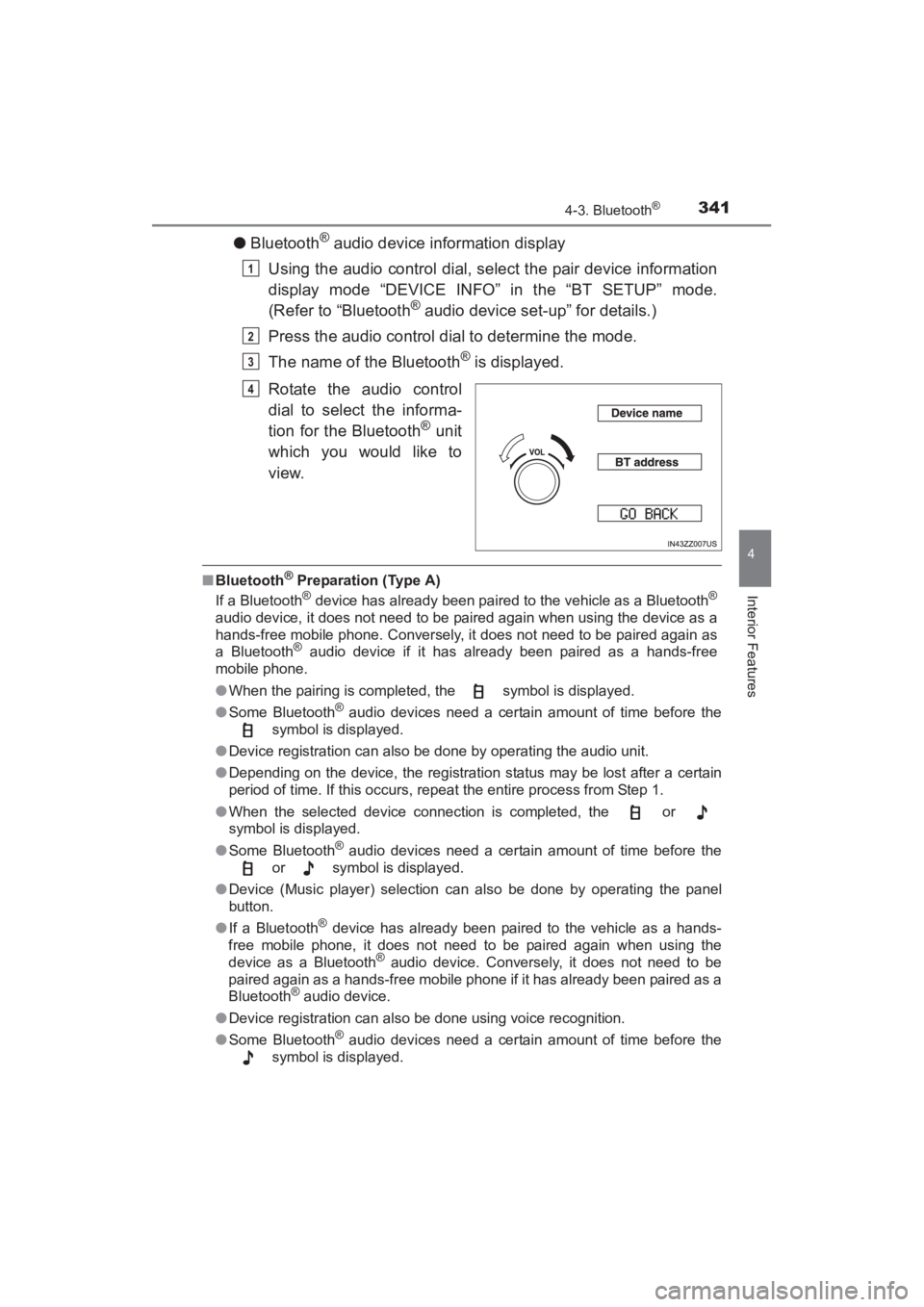
●Bluetooth® audio device information display
Using the audio control dial, select the pair device information
display mode “DEVICE INFO” in the “BT SETUP” mode.
(Refer to “Bluetooth
® audio device set-up” for details.)
Press the audio control dial to determine the mode.
The name of the Bluetooth
® is displayed.
Rotate the audio control
dial to select the informa-
tion for the Bluetooth
® unit
which you would like to
view.
■ Bluetooth® Preparation (Type A)
If a Bluetooth® device has already been paired to the vehicle as a Bluetooth®
audio device, it does not need to be paired again when using the device as a
hands-free mobile phone. Conversely, it does not need to be paired again as
a Bluetooth
® audio device if it has already been paired as a hands-free
mobile phone.
● When the pairing is completed, the symbol is displayed.
● Some Bluetooth
® audio devices need a certain amount of time before the
symbol is displayed.
● Device registration can also be done by operating the audio unit.
● Depending on the device, the registration status may be lost after a certain
period of time. If this occurs, repeat the entire process from Step 1.
● When the selected device connection is completed, the or
symbol is displayed.
● Some Bluetooth
® audio devices need a certain amount of time before the
or symbol is displayed.
● Device (Music player) selection can also be done by operating the panel
button.
● If a Bluetooth
® device has already been paired to the vehicle as a hands-
free mobile phone, it does not need to be paired again when using the
device as a Bluetooth
® audio device. Conversely, it does not need to be
paired again as a hands-free mobile phone if it has already been paired as a
Bluetooth
® audio device.
● Device registration can also be done using voice recognition.
● Some Bluetooth
® audio devices need a certain amount of time before the
symbol is displayed.
1
2
3
4
YARIS_SEDAN_OM_OM99M18z_(U).book Page 341 Monday, June 1, 2015 9:22 PM
Page 344 of 592
342
YARIS_SEDAN_OM_OM99M18z_(U)
4-3. Bluetooth®
●If the pairing failed, “Err” flashes for three seconds.
● Pairing cannot be performed while the vehicle is moving. If you attempt to
perform pairing while the vehicle is moving, “PAIR DISABLE” is displayed.
● If seven Bluetooth
® audio devices have already been paired to the vehicle,
pairing cannot be performed and “MEMORY FULL” is displayed. Delete one
paired device to pair another one.
● If pairing cannot be completed, try “1234” instead. Refer to the owner’s
manual of your mobile device for the right PIN code.
● If a hands-free type mobile phone has been the most recently paired device,
the Bluetooth
® unit links this device. If you would like to use a Bluetooth®
audio type device which has been previously paired to the Bluetooth® unit,
the link must be changed to this device.
● If an error occurs while trying to link a device, “Err” flashes in the audio dis-
play for three seconds, and the display returns to “LINK CHANGE”. If this
occurs, check the pairing status of the Bluetooth
® audio device and the
location of the device in the vehicle (not in the luggage compartment/trunk
or a metal-type box), and then try the link operation again.
● When “GO BACK” is selected and the audio control dial is pressed, the dis-
play returns to “DEVICE INFO”.
YARIS_SEDAN_OM_OM99M18z_(U).book Page 342 Monday, June 1, 2015 9:22 PM