ECO mode TOYOTA YARIS 2016 Owner's Manual
[x] Cancel search | Manufacturer: TOYOTA, Model Year: 2016, Model line: YARIS, Model: TOYOTA YARIS 2016Pages: 592, PDF Size: 10.44 MB
Page 319 of 592
YARIS_SEDAN_OM_OM99M18z_(U)
3174-2. Audio System
4
Interior Features
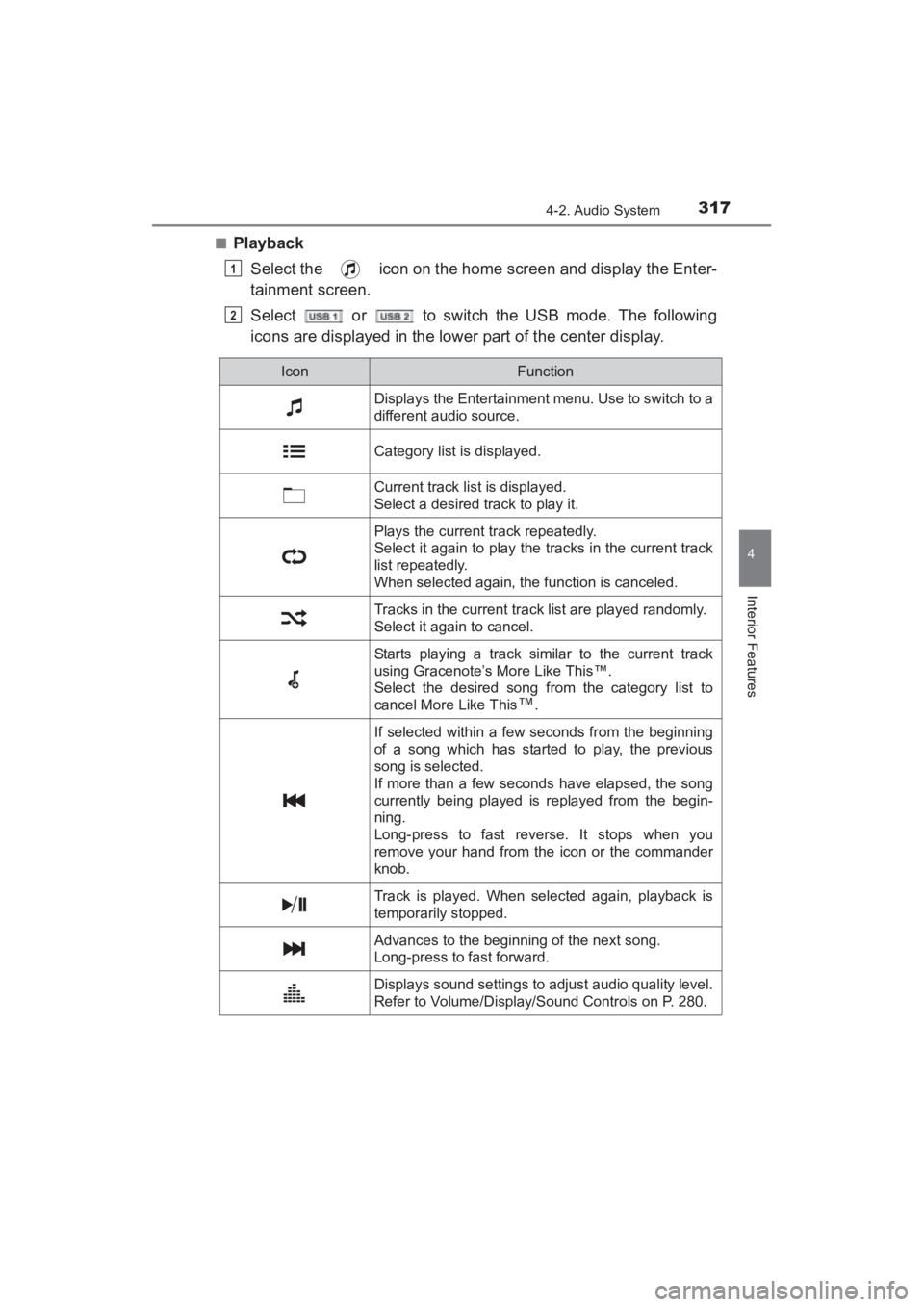
■PlaybackSelect the icon on the home screen and display the Enter-
tainment screen.
Select or to switch the USB mode. The following
icons are displayed in the lower part of the center display.
1
2
IconFunction
Displays the Entertainment menu. Use to switch to a
different audio source.
Category list is displayed.
Current track list is displayed.
Select a desired track to play it.
Plays the current track repeatedly.
Select it again to play the tracks in the current track
list repeatedly.
When selected again, the function is canceled.
Tracks in the current track list are played randomly.
Select it again to cancel.
Starts playing a track similar to the current track
using Gracenote’s More Like This™.
Select the desired song from the category list to
cancel More Like This
™.
If selected within a few seconds from the beginning
of a song which has started to play, the previous
song is selected.
If more than a few seconds have elapsed, the song
currently being played is replayed from the begin-
ning.
Long-press to fast reverse. It stops when you
remove your hand from the icon or the commander
knob.
Track is played. When selected again, playback is
temporarily stopped.
Advances to the beginning of the next song.
Long-press to fast forward.
Displays sound settings to adjust audio quality level.
Refer to Volume/Display/Sound Controls on P. 280.
YARIS_SEDAN_OM_OM99M18z_(U).book Page 317 Monday, June 1, 2015 9:22 PM
Page 321 of 592
YARIS_SEDAN_OM_OM99M18z_(U)
3194-2. Audio System
4
Interior Features
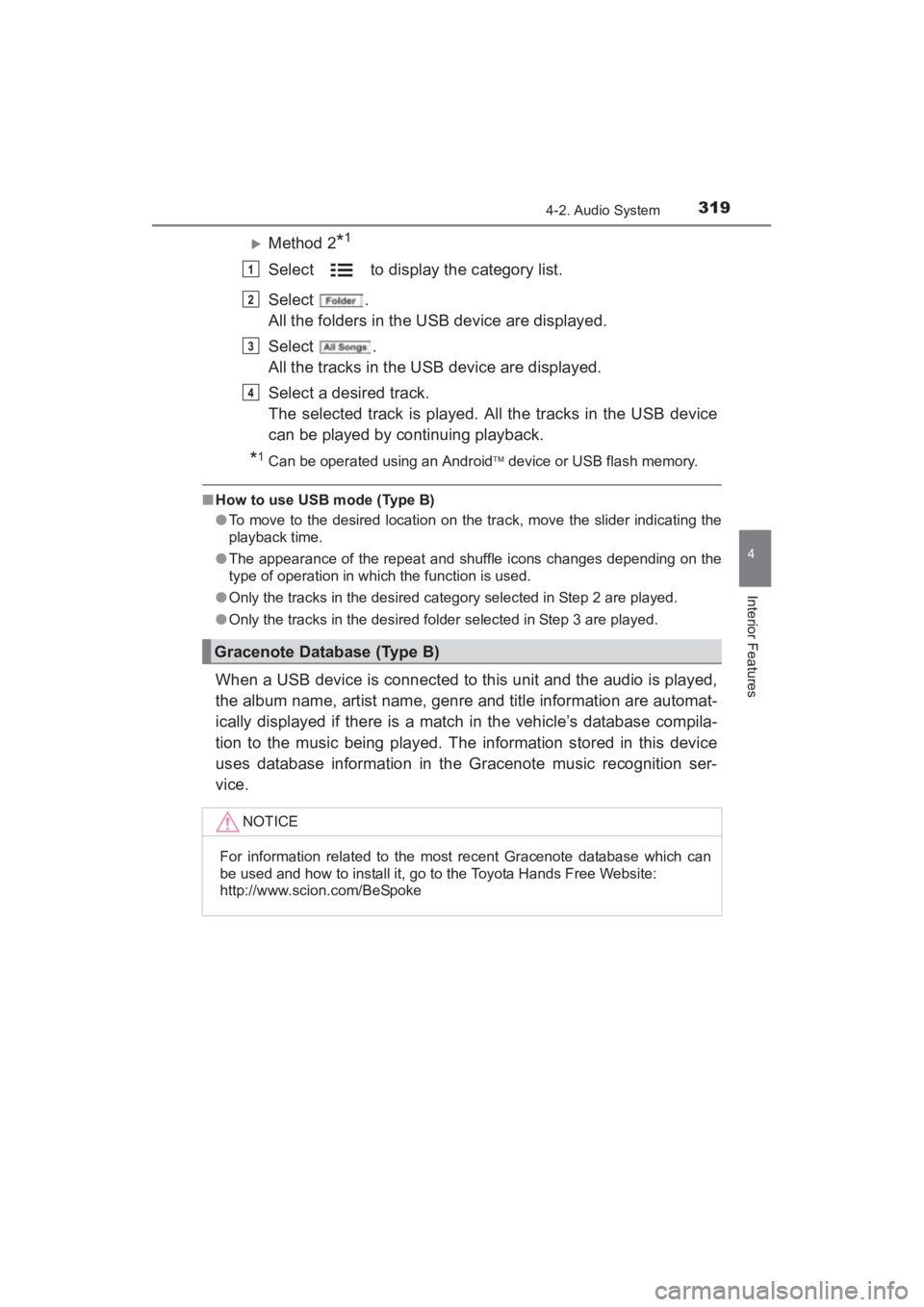
XMethod 2*1
Select to display the category list.
Select .
All the folders in the USB device are displayed.
Select .
All the tracks in the USB device are displayed.
Select a desired track.
The selected track is played. All the tracks in the USB device
can be played by continuing playback.
*1Can be operated using an Android device or USB flash memory.
■ How to use USB mode (Type B)
●To move to the desired location on the track, move the slider indicating the
playback time.
● The appearance of the repeat and shuffle icons changes depending on the
type of operation in which the function is used.
● Only the tracks in the desired category selected in Step 2 are played.
● Only the tracks in the desired folder selected in Step 3 are played.
When a USB device is connected to this unit and the audio is played,
the album name, artist name, genre and title information are automat-
ically displayed if there is a match in the vehicle’s database compila-
tion to the music being played. The information stored in this device
uses database information in the Gracenote music recognition ser-
vice.
Gracenote Database (Type B)
NOTICE
For information related to the most recent Gracenote database which can
be used and how to install it, go to the Toyota Hands Free Website:
http://www.scion.com/BeSpoke
1
2
3
4
YARIS_SEDAN_OM_OM99M18z_(U).book Page 319 Monday, June 1, 2015 9:22 PM
Page 338 of 592
336
YARIS_SEDAN_OM_OM99M18z_(U)
4-3. Bluetooth®
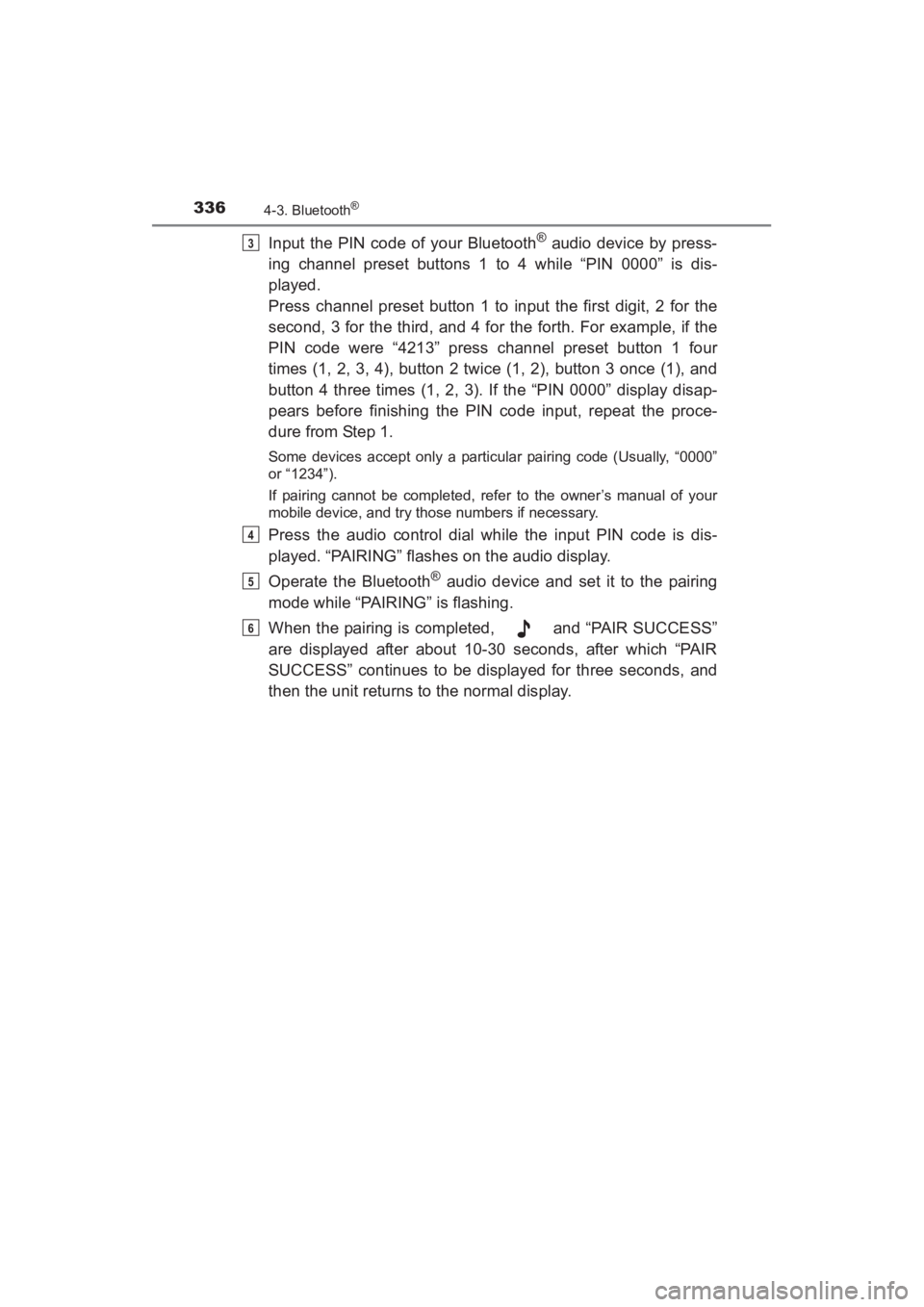
Input the PIN code of your Bluetooth® audio device by press-
ing channel preset buttons 1 to 4 while “PIN 0000” is dis-
played.
Press channel preset button 1 to input the first digit, 2 for the
second, 3 for the third, and 4 for the forth. For example, if the
PIN code were “4213” press channel preset button 1 four
times (1, 2, 3, 4), button 2 twice (1, 2), button 3 once (1), and
button 4 three times (1, 2, 3). If the “PIN 0000” display disap-
pears before finishing the PIN code input, repeat the proce-
dure from Step 1.
Some devices accept only a particular pairing code (Usually, “0000”
or “1234”).
If pairing cannot be completed, refer to the owner’s manual of your
mobile device, and try those numbers if necessary.
Press the audio control dial while the input PIN code is dis-
played. “PAIRING” flashes on the audio display.
Operate the Bluetooth
® audio device and set it to the pairing
mode while “PAIRING” is flashing.
When the pairing is completed, and “PAIR SUCCESS”
are displayed after about 10-30 seconds, after which “PAIR
SUCCESS” continues to be displayed for three seconds, and
then the unit returns to the normal display.
3
4
5
6
YARIS_SEDAN_OM_OM99M18z_(U).book Page 336 Monday, June 1, 2015 9:22 PM
Page 339 of 592
YARIS_SEDAN_OM_OM99M18z_(U)
3374-3. Bluetooth®
4
Interior Features
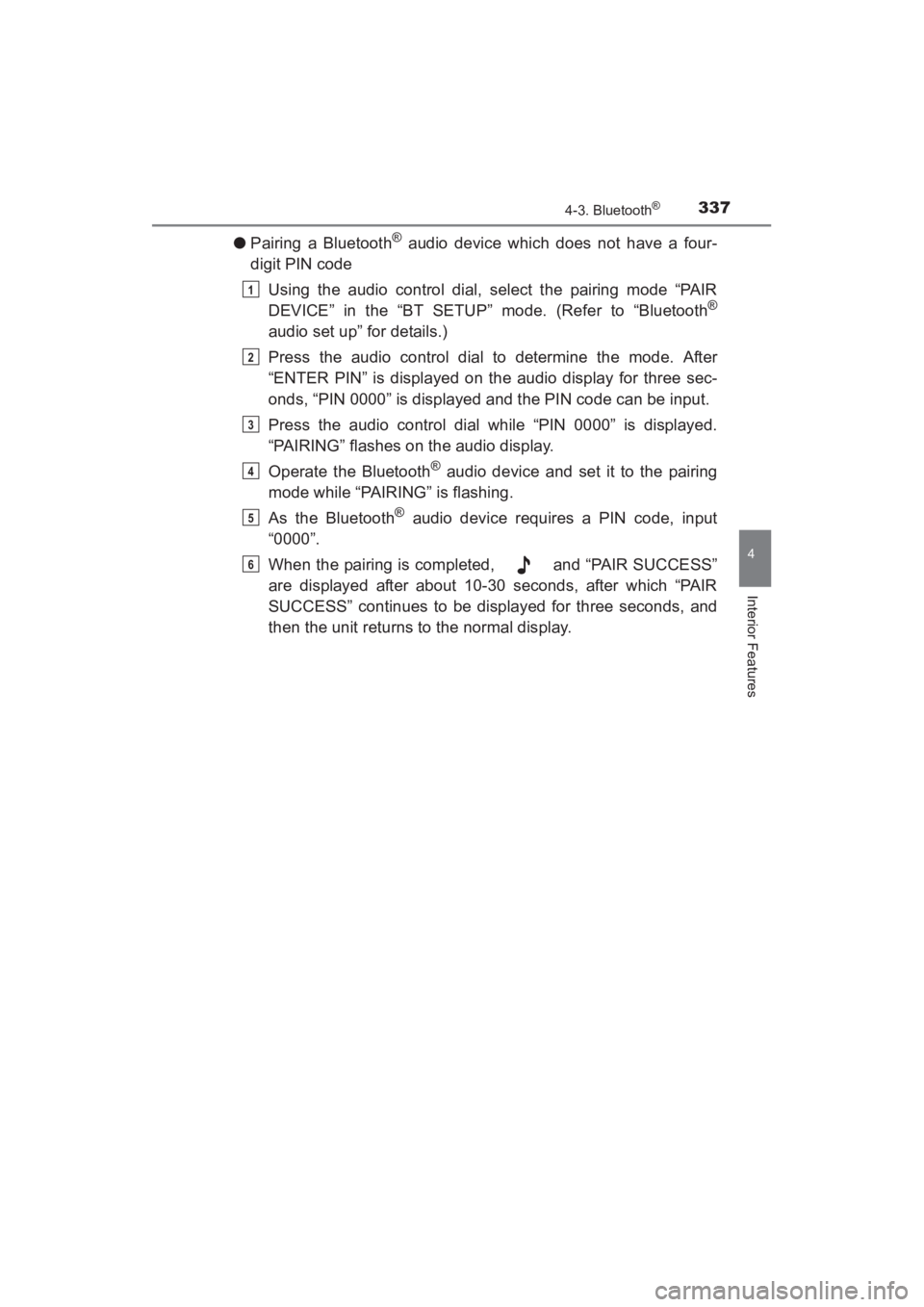
●Pairing a Bluetooth® audio device which does not have a four-
digit PIN code
Using the audio control dial, select the pairing mode “PAIR
DEVICE” in the “BT SETUP” mode. (Refer to “Bluetooth
®
audio set up” for details.)
Press the audio control dial to determine the mode. After
“ENTER PIN” is displayed on the audio display for three sec-
onds, “PIN 0000” is displayed and the PIN code can be input.
Press the audio control dial while “PIN 0000” is displayed.
“PAIRING” flashes on the audio display.
Operate the Bluetooth
® audio device and set it to the pairing
mode while “PAIRING” is flashing.
As the Bluetooth
® audio device requires a PIN code, input
“0000”.
When the pairing is completed, and “PAIR SUCCESS”
are displayed after about 10-30 seconds, after which “PAIR
SUCCESS” continues to be displayed for three seconds, and
then the unit returns to the normal display.
1
2
3
4
5
6
YARIS_SEDAN_OM_OM99M18z_(U).book Page 337 Monday, June 1, 2015 9:22 PM
Page 341 of 592
YARIS_SEDAN_OM_OM99M18z_(U)
3394-3. Bluetooth®
4
Interior Features
If the link to the desired device is successful, the sym-
bol is displayed again, together with “LINK CHANGED”. “LINK
CHANGED” is displayed for three seconds, then it returns to
the normal display.
● How to confirm the device currently linked
Switch to the link-change mode. (Refer to “Changing the link to a
Bluetooth
® audio device”)
The device name displayed first is the device which is currently
linked.
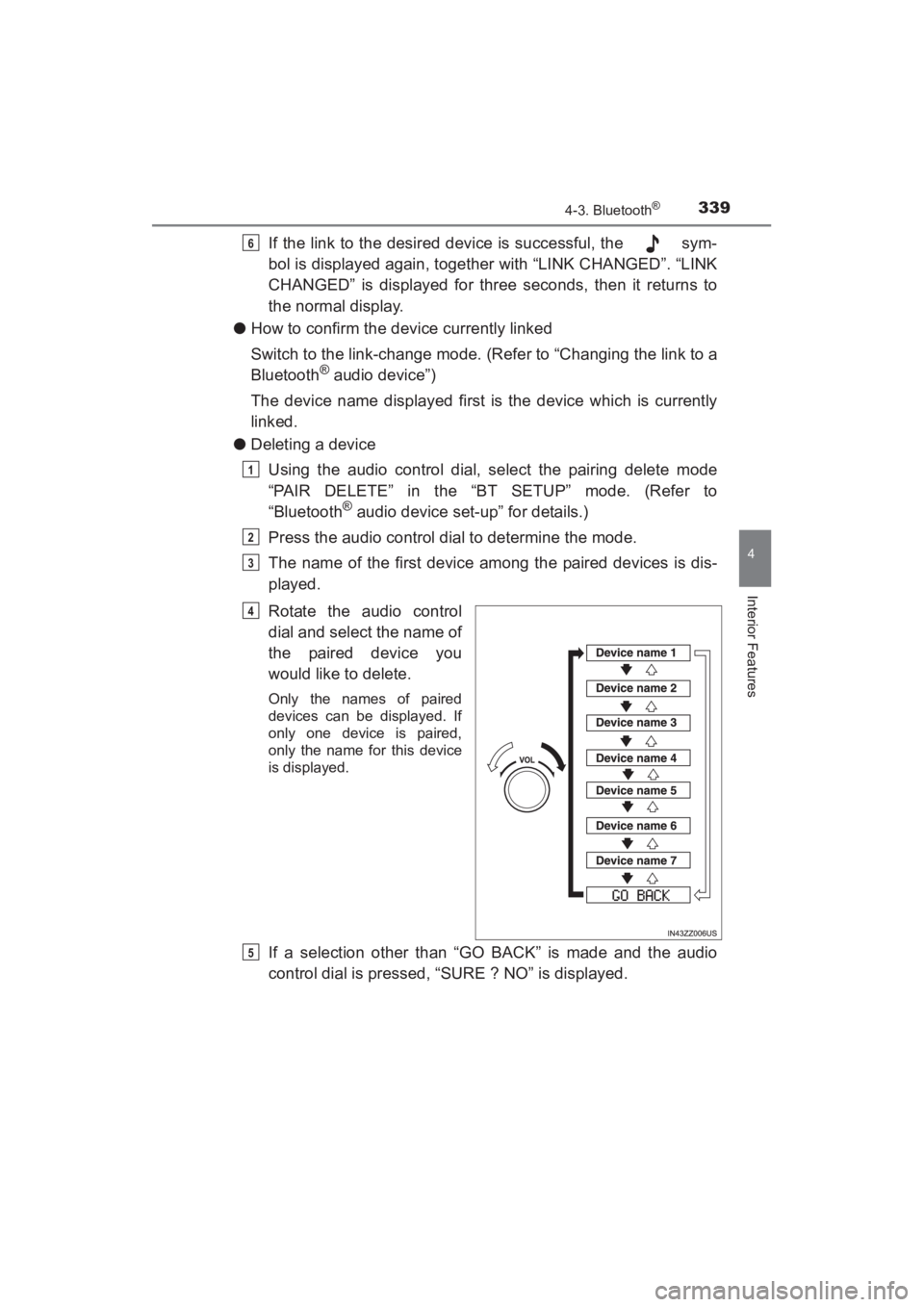
● Deleting a device
Using the audio control dial, select the pairing delete mode
“PAIR DELETE” in the “BT SETUP” mode. (Refer to
“Bluetooth
® audio device set-up” for details.)
Press the audio control dial to determine the mode.
The name of the first device among the paired devices is dis-
played.
Rotate the audio control
dial and select the name of
the paired device you
would like to delete.
Only the names of paired
devices can be displayed. If
only one device is paired,
only the name for this device
is displayed.
If a selection other than “GO BACK” is made and the audio
control dial is pressed, “SURE ? NO” is displayed.
6
1
2
3
4
5
YARIS_SEDAN_OM_OM99M18z_(U).book Page 339 Monday, June 1, 2015 9:22 PM
Page 343 of 592
YARIS_SEDAN_OM_OM99M18z_(U)
3414-3. Bluetooth®
4
Interior Features
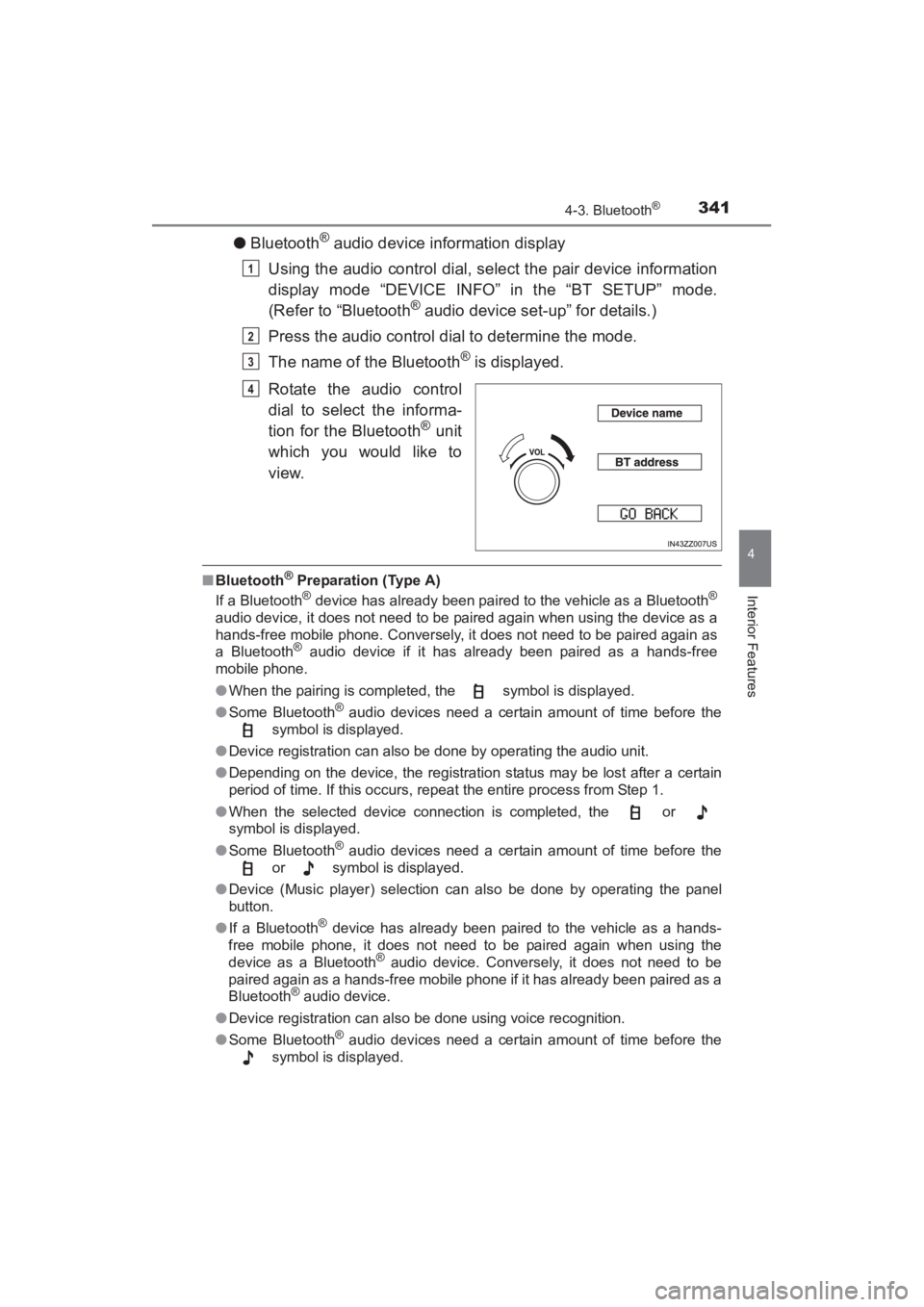
●Bluetooth® audio device information display
Using the audio control dial, select the pair device information
display mode “DEVICE INFO” in the “BT SETUP” mode.
(Refer to “Bluetooth
® audio device set-up” for details.)
Press the audio control dial to determine the mode.
The name of the Bluetooth
® is displayed.
Rotate the audio control
dial to select the informa-
tion for the Bluetooth
® unit
which you would like to
view.
■ Bluetooth® Preparation (Type A)
If a Bluetooth® device has already been paired to the vehicle as a Bluetooth®
audio device, it does not need to be paired again when using the device as a
hands-free mobile phone. Conversely, it does not need to be paired again as
a Bluetooth
® audio device if it has already been paired as a hands-free
mobile phone.
● When the pairing is completed, the symbol is displayed.
● Some Bluetooth
® audio devices need a certain amount of time before the
symbol is displayed.
● Device registration can also be done by operating the audio unit.
● Depending on the device, the registration status may be lost after a certain
period of time. If this occurs, repeat the entire process from Step 1.
● When the selected device connection is completed, the or
symbol is displayed.
● Some Bluetooth
® audio devices need a certain amount of time before the
or symbol is displayed.
● Device (Music player) selection can also be done by operating the panel
button.
● If a Bluetooth
® device has already been paired to the vehicle as a hands-
free mobile phone, it does not need to be paired again when using the
device as a Bluetooth
® audio device. Conversely, it does not need to be
paired again as a hands-free mobile phone if it has already been paired as a
Bluetooth
® audio device.
● Device registration can also be done using voice recognition.
● Some Bluetooth
® audio devices need a certain amount of time before the
symbol is displayed.
1
2
3
4
YARIS_SEDAN_OM_OM99M18z_(U).book Page 341 Monday, June 1, 2015 9:22 PM
Page 347 of 592
YARIS_SEDAN_OM_OM99M18z_(U)
3454-3. Bluetooth®
4
Interior Features
■Tu t o r i a l
The tutorial explains how to use Bluetooth
® Hands-Free.
To activate the tutorial, do the following:
Press the pick-up button or talk button with a short press.
Say: [Beep] “Tutorial”
Follow the prompts to receive the appropriate voice guidance
instructions.
■Commands useable anytime during voice recognition
“Help” or “Go Back” are commands which can be used at anytime
during voice recognition.
●Help function use
The help function informs the user of all the available voice com-
mands under the current conditions.
Say: [Beep] “Help”
Follow the prompts to receive the appropriate voice guidance
instructions.
■Returning to previous operation
This command is for returning to the previous operation while in the
voice recognition mode.
Say: [Beep] “Go Back”
■To prevent a deterioration in the voice recognition rate and
voice quality, the following points should be observed:
●The voice recognition cannot be performed while voice guidance
or the beep sound is operating. Wait until the voice guidance or
the beep sound is finished before saying your commands.
● Dialects or different wording other than hands-free prompts can-
not be recognized by voice recognition. Speak in the wording
specified by the voice commands.
● It is not necessary to face the microphone or approach it. Speak
the voice commands while maintaining a safe driving position.
● Do not speak too slow or too loud.
● Speak clearly, without pausing between words or numbers.
● Close the windows to reduce loud noises from outside the vehi-
cle, or turn down the airflow of the air-conditioning system while
Bluetooth
® Hands-Free is being used.
1
2
3
1
2
YARIS_SEDAN_OM_OM99M18z_(U).book Page 345 Monday, June 1, 2015 9:22 PM
Page 358 of 592
356
YARIS_SEDAN_OM_OM99M18z_(U)
4-3. Bluetooth®
In this section, the basic operation of the voice recognition is
explained.
■Activating Voice Recognition
Press the talk button.
■Ending Voice Recognition
Use one of the following methods:
●Press the hang-up button.
● Say, “Cancel”.
● Operate the commander switch or the center display (only when
vehicle is stopped).
■Skipping Voice Guidance (for faster operation)
Press and release the talk button.
■Troubleshooting for Voice Recognition
If you do not understand an operation method while in the voice
recognition mode, say “Tutorial” or “Help”.
■Commands useable anytime during voice recognition
“Go Back” and “Cancel” are commands which can be used at any-
time during voice recognition.
●Returning to previous operation
To return to the previous operation, say, “Go Back” while in voice
recognition mode.
● Cancel
To put the Bluetooth
® Hands-Free system in standby mode, say,
“Cancel” while in voice recognition mode.
Voice Recognition (Type B)
YARIS_SEDAN_OM_OM99M18z_(U).book Page 356 Monday, June 1, 2015 9:22 PM
Page 359 of 592
YARIS_SEDAN_OM_OM99M18z_(U)
3574-3. Bluetooth®
4
Interior Features
■To prevent a deterioration in the voice recognition rate and
voice quality, the following points should be observed:
●The voice recognition cannot be performed while voice guidance
or the beep sound is operating. Wait until the voice guidance or
the beep sound is finished before saying your commands.
● Phone related commands are available only when your phone is
connected via Bluetooth
®. Make sure your phone is connected
via Bluetooth® before you operate phone related voice com-
mands.
● Music play commands, such as Play Artist and Play Album can
be used only in USB audio mode.
● Do not speak too slowly or loudly (no loud voice).
● Speak clearly, without pausing between words or numbers.
● Dialects or different wording other than hands-free prompts can-
not be recognized by voice recognition. Speak in the wording
specified by the voice commands.
● It is not necessary to face the microphone or approach it. Speak
the voice commands while maintaining a safe driving position.
● Close the windows to reduce loud noises from outside the vehi-
cle, or turn down the airflow of the air-conditioning system while
Bluetooth
® Hands-Free is being used.
● Make sure the vents are not directing air up towards the micro-
phone.
If the voice recognition performance is not satisfactory.
Refer to Troubleshooting on P. 401.
YARIS_SEDAN_OM_OM99M18z_(U).book Page 357 Monday, June 1, 2015 9:22 PM
Page 376 of 592
374
YARIS_SEDAN_OM_OM99M18z_(U)
4-3. Bluetooth®
■Telephone Number InputSelect the icon on the home screen and display the Com-
munication screen.
When is pressed, the dial pad is displayed.
Input the telephone number using the dial pad.
Select to make the call.
● Numeral or symbol entry
Use the dial pad.
Long-press the to input +.
Select to delete the currently input value.
Long-press to delete all input values.
■Redial Function
Makes a call to the last person called (latest person on outgoing call
record) from the mobile phone/vehicle.
Press the talk button.
Wait for the beep sound.
Say: “Redial”
■Call back Function
Makes a call to the last person who called your (latest person on
incoming call record) mobile phone/vehicle.Press the talk button.
Wait for the beep sound.
Say: “Call back”
● Mobile 911 (U.S.A./Canada only)
If the vehicle is involved in a moderate to severe collision, a call
is made automatically to 911 from the connected device. The
“Emergency Assistance Call” setting must be on.
Refer to Communication Settings on P. 382.
NOTICE
Though the system can be set to not call 911, doing so will defeat the pur-
pose of the system. Toyota recommends that the Mobile 911 system remain
activated.
1
2
3
4
1
2
3
1
2
3
YARIS_SEDAN_OM_OM99M18z_(U).book Page 374 Monday, June 1, 2015 9:22 PM