USB TOYOTA YARIS 2016 Owner's Manual
[x] Cancel search | Manufacturer: TOYOTA, Model Year: 2016, Model line: YARIS, Model: TOYOTA YARIS 2016Pages: 592, PDF Size: 10.44 MB
Page 317 of 592
YARIS_SEDAN_OM_OM99M18z_(U)
3154-2. Audio System
4
Interior Features
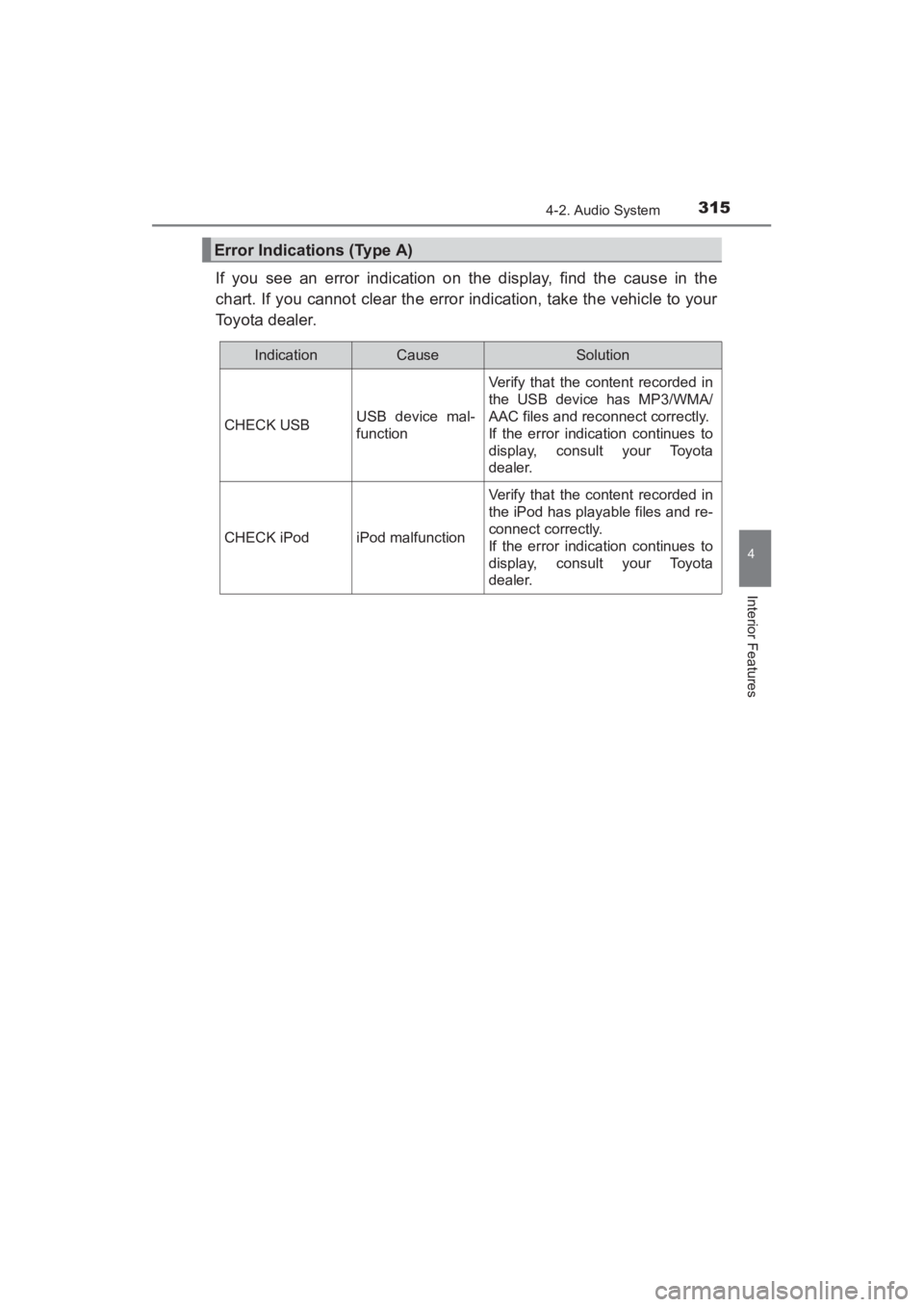
If you see an error indication on the display, find the cause in the
chart. If you cannot clear the error indication, take the vehicle to your
Toyota dealer.
Error Indications (Type A)
IndicationCauseSolution
CHECK USBUSB device mal-
function
Verify that the content recorded in
the USB device has MP3/WMA/
AAC files and reconnect correctly.
If the error indication continues to
display, consult your Toyota
dealer.
CHECK iPodiPod malfunction
Verify that the content recorded in
the iPod has playable files and re-
connect correctly.
If the error indication continues to
display, consult your Toyota
dealer.
YARIS_SEDAN_OM_OM99M18z_(U).book Page 315 Monday, June 1, 2015 9:22 PM
Page 318 of 592
316
YARIS_SEDAN_OM_OM99M18z_(U)
4-2. Audio System
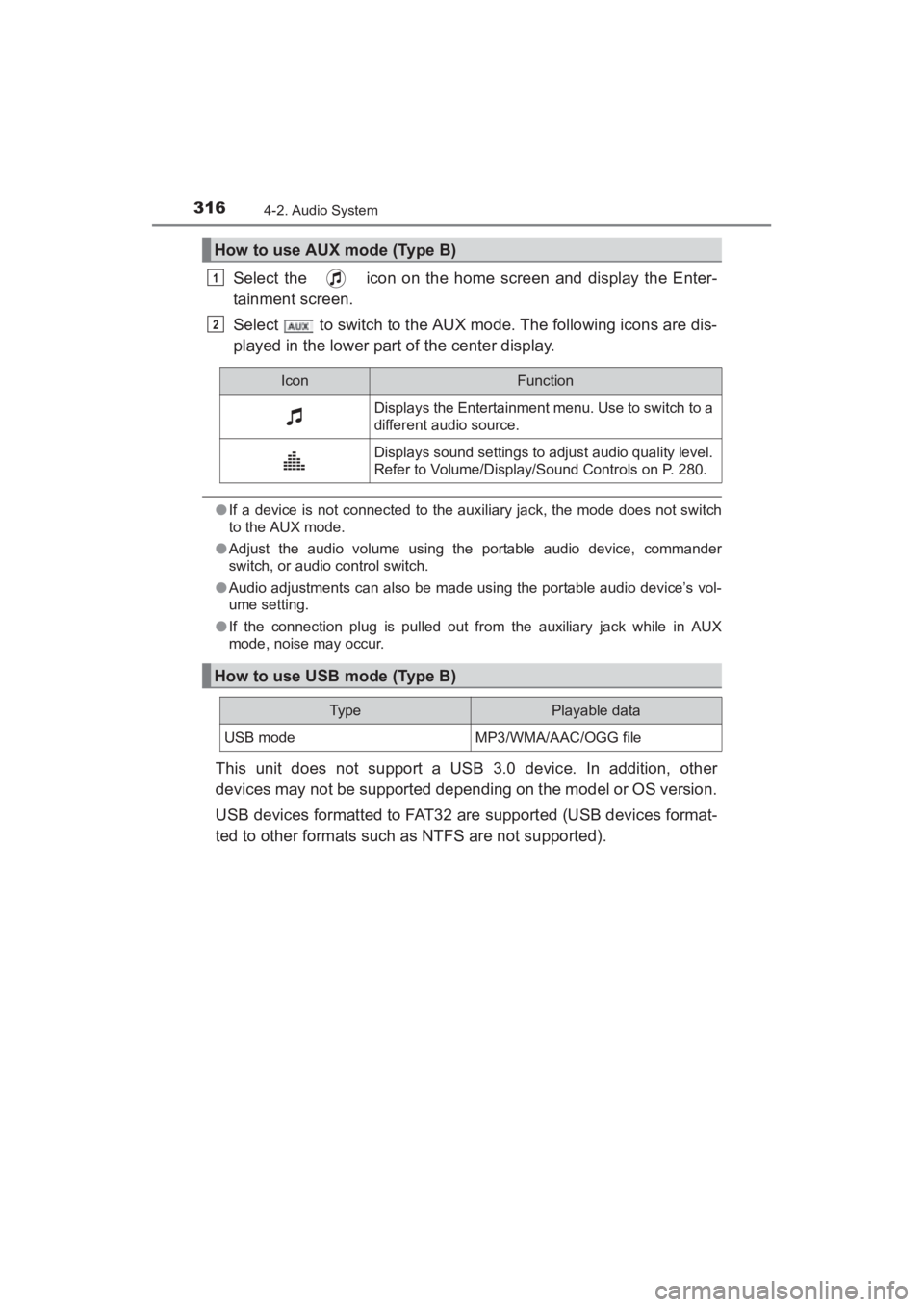
Select the icon on the home screen and display the Enter-
tainment screen.
Select to switch to the AUX mode. The following icons are dis-
played in the lower part of the center display.
●If a device is not connected to the auxiliary jack, the mode does not switch
to the AUX mode.
● Adjust the audio volume using the portable audio device, commander
switch, or audio control switch.
● Audio adjustments can also be made using the portable audio device’s vol-
ume setting.
● If the connection plug is pulled out from the auxiliary jack while in AUX
mode, noise may occur.
This unit does not support a USB 3.0 device. In addition, other
devices may not be supported depending on the model or OS version.
USB devices formatted to FAT32 are supported (USB devices format-
ted to other formats such as NTFS are not supported).
How to use AUX mode (Type B)
1
2
IconFunction
Displays the Entertainment menu. Use to switch to a
different audio source.
Displays sound settings to adjust audio quality level.
Refer to Volume/Display/Sound Controls on P. 280.
How to use USB mode (Type B)
Typ ePlayable data
USB modeMP3/WMA/AAC/OGG file
YARIS_SEDAN_OM_OM99M18z_(U).book Page 316 Monday, June 1, 2015 9:22 PM
Page 319 of 592
YARIS_SEDAN_OM_OM99M18z_(U)
3174-2. Audio System
4
Interior Features
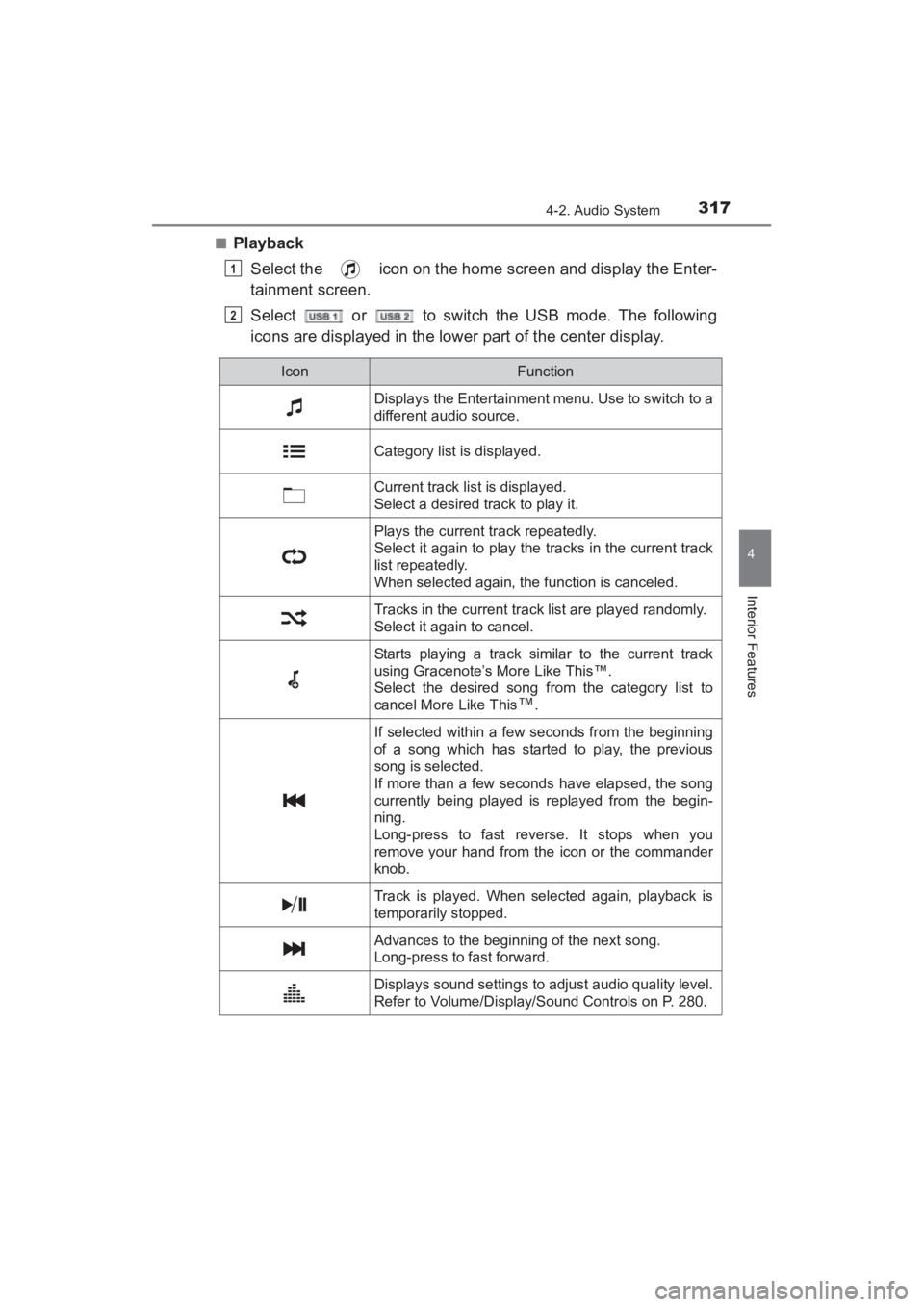
■PlaybackSelect the icon on the home screen and display the Enter-
tainment screen.
Select or to switch the USB mode. The following
icons are displayed in the lower part of the center display.
1
2
IconFunction
Displays the Entertainment menu. Use to switch to a
different audio source.
Category list is displayed.
Current track list is displayed.
Select a desired track to play it.
Plays the current track repeatedly.
Select it again to play the tracks in the current track
list repeatedly.
When selected again, the function is canceled.
Tracks in the current track list are played randomly.
Select it again to cancel.
Starts playing a track similar to the current track
using Gracenote’s More Like This™.
Select the desired song from the category list to
cancel More Like This
™.
If selected within a few seconds from the beginning
of a song which has started to play, the previous
song is selected.
If more than a few seconds have elapsed, the song
currently being played is replayed from the begin-
ning.
Long-press to fast reverse. It stops when you
remove your hand from the icon or the commander
knob.
Track is played. When selected again, playback is
temporarily stopped.
Advances to the beginning of the next song.
Long-press to fast forward.
Displays sound settings to adjust audio quality level.
Refer to Volume/Display/Sound Controls on P. 280.
YARIS_SEDAN_OM_OM99M18z_(U).book Page 317 Monday, June 1, 2015 9:22 PM
Page 320 of 592
318
YARIS_SEDAN_OM_OM99M18z_(U)
4-2. Audio System
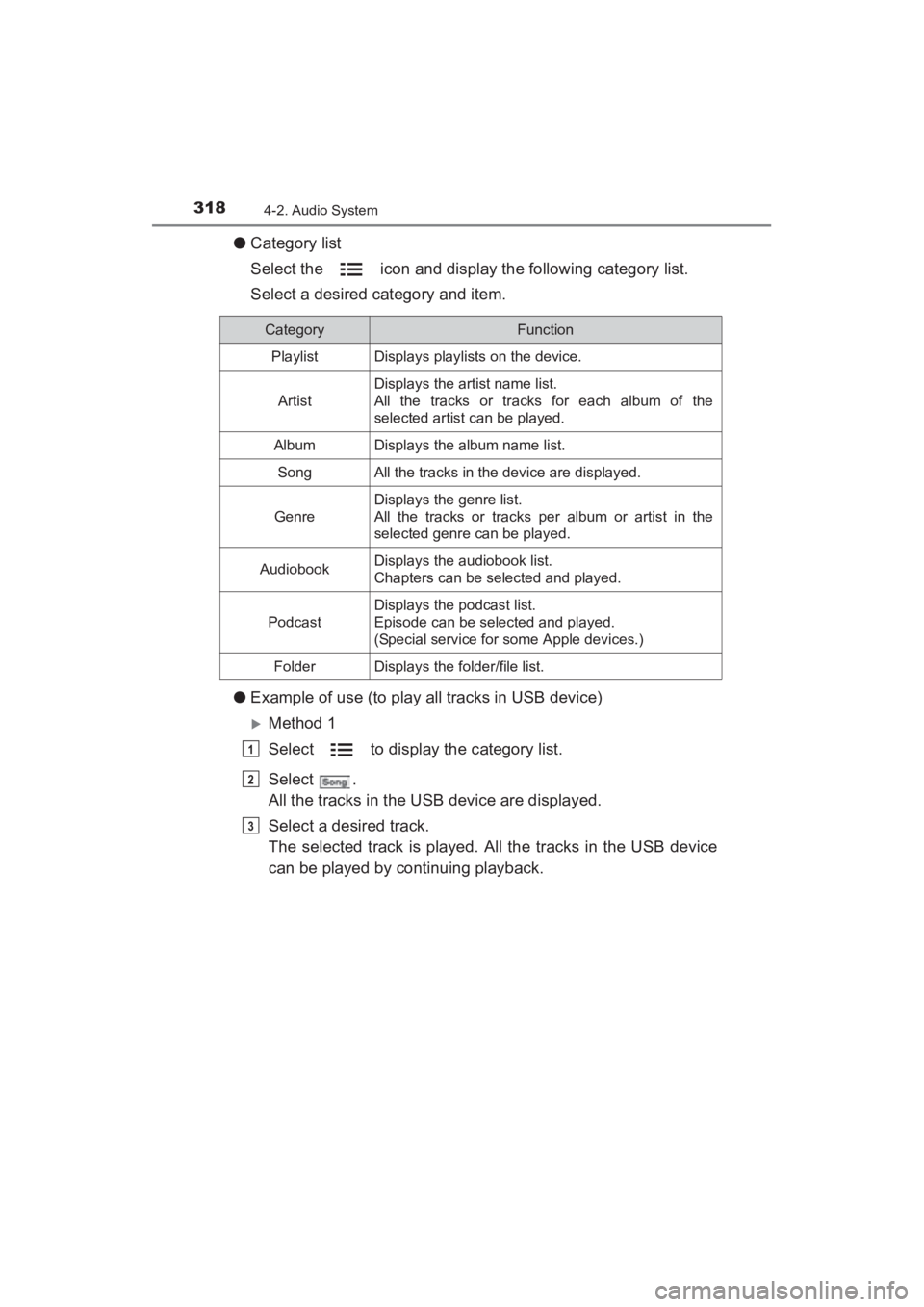
●Category list
Select the icon and display the following category list.
Select a desired category and item.
● Example of use (to play all tracks in USB device)
XMethod 1
Select to display the category list.
Select .
All the tracks in the USB device are displayed.
Select a desired track.
The selected track is played. All the tracks in the USB device
can be played by continuing playback.
CategoryFunction
PlaylistDisplays playlists on the device.
Artist
Displays the artist name list.
All the tracks or tracks for each album of the
selected artist can be played.
AlbumDisplays the album name list.
SongAll the tracks in the device are displayed.
Genre
Displays the genre list.
All the tracks or tracks per album or artist in the
selected genre can be played.
AudiobookDisplays the audiobook list.
Chapters can be selected and played.
Podcast
Displays the podcast list.
Episode can be selected and played.
(Special service for some Apple devices.)
FolderDisplays the folder/file list.
1
2
3
YARIS_SEDAN_OM_OM99M18z_(U).book Page 318 Monday, June 1, 2015 9:22 PM
Page 321 of 592
YARIS_SEDAN_OM_OM99M18z_(U)
3194-2. Audio System
4
Interior Features
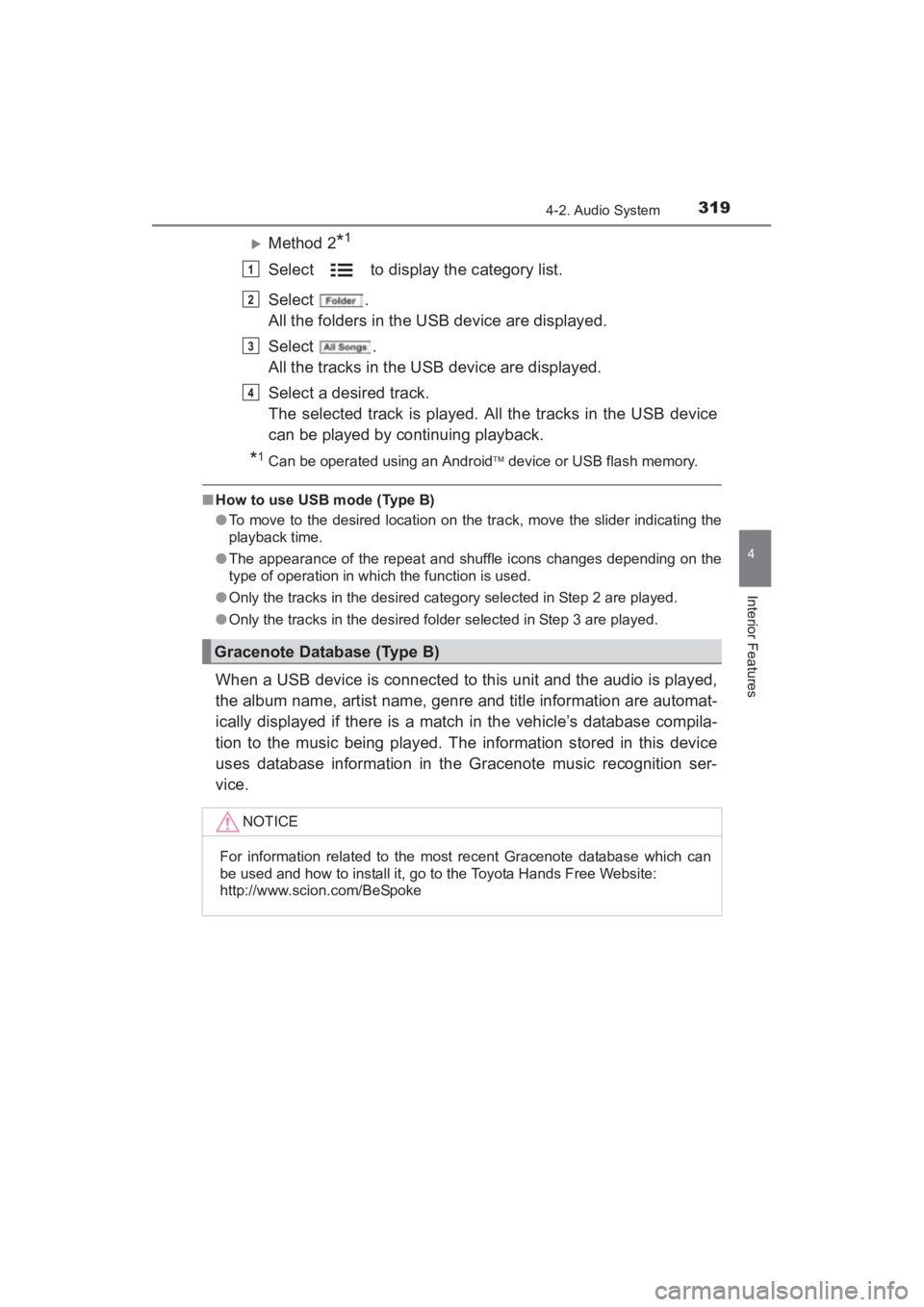
XMethod 2*1
Select to display the category list.
Select .
All the folders in the USB device are displayed.
Select .
All the tracks in the USB device are displayed.
Select a desired track.
The selected track is played. All the tracks in the USB device
can be played by continuing playback.
*1Can be operated using an Android device or USB flash memory.
■ How to use USB mode (Type B)
●To move to the desired location on the track, move the slider indicating the
playback time.
● The appearance of the repeat and shuffle icons changes depending on the
type of operation in which the function is used.
● Only the tracks in the desired category selected in Step 2 are played.
● Only the tracks in the desired folder selected in Step 3 are played.
When a USB device is connected to this unit and the audio is played,
the album name, artist name, genre and title information are automat-
ically displayed if there is a match in the vehicle’s database compila-
tion to the music being played. The information stored in this device
uses database information in the Gracenote music recognition ser-
vice.
Gracenote Database (Type B)
NOTICE
For information related to the most recent Gracenote database which can
be used and how to install it, go to the Toyota Hands Free Website:
http://www.scion.com/BeSpoke
1
2
3
4
YARIS_SEDAN_OM_OM99M18z_(U).book Page 319 Monday, June 1, 2015 9:22 PM
Page 325 of 592
YARIS_SEDAN_OM_OM99M18z_(U)
3234-2. Audio System
4
Interior Features
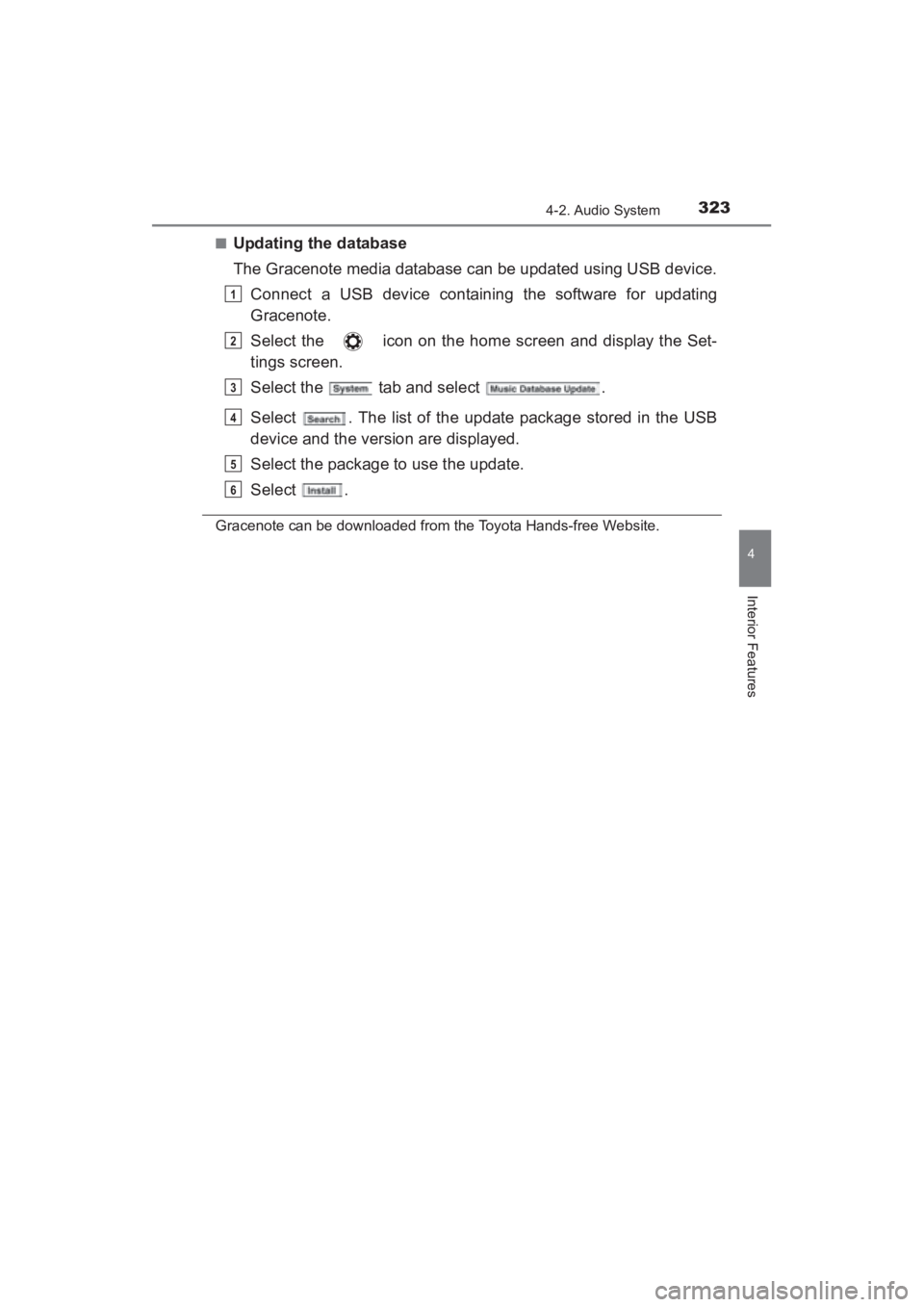
■Updating the database
The Gracenote media database can be updated using USB device.Connect a USB device containing the software for updating
Gracenote.
Select the icon on the home screen and display the Set-
tings screen.
Select the tab and select .
Select . The list of the update package stored in the USB
device and the version are displayed.
Select the package to use the update.
Select .
Gracenote can be downloaded from the Toyota Hands-free Website.
1
2
3
4
5
6
YARIS_SEDAN_OM_OM99M18z_(U).book Page 323 Monday, June 1, 2015 9:22 PM
Page 359 of 592
YARIS_SEDAN_OM_OM99M18z_(U)
3574-3. Bluetooth®
4
Interior Features
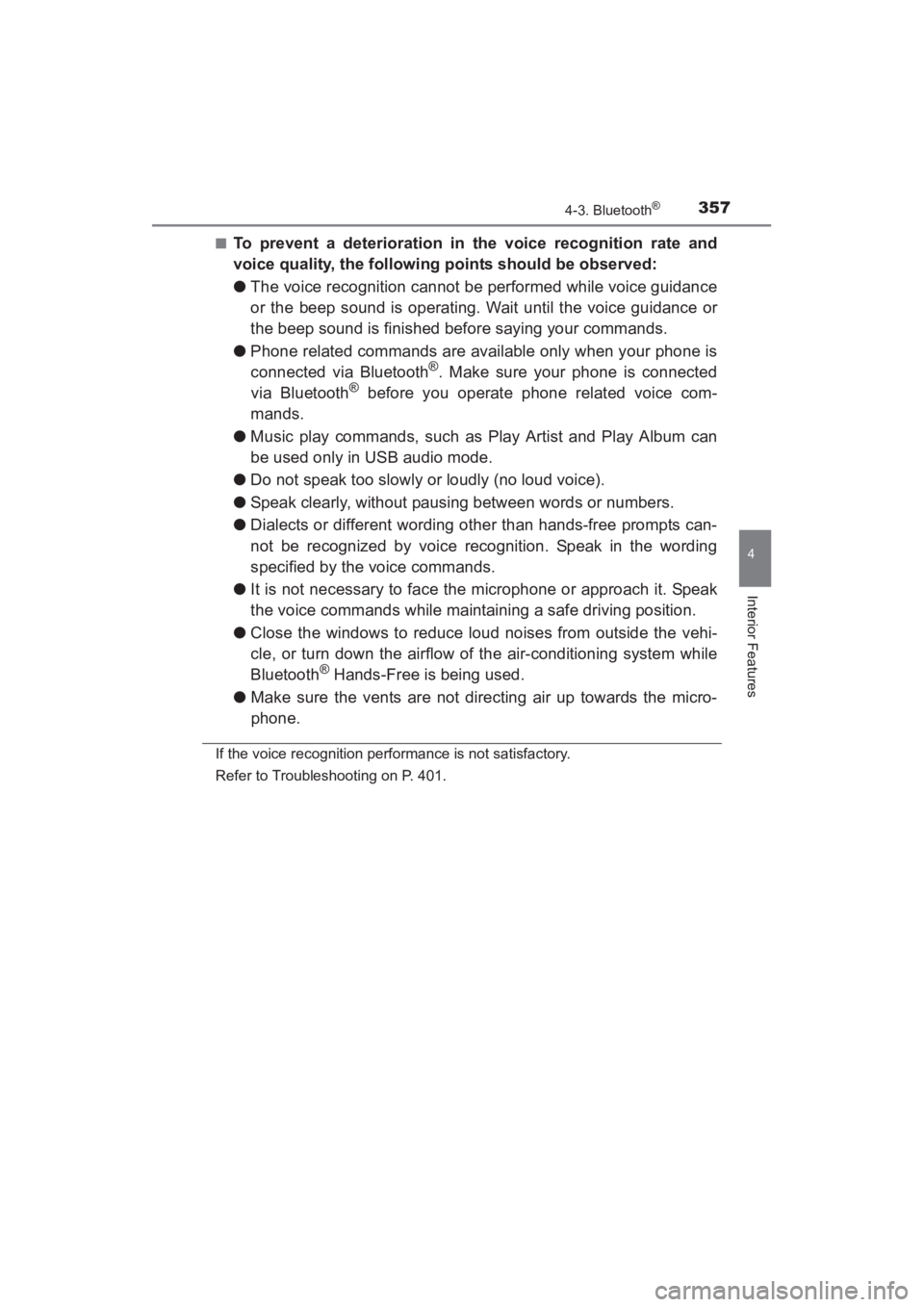
■To prevent a deterioration in the voice recognition rate and
voice quality, the following points should be observed:
●The voice recognition cannot be performed while voice guidance
or the beep sound is operating. Wait until the voice guidance or
the beep sound is finished before saying your commands.
● Phone related commands are available only when your phone is
connected via Bluetooth
®. Make sure your phone is connected
via Bluetooth® before you operate phone related voice com-
mands.
● Music play commands, such as Play Artist and Play Album can
be used only in USB audio mode.
● Do not speak too slowly or loudly (no loud voice).
● Speak clearly, without pausing between words or numbers.
● Dialects or different wording other than hands-free prompts can-
not be recognized by voice recognition. Speak in the wording
specified by the voice commands.
● It is not necessary to face the microphone or approach it. Speak
the voice commands while maintaining a safe driving position.
● Close the windows to reduce loud noises from outside the vehi-
cle, or turn down the airflow of the air-conditioning system while
Bluetooth
® Hands-Free is being used.
● Make sure the vents are not directing air up towards the micro-
phone.
If the voice recognition performance is not satisfactory.
Refer to Troubleshooting on P. 401.
YARIS_SEDAN_OM_OM99M18z_(U).book Page 357 Monday, June 1, 2015 9:22 PM
Page 360 of 592
358
YARIS_SEDAN_OM_OM99M18z_(U)
4-3. Bluetooth®
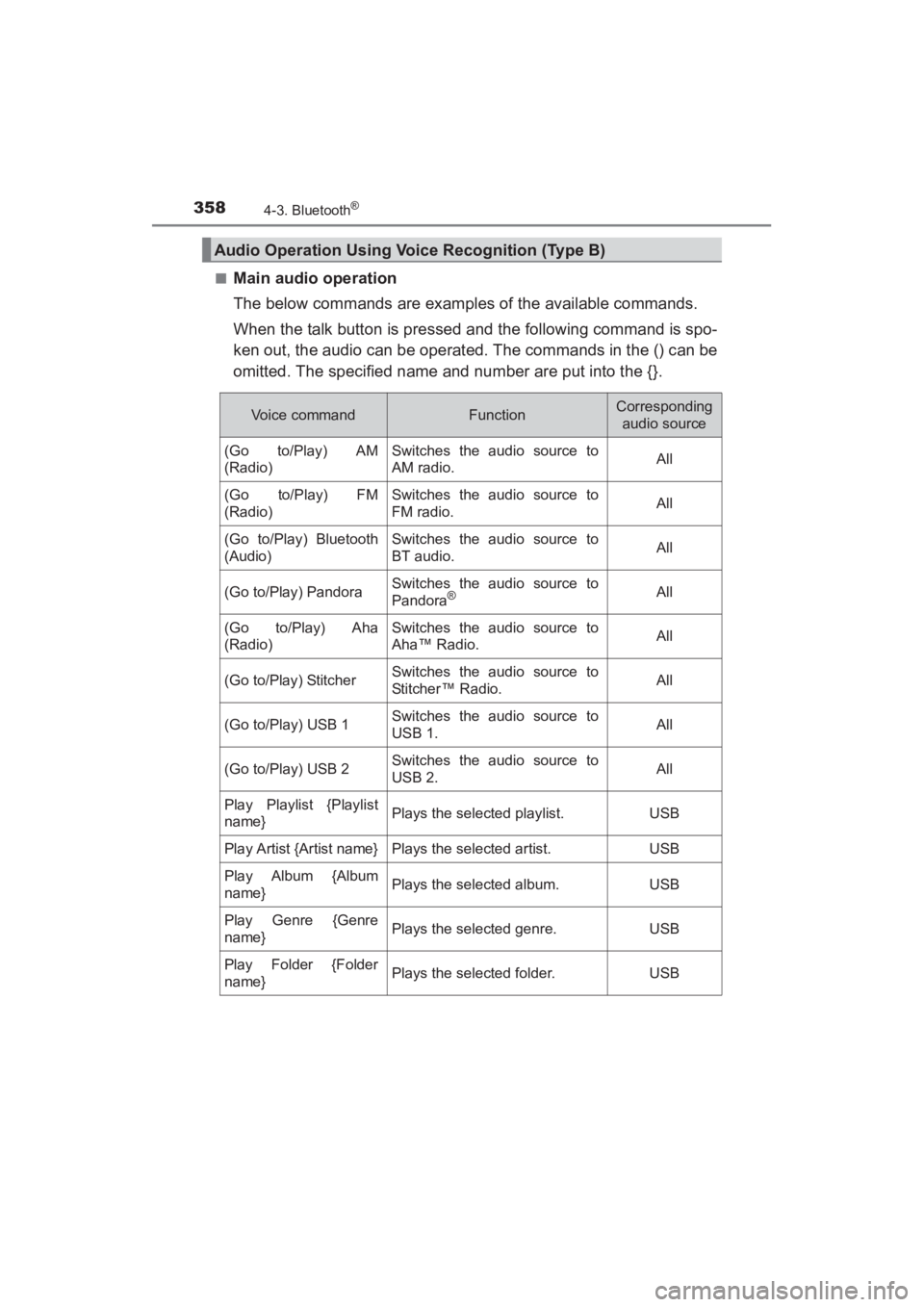
■Main audio operation
The below commands are examples of the available commands.
When the talk button is pressed and the following command is spo-
ken out, the audio can be operated. The commands in the () can be
omitted. The specified name and number are put into the {}.
Audio Operation Using Voice Recognition (Type B)
Voice commandFunctionCorresponding audio source
(Go to/Play) AM
(Radio)Switches the audio source to
AM radio.All
(Go to/Play) FM
(Radio)Switches the audio source to
FM radio.All
(Go to/Play) Bluetooth
(Audio)Switches the audio source to
BT audio.All
(Go to/Play) PandoraSwitches the audio source to
Pandora®All
(Go to/Play) Aha
(Radio)Switches the audio source to
Aha™ Radio.All
(Go to/Play) StitcherSwitches the audio source to
Stitcher™ Radio.All
(Go to/Play) USB 1Switches the audio source to
USB 1.All
(Go to/Play) USB 2Switches the audio source to
USB 2.All
Play Playlist {Playlist
name}Plays the selected playlist.USB
Play Artist {Artist name}Plays the selected artist.USB
Play Album {Album
name}Plays the selected album.USB
Play Genre {Genre
name}Plays the selected genre.USB
Play Folder {Folder
name}Plays the selected folder.USB
YARIS_SEDAN_OM_OM99M18z_(U).book Page 358 Monday, June 1, 2015 9:22 PM
Page 361 of 592

YARIS_SEDAN_OM_OM99M18z_(U)
3594-3. Bluetooth®
4
Interior Features
■Main audio operation
●Some commands cannot be used depending on devices and use condi-
tions.
● If the Bluetooth
® device, USB, or AUX is not connected, the related com-
mands cannot be used.
YARIS_SEDAN_OM_OM99M18z_(U).book Page 359 Monday, June 1, 2015 9:22 PM
Page 386 of 592
384
YARIS_SEDAN_OM_OM99M18z_(U)
4-3. Bluetooth®
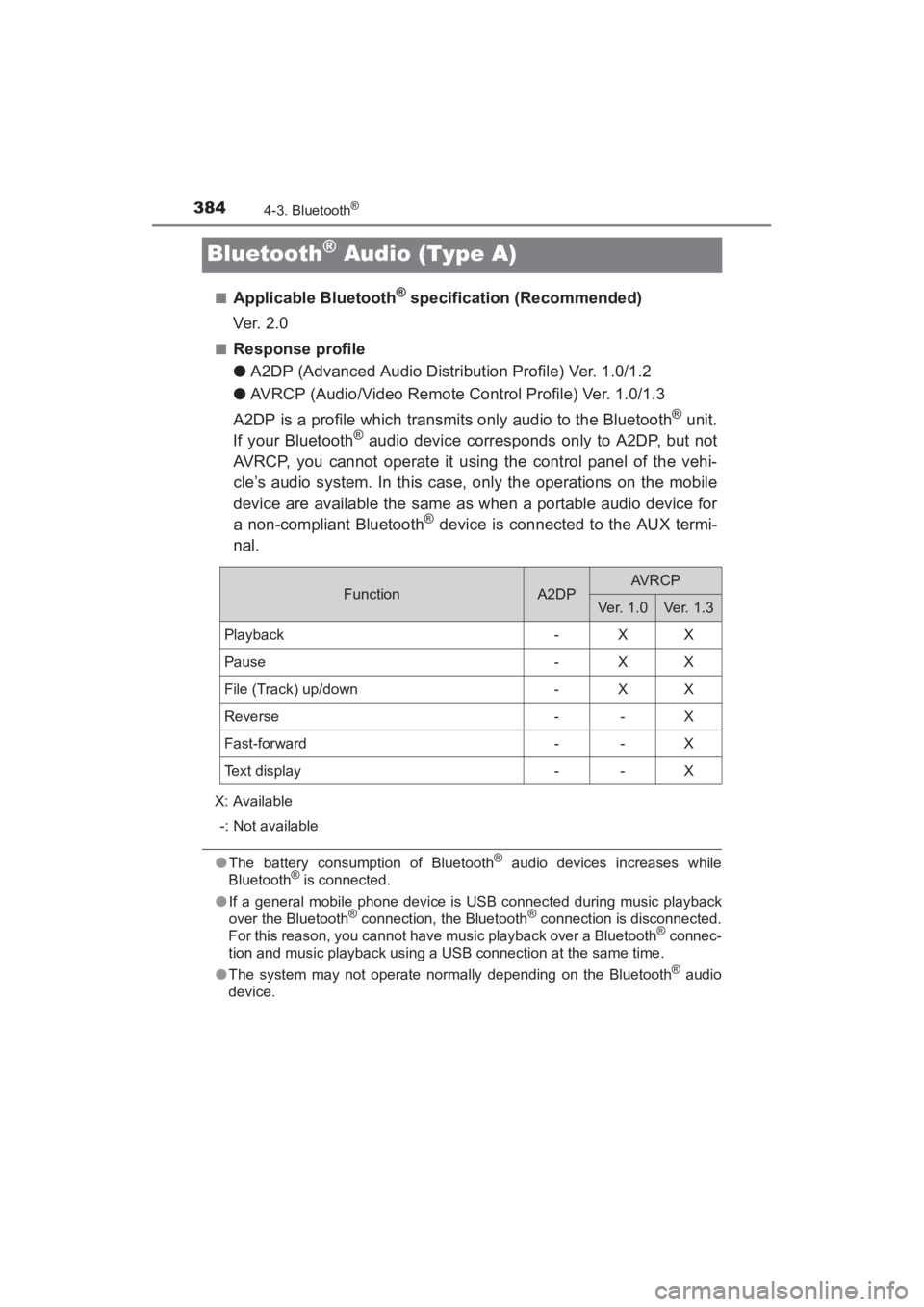
Bluetooth® Audio (Type A)
■Applicable Bluetooth® specification (Recommended)
Ver. 2 .0
■Response profile
● A2DP (Advanced Audio Distribution Profile) Ver. 1.0/1.2
● AVRCP (Audio/Video Remote Control Profile) Ver. 1.0/1.3
A2DP is a profile which transmits only audio to the Bluetooth
® unit.
If your Bluetooth® audio device corresponds only to A2DP, but not
AVRCP, you cannot operate it using the control panel of the vehi-
cle’s audio system. In this case, only the operations on the mobile
device are available the same as when a portable audio device for
a non-compliant Bluetooth
® device is connected to the AUX termi-
nal.
X: Available
-: Not available
● The battery consumption of Bluetooth® audio devices increases while
Bluetooth® is connected.
● If a general mobile phone device is USB connected during music playback
over the Bluetooth
® connection, the Bluetooth® connection is disconnected.
For this reason, you cannot have music playback over a Bluetooth® connec-
tion and music playback using a USB connection at the same time.
● The system may not operate normally depending on the Bluetooth
® audio
device.
FunctionA2DPAVRCP
Ver. 1.0Ve r. 1 . 3
Playback-XX
Pause-XX
File (Track) up/down-XX
Reverse--X
Fast-forward--X
Text display--X
YARIS_SEDAN_OM_OM99M18z_(U).book Page 384 Monday, June 1, 2015 9:22 PM