audio TOYOTA YARIS 2016 Owner's Manual
[x] Cancel search | Manufacturer: TOYOTA, Model Year: 2016, Model line: YARIS, Model: TOYOTA YARIS 2016Pages: 592, PDF Size: 10.44 MB
Page 259 of 592
YARIS_SEDAN_OM_OM99M18z_(U)
2574-2. Audio System
4
Interior Features
■Operating Tips for USB device
●Playback may not be possible depending on the type and condition of the
USB flash memory even if the audio file complies with the standard above.
● A copyright protected WMA/AAC file cannot be played in this unit.
● The order of the music data stored in the device may differ from the play-
back order.
● To prevent loss or damage of stored data, we recommend that you always
back up your data.
● If a device exceeds the maximum electric current value of 1,000 mA, it may
not operate or recharge when connected.
● Do not pull out the USB device while in the USB mode (only pull it out while
in FM/AM radio or CD mode).
● The device will not operate if the data is password protected.
● MP3/WMA/AAC/OGG
*1 files written under specifications other than the
indicated specification may not play normally or files/folder names may not
display correctly.
*1Type B
This unit supports playback of music files recorded to an iPod.
● iPod is a trademark of Apple Inc., registered in the U.S. and other
countries.
The iPod may not be compatible depending on the model or OS ver-
sion. In this case, an error message is displayed.
The audio unit cannot display images or videos stored in an iPod. NOTICE
Do not use an audio file extension on files other than audio files. In addition,
do not change the audio file extension.
Otherwise, the unit will not recog-
nize the file correctly resulting in noise or a malfunction.
Operating Tips for iPod
YARIS_SEDAN_OM_OM99M18z_(U).book Page 257 Monday, June 1, 2015 9:22 PM
Page 260 of 592
258
YARIS_SEDAN_OM_OM99M18z_(U)
4-2. Audio System
NOTICE
●Remove the iPod when it is not in use. Because the iPod is not designed
to withstand excessive changes in temperature inside the cabin, it could
be damaged or the battery may deteriorate due to the excessive tempera-
ture or humidity inside the cabin if it is left in the vehicle.
● If data in the iPod is lost while it is connected to the unit, Toyota cannot
guarantee recovery of any lost data.
● If the iPod battery is deteriorated, the iPod may not recharge and playback
may not be possible when it is connected to the unit.
● For details on using the iPod, refer to the iPod instruction manual.
● When connecting the iPod to a USB port, all commands are made from
the audio unit. iPod control is not possible.
YARIS_SEDAN_OM_OM99M18z_(U).book Page 258 Monday, June 1, 2015 9:22 PM
Page 261 of 592
259
YARIS_SEDAN_OM_OM99M18z_(U)
4-2. Audio System
4
Interior Features
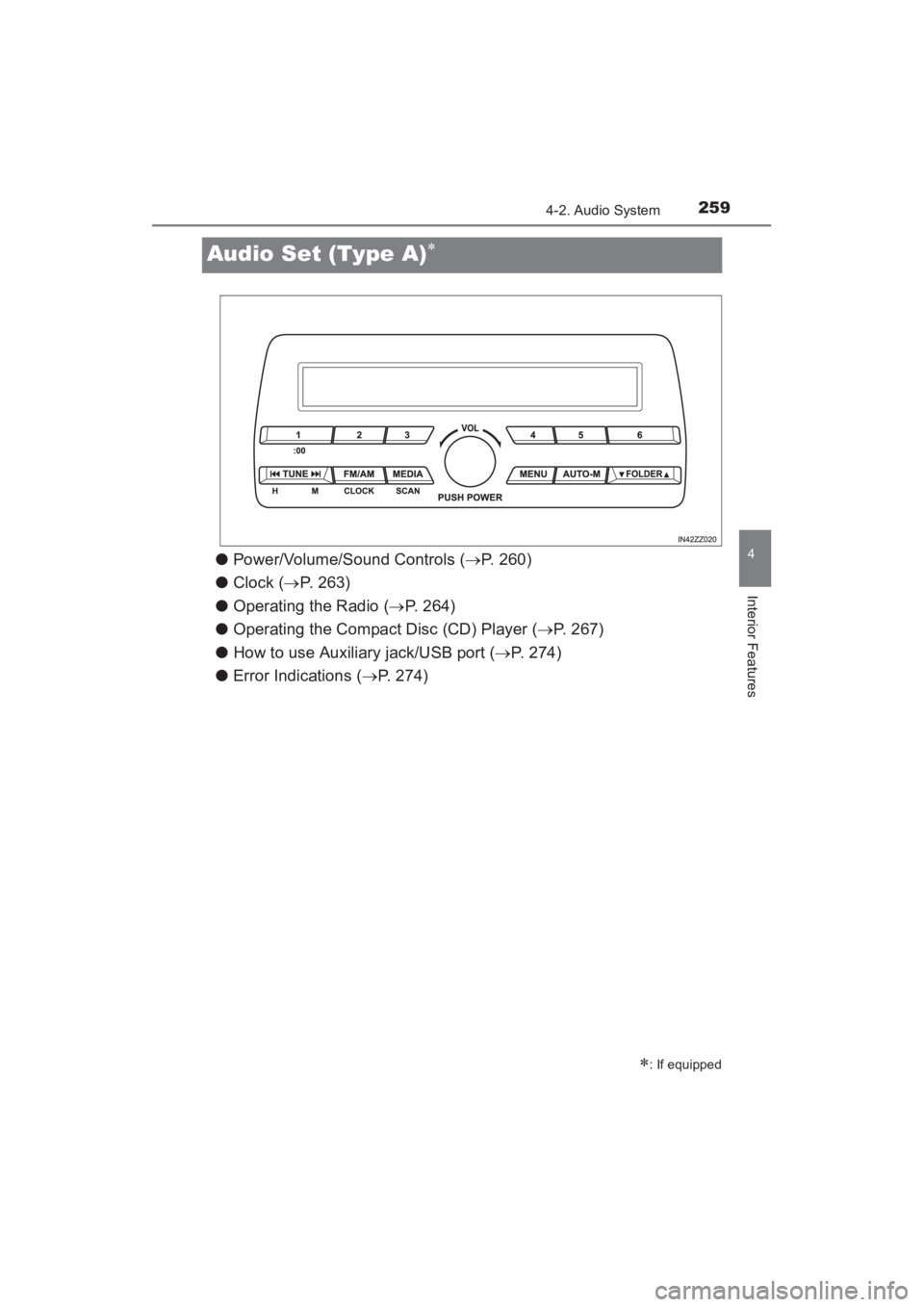
Audio Set (Type A)∗
●Power/Volume/Sound Controls ( →P. 260)
● Clock ( →P. 263)
● Operating the Radio ( →P. 264)
● Operating the Compact Disc (CD) Player ( →P. 267)
● How to use Auxiliary jack/USB port ( →P. 274)
● Error Indications ( →P. 274)
∗: If equipped
YARIS_SEDAN_OM_OM99M18z_(U).book Page 259 Monday, June 1, 2015 9:22 PM
Page 262 of 592
260
YARIS_SEDAN_OM_OM99M18z_(U)
4-2. Audio System
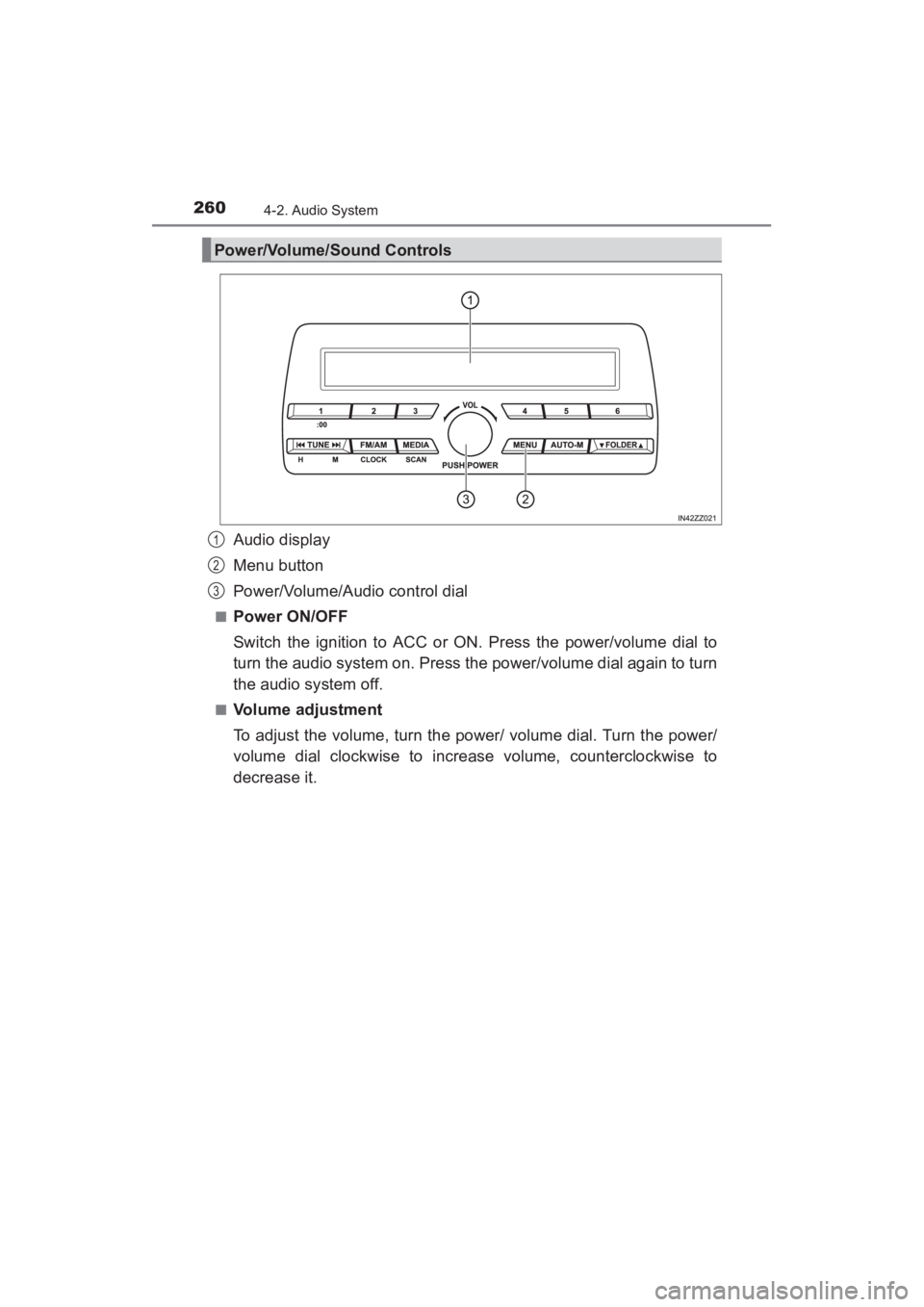
Audio display
Menu button
Power/Volume/Audio control dial
■Power ON/OFF
Switch the ignition to ACC or ON. Press the power/volume dial to
turn the audio system on. Press the power/volume dial again to turn
the audio system off.
■Volume adjustment
To adjust the volume, turn the power/ volume dial. Turn the power/
volume dial clockwise to increase volume, counterclockwise to
decrease it.
Power/Volume/Sound Controls
1
2
3
YARIS_SEDAN_OM_OM99M18z_(U).book Page 260 Monday, June 1, 2015 9:22 PM
Page 263 of 592
YARIS_SEDAN_OM_OM99M18z_(U)
2614-2. Audio System
4
Interior Features
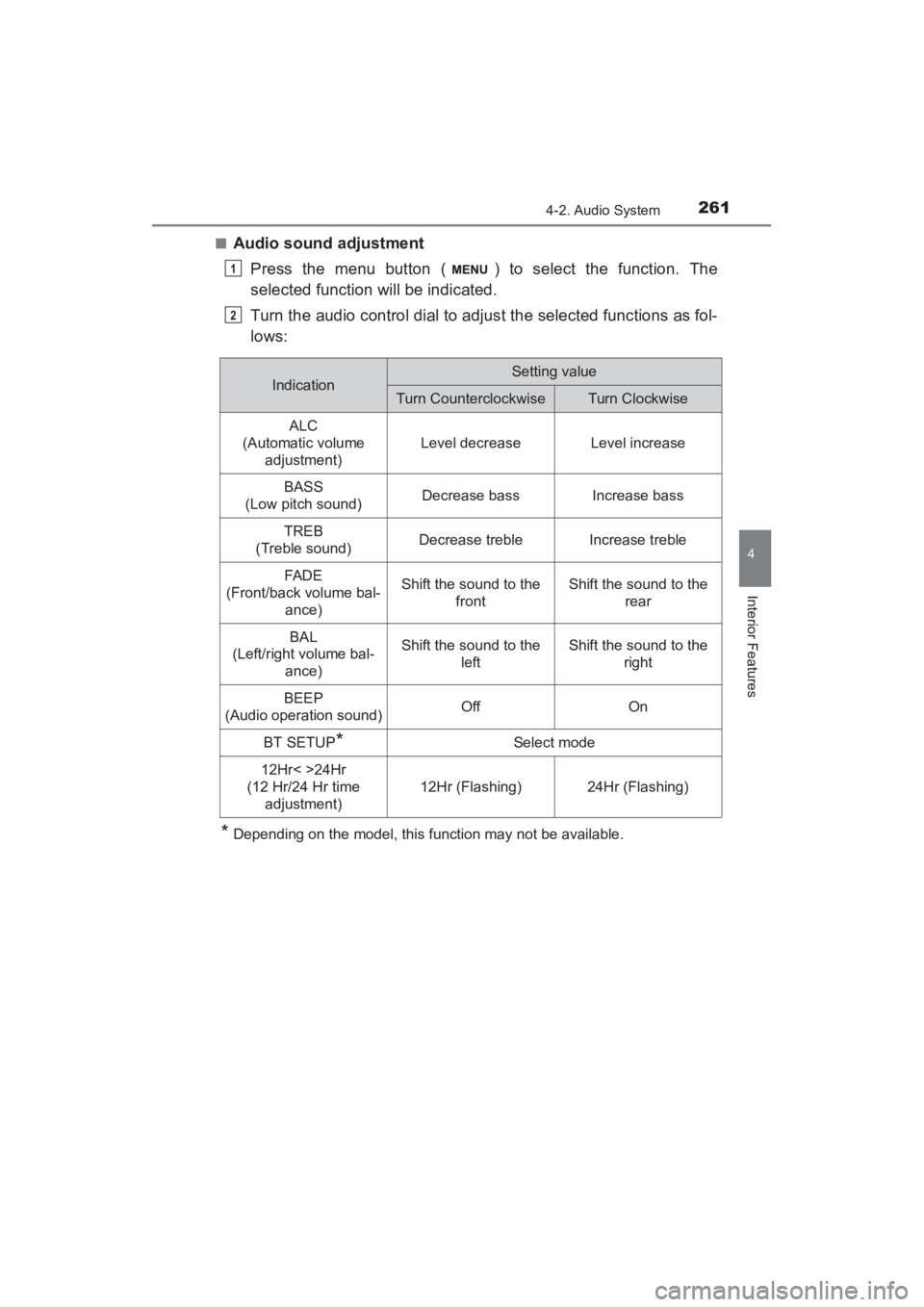
■Audio sound adjustmentPress the menu button ( ) to select the function. The
selected function will be indicated.
Turn the audio control dial to adjust the selected functions as fol-
lows:
*Depending on the model, this function may not be available.
1
2
IndicationSetting value
Turn CounterclockwiseTurn Clockwise
ALC
(Automatic volume adjustment)
Level decreaseLevel increase
BASS
(Low pitch sound)Decrease bassIncrease bass
TREB
(Treble sound)Decrease trebleIncrease treble
FAD E
(Front/back volume bal- ance)Shift the sound to the frontShift the sound to the rear
BAL
(Left/right volume bal-
ance)Shift the sound to the leftShift the sound to the right
BEEP
(Audio operation sound)OffOn
BT SETUP*Select mode
12Hr< >24Hr
(12 Hr/24 Hr time adjustment)
12Hr (Flashing)24Hr (Flashing)
YARIS_SEDAN_OM_OM99M18z_(U).book Page 261 Monday, June 1, 2015 9:22 PM
Page 264 of 592
262
YARIS_SEDAN_OM_OM99M18z_(U)
4-2. Audio System
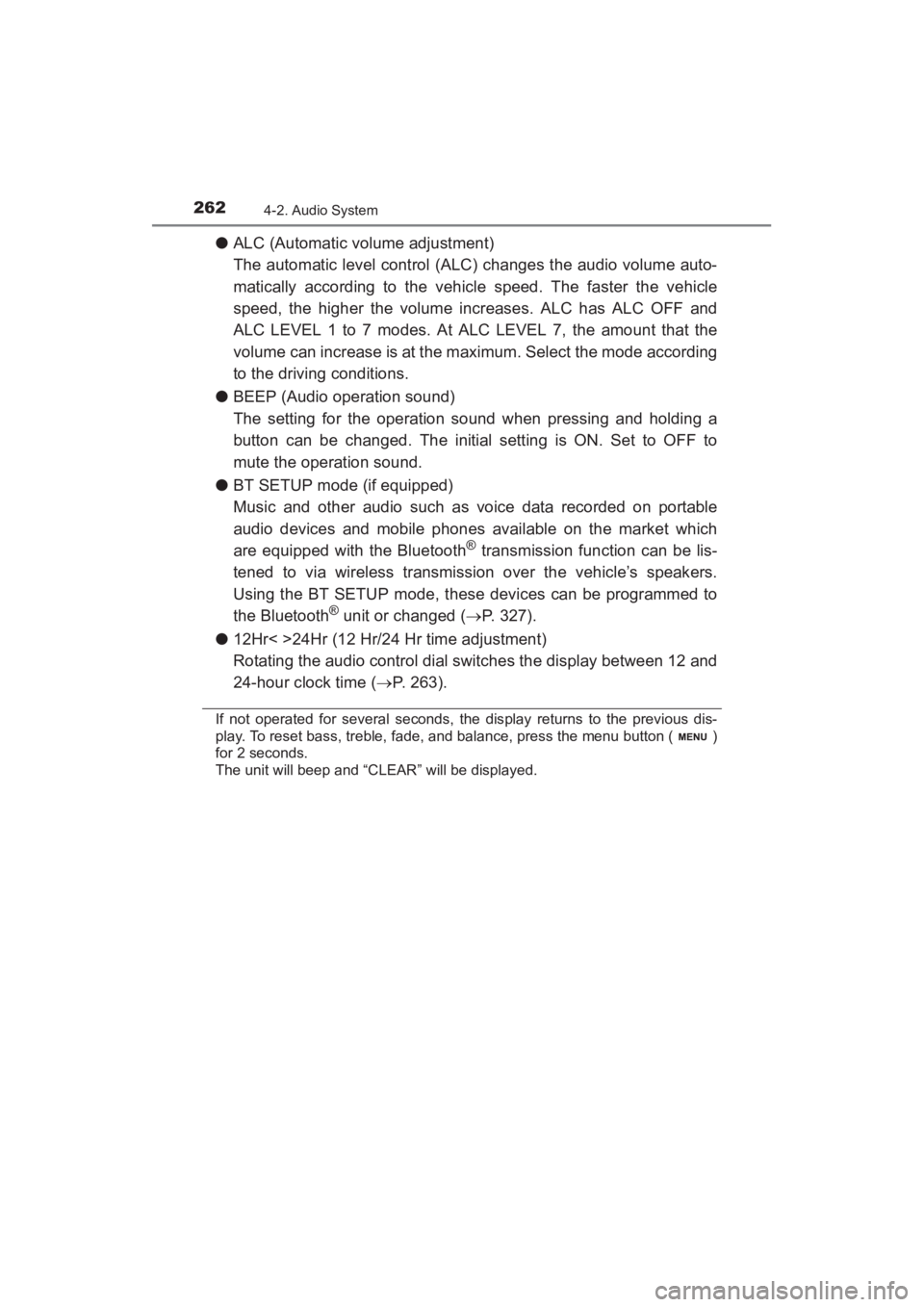
●ALC (Automatic volume adjustment)
The automatic level control (ALC) changes the audio volume auto-
matically according to the vehicle speed. The faster the vehicle
speed, the higher the volume increases. ALC has ALC OFF and
ALC LEVEL 1 to 7 modes. At ALC LEVEL 7, the amount that the
volume can increase is at the maximum. Select the mode according
to the driving conditions.
● BEEP (Audio operation sound)
The setting for the operation sound when pressing and holding a
button can be changed. The initial setting is ON. Set to OFF to
mute the operation sound.
● BT SETUP mode (if equipped)
Music and other audio such as voice data recorded on portable
audio devices and mobile phones available on the market which
are equipped with the Bluetooth
® transmission function can be lis-
tened to via wireless transmission over the vehicle’s speakers.
Using the BT SETUP mode, these devices can be programmed to
the Bluetooth
® unit or changed ( →P. 327).
● 12Hr< >24Hr (12 Hr/24 Hr time adjustment)
Rotating the audio control dial switches the display between 12 and
24-hour clock time ( →P. 263).
If not operated for several seconds, the display returns to the previous dis-
play. To reset bass, treble, fade, and balance, press the menu button ( )
for 2 seconds.
The unit will beep and “CLEAR” will be displayed.
YARIS_SEDAN_OM_OM99M18z_(U).book Page 262 Monday, June 1, 2015 9:22 PM
Page 265 of 592
YARIS_SEDAN_OM_OM99M18z_(U)
2634-2. Audio System
4
Interior Features
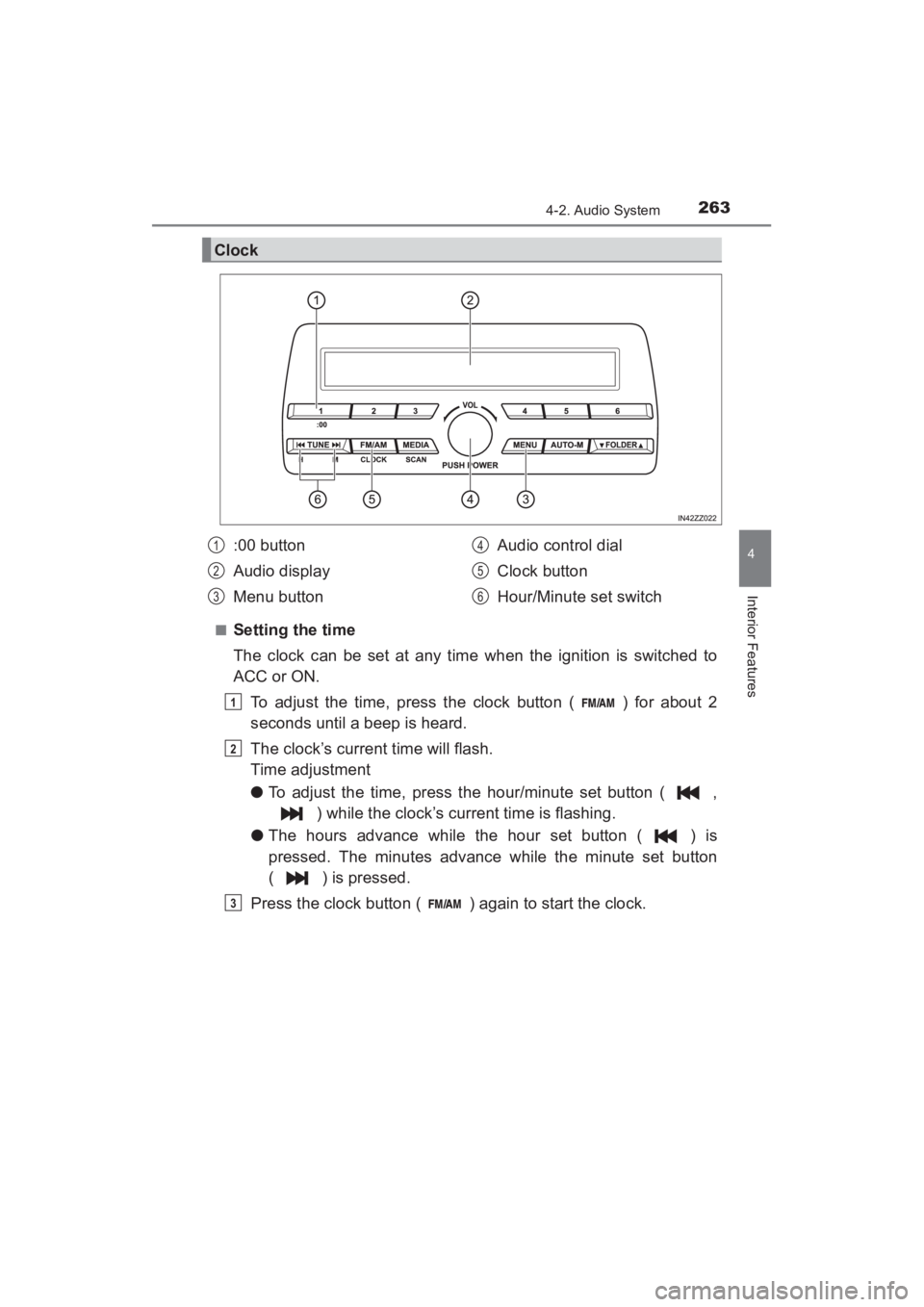
■Setting the time
The clock can be set at any time when the ignition is switched to
ACC or ON.To adjust the time, press the clock button ( ) for about 2
seconds until a beep is heard.
The clock’s current time will flash.
Time adjustment
● To adjust the time, press the hour/minute set button ( ,
) while the clock’s current time is flashing.
● The hours advance while the hour set button ( ) is
pressed. The minutes advance while the minute set button
( ) is pressed.
Press the clock button ( ) again to start the clock.
Clock
:00 button
Audio display
Menu button Audio control dial
Clock button
Hour/Minute set switch1
2
3
4
5
6
1
2
3
YARIS_SEDAN_OM_OM99M18z_(U).book Page 263 Monday, June 1, 2015 9:22 PM
Page 266 of 592
264
YARIS_SEDAN_OM_OM99M18z_(U)
4-2. Audio System
■Time resettingPress the clock button ( ) for about 2 seconds until a beep
is heard.
Press the :00 button (1).
When the button is pressed, the time will be reset as follows:
(Example) 12:01 - 12:29 →12:00
12:30 - 12:59 →1:00
●When the :00 button (1) is pressed, the seconds will start at “00”.
● Switching between 12 and 24-hour clock time:
Press the menu button ( ) several times until 12 and 24-hour clock time
are displayed. Turn the audio control dial in either direction, select the
desired clock setting while the preferred clock time is flashing.
■
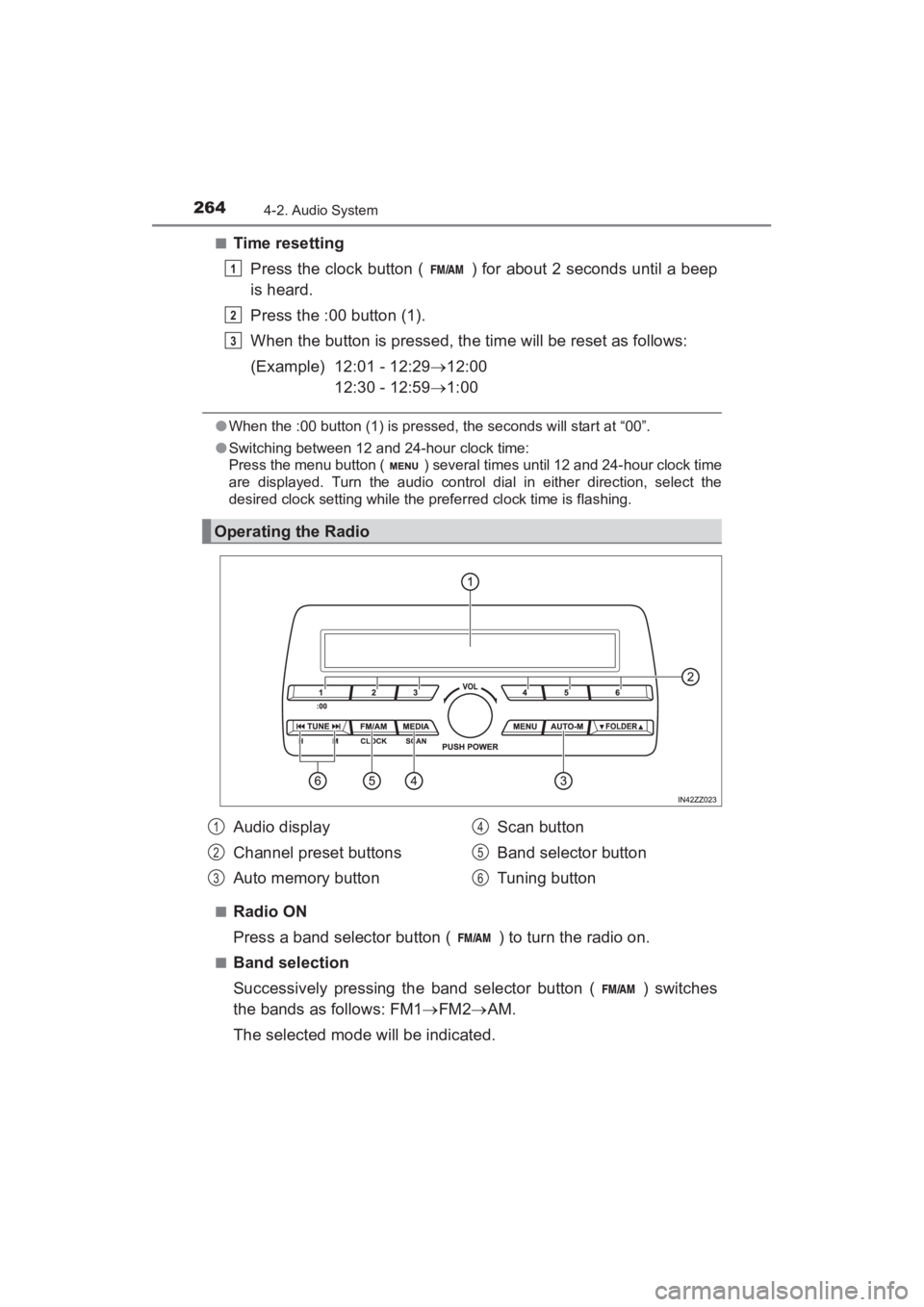
Radio ON
Press a band selector button ( ) to turn the radio on.
■Band selection
Successively pressing the band selector button ( ) switches
the bands as follows: FM1 →FM2 →AM.
The selected mode will be indicated.
Operating the Radio
1
2
3
Audio display
Channel preset buttons
Auto memory button Scan button
Band selector button
Tuning button1
2
3
4
5
6
YARIS_SEDAN_OM_OM99M18z_(U).book Page 264 Monday, June 1, 2015 9:22 PM
Page 267 of 592
YARIS_SEDAN_OM_OM99M18z_(U)
2654-2. Audio System
4
Interior Features
■Tuning
The radio has the following tuning methods: Manual, Seek, Scan,
Preset channel, and Auto memory tuning. The easiest way to tune
stations is to set them on preset channels.
●Manual tuning
Select the station by pressing the tuning button ( , )
lightly.
● Seek tuning
Automatic search for radio stations starts when the tuning button
( , ) is pressed until a beep sound is heard. The
search stops when a station is found.
● Scan tuning
Press and hold the scan button ( ) to automatically sample
strong stations.
Scanning stops at each station for about 5 seconds. To hold a
station, press and hold the scan button ( ) again during this
interval.
● Preset channel tuning
The 6 preset channels can be used to store 6 AM and 12 FM sta-
tions.
To set a channel first select AM, FM1, or FM2. Tune to the
desired station.
Press a channel preset button for about 2 seconds until a beep
is heard. The preset channel number or station frequency will
be displayed. The station is now held in the memory.
Repeat this operation for the other stations and bands you
want to store. To tune one in the memory, select AM, FM1, or
FM2 and then press its channel preset button. The station fre-
quency or the channel number will be displayed.
1
2
3
YARIS_SEDAN_OM_OM99M18z_(U).book Page 265 Monday, June 1, 2015 9:22 PM
Page 268 of 592
266
YARIS_SEDAN_OM_OM99M18z_(U)
4-2. Audio System
●Auto memory tuning
This is especially useful when driving in an area where the local
stations are not known.
Press and hold the auto memory button ( ) for about 2 sec-
onds until a beep is heard; the system will automatically scan
and temporarily store up to 6 stations with the strongest frequen-
cies in each selected band in that area.
After scanning is completed, the station with the strongest fre-
quency will be tuned and its frequency displayed. Press and
release the auto memory button ( ) to recall stations from
the auto-stored stations. One stored station will be selected each
time and its frequency and channel number will be displayed.
■Operating the Radio
●If the FM broadcast signal becomes weak, reception automatically changes
from STEREO to MONO for reduced noise.
● If you continue to press and hold the button, the frequency will continue
changing without stopping.
● If no stations can be tuned after scanning operations, “A” will be displayed.
YARIS_SEDAN_OM_OM99M18z_(U).book Page 266 Monday, June 1, 2015 9:22 PM