audio TOYOTA YARIS 2016 Owner's Guide
[x] Cancel search | Manufacturer: TOYOTA, Model Year: 2016, Model line: YARIS, Model: TOYOTA YARIS 2016Pages: 592, PDF Size: 10.44 MB
Page 269 of 592
YARIS_SEDAN_OM_OM99M18z_(U)
2674-2. Audio System
4
Interior Features
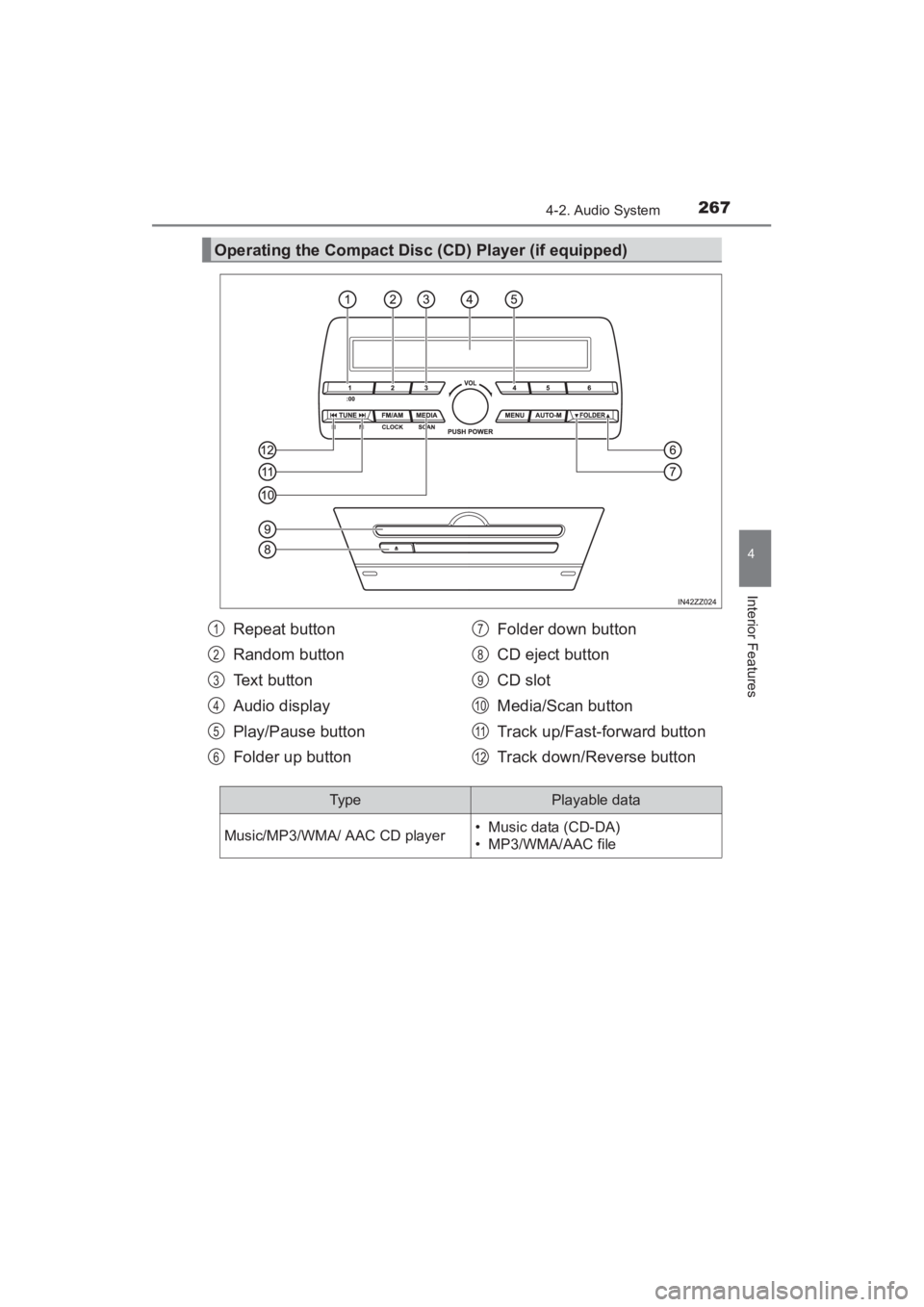
Operating the Compact Disc (CD) Player (if equipped)
Repeat button
Random button
Text button
Audio display
Play/Pause button
Folder up buttonFolder down button
CD eject button
CD slot
Media/Scan button
Track up/Fast-forward button
Track down/Reverse button1
2
3
4
5
6
7
8
9
10
11
12
Typ ePlayable data
Music/MP3/WMA/ AAC CD player• Music data (CD-DA)
• MP3/WMA/AAC file
YARIS_SEDAN_OM_OM99M18z_(U).book Page 267 Monday, June 1, 2015 9:22 PM
Page 270 of 592
268
YARIS_SEDAN_OM_OM99M18z_(U)
4-2. Audio System
■Inserting the CD
Insert the CD into the slot, label-side up. The auto-loading mecha-
nism will set the CD and begin play.
■Ejecting the CD
Press the CD eject button ( ) to eject the CD.
■Playback
Press the media button ( ) to switch to CD mode and start
playback.
■Pause
To stop playback, press the Play/Pause button (4).
Press the button again to resume playback.
■Fast-forward/Reverse
Press and hold the fast-forward button ( ) to advance through
a track at high speed. Press and hold the reverse button ( ) to
reverse through a track at high speed.
■Track search
Press the track up button ( ) once to skip forward to the
beginning of the next track. Press the track down button ( )
within a few seconds after playback begins to track down to the
beginning of the previous track.
Press the track down button ( ) after a few seconds have
elapsed to start playback from the beginning of the current track.
■Folder search (during MP3/WMA/AAC CD playback)
To change to the previous folder, press the folder down button
( ), or press the folder up button ( ) to advance to the
next folder.
YARIS_SEDAN_OM_OM99M18z_(U).book Page 268 Monday, June 1, 2015 9:22 PM
Page 271 of 592
YARIS_SEDAN_OM_OM99M18z_(U)
2694-2. Audio System
4
Interior Features
■Music scan
●During music CD playback
This function scans the titles on a CD and plays 10 seconds of
each song to aid you in finding a song you want to listen to.
Press and hold the scan button ( ) during playback to start
the scan play operation (the track number will flash). Press and
hold the scan button ( ) again to cancel scan playback.
● During MP3/WMA/AAC CD playback
This function scans the titles in a folder currently being played
and plays 10 seconds of each song to aid you in finding a song
you want to listen to. Press and hold the scan button ( )
during playback to start the scan play operation (the track num-
ber will flash).
Press and hold the scan button ( ) again to cancel scan
playback.
YARIS_SEDAN_OM_OM99M18z_(U).book Page 269 Monday, June 1, 2015 9:22 PM
Page 272 of 592
270
YARIS_SEDAN_OM_OM99M18z_(U)
4-2. Audio System
■Repeat playback
●During music CD playback
Press the repeat button (1) during playback to play the current
track repeatedly. “TRACK RPT” is displayed ( is dis-
played next to RPT at the bottom of the display area).
Press the button again to cancel the repeat playback.
● During MP3/WMA/AAC CD playback
XTrack repeat
Press the repeat button (1) during playback to play the current
track repeatedly. “TRACK RPT” is displayed ( is dis-
played next to RPT at the bottom of the display area).
To cancel the repeat playback, press the button again after 3
seconds.
XFolder repeat
Press the repeat button (1) during playback, and then press
the button again within 3 seconds to play the tracks in the cur-
rent folder repeatedly. “FOLDER RPT” is displayed ( is
displayed next to RPT at the bottom of the display area).
Press the button again to cancel the repeat playback.
■Random playback
Tracks are randomly selected and played.
●During music CD playback
Press the random button (2) during playback to play the tracks
on the CD randomly. “DISC RDM” is displayed ( is dis-
played next to RDM at the bottom of the display area).
Press the button again to cancel the random playback.
1
2
1
2
1
2
1
2
YARIS_SEDAN_OM_OM99M18z_(U).book Page 270 Monday, June 1, 2015 9:22 PM
Page 273 of 592
YARIS_SEDAN_OM_OM99M18z_(U)
2714-2. Audio System
4
Interior Features
●During MP3/WMA/AAC CD playback
XFolder random
Press the random button (2) during playback to play the tracks
in the folder randomly. “FOLDER RDM” is displayed ( is
displayed next to RDM at the bottom of the display area).
To cancel the random playback, press the button again after 3
seconds.
XCD random
Press the random button (2) during playback, and then press
the button again within 3 seconds to play the tracks on the CD
randomly. “DISC RDM” is displayed ( is displayed next
to RDM at the bottom of the display area).
Press the button again to cancel the random playback.
1
2
1
2
YARIS_SEDAN_OM_OM99M18z_(U).book Page 271 Monday, June 1, 2015 9:22 PM
Page 274 of 592
272
YARIS_SEDAN_OM_OM99M18z_(U)
4-2. Audio System
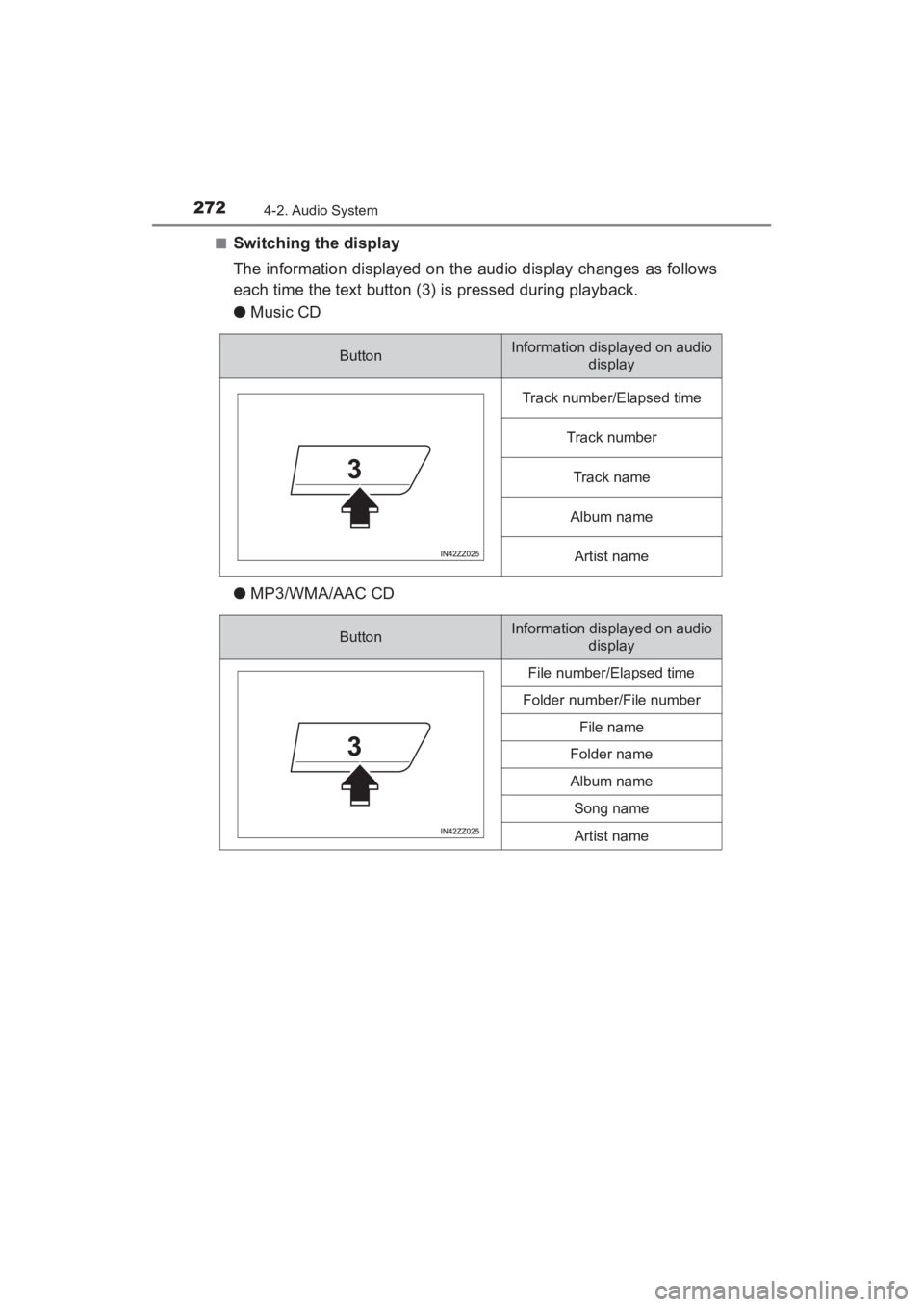
■Switching the display
The information displayed on the audio display changes as follows
each time the text button (3) is pressed during playback.
●Music CD
● MP3/WMA/AAC CD
ButtonInformation displayed on audio
display
Track number/Elapsed time
Track number
Track name
Album name
Artist name
ButtonInformation displayed on audio display
File number/Elapsed time
Folder number/File number
File name
Folder name
Album name
Song name
Artist name
YARIS_SEDAN_OM_OM99M18z_(U).book Page 272 Monday, June 1, 2015 9:22 PM
Page 275 of 592
YARIS_SEDAN_OM_OM99M18z_(U)
2734-2. Audio System
4
Interior Features
■Display scroll
Only 13 characters can be displayed at one time. To display the rest
of the characters of a long title, press and hold the text button (3).
The display scrolls the next 13 characters. Press and hold the text
button (3) again after the last 13 characters have been displayed to
return to the beginning of the title.
■Message display
If “CHECK CD” is displayed, it means that there is some CD mal-
function. Check the CD for damage, dirt, or smudges, and then
properly reinsert it. If the message appears again, insert another
known good CD. If the message continues to appear, take the unit
to your Toyota dealer for service.
■Operating the Compact Disc (CD) Player
●If a disc has both music data (CD-DA) and MP3/WMA/AAC files, playback of
the two or three file types differs depending on how the disc was recorded.
● There will be a short lapse before play begins while the player reads the dig-
ital signals on the CD.
● The CD mode cannot be selected if a CD has not been inserted.
● If the unit is left in scan, normal playback will resume where scan was
selected.
● The information viewable in the display is only CD information (such as art-
ist name, song title) which has been recorded to the CD.
● This unit cannot display some characters. Characters which cannot be dis-
played are indicated by an asterisk ( ).
● The number of characters which can be displayed is restricted.
YARIS_SEDAN_OM_OM99M18z_(U).book Page 273 Monday, June 1, 2015 9:22 PM
Page 276 of 592
274
YARIS_SEDAN_OM_OM99M18z_(U)
4-2. Audio System
Audio can be heard from the vehicle’s speakers by connecting a com-
mercially- available portable audio unit to the auxiliary jack.
Use a commercially-available, non- impedance (3.5∅) stereo mini
plug cable. Contact your Toyota dealer for details.
In addition, audio can be played from the vehicle audio device by con-
necting a USB device or an iPod to the USB port.
Refer to AUX/USB/iPod mode on P. 302.
If you see an error indication on the audio display, find the cause in
the chart. If you cannot clear the error indication, take the vehicle to
your Toyota dealer.
How to use Auxiliary jack/USB port
Error Indications
IndicationCauseSolution
CHECK CD
CD is inserted
upside downInsert the CD properly. If the error
indication continues to display,
consult your Toyota dealer.
CD is defective
Insert another CD properly. If the
error indication continues to dis-
play, consult your Toyota dealer.
YARIS_SEDAN_OM_OM99M18z_(U).book Page 274 Monday, June 1, 2015 9:22 PM
Page 277 of 592
275
YARIS_SEDAN_OM_OM99M18z_(U)
4-2. Audio System
4
Interior Features
Audio Set (Type B)∗
Audio Set (Type B) has three different human interfaces.
●Commander switch
● Touch panel
● Voice recognition with steering switch and microphone
■Commander switch operation
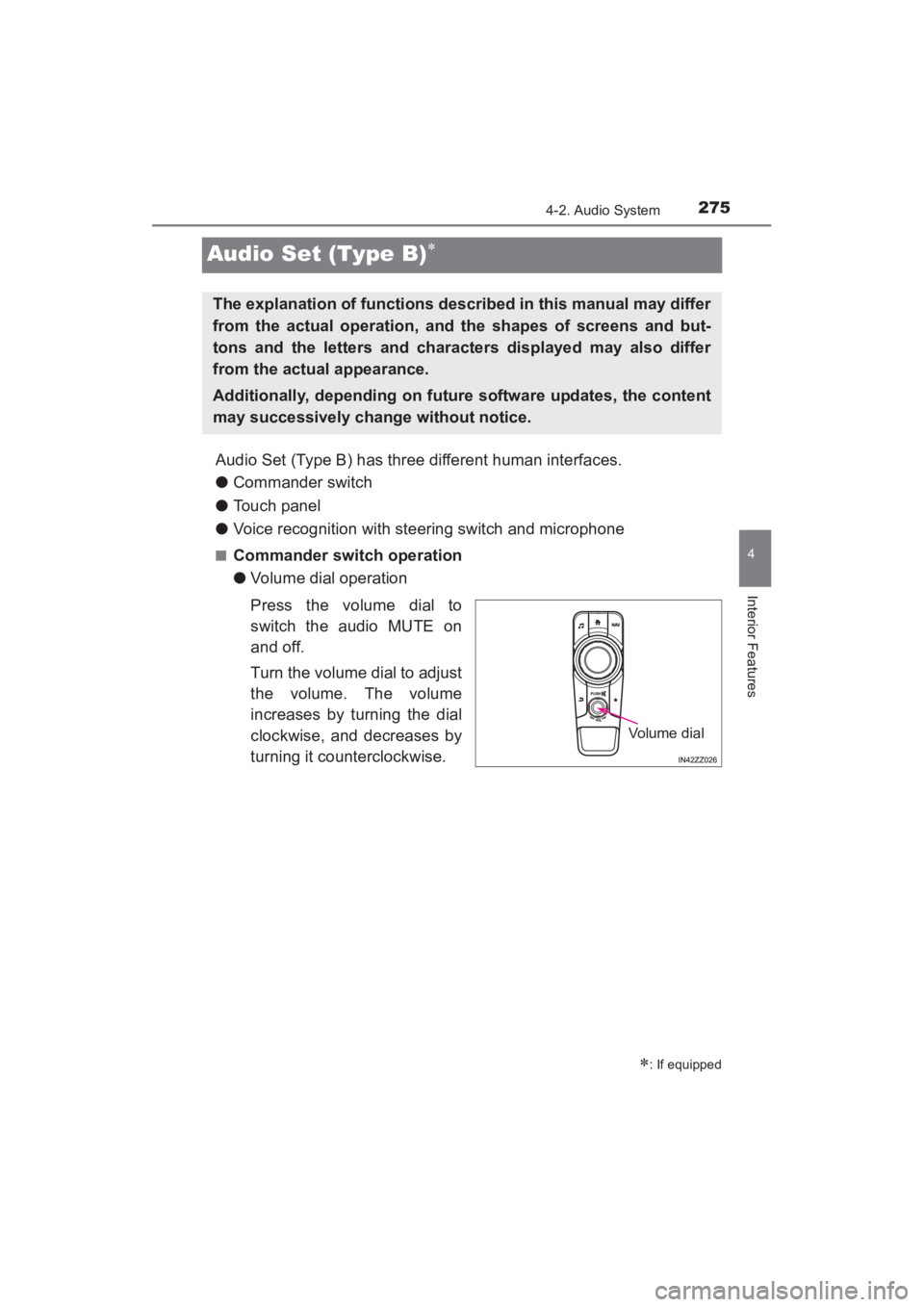
●Volume dial operation
Press the volume dial to
switch the audio MUTE on
and off.
Turn the volume dial to adjust
the volume. The volume
increases by turning the dial
clockwise, and decreases by
turning it counterclockwise.
∗: If equipped
The explanation of functions described in this manual may differ
from the actual operation, and the shapes of screens and but-
tons and the letters and characters displayed may also differ
from the actual appearance.
Additionally, depending on future software updates, the content
may successively change without notice.
Volume dial
YARIS_SEDAN_OM_OM99M18z_(U).book Page 275 Monday, June 1, 2015 9:22 PM
Page 278 of 592
276
YARIS_SEDAN_OM_OM99M18z_(U)
4-2. Audio System
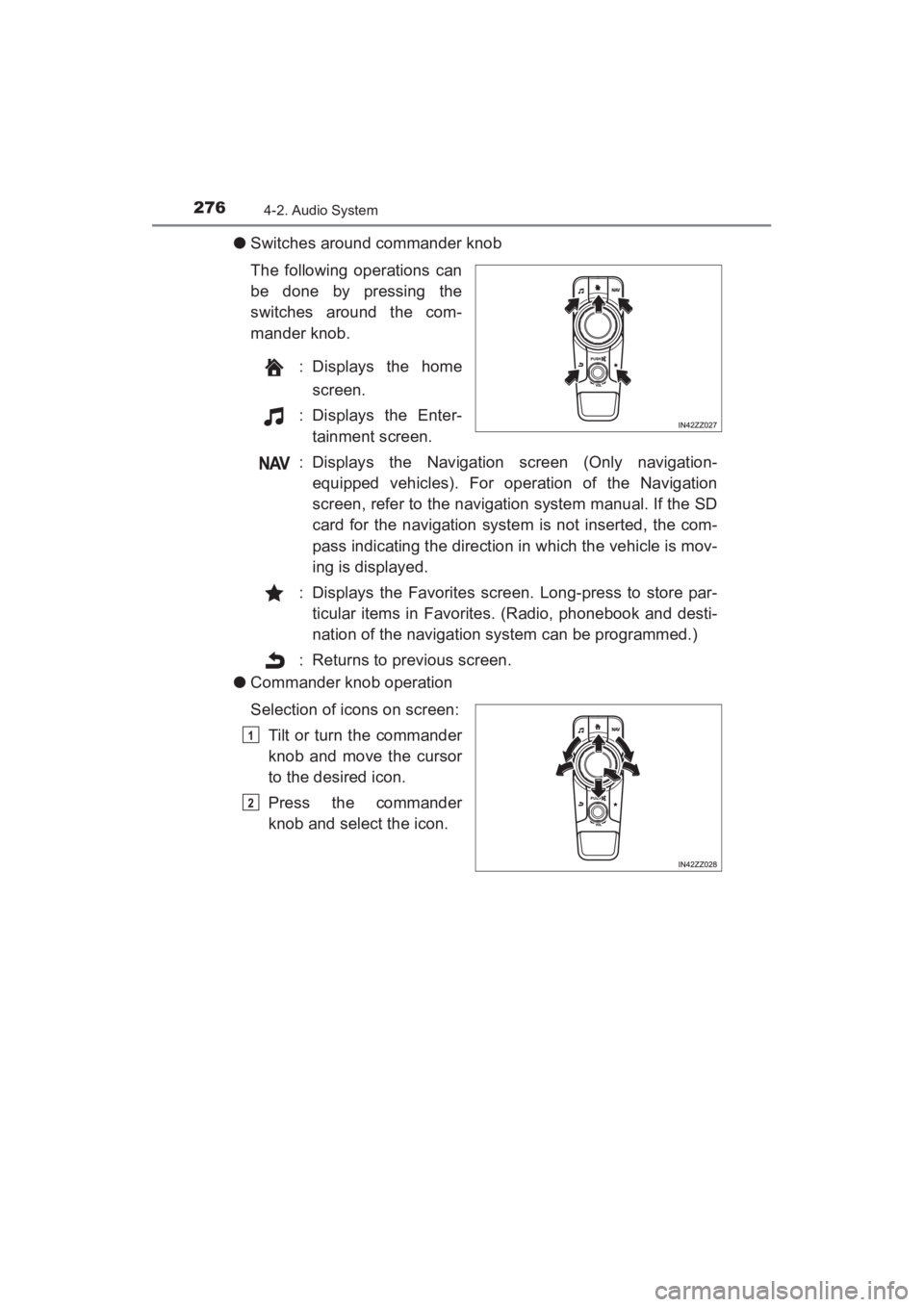
●Switches around commander knob
The following operations can
be done by pressing the
switches around the com-
mander knob.
: Displays the homescreen.
: Displays the Enter- tainment screen.
: Displays the Navigation screen (Only navigation- equipped vehicles). For operation of the Navigation
screen, refer to the navigation system manual. If the SD
card for the navigation system is not inserted, the com-
pass indicating the direction in which the vehicle is mov-
ing is displayed.
: Displays the Favorites screen. Long-press to store par- ticular items in Favorites. (Radio, phonebook and desti-
nation of the navigation system can be programmed.)
: Returns to previous screen.
● Commander knob operation
Selection of icons on screen:
Tilt or turn the commander
knob and move the cursor
to the desired icon.
Press the commander
knob and select the icon.
1
2
YARIS_SEDAN_OM_OM99M18z_(U).book Page 276 Monday, June 1, 2015 9:22 PM