ignition TOYOTA YARIS 2016 Manual PDF
[x] Cancel search | Manufacturer: TOYOTA, Model Year: 2016, Model line: YARIS, Model: TOYOTA YARIS 2016Pages: 592, PDF Size: 10.44 MB
Page 348 of 592
346
YARIS_SEDAN_OM_OM99M18z_(U)
4-3. Bluetooth®
●Make sure the vents are not directing air up towards the micro-
phone.
■Voice Recognition (Type A)
●The Bluetooth® Hands-Free system is operable several seconds after the
ignition is switched to ACC or ON (requires less than 15 seconds).
● When operating the audio unit or the A/C while using Bluetooth
® Hands-
Free, the beep sounds or voice guidance (audio unit)/cannot be heard.
● If the voice recognition performance is not satisfactory.
● Refer to Voice Recognition Learning Function (Speaker Enrollment) (Type
A) on P. 348.
Refer to Troubleshooting on P. 401.
If a passcode is set, the system cannot be activated unless the pass-
code is input.
Do this function only when parked. It is too distracting to attempt while driv-
ing and you may make too many errors to be effective.
■
Passcode setting
Press the pick-up button or talk button with a short press.
Say: [Beep] “Setup”
Prompt: “Select one of the following: Pairing options, confirma-
tion prompts, language, passcode, select phone or select music
player.”
Say: [Beep] “Passcode”
Prompt: “Passcode is disabled. Would you like to enable it?”
Say: [Beep] “Yes”
Prompt: “Please say a 4-digit passcode. Remember this pass-
code. It will be required to use this system.”
Say: [Beep] “XXXX” (Say a desired 4-digit passcode, “PCode”.)
Prompt: “Passcode XXXX (Passcode, PCode). Is this correct?”
Say: [Beep] “Yes”
Prompt: “Passcode is enabled.”
Security Setting (Type A)
1
2
3
4
5
6
7
8
9
10
11
YARIS_SEDAN_OM_OM99M18z_(U).book Page 346 Monday, June 1, 2015 9:22 PM
Page 354 of 592
352
YARIS_SEDAN_OM_OM99M18z_(U)
4-3. Bluetooth®
(Device with Bluetooth® version 2.0)
Input the displayed 4-digit pairing code into the device.
(Device with Bluetooth
® version 2.1 or higher)
Make sure the displayed 6-digit code on the audio is also dis-
played on the device, and touch the .
Connection permission and phonebook access permission for
your mobile device may be required depending on the mobile
device.
If pairing is successful, the functions of the device connected
to Bluetooth
® are displayed.
(Devices compatible with Toyota/Scion Email/SMS function)
SMS (Short Message Service) messages, and E-mail for the
device are downloaded automatically. A download permission
operation for your device may be required depending on the
device.
After a device is registered, the system automatically identifies the
device. By activating Bluetooth
® Hands-Free again, or by activating
Bluetooth® Hands-Free first after switching the ignition from OFF to
ACC, the device connection condition is indicated in the center dis-
play.
● IMPORTANT note about pairing and automatic reconnection:
• If pairing is redone on the same mobile phone device, first
clear “Toyota” displayed on the Bluetooth
® setting screen of
the mobile device.
• When the OS of the device is updated, the pairing information may be deleted. If this happens, reprogram the pairing infor-
mation to the Bluetooth
® unit.
• Before you pair your device, make sure that Bluetooth® is
“ON”, both on your phone and on the vehicle.
8
9
10
YARIS_SEDAN_OM_OM99M18z_(U).book Page 352 Monday, June 1, 2015 9:22 PM
Page 355 of 592
YARIS_SEDAN_OM_OM99M18z_(U)
3534-3. Bluetooth®
4
Interior Features
■Device selection
If several devices have been paired, the Bluetooth
® unit links the
device last paired. If you would like to link a different paired device,
it is necessary to change the link. The order of device priority after
the link has been changed is maintained even when the ignition is
switched off.
● Connecting other devices
Select the icon on the home screen and display the
Settings screen.
Select the tab.
Select .
Turn the Bluetooth
® setting on.
Select the name of the device you would like to connect. selection
Connects both devices as hands-free and Bluetooth
® audio.
selection
Connects as a hands-free device.
selection
Connects as Bluetooth
® audio.
● Disconnecting a device
Select the icon on the home screen and display the
Settings screen.
Select the tab.
Select .
Turn the Bluetooth
® setting on.
Select the device name which is currently connected.
Select .
1
2
3
4
5
6
1
2
3
4
5
6
YARIS_SEDAN_OM_OM99M18z_(U).book Page 353 Monday, June 1, 2015 9:22 PM
Page 357 of 592
YARIS_SEDAN_OM_OM99M18z_(U)
3554-3. Bluetooth®
4
Interior Features
■Bluetooth® Preparation (Type B)
The Bluetooth® system may not operate for 1 or 2 minutes after the ignition is
switched to ACC or ON. However, this does not indicate a problem. If the
Bluetooth
® system does not connect automatically after 1 or 2 minutes have
elapsed, make sure that the Bluetooth® setting on the device is normal and
attempt to reconnect the Bluetooth® device from the vehicle side.
When Call history and messages are downloaded automatically, each auto-
matic download setting must be on.
Refer to Communication Settings on P. 382.
● The following functions can be used for the Hands-free or audio.
• Hands-free: Phone calls and E-mail/ SMS
• Audio: Bluetooth
® audio, Pandora®, Aha™, Stitcher™ radio
The Bluetooth® Hands-Free System applies to the following lan-
guages:
● English
● Spanish
● French
Refer to Settings on P. 295.
Available Language (Type B)
YARIS_SEDAN_OM_OM99M18z_(U).book Page 355 Monday, June 1, 2015 9:22 PM
Page 379 of 592

YARIS_SEDAN_OM_OM99M18z_(U)
3774-3. Bluetooth®
4
Interior Features
●If the ignition is switched off during a hands-free call, the line is transferred
to the device (Mobile phone) automatically.
● If the DTMF code has two or more digits or symbols, each one must be
transmitted individually.
The call on hold is made to make a 3-way call.
The device may be unusable depending on the con-
tractual content.
Switches the call on hold.
DTMF (Dual Tone Multi-Frequency Signal) Trans-
mission
This function is used when transmitting DTMF via
the dial pad. The receiver of a DTMF transmission is
generally a home telephone answering machine or
a company’s automated guidance call center.
Input the number using a dial pad.
IconFunction
YARIS_SEDAN_OM_OM99M18z_(U).book Page 377 Monday, June 1, 2015 9:22 PM
Page 387 of 592
YARIS_SEDAN_OM_OM99M18z_(U)
3854-3. Bluetooth®
4
Interior Features
■Switching to Bluetooth® audio mode
To listen to music or voice audio recorded to a Bluetooth
® audio
device, switch to the Bluetooth® audio mode to operate the audio
device using the audio system control panel. Any Bluetooth® audio
device must be paired to the vehicle’s Bluetooth unit before it can
be used.
Refer to Bluetooth
® Preparation (Type A) on P. 327.
Turn on the Bluetooth
® audio device’s power.
Switch the ignition to ACC or ON. Make sure that the “ ”
symbol is displayed in the audio display. The symbol is not dis-
played if an un-paired Bluetooth
® audio device is being used or
the vehicle’s Bluetooth
® unit has a malfunction.
Press the media button ( ) to switch to the Bluetooth
®
audio mode and start playback.
XIf the current device version is lower than AVRCP Ver. 1.3: “BT
Audio” is displayed.
XIf the current device is AVRCP Ver. 1.3: The playback time is
displayed.
■Playback To listen to a Bluetooth
® audio device over the vehicle’s speaker
system, switch the mode to Bluetooth® audio mode. (Refer to
“Switching to Bluetooth® audio mode”)
To stop playback, press the Play/Pause button (4).
Press the button again to resume playback.
How to Use the Bluetooth® Audio System
1
2
3
1
2
3
YARIS_SEDAN_OM_OM99M18z_(U).book Page 385 Monday, June 1, 2015 9:22 PM
Page 391 of 592
YARIS_SEDAN_OM_OM99M18z_(U)
3894-3. Bluetooth®
4
Interior Features
●The battery consumption of Bluetooth® audio devices increases while
Bluetooth® is connected.
● If a general mobile phone device is USB connected during music playback
over the Bluetooth
® connection, the Bluetooth® connection is disconnected.
For this reason, you cannot have music playback over a Bluetooth® connec-
tion and music playback using a USB connection at the same time.
● The system may not operate normally depending on the Bluetooth
® audio
device.
■
Switching to Bluetooth® audio mode
To listen to music or voice audio recorded to a Bluetooth
® audio
device, switch to the Bluetooth® audio mode to operate the audio
device using the audio system control panel. Any Bluetooth® audio
device must be paired to the vehicle’s Bluetooth® unit before it can
be used.
Refer to Bluetooth
® Preparation (Type B) on P. 351.
Turn on the Bluetooth
® audio device’s power.
Switch the ignition to ACC or ON.
Select the icon on the home screen to display the Enter-
tainment screen.
When is selected, switches to the Bluetooth
® audio
mode to begin playback.
■Playback
To listen to a Bluetooth
® audio device over the vehicle’s speaker
system, switch the mode to Bluetooth® audio mode. (Refer to
“Switching to Bluetooth® audio mode”)
After switching to the Bluetooth
® audio mode, the following icons
are displayed in the lower part of the display. Icons which can be
used differ depending on the version of the Bluetooth
® audio device
which you are currently using.
How to Use the Bluetooth® Audio System
1
2
3
4
YARIS_SEDAN_OM_OM99M18z_(U).book Page 389 Monday, June 1, 2015 9:22 PM
Page 410 of 592
408
YARIS_SEDAN_OM_OM99M18z_(U)
4-4. Interior Equipment
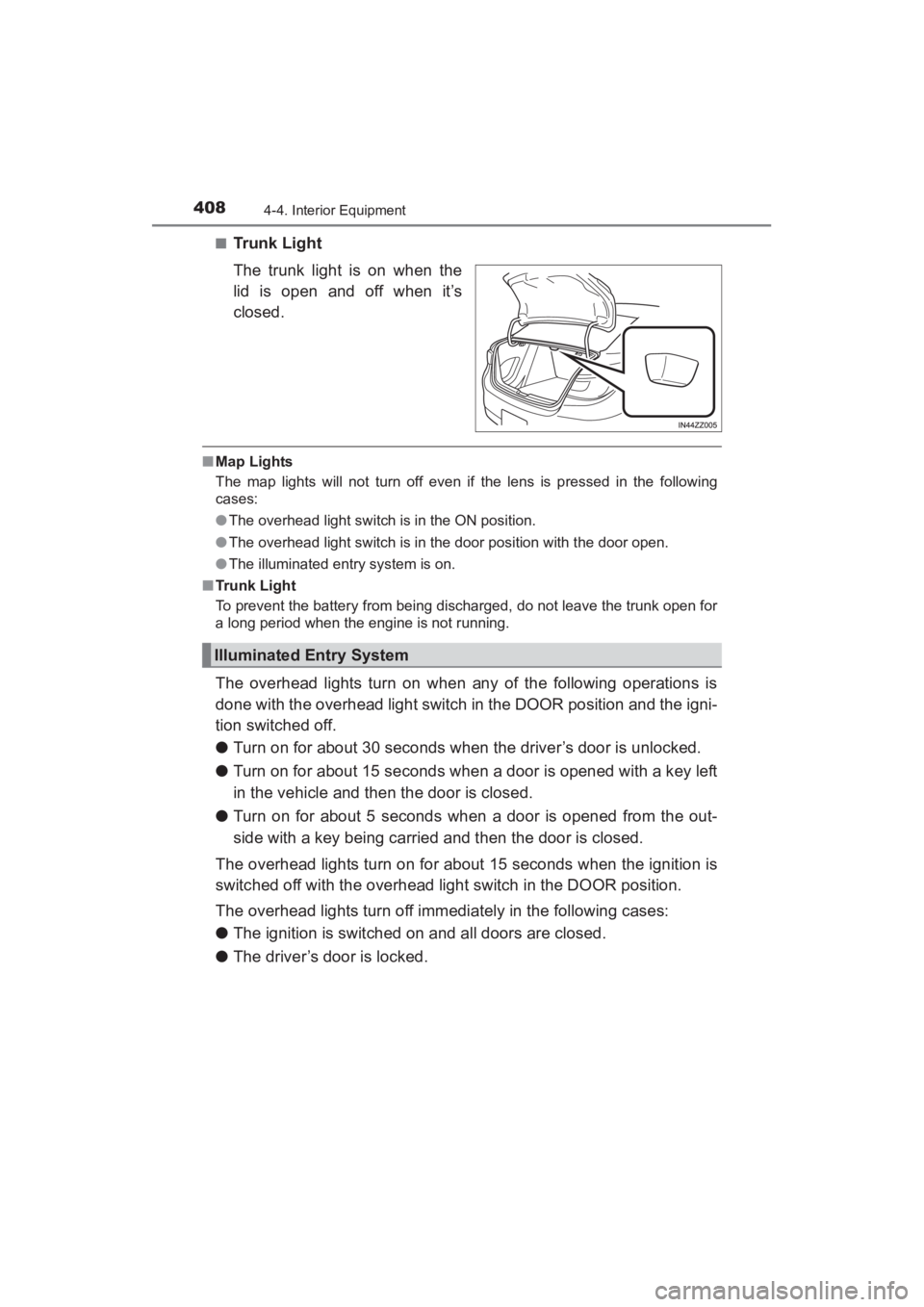
■Trunk Light
The trunk light is on when the
lid is open and off when it’s
closed.
■Map Lights
The map lights will not turn off even if the lens is pressed in the following
cases:
●The overhead light switch is in the ON position.
● The overhead light switch is in the door position with the door open.
● The illuminated entry system is on.
■ Trunk Light
To prevent the battery from being discharged, do not leave the trunk open for
a long period when the engine is not running.
The overhead lights turn on when any of the following operations is
done with the overhead light switch in the DOOR position and the igni-
tion switched off.
● Turn on for about 30 seconds when the driver’s door is unlocked.
● Turn on for about 15 seconds when a door is opened with a key left
in the vehicle and then the door is closed.
● Turn on for about 5 seconds when a door is opened from the out-
side with a key being carried and then the door is closed.
The overhead lights turn on for about 15 seconds when the ignition is
switched off with the overhead light switch in the DOOR position.
The overhead lights turn off immediately in the following cases:
● The ignition is switched on and all doors are closed.
● The driver’s door is locked.
Illuminated Entry System
YARIS_SEDAN_OM_OM99M18z_(U).book Page 408 Monday, June 1, 2015 9:22 PM
Page 411 of 592
YARIS_SEDAN_OM_OM99M18z_(U)
4094-4. Interior Equipment
4
Interior Features
■Illuminated Entry System
●Battery saver
If any door is left open with the overhead light switch in the DOOR position,
or the trunk lid is left open, the ov erhead light or luggage compartment light/
trunk light turns off after about 30 minutes to prevent battery depletion.
● To prevent battery depletion, if the interior lights remain turned on (the inte-
rior light switch is in the ON position or an interior light is turned on by press-
ing the lens of the interior light), they turn off automatically under the
following conditions:
• No operations are done for about 30 minutes after the ignition is switched off.
• When the LOCK button on the key is pressed or the request switch is
pressed to lock the doors on vehicles with the advanced keyless function
after the ignition is switched off (interior lights turn off a few seconds).
In addition, if the following operations are performed after turning the interior
lights off, they will turn on again.
• The ignition is switched to a position other than OFF.
• A door is opened.
• A door is unlocked.
● The operation of the illuminated entry system can be changed.
Refer to Customizable Features on P. 572.
YARIS_SEDAN_OM_OM99M18z_(U).book Page 409 Monday, June 1, 2015 9:22 PM
Page 412 of 592
410
YARIS_SEDAN_OM_OM99M18z_(U)
4-4. Interior Equipment
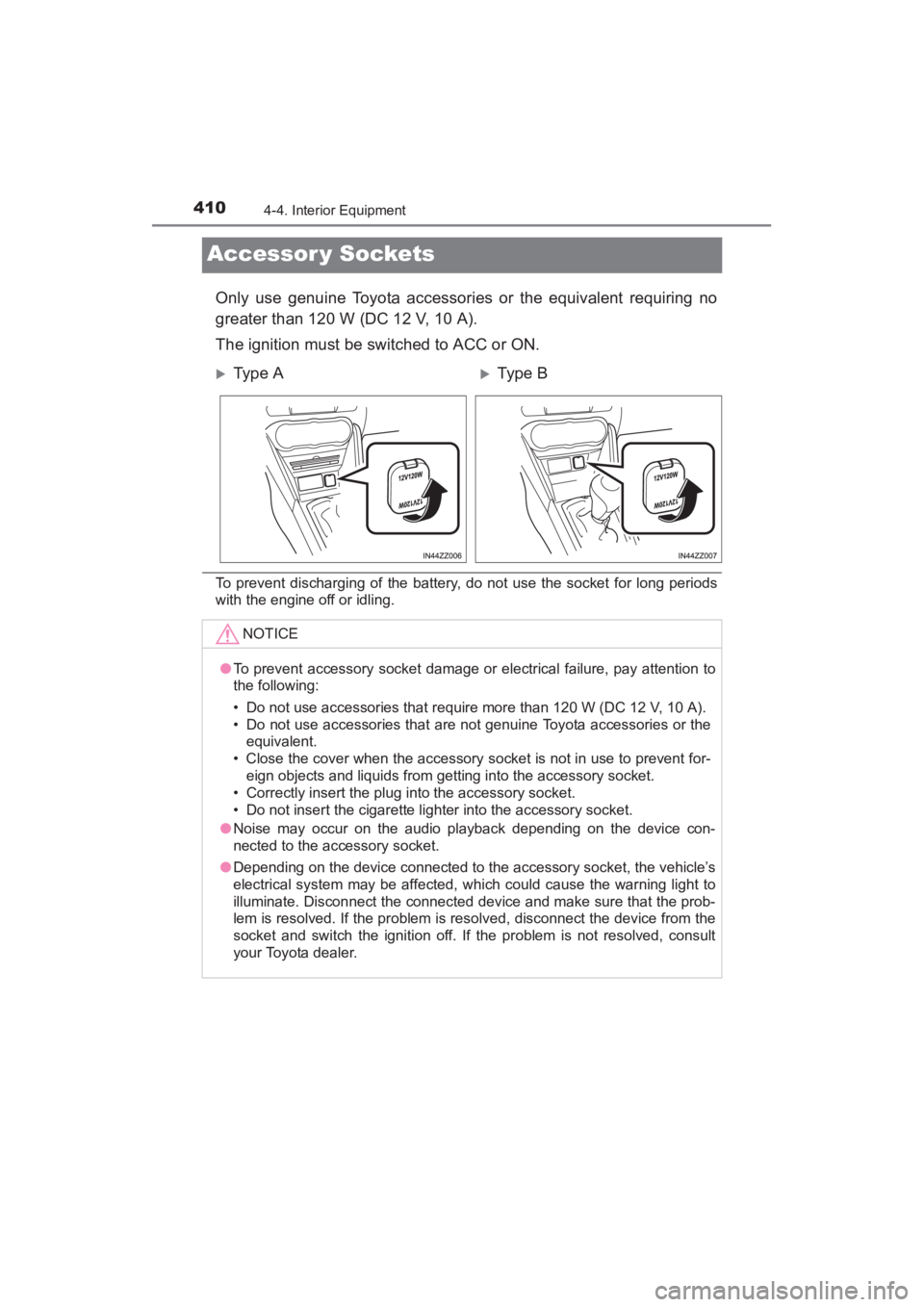
Accessor y Sockets
Only use genuine Toyota accessories or the equivalent requiring no
greater than 120 W (DC 12 V, 10 A).
The ignition must be switched to ACC or ON.
To prevent discharging of the battery, do not use the socket for long periods
with the engine off or idling.
XType AXTy pe B
NOTICE
●To prevent accessory socket damage or electrical failure, pay attention to
the following:
• Do not use accessories that require more than 120 W (DC 12 V, 10 A).
• Do not use accessories that are not genuine Toyota accessories or the
equivalent.
• Close the cover when the accessory socket is not in use to prevent for- eign objects and liquids from getting into the accessory socket.
• Correctly insert the plug into the accessory socket.
• Do not insert the cigarette lighter into the accessory socket.
● Noise may occur on the audio playback depending on the device con-
nected to the accessory socket.
● Depending on the device connected to the accessory socket, the vehicle’s
electrical system may be affected, which could cause the warning light to
illuminate. Disconnect the connected device and make sure that the prob-
lem is resolved. If the problem is resolved, disconnect the device from the
socket and switch the ignition off. If the problem is not resolved, consult
your Toyota dealer.
YARIS_SEDAN_OM_OM99M18z_(U).book Page 410 Monday, June 1, 2015 9:22 PM