language TOYOTA YARIS 2016 Owners Manual
[x] Cancel search | Manufacturer: TOYOTA, Model Year: 2016, Model line: YARIS, Model: TOYOTA YARIS 2016Pages: 592, PDF Size: 10.44 MB
Page 281 of 592
YARIS_SEDAN_OM_OM99M18z_(U)
2794-2. Audio System
4
Interior Features
■Return to previous screen
Touch the .
■Displaying the home screen
Touch the .
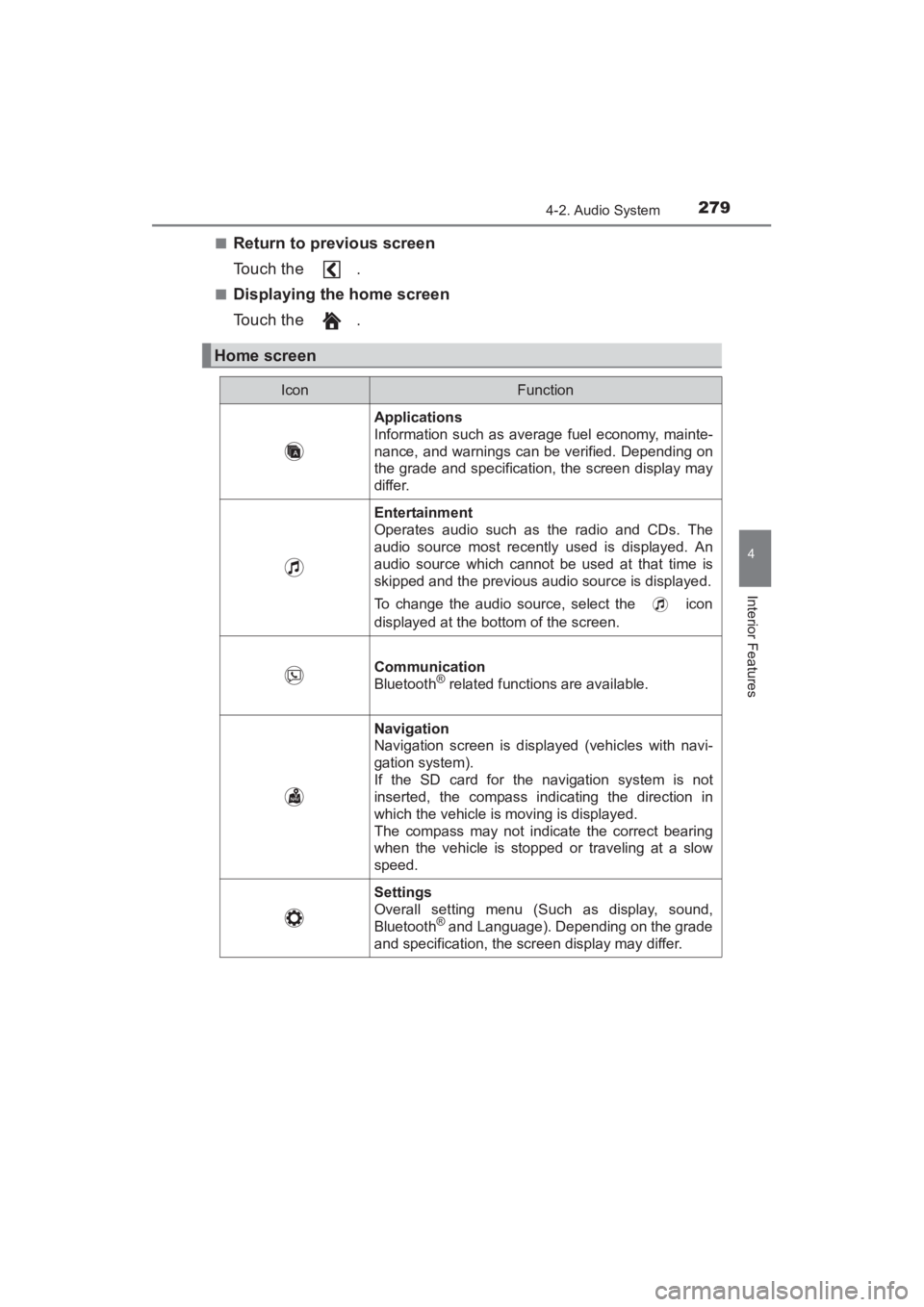
Home screen
IconFunction
Applications
Information such as average fuel economy, mainte-
nance, and warnings can be verified. Depending on
the grade and specification, the screen display may
differ.
Entertainment
Operates audio such as the radio and CDs. The
audio source most recently used is displayed. An
audio source which cannot be used at that time is
skipped and the previous audio source is displayed.
To change the audio source, select the icon
displayed at the bottom of the screen.
Communication
Bluetooth® related functions are available.
Navigation
Navigation screen is displayed (vehicles with navi-
gation system).
If the SD card for the navigation system is not
inserted, the compass indicating the direction in
which the vehicle is moving is displayed.
The compass may not indicate the correct bearing
when the vehicle is stopped or traveling at a slow
speed.
Settings
Overall setting menu (Such as display, sound,
Bluetooth
® and Language). Depending on the grade
and specification, the screen display may differ.
YARIS_SEDAN_OM_OM99M18z_(U).book Page 279 Monday, June 1, 2015 9:22 PM
Page 299 of 592
YARIS_SEDAN_OM_OM99M18z_(U)
2974-2. Audio System
4
Interior Features
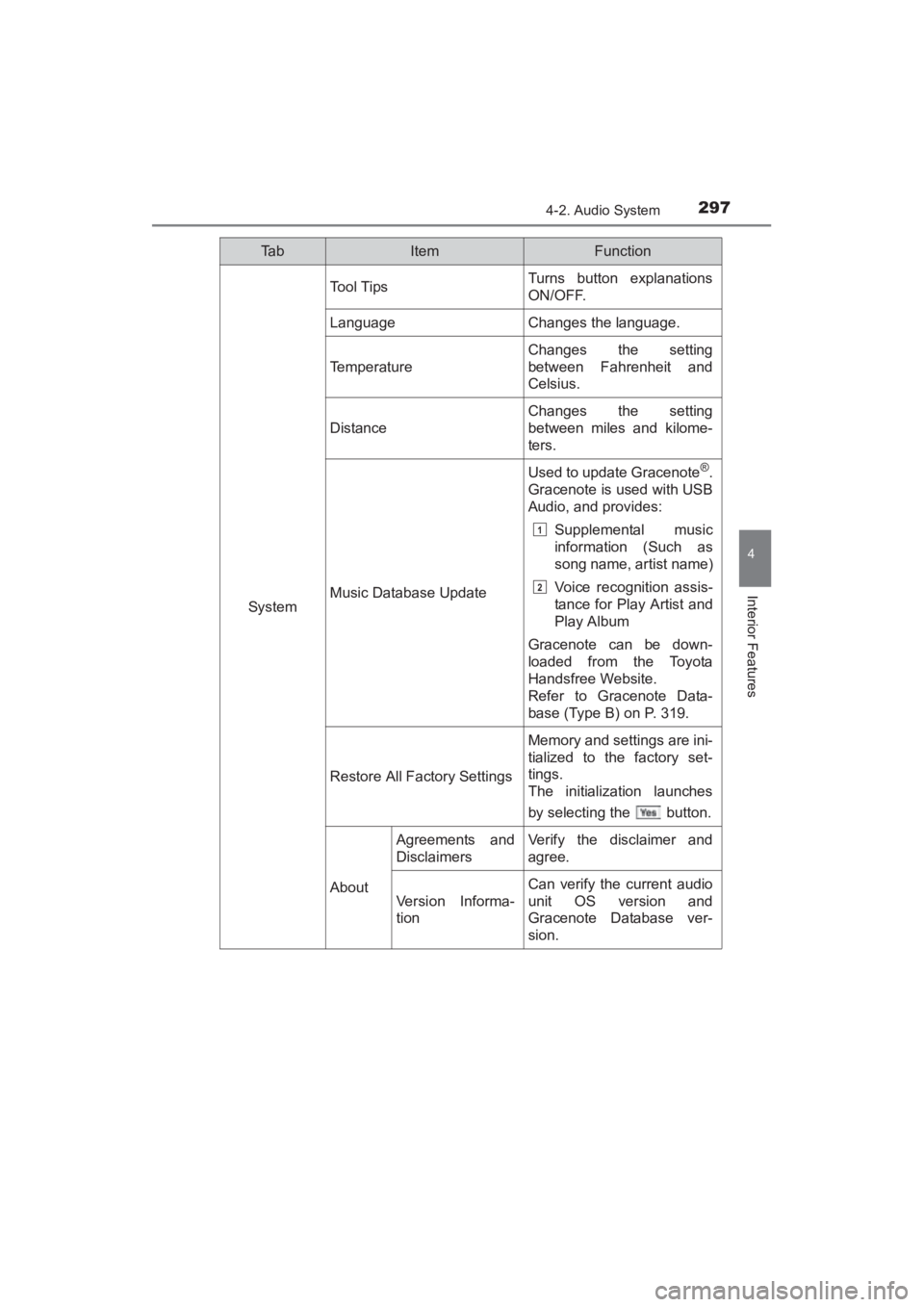
System
Tool TipsTurns button explanations
ON/OFF.
LanguageChanges the language.
Temperature
Changes the setting
between Fahrenheit and
Celsius.
Distance
Changes the setting
between miles and kilome-
ters.
Music Database Update
Used to update Gracenote®.
Gracenote is used with USB
Audio, and provides:
Supplemental music
information (Such as
song name, artist name)
Voice recognition assis-
tance for Play Artist and
Play Album
Gracenote can be down-
loaded from the Toyota
Handsfree Website.
Refer to Gracenote Data-
base (Type B) on P. 319.
Restore All Factory Settings
Memory and settings are ini-
tialized to the factory set-
tings.
The initialization launches
by selecting the button.
About
Agreements and
DisclaimersVerify the disclaimer and
agree.
Version Informa-
tion
Can verify the current audio
unit OS version and
Gracenote Database ver-
sion.
Ta bItemFunction
1
2
YARIS_SEDAN_OM_OM99M18z_(U).book Page 297 Monday, June 1, 2015 9:22 PM
Page 329 of 592
YARIS_SEDAN_OM_OM99M18z_(U)
3274-3. Bluetooth®
4
Interior Features
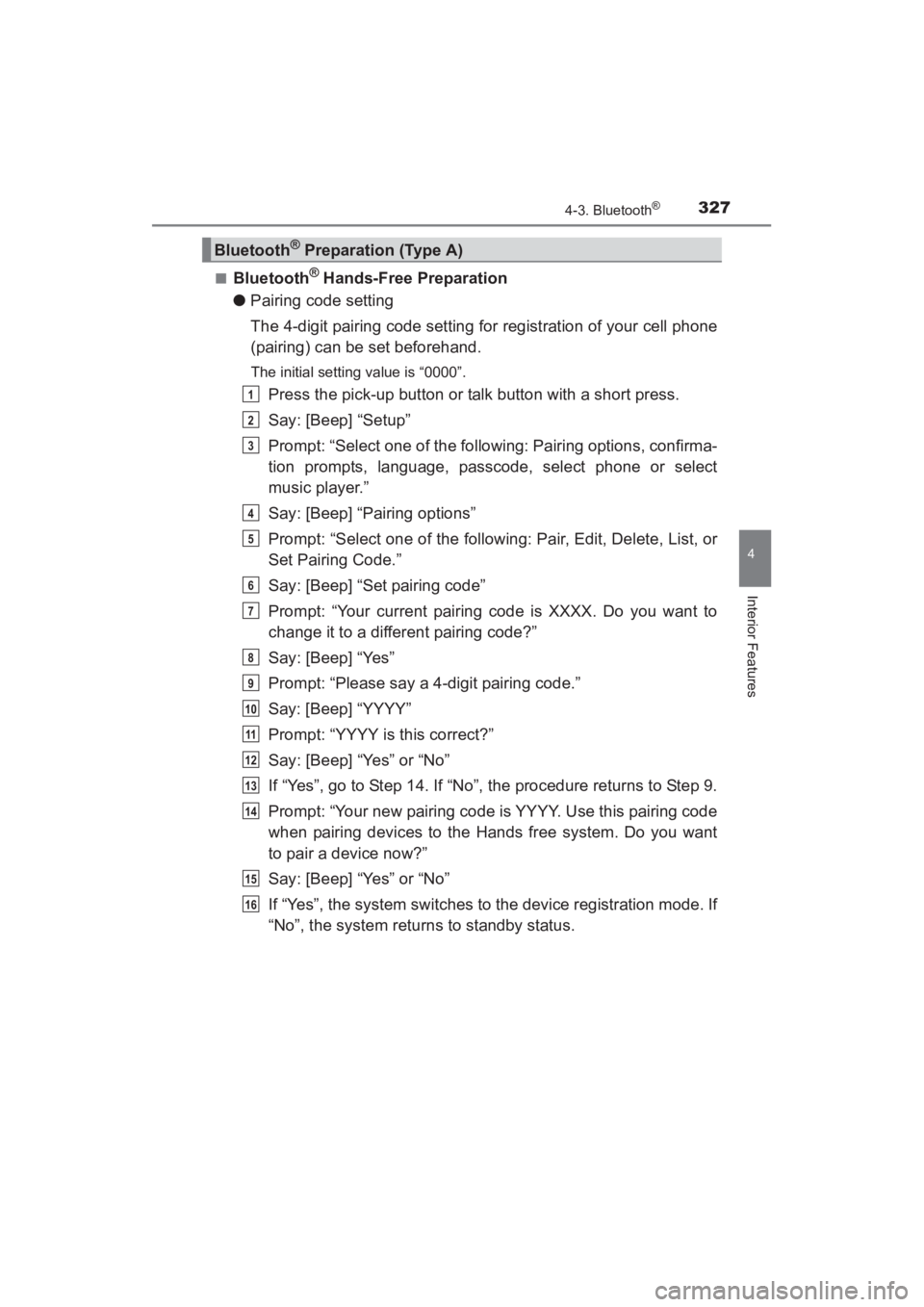
■Bluetooth® Hands-Free Preparation
● Pairing code setting
The 4-digit pairing code setting for registration of your cell phone
(pairing) can be set beforehand.
The initial setting value is “0000”.
Press the pick-up button or talk button with a short press.
Say: [Beep] “Setup”
Prompt: “Select one of the following: Pairing options, confirma-
tion prompts, language, passcode, select phone or select
music player.”
Say: [Beep] “Pairing options”
Prompt: “Select one of the following: Pair, Edit, Delete, List, or
Set Pairing Code.”
Say: [Beep] “Set pairing code”
Prompt: “Your current pairing code is XXXX. Do you want to
change it to a different pairing code?”
Say: [Beep] “Yes”
Prompt: “Please say a 4-digit pairing code.”
Say: [Beep] “YYYY”
Prompt: “YYYY is this correct?”
Say: [Beep] “Yes” or “No”
If “Yes”, go to Step 14. If “No”, the procedure returns to Step 9.
Prompt: “Your new pairing code is YYYY. Use this pairing code
when pairing devices to the Hands free system. Do you want
to pair a device now?”
Say: [Beep] “Yes” or “No”
If “Yes”, the system switches to the device registration mode. If
“No”, the system returns to standby status.
Bluetooth® Preparation (Type A)
1
2
3
4
5
6
7
8
9
10
11
12
13
14
15
16
YARIS_SEDAN_OM_OM99M18z_(U).book Page 327 Monday, June 1, 2015 9:22 PM
Page 330 of 592
328
YARIS_SEDAN_OM_OM99M18z_(U)
4-3. Bluetooth®
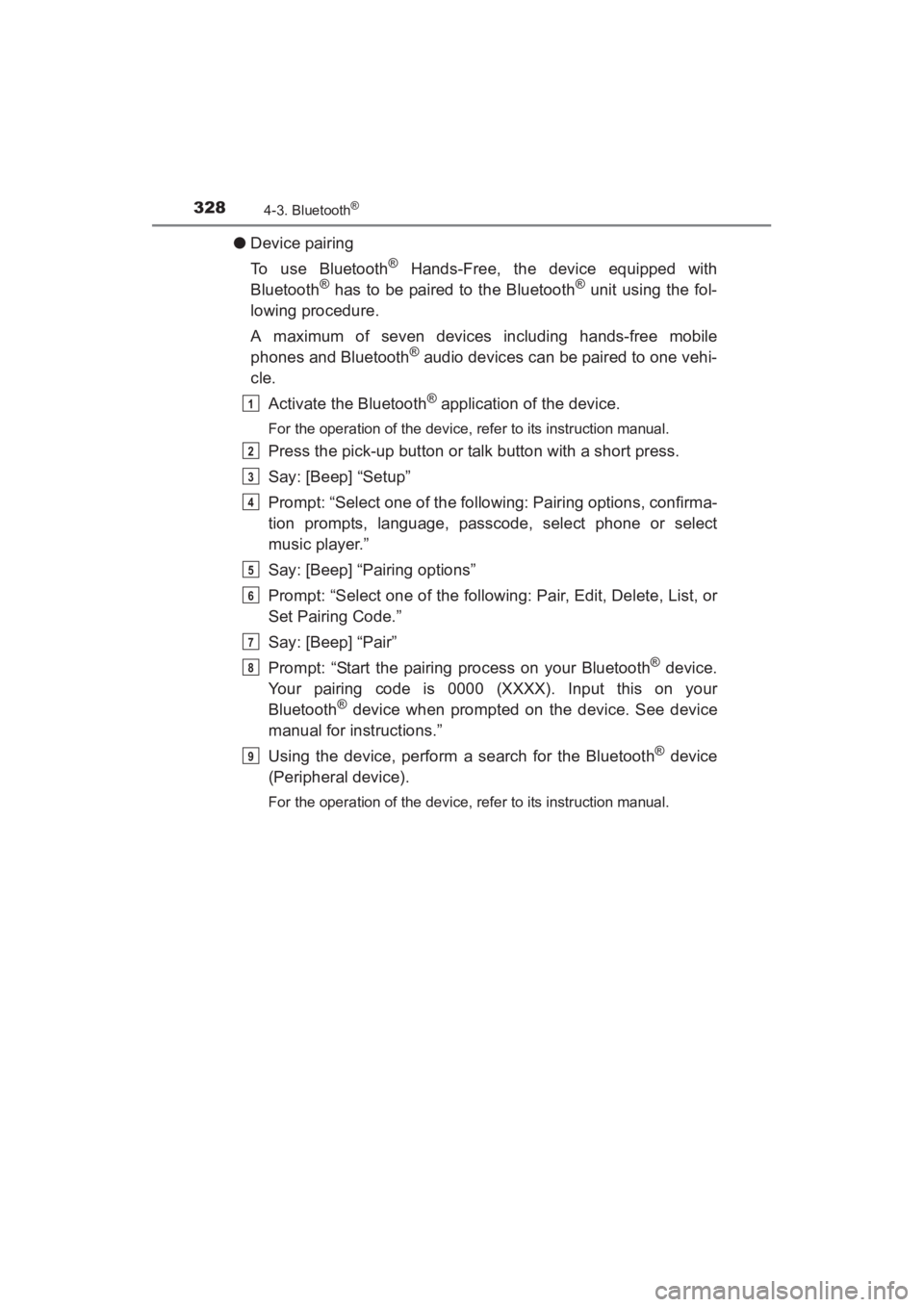
●Device pairing
To use Bluetooth
® Hands-Free, the device equipped with
Bluetooth® has to be paired to the Bluetooth® unit using the fol-
lowing procedure.
A maximum of seven devices including hands-free mobile
phones and Bluetooth
® audio devices can be paired to one vehi-
cle.
Activate the Bluetooth
® application of the device.
For the operation of the device, refer to its instruction manual.
Press the pick-up button or talk button with a short press.
Say: [Beep] “Setup”
Prompt: “Select one of the following: Pairing options, confirma-
tion prompts, language, passcode, select phone or select
music player.”
Say: [Beep] “Pairing options”
Prompt: “Select one of the following: Pair, Edit, Delete, List, or
Set Pairing Code.”
Say: [Beep] “Pair”
Prompt: “Start the pairing process on your Bluetooth
® device.
Your pairing code is 0000 (XXXX). Input this on your
Bluetooth
® device when prompted on the device. See device
manual for instructions.”
Using the device, perform a search for the Bluetooth
® device
(Peripheral device).
For the operation of the device, refer to its instruction manual.
1
2
3
4
5
6
7
8
9
YARIS_SEDAN_OM_OM99M18z_(U).book Page 328 Monday, June 1, 2015 9:22 PM
Page 332 of 592
330
YARIS_SEDAN_OM_OM99M18z_(U)
4-3. Bluetooth®
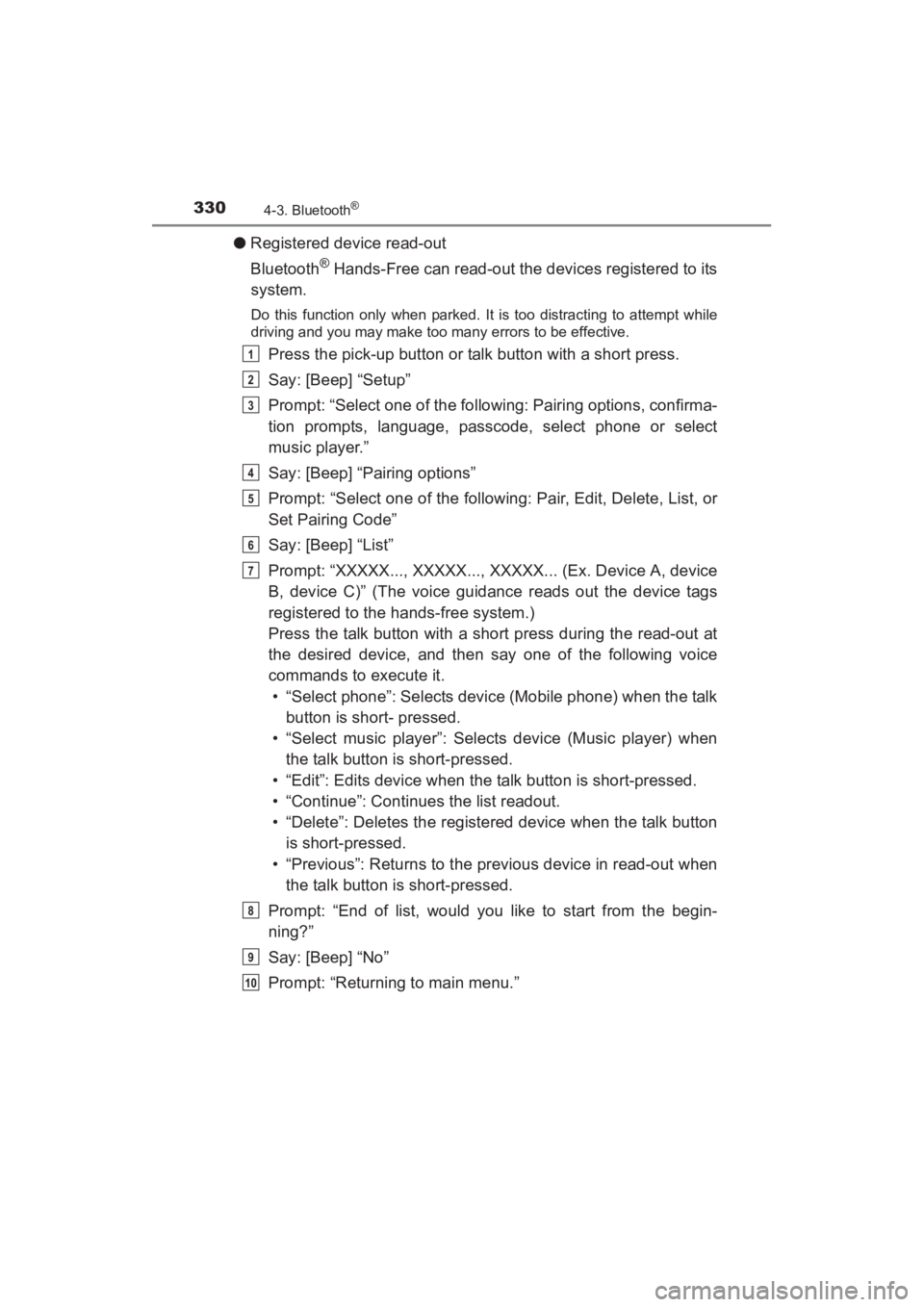
●Registered device read-out
Bluetooth
® Hands-Free can read-out the devices registered to its
system.
Do this function only when parked. It is too distracting to attempt while
driving and you may make too many errors to be effective.
Press the pick-up button or talk button with a short press.
Say: [Beep] “Setup”
Prompt: “Select one of the following: Pairing options, confirma-
tion prompts, language, passcode, select phone or select
music player.”
Say: [Beep] “Pairing options”
Prompt: “Select one of the following: Pair, Edit, Delete, List, or
Set Pairing Code”
Say: [Beep] “List”
Prompt: “XXXXX..., XXXXX..., XXXXX... (Ex. Device A, device
B, device C)” (The voice guidance reads out the device tags
registered to the hands-free system.)
Press the talk button with a short press during the read-out at
the desired device, and then say one of the following voice
commands to execute it.
• “Select phone”: Selects device (Mobile phone) when the talk button is short- pressed.
• “Select music player”: Selects device (Music player) when the talk button is short-pressed.
• “Edit”: Edits device when the talk button is short-pressed.
• “Continue”: Continues the list readout.
• “Delete”: Deletes the registered device when the talk button is short-pressed.
• “Previous”: Returns to the previous device in read-out when the talk button is short-pressed.
Prompt: “End of list, would you like to start from the begin-
ning?”
Say: [Beep] “No”
Prompt: “Returning to main menu.”1
2
3
4
5
6
7
8
9
10
YARIS_SEDAN_OM_OM99M18z_(U).book Page 330 Monday, June 1, 2015 9:22 PM
Page 333 of 592
YARIS_SEDAN_OM_OM99M18z_(U)
3314-3. Bluetooth®
4
Interior Features
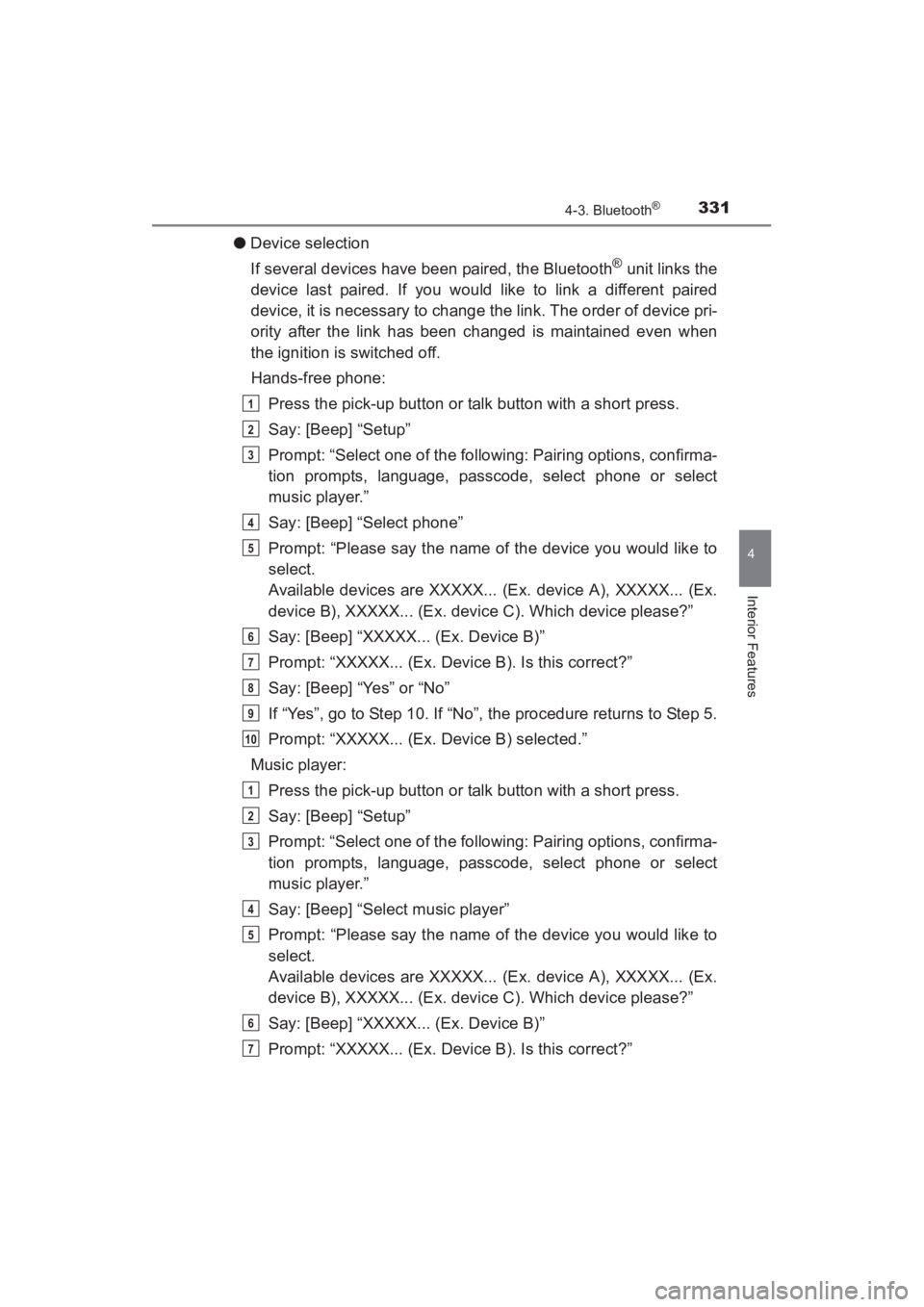
●Device selection
If several devices have been paired, the Bluetooth
® unit links the
device last paired. If you would like to link a different paired
device, it is necessary to change the link. The order of device pri-
ority after the link has been changed is maintained even when
the ignition is switched off.
Hands-free phone:
Press the pick-up button or talk button with a short press.
Say: [Beep] “Setup”
Prompt: “Select one of the following: Pairing options, confirma-
tion prompts, language, passcode, select phone or select
music player.”
Say: [Beep] “Select phone”
Prompt: “Please say the name of the device you would like to
select.
Available devices are XXXXX... (Ex. device A), XXXXX... (Ex.
device B), XXXXX... (Ex. device C). Which device please?”
Say: [Beep] “XXXXX... (Ex. Device B)”
Prompt: “XXXXX... (Ex. Device B). Is this correct?”
Say: [Beep] “Yes” or “No”
If “Yes”, go to Step 10. If “No”, the procedure returns to Step 5.
Prompt: “XXXXX... (Ex. Device B) selected.”
Music player: Press the pick-up button or talk button with a short press.
Say: [Beep] “Setup”
Prompt: “Select one of the following: Pairing options, confirma-
tion prompts, language, passcode, select phone or select
music player.”
Say: [Beep] “Select music player”
Prompt: “Please say the name of the device you would like to
select.
Available devices are XXXXX... (Ex. device A), XXXXX... (Ex.
device B), XXXXX... (Ex. device C). Which device please?”
Say: [Beep] “XXXXX... (Ex. Device B)”
Prompt: “XXXXX... (Ex. Device B). Is this correct?”
1
2
3
4
5
6
7
8
9
10
1
2
3
4
5
6
7
YARIS_SEDAN_OM_OM99M18z_(U).book Page 331 Monday, June 1, 2015 9:22 PM
Page 334 of 592
![TOYOTA YARIS 2016 Owners Manual 332
YARIS_SEDAN_OM_OM99M18z_(U)
4-3. Bluetooth®
Say: [Beep] “Yes” or “No”
If “Yes”, go to Step 10. If “No”, the procedure returns to Step 5.
Prompt: “XXXXX... (Ex. Device B) selecte](/img/14/60787/w960_60787-333.png "TOYOTA YARIS 2016 Owners Manual 332
YARIS_SEDAN_OM_OM99M18z_(U)
4-3. Bluetooth®
Say: [Beep] “Yes” or “No”
If “Yes”, go to Step 10. If “No”, the procedure returns to Step 5.
Prompt: “XXXXX... (Ex. Device B) selecte")
332
YARIS_SEDAN_OM_OM99M18z_(U)
4-3. Bluetooth®
Say: [Beep] “Yes” or “No”
If “Yes”, go to Step 10. If “No”, the procedure returns to Step 5.
Prompt: “XXXXX... (Ex. Device B) selected.”
● Deleting a device
Registered devices (Mobile phone) can be deleted individually or
collectively.
Do this function only when parked. It is too distracting to attempt while
driving and you may make too many errors to be effective.
Press the pick-up button or talk button with a short press.
Say: [Beep] “Setup”
Prompt: “Select one of the following: Pairing options, confirma-
tion prompts, language, passcode, select phone or select
music player.”
Say: [Beep] “Pairing options”
Prompt: “Select one of the following: Pair, Edit, Delete, List, or
Set Pairing Code.”
A registered device (Mobile phone) can be deleted using the registra-
tion list.
Say: [Beep] “Delete”
Prompt: “Please say the name of the device you would like to
delete.
Available devices are XXXXX... (Ex. device A), XXXXX... (Ex.
device B), XXXXX... (Ex. device C), or all. Which device
please?”
Say: [Beep] “X” (Say the number of the device to be deleted.)
Say “All” to delete all devices (Mobile phone).
Prompt: “Deleting XXXXX... (Ex. device B...) (Registered
device tag). Is this correct?”
Say: [Beep] “Yes”
Prompt: “Deleted”
8
9
10
1
2
3
4
5
6
7
8
9
10
11
YARIS_SEDAN_OM_OM99M18z_(U).book Page 332 Monday, June 1, 2015 9:22 PM
Page 335 of 592
![TOYOTA YARIS 2016 Owners Manual YARIS_SEDAN_OM_OM99M18z_(U)
3334-3. Bluetooth®
4
Interior Features
●Registered device editing
Press the pick-up button or talk button with a short press.
Say: [Beep] “Setup”
Prompt: “Select o](/img/14/60787/w960_60787-334.png "TOYOTA YARIS 2016 Owners Manual YARIS_SEDAN_OM_OM99M18z_(U)
3334-3. Bluetooth®
4
Interior Features
●Registered device editing
Press the pick-up button or talk button with a short press.
Say: [Beep] “Setup”
Prompt: “Select o")
YARIS_SEDAN_OM_OM99M18z_(U)
3334-3. Bluetooth®
4
Interior Features
●Registered device editing
Press the pick-up button or talk button with a short press.
Say: [Beep] “Setup”
Prompt: “Select one of the following: Pairing options, confirma-
tion prompts, language, passcode, select phone or select
music player.”
Say: [Beep] “Pairing options”
Prompt: “Select one of the following: Pair, Edit, Delete, List, or
Set Pairing Code.”
Say: [Beep] “Edit”
Prompt: “Please say the name of the device you would like to
edit. Available devices are XXXXX... (Ex. device A), XXXXX...
(Ex. device B), XXXXX... (Ex. device C). Which device
please?”
Say: [Beep] “X” (Say the number of the device to be edited.)
Prompt: “New name please?”
Say: [Beep] “XXXXX... (Ex. Device C)” (Speak a “device tag”
an arbitrary name for the device.)
Prompt: “XXXXX... (Ex. device C) (Device tag), is this cor-
rect?”
Say: [Beep] “Yes”
Prompt: “New name saved.”
1
2
3
4
5
6
7
8
9
10
11
12
13
YARIS_SEDAN_OM_OM99M18z_(U).book Page 333 Monday, June 1, 2015 9:22 PM
Page 345 of 592
YARIS_SEDAN_OM_OM99M18z_(U)
3434-3. Bluetooth®
4
Interior Features
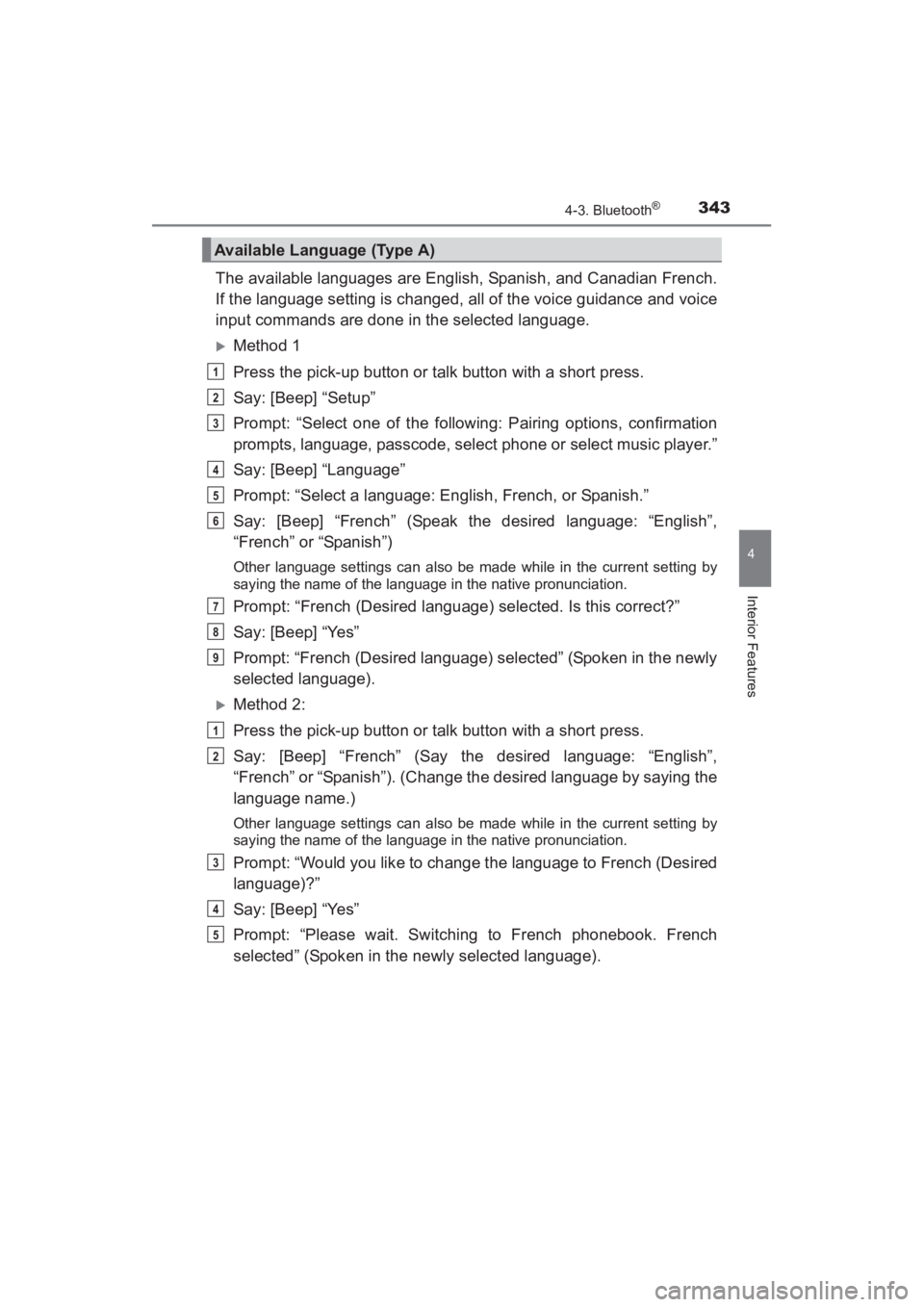
The available languages are English, Spanish, and Canadian French.
If the language setting is changed, all of the voice guidance and voice
input commands are done in the selected language.
XMethod 1
Press the pick-up button or talk button with a short press.
Say: [Beep] “Setup”
Prompt: “Select one of the following: Pairing options, confirmation
prompts, language, passcode, select phone or select music player.”
Say: [Beep] “Language”
Prompt: “Select a language: English, French, or Spanish.”
Say: [Beep] “French” (Speak the desired language: “English”,
“French” or “Spanish”)
Other language settings can also be made while in the current setting by
saying the name of the language in the native pronunciation.
Prompt: “French (Desired language) selected. Is this correct?”
Say: [Beep] “Yes”
Prompt: “French (Desired language) selected” (Spoken in the newly
selected language).
XMethod 2:
Press the pick-up button or talk button with a short press.
Say: [Beep] “French” (Say the desired language: “English”,
“French” or “Spanish”). (Change the desired language by saying the
language name.)
Other language settings can also be made while in the current setting by
saying the name of the language in the native pronunciation.
Prompt: “Would you like to change the language to French (Desired
language)?”
Say: [Beep] “Yes”
Prompt: “Please wait. Switching to French phonebook. French
selected” (Spoken in the newly selected language).
Available Language (Type A)
1
2
3
4
5
6
7
8
9
1
2
3
4
5
YARIS_SEDAN_OM_OM99M18z_(U).book Page 343 Monday, June 1, 2015 9:22 PM
Page 346 of 592
344
YARIS_SEDAN_OM_OM99M18z_(U)
4-3. Bluetooth®
■Available Language (Type A)
●If the language setting is changed, dev ice registration is maintained.
● Phonebook records are not cleared, but each language has a separate
phonebook. Therefore, entries created in one language will need to be re-
entered in the phonebook of the new language.
● Do these steps before you start driving. These less used functions are too
distracting to undertake while driving until you are fully familiar with the sys-
tem.
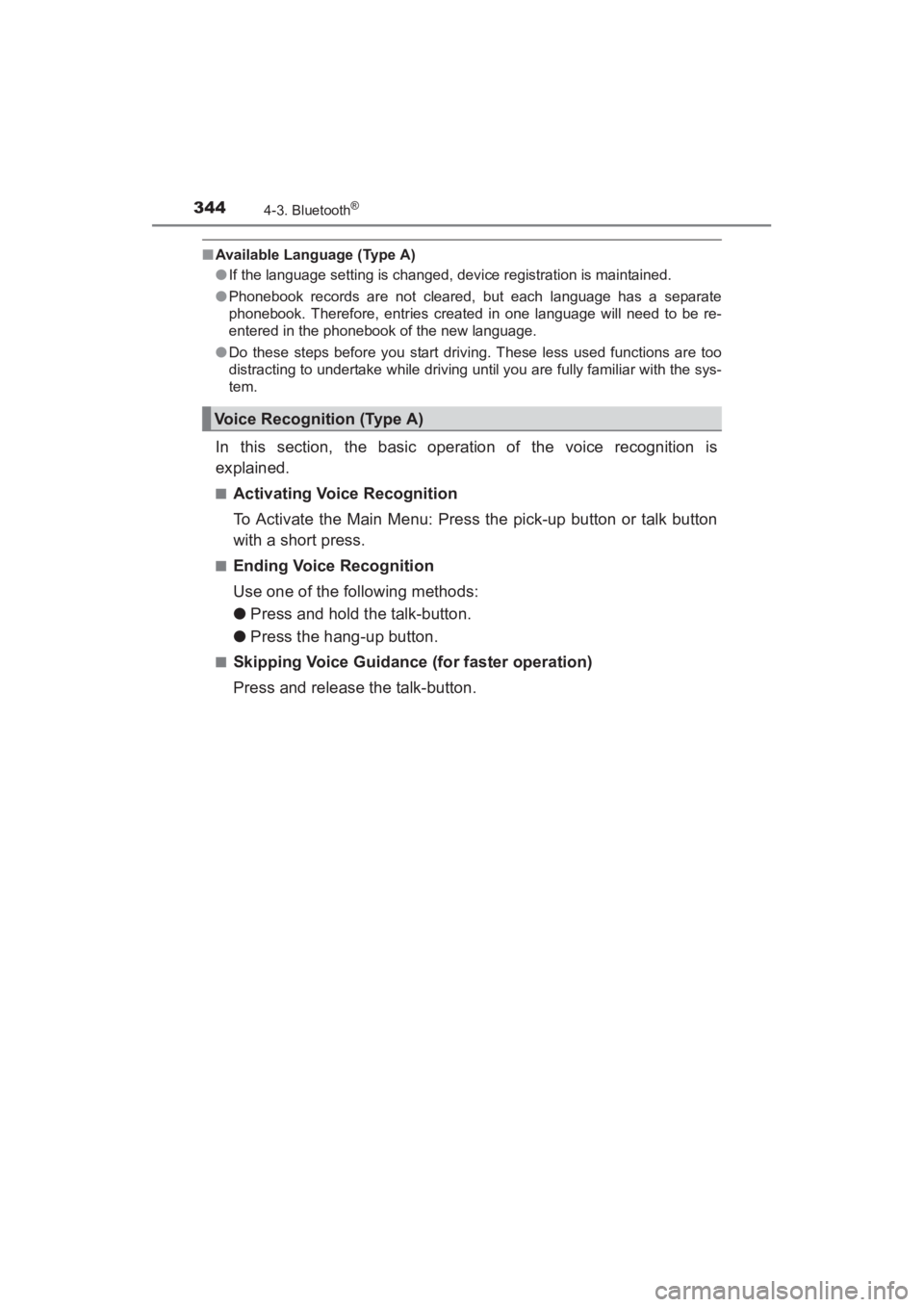
In this section, the basic operation of the voice recognition is
explained.
■Activating Voice Recognition
To Activate the Main Menu: Press the pick-up button or talk button
with a short press.
■Ending Voice Recognition
Use one of the following methods:
● Press and hold the talk-button.
● Press the hang-up button.
■Skipping Voice Guidance (for faster operation)
Press and release the talk-button.
Voice Recognition (Type A)
YARIS_SEDAN_OM_OM99M18z_(U).book Page 344 Monday, June 1, 2015 9:22 PM