warning TOYOTA YARIS 2017 Owners Manual
[x] Cancel search | Manufacturer: TOYOTA, Model Year: 2017, Model line: YARIS, Model: TOYOTA YARIS 2017Pages: 549, PDF Size: 33.09 MB
Page 267 of 549
2674-6. Using the driving support systems
4
Driving
YARIS_F_OM_Europe_OM52J20E
■Turning off both TRC and VSC systems
To turn TRC and VSC systems off, press and hold the VSC OFF switch for
more than 3 seconds while the vehicle is stopped.
The “TRC OFF” indicator and the VSC OFF indicator will come on.
Press the switch again to turn the systems back on.
On vehicles with pre-crash safety system, pre-crash brake assist and pre-
crash braking will also be disabled. The PCS warning light will come on.
( P. 239)
■ When the “TRC OFF” indicator comes on even if the VSC OFF switch
has not been pressed
TRC cannot be operated. Contact any authorized Toyota dealer or repairer, or
another duly qualified and equipped professional.
■ Sounds and vibrations caused by the ABS, brake assist, TRC and VSC
systems
● A sound may be heard from the engine compartment when the brake pedal
is depressed repeatedly, when the engine is started or just after the vehicle
begins to move. This sound does not indicate that a malfunction has
occurred in any of these systems.
● Any of the following conditions may occur when the above systems are
operating. None of these indicates that a malfunction has occurred.
• Vibrations may be felt through the vehicle body and steering.
• A motor sound may be heard after the vehicle comes to a stop.
• The brake pedal may pulsate slightly after the ABS is activated.
• The brake pedal may move down slightly after the ABS is activated.
■ EPS operation sound
When the steering wheel is operated, a motor sound (whirring sound) may be
heard. This does not indicate a malfunction.
■ Automatic reactivation of TRC and VSC systems
After turning the TRC and VSC systems off, the systems will be automatically
re-enabled in the following situations:
● When the engine switch is turned to the “LOCK” position
● If only the TRC system is turned off, the TRC will turn on when vehicle
speed increases
If both the TRC and VSC systems are turned off, automatic re-enabling will
not occur when vehicle speed increases.
■ Reduced effectiveness of the EPS system
The effectiveness of the EPS system is reduced to prevent the system from
overheating when there is frequent steering input over an extended period of
time. The steering wheel may feel heavy as a result.
Should this occur, refrain from excessive steering input or stop the vehicle
and turn the engine off. The EPS system should return to normal within 10
minutes.
Page 268 of 549
2684-6. Using the driving support systems
YARIS_F_OM_Europe_OM52J20E
■ If the slip indicator comes on
It may indicate a malfunction in the systems. Contact any authorized Toyota
dealer or repairer, or another duly qualified and equipped professional.
■ Operating conditions of emergency brake signal
When the following three conditions are met, the emergency brake signal will
operate:
● The emergency flashers are off.
● Actual vehicle speed is over 55 km/h (35 mph).
● The brake pedal is depressed in a manner that cause the system to judge
from the vehicle deceleration that this is a sudden braking operation.
■ Automatic system cancelation of emergency brake signal
The emergency brake signal will turn off in any of the following situations:
● The emergency flashers are turned on.
● The brake pedal is released.
● The system judges from the vehicle deceleration that is not a sudden brak-
ing operation.
WARNING
■ The ABS does not operate effectively when
● The limits of tire gripping performance have been exceeded (such as
excessively worn tires on a snow covered road).
● The vehicle hydroplanes while driving at high speed on wet or slick roads.
■ Stopping distance when the ABS is operating may exceed that of nor-
mal conditions
The ABS is not designed to shorten t he vehicle’s stopping distance. Always
maintain a safe distance from the vehicle in front of you, especially in the
following situations:
● When driving on dirt, gravel or snow-covered roads
● When driving with tire chains
● When driving over bumps in the road
● When driving over roads with potholes or roads with uneven surfaces
■ TRC may not operate effectively when
Directional control and power may not be achievable while driving on slip-
pery road surfaces, even if the TRC system is operating.
Drive the vehicle carefully in conditions where stability and power may be
lost.
Page 269 of 549
2694-6. Using the driving support systems
4
Driving
YARIS_F_OM_Europe_OM52J20E
WARNING
■When the VSC is activated
The slip indicator flashes. Always drive carefully. Reckless driving may
cause an accident. Exercise particular care when the indicator light flashes.
■ When the TRC/VSC systems are turned off
Be especially careful and drive at a speed appropriate to the road condi-
tions. As these are the systems to help ensure vehicle stability and driving
force, do not turn the TRC/VSC systems off unless unnecessary.
■ Replacing tires
Make sure that all tires are of the specified size, brand, tread pattern and
total load capacity. In addition, make sure that the tires are inflated to the
recommended tire inflation pressure level.
The ABS, TRC and VSC systems will not function correctly if different tires
are installed on the vehicle.
Contact any authorized Toyota dealer or repairer, or another duly qualified
and equipped professional for further in formation when replacing tires or
wheels.
■ Handling of tires and the suspension
Using tires with any kind of problem or modifying the suspension will affect
the driving assist systems, and may cause a system to malfunction.
Page 271 of 549
2714-6. Using the driving support systems
4
Driving
YARIS_F_OM_Europe_OM52J20E
WARNING
■Exhaust pipe
Do not touch the exhaust pipe during cleaning, as the exhaust pipe and
exhaust gases will become particularly hot. Also, make sure that there are
no people or flammable materials near the exhaust pipe while the vehicle is
stopped.
Failure to do so may cause injury by burning or a fire.
NOTICE
■ To prevent the DPF system from failing
● Do not use fuel other than the specified type
● Do not use engine oil other than the recommended type
● Do not modify the exhaust pipe
Page 275 of 549
2754-7. Driving tips
4
Driving
YARIS_F_OM_Europe_OM52J20E
WARNING
■Driving with snow tires
Observe the following precautions to reduce the risk of accidents.
Failure to do so may result in a loss of vehicle control and cause death or
serious injury.
● Use tires of the specified size.
● Maintain the recommended level of air pressure.
● Do not drive at speeds in excess of the speed limit or the speed limit spec-
ified for the snow tires being used.
● Use snow tires on all, not just some wheels.
● Do not use tires of noticeably different wear level.
■ Driving with tire chains
Observe the following precautions to reduce the risk of accidents.
Failure to do so may result in the vehicle being unable to be driven safely,
and may cause death or serious injury.
● Do not drive in excess of the speed limit specified for the tire chains being
used, or 50 km/h (30 mph), whichever is lower.
● Avoid driving on bumpy road surfaces or over potholes.
● Avoid sudden acceleration, abrupt steering, sudden braking and shifting
operations that cause sudden engine braking.
● Slow down sufficiently before entering a curve to ensure that vehicle con-
trol is maintained.
● Do not use LDA (Lane Departure Alert) (if equipped).
Page 280 of 549
2805-1. Basic Operations
YARIS_F_OM_Europe_OM52J20E
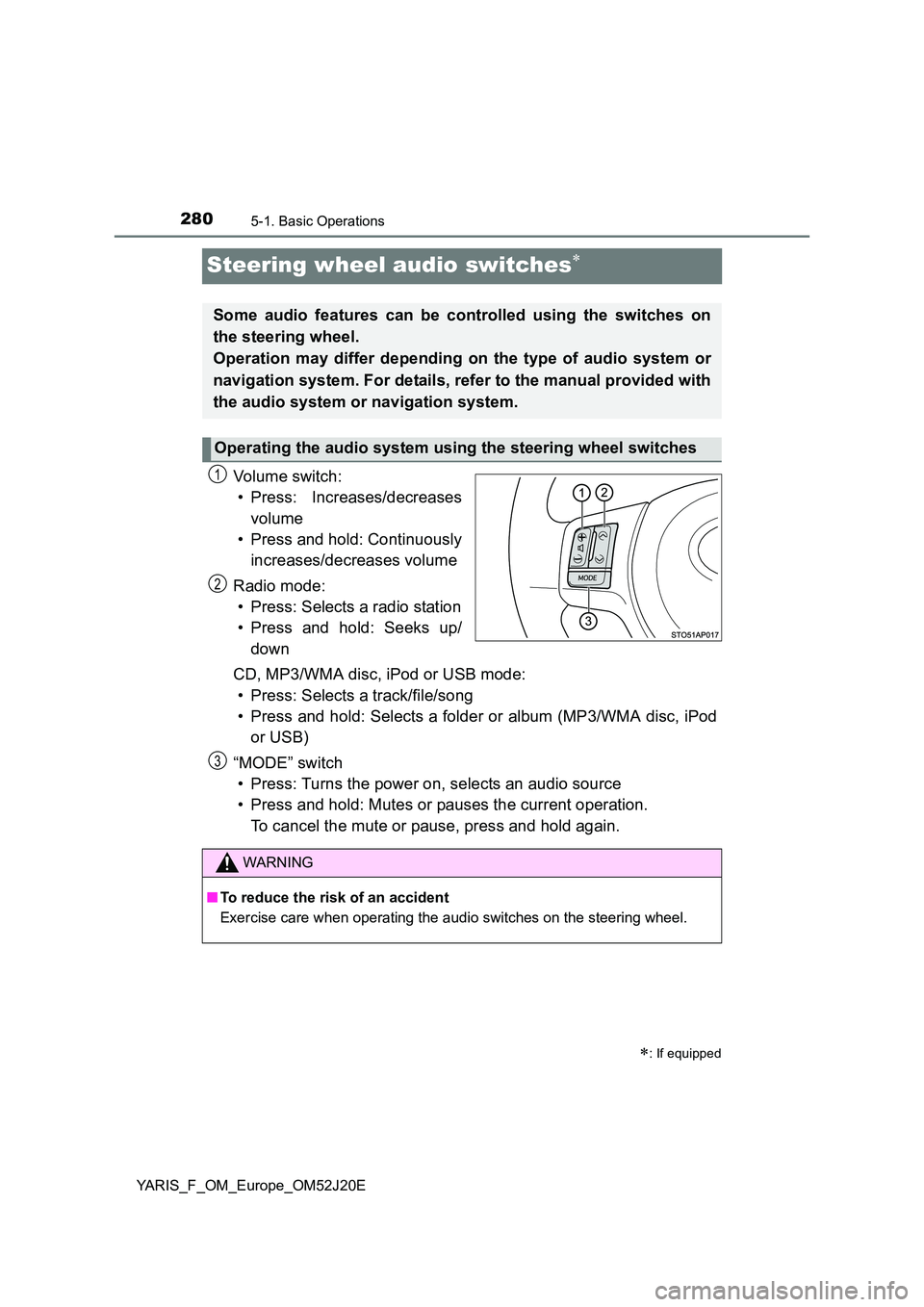
Steering wheel audio switches
Vo lu m e swi tc h :
• Press: Increases/decreases
volume
• Press and hold: Continuously
increases/decreases volume
Radio mode:
• Press: Selects a radio station
• Press and hold: Seeks up/
down
CD, MP3/WMA disc, iPod or USB mode:
• Press: Selects a track/file/song
• Press and hold: Selects a folder or album (MP3/WMA disc, iPod
or USB)
“MODE” switch
• Press: Turns the power on, selects an audio source
• Press and hold: Mutes or pauses the current operation.
To cancel the mute or pause, press and hold again.
: If equipped
Some audio features can be controlled using the switches on
the steering wheel.
Operation may differ depending on the type of audio system or
navigation system. For details, refer to the manual provided with
the audio system or navigation system.
Operating the audio system using the steering wheel switches
1
2
WARNING
■ To reduce the risk of an accident
Exercise care when operating the audio switches on the steering wheel.
3
Page 281 of 549
281
5
5-1. Basic Operations
Audio system
YARIS_F_OM_Europe_OM52J20E
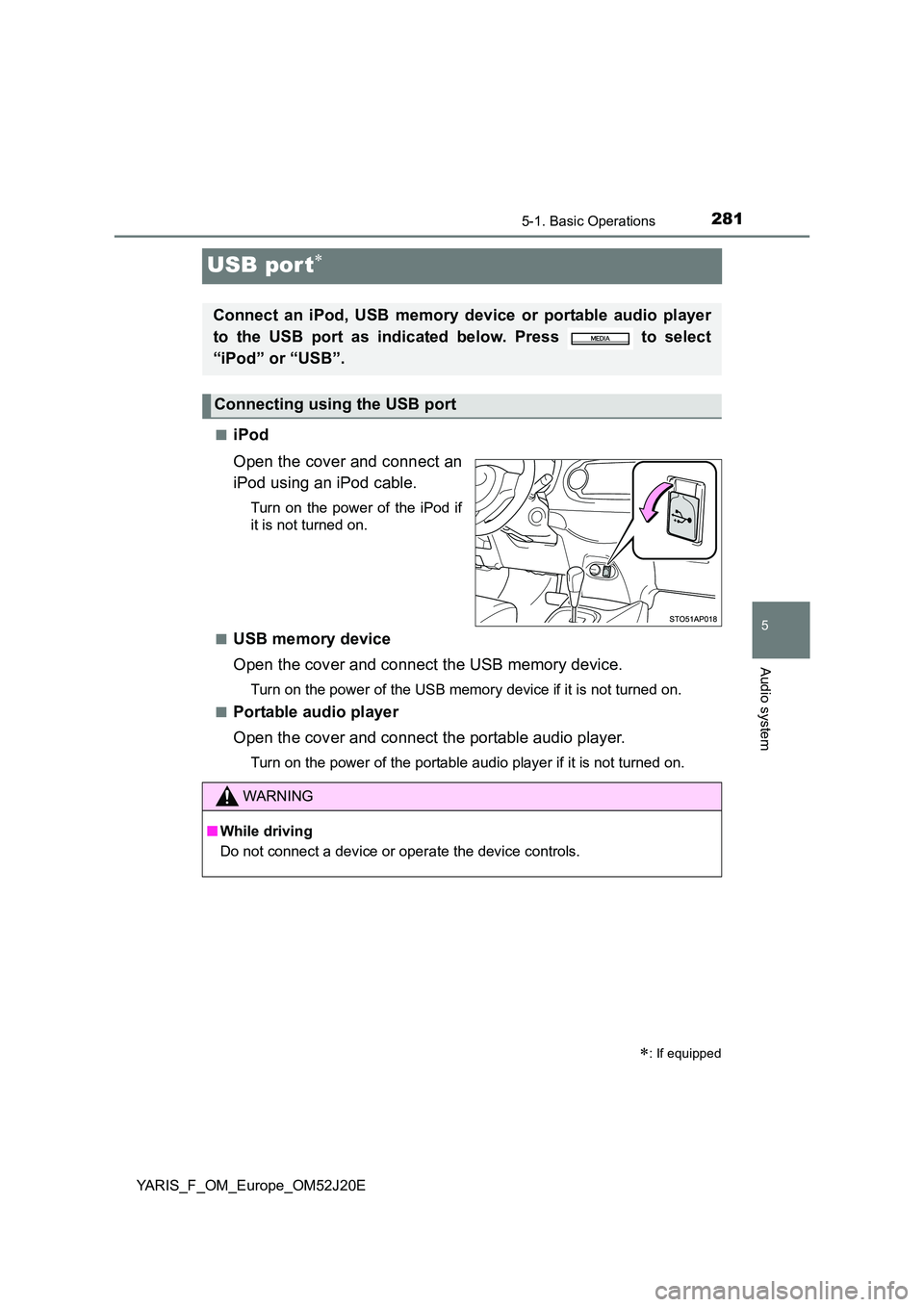
USB por t
■iPod
Open the cover and connect an
iPod using an iPod cable.
Turn on the power of the iPod if
it is not turned on.
■USB memory device
Open the cover and connect the USB memory device.
Turn on the power of the USB memory device if it is not turned on.
■Portable audio player
Open the cover and connect the portable audio player.
Turn on the power of the portable audio player if it is not turned on.
: If equipped
Connect an iPod, USB memory device or portable audio player
to the USB port as indicated below. Press to select
“iPod” or “USB”.
Connecting using the USB port
WARNING
■ While driving
Do not connect a device or operate the device controls.
Page 295 of 549
2955-4. Playing audio CDs and MP3/WMA discs
5
Audio system
YARIS_F_OM_Europe_OM52J20E
● ID3 and WMA tags
ID3 tags can be added to MP3 files, making it possible to record the track
title, artist name, etc.
The system is compatible with ID3 Ver. 1.0, 1.1, and Ver. 2.2, 2.3 ID3 tags.
(The number of characters is based on ID3 Ver. 1.0 and 1.1.)
WMA tags can be added to WMA files, making it possible to record the
track title and artist name in the same way as with ID3 tags.
● MP3 and WMA playback
When a disc containing MP3 or WMA files is inserted, all files on the disc
are first checked. Once the file check is finished, the first MP3 or WMA file
is played. To make the file check finish more quickly, we recommend you
do not write in any files other than MP3 or WMA files or create any unnec-
essary folders.
If the discs contain a mixture of music data and MP3 or WMA format data,
only music data can be played.
● Extensions
If the file extensions .mp3 and .wma are used for files other than MP3 and
WMA files, they will be mistakenly recognized and played as MP3 and
WMA files. This may result in large amounts of interference and damage to
the speakers.
● Playback
• To play MP3 files with steady s ound quality, we recommend a fixed bit
rate of 128 kbps and a sampling frequency of 44.1 kHz.
• CD-R or CD-RW playback may not be possible in some instances,
depending on the characteristics of the disc.
• There is a wide variety of freeware and other encoding software for MP3
and WMA files on the market, and depending on the status of the encod-
ing and the file format, poor sound quality or noise at the start of playback
may result. In some cases, playback may not be possible at all.
• When files other than MP3 or WMA fi les are recorded on a disc, it may
take more time to recognize the disc and in some cases, playback may
not be possible at all.
• Microsoft, Windows, and Windows Media are the registered trademarks
of Microsoft Corporation in the U.S. and other countries.
WARNING
■ Certification for the CD player
This product is a class I laser product.
● Do not open the cover of the player or attempt to repair the unit yourself.
Refer servicing to qualified personnel.
● Laser power: No hazardous
Page 303 of 549
3035-5. Using an external device
5
Audio system
YARIS_F_OM_Europe_OM52J20E
WARNING
■Caution while driving
Do not connect iPod or operate the controls.
NOTICE
■ To prevent damage to iPod
● Do not leave iPod in the vehicle. The temperature inside the vehicle may
become high, resulting in damage to the iPod.
● Do not push down on or apply unnecessary pressure to the iPod while it is
connected as this may damage the iPod or its terminal.
● Do not insert foreign objects into the port as this may damage the iPod or
its terminal.
Page 309 of 549
3095-5. Using an external device
5
Audio system
YARIS_F_OM_Europe_OM52J20E
WARNING
■Caution while driving
Do not connect USB memory or operate the controls.
NOTICE
■ To prevent damage to USB memory
● Do not leave USB memory in the vehicle. The temperature inside the vehi-
cle may become high, resulting in damage to the player.
● Do not push down on or apply unnecessary pressure to the USB memory
while it is connected as this may damage the USB memory or its terminal.
● Do not insert foreign objects into the port as this may damage the USB
memory or its terminal.