ESP TOYOTA YARIS 2017 User Guide
[x] Cancel search | Manufacturer: TOYOTA, Model Year: 2017, Model line: YARIS, Model: TOYOTA YARIS 2017Pages: 549, PDF Size: 33.09 MB
Page 165 of 549
1654-1. Before driving
4
Driving
YARIS_F_OM_Europe_OM52J20E
WARNING
Observe the following precautions.
Failure to do so may result in death or serious injury.
■ When starting the vehicle
On vehicles with a Multidrive, always keep your foot on the brake pedal
while stopped with the engine running. This prevents the vehicle from
creeping.
■ When driving the vehicle
● Do not drive if you are unfamiliar with the location of the brake and accel-
erator pedals to avoid depressing the wrong pedal.
• Accidentally depressing the accelerator pedal instead of the brake
pedal will result in sudden acceleration that may lead to an accident.
• When backing up, you may twist your body around, leading to difficulty
in operating the pedals. Make su re to operate the pedals properly.
• Make sure to keep a correct driving posture even when moving the
vehicle only slightly. This allows you to depress the brake and accelera-
tor pedals properly.
• Depress the brake pedal using your right foot. Depressing the brake
pedal using your left foot may delay response in an emergency, result-
ing in an accident.
● Do not drive the vehicle over or stop the vehicle near flammable materials.
The exhaust system and exhaust gases can be extremely hot. These hot
parts may cause a fire if there is any flammable material nearby.
● During normal driving, do not turn off the engine. Turning the engine off
while driving will not cause loss of steering or braking control, but the
power assist to these systems will be lost. This will make it more difficult to
steer and brake, so you should pull over and stop the vehicle as soon as it
is safe to do so.
However, in the event of an emergency, such as if it becomes impossible
to stop the vehicle in the normal way: P. 429
● Use engine braking (downshift) to maintain a safe speed when driving
down a steep hill.
Using the brakes continuously may cause the brakes to overheat and lose
effectiveness. ( P. 191, 197)
● Do not adjust the positions of the steering wheel, the seat, or the inside or
outside rear view mirrors while driving.
Doing so may result in a loss of vehicle control.
● Always check that all passengers’ arms, heads or other parts of their body
are not outside the vehicle.
Page 179 of 549
1794-1. Before driving
4
Driving
YARIS_F_OM_Europe_OM52J20E
Your vehicle will handle differently when towing a trailer. In order to
avoid accident, death or serious injury, keep the following in mind
when towing:
■Checking connections between trailer and lights
Stop the vehicle and check the operation of the connection
between the trailer and lights after driving for a brief period as well
as before starting off.
■Practicing driving with a coupled trailer
● Get the feel for turning, stopping and reversing with the trailer
coupled by practicing in an area with no or light traffic.
● When reversing with a coupled trailer, hold the section of the
steering wheel nearest to you and rotate clockwise to turn the
trailer left or counterclockwise to turn it right. Always rotate a little
at a time to prevent steering error. Have someone guide you
when reversing to lessen the risk of an accident.
■Increasing vehicle-to-vehicle distance
At a speed of 10 km/h (6 mph), the distance to the vehicle running
ahead of you should be equivalent to or greater than the combined
length of your vehicle and trailer. Avoid sudden braking that may
cause skidding. Otherwise, the vehicle may spin out of control. This
is especially true when driving on wet or slippery road surfaces.
■Sudden acceleration/steering input/cornering
Executing sharp turns when towing may result in the trailer colliding
with your vehicle. Decelerate well in advance when approaching
turns and take them slowly and carefully to avoid sudden braking.
■Important points regarding turning
The wheels of the trailer will travel closer to the inside of the curve
than the wheels of the vehicle. To make allowance for this, take the
turns wider than you would normally do.
Guidance
Page 220 of 549
2204-5. Toyota Safety Sense
YARIS_F_OM_Europe_OM52J20E
Toyota Safety Sense
◆PCS (Pre-Crash Safety system)
P. 2 2 6
◆LDA (Lane Departure Alert)
P. 2 4 0
◆Automatic High Beam
P. 2 4 5
: If equipped
The Toyota Safety Sense consists of the following drive assist
systems and contributes to a safe and comfortable driving expe-
rience:
WARNING
■ Toyota Safety Sense The Toyota Safety Sense is designed to operate under the assumption that
the driver will drive safely, and is designed to help reduce the impact to the
occupants and the vehicle in the case of a collision or assist the driver in
normal driving conditions.
As there is a limit to the degree of recognition accuracy and control perfor-
mance that this system can provide, do not overly rely on this system. The
driver is always responsible for paying attention to the vehicle's surround-
ings and driving safely.
Page 221 of 549
2214-5. Toyota Safety Sense
4
Driving
YARIS_F_OM_Europe_OM52J20E
The pre-crash safety system is equipped with a sophisticated com-
puter that will record certain data, such as:
• Accelerator status
• Brake status
• Vehicle speed
• Operation status of the pre-crash safety system functions
• Information (such as the distance and relative speed between your
vehicle and the vehicle ahead or other objects)
● Data usage
Toyota may use the data recorded in this computer to diagnose
malfunctions, conduct research and development, and improve
quality.
Toyota will not disclose the recorded data to a third party except:
• With the consent of the vehicle owner or with the consent of the
lessee if the vehicle is leased
• In response to an official request by the police, a court of law or a
government agency
• For use by Toyota in a lawsuit
• For research purposes where the data is not tied to a specific
vehicle or vehicle owner
Vehicle data recording
Page 227 of 549
2274-5. Toyota Safety Sense
4
Driving
YARIS_F_OM_Europe_OM52J20E
WARNING
■Limitations of the pre-crash safety system
● The driver is solely responsible for safe driving. Always drive safely, taking
care to observe your surroundings.
Do not use the pre-crash safety system instead of normal braking opera-
tions under any circumstances. This system will not prevent collisions or
lessen collision damage or injury in every situation. Do not overly rely on
this system. Failure to do so may lead to an accident, resulting in death or
serious injury.
● Although this system is designed to help avoid and reduce the impact of a
collision, its effectiveness may change according to various conditions,
therefore the system may not always be able to achieve the same level of
performance.
Read the following conditions carefully. Do not overly rely on this system
and always drive carefully.
• Conditions under which the system may operate even if there is no pos-
sibility of a collision: P. 232
• Conditions under which the system may not operate properly: P. 2 3 6
● Do not attempt to test the operation of the pre-crash safety system your-
self, as the system may not operate properly, possibly leading to an acci-
dent.
■ Pre-crash braking
● The pre-crash braking function may not operate if certain operations are
performed by the driver. If the accelerator pedal is being depressed
strongly or the steering wheel is bei ng turned, the system may determine
that the driver is taking evasive action and possibly prevent the pre-crash
braking function from operating.
● In some situations, while the pre-crash braking function is operating, oper-
ation of the function may be canceled if the accelerator pedal is depressed
strongly or the steering wheel is turned and the system determines that
the driver is taking evasive action.
● A large amount of braking force is applied while the pre-crash braking
function is operating. Additionally, as the operation of the pre-crash brak-
ing function will be canceled af ter the vehicle has been stopped for
approximately 2 seconds if it is stopped by the operation of the pre-crash
braking function, the driver should depress the brake pedal as necessary.
● If the brake pedal is being depressed, the system may determine that the
driver is taking evasive action and possibly delay the operation timing of
the pre-crash braking function.
Page 244 of 549
2444-5. Toyota Safety Sense
YARIS_F_OM_Europe_OM52J20E
WARNING
■Before using the LDA system
Do not rely solely on the LDA system. The LDA system does not drive the
vehicle automatically, nor does it reduce the amount of care you need to
take. As such, the driver must always assume full responsibility for under-
standing his/her surroundings, for operat ing the steering wheel to correct
the driving line, and for driving safely.
Inappropriate or negligent driving could lead to an accident.
■ To avoid operating the LDA by mistake
Switch the LDA system off using the LDA switch when not in use.
NOTICE
■ To prevent damage to or incorrect operation of the LDA system
● Do not modify the headlights or attach stickers to the surface of the lights.
● Do not modify the suspension. If your suspension needs repairs, contact
any authorized Toyota dealer or repairer, or another duly qualified and
equipped professional.
● Do not install or place anything on the hood or the grille. Also, do not install
a grille guard (bull bars, kangaroo bar etc.).
Page 265 of 549
265
4
4-6. Using the driving support systems
Driving
YARIS_F_OM_Europe_OM52J20E
Driving assist systems
◆ABS (Anti-lock Brake System)
Helps to prevent wheel lock when the brakes are applied suddenly,
or if the brakes are applied while driving on a slippery road surface
◆Brake assist
Generates an increased level of braking force after the brake pedal
is depressed when the system detects a panic stop situation
◆VSC (Vehicle Stability Control) (if equipped)
Helps the driver to control skidding when swerving suddenly or
turning on slippery road surfaces
◆TRC (Traction Control) (if equipped)
Helps to maintain drive power and prevent the drive wheels from
spinning when starting the vehicle or accelerating on slippery roads
◆EPS (Electric Power Steering)
Employs an electric motor to reduce the amount of effort needed to
turn the steering wheel
◆PCS (Pre-Crash Safety system) (if equipped)
P. 2 2 6
◆Emergency brake signal
When the brakes are applied suddenly, the emergency flashers
automatically flash to alert the vehicle behind.
To help enhance driving safety and performance, the following
systems operate automatically in response to various driving
situations. Be aware, however, that these systems are supple-
mentary and should not be relied upon too heavily when operat-
ing the vehicle.
Page 268 of 549
2684-6. Using the driving support systems
YARIS_F_OM_Europe_OM52J20E
■ If the slip indicator comes on
It may indicate a malfunction in the systems. Contact any authorized Toyota
dealer or repairer, or another duly qualified and equipped professional.
■ Operating conditions of emergency brake signal
When the following three conditions are met, the emergency brake signal will
operate:
● The emergency flashers are off.
● Actual vehicle speed is over 55 km/h (35 mph).
● The brake pedal is depressed in a manner that cause the system to judge
from the vehicle deceleration that this is a sudden braking operation.
■ Automatic system cancelation of emergency brake signal
The emergency brake signal will turn off in any of the following situations:
● The emergency flashers are turned on.
● The brake pedal is released.
● The system judges from the vehicle deceleration that is not a sudden brak-
ing operation.
WARNING
■ The ABS does not operate effectively when
● The limits of tire gripping performance have been exceeded (such as
excessively worn tires on a snow covered road).
● The vehicle hydroplanes while driving at high speed on wet or slick roads.
■ Stopping distance when the ABS is operating may exceed that of nor-
mal conditions
The ABS is not designed to shorten t he vehicle’s stopping distance. Always
maintain a safe distance from the vehicle in front of you, especially in the
following situations:
● When driving on dirt, gravel or snow-covered roads
● When driving with tire chains
● When driving over bumps in the road
● When driving over roads with potholes or roads with uneven surfaces
■ TRC may not operate effectively when
Directional control and power may not be achievable while driving on slip-
pery road surfaces, even if the TRC system is operating.
Drive the vehicle carefully in conditions where stability and power may be
lost.
Page 269 of 549
2694-6. Using the driving support systems
4
Driving
YARIS_F_OM_Europe_OM52J20E
WARNING
■When the VSC is activated
The slip indicator flashes. Always drive carefully. Reckless driving may
cause an accident. Exercise particular care when the indicator light flashes.
■ When the TRC/VSC systems are turned off
Be especially careful and drive at a speed appropriate to the road condi-
tions. As these are the systems to help ensure vehicle stability and driving
force, do not turn the TRC/VSC systems off unless unnecessary.
■ Replacing tires
Make sure that all tires are of the specified size, brand, tread pattern and
total load capacity. In addition, make sure that the tires are inflated to the
recommended tire inflation pressure level.
The ABS, TRC and VSC systems will not function correctly if different tires
are installed on the vehicle.
Contact any authorized Toyota dealer or repairer, or another duly qualified
and equipped professional for further in formation when replacing tires or
wheels.
■ Handling of tires and the suspension
Using tires with any kind of problem or modifying the suspension will affect
the driving assist systems, and may cause a system to malfunction.
Page 282 of 549
2825-2. Using the audio system
YARIS_F_OM_Europe_OM52J20E
Optimal use of the audio system
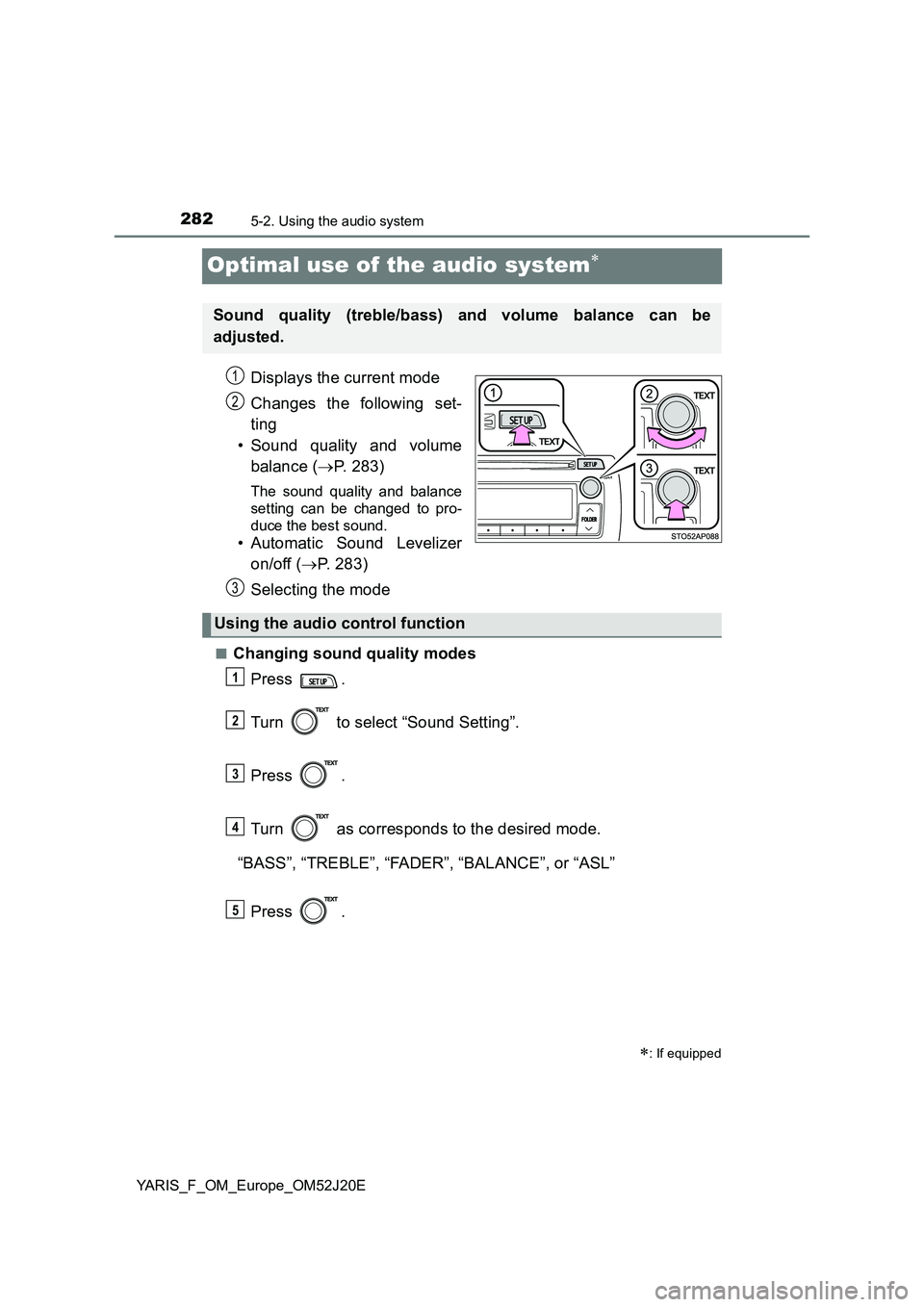
Displays the current mode
Changes the following set-
ting
• Sound quality and volume
balance ( P. 283)
The sound quality and balance
setting can be changed to pro-
duce the best sound.
• Automatic Sound Levelizer
on/off ( P. 283)
Selecting the mode
■Changing sound quality modes
Press .
Turn to select “Sound Setting”.
Press .
Turn as corresponds to the desired mode.
“BASS”, “TREBLE”, “FADER”, “BALANCE”, or “ASL”
Press .
: If equipped
Sound quality (treble/bass) and volume balance can be
adjusted.
STO51AP005
1
2
3
Using the audio control function
1
2
3
4
5