fog light TOYOTA YARIS 2017 Owner's Manual
[x] Cancel search | Manufacturer: TOYOTA, Model Year: 2017, Model line: YARIS, Model: TOYOTA YARIS 2017Pages: 549, PDF Size: 33.09 MB
Page 326 of 549
3266-1. Using the air conditioning system and defogger
YARIS_F_OM_Europe_OM52J20E
■Using automatic mode
Fan speed is adjusted automatically according to the temperature setting and
the ambient conditions.
Therefore, the fan may stop for a while until warm or cool air is ready to flow
immediately after is pressed.
■ Fogging up of the windows
● The windows will easily fog up when the humidity in the vehicle is high.
Turning on will dehumidify the air from the outlets and defog the wind-
shield effectively.
● If you turn off, the windows may fog up more easily.
● The windows may fog up if the recirculated air mode is used.
■ Outside/recirculated air mode
● When driving on dusty roads such as tunnels or in heavy traffic, set the out-
side/recirculated air mode button to the recirculated air mode. This is effec-
tive in preventing outside air from entering the vehicle interior. During
cooling operation, setting the recirculat ed air mode will also cool the vehicle
interior effectively.
● Outside/recirculated air mode may automatically switch depending on the
temperature setting or the inside temperature.
■ When the outside temperature falls to nearly 0C (32F)
The dehumidification function may not operate even when is pressed.
■ When the indicator light on goes off by itself
Press to turn off the dehumidification function and turn it on again.
There may be a problem in the air condi tioning system if the indicator light
goes off again. Turn the air conditioning system off and have it inspected by
any authorized Toyota dealer or re pairer, or another duly qualified and
equipped professional.
Page 328 of 549
3286-1. Using the air conditioning system and defogger
YARIS_F_OM_Europe_OM52J20E
Power heater
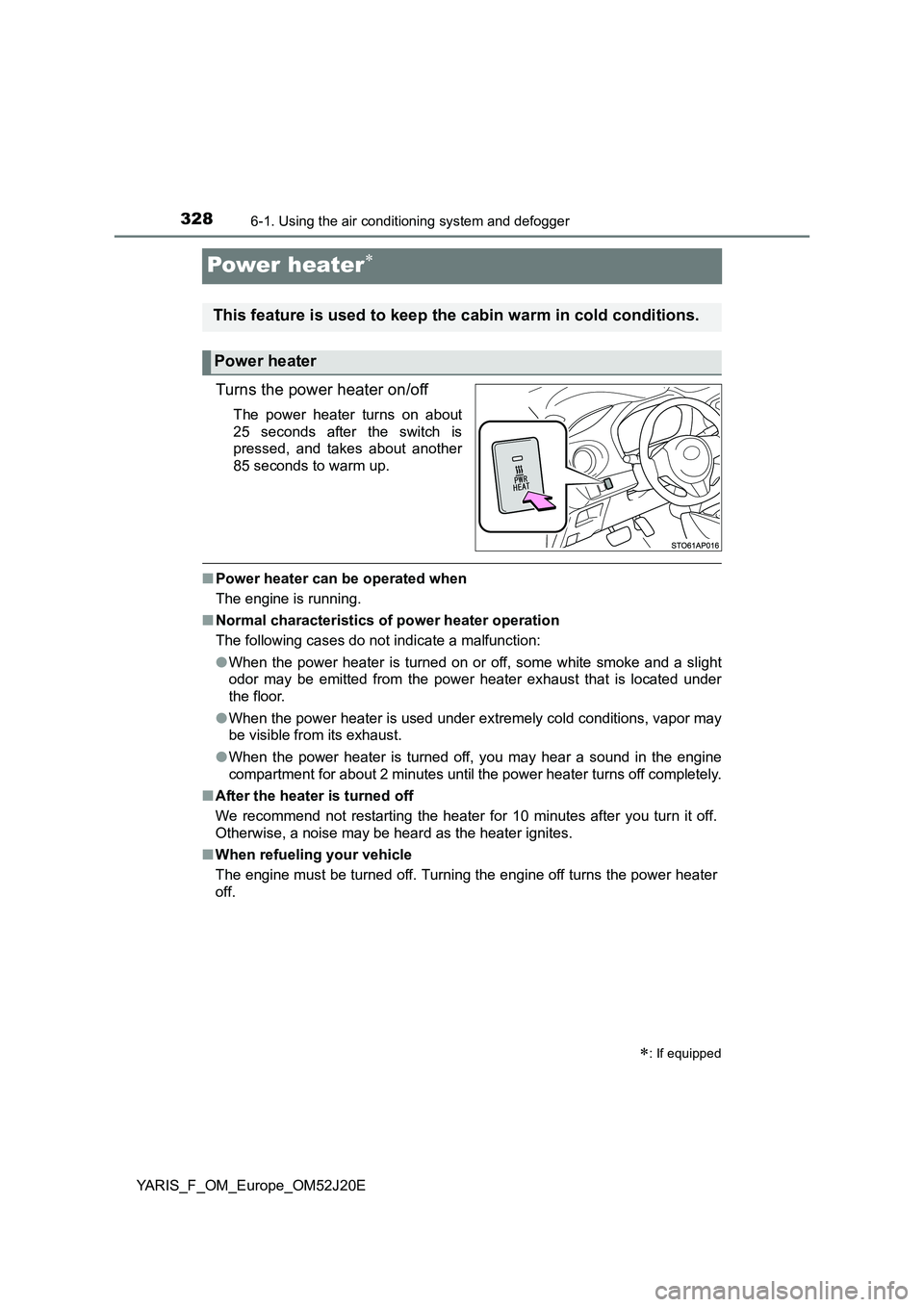
Turns the power heater on/off
The power heater turns on about
25 seconds after the switch is
pressed, and takes about another
85 seconds to warm up.
■ Power heater can be operated when
The engine is running.
■ Normal characteristics of power heater operation
The following cases do not indicate a malfunction:
● When the power heater is turned on or off, some white smoke and a slight
odor may be emitted from the power heater exhaust that is located under
the floor.
● When the power heater is used under extremely cold conditions, vapor may
be visible from its exhaust.
● When the power heater is turned off, you may hear a sound in the engine
compartment for about 2 minutes until the power heater turns off completely.
■ After the heater is turned off
We recommend not restarting the heater for 10 minutes after you turn it off.
Otherwise, a noise may be heard as the heater ignites.
■ When refueling your vehicle
The engine must be turned off. Turning the engine off turns the power heater
off.
: If equipped
This feature is used to keep the cabin warm in cold conditions.
Power heater
Page 330 of 549
3306-1. Using the air conditioning system and defogger
YARIS_F_OM_Europe_OM52J20E
Seat heaters
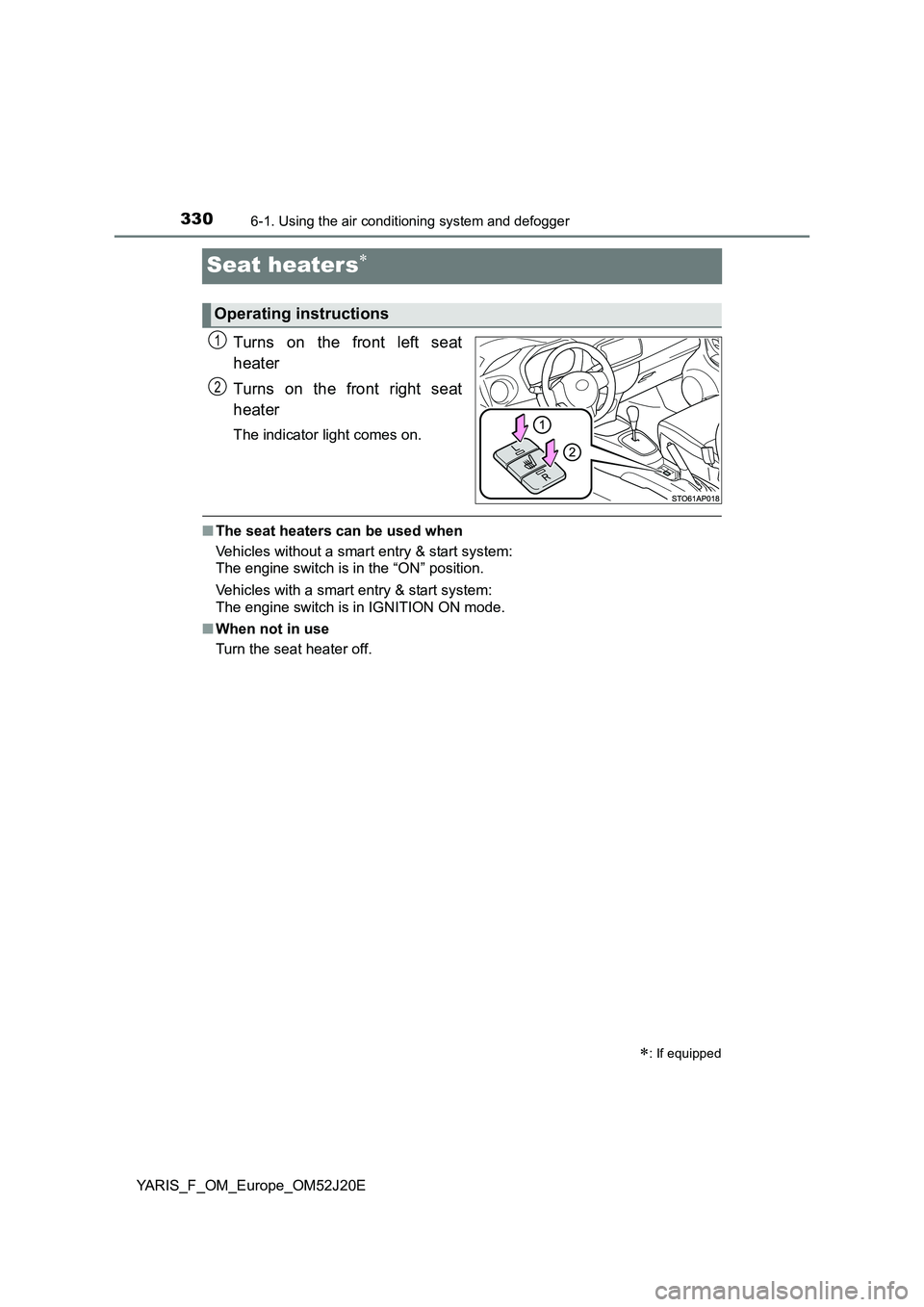
Turns on the front left seat
heater
Turns on the front right seat
heater
The indicator light comes on.
■ The seat heaters can be used when
Vehicles without a smart entry & start system:
The engine switch is in the “ON” position.
Vehicles with a smart entry & start system:
The engine switch is in IGNITION ON mode.
■ When not in use
Turn the seat heater off.
: If equipped
Operating instructions
1
2
Page 355 of 549
3557-1. Maintenance and care
7
Maintenance and care
YARIS_F_OM_Europe_OM52J20E
NOTICE
■Cleaning detergents
● Do not use the following types of detergent, as they may discolor the vehi-
cle interior or cause streaks or damage to painted surfaces:
• Non-seat portions: Organic substances such as benzene or gasoline,
alkaline or acidic solutions, dye, and bleach
• Seats: Alkaline or acidic solutions, such as thinner, benzene, and alco-
hol
● Do not use polish wax or polish cleaner. The instrument panel’s or other
interior part’s painted surface may be damaged.
■ Preventing damage to leather surfaces
Observe the following precautions to avoid damage to and deterioration of
leather surfaces:
● Remove any dust or dirt from leather surfaces immediately.
● Do not expose the vehicle to direct sunlight for extended periods of time.
Park the vehicle in the shade, especially during summer.
● Do not place items made of vinyl, plastic, or containing wax on the uphol-
stery, as they may stick to the leather surface if the vehicle interior heats
up significantly.
■ Water on the floor
Do not wash the vehicle floor with water.
Vehicle systems such as the audio system may be damaged if water comes
into contact with electrical components such as the audio system above or
under the floor of the vehicle. Water may also cause the body to rust.
■ When cleaning the inside of the windshield (vehicles with front sensor)
Be careful not to touch the front sensor ( P. 222).
If the camera is accidentally scratched or hit, PCS, LDA and Automatic High
Beam may not operate properly or may cause a malfunction.
■ Cleaning the inside of the rear window
● Do not use glass cleaner to clean the rear window, as this may cause
damage to the rear window defogger heater wires. Use a cloth dampened
with lukewarm water to gently wipe the window clean. Wipe the window in
strokes running parallel to the heater wires.
● Be careful not to scratch or damage the heater wires.
Page 411 of 549
4117-3. Do-it-yourself maintenance
7
Maintenance and care
YARIS_F_OM_Europe_OM52J20E
Light bulbs
Check the wattage of the light bulb to be replaced. (P. 521)
■Front
You may replace the following bulbs by yourself. The difficulty
level of replacement varies depending on the bulb. As there is a
danger that components may be damaged, we recommend that
replacement is carried out by any authorized Toyota dealer or
repairer, or another duly qualified and equipped professional.
For more information about replacing other light bulbs, contact
any authorized Toyota dealer or repairer, or another duly quali-
fied and equipped professional.
Preparing for light bulb replacement
Bulb locations
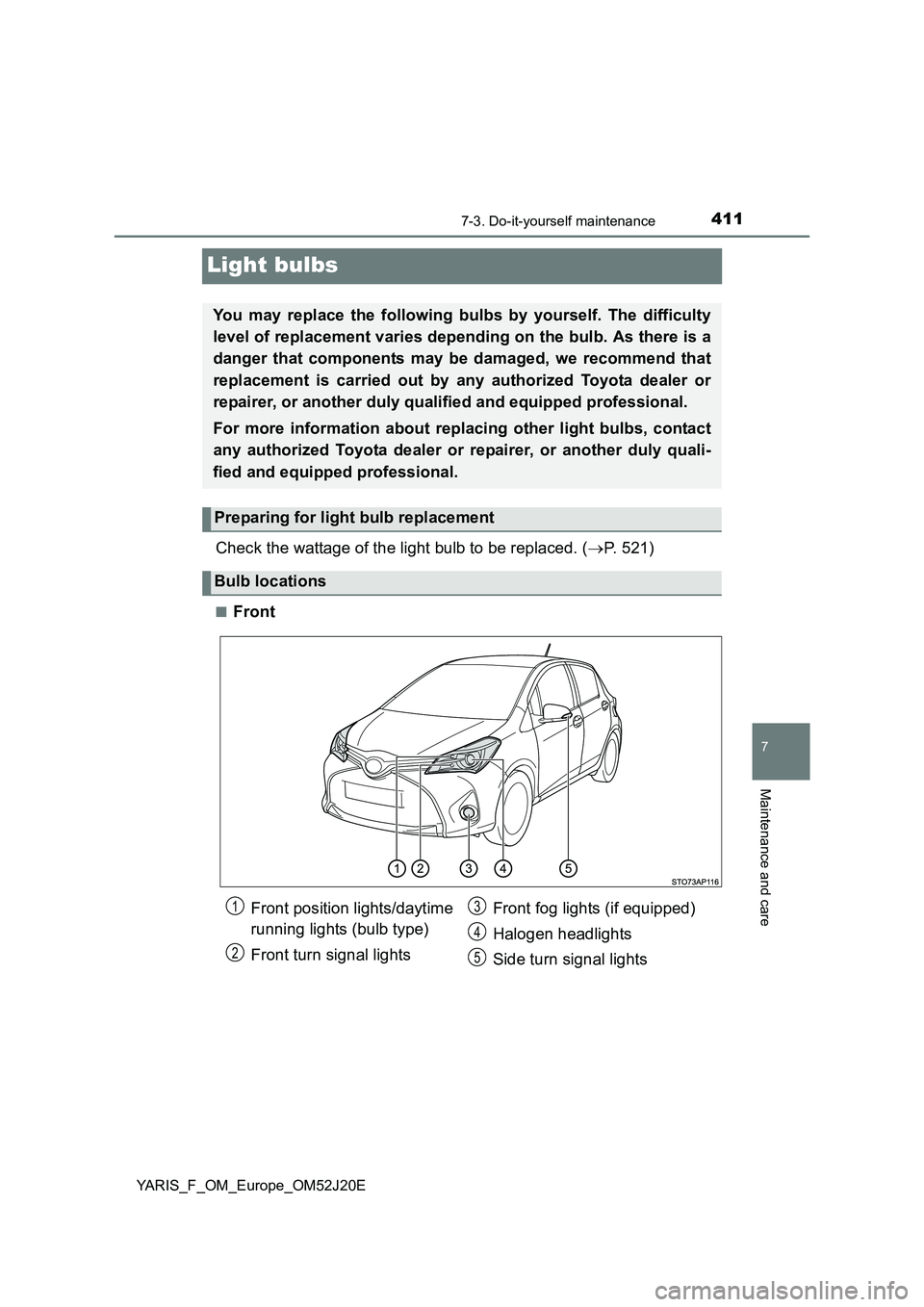
Front position lights/daytime
running lights (bulb type)
Front turn signal lights
Front fog lights (if equipped)
Halogen headlights
Side turn signal lights
1
2
3
4
5
Page 412 of 549
4127-3. Do-it-yourself maintenance
YARIS_F_OM_Europe_OM52J20E
■Rear
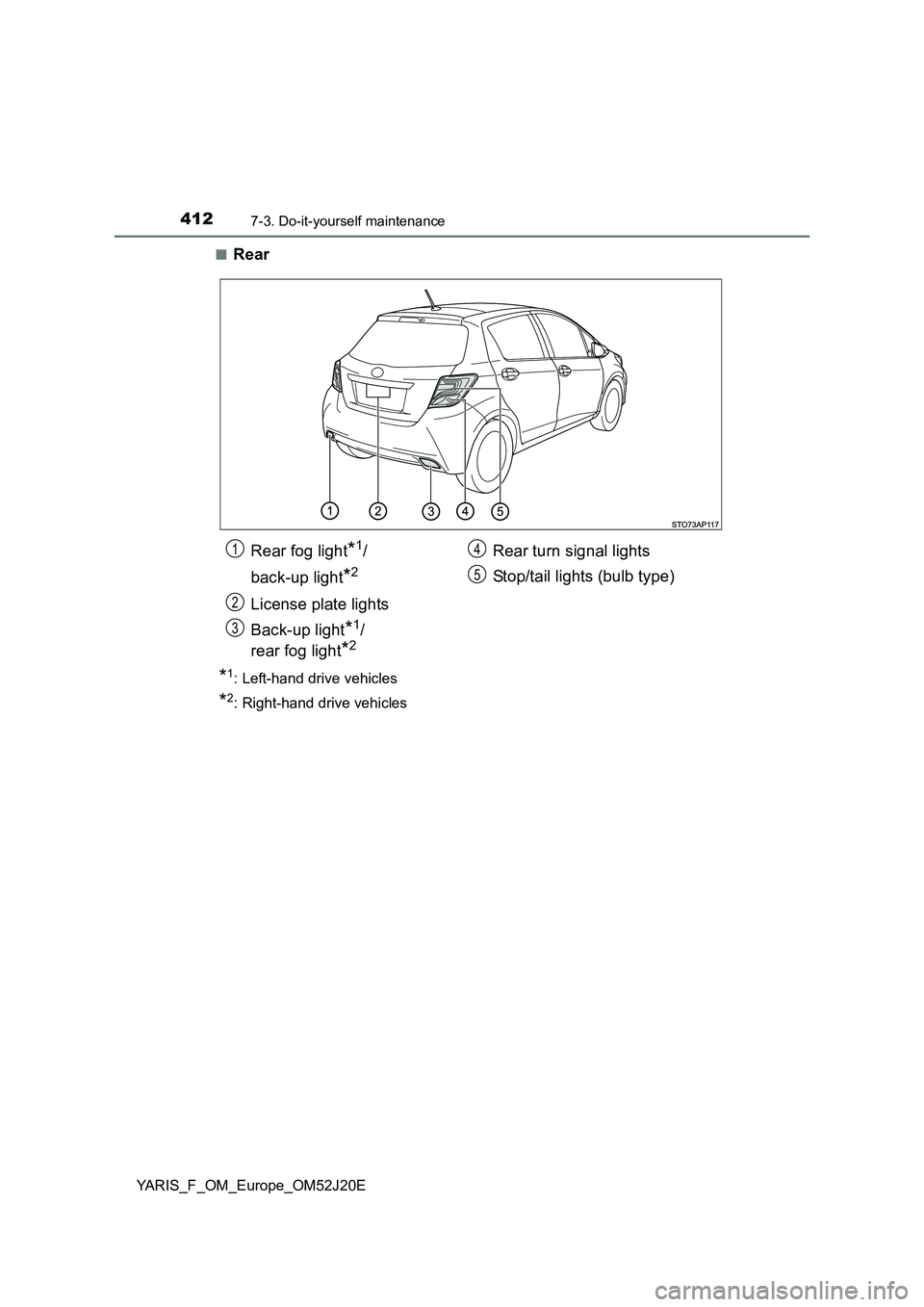
*1: Left-hand drive vehicles
*2: Right-hand drive vehicles
Rear fog light*1/
back-up light*2
License plate lights
Back-up light*1/
rear fog light*2
Rear turn signal lights
Stop/tail lights (bulb type)
1
2
3
4
5
Page 416 of 549
4167-3. Do-it-yourself maintenance
YARIS_F_OM_Europe_OM52J20E
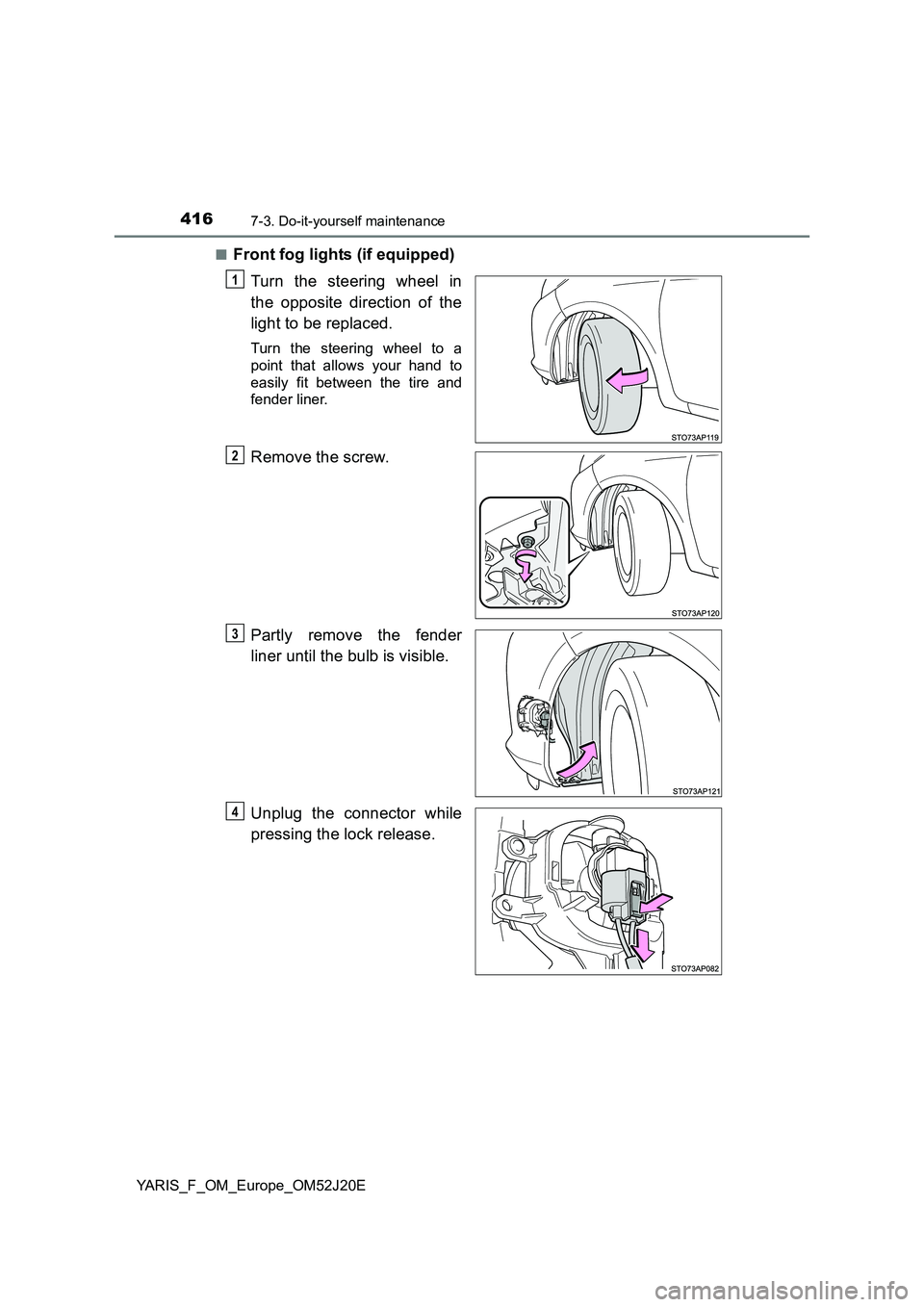
■Front fog lights (if equipped)
Turn the steering wheel in
the opposite direction of the
light to be replaced.
Turn the steering wheel to a
point that allows your hand to
easily fit between the tire and
fender liner.
Remove the screw.
Partly remove the fender
liner until the bulb is visible.
Unplug the connector while
pressing the lock release.
1
2
3
4
Page 417 of 549
4177-3. Do-it-yourself maintenance
7
Maintenance and care
YARIS_F_OM_Europe_OM52J20E
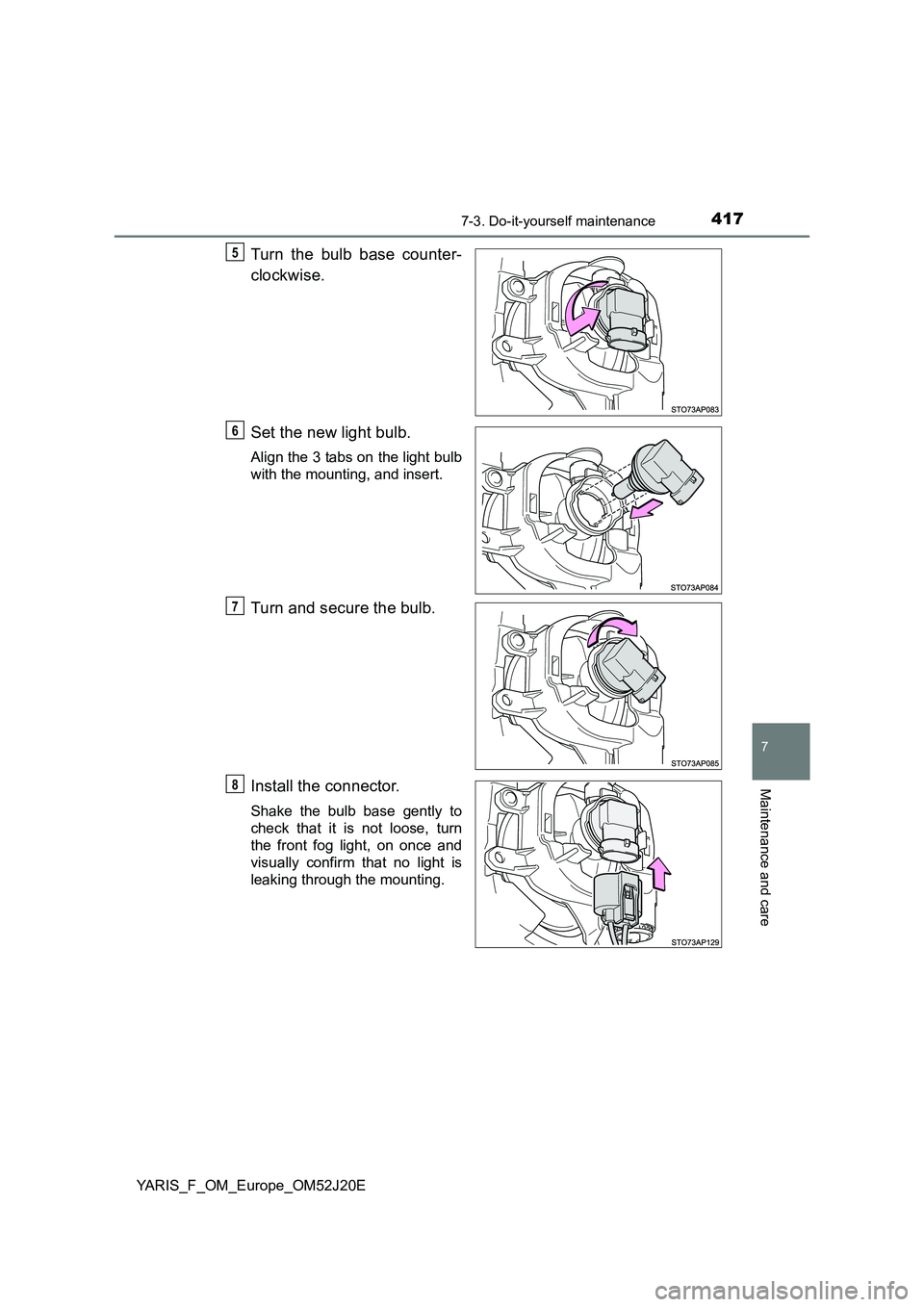
Turn the bulb base counter-
clockwise.
Set the new light bulb.
Align the 3 tabs on the light bulb
with the mounting, and insert.
Turn and secure the bulb.
Install the connector.
Shake the bulb base gently to
check that it is not loose, turn
the front fog light, on once and
visually confirm that no light is
leaking through the mounting.
5
6
7
8
Page 424 of 549
4247-3. Do-it-yourself maintenance
YARIS_F_OM_Europe_OM52J20E
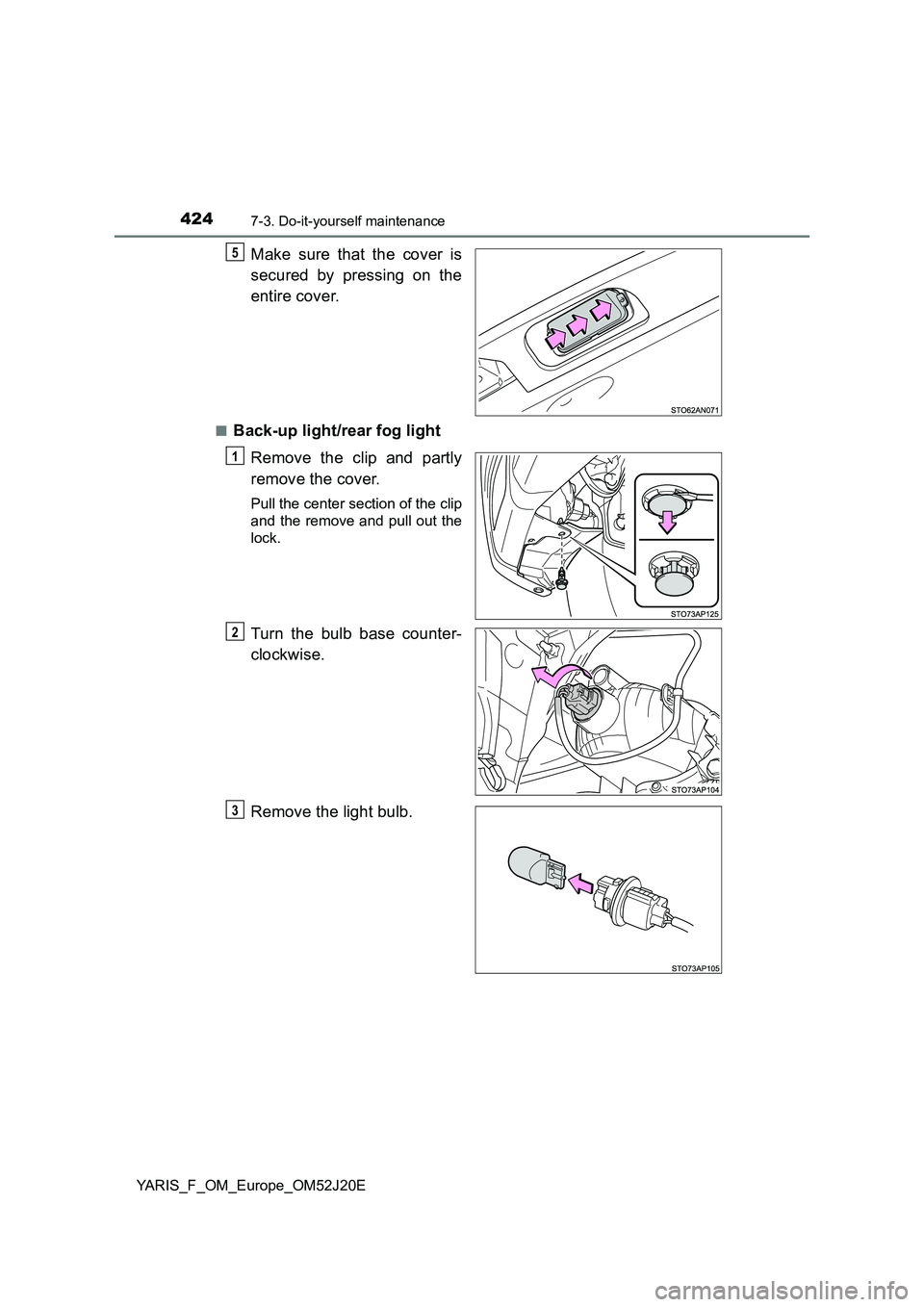
Make sure that the cover is
secured by pressing on the
entire cover.
■Back-up light/rear fog light
Remove the clip and partly
remove the cover.
Pull the center section of the clip
and the remove and pull out the
lock.
Turn the bulb base counter-
clockwise.
Remove the light bulb.
5
1
2
3
Page 441 of 549
4418-2. Steps to take in an emergency
8
When trouble arises
YARIS_F_OM_Europe_OM52J20E
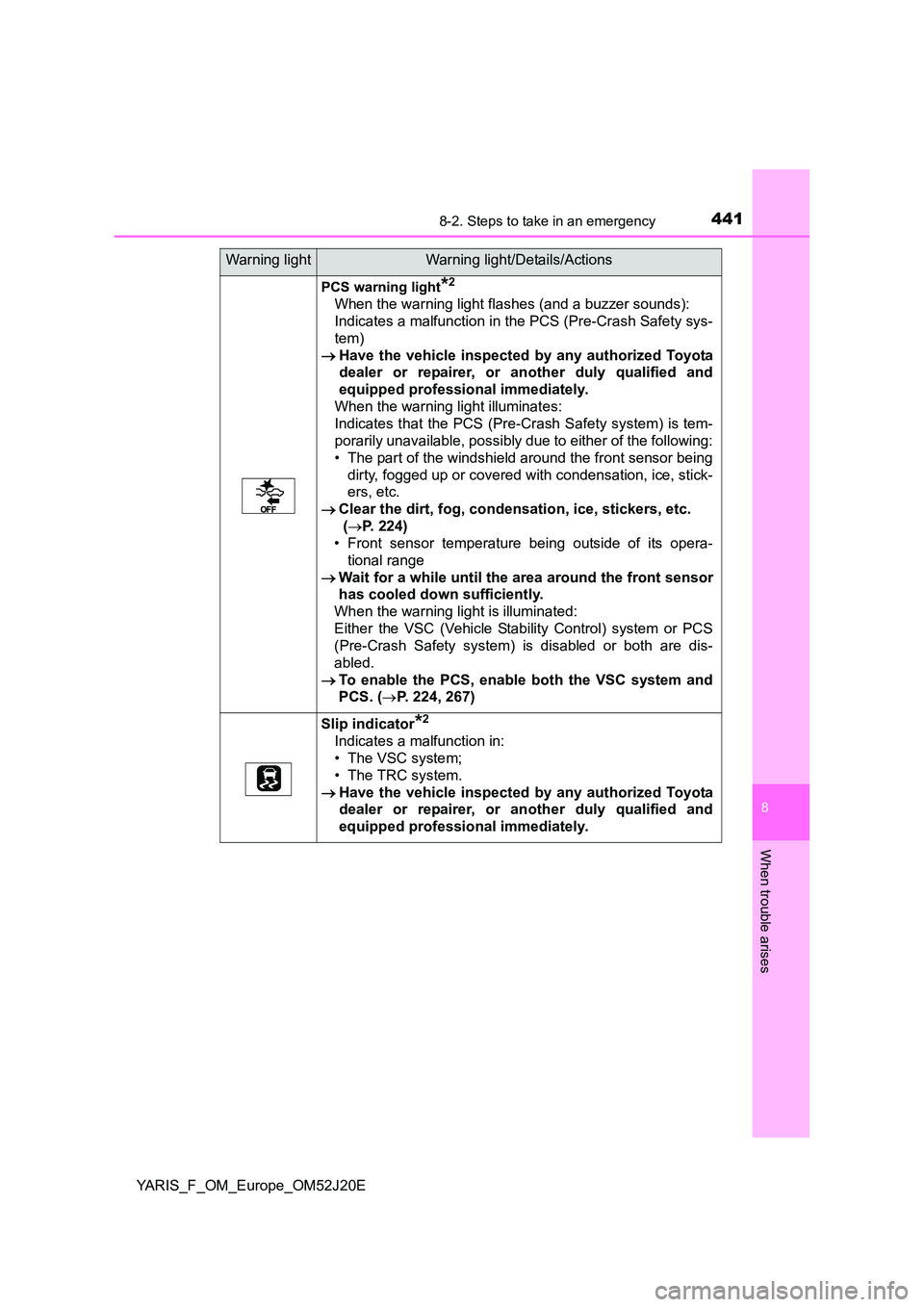
PCS warning light*2
When the warning light flashes (and a buzzer sounds):
Indicates a malfunction in the PCS (Pre-Crash Safety sys-
tem)
Have the vehicle inspected by any authorized Toyota
dealer or repairer, or another duly qualified and
equipped professional immediately.
When the warning light illuminates:
Indicates that the PCS (Pre-Crash Safety system) is tem-
porarily unavailable, possibly due to either of the following:
• The part of the windshield around the front sensor being
dirty, fogged up or covered with condensation, ice, stick-
ers, etc.
Clear the dirt, fog, condensation, ice, stickers, etc.
( P. 224)
• Front sensor temperature being outside of its opera-
tional range
Wait for a while until the area around the front sensor
has cooled down sufficiently.
When the warning light is illuminated:
Either the VSC (Vehicle Stability Control) system or PCS
(Pre-Crash Safety system) is disabled or both are dis-
abled.
To enable the PCS, enable both the VSC system and
PCS. ( P. 224, 267)
Slip indicator*2
Indicates a malfunction in:
• The VSC system;
• The TRC system.
Have the vehicle inspected by any authorized Toyota
dealer or repairer, or another duly qualified and
equipped professional immediately.
Warning lightWarning light/Details/Actions