sensor TOYOTA YARIS 2017 Owners Manual
[x] Cancel search | Manufacturer: TOYOTA, Model Year: 2017, Model line: YARIS, Model: TOYOTA YARIS 2017Pages: 549, PDF Size: 33.09 MB
Page 40 of 549
401-1. For safe use
YARIS_F_OM_Europe_OM52J20E
*1: 5-door models
*2: 3-door models
*3: If equipped
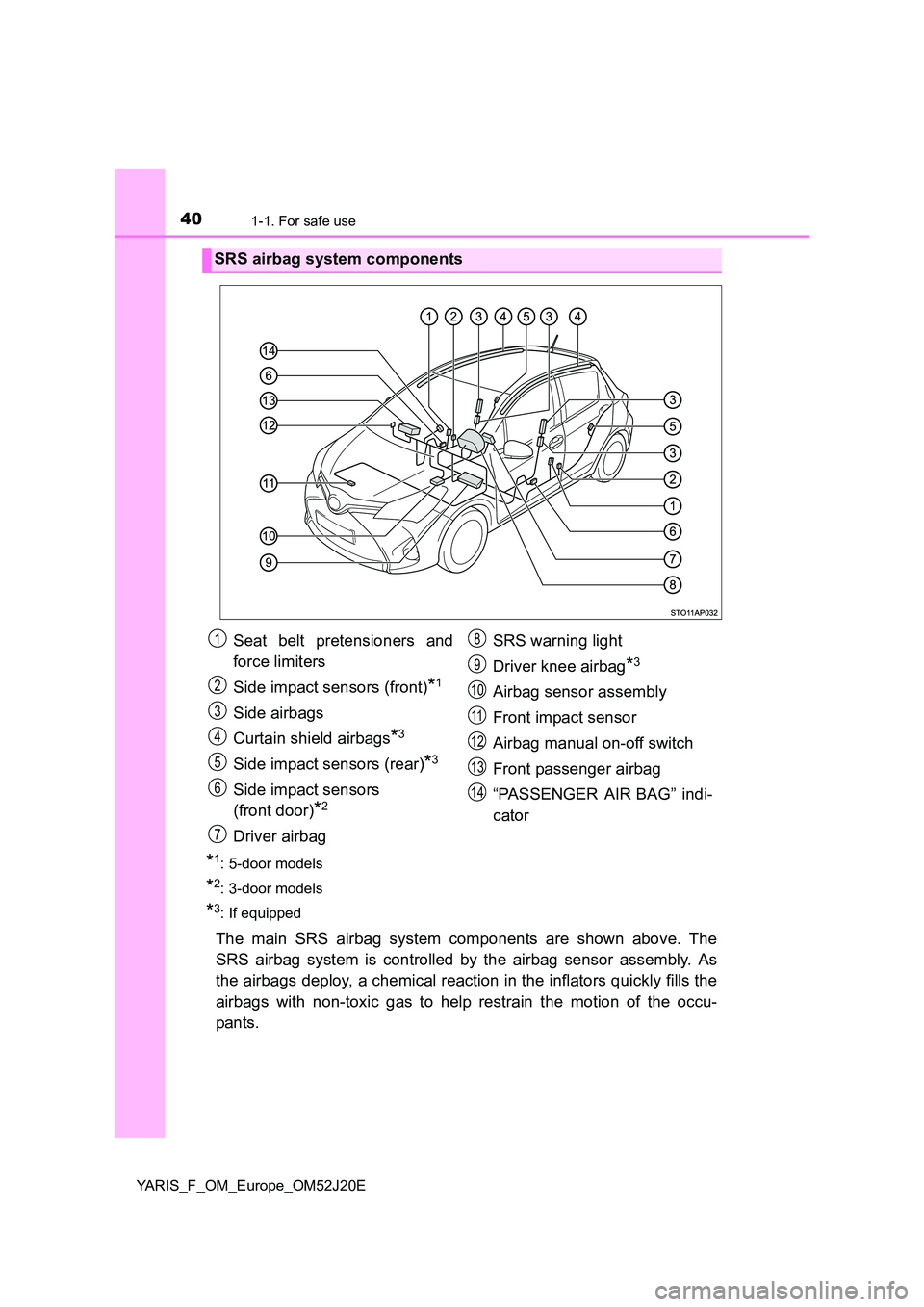
The main SRS airbag system components are shown above. The
SRS airbag system is controlled by the airbag sensor assembly. As
the airbags deploy, a chemical reaction in the inflators quickly fills the
airbags with non-toxic gas to help restrain the motion of the occu-
pants.
SRS airbag system components
Seat belt pretensioners and
force limiters
Side impact sensors (front)*1
Side airbags
Curtain shield airbags*3
Side impact sensors (rear)*3
Side impact sensors
(front door)*2
Driver airbag
SRS warning light
Driver knee airbag*3
Airbag sensor assembly
Front impact sensor
Airbag manual on-off switch
Front passenger airbag
“PASSENGER AIR BAG” indi-
cator
1
2
3
4
5
6
7
8
9
10
11
12
13
14
Page 81 of 549
81
1
1-2. Theft deterrent system
For safety and security
YARIS_F_OM_Europe_OM52J20E
Double locking system
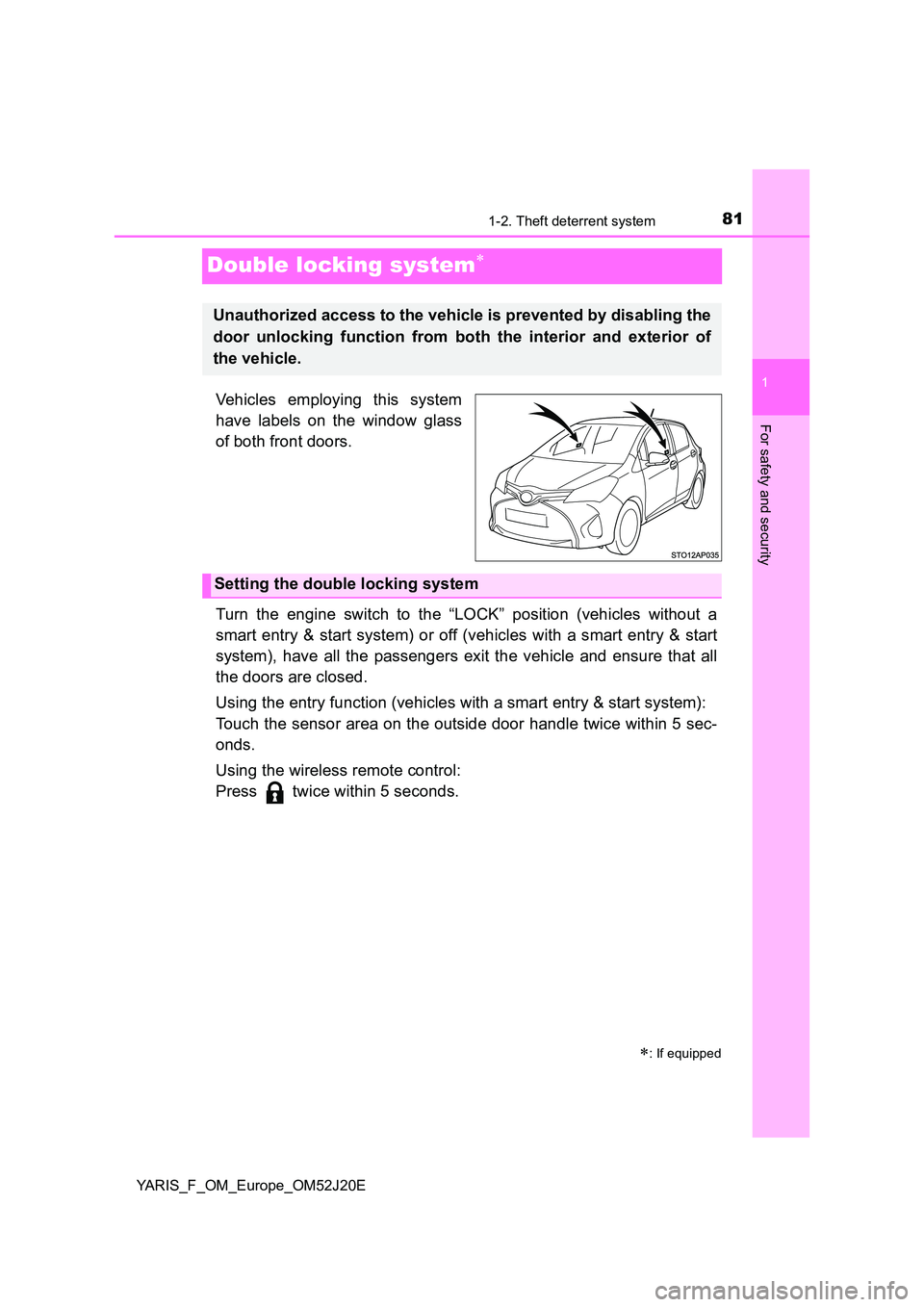
Vehicles employing this system
have labels on the window glass
of both front doors.
Turn the engine switch to the “LOCK” position (vehicles without a
smart entry & start system) or off (vehicles with a smart entry & start
system), have all the passengers exit the vehicle and ensure that all
the doors are closed.
Using the entry function (vehicles with a smart entry & start system):
Touch the sensor area on the outside door handle twice within 5 sec-
onds.
Using the wireless remote control:
Press twice within 5 seconds.
: If equipped
Unauthorized access to the vehicle is prevented by disabling the
door unlocking function from both the interior and exterior of
the vehicle.
Setting the double locking system
Page 114 of 549
1143-2. Opening, closing and locking the doors
YARIS_F_OM_Europe_OM52J20E
Side doors
The vehicle can be locked and unlocked using the entry function,
wireless remote control, key or door lock switches.
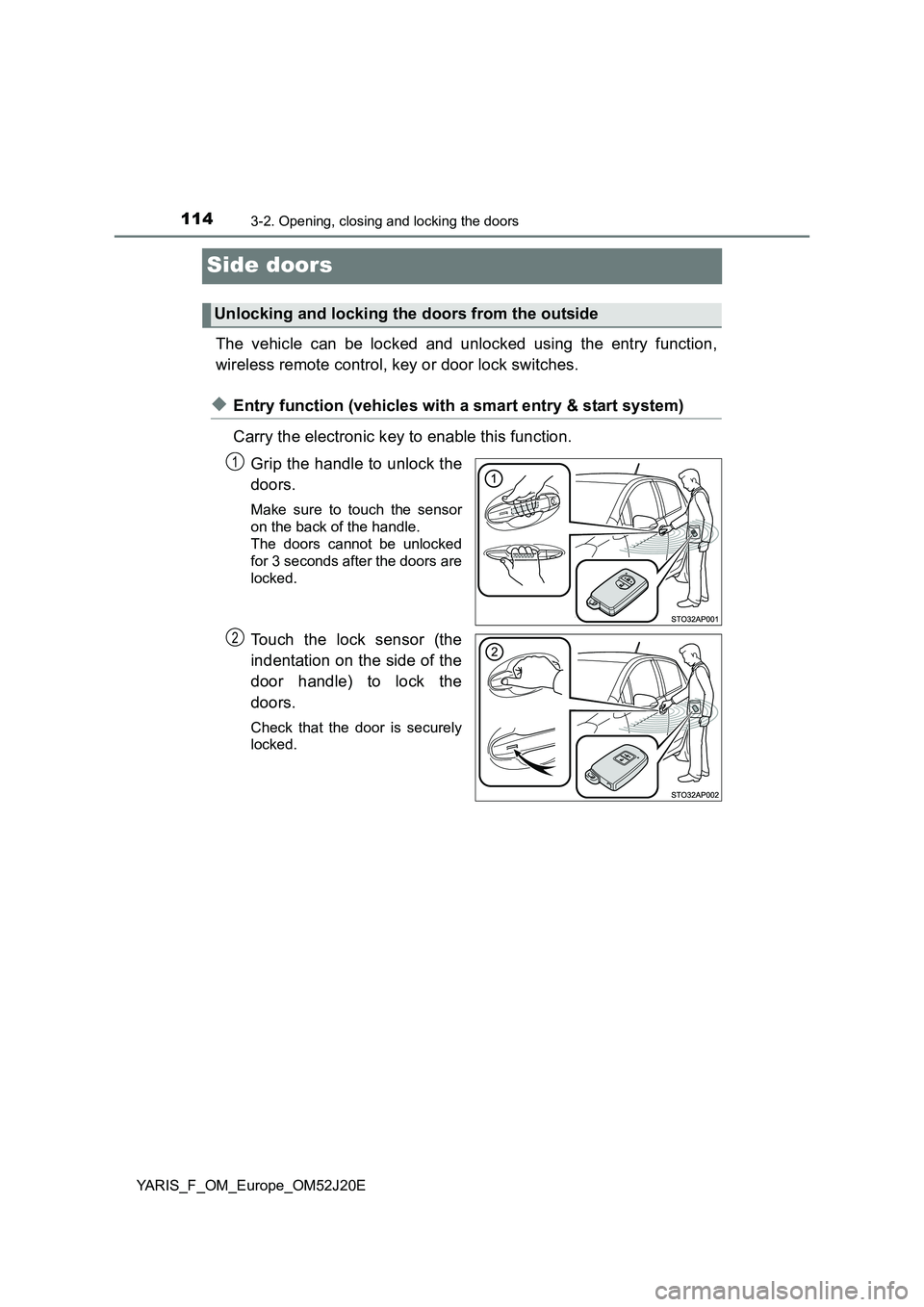
◆Entry function (vehicles with a smart entry & start system)
Carry the electronic key to enable this function.
Grip the handle to unlock the
doors.
Make sure to touch the sensor
on the back of the handle.
The doors cannot be unlocked
for 3 seconds after the doors are
locked.
Touch the lock sensor (the
indentation on the side of the
door handle) to lock the
doors.
Check that the door is securely
locked.
Unlocking and locking the doors from the outside
1
2
Page 117 of 549
1173-2. Opening, closing and locking the doors
3
Operation of each component
YARIS_F_OM_Europe_OM52J20E
■ Security feature
Vehicles without a smart entry & start system
If a door is not opened within approximately 30 seconds after the vehicle is
unlocked, the security feature automatically locks the vehicle again.
Vehicles with a smart entry & start system
If a door is not opened within approximately 30 seconds after the vehicle is
unlocked, the security feature automatically locks the vehicle again. (How-
ever, depending on the location of the electronic key, the key may be
detected as being in the vehicle. In this case, vehicle may be unlocked.)
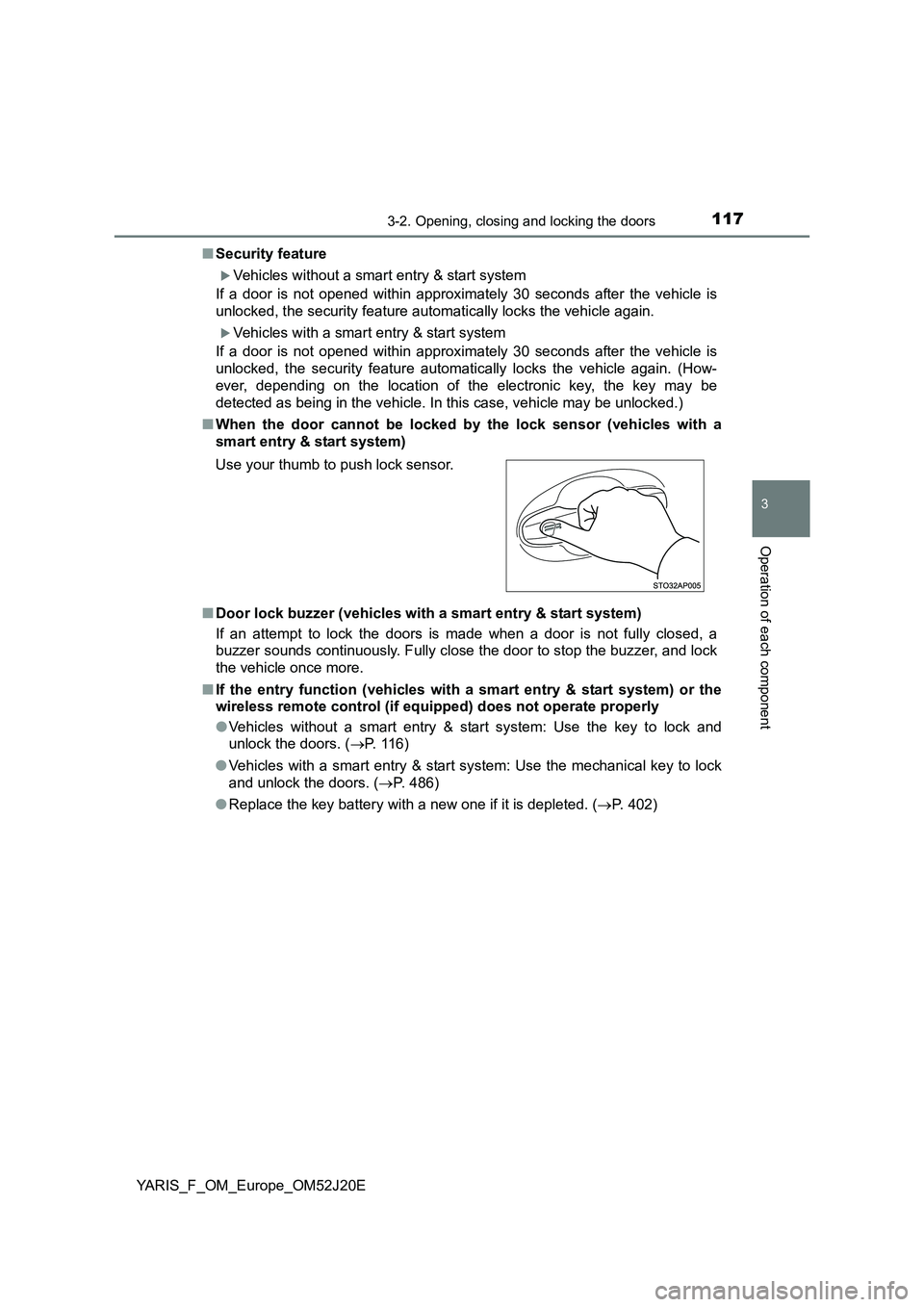
■ When the door cannot be locked by the lock sensor (vehicles with a
smart entry & start system)
■ Door lock buzzer (vehicles with a smart entry & start system)
If an attempt to lock the doors is made when a door is not fully closed, a
buzzer sounds continuously. Fully close the door to stop the buzzer, and lock
the vehicle once more.
■ If the entry function (vehicles with a smart entry & start system) or the
wireless remote control (if equipped) does not operate properly
● Vehicles without a smart entry & start system: Use the key to lock and
unlock the doors. ( P. 116)
● Vehicles with a smart entry & start system: Use the mechanical key to lock
and unlock the doors. ( P. 486)
● Replace the key battery with a new one if it is depleted. (P. 402)
Use your thumb to push lock sensor.
Page 131 of 549
1313-2. Opening, closing and locking the doors
3
Operation of each component
YARIS_F_OM_Europe_OM52J20E
■ Notes for the entry function
● Even when the electronic key is within the effective range (detection areas),
the system may not operate properly in the following cases:
• The electronic key is too close to the window or outside door handle, near
the ground, or in a high place w hen the doors are locked or unlocked.
• The electronic key is on the inst rument panel, luggage cover (if equipped)
or floor, or in the door pockets, glove box, accessory box of the instru-
ment panel, or in/near the front cup holder when the engine is started or
engine switch modes are changed.
● Do not leave the electronic key on top of the instrument panel or near the
door pockets when exiting the vehicle. Depending on the radio wave recep-
tion conditions, it may be detected by the antenna outside the cabin and the
door will become lockable from the outside, possibly trapping the electronic
key inside the vehicle.
● As long as the electronic key is within the effective range, the doors may be
locked or unlocked by anyone.
● Even if the electronic key is not inside the vehicle, it may be possible to start
the engine if the electronic key is near the window.
● The doors may unlock if a large amount of water splashes on the door han-
dle, such as in the rain or in a car wash when the electronic key is within the
effective range. (The door will automatically be locked after approximately
30 seconds if the doors are not opened and closed.)
● Gripping the door handle when wearing a glove may not unlock the door.
● If the wireless remote control is used to lock the doors when the electronic
key is near the vehicle, there is a possibility that the door may not be
unlocked by the entry function. (Use the wireless remote control to unlock
the doors.)
● A sudden approach to the effective range or door handle may prevent the
doors from being unlocked. In this case, return the door handle to the origi-
nal position and check that the doors unlock before pulling the door handle
again.
■ Notes for locking the doors
● Touching the door lock sensor while wearing gloves may delay or prevent
lock operation. Remove the gloves and touch the lock sensor again.
● If the door handle becomes wet while the electronic key is within the effec-
tive range, the door may lock and unlock repeatedly. Place the key in a posi-
tion 2 m (6 ft.) or more separate from the vehicle while the vehicle is being
washed. (Take care to ensure that the key is not stolen.)
● If the electronic key is inside the vehicle and a door handle becomes wet
during a car wash, a buzzer will sound outside the vehicle. To turn off the
alarm, lock all the doors.
● The lock sensor may not work properly if it comes into contact with ice,
snow, mud, etc. Clean the lock sensor and attempt to operate it again.
Page 132 of 549
1323-2. Opening, closing and locking the doors
YARIS_F_OM_Europe_OM52J20E
■ Notes for the unlocking function
● A sudden approach to the effective range or door handle may prevent the
doors from being unlocked. In this case, return the door handle to the origi-
nal position and check that the doors unlock before pulling the door handle
again.
● Gripping the door handle when wearing a glove may not unlock the door.
Remove the gloves and touch the sensor on the back of the handle again.
● If the door handle becomes wet while the electronic key is within the effec-
tive range, the door may lock and unlock repeatedly. Place the key in a posi-
tion 2 m (6 ft.) or more separate from the vehicle while the vehicle is being
washed. (Take care to ensure that the key is not stolen.)
● If there is another electronic key in the detection area, it may take slightly
longer to unlock the doors after the door handle is gripped.
■ When the vehicle is not driven for extended periods
● To prevent theft of the vehicle, do not leave the electronic key within 2 m
(6 ft.) of the vehicle.
● The smart entry & start system can be deactivated in advance. (P. 524)
■ To operate the system properly
Make sure to carry the electronic key when operating the system. Do not get
the electronic key too close to the vehicle when operating the system from the
outside of the vehicle.
Depending on the position and holding condition of the electronic key, the key
may not be detected correctly and the system may not operate properly. (The
alarm may go off accidentally, or the door lock prevention function may not
operate.)
■ If the smart entry & start system does not operate properly
● Locking and unlocking the doors: Use the mechanical key. (P. 486)
● Starting the engine: P. 486
■ Customization
Settings (e. g. smart entry & start system) can be changed.
(Customizable features: P. 524)
■ If the smart entry & start system has been deactivated in a customized
setting
● Locking and unlocking the doors:
Use the wireless remote control or mechanical key. ( P. 115, 486)
● Starting the engine and changing engine switch modes: P. 486
● Stopping the engine: P. 186
Page 150 of 549
1503-4. Adjusting the steering wheel and mirrors
YARIS_F_OM_Europe_OM52J20E
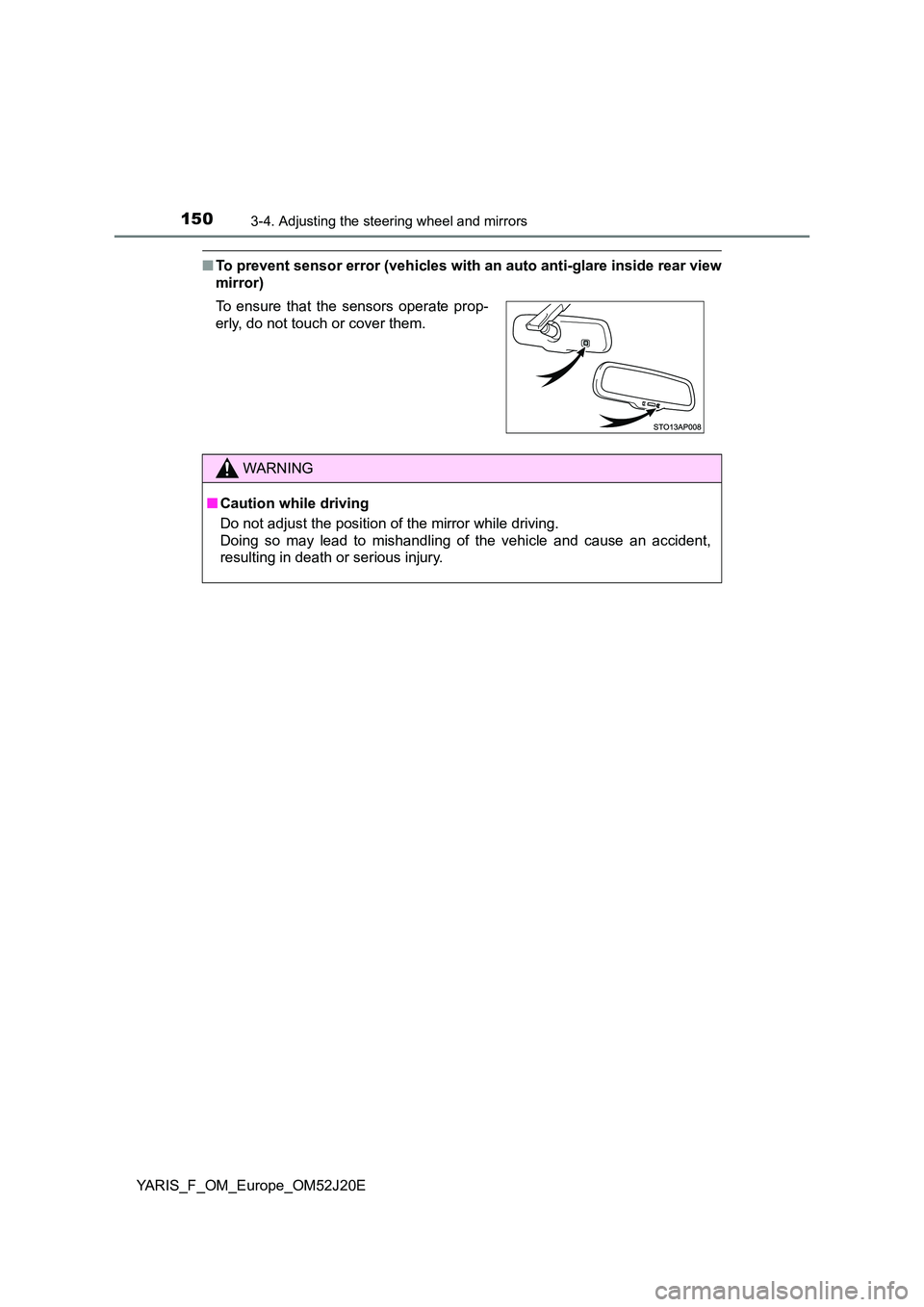
■To prevent sensor error (vehicles with an auto anti-glare inside rear view
mirror)
To ensure that the sensors operate prop-
erly, do not touch or cover them.
WARNING
■ Caution while driving
Do not adjust the position of the mirror while driving.
Doing so may lead to mishandling of the vehicle and cause an accident,
resulting in death or serious injury.
Page 207 of 549
2074-3. Operating the lights and wipers
4
Driving
YARIS_F_OM_Europe_OM52J20E
■Daytime running light system
To make your vehicle more visible to other drivers during daytime driving, the
daytime running lights turn on automatically whenever the engine is started
and the parking brake is released with the headlight switch off or in the
“AUTO” position. (Illuminate brighter than the front position lights.) Daytime
running lights are not designed for use at night.
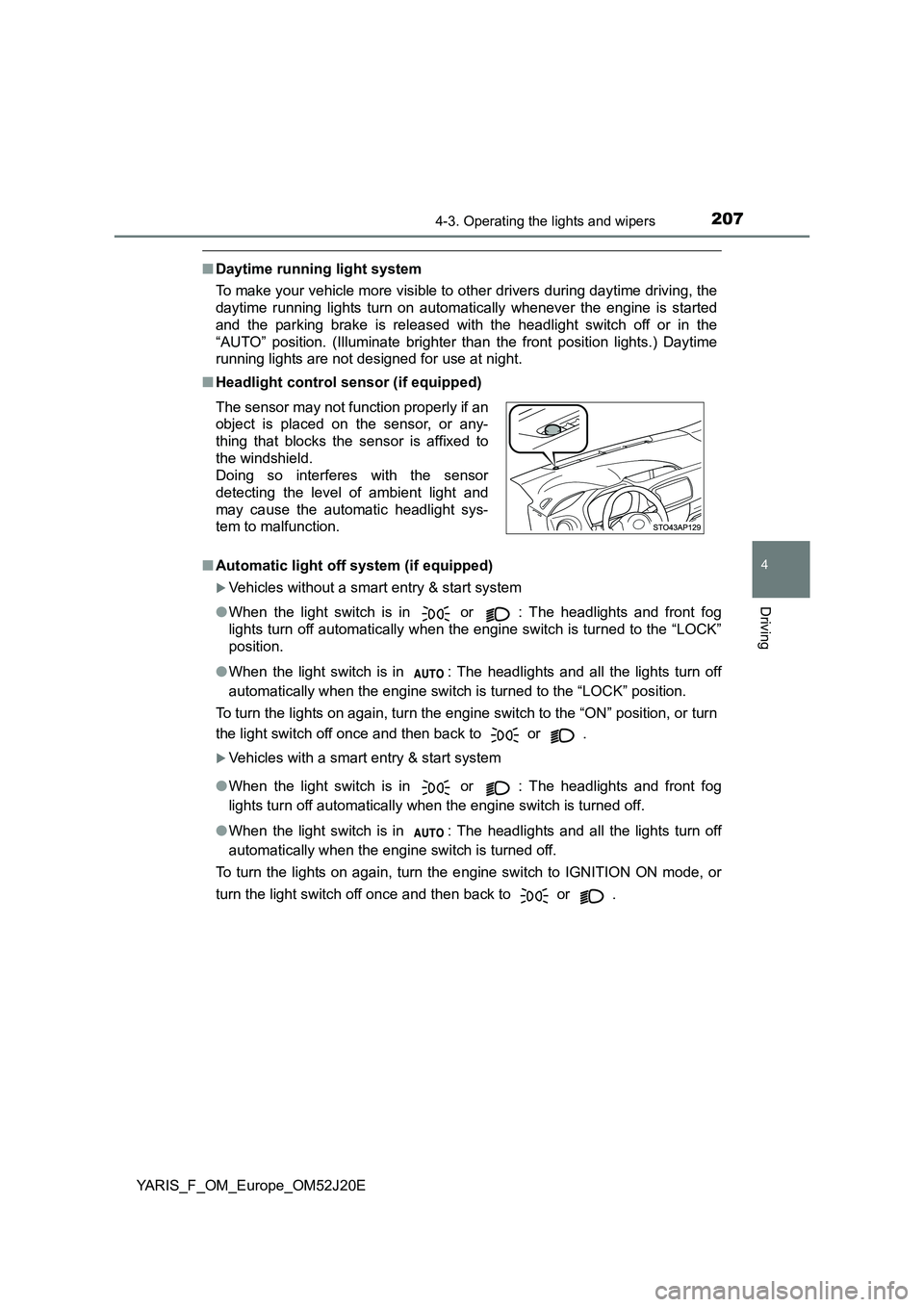
■ Headlight control sensor (if equipped)
■ Automatic light off system (if equipped)
Vehicles without a smart entry & start system
● When the light switch is in or : The headlights and front fog
lights turn off automatically when the engine switch is turned to the “LOCK”
position.
● When the light switch is in : The headlights and all the lights turn off
automatically when the engine switch is turned to the “LOCK” position.
To turn the lights on again, turn the engine switch to the “ON” position, or turn
the light switch off once and then back to or .
Vehicles with a smart entry & start system
● When the light switch is in or : The headlights and front fog
lights turn off automatically when the engine switch is turned off.
● When the light switch is in : The headlights and all the lights turn off
automatically when the engine switch is turned off.
To turn the lights on again, turn the engine switch to IGNITION ON mode, or
turn the light switch off once and then back to or .
The sensor may not function properly if an
object is placed on the sensor, or any-
thing that blocks the sensor is affixed to
the windshield.
Doing so interferes with the sensor
detecting the level of ambient light and
may cause the automatic headlight sys-
tem to malfunction.
Page 208 of 549
2084-3. Operating the lights and wipers
YARIS_F_OM_Europe_OM52J20E
■ Automatic High Beam (if equipped)
P. 245
■ Light reminder buzzer
Vehicles without a smart entry & start system
A buzzer sounds when the key is removed from the engine switch and the
driver’s door is opened while the lights are turned on.
Vehicles with a smart entry & start system
A buzzer sounds when the engine switch is turned off and the driver’s door is
opened while the lights are turned on.
■ Battery-saving function
In all conditions following below, the headlights and the other remaining lights
will go off automatically after 20 minutes in order to prevent the vehicle bat-
tery from being discharged:
● The headlights and/or tail lights are on.
● The light switch is in or .
● Vehicles without a smart entry & start system: The engine switch is turned to
the “LOCK” position.
● Vehicles with a smart entry & start system: The engine switch is turned off.
This function will be canceled in any of the following situations:
● Vehicles without a smart entry & start system: When the engine switch is
turned to the “ON” position.
● Vehicles with a smart entry & start system: When the engine switch is
turned to IGNITION ON mode.
● When the light switch is operated.
● When the door is opened or closed.
■ Customization
Settings (e.g. light sensor sensitivity) can be changed.
(Customizable features: P. 524)
NOTICE
■To prevent battery discharge
Do not leave the lights on longer than necessary when the engine is not
running.
Page 212 of 549
2124-3. Operating the lights and wipers
YARIS_F_OM_Europe_OM52J20E
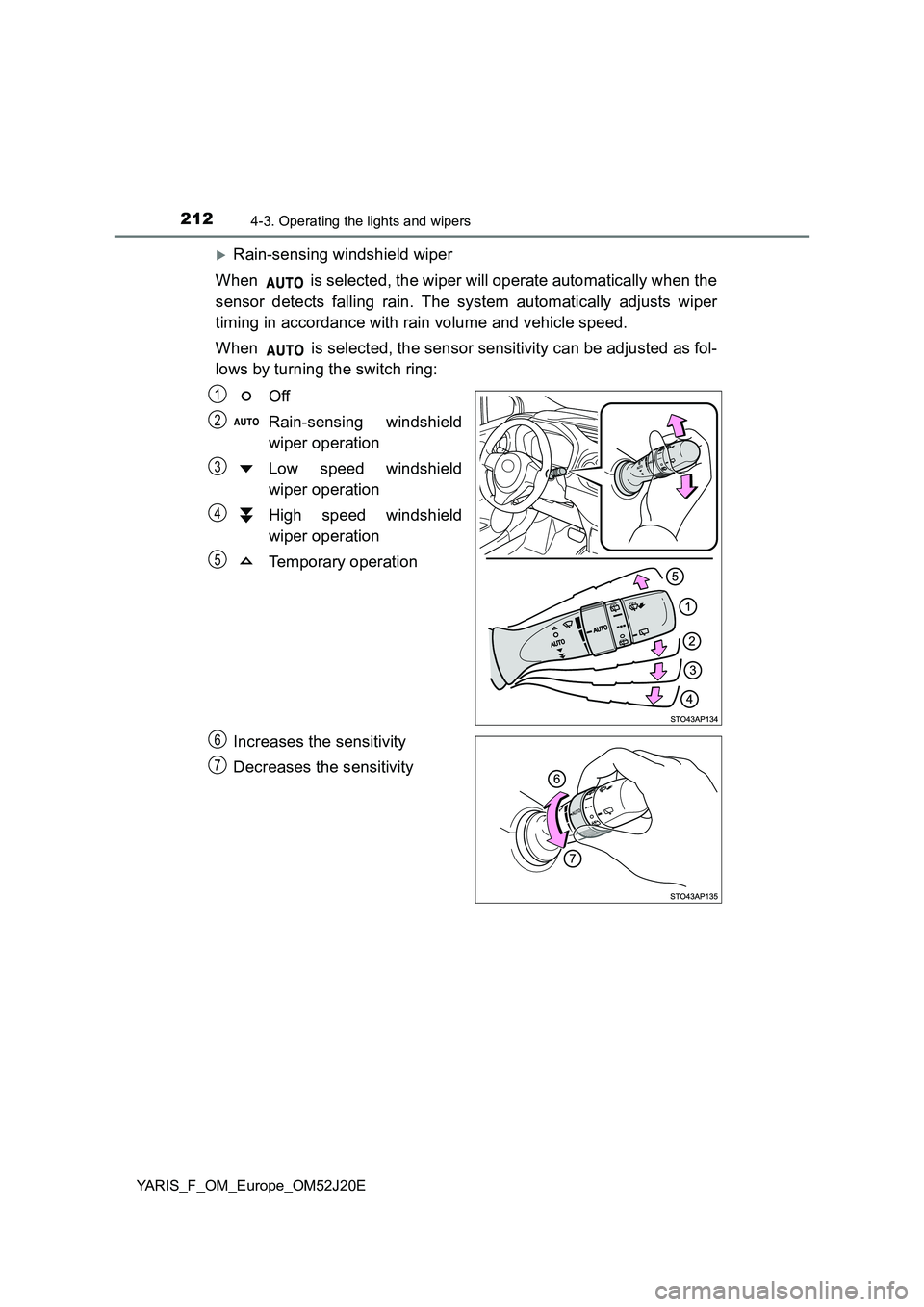
Rain-sensing windshield wiper
When is selected, the wiper will operate automatically when the
sensor detects falling rain. The system automatically adjusts wiper
timing in accordance with rain volume and vehicle speed.
When is selected, the sensor sensitivity can be adjusted as fol-
lows by turning the switch ring:
Off
Rain-sensing windshield
wiper operation
Low speed windshield
wiper operation
High speed windshield
wiper operation
Temporary operation
Increases the sensitivity
Decreases the sensitivity
1
2
3
4
5
6
7