reset TOYOTA YARIS 2018 User Guide
[x] Cancel search | Manufacturer: TOYOTA, Model Year: 2018, Model line: YARIS, Model: TOYOTA YARIS 2018Pages: 632, PDF Size: 44.1 MB
Page 301 of 632
3014-6. Using the driving support systems
4
Driving
YARIS_HV_OM_Europe_OM52J66E
■Cruise control can be set when
● The shift lever is in D.
● Vehicle speed is above approximately 40 km/h (25 mph).
■ Accelerating after setting the vehicle speed
● The vehicle can be accelerated normally. After acceleration, the set speed
resumes.
● Even without canceling the cruise control, the set speed can be increased
by first accelerating the vehicle to the desired speed and then pushing the
lever down to set the new speed.
■ Automatic cruise control cancelation
Cruise control will stop maintaining the vehicle speed in any of the following
situations.
● Actual vehicle speed falls more than approximately 16 km/h (10 mph) below
the preset vehicle speed.
At this time, the memorized set speed is not retained.
● Actual vehicle speed is below approximately 40 km/h (25 mph).
● VSC is activated.
■ If the cruise control indicator comes in yellow (vehicles with mono-
chrome display) or “Check cruise control system.” is displayed on the
multi-information display ( vehicles with color display)
Press the “ON-OFF” button once to deactivate the system, and then press
the button again to reactivate the system.
If the cruise control speed cannot be set or if the cruise control cancels imme-
diately after being activated, there may be a malfunction in the cruise control
system. Have the vehicle inspected by any authorized Toyota retailer or Toy-
ota authorized repairer, or any reliable repairer.
Page 326 of 632
3265-3. Using the radio
YARIS_HV_OM_Europe_OM52J66E
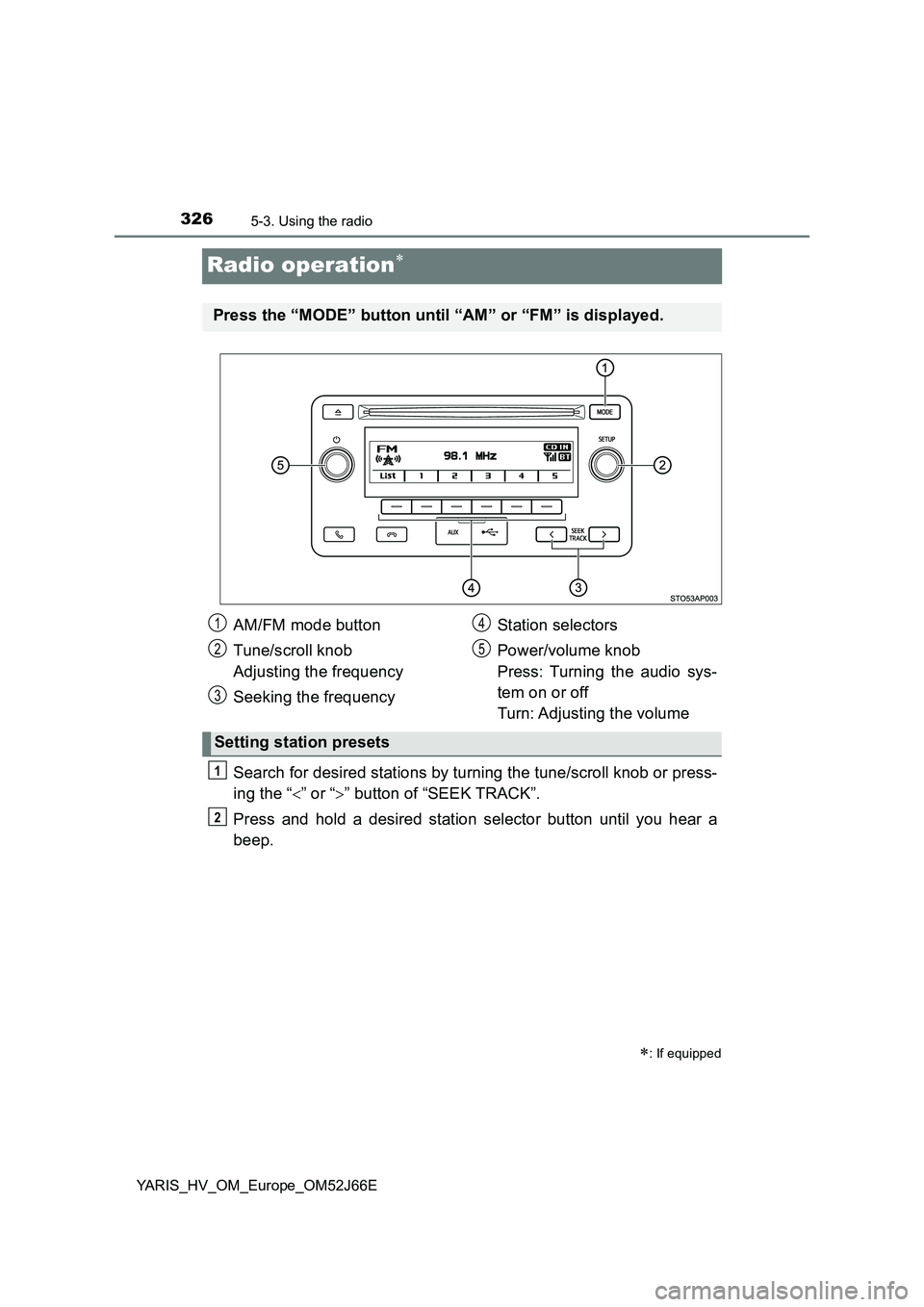
Radio operation
Search for desired stations by turning the tune/scroll knob or press-
ing the “ ” or “” button of “SEEK TRACK”.
Press and hold a desired station selector button until you hear a
beep.
: If equipped
Press the “MODE” button until “AM” or “FM” is displayed.
AM/FM mode button
Tune/scroll knob
Adjusting the frequency
Seeking the frequency
Station selectors
Power/volume knob
Press: Turning the audio sys-
tem on or off
Turn: Adjusting the volume
Setting station presets
1
2
3
4
5
1
2
Page 329 of 632
3295-3. Using the radio
5
Audio system
YARIS_HV_OM_Europe_OM52J66E
■EON (Enhanced Other Network) system (for traffic announcement func-
tion)
If the RDS station (with EON data) you are listening to is not broadcasting a
traffic information program and the audio system is in the TA (traffic
announcement) mode, the radio will be switched automatically to a station
broadcasting a traffic information program in the EON AF list when traffic
information begins.
■ When the battery is disconnected
Station presets are erased.
■ Reception sensitivity
● Maintaining perfect radio reception at all times is difficult due to the continu-
ally changing position of the antenna, differences in signal strength and sur-
rounding objects, such as trains, transmitters, etc.
● The radio antenna is mounted on the rear roof. The antenna can be
removed from the base by turning it.
NOTICE
■ To prevent damage, remove the antenna in the following cases
● The antenna will touch the ceiling of a garage.
● A cover will be put on the roof.
Page 343 of 632
3435-5. Using an external device
5
Audio system
YARIS_HV_OM_Europe_OM52J66E
■ iPod functions
● When an iPod is connected and the audio source is changed to iPod mode,
the iPod will resume play from the same point in which it was last used.
● Depending on the iPod that is connected to the system, certain functions
may not be available. If a function is unavailable due to a malfunction (as
opposed to a system specification), disconnecting the device and recon-
necting it once again may resolve the problem.
● While connected to the system, the iPod cannot be operated with its own
controls. It is necessary to use the controls of the vehicle’s audio system
instead.
● When the battery level of an iPod is very low, the iPod may not operate. If
so, charge the iPod before use.
● Supported models (P. 345)
■ iPod problems
To resolve most problems encountered when using your iPod, disconnect
your iPod from the vehicle iPod connection and reset it.
For instructions on how to reset your iPod, refer to your iPod Owner’s Man-
ual.
■ Display
P. 333
Page 358 of 632
3585-6. Using Bluetooth® devices
YARIS_HV_OM_Europe_OM52J66E
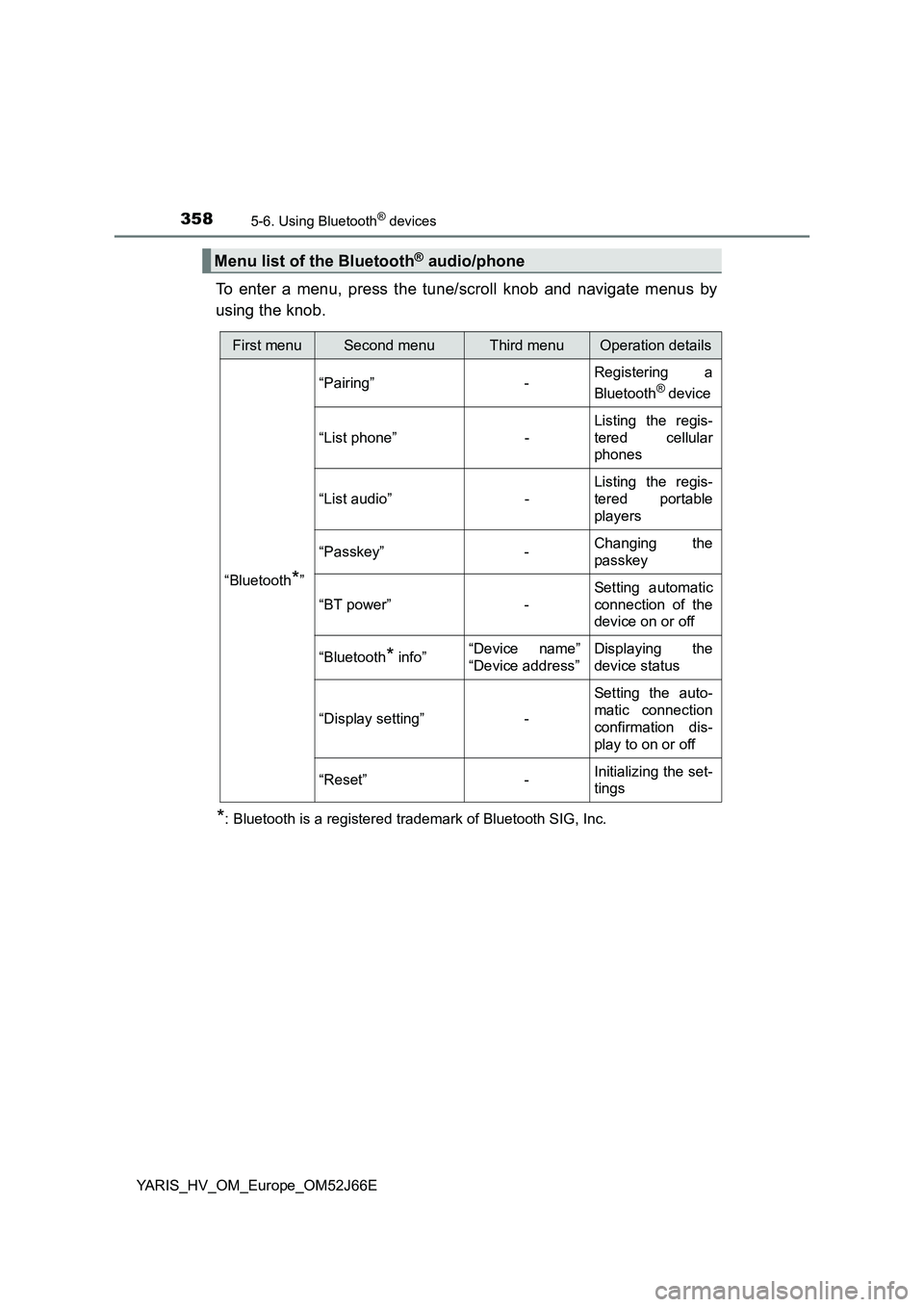
To enter a menu, press the tune/scroll knob and navigate menus by
using the knob.
*: Bluetooth is a registered trademark of Bluetooth SIG, Inc.
Menu list of the Bluetooth® audio/phone
First menuSecond menuThird menuOperation details
“Bluetooth*”
“Pairing” - Registering a
Bluetooth® device
“List phone” -
Listing the regis-
tered cellular
phones
“List audio” -
Listing the regis-
tered portable
players
“Passkey” - Changing the
passkey
“BT power” -
Setting automatic
connection of the
device on or off
“Bluetooth* info” “Device name”
“Device address”
Displaying the
device status
“Display setting” -
Setting the auto-
matic connection
confirmation dis-
play to on or off
“Reset” - Initializing the set-
tings
Page 366 of 632
3665-7. “SETUP” menu
YARIS_HV_OM_Europe_OM52J66E
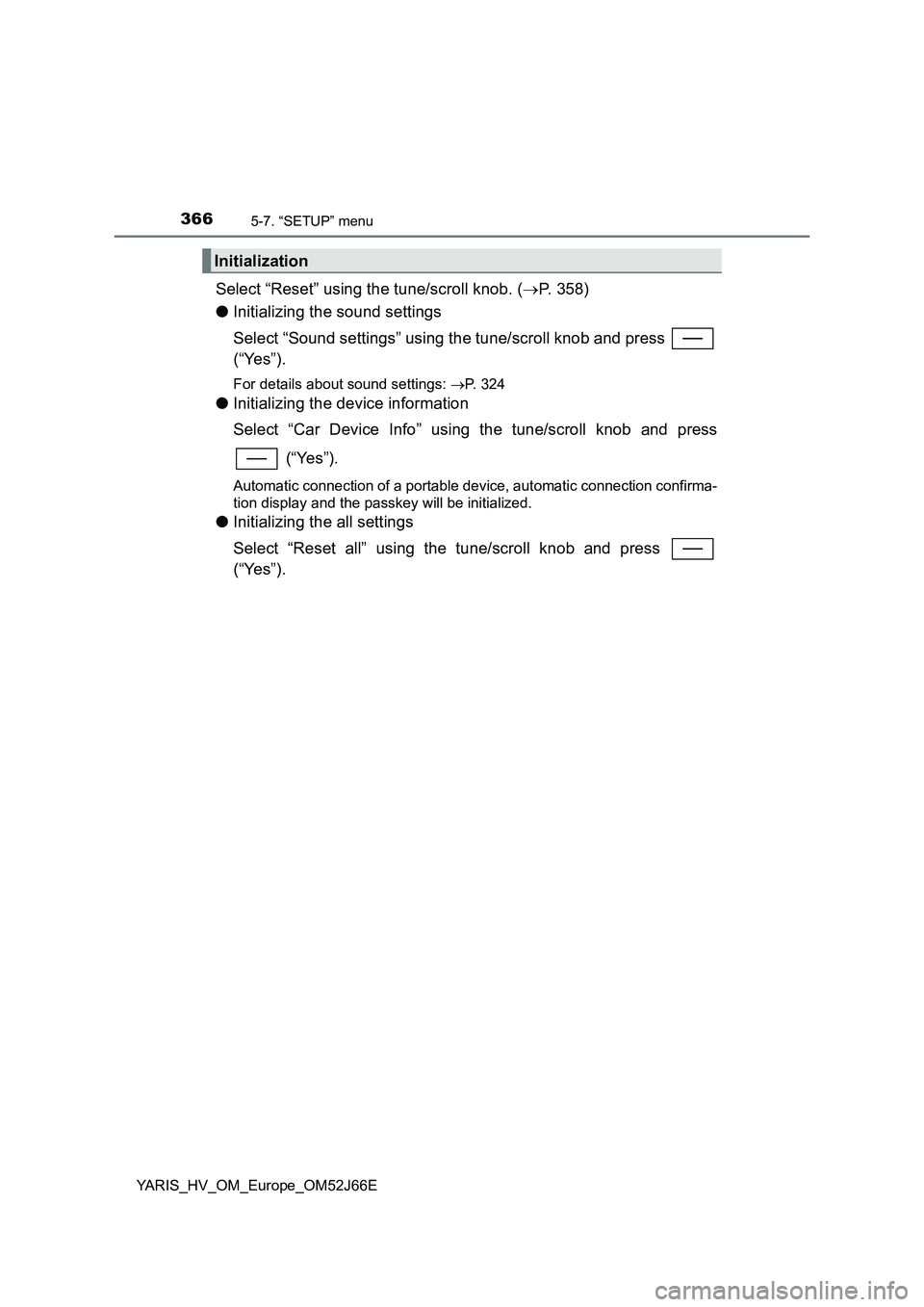
Select “Reset” using the tune/scroll knob. (P. 358)
● Initializing the sound settings
Select “Sound settings” using the tune/scroll knob and press
(“Yes”).
For details about sound settings: P. 324
●Initializing the device information
Select “Car Device Info” using the tune/scroll knob and press
(“Yes”).
Automatic connection of a portable device, automatic connection confirma-
tion display and the passkey will be initialized.
● Initializing the all settings
Select “Reset all” using the tune/scroll knob and press
(“Yes”).
Initialization
Page 367 of 632
3675-7. “SETUP” menu
5
Audio system
YARIS_HV_OM_Europe_OM52J66E
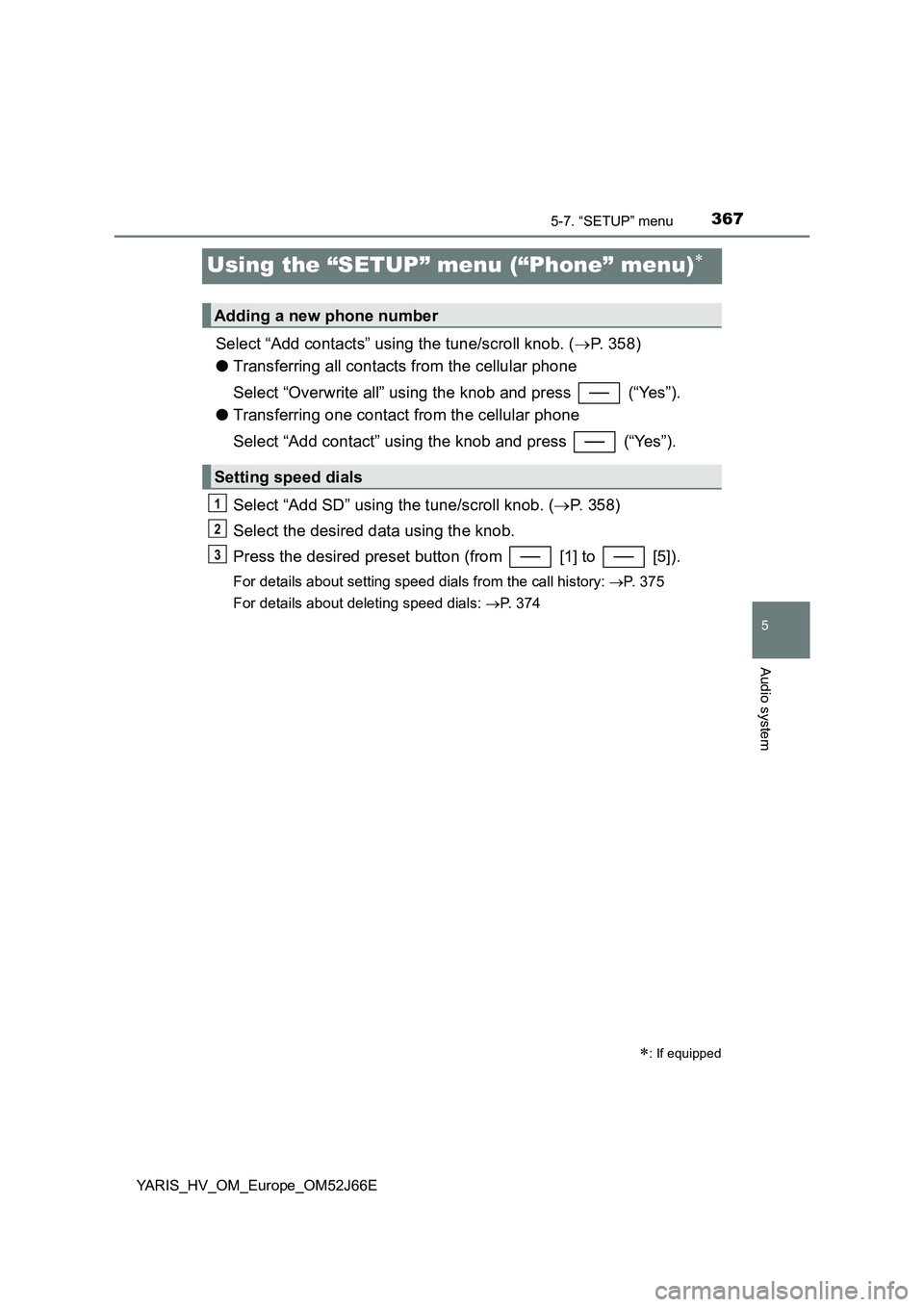
Using the “SETUP” menu (“Phone” menu)
Select “Add contacts” using the tune/scroll knob. (P. 358)
● Transferring all contacts from the cellular phone
Select “Overwrite all” using the knob and press (“Yes”).
● Transferring one contact from the cellular phone
Select “Add contact” using the knob and press (“Yes”).
Select “Add SD” using the tune/scroll knob. ( P. 358)
Select the desired data using the knob.
Press the desired preset button (from [1] to [5]).
For details about setting speed dials from the call history: P. 375
For details about deleting speed dials: P. 374
: If equipped
Adding a new phone number
Setting speed dials
1
2
3
Page 374 of 632
3745-9. Bluetooth® Phone
YARIS_HV_OM_Europe_OM52J66E
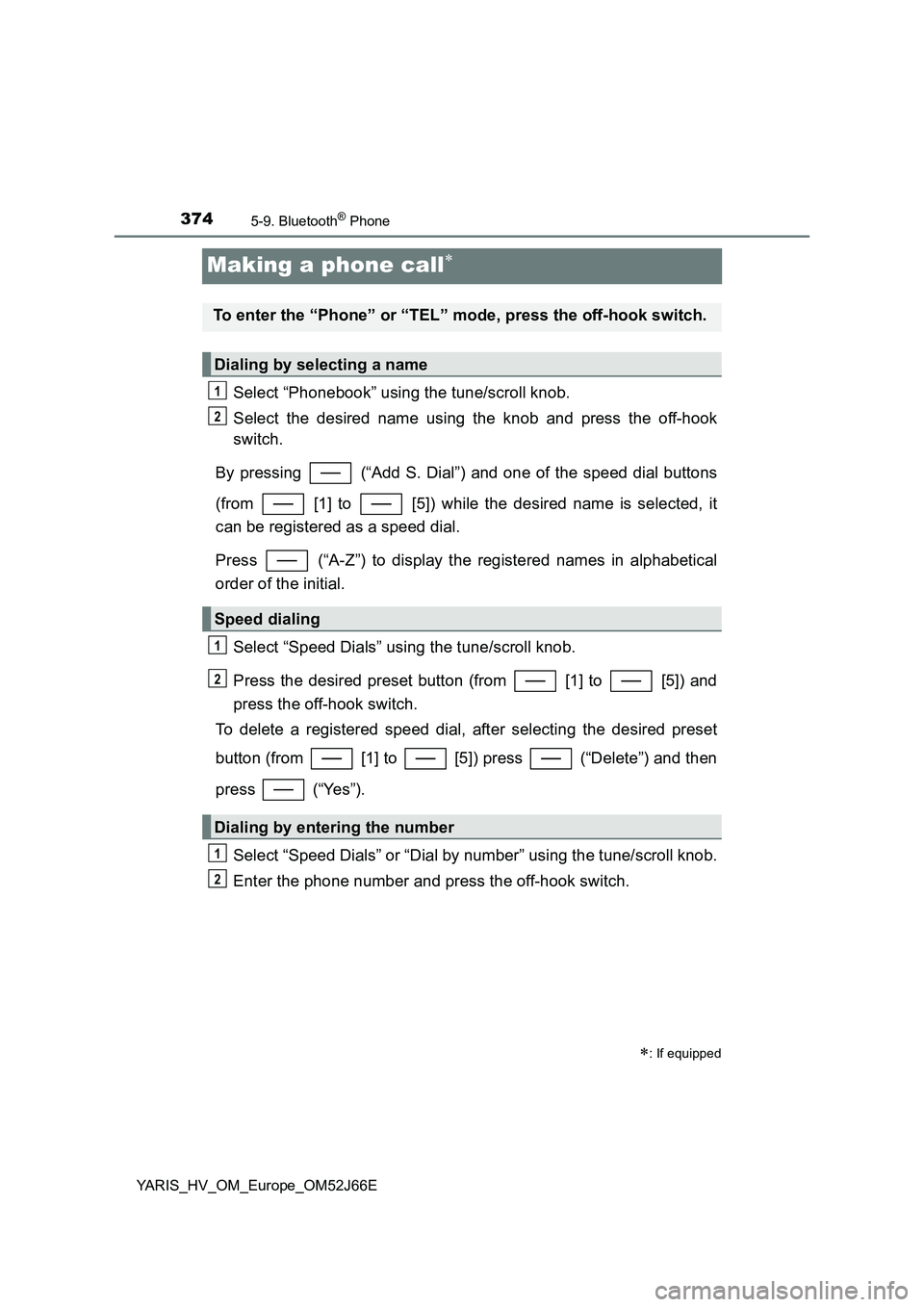
Making a phone call
Select “Phonebook” using the tune/scroll knob.
Select the desired name using the knob and press the off-hook
switch.
By pressing (“Add S. Dial”) and one of the speed dial buttons
(from [1] to [5]) while the desired name is selected, it
can be registered as a speed dial.
Press (“A-Z”) to display the registered names in alphabetical
order of the initial.
Select “Speed Dials” using the tune/scroll knob.
Press the desired preset button (from [1] to [5]) and
press the off-hook switch.
To delete a registered speed dial, after selecting the desired preset
button (from [1] to [5]) press (“Delete”) and then
press (“Yes”).
Select “Speed Dials” or “Dial by number” using the tune/scroll knob.
Enter the phone number and press the off-hook switch.
: If equipped
To enter the “Phone” or “TEL” mode, press the off-hook switch.
Dialing by selecting a name
Speed dialing
Dialing by entering the number
1
2
1
2
1
2
Page 375 of 632
3755-9. Bluetooth® Phone
5
Audio system
YARIS_HV_OM_Europe_OM52J66E
Select “All calls”, “Missed calls”, “Incoming calls” or “Outgoing calls”
using the tune/scroll knob.
Select a desired number using the knob and press the off-hook
switch.
The following operations can be performed:
● Registering a number as a speed dial
Press (“Add S. Dial”) and then press the desired preset but-
ton (from [1] to [5]).
● Deleting the selected number
Press (“Delete”) and press (“Yes”).
Dialing from call histories
1
2
Page 454 of 632
4547-3. Do-it-yourself maintenance
YARIS_HV_OM_Europe_OM52J66E
■How to initialize the tire pressure warning system
Park the vehicle in a safe place and turn the power switch to the
“LOCK” position (vehicles without a smart entry & start system)
or off (vehicles with a smart entry & start system).
Initialization cannot be performed while the vehicle is moving.
Adjust the tire inflation pressure to the specified cold tire inflation
pressure level. ( P. 598)
Make sure to adjust the tire pressure to the specified cold tire inflation
pressure level. The tire pressure warning system will operate based on
this pressure level.
Turn the power switch to the “ON” position (vehicles without a
smart entry & start system) or ON mode (vehicles with a smart
entry & start system).
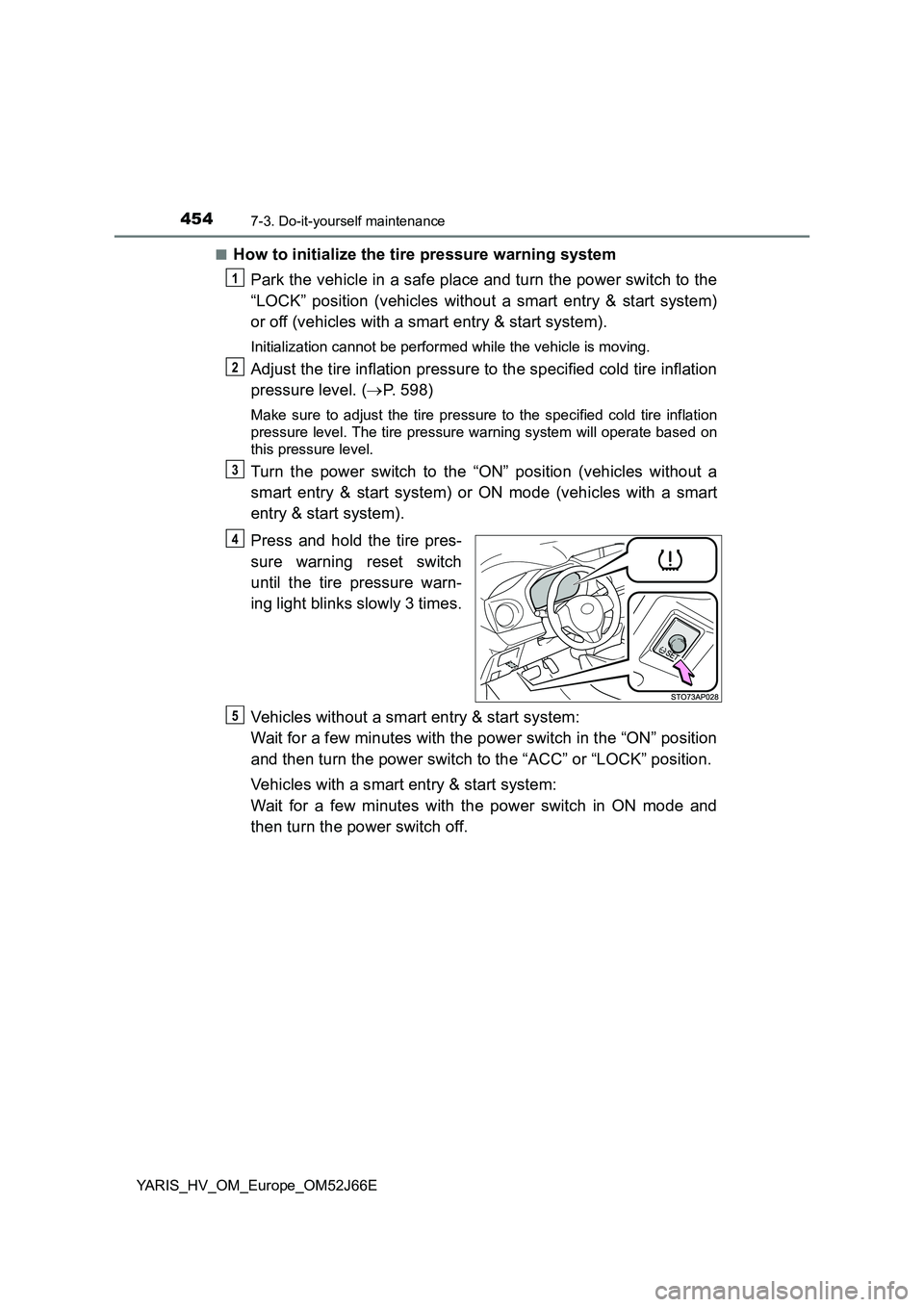
Press and hold the tire pres-
sure warning reset switch
until the tire pressure warn-
ing light blinks slowly 3 times.
Vehicles without a smart entry & start system:
Wait for a few minutes with the power switch in the “ON” position
and then turn the power switch to the “ACC” or “LOCK” position.
Vehicles with a smart entry & start system:
Wait for a few minutes with the power switch in ON mode and
then turn the power switch off.
1
2
3
4
5