key TOYOTA YARIS 2018 Owner's Manual
[x] Cancel search | Manufacturer: TOYOTA, Model Year: 2018, Model line: YARIS, Model: TOYOTA YARIS 2018Pages: 632, PDF Size: 44.1 MB
Page 146 of 632
1463-1. Key information
YARIS_HV_OM_Europe_OM52J66E
Page 147 of 632
1473-1. Key information
3
Operation of each component
YARIS_HV_OM_Europe_OM52J66E
Page 148 of 632
1483-1. Key information
YARIS_HV_OM_Europe_OM52J66E
Page 149 of 632
1493-1. Key information
3
Operation of each component
YARIS_HV_OM_Europe_OM52J66E
Page 150 of 632
1503-1. Key information
YARIS_HV_OM_Europe_OM52J66E
Page 151 of 632
1513-1. Key information
3
Operation of each component
YARIS_HV_OM_Europe_OM52J66E
NOTICE
■To prevent key damage
● Do not drop the keys, subject them to strong shocks or bend them.
● Do not expose the keys to high temperatures for a long periods of time.
● Do not get the keys wet or wash them in an ultrasonic washer etc.
● Do not attach metallic or magnetic materials to the keys or place the keys
close to such materials.
● Do not disassemble the keys.
● Do not attach a sticker or anything else to the surface of the key.
● Vehicles with a smart entry & start system: Do not place the keys near
objects that produce magnetic fields, such as TVs, audio systems, induc-
tion cookers, or medical electrical equipment, such as low-frequency ther-
apy equipment.
■ Carrying the electronic key on your person (vehicles with a smart entry
& start system)
Carry the electronic key 10 cm (3.9 in.) or more away from electric appli-
ances that are turned on. Radio wave s emitted from electric appliances
within 10 cm (3.9 in.) of the electronic key may interfere with the key, caus-
ing the key to not function properly.
■ In case of a smart entry & start system malfunction or other key-related
problems (vehicles with a smart entry & start system)
Take your vehicle with all the electronic keys provided with your vehicle to
any authorized Toyota retailer or Toyota authorized repairer, or any reliable
repairer.
■ When an electronic key is lost (vehicles with a smart entry & start sys-
tem)
If the electronic key remains lost, the risk of vehicle theft increases signifi-
cantly. Visit any authorized Toyota reta iler or Toyota authorized repairer, or
any reliable repairer imm ediately with all remaining electronic keys that
were provided with your vehicle.
Page 152 of 632
1523-2. Opening, closing and locking the doors
YARIS_HV_OM_Europe_OM52J66E
Side doors
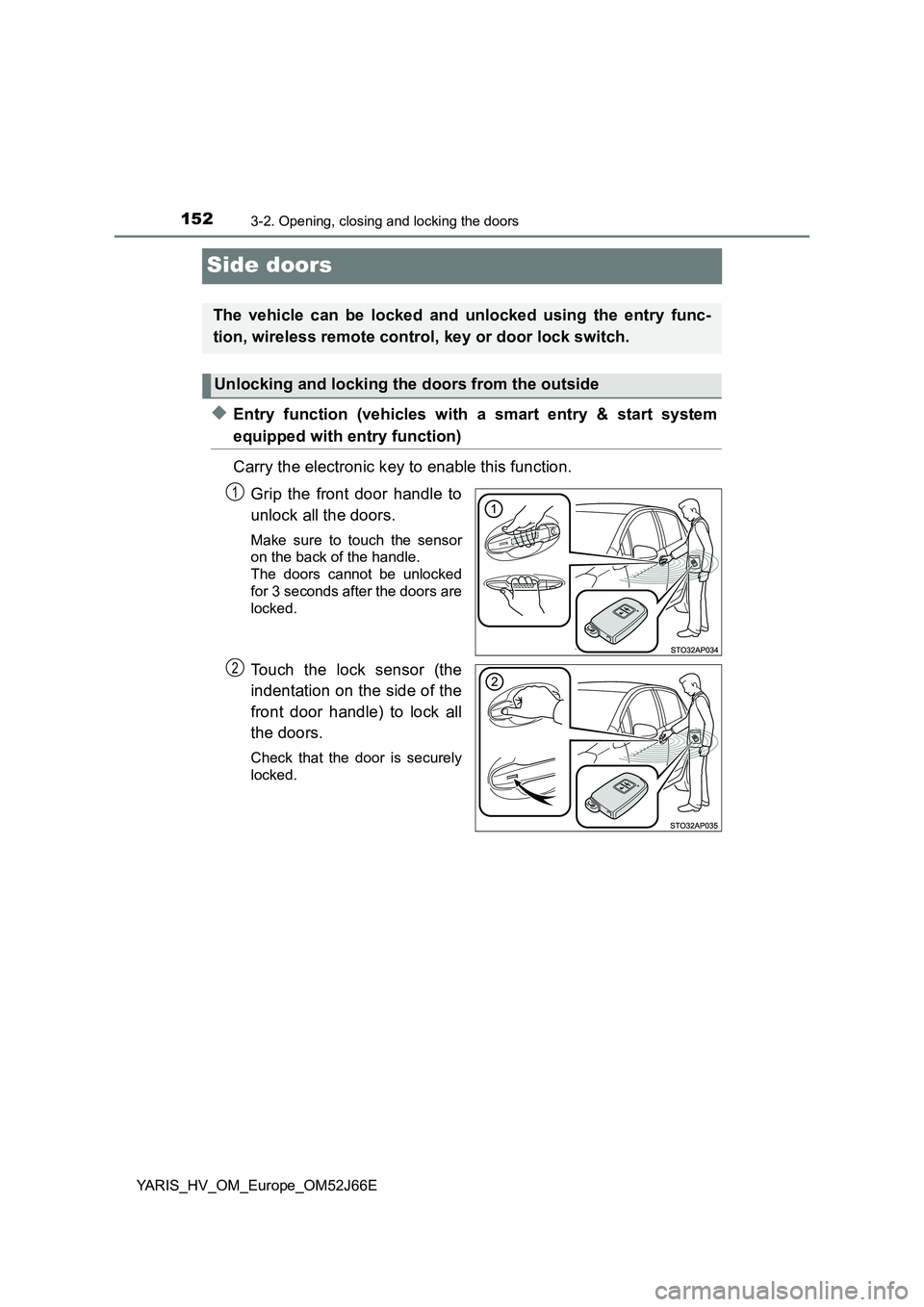
◆Entry function (vehicles with a smart entry & start system
equipped with entry function)
Carry the electronic key to enable this function.
Grip the front door handle to
unlock all the doors.
Make sure to touch the sensor
on the back of the handle.
The doors cannot be unlocked
for 3 seconds after the doors are
locked.
Touch the lock sensor (the
indentation on the side of the
front door handle) to lock all
the doors.
Check that the door is securely
locked.
The vehicle can be locked and unlocked using the entry func-
tion, wireless remote control, key or door lock switch.
Unlocking and locking the doors from the outside
1
2
Page 154 of 632
1543-2. Opening, closing and locking the doors
YARIS_HV_OM_Europe_OM52J66E
◆Keys
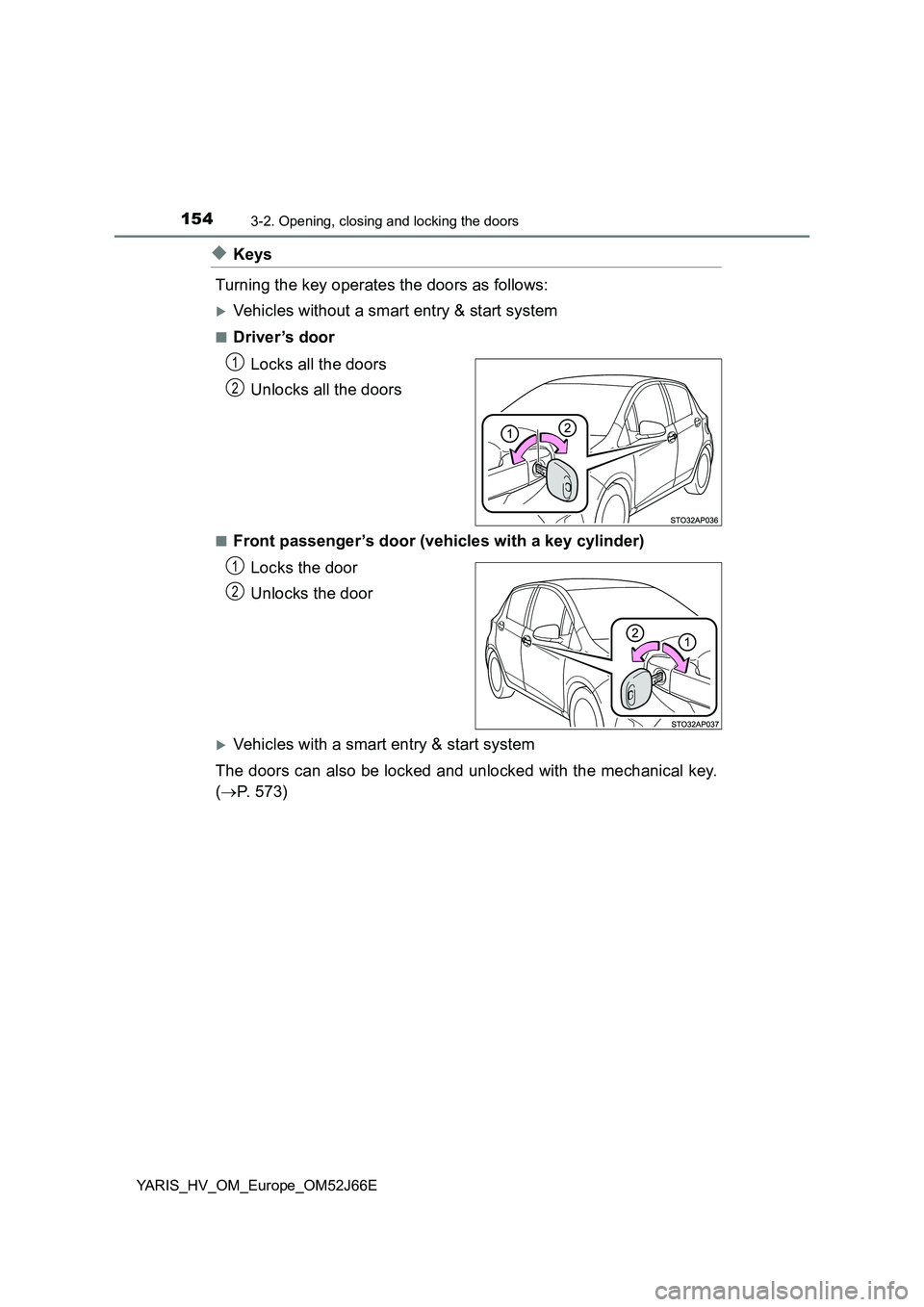
Turning the key operates the doors as follows:
Vehicles without a smart entry & start system
■Driver ’s door
Locks all the doors
Unlocks all the doors
■Front passenger’s door (vehicles with a key cylinder)
Locks the door
Unlocks the door
Vehicles with a smart entry & start system
The doors can also be locked and unlocked with the mechanical key.
( P. 573)
1
2
1
2
Page 155 of 632
1553-2. Opening, closing and locking the doors
3
Operation of each component
YARIS_HV_OM_Europe_OM52J66E
■Operation signals (vehicles with an entry function or wireless remote
control)
The emergency flashers flash to indicate that the doors have been locked/
unlocked. (Locked: once; Unlocked: twice)
■ Security feature (wireless remote control)
Vehicles without a smart entry & start system
If a door is not opened within approximately 30 seconds after the vehicle is
unlocked, the security feature automatically locks the vehicle again.
Vehicles with a smart entry & start system
If a door is not opened within approximately 30 seconds after the vehicle is
unlocked, the security feature automatically locks the vehicle again. (How-
ever, depending on the location of the electronic key, the key may be
detected as being in the vehicle. In this case, vehicle may be unlocked.)
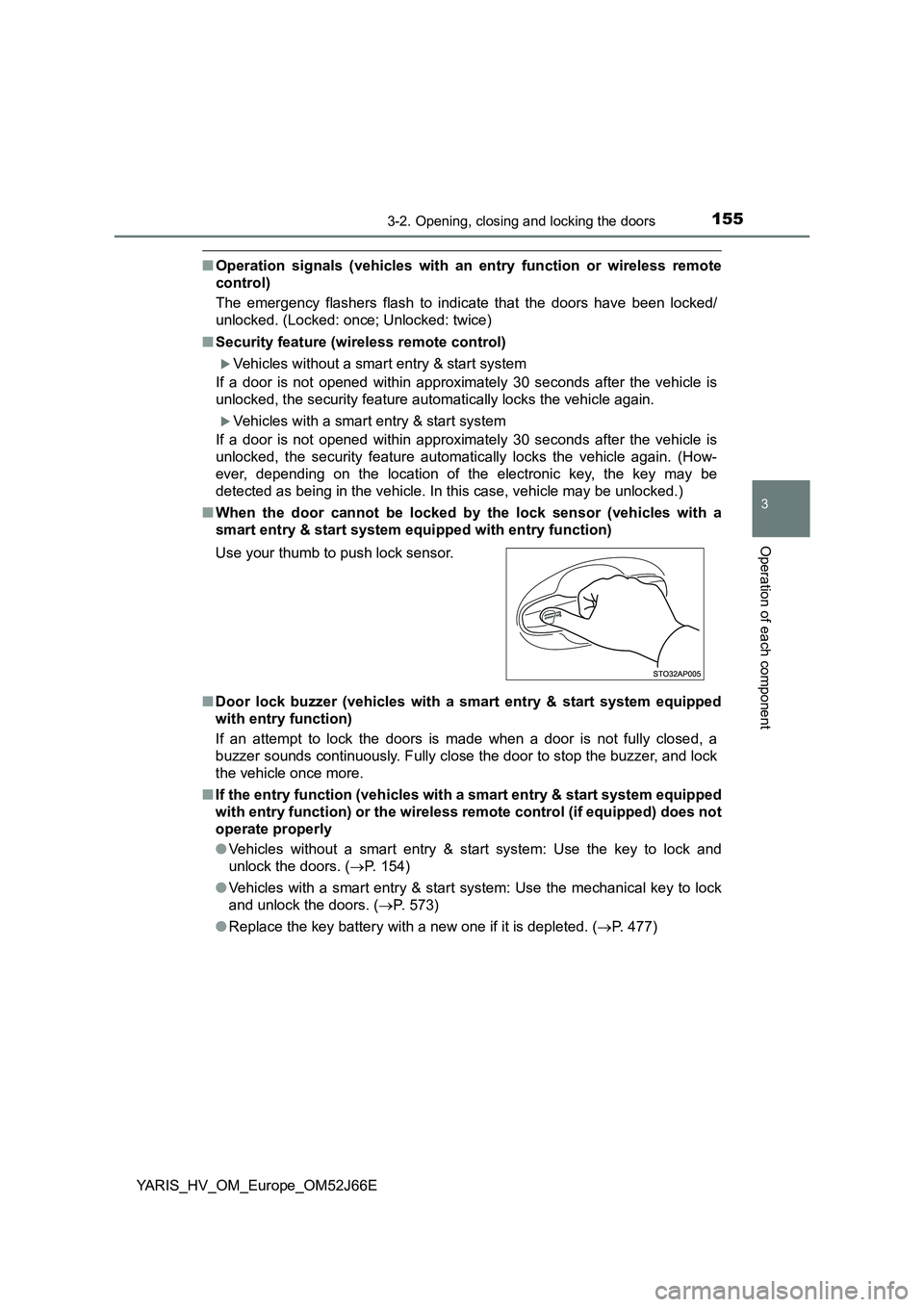
■ When the door cannot be locked by the lock sensor (vehicles with a
smart entry & start system equi pped with entry function)
■ Door lock buzzer (vehicles with a smart entry & start system equipped
with entry function)
If an attempt to lock the doors is made when a door is not fully closed, a
buzzer sounds continuously. Fully close the door to stop the buzzer, and lock
the vehicle once more.
■ If the entry function (vehicles with a smart entry & start system equipped
with entry function) or the wireless remote control (if equipped) does not
operate properly
● Vehicles without a smart entry & start system: Use the key to lock and
unlock the doors. ( P. 154)
● Vehicles with a smart entry & start system: Use the mechanical key to lock
and unlock the doors. ( P. 573)
● Replace the key battery with a new one if it is depleted. (P. 477)
Use your thumb to push lock sensor.
Page 157 of 632
1573-2. Opening, closing and locking the doors
3
Operation of each component
YARIS_HV_OM_Europe_OM52J66E
Move the inside lock button to the lock position.
Close the door while pulling the door handle.
Vehicles without a smart entry & start system
The door cannot be locked if the key is in the power switch.
Vehicles with a smart entry & start system
The door cannot be locked if the power switch is in ACCESSORY or
ON mode, or the electronic key is left inside the vehicle. However, the
key may not be detected correctly and the door may be locked.
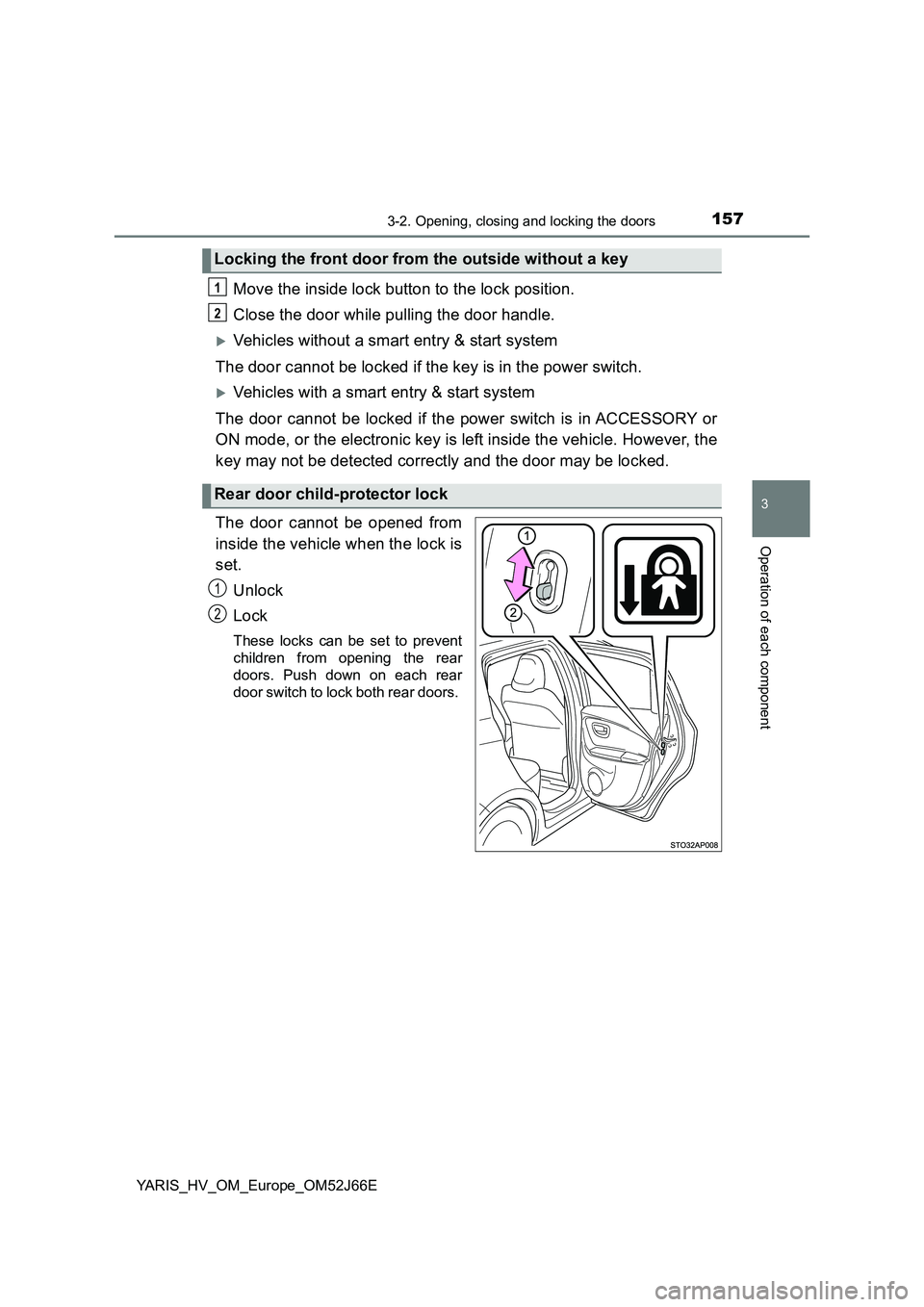
The door cannot be opened from
inside the vehicle when the lock is
set.
Unlock
Lock
These locks can be set to prevent
children from opening the rear
doors. Push down on each rear
door switch to lock both rear doors.
Locking the front door from the outside without a key
Rear door child-protector lock
1
2
1
2