remote control TOYOTA YARIS 2018 Owner's Manual
[x] Cancel search | Manufacturer: TOYOTA, Model Year: 2018, Model line: YARIS, Model: TOYOTA YARIS 2018Pages: 632, PDF Size: 44.1 MB
Page 380 of 632
3805-10. Bluetooth®
YARIS_HV_OM_Europe_OM52J66E
■ About Bluetooth®
■Compatible models
● Bluetooth® specifications:
Ver. 1.1, or higher (Recommended: Ver. 2.1 + EDR or higher)
● Following Profiles:
• A2DP (Advanced Audio Distribution Profile) Ver. 1.0 or higher (recom-
mended: Ver. 1.2 or higher)
• AVRCP (Audio/Video Remote Control Profile) Ver. 1.0 or higher (recom-
mended: Ver. 1.3 or higher)
Portable players must correspond to the above specifications in order to be
connected to the Bluetooth® audio/phone. However, please note that some
functions may be limited depending on the type of portable player.
● Cellular phone
• HFP (Hands Free Profile) Ver. 1.0 or higher (Recommended: Ver. 1.5)
• OPP (Object Push Profile) Ver. 1.1
• PBAP (Phone Book Access Profile) Ver. 1.0
Bluetooth is a registered trademark of
Bluetooth SIG, Inc.
Page 413 of 632
413
7Maintenance and care
YARIS_HV_OM_Europe_OM52J66E
7-1. Maintenance and care
Cleaning and protecting
the vehicle exterior .......... 414
Cleaning and protecting
the vehicle interior ........... 419
7-2. Maintenance
Maintenance
requirements.................... 427
7-3. Do-it-yourself maintenance
Do-it-yourself service
precautions ...................... 430
Hood .................................. 433
Positioning a floor jack ....... 435
Engine compartment.......... 437
12-volt battery .................... 445
Tires ................................... 451
Tire inflation pressure ........ 468
Wheels ............................... 470
Air conditioning filter .......... 474
Wireless remote control/
electronic key battery....... 477
Checking and replacing
fuses ................................ 481
Light bulbs ......................... 486
Page 448 of 632
4487-3. Do-it-yourself maintenance
YARIS_HV_OM_Europe_OM52J66E
■Before recharging
When recharging, the 12-volt battery produces hydrogen gas which is flam-
mable and explosive. Therefore, obser ve the following precautions before
recharging:
● If recharging with the 12-volt battery installed on the vehicle, be sure to dis-
connect the ground cable.
● Make sure the power switch on the charger is off when connecting and dis-
connecting the charger cables to the 12-volt battery.
■ When disconnecting the 12-volt battery terminals
Always disconnect the negative (-) terminal first.
■ After recharging/reconnecting the 12-volt battery (vehicles with a smart
entry & start system)
● Unlocking the doors using entry function of the smart entry & start system
may not be possible immediately after reconnecting the 12-volt battery. If
this happens, use the wireless remote control or the mechanical key to lock/
unlock the doors.
● Start the hybrid system with the power switch in ACCESSORY mode. The
hybrid system may not start with the power switch turned off. However, the
hybrid system will operate normally from the second attempt.
● The power switch mode is recorded by the vehicle. If the 12-volt battery is
reconnected, the vehicle will return the power switch mode to the status it
was in before the 12-volt battery was disconnected. Make sure to turn off
the power before disconnect the 12-volt battery. Take extra care when con-
necting the 12-volt battery if the power switch mode prior to discharge is
unknown.
If the system will not start even after multiple attempts, contact any authorized
Toyota retailer or Toyota authorized repairer, or any reliable repairer.
Page 477 of 632
4777-3. Do-it-yourself maintenance
7
Maintenance and care
YARIS_HV_OM_Europe_OM52J66E
Wireless remote control/electronic key
battery
● Flathead screwdriver
● Lithium battery CR2016 (vehicles without a smart entry & start sys-
tem), or CR2032 (vehicles with a smart entry & start system)
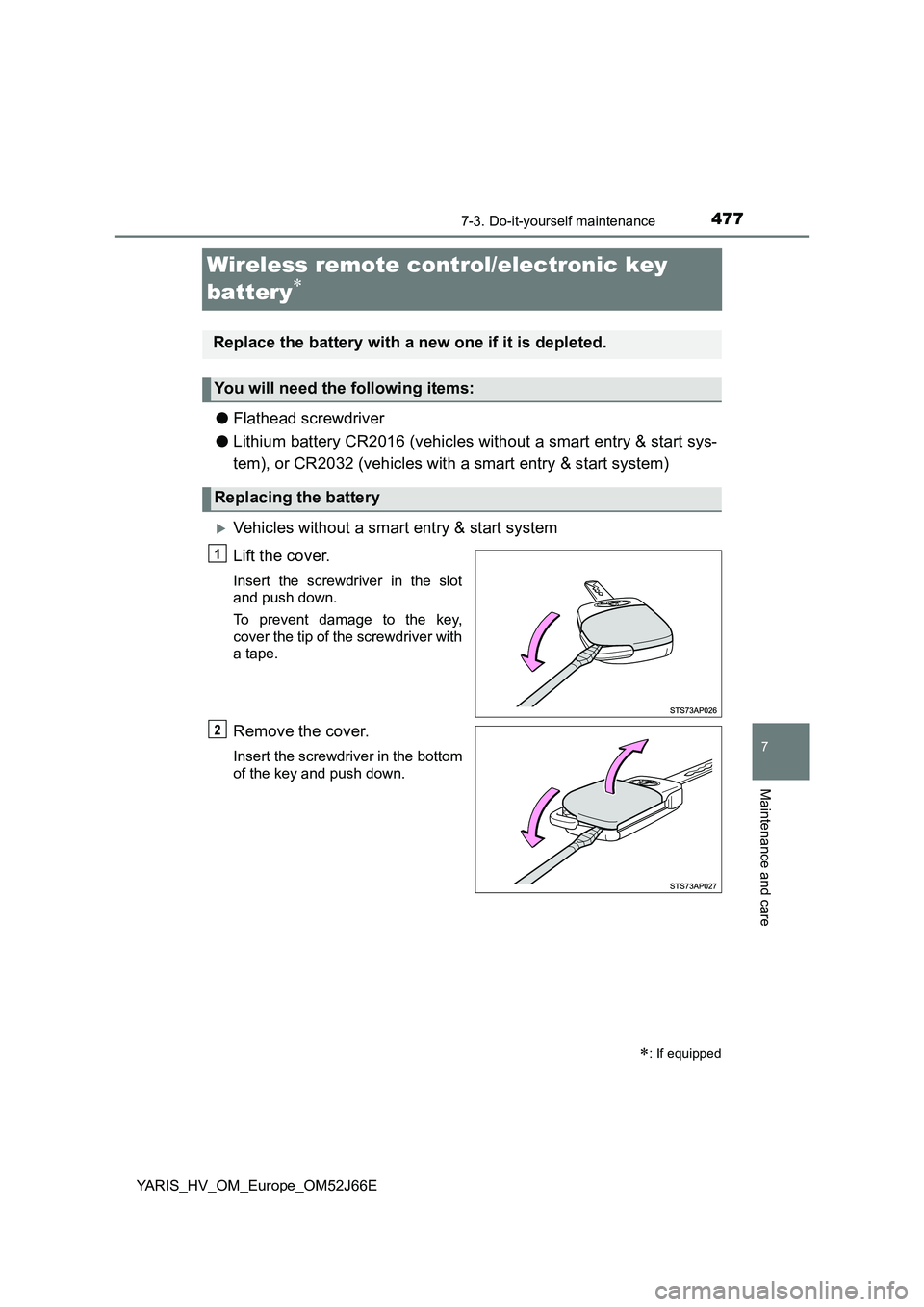
Vehicles without a smart entry & start system
Lift the cover.
Insert the screwdriver in the slot
and push down.
To prevent damage to the key,
cover the tip of the screwdriver with
a tape.
Remove the cover.
Insert the screwdriver in the bottom
of the key and push down.
: If equipped
Replace the battery with a new one if it is depleted.
You will need the following items:
Replacing the battery
1
2
Page 479 of 632
4797-3. Do-it-yourself maintenance
7
Maintenance and care
YARIS_HV_OM_Europe_OM52J66E
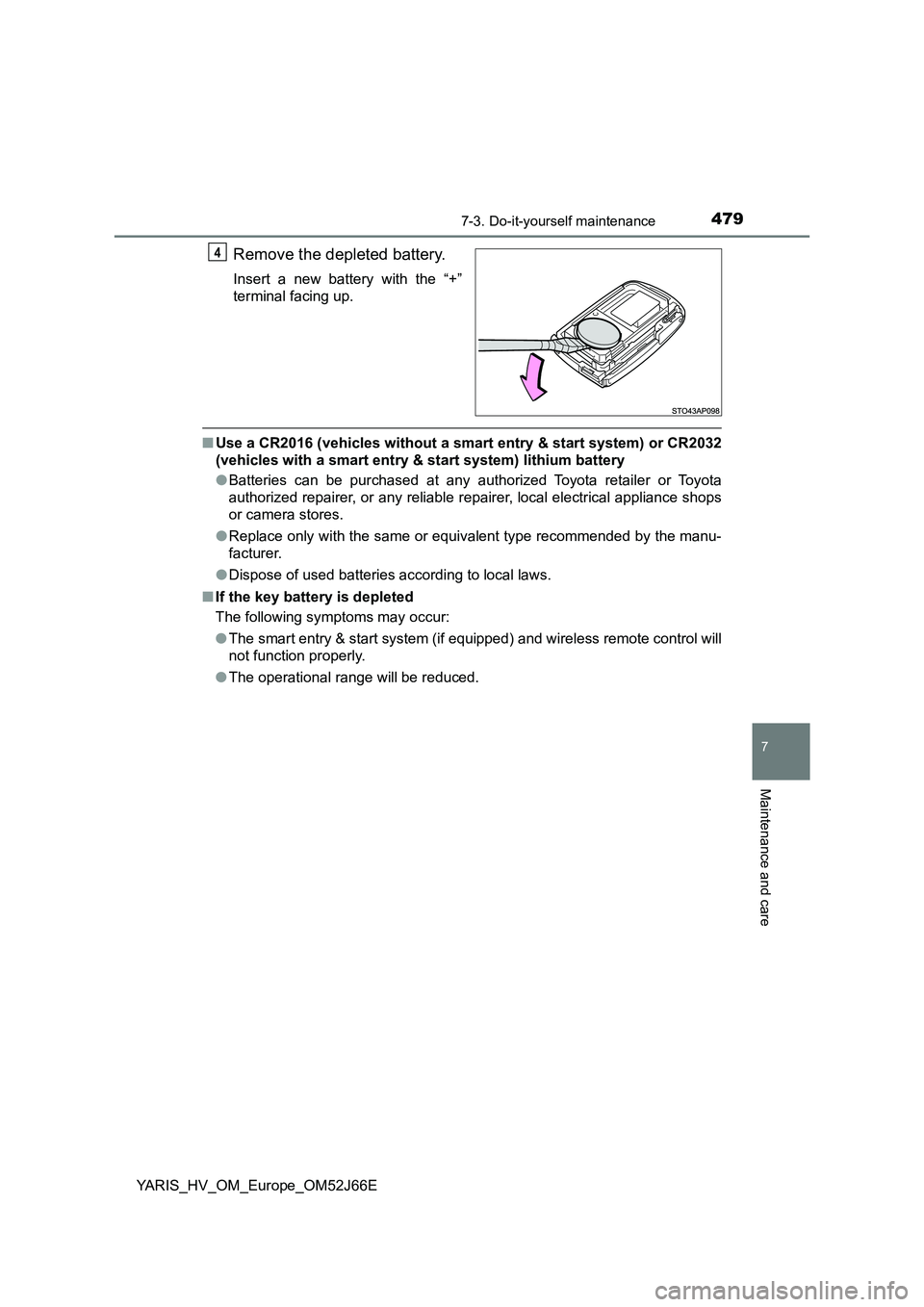
Remove the depleted battery.
Insert a new battery with the “+”
terminal facing up.
■ Use a CR2016 (vehicles without a smart entry & start system) or CR2032
(vehicles with a smart entry & start system) lithium battery
● Batteries can be purchased at any authorized Toyota retailer or Toyota
authorized repairer, or any reliable repairer, local electrical appliance shops
or camera stores.
● Replace only with the same or equivalent type recommended by the manu-
facturer.
● Dispose of used batteries according to local laws.
■ If the key battery is depleted
The following symptoms may occur:
● The smart entry & start system (if equipped) and wireless remote control will
not function properly.
● The operational range will be reduced.
4
Page 480 of 632
4807-3. Do-it-yourself maintenance
YARIS_HV_OM_Europe_OM52J66E
WARNING
■Removed battery and other parts
These parts are small and if swallowed by a child, they can cause choking.
Keep away from children. Failure to do so could result in death or serious
injury.
■ Certification for the lithium battery
CAUTION: RISK OF EXPLOSION IF BATTERY IS REPLACED BY AN
INCORRECT TYPE. DISPOSE OF USED BATTERIES ACCORDING TO
THE INSTRUCTIONS
NOTICE
■ For normal operation after replacing the battery
Observe the following precautions to prevent accidents:
● Always work with dry hands.
Moisture may cause the battery to rust.
● Do not touch or move any other component inside the remote control.
● Do not bend either of the battery terminals.
Page 573 of 632
5738-2. Steps to take in an emergency
8
When trouble arises
YARIS_HV_OM_Europe_OM52J66E
If the electronic key does not operate properly
(vehicles with a smart entry & start system)
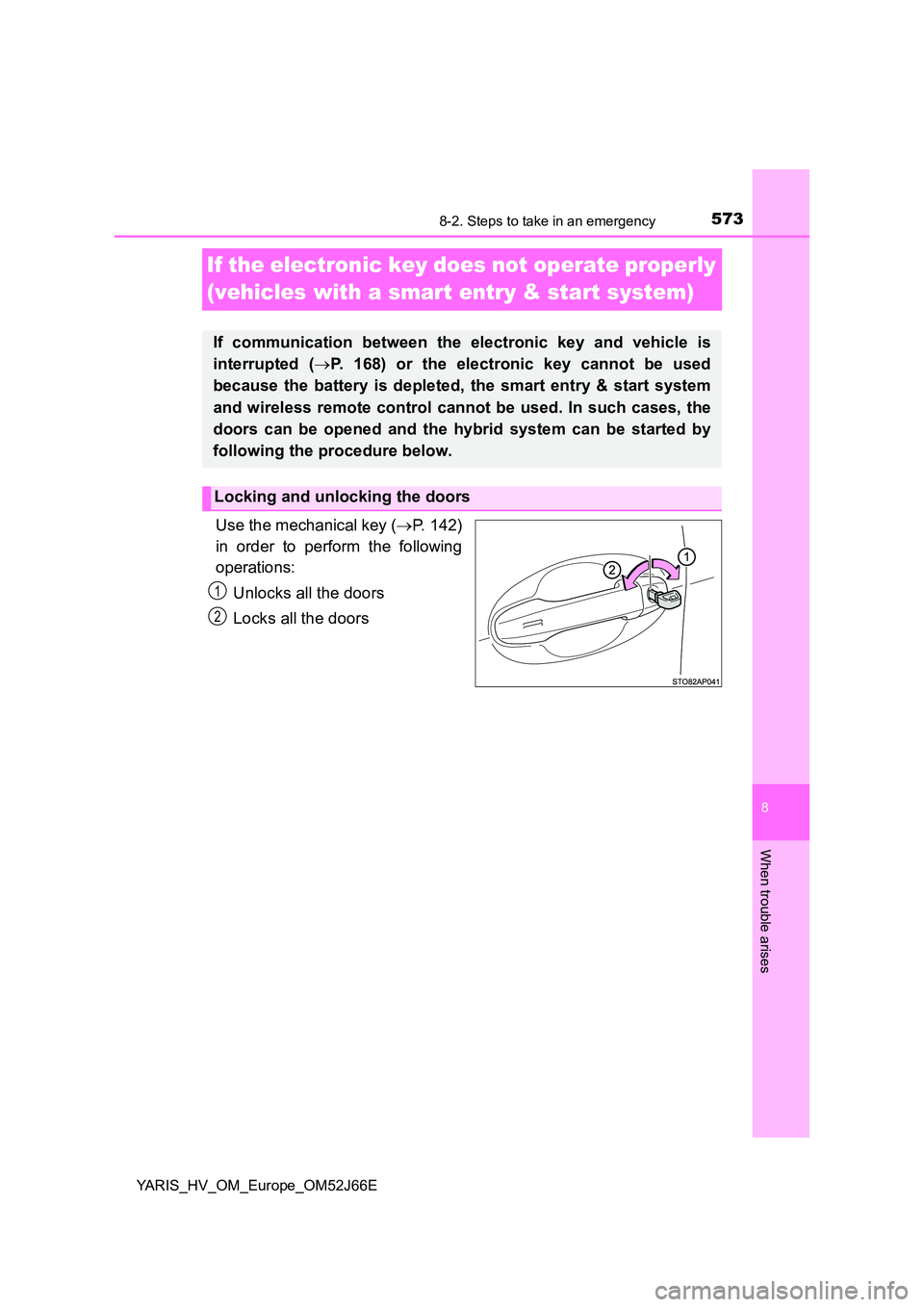
Use the mechanical key ( P. 142)
in order to perform the following
operations:
Unlocks all the doors
Locks all the doors
If communication between the electronic key and vehicle is
interrupted ( P. 168) or the electronic key cannot be used
because the battery is depleted, the smart entry & start system
and wireless remote control cannot be used. In such cases, the
doors can be opened and the hybrid system can be started by
following the procedure below.
Locking and unlocking the doors
1
2
Page 579 of 632
5798-2. Steps to take in an emergency
8
When trouble arises
YARIS_HV_OM_Europe_OM52J66E
■ Precautions when the 12-volt battery is discharged (vehicles with a
smart entry & start system)
● In some cases, it may not be possible to unlock the doors using entry func-
tion of the smart entry & start system immediately after the 12-volt battery
has been disconnected and reconnected. Use the wireless remote control
or the mechanical key to lock or unlock the doors.
● The hybrid system may not start on the first attempt after the 12-volt battery
has recharged but will start normally after the second attempt. This is not a
malfunction.
● The power switch mode is memorized by the vehicle. When the 12-volt bat-
tery is reconnected, the system will return to the mode it was in before the
12-volt battery was discharged.
Before disconnecting the 12-volt battery, turn the power switch off. If the
power switch was in ACCESSORY or ON mode before the 12-volt battery
was discharged, the audio system and/or air conditioning system may oper-
ate when the 12-volt battery is reconnected.
WARNING
■ Avoiding 12-volt battery fires or explosions
Observe the following precautions to prevent accidentally igniting the flam-
mable gas that may be emitted from the 12-volt battery:
● Make sure each jumper cable is connected to the correct terminal and that
it is not unintentionally in contact with anything other than the intended ter-
minal.
● Do not allow the other end of the jumper cable connected to the “+” termi-
nal to come into contact with any other parts or metal surfaces in the area,
such as brackets or unpainted metal.
● Do not allow the + and - clamps of the jumper cables to come into contact
with each other.
● Do not smoke, use matches, cigarette lighters or allow open flame near
the 12-volt battery.
■ After recharging the 12-volt battery
Have the 12-volt battery inspected at any authorized Toyota retailer or
Toyota authorized repairer, or any reliable repairer as soon as possible. If
the 12-volt battery is deteriorating, continued use may cause the 12-volt
battery to emit a malodorous gas, whic h may be detrimental to the health of
passengers.
Page 606 of 632
6069-2. Customization
YARIS_HV_OM_Europe_OM52J66E
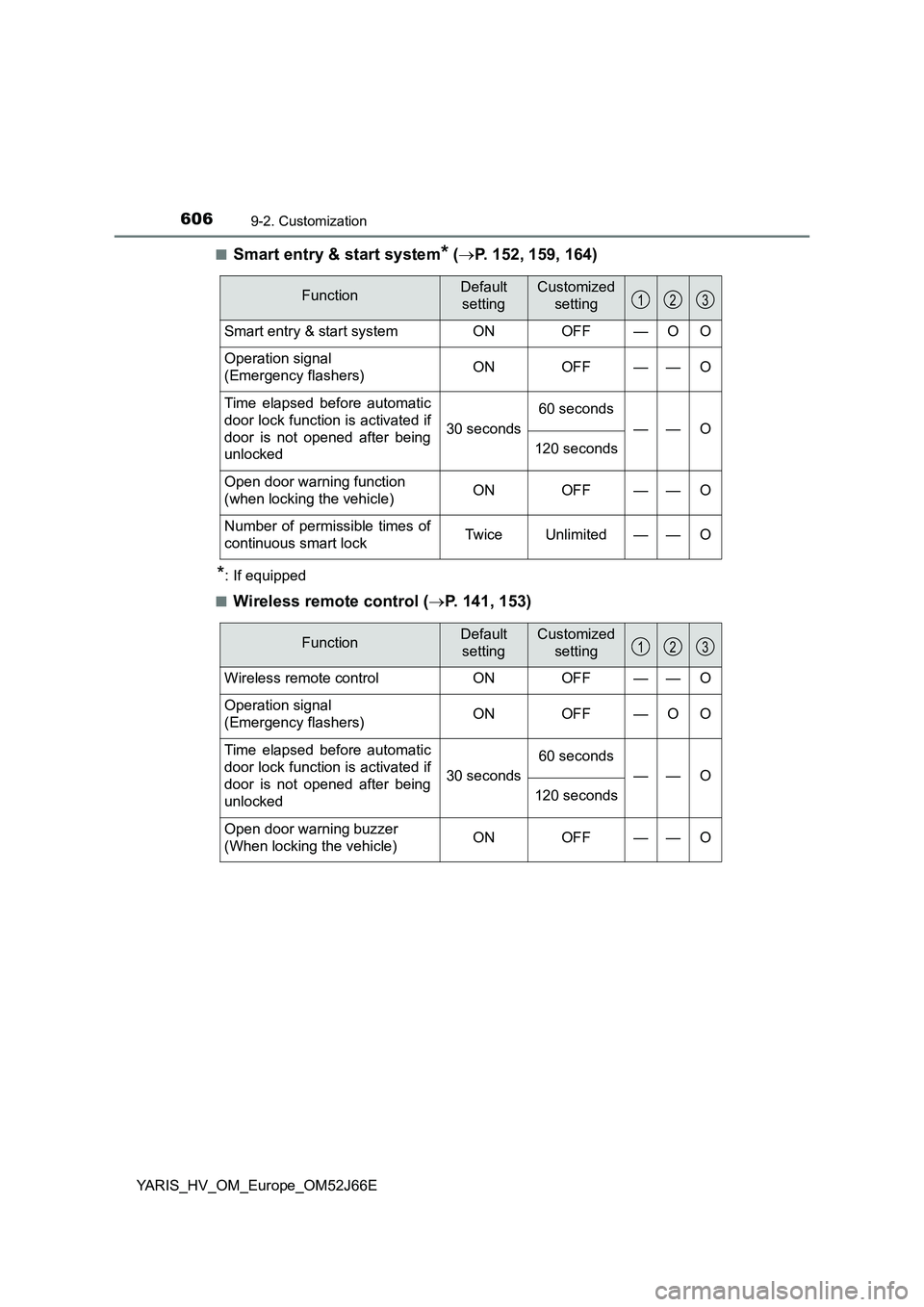
■Smart entry & start system* ( P. 152, 159, 164)
*: If equipped
■Wireless remote control ( P. 141, 153)
FunctionDefault
setting
Customized
setting
Smart entry & start system ON OFF—O O
Operation signal
(Emergency flashers) ON OFF—— O
Time elapsed before automatic
door lock function is activated if
door is not opened after being
unlocked
30 seconds
60 seconds
——O
120 seconds
Open door warning function
(when locking the vehicle) ON OFF — — O
Number of permissible times of
continuous smart lock Twice Unlimited — — O
123
FunctionDefault
setting
Customized
setting
Wireless remote control ON OFF — — O
Operation signal
(Emergency flashers) ON OFF — O O
Time elapsed before automatic
door lock function is activated if
door is not opened after being
unlocked
30 seconds
60 seconds
——O
120 seconds
Open door warning buzzer
(When locking the vehicle) ON OFF — — O
123
Page 619 of 632
619Alphabetical index
YARIS_HV_OM_Europe_OM52J66E
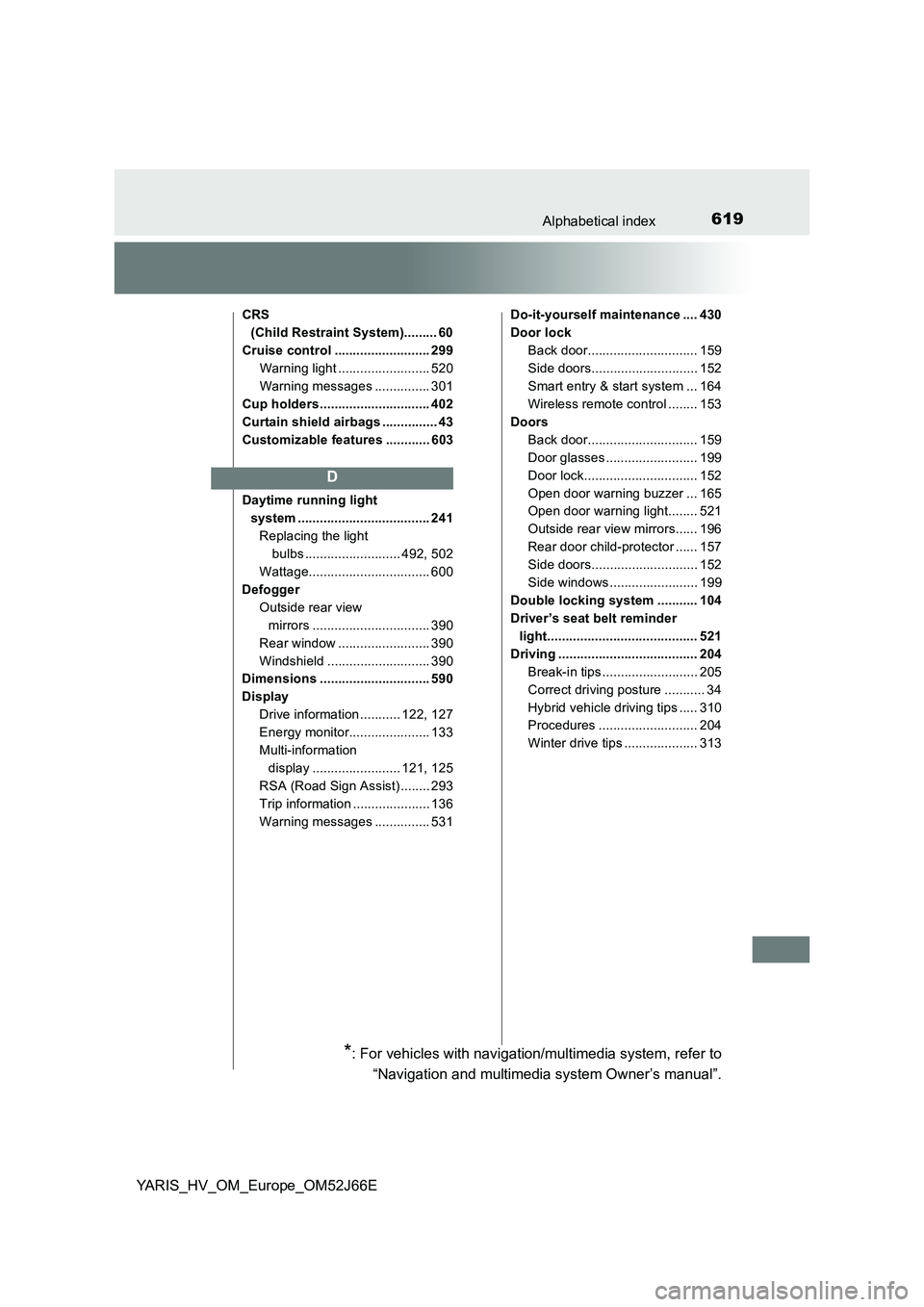
CRS
(Child Restraint System)......... 60
Cruise control .......................... 299
Warning light ......................... 520
Warning messages ............... 301
Cup holders .............................. 402
Curtain shield airbags ............... 43
Customizable features ............ 603
Daytime running light
system .................................... 241
Replacing the light
bulbs .......................... 492, 502
Wattage................................. 600
Defogger
Outside rear view
mirrors ................................ 390
Rear window ......................... 390
Windshield ............................ 390
Dimensions .............................. 590
Display
Drive information ........... 122, 127
Energy monitor...................... 133
Multi-information
display ........................ 121, 125
RSA (Road Sign Assist) ........ 293
Trip information ..................... 136
Warning messages ............... 531
Do-it-yourself maintenance .... 430
Door lock
Back door.............................. 159
Side doors............................. 152
Smart entry & start system ... 164
Wireless remote control ........ 153
Doors
Back door.............................. 159
Door glasses ......................... 199
Door lock............................... 152
Open door warning buzzer ... 165
Open door warning light........ 521
Outside rear view mirrors...... 196
Rear door child-protector ...... 157
Side doors............................. 152
Side windows ........................ 199
Double locking system ........... 104
Driver’s seat belt reminder
light......................................... 521
Driving ...................................... 204
Break-in tips .......................... 205
Correct driving posture ........... 34
Hybrid vehicle driving tips ..... 310
Procedures ........................... 204
Winter drive tips .................... 313
D
*: For vehicles with navigation/multimedia system, refer to
“Navigation and multimedia system Owner’s manual”.