fuel consumption TOYOTA YARIS 2019 Owners Manual (in English)
[x] Cancel search | Manufacturer: TOYOTA, Model Year: 2019, Model line: YARIS, Model: TOYOTA YARIS 2019Pages: 600, PDF Size: 6.11 MB
Page 156 of 600

156
YARIS SEDAN_OM_OM99S50z_(U)
3-2. Combination Meter and Display
■Odometer
The odometer records the total distance the vehicle has been
driven.
■Tr i p m e t e r
The trip meter can record the to tal distance of two trips. One is
recorded in trip meter A, and the other is recorded in trip met er B.
For instance, trip meter A can re cord the distance from the point of
origin, and trip meter B can record the distance from where the fuel
tank is filled.
When trip meter A is selected, pressing the selector again with in
one second will change to trip meter B mode.
When trip meter A is selected, TRIP A will be displayed. When t rip
meter B is selected, TRI P B will be displayed.
The trip meter records the total distance the vehicle is driven until
the meter is again reset. Return it to “0.0” by depressing and hold-
ing the selector for one second or more. Use this meter to meas ure
trip distances and to com pute fuel consumption.
■Odometer, Trip Meter and Trip Meter Selector
When the ignition is switched to ACC or off, the odometer or trip meters can-
not be displayed, however, pressing the selector can inadverten tly switch the
trip meters or reset them duri ng an approximate ten-minute peri od in the fol-
lowing cases:
● After the ignition is switched to off from ON.
● After the driver’s door is opened.
■ Trip meter
●Vehicles with type B audio:
If TRIP A is reset using the trip meter when the function which synchronizes
(resets) the fuel economy monitor and the trip meter (TRIP A) i s on, the fuel
economy data resets in conjunction with TRIP A.
Refer to Fuel Economy Monitor on P. 210.
● Only the trip meters record tenths of miles (kilometers).
● The trip record will be erased when:
• The power supply is interrupted (blown fuse or the battery is discon-
nected).
• The vehicle is driven over 9999.9 mile (km).
Page 160 of 600
160
YARIS SEDAN_OM_OM99S50z_(U)
3-2. Combination Meter and Display
The following information can be selected by pressing the INFO
switch with the ignition switched ON.
• Distance-to-empty mode
• Average fuel economy mode
• Current fuel economy mode
• Average vehicle speed
If you have any problems with your trip computer, consult your To y o t a
dealer.
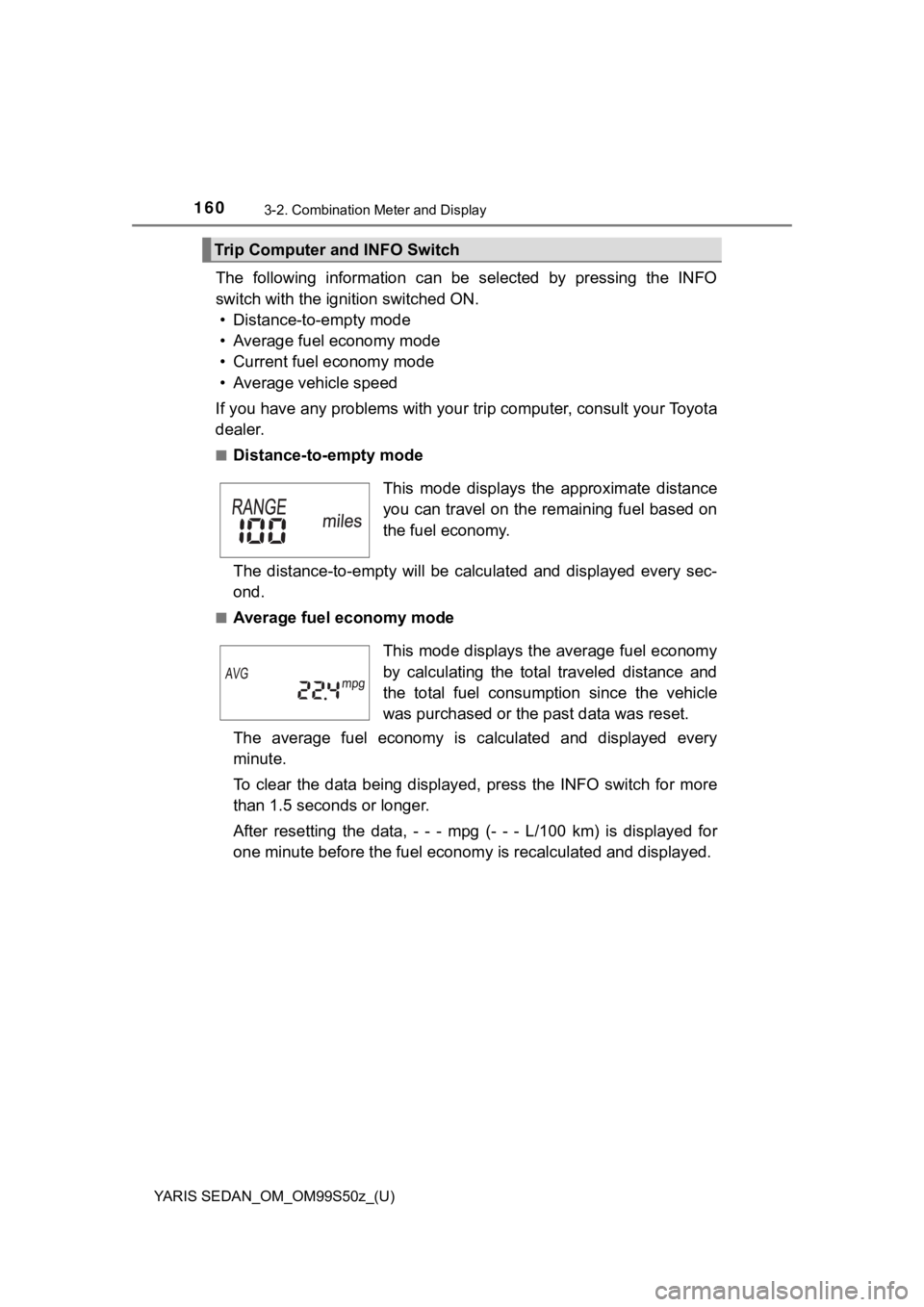
■Distance-to-empty mode
The distance-to-empty will be cal culated and displayed every sec-
ond.
■Average fuel economy mode
The average fuel economy is calculated and displayed every
minute.
To clear the data being displayed, press the INFO switch for mo re
than 1.5 seconds or longer.
After resetting the data, - - - mpg (- - - L/100 km) is displayed for
one minute before the fuel econom y is recalculated and displayed.
Trip Computer and INFO Switch
This mode displays the approximate distance
you can travel on the remaining fuel based on
the fuel economy.
This mode displays the average fuel economy
by calculating the total traveled distance and
the total fuel consumption since the vehicle
was purchased or the past data was reset.
Page 161 of 600
YARIS SEDAN_OM_OM99S50z_(U)
1613-2. Combination Meter and Display
3
When Driving
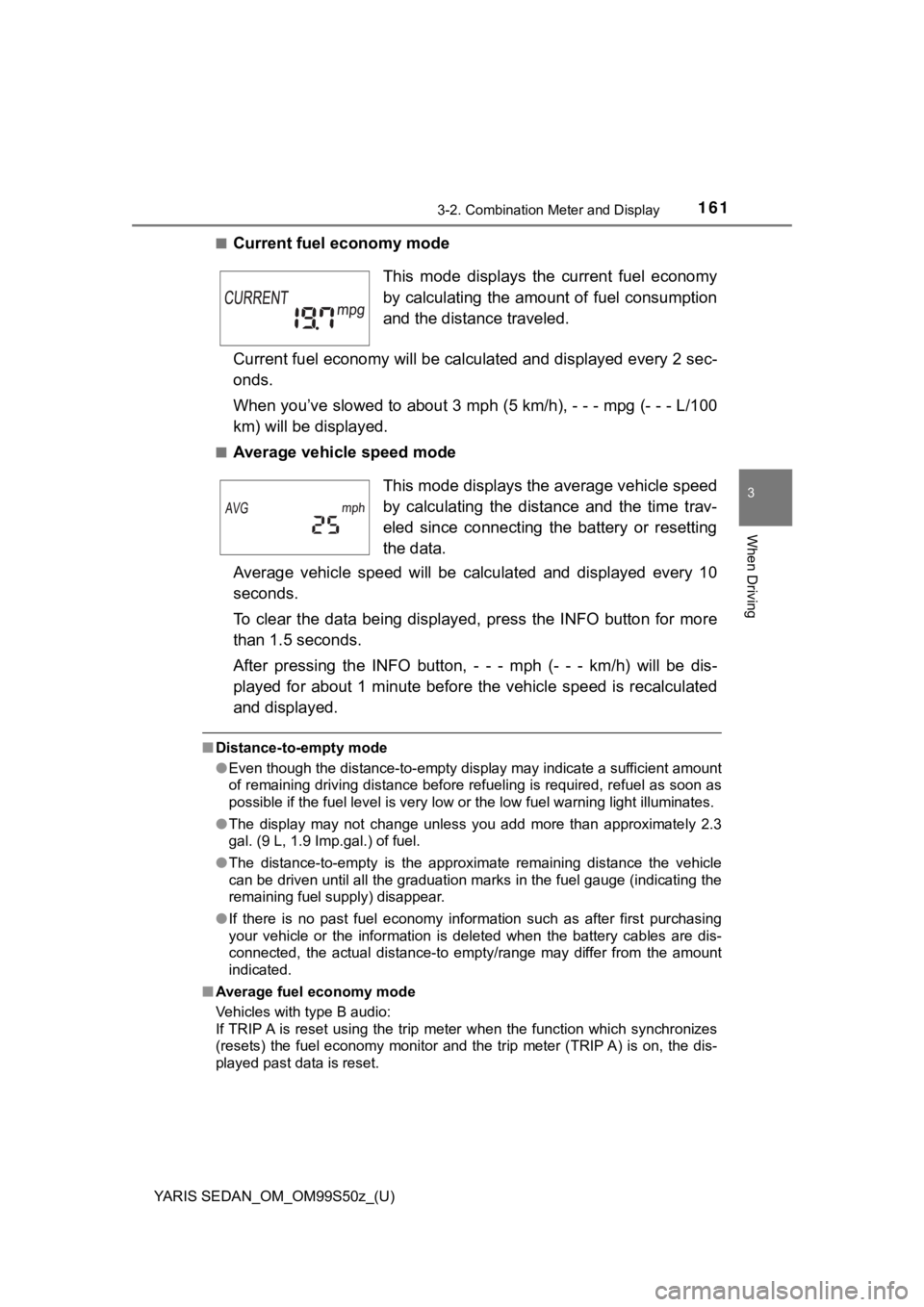
■Current fuel economy mode
Current fuel economy will be calculated and displayed every 2 sec-
onds.
When you’ve slowed to about 3 mph (5 km/h), - - - mpg (- - - L/ 100
km) will be displayed.
■Average vehicle speed mode
Average vehicle speed will be cal culated and displayed every 10
seconds.
To clear the data being displayed, press the INFO button for mo re
than 1.5 seconds.
After pressing the IN FO button, - - - mph (- - - km/h) will be dis-
played for about 1 minute before the vehicle speed is recalculated
and displayed.
■ Distance-to-empty mode
●Even though the distance-to-empty display may indicate a suffic ient amount
of remaining driving distance before refueling is required, refuel as soon as
possible if the fuel level is very low or the low fuel warning light illuminates.
● The display may not change unless you add more than approximate ly 2.3
gal. (9 L, 1.9 Imp.gal.) of fuel.
● The distance-to-empty is the approximate remaining distance the vehicle
can be driven until all the graduation marks in the fuel gauge (indicating the
remaining fuel supply) disappear.
● If there is no past fuel economy information such as after firs t purchasing
your vehicle or the information is deleted when the battery cab les are dis-
connected, the actual distance-to empty/range may differ from t he amount
indicated.
■ Average fuel economy mode
Vehicles with type B audio:
If TRIP A is reset using the trip meter when the function which synchronizes
(resets) the fuel economy monitor and the trip meter (TRIP A) i s on, the dis-
played past data is reset.
This mode displays the current fuel economy
by calculating the amount of fuel consumption
and the distance traveled.
This mode displays the average vehicle speed
by calculating the distance and the time trav-
eled since connecting the battery or resetting
the data.
Page 210 of 600
210
YARIS SEDAN_OM_OM99S50z_(U)
3-7. Fuel Economy Monitor
Fuel Economy Monitor
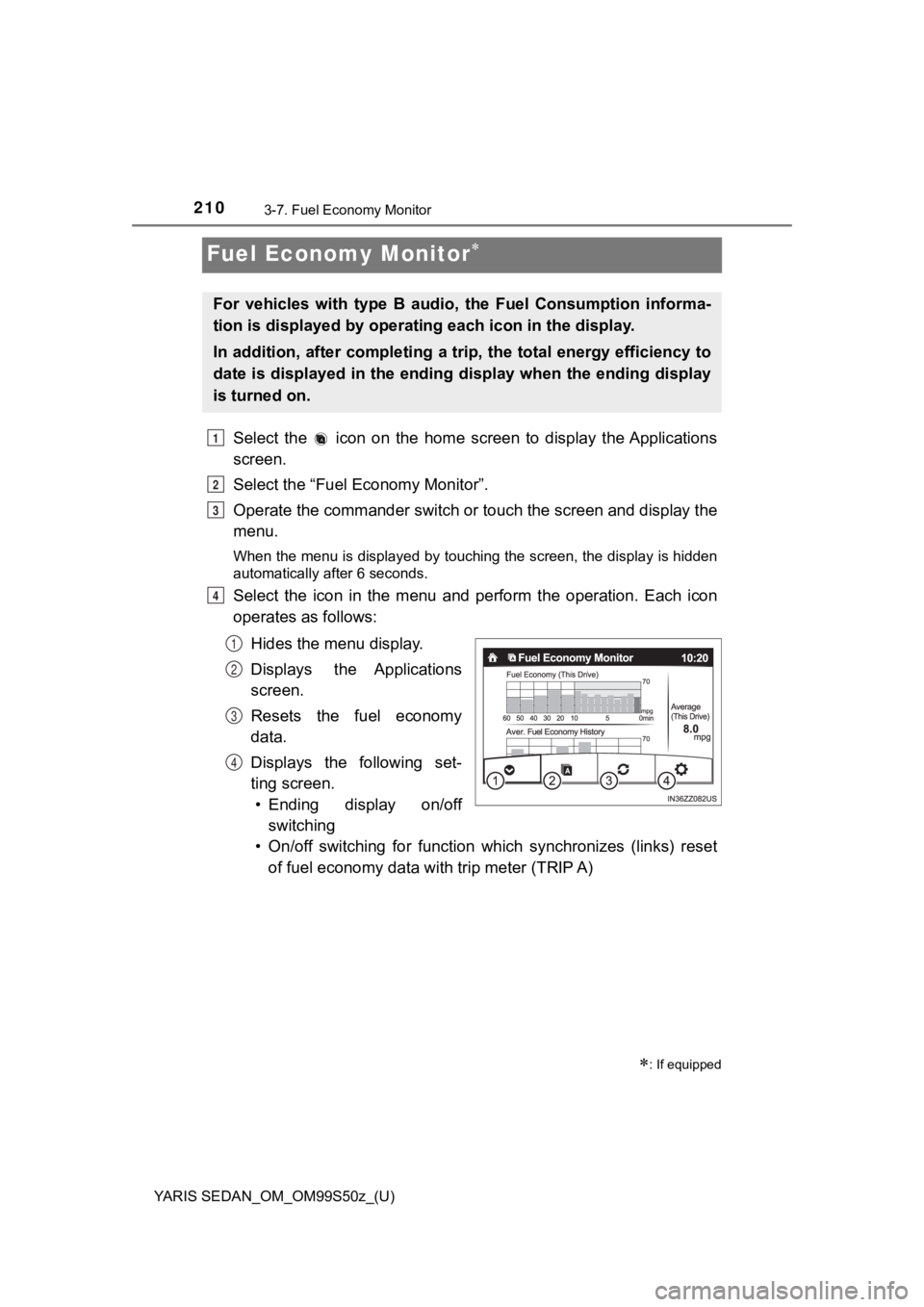
Select the icon on the home screen to display the Applications
screen.
Select the “Fuel Economy Monitor”.
Operate the commander switch or touch the screen and display the
menu.
When the menu is displayed by touching the screen, the display is hidden
automatically after 6 seconds.
Select the icon in the menu and perform the operation. Each ico n
operates as follows:
Hides the menu display.
Displays the Applications
screen.
Resets the fuel economy
data.
Displays the following set-
ting screen.• Ending display on/off
switching
• On/off switching for function which synchronizes (links) reset of fuel economy data with trip meter (TRIP A)
: If equipped
For vehicles with type B audio, the Fuel Consumption informa-
tion is displayed by operating each icon in the display.
In addition, after completing a trip, the total energy efficiency to
date is displayed in the ending display when the ending display
is turned on.
1
2
3
4
1
2
3
4
Page 211 of 600
YARIS SEDAN_OM_OM99S50z_(U)
2113-7. Fuel Economy Monitor
3
When Driving
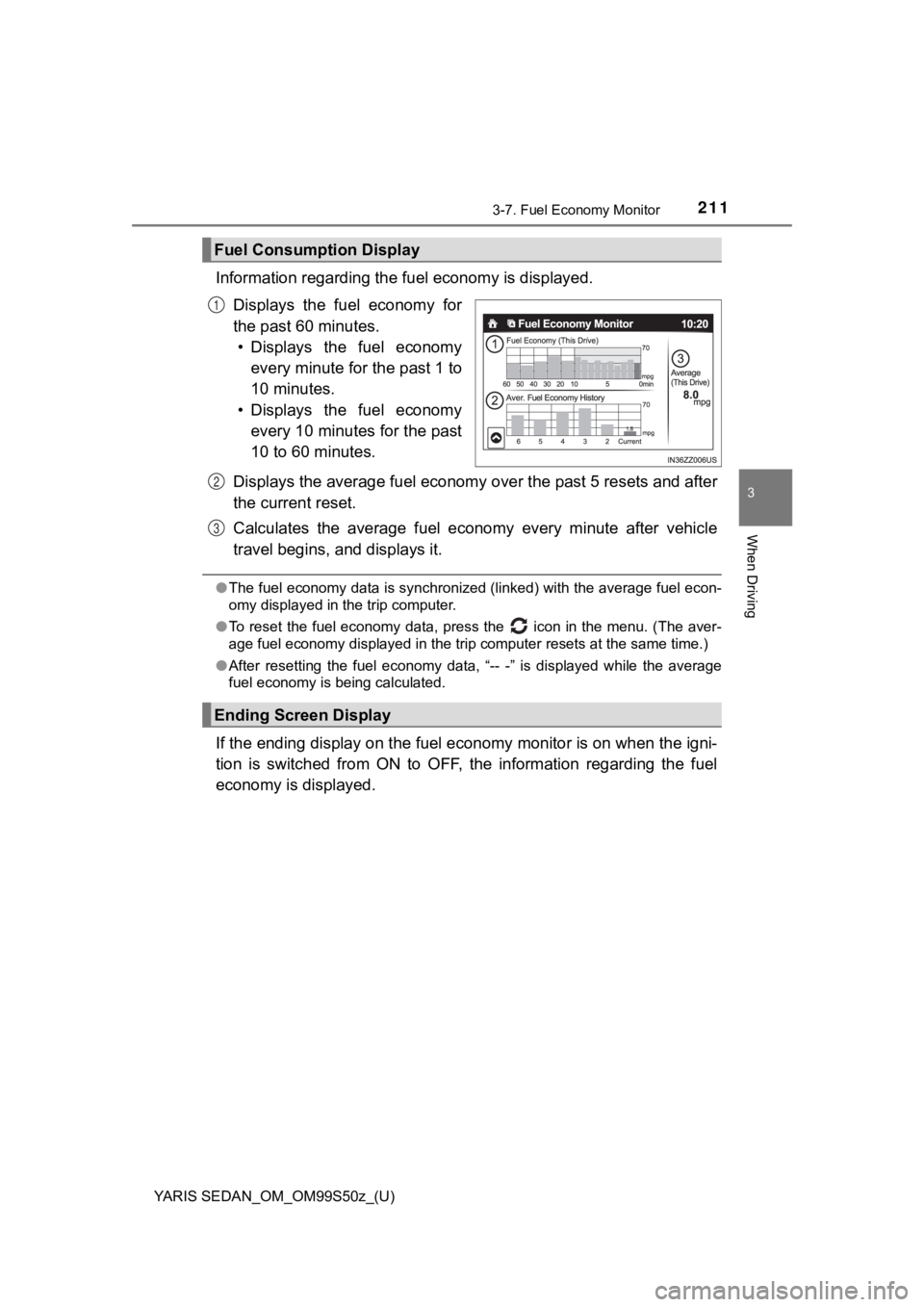
Information regarding the fuel economy is displayed.
Displays the fuel economy for
the past 60 minutes. • Displays the fuel economy
every minute for the past 1 to
10 minutes.
• Displays the fuel economy
every 10 minutes for the past
10 to 60 minutes.
Displays the average fuel econom y over the past 5 resets and after
the current reset.
Calculates the average fuel econo my every minute after vehicle
travel begins, and displays it.
● The fuel economy data is synchronized (linked) with the average fuel econ-
omy displayed in the trip computer.
● To reset the fuel economy data, press the icon in the menu. (The aver-
age fuel economy displayed in the trip computer resets at the same time.)
● After resetting the fuel economy data, “-- -” is displayed whil e the average
fuel economy is being calculated.
If the ending display on the fuel economy monitor is on when th e igni-
tion is switched from ON to OFF, the information regarding the fuel
economy is displayed.
Fuel Consumption Display
1
Ending Screen Display
2
3
Page 213 of 600
213
YARIS SEDAN_OM_OM99S50z_(U)
3-8. Drive Selection
3
When Driving
Drive Selection (Automatic Transaxle)
●When the sport mode is selected, driving at higher engine speed s increases
and it may increase fuel consumption. Toyota recommends that yo u cancel
the sport mode on normal driving.
● Drive mode cannot be switched in the following conditions:
• ABS/TCS/DSC is operating
• Cruise control is operating.
• Steering wheel is being operated abruptly
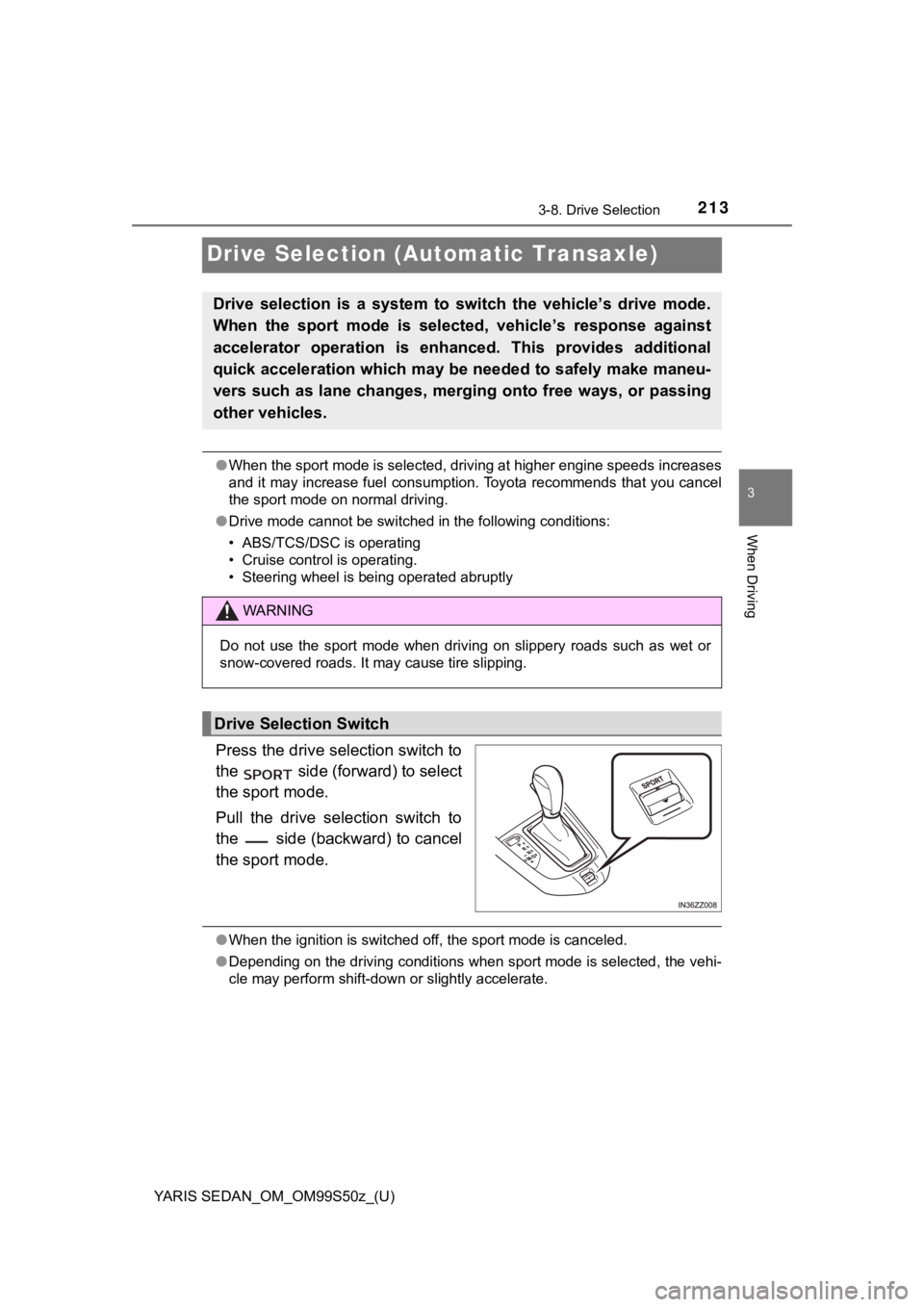
Press the drive selection switch to
the side (forward) to select
the sport mode.
Pull the drive selection switch to
the side (backward) to cancel
the sport mode.
●When the ignition is switched off, the sport mode is canceled.
● Depending on the driving conditions when sport mode is selected , the vehi-
cle may perform shift-down or slightly accelerate.
Drive selection is a system to switch the vehicle’s drive mode.
When the sport mode is selected, vehicle’s response against
accelerator operation is enhanc ed. This provides additional
quick acceleration which may be needed to safely make maneu-
vers such as lane changes, merging onto free ways, or passing
other vehicles.
WARNING
Do not use the sport mode when driving on slippery roads such a s wet or
snow-covered roads. It may cause tire slipping.
Drive Selection Switch
Page 313 of 600
YARIS SEDAN_OM_OM99S50z_(U)
3134-2. Audio System
4
Interior Features
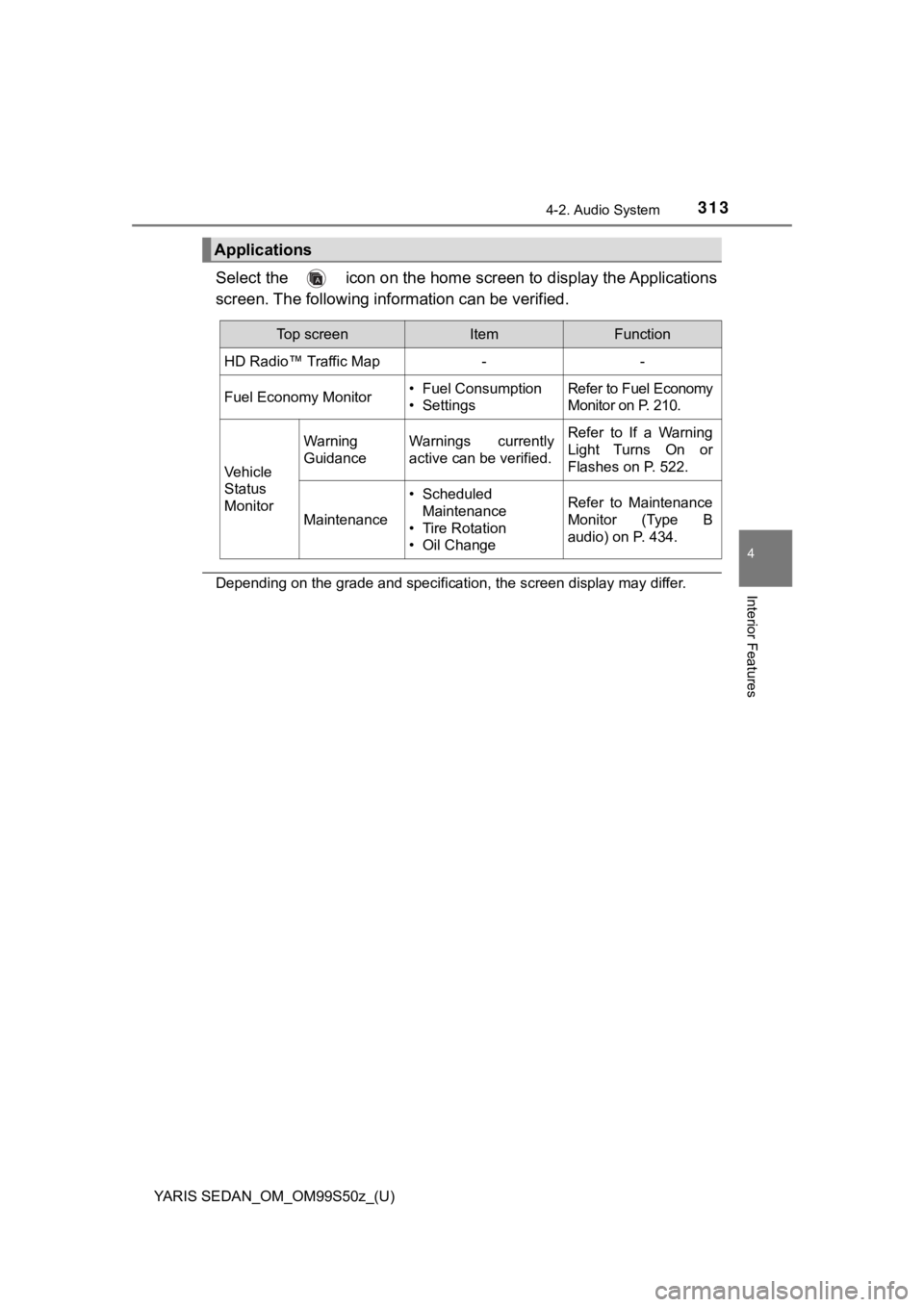
Select the icon on the home screen to display the Applications
screen. The following information can be verified.
Depending on the grade and specification, the screen display ma y differ.
Applications
Top screenItemFunction
HD Radio™ Traffic Map--
Fuel Economy Monitor• Fuel Consumption
• SettingsRefer to Fuel Economy
Monitor on P. 210.
Vehicle
Status
Monitor
Warning
GuidanceWarnings currently
active can be verified.Refer to If a Warning
Light Turns On or
Flashes on P. 522.
Maintenance
• Scheduled
Maintenance
• Tire Rotation
• Oil ChangeRefer to Maintenance
Monitor (Type B
audio) on P. 434.
Page 594 of 600
594Alphabetical index
YARIS SEDAN_OM_OM99S50z_(U)
Exhaust Gas ............................. 115
Exterior Care ............................ 482Aluminum Wheel Maintenance ....................... 488
Bright-Metal Maintenance ..... 487
Maintaining the Finish ........... 484
Plastic Part Maintenance ...... 489
Flasher Hazard warning..................... 197
Headlights ............................. 181
Flat Tire..................................... 497 Mounting the Spare Tire ....... 507
Removing a Flat Tire ............ 503
Floor Mat .................................. 135
Fluid Brake/Clutch ......................... 448
Washer ................................. 449
Fluids
Classification......................... 579
Fog Lights ................................ 188
Foot Brake ................................ 198
Front Seat ................................... 21
Fuel Filler lid and cap.................... 116
Gauge ................................... 157
Requirements ....................... 113
Tank capacity........................ 579
Fuel Consumption Display ..... 211
Fuel Economy Monitor ............ 210
Ending display ...................... 211
Fuel consumption display ..... 211
Fuses ........................................ 475 Panel description .................. 478
Replacement......................... 475
Gauges ..................................... 154
Glove Compartment ................ 428 Hazard Warning Flasher ......... 197
Hazardous Driving................... 134
Head Restraint ........................... 27
Headlights
Coming home light................ 186
Control .................................. 181
Flashing ................................ 185
High-low beam...................... 185
Leaving home light ............... 186
Leveling ................................ 187
Hill Launch Assist (HLA) ........ 202
Hood Release........................... 439
Horn .......................................... 119
If a Warning Light Turns On or Flashes ........................ 522
Ignition Switch ................................... 146
Ignition not switched off
(STOP) warning beep............ 537
Illuminated Entry System ....... 422
Immobilizer System................. 127
Indicator Lights ....................... 163 Low engine coolant temperature ........................ 165
Wrench ................................. 164
Inside Trunk Release Lever .... 112
Inspecting Brake/Clutch Fluid Level ............................. 448
Inspecting Coolant Level ........ 445
Inspecting Engine Oil Level ... 444
Inspecting Washer Fluid Level ....................................... 449
F
G
H
I