light TOYOTA YARIS 2019 Owners Manual
[x] Cancel search | Manufacturer: TOYOTA, Model Year: 2019, Model line: YARIS, Model: TOYOTA YARIS 2019Pages: 700, PDF Size: 65.2 MB
Page 318 of 700
3184-5. Toyota Safety Sense
YARIS_F_OM_Europe_OM52K19E
When all of the following conditions are fulfilled, high beam will be
automatically turned on:
● Vehicle speed is above approximately 40 km/h (25 mph).
● The area ahead of the vehicle is dark.
● There are no oncoming or preceding vehicles with headlights or tail
lights turned on.
● There are few streetlights on the road ahead.
If any of the following conditions are fulfilled, high beam will be auto-
matically turned off:
● Vehicle speed drops below approximately 30 km/h (19 mph).
● The area ahead of the vehicle is not dark.
● Oncoming or preceding vehicles have headlights or tail lights
turned on.
● There are many streetlights on the road ahead.
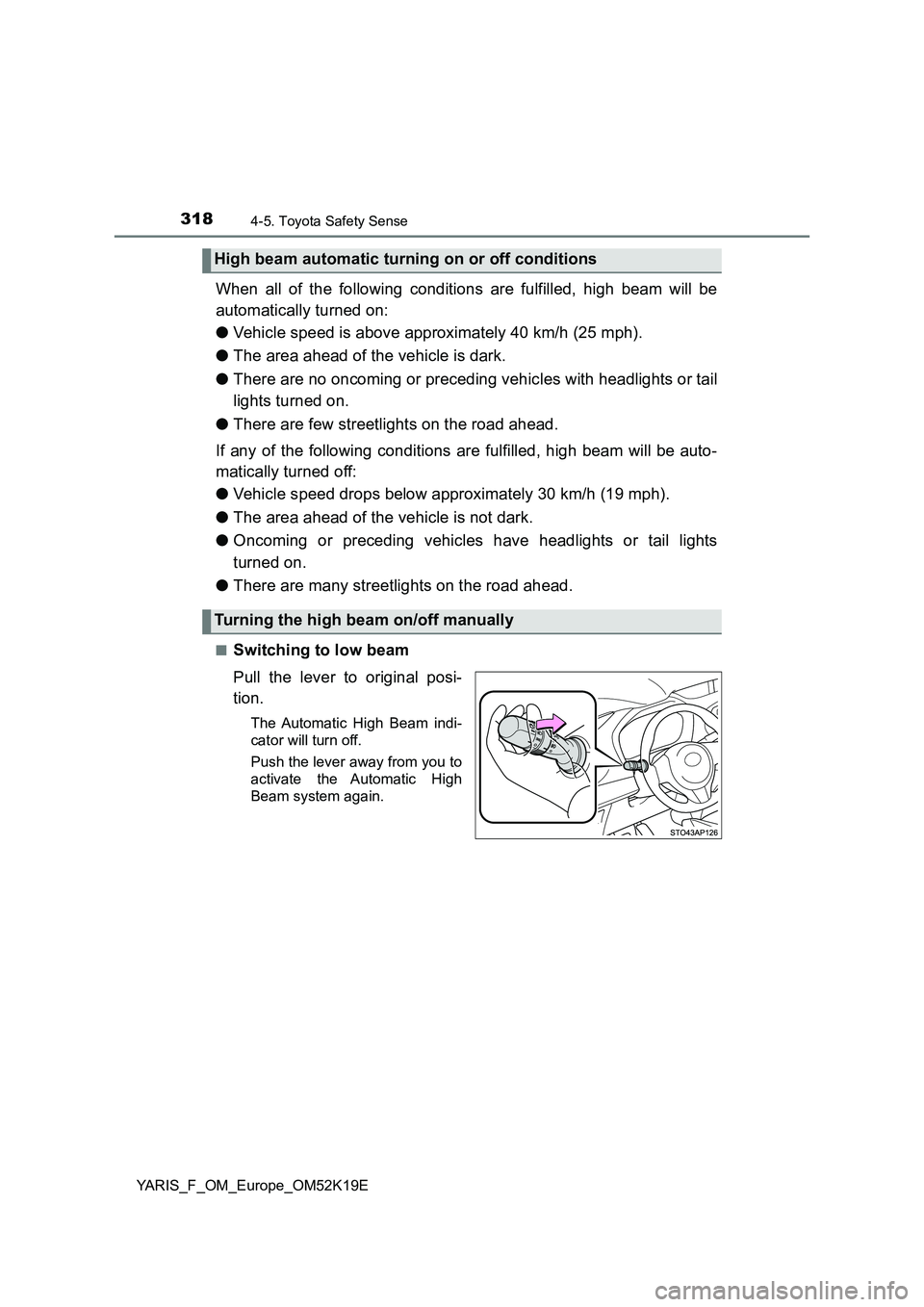
■Switching to low beam
Pull the lever to original posi-
tion.
The Automatic High Beam indi-
cator will turn off.
Push the lever away from you to
activate the Automatic High
Beam system again.
High beam automatic turning on or off conditions
Turning the high beam on/off manually
Page 319 of 700
3194-5. Toyota Safety Sense
4
Driving
YARIS_F_OM_Europe_OM52K19E
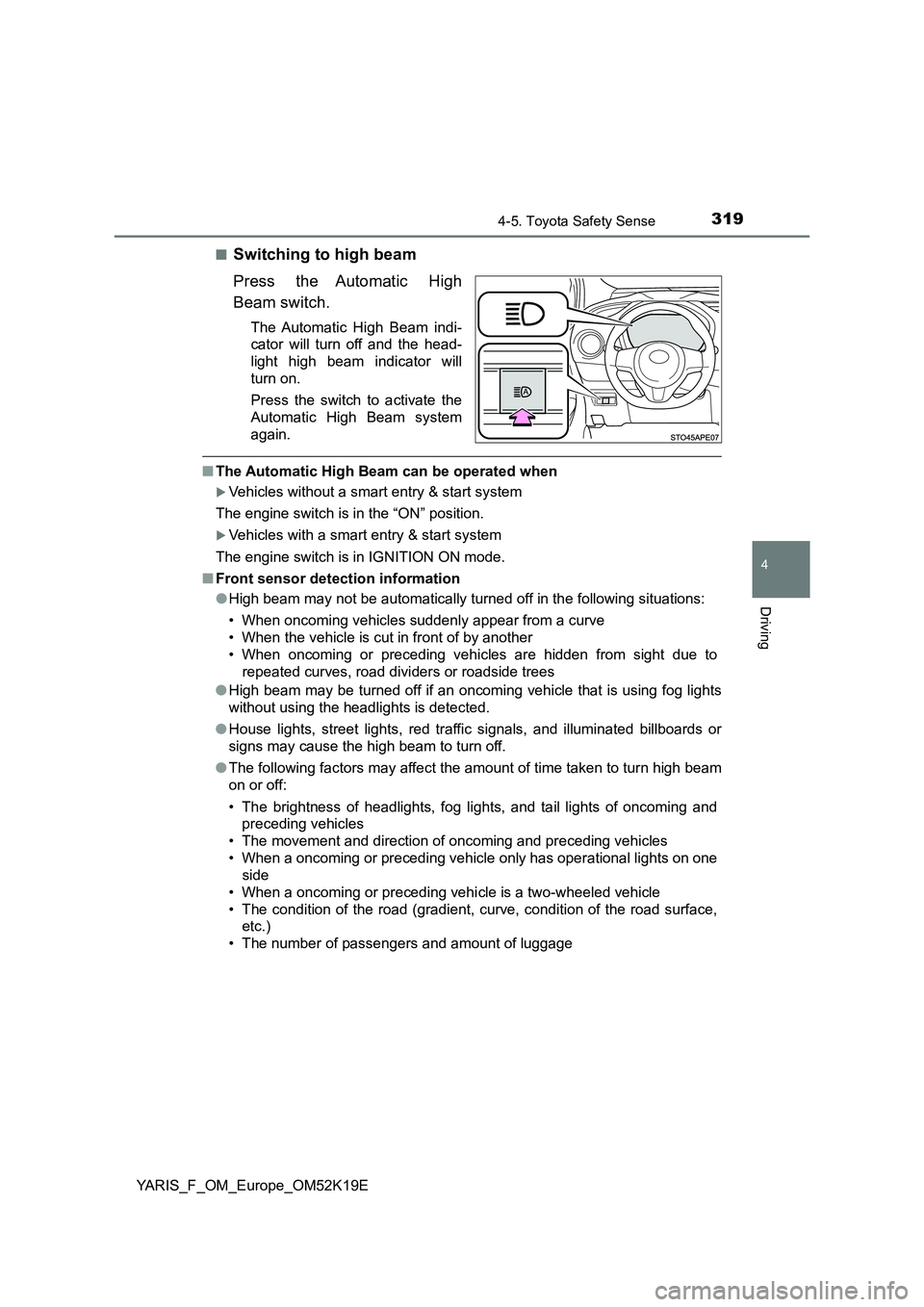
■Switching to high beam
Press the Automatic High
Beam switch.
The Automatic High Beam indi-
cator will turn off and the head-
light high beam indicator will
turn on.
Press the switch to activate the
Automatic High Beam system
again.
■ The Automatic High Beam can be operated when
Vehicles without a smart entry & start system
The engine switch is in the “ON” position.
Vehicles with a smart entry & start system
The engine switch is in IGNITION ON mode.
■ Front sensor detection information
● High beam may not be automatically turned off in the following situations:
• When oncoming vehicles suddenly appear from a curve
• When the vehicle is cut in front of by another
• When oncoming or preceding vehicles are hidden from sight due to
repeated curves, road divi ders or roadside trees
● High beam may be turned off if an oncoming vehicle that is using fog lights
without using the headlights is detected.
● House lights, street lights, red traffic signals, and illuminated billboards or
signs may cause the high beam to turn off.
● The following factors may affect the amount of time taken to turn high beam
on or off:
• The brightness of headlights, fog lights, and tail lights of oncoming and
preceding vehicles
• The movement and direction of oncoming and preceding vehicles
• When a oncoming or preceding vehicl e only has operational lights on one
side
• When a oncoming or preceding vehi cle is a two-wheeled vehicle
• The condition of the road (gradient, curve, condition of the road surface,
etc.)
• The number of passengers and amount of luggage
Page 320 of 700
3204-5. Toyota Safety Sense
YARIS_F_OM_Europe_OM52K19E
● High beam may be turned on or off when unexpected by the driver.
● In the situations below, the system may not be able to correctly detect the surrounding brightness levels, and may flash or expose nearby pedestrians to the high beam. Therefore, you should consider turning the high beams on or off manually rather than relying on the Automatic High Beam system.
• In bad weather (rain, snow, fog, sandstorms, etc.) • The windshield is obscured by fog, mist, ice, dirt, etc.• The windshield is cracked or damaged.• The front sensor is deformed or dirty. • The front sensor temperature is extremely high. • Surrounding brightness levels are equal to those of headlights, tail lightsor fog lights.• Vehicles ahead have headlights or tail lights that are either switched off,dirty, are changing color, or are not aimed properly.• When driving through an area of intermittently changing brightness anddarkness. • When frequently and repeatedly driving ascending/descending roads, or roads with rough, bumpy or uneven surfaces (such as stone-pavedroads, gravel tracks, etc.).• When frequently and repeatedly taking curves or driving on a windingroad.• There is a highly reflective object ahead of the vehicle, such as a sign or a mirror. • The back of a vehicle ahead is highly reflective, such as a container on atruck.• The vehicle’s headlights are damaged or dirty.• The vehicle is listing or titling, due to a flat tire, a trailer being towed, etc.• The driver believes that the high beam may be causing problems or dis- tress to other drivers or pedestrians nearby.
■ If the Automatic High Beam indicator comes on in yellow (vehicles with monochrome display)
It may indicate a malfunction in the system. Contact any authorized Toyota retailer or Toyota authorized repairer, or any reliable repairer.
■ If “Headlight system malfunction. Visit your dealer.” is displayed on the multi-information display ( vehicles with color display)
The system may be malfunctioning. Have the vehicle inspected by any autho- rized Toyota retailer or Toyota authorized repairer, or any reliable repairer.
Page 326 of 700
3264-5. Toyota Safety Sense
YARIS_F_OM_Europe_OM52K19E
■ Conditions in which the function may not operate or detect correctly
In the following situations, RSA does not operate normally and may not rec-
ognize signs, display the incorrect sign, etc. However, this does not indicate a
malfunction.
● The front sensor is misaligned due to a strong impact being applied to the
sensor, etc.
● Dirt, snow, stickers, etc., are on the windshield near the front sensor.
● In inclement weather such as heavy rain, fog, snow or sand storms
● Light from an oncoming vehicle, the sun, etc., enters the front sensor.
● The sign is small, dirty, faded, tilted or bent, and if an electronic sign, the
contrast is poor.
● All or part of the sign is hidden by the leaves of a tree, a pole, etc.
● The sign is only visible to the front sensor for a short amount of time.
● The driving scene (turning, lane change, etc.) is judged incorrectly.
● Even if it is a sign not appropriate for the currently traveled lane, such a sign
exists directly after a freeway branches, or in an adjacent lane just before
merging.
● Stickers are attached to the rear of the preceding vehicle.
● A sign resembling a system compatible sign is recognized.
● The vehicle is driven in a country with a different direction of traffic.
● Side road speed signs may be detected and displayed (if positioned in sight
of the front sensor) while the vehicle is traveling on the main road.
● Roundabout exit road speed signs may be detected and displayed (if posi-
tioned in sight of the front sensor) while traveling on a roundabout.
● The speed information displayed on the meter and that displayed on the
Navigation system (if equipped) may be different due to the Navigation sys-
tem using map data.
Page 335 of 700
3354-6. Using the driving support systems
4
Driving
YARIS_F_OM_Europe_OM52K19E
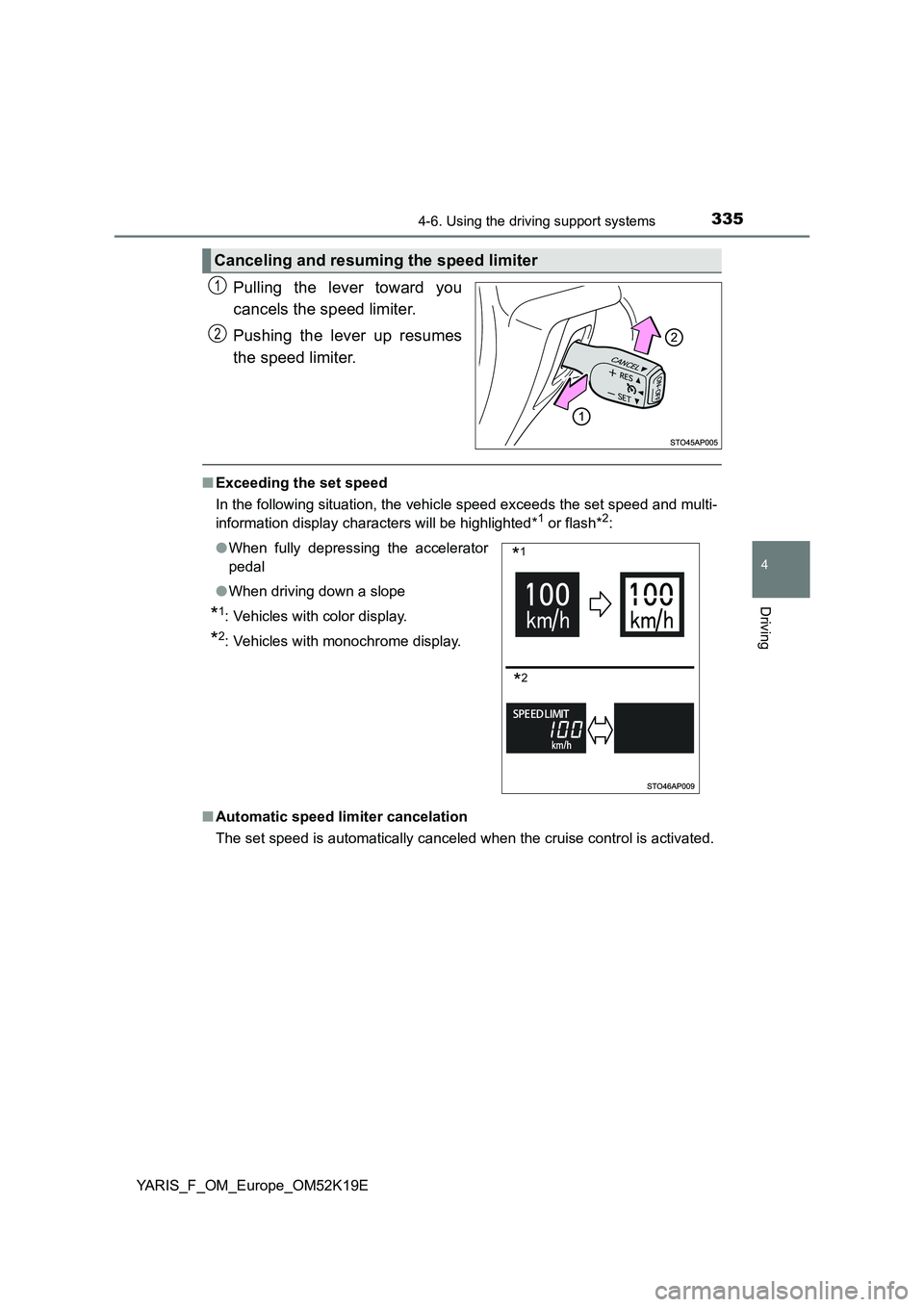
Pulling the lever toward you
cancels the speed limiter.
Pushing the lever up resumes
the speed limiter.
■ Exceeding the set speed
In the following situation, the vehicle speed exceeds the set speed and multi-
information display characters will be highlighted*1 or flash*2:
■ Automatic speed limiter cancelation
The set speed is automatically canceled when the cruise control is activated.
Canceling and resuming the speed limiter
1
2
● When fully depressing the accelerator
pedal
● When driving down a slope
*1: Vehicles with color display.
*2: Vehicles with monochrome display.
*1
*2
Page 347 of 700
3474-6. Using the driving support systems
4
Driving
YARIS_F_OM_Europe_OM52K19E
NOTICE
■To ensure the system operates correctly
If any one of the following situations occurs, the Stop & Start system may
not operate correctly, thus, please have your vehicle checked by any autho-
rized Toyota retailer or Toyota authorized repairer, or any reliable repairer.
● While the driver’s seat belt is fastened, the driver’s and front passenger’s
seat belt reminder light flashes.
● Even when the driver’s seat belt is not fastened, the driver’s and front pas-
senger’s seat belt reminder light remains off.
● Vehicles with monochrome display: Even though the driver’ door is closed,
the open door warning light is illuminated or the interior light is illuminated
when the interior light switch is in the door position.
● Vehicles with color display: Even though the driver’ door is closed, the
open door warning is displayed on the multi-information display or the inte-
rior light is illuminated when the interior light switch is in the door position.
● Vehicles with monochrome display: Even though the driver’ door is open,
the open door warning light does not illuminate or the interior light does not
illuminate when the interior light switch is in the door position.
● Vehicles with color display: Even though the driver’ door is open, the open
door warning is not displayed on the multi-information display or the inte-
rior light does not illuminate when the interior light switch is in the door
position.
Page 349 of 700
3494-6. Using the driving support systems
4
Driving
YARIS_F_OM_Europe_OM52K19E
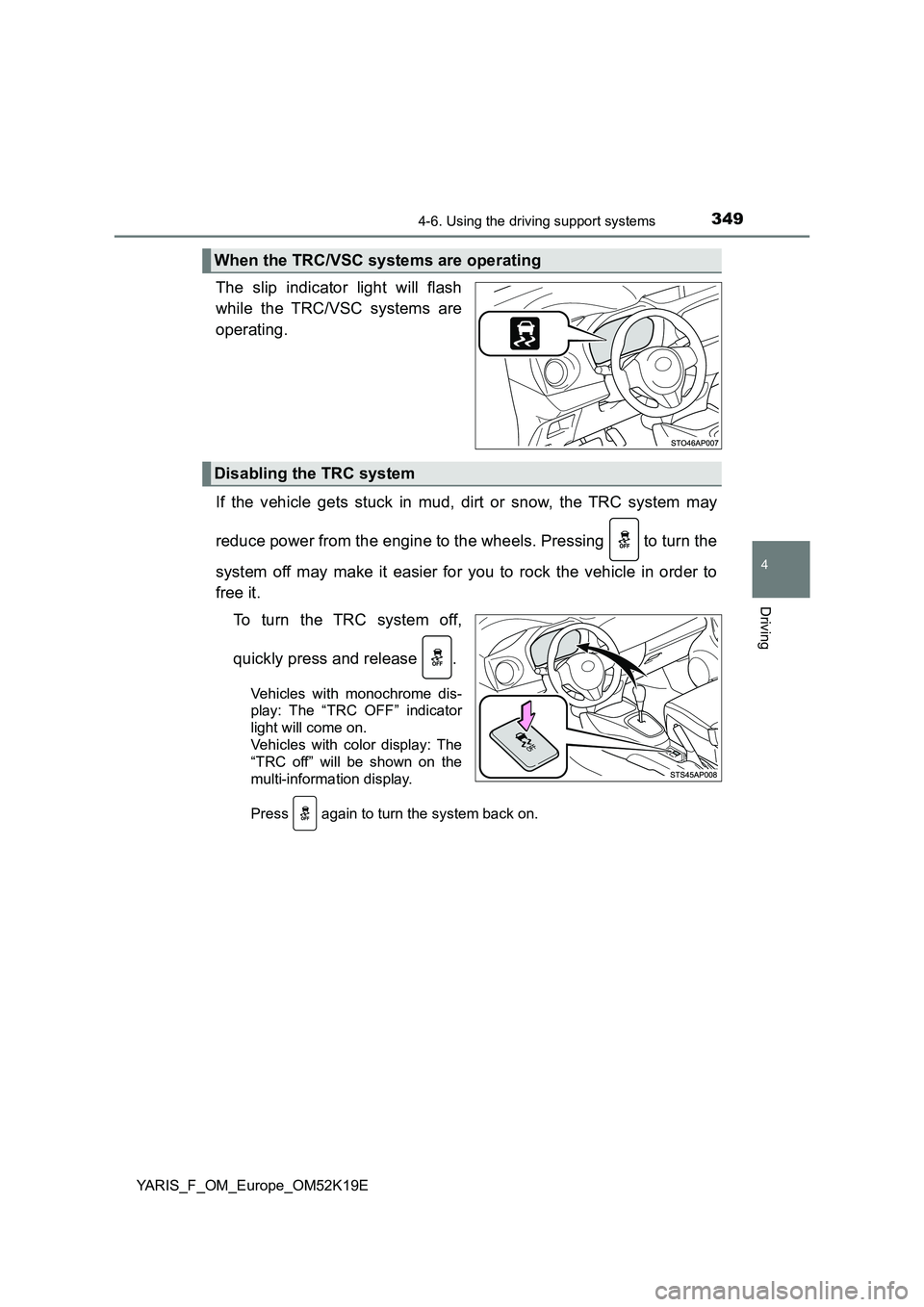
The slip indicator light will flash
while the TRC/VSC systems are
operating.
If the vehicle gets stuck in mud, dirt or snow, the TRC system may
reduce power from the engine to the wheels. Pressing to turn the
system off may make it easier for you to rock the vehicle in order to
free it.
To turn the TRC system off,
quickly press and release .
Vehicles with monochrome dis-
play: The “TRC OFF” indicator
light will come on.
Vehicles with color display: The
“TRC off” will be shown on the
multi-information display.
Press again to turn the system back on.
When the TRC/VSC systems are operating
Disabling the TRC system
Page 350 of 700
3504-6. Using the driving support systems
YARIS_F_OM_Europe_OM52K19E
■Turning off both TRC and VSC systems
Vehicles with monochrome display
To turn the TRC and VSC systems off, press and hold for more than 3
seconds while the vehicle is stopped.
The “TRC OFF” indicator light and the VSC OFF indicator light will come on.
Press again to turn the systems back on.
Vehicles with color display
To turn TRC and VSC systems off, press and hold for more than 3 sec-
onds while the vehicle is stopped.
The VSC OFF indicator light will come on and the “TRC off” will be shown on
the multi-information display.*
Press again to turn the systems back on.
*: On vehicles with pre-crash safety system, pre-crash brake assist and pre-
crash braking will also be disabled. The PCS warning light will come on.
( P. 309)
■ When the “TRC OFF” indicator light comes on even if has not been
pressed (vehicles with monochrome display)
TRC is temporary deactivated. If the indicator light continues to remain on,
contact any authorized Toyota retailer or Toyota authorized repairer, or any
reliable repairer.
■ When the message is displayed on the multi-information display show-
ing that TRC has been disabled even if has not been pressed (vehi-
cles with color display)
TRC is temporary deactivated. If the information continues to show, contact
any authorized Toyota retailer or Toyota authorized repairer, or any reliable
repairer.
Page 351 of 700
3514-6. Using the driving support systems
4
Driving
YARIS_F_OM_Europe_OM52K19E
■ Operating conditions of hill-start assist control
When the following four conditions are me t, the hill-start assist control will
operate:
● Vehicles with Multidrive: The shift lever is in a position other than P or N
(when starting off forward/bac kward on an upward incline).
● Vehicles with manual transmission: The shift lever is in a position other than
R when starting off forward on an upward incline, or the shift lever is in R
when starting off backward on an upward incline.
● The vehicle is stopped.
● The accelerator pedal is not depressed.
● The parking brake is not engaged.
■ Automatic system cancelation of hill-start assist control
The hill-start assist control will turn off in any of the following situations:
● Vehicles with Multidrive: The shift lever is shifted to P or N.
● Vehicles with manual transmission: The shift lever is shifted to R when start-
ing off forward on an upward incline, or the shift lever is shifted to other than
R when starting off backward on an upward incline.
● The accelerator pedal is depressed.
● Approximately 2 seconds elapse.
● 2 seconds at maximum elapsed after the brake pedal is released.
■ Sounds and vibrations caused by the ABS, brake assist, VSC, TRC, and
hill-start assist control systems
● A sound may be heard from the engine compartment when the brake pedal
is depressed repeatedly, when the engine is started or just after the vehicle
begins to move. This sound does not indicate that a malfunction has
occurred in any of these systems.
● Any of the following conditions may occur when the above systems are
operating. None of these indicates that a malfunction has occurred.
• Vibrations may be felt through the vehicle body and steering.
• A motor sound may be heard also after the vehicle comes to a stop.
• The brake pedal may pulsate slightly after the ABS is activated.
• The brake pedal may move down slightly after the ABS is activated.
Page 354 of 700
3544-6. Using the driving support systems
YARIS_F_OM_Europe_OM52K19E
WARNING
■When the VSC is activated
The slip indicator light flashes. Always drive carefully. Reckless driving may
cause an accident. Exercise particular care when the indicator light flashes.
■ When the TRC/VSC systems are turned off
Be especially careful and drive at a speed appropriate to the road condi-
tions. As these are the systems to help ensure vehicle stability and driving
force, do not turn the TRC/VSC systems off unless necessary.
■ Replacing tires
Make sure that all tires are of the specified size, brand, tread pattern and
total load capacity. In addition, make sure that the tires are inflated to the
recommended tire inflation pressure level.
The ABS, TRC and VSC systems will not function correctly if different tires
are installed on the vehicle.
Contact any authorized Toyota retailer or Toyota authorized repairer, or any
reliable repairer for further information when replacing tires or wheels.
■ Handling of tires and the suspension
Using tires with any kind of problem or modifying the suspension will affect
the driving assist systems, and may cause a system to malfunction.