reset TOYOTA YARIS 2019 User Guide
[x] Cancel search | Manufacturer: TOYOTA, Model Year: 2019, Model line: YARIS, Model: TOYOTA YARIS 2019Pages: 700, PDF Size: 65.2 MB
Page 137 of 700
1372. Instrument cluster
2
Instrument cluster
YARIS_F_OM_Europe_OM52K19E
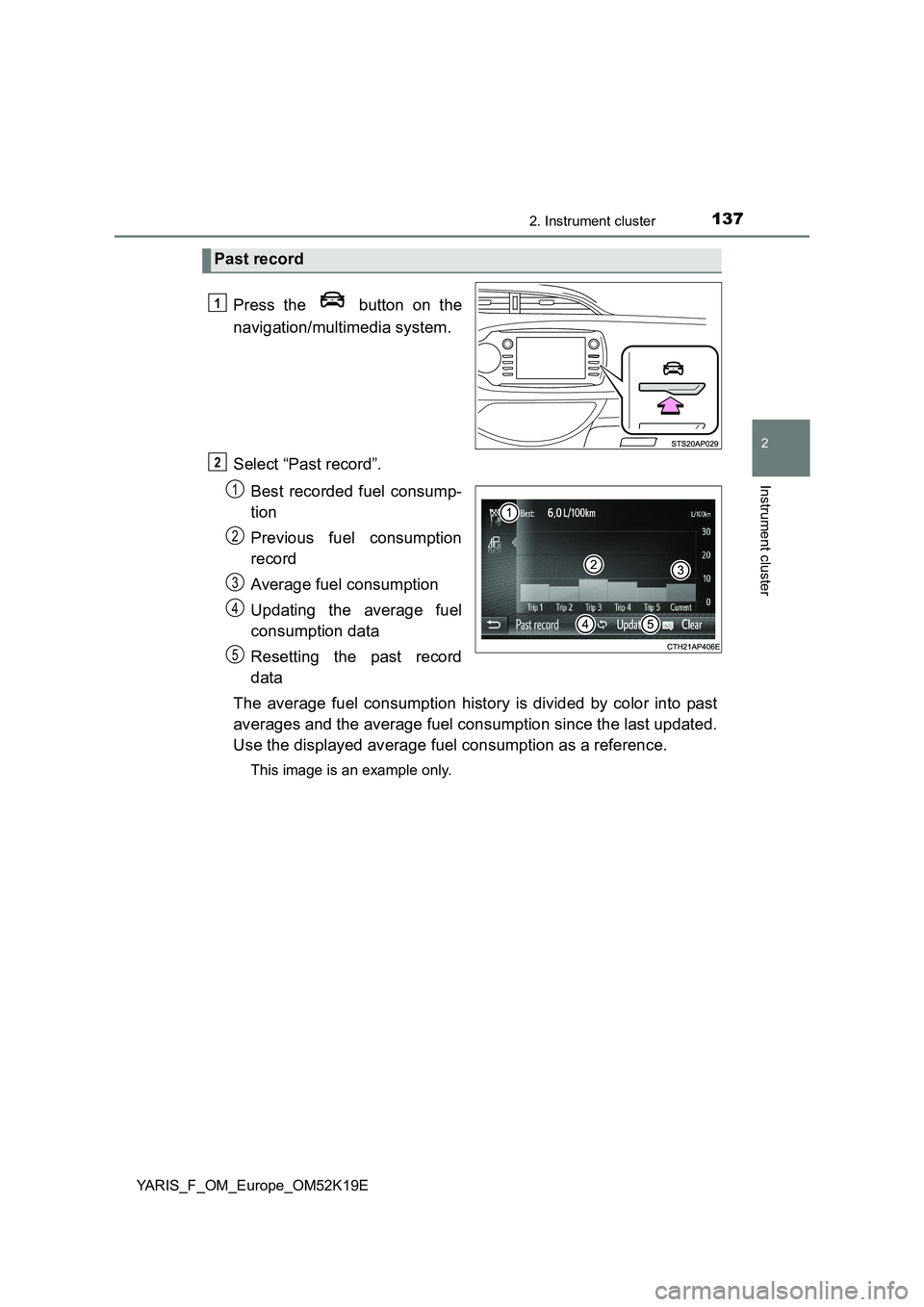
Press the button on the
navigation/multimedia system.
Select “Past record”.
Best recorded fuel consump-
tion
Previous fuel consumption
record
Average fuel consumption
Updating the average fuel
consumption data
Resetting the past record
data
The average fuel consumption history is divided by color into past
averages and the average fuel consumption since the last updated.
Use the displayed average fuel consumption as a reference.
This image is an example only.
Past record
1
2
1
2
3
4
5
Page 138 of 700
1382. Instrument cluster
YARIS_F_OM_Europe_OM52K19E
■Updating the past record data
Update the average fuel consumption by selecting “Update” to measure the
current fuel consumption again.
■ Resetting the data
The fuel consumption data can be deleted by selecting “Clear”.
■ Cruising range
Displays the estimated maximum distance that can be driven with the quan-
tity of fuel remaining.
This distance is computed based on your average fuel consumption.
As a result, the actual distance that can be driven may differ from that dis-
played.
Page 330 of 700
3304-6. Using the driving support systems
YARIS_F_OM_Europe_OM52K19E
■Cruise control can be set when
Vehicles with a Multidrive
● The shift lever is in the D or range 4 or higher of M has been selected.
● Range 4 or higher has been selected by using the paddle shift.
● Vehicle speed is above approximately 40 km/h (25 mph).
Vehicles with a manual transmission
● Vehicle speed is above approximately 40 km/h (25 mph).
■ Accelerating after setting the vehicle speed
● The vehicle can be accelerated normally. After acceleration, the set speed
resumes.
● Even without canceling the cruise control, the set speed can be increased
by first accelerating the vehicle to the desired speed and then pushing the
lever down to set the new speed.
■ Automatic cruise control cancelation
Cruise control will stop maintaining the vehicle speed in any of the following
situations.
● Actual vehicle speed falls more than approximately 16 km/h (10 mph) below
the preset vehicle speed.
At this time, the memorized set speed is not retained.
● Actual vehicle speed is below approximately 40 km/h (25 mph).
● VSC is activated (if equipped).
● Speed limiter is activated (if equipped).
Page 366 of 700
3665-3. Using the radio
YARIS_F_OM_Europe_OM52K19E
Radio operation
Search for desired stations by turning the tune/scroll knob or press-
ing the “ ” or “” button of “SEEK TRACK”.
Press and hold a desired station selector button until you hear a
beep.
: If equipped
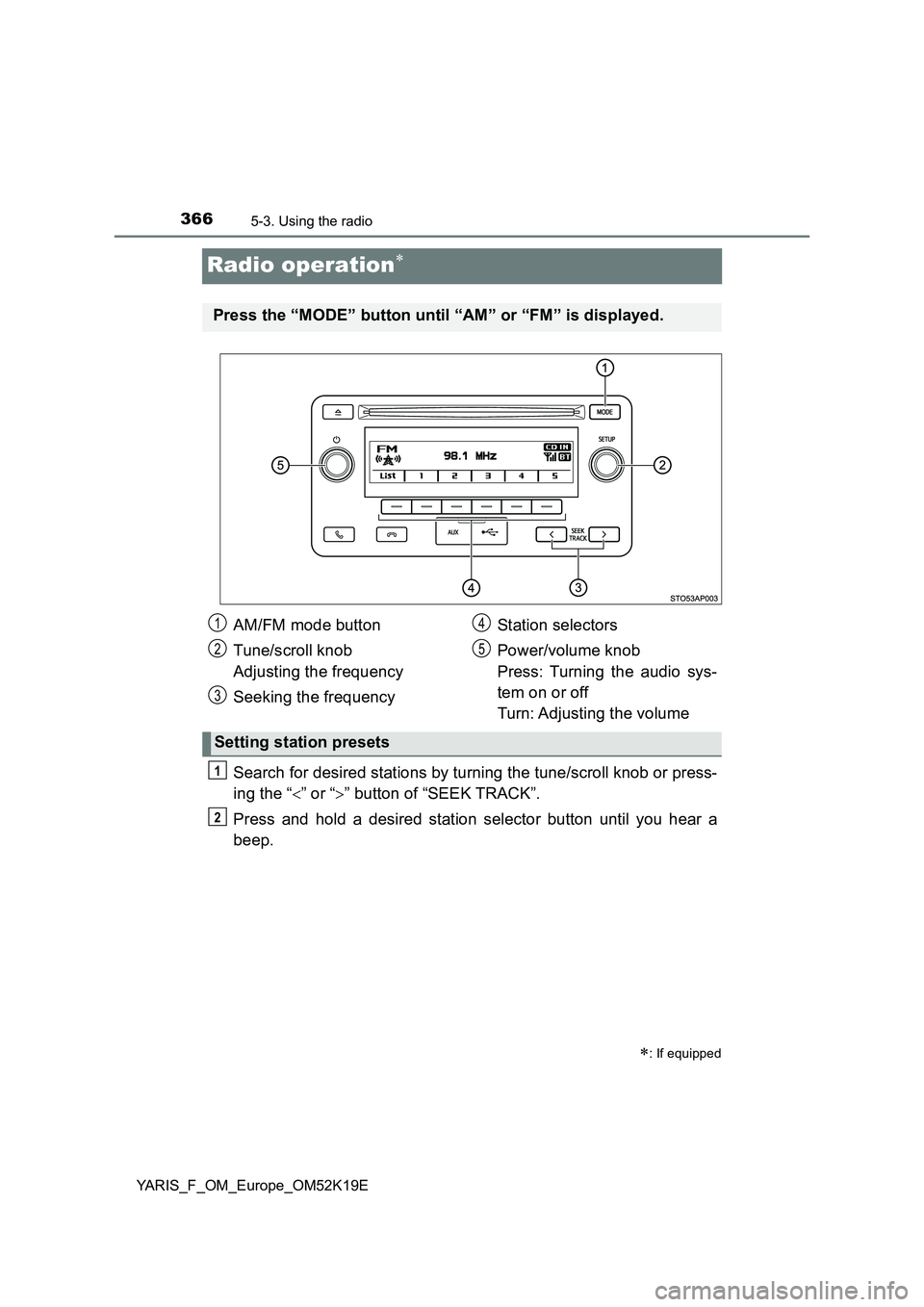
Press the “MODE” button until “AM” or “FM” is displayed.
AM/FM mode button
Tune/scroll knob
Adjusting the frequency
Seeking the frequency
Station selectors
Power/volume knob
Press: Turning the audio sys-
tem on or off
Turn: Adjusting the volume
Setting station presets
1
2
3
4
5
1
2
Page 369 of 700
3695-3. Using the radio
5
Audio system
YARIS_F_OM_Europe_OM52K19E
■EON (Enhanced Other Network) system (for traffic announcement func-
tion)
If the RDS station (with EON data) you are listening to is not broadcasting a
traffic information program and the audio system is in the TA (traffic
announcement) mode, the radio will be switched automatically to a station
broadcasting a traffic information program in the EON AF list when traffic
information begins.
■ When the battery is disconnected
Station presets are erased.
■ Reception sensitivity
● Maintaining perfect radio reception at all times is difficult due to the continu-
ally changing position of the antenna, differences in signal strength and sur-
rounding objects, such as trains, transmitters, etc.
● The radio antenna is mounted on the rear roof. The antenna can be
removed from the base by turning it.
NOTICE
■ To prevent damage, remove the antenna in the following cases
● The antenna will touch the ceiling of a garage.
● A cover will be put on the roof.
Page 383 of 700
3835-5. Using an external device
5
Audio system
YARIS_F_OM_Europe_OM52K19E
■ iPod functions
● When an iPod is connected and the audio source is changed to iPod mode,
the iPod will resume play from the same point in which it was last used.
● Depending on the iPod that is connected to the system, certain functions
may not be available. If a function is unavailable due to a malfunction (as
opposed to a system specification), disconnecting the device and recon-
necting it once again may resolve the problem.
● While connected to the system, the iPod cannot be operated with its own
controls. It is necessary to use the controls of the vehicle’s audio system
instead.
● When the battery level of an iPod is very low, the iPod may not operate. If
so, charge the iPod before use.
● Supported models (P. 385)
■ iPod problems
To resolve most problems encountered when using your iPod, disconnect
your iPod from the vehicle iPod connection and reset it.
For instructions on how to reset your iPod, refer to your iPod Owner’s Man-
ual.
■ Display
P. 373
Page 399 of 700
3995-6. Using Bluetooth® devices
5
Audio system
YARIS_F_OM_Europe_OM52K19E
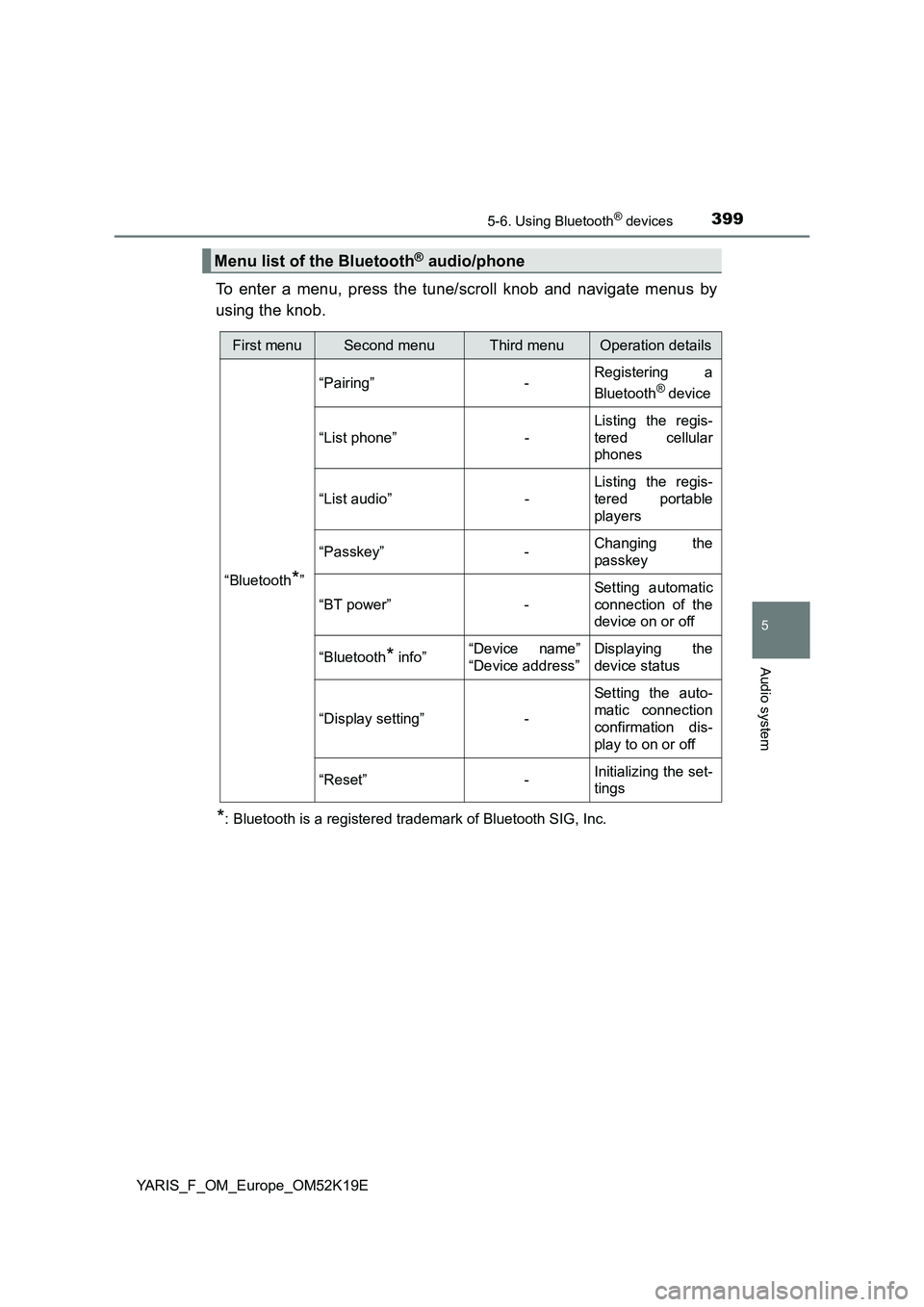
To enter a menu, press the tune/scroll knob and navigate menus by
using the knob.
*: Bluetooth is a registered trademark of Bluetooth SIG, Inc.
Menu list of the Bluetooth® audio/phone
First menuSecond menuThird menuOperation details
“Bluetooth*”
“Pairing” - Registering a
Bluetooth® device
“List phone” -
Listing the regis-
tered cellular
phones
“List audio” -
Listing the regis-
tered portable
players
“Passkey” - Changing the
passkey
“BT power” -
Setting automatic
connection of the
device on or off
“Bluetooth* info” “Device name”
“Device address”
Displaying the
device status
“Display setting” -
Setting the auto-
matic connection
confirmation dis-
play to on or off
“Reset” - Initializing the set-
tings
Page 407 of 700
4075-7. “SETUP” menu
5
Audio system
YARIS_F_OM_Europe_OM52K19E
Select “Reset” using the tune/scroll knob. (P. 399)
● Initializing the sound settings
Select “Sound settings” using the tune/scroll knob and press
(“Yes”).
For details about sound settings: P. 364
●Initializing the device information
Select “Car Device Info” using the tune/scroll knob and press
(“Yes”).
Automatic connection of a portable device, automatic connection confirma-
tion display and the passkey will be initialized.
● Initializing the all settings
Select “Reset all” using the tune/scroll knob and press
(“Yes”).
Initialization
Page 408 of 700
4085-7. “SETUP” menu
YARIS_F_OM_Europe_OM52K19E
Using the “SETUP” menu (“Phone” menu)
Select “Add contacts” using the tune/scroll knob. (P. 399)
● Transferring all contacts from the cellular phone
Select “Overwrite all” using the knob and press (“Yes”).
● Transferring one contact from the cellular phone
Select “Add contact” using the knob and press (“Yes”).
Select “Add SD” using the tune/scroll knob. ( P. 399)
Select the desired data using the knob.
Press the desired preset button (from [1] to [5]).
For details about setting speed dials from the call history: P. 416
For details about deleting speed dials: P. 415
: If equipped
Adding a new phone number
Setting speed dials
1
2
3
Page 415 of 700
4155-9. Bluetooth® Phone
5
Audio system
YARIS_F_OM_Europe_OM52K19E
Making a phone call
Select “Phonebook” using the tune/scroll knob.
Select the desired name using the knob and press the off-hook
switch.
By pressing (“Add S. Dial”) and one of the speed dial buttons
(from [1] to [5]) while the desired name is selected, it
can be registered as a speed dial.
Press (“A-Z”) to display the registered names in alphabetical
order of the initial.
Select “Speed Dials” using the tune/scroll knob.
Press the desired preset button (from [1] to [5]) and
press the off-hook switch.
To delete a registered speed dial, after selecting the desired preset
button (from [1] to [5]) press (“Delete”) and then
press (“Yes”).
: If equipped
To enter the “Phone” or “TEL” mode, press the off-hook switch.
Dialing by selecting a name
Speed dialing
1
2
1
2