ESP TOYOTA YARIS 2019 Owner's Manual
[x] Cancel search | Manufacturer: TOYOTA, Model Year: 2019, Model line: YARIS, Model: TOYOTA YARIS 2019Pages: 700, PDF Size: 65.2 MB
Page 353 of 700
3534-6. Using the driving support systems
4
Driving
YARIS_F_OM_Europe_OM52K19E
WARNING
■The ABS does not operate effectively when
● The limits of tire gripping performance have been exceeded (such as
excessively worn tires on a snow covered road).
● The vehicle hydroplanes while driving at high speed on wet or slick roads.
■ Stopping distance when the ABS is operating may exceed that of nor-
mal conditions
The ABS is not designed to shorten t he vehicle’s stopping distance. Always
maintain a safe distance from the vehicle in front of you, especially in the
following situations:
● When driving on dirt, gravel or snow-covered roads
● When driving with tire chains
● When driving over bumps in the road
● When driving over roads with potholes or uneven surfaces
■ TRC/VSC may not operate effectively when
Directional control and power may not be achievable while driving on slip-
pery road surfaces, even if the TRC/VSC system is operating.
Drive the vehicle carefully in conditions where stability and power may be
lost.
■ Hill-start assist control does not operate effectively when
● Do not overly rely on hill-start assist control. Hill-start assist control may
not operate effectively on steep inclines and roads covered with ice.
● Unlike the parking brake, hill-start assist control is not intended to hold the
vehicle stationary for an extended period of time. Do not attempt to use
hill-start assist control to hold the vehicle on an incline, as doing so may
lead to an accident.
Page 354 of 700
3544-6. Using the driving support systems
YARIS_F_OM_Europe_OM52K19E
WARNING
■When the VSC is activated
The slip indicator light flashes. Always drive carefully. Reckless driving may
cause an accident. Exercise particular care when the indicator light flashes.
■ When the TRC/VSC systems are turned off
Be especially careful and drive at a speed appropriate to the road condi-
tions. As these are the systems to help ensure vehicle stability and driving
force, do not turn the TRC/VSC systems off unless necessary.
■ Replacing tires
Make sure that all tires are of the specified size, brand, tread pattern and
total load capacity. In addition, make sure that the tires are inflated to the
recommended tire inflation pressure level.
The ABS, TRC and VSC systems will not function correctly if different tires
are installed on the vehicle.
Contact any authorized Toyota retailer or Toyota authorized repairer, or any
reliable repairer for further information when replacing tires or wheels.
■ Handling of tires and the suspension
Using tires with any kind of problem or modifying the suspension will affect
the driving assist systems, and may cause a system to malfunction.
Page 365 of 700
3655-2. Using the audio system
5
Audio system
YARIS_F_OM_Europe_OM52K19E
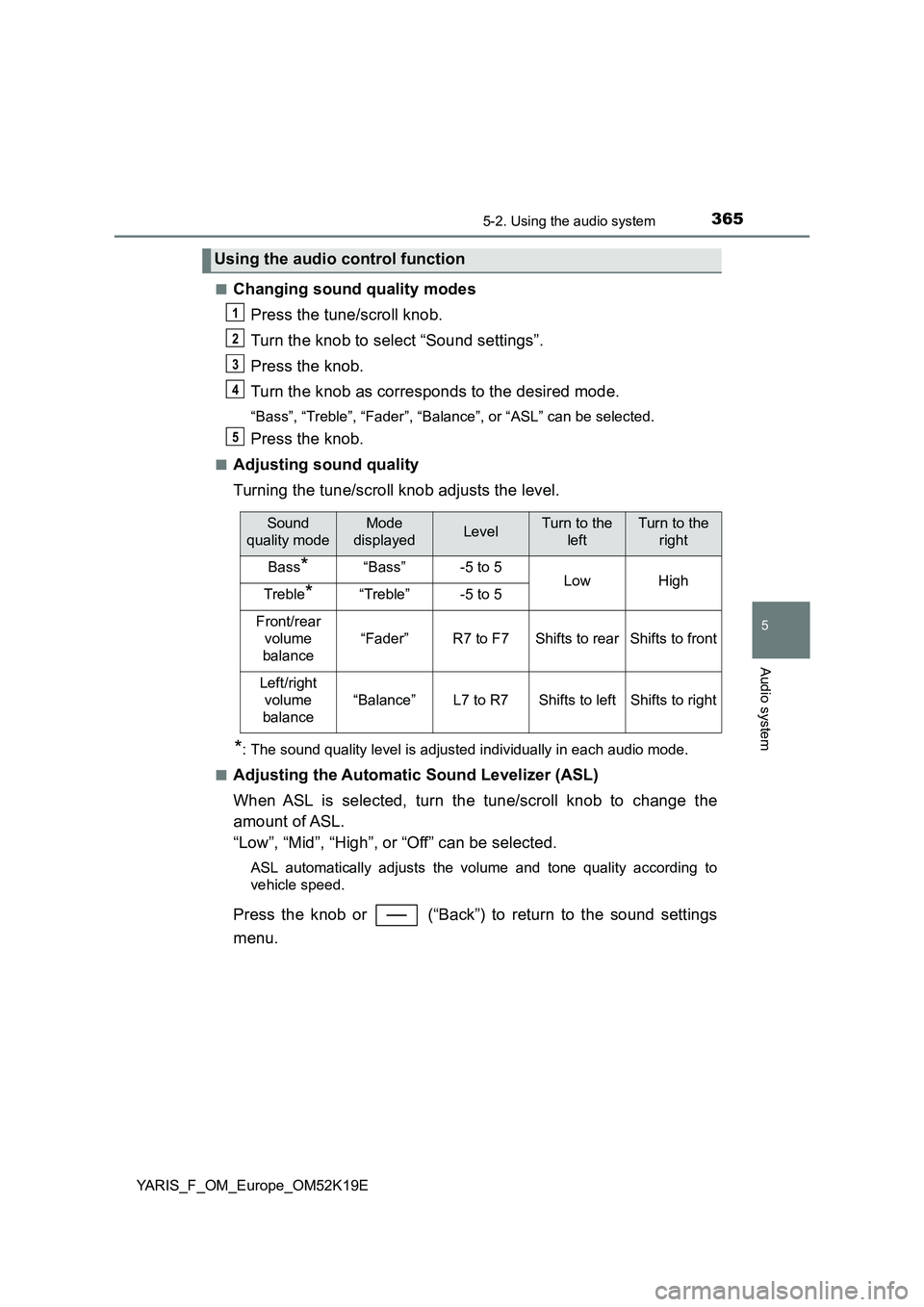
■Changing sound quality modes
Press the tune/scroll knob.
Turn the knob to select “Sound settings”.
Press the knob.
Turn the knob as corresponds to the desired mode.
“Bass”, “Treble”, “Fader”, “Balance”, or “ASL” can be selected.
Press the knob.
■Adjusting sound quality
Turning the tune/scroll knob adjusts the level.
*: The sound quality level is adjusted individually in each audio mode.
■Adjusting the Automatic Sound Levelizer (ASL)
When ASL is selected, turn the tune/scroll knob to change the
amount of ASL.
“Low”, “Mid”, “High”, or “Off” can be selected.
ASL automatically adjusts the volume and tone quality according to
vehicle speed.
Press the knob or (“Back”) to return to the sound settings
menu.
Using the audio control function
1
2
3
4
5
Sound
quality mode
Mode
displayedLevelTurn to the
left
Turn to the
right
Bass*“Bass”-5 to 5LowHighTreble*“Treble”-5 to 5
Front/rear
volume
balance
“Fader”R7 to F7Shifts to rearShifts to front
Left/right
volume
balance
“Balance”L7 to R7Shifts to leftShifts to right
Page 368 of 700
3685-3. Using the radio
YARIS_F_OM_Europe_OM52K19E
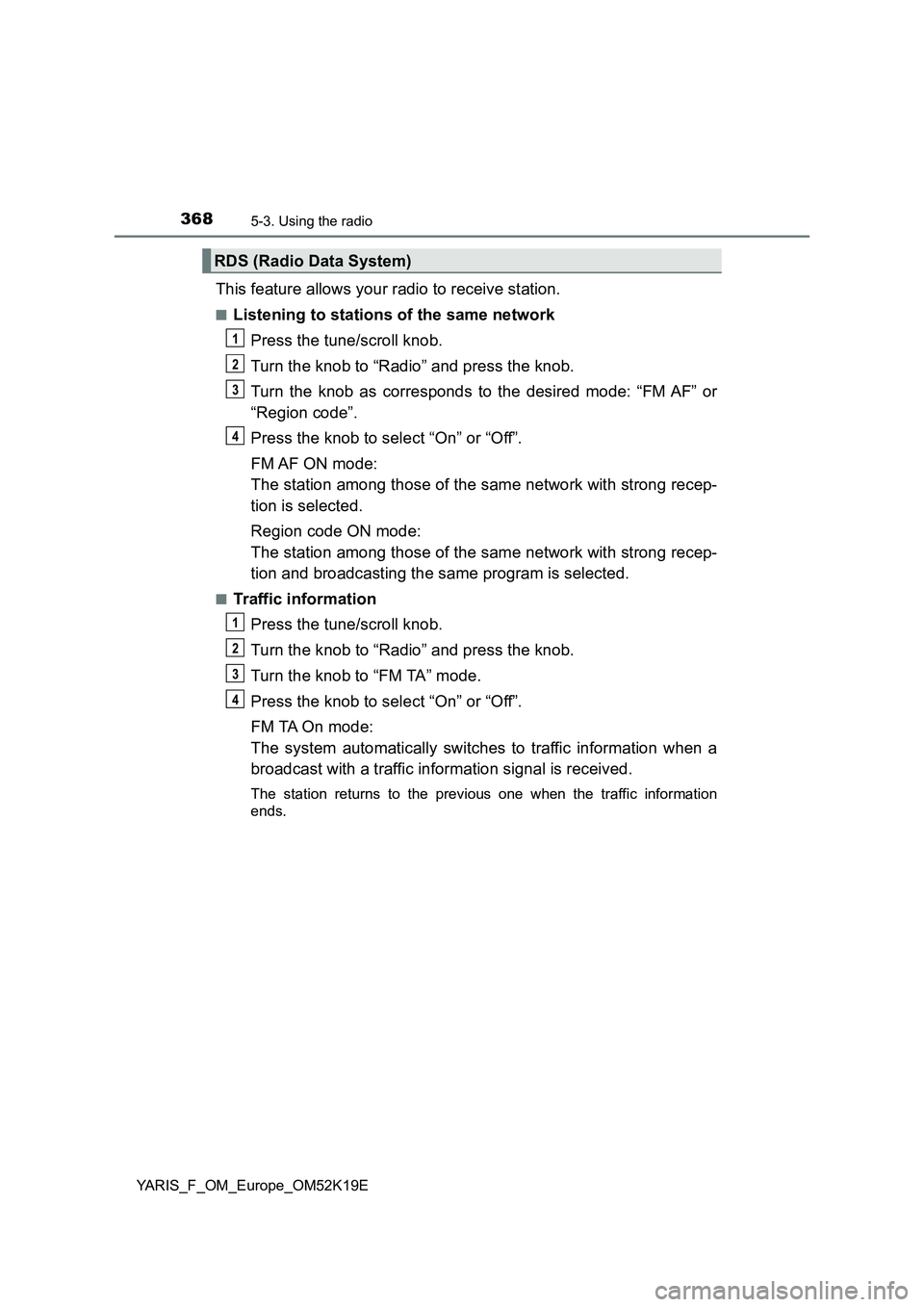
This feature allows your radio to receive station.
■Listening to stations of the same network
Press the tune/scroll knob.
Turn the knob to “Radio” and press the knob.
Turn the knob as corresponds to the desired mode: “FM AF” or
“Region code”.
Press the knob to select “On” or “Off”.
FM AF ON mode:
The station among those of the same network with strong recep-
tion is selected.
Region code ON mode:
The station among those of the same network with strong recep-
tion and broadcasting the same program is selected.
■Traffic information
Press the tune/scroll knob.
Turn the knob to “Radio” and press the knob.
Turn the knob to “FM TA” mode.
Press the knob to select “On” or “Off”.
FM TA On mode:
The system automatically switches to traffic information when a
broadcast with a traffic information signal is received.
The station returns to the previous one when the traffic information
ends.
RDS (Radio Data System)
1
2
3
34
1
2
3
34
Page 382 of 700

3825-5. Using an external device
YARIS_F_OM_Europe_OM52K19E
Pressing (“RDM”) changes modes in the following order:
Track shuffle Album shuffle Off.
Press (“Text”) display or hide the album title.
If there are continuing texts, is displayed.
Press and hold the button to display the remaining texts.
Press the tune/scroll knob to enter iPod menu mode.
Turning the knob changes sound modes. ( P. 365)
■About iPod
● “Made for iPod” and “Made for iPhone” mean that an electronic accessory
has been designed to connect specifically to iPod, or iPhone, respectively,
and has been certified by the developer to meet Apple performance stan-
dards.
● Apple is not responsible for the operation of this device or its compliance
with safety and regulatory standards. Please note that the use of this acces-
sory with iPod or iPhone may affect wireless performance.
● iPhone, iPod, iPod classic, iPod nano and iPod touch are trademarks of
Apple Inc., registered in the U.S. and other countries.
Shuffle playback
Switching the display
Adjusting sound quality and volume balance
1
2
Page 390 of 700
3905-5. Using an external device
YARIS_F_OM_Europe_OM52K19E
■ USB memory
● Compatible devices
USB memory that can be used for MP3 and WMA playback
● Compatible device formats
The following device formats can be used:
• USB communication formats: USB2.0 FS (12 Mbps)
• File formats: FAT12/16/32 (Windows)
• Correspondence class: Mass storage class
MP3 and WMA files written in any format other than those listed above may
not play correctly, and their file names and folder names may not be dis-
played correctly.
Items related to standards and limitations are as follows:
• Maximum directory hierarchy: 8 levels
• Maximum number of folders in a device: 999 (including the root)
• Maximum number of files in a device: 9999
• Maximum number of files per folder: 255
● MP3 and WMA files
MP3 (MPEG Audio LAYER 3) is a standard audio compression format.
Files can be compressed to approximately 1/10 of their original size by
using MP3 compression.
WMA (Windows Media Audio) is a Microsoft audio compression format.
This format compresses audio data to a size smaller than that of the MP3
format.
There is a limit to the MP3 and WMA file standards and to the media/for-
mats recorded by them that can be used.
● MP3 file compatibility
• Compatible standards
MP3 (MPEG1 AUDIO LAYERII, III, MPEG2 AUDIO LAYERII, III, MPEG2.5)
• Compatible sampling frequencies
MPEG1 AUDIO LAYERII, III: 32, 44.1, 48 (kHz)
MPEG2 AUDIO LAYERII, III: 16, 22.05, 24 (kHz)
• Compatible bit rates (compatible with VBR)
MPEG1 AUDIO LAYERII, III: 32-320 (kbps)
MPEG2 AUDIO LAYERII, III: 8-160 (kbps)
• Compatible channel modes: stereo, joint stereo, dual channel and mon-
aural
Page 421 of 700
4215-10. Bluetooth®
5
Audio system
YARIS_F_OM_Europe_OM52K19E
■ About Bluetooth®
■Compatible models
● Bluetooth® specifications:
Ver. 1.1, or higher (Recommended: Ver. 2.1 + EDR or higher)
● Following Profiles:
• A2DP (Advanced Audio Distribution Profile) Ver. 1.0 or higher (recom-
mended: Ver. 1.2 or higher)
• AVRCP (Audio/Video Remote Control Profile) Ver. 1.0 or higher (recom-
mended: Ver. 1.3 or higher)
Portable players must correspond to the above specifications in order to be
connected to the Bluetooth® audio/phone. However, please note that some
functions may be limited depending on the type of portable player.
● Cellular phone
• HFP (Hands Free Profile) Ver. 1.0 or higher (Recommended: Ver. 1.5)
• OPP (Object Push Profile) Ver. 1.1
• PBAP (Phone Book Access Profile) Ver. 1.0
Bluetooth is a registered trademark of
Bluetooth SIG, Inc.
Page 475 of 700
4757-1. Maintenance and care
7
Maintenance and care
YARIS_F_OM_Europe_OM52K19E
■Caring for leather areas
Toyota recommends cleaning the interior of the vehicle at least twice a year to
maintain the quality of the vehicle’s interior.
■ Shampooing the carpets
There are several commercial foaming-type cleaners available. Use a sponge
or brush to apply the foam. Rub in overlapping circles. Do not use water.
Wipe dirty surfaces and let them dry. Excellent results are obtained by keep-
ing the carpet as dry as possible.
■ Seat belts
Clean with mild soap and lukewarm water using a cloth or sponge. Also
check the belts periodically for excessive wear, fraying or cuts.
WARNING
■ Water in the vehicle
● Do not splash or spill liquid in the vehicle.
Doing so may cause electrical components, etc., to malfunction or catch
fire.
● Do not get any of the SRS components or wiring in the vehicle interior wet.
( P. 44)
An electrical malfunction may cause the airbags to deploy or not function
properly, resulting in death or serious injury.
■ Cleaning the interior (especially instrument panel)
Do not use polish wax or polish cleaner. The instrument panel may reflect
off the windshield, obstructing the driver’s view and leading to an accident,
resulting in death or serious injury.
Page 476 of 700
4767-1. Maintenance and care
YARIS_F_OM_Europe_OM52K19E
NOTICE
■Cleaning detergents
● Do not use the following types of detergent, as they may discolor the vehi-
cle interior or cause streaks or damage to painted surfaces:
• Non-seat portions: Organic substances such as benzene or gasoline,
alkaline or acidic solutions, dye, and bleach
• Seats: Alkaline or acidic solutions, such as thinner, benzene, and alco-
hol
● Do not use polish wax or polish cleaner. The instrument panel’s or other
interior part’s painted surface may be damaged.
■ Preventing damage to leather surfaces
Observe the following precautions to avoid damage to and deterioration of
leather surfaces:
● Remove any dust or dirt from leather surfaces immediately.
● Do not expose the vehicle to direct sunlight for extended periods of time.
Park the vehicle in the shade, especially during summer.
● Do not place items made of vinyl, plastic, or containing wax on the uphol-
stery, as they may stick to the leather surface if the vehicle interior heats
up significantly.
■ Water on the floor
Do not wash the vehicle floor with water.
Vehicle systems such as the audio system may be damaged if water comes
into contact with electrical components such as the audio system above or
under the floor of the vehicle. Water may also cause the body to rust.
■ When cleaning the inside of the windshield (vehicles with Toyota
Safety Sense system)
Be careful not to touch the front sensor ( P. 287).
If the camera is accidentally scratched or hit, Toyota Safety Sense system
may not operate properly or may cause a malfunction.
■ Cleaning the inside of the rear window
● Do not use glass cleaner to clean the rear window, as this may cause
damage to the rear window defogger heater wires. Use a cloth dampened
with lukewarm water to gently wipe the window clean. Wipe the window in
strokes running parallel to the heater wires.
● Be careful not to scratch or damage the heater wires.
Page 605 of 700
6058-2. Steps to take in an emergency
8
When trouble arises
YARIS_F_OM_Europe_OM52K19E
■ Emergency tire puncture repair kit
● The sealant stored in the emergency tire puncture repair kit can be used
only once to temporarily repair a single tire. If the sealant has been used
and needs to be replaced, purchase a new bottle at any authorized Toyota
retailer or Toyota authorized repairer, or any reliable repairer. The compres-
sor is reusable.
● The sealant can be used when the outside temperature is from -30°C
(-22°F) to 60°C (140°F).
● The repair kit is exclusively designed for size and type of tires originally
installed on your vehicle. Do not use it for tires that a different size than the
original ones, or for any other purposes.
● The sealant has a limited lifespan. The expiry date is marked on the bottle.
The bottle of sealant should be replaced with a new bottle before the expiry
date. Contact any authorized Toyota retailer or Toyota authorized repairer, or
any reliable repairer for replacement.
● If the sealant gets on your clothes, it may stain.
● If the sealant adheres to a wheel or the surface of the vehicle body, the stain
may not be removable if it is not cleaned at once. Immediately wipe away
the sealant with a wet cloth.
● During operation of the repair kit, a loud operation noise is produced. This
does not indicate a malfunction.
● Do not use to check or to adjust the tire pressure.