remote control TOYOTA YARIS 2019 Owner's Manual
[x] Cancel search | Manufacturer: TOYOTA, Model Year: 2019, Model line: YARIS, Model: TOYOTA YARIS 2019Pages: 700, PDF Size: 65.2 MB
Page 421 of 700
4215-10. Bluetooth®
5
Audio system
YARIS_F_OM_Europe_OM52K19E
■ About Bluetooth®
■Compatible models
● Bluetooth® specifications:
Ver. 1.1, or higher (Recommended: Ver. 2.1 + EDR or higher)
● Following Profiles:
• A2DP (Advanced Audio Distribution Profile) Ver. 1.0 or higher (recom-
mended: Ver. 1.2 or higher)
• AVRCP (Audio/Video Remote Control Profile) Ver. 1.0 or higher (recom-
mended: Ver. 1.3 or higher)
Portable players must correspond to the above specifications in order to be
connected to the Bluetooth® audio/phone. However, please note that some
functions may be limited depending on the type of portable player.
● Cellular phone
• HFP (Hands Free Profile) Ver. 1.0 or higher (Recommended: Ver. 1.5)
• OPP (Object Push Profile) Ver. 1.1
• PBAP (Phone Book Access Profile) Ver. 1.0
Bluetooth is a registered trademark of
Bluetooth SIG, Inc.
Page 469 of 700
469
7Maintenance and care
YARIS_F_OM_Europe_OM52K19E
7-1. Maintenance and care
Cleaning and protecting
the vehicle exterior .......... 470
Cleaning and protecting
the vehicle interior ........... 474
7-2. Maintenance
Maintenance
requirements.................... 477
7-3. Do-it-yourself maintenance
Do-it-yourself service
precautions ...................... 480
Hood .................................. 483
Positioning a floor jack ....... 485
Engine compartment.......... 487
Tires ................................... 503
Tire inflation pressure ........ 523
Wheels ............................... 525
Air conditioning filter .......... 529
Wireless remote control/
electronic key battery....... 532
Checking and replacing
fuses ................................ 536
Light bulbs ......................... 542
Page 499 of 700
4997-3. Do-it-yourself maintenance
7
Maintenance and care
YARIS_F_OM_Europe_OM52K19E
■Before recharging
When recharging, the battery produces hydrogen gas which is flammable and
explosive. Therefore, observe the following before recharging:
● If recharging with the battery installed on the vehicle, be sure to disconnect
the ground cable.
● Make sure the power switch on the charger is off when connecting and dis-
connecting the charger cables to the battery.
■ After recharging/reconnecting the battery (vehicles with a smart entry &
start system)
● Unlocking the doors using the smart entry & start system may not be possi-
ble immediately after reconnecting the battery. If this happens, use the wire-
less remote control or the mechanical key to lock/unlock the doors.
● Start the engine with the engine switch in ACCESSORY mode. The engine
may not start with the engine switch turned off. However, the engine will
operate normally from the second attempt.
● The engine switch mode is recorded by the vehicle. If the battery is recon-
nected, the vehicle will return the engine switch mode to the status it was in
before the battery was disconnected. Make sure to turn off the engine
before disconnect the battery. Take extra care when connecting the battery
if the engine switch mode prior to discharge is unknown.
If the engine will not start even after multiple attempts, contact any authorized
Toyota retailer or Toyota authorized repairer, or any reliable repairer.
WARNING
■ Chemicals in the battery
Batteries contain poisonous and corrosive sulfuric acid and may produce
hydrogen gas which is flammable and explosive. To reduce the risk of death
or serious injury, take the following precautions while working on or near the
battery:
● Do not cause sparks by touching the battery terminals with tools.
● Do not smoke or light a match near the battery.
● Avoid contact with eyes, skin and clothes.
● Never inhale or swallow electrolyte.
● Wear protective safety glasses when working near the battery.
● Keep children away from the battery.
Page 532 of 700
5327-3. Do-it-yourself maintenance
YARIS_F_OM_Europe_OM52K19E
Wireless remote control/electronic key battery
●Flathead screwdriver
● Lithium battery CR2016 (vehicles without a smart entry & start sys-
tem), or CR2032 (vehicles with a smart entry & start system)
Vehicles without a smart entry & start system
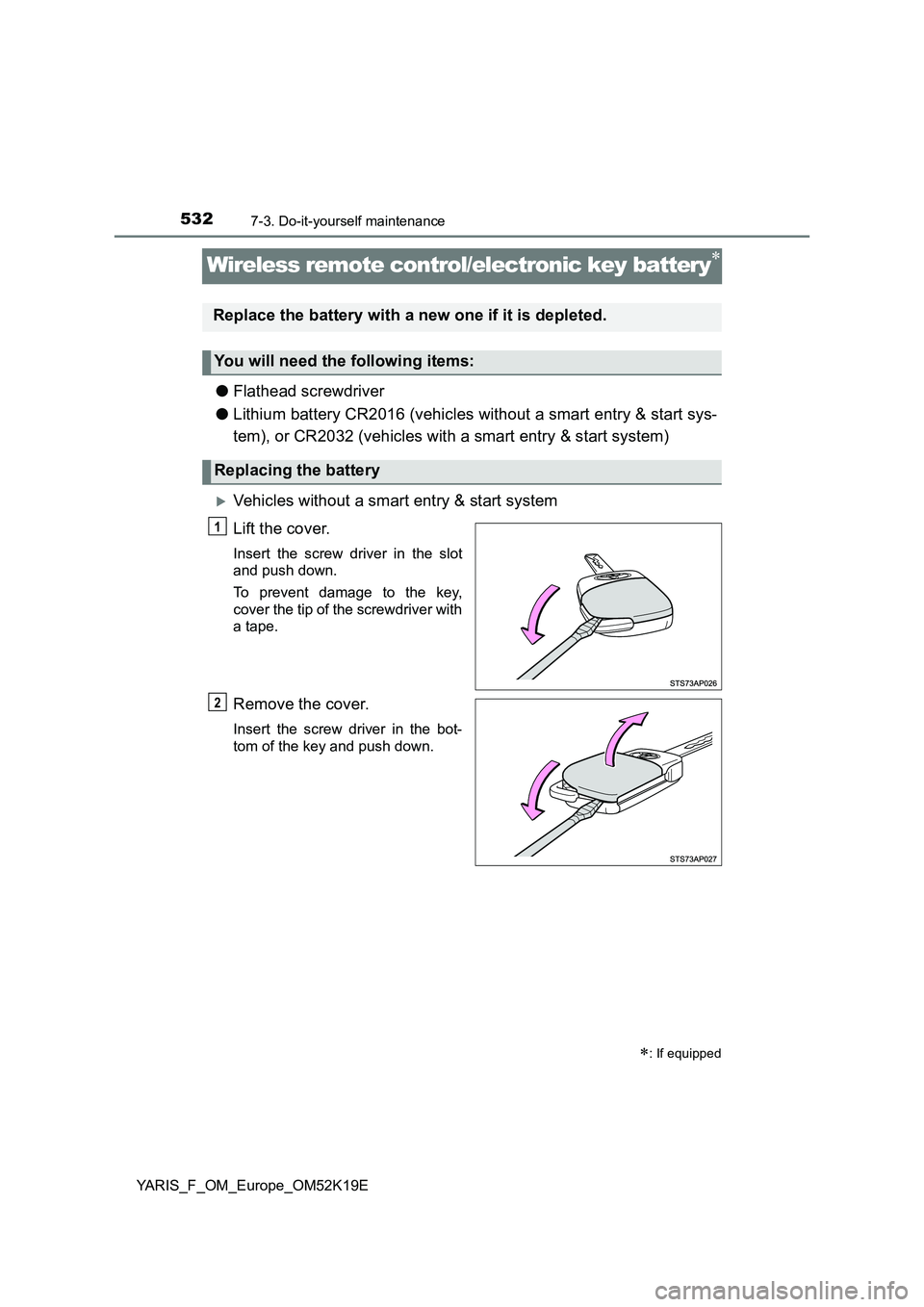
Lift the cover.
Insert the screw driver in the slot
and push down.
To prevent damage to the key,
cover the tip of the screwdriver with
a tape.
Remove the cover.
Insert the screw driver in the bot-
tom of the key and push down.
: If equipped
Replace the battery with a new one if it is depleted.
You will need the following items:
Replacing the battery
1
2
Page 534 of 700
5347-3. Do-it-yourself maintenance
YARIS_F_OM_Europe_OM52K19E
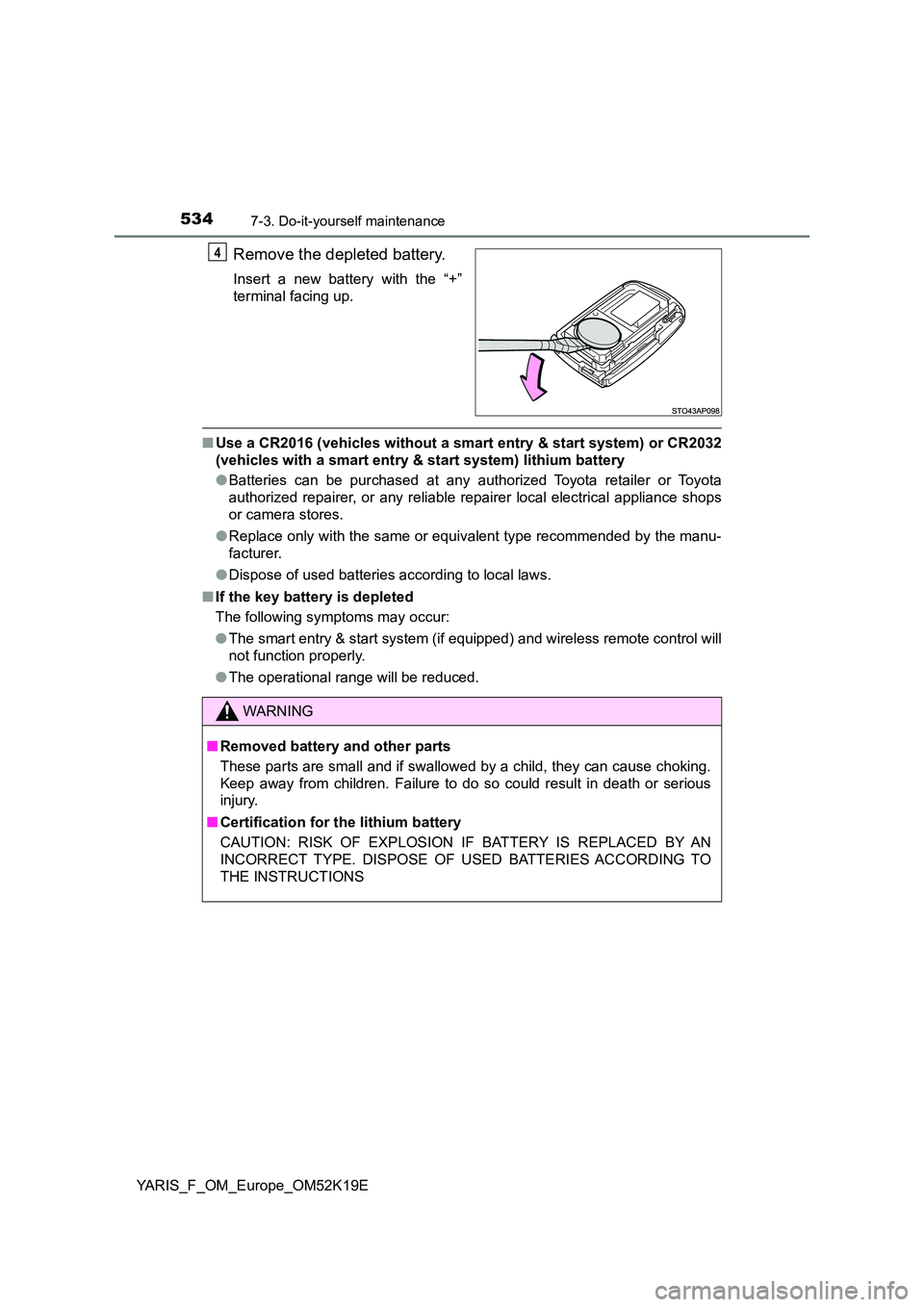
Remove the depleted battery.
Insert a new battery with the “+”
terminal facing up.
■ Use a CR2016 (vehicles without a smart entry & start system) or CR2032
(vehicles with a smart entry & start system) lithium battery
● Batteries can be purchased at any authorized Toyota retailer or Toyota
authorized repairer, or any reliable repairer local electrical appliance shops
or camera stores.
● Replace only with the same or equivalent type recommended by the manu-
facturer.
● Dispose of used batteries according to local laws.
■ If the key battery is depleted
The following symptoms may occur:
● The smart entry & start system (if equipped) and wireless remote control will
not function properly.
● The operational range will be reduced.
4
WARNING
■Removed battery and other parts
These parts are small and if swallowed by a child, they can cause choking.
Keep away from children. Failure to do so could result in death or serious
injury.
■ Certification for the lithium battery
CAUTION: RISK OF EXPLOSION IF BATTERY IS REPLACED BY AN
INCORRECT TYPE. DISPOSE OF USED BATTERIES ACCORDING TO
THE INSTRUCTIONS
Page 535 of 700
5357-3. Do-it-yourself maintenance
7
Maintenance and care
YARIS_F_OM_Europe_OM52K19E
NOTICE
■For normal operation after replacing the battery
Observe the following precautions to prevent accidents:
● Always work with dry hands.
Moisture may cause the battery to rust.
● Do not touch or move any other component inside the remote control.
● Do not bend either of the battery terminals.
Page 627 of 700
6278-2. Steps to take in an emergency
8
When trouble arises
YARIS_F_OM_Europe_OM52K19E
If the electronic key does not operate properly
(vehicles with a smart entry & start system)
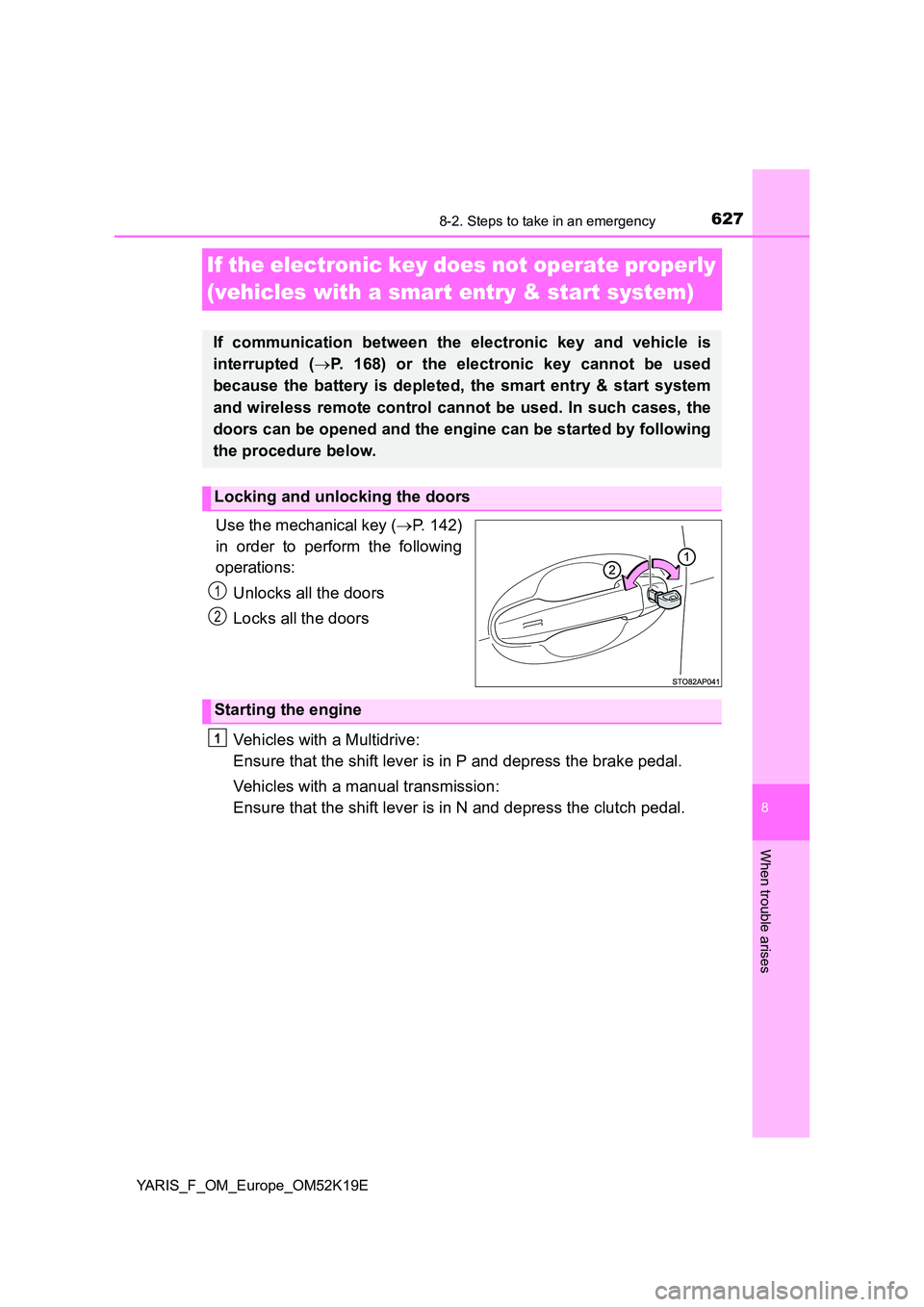
Use the mechanical key ( P. 142)
in order to perform the following
operations:
Unlocks all the doors
Locks all the doors
Vehicles with a Multidrive:
Ensure that the shift lever is in P and depress the brake pedal.
Vehicles with a manual transmission:
Ensure that the shift lever is in N and depress the clutch pedal.
If communication between the electronic key and vehicle is
interrupted ( P. 168) or the electronic key cannot be used
because the battery is depleted, the smart entry & start system
and wireless remote control cannot be used. In such cases, the
doors can be opened and the engine can be started by following
the procedure below.
Locking and unlocking the doors
1
2
Starting the engine
1
Page 633 of 700
6338-2. Steps to take in an emergency
8
When trouble arises
YARIS_F_OM_Europe_OM52K19E
■Starting the engine when the battery is discharged (vehicles with a Multi-
drive)
The engine cannot be started by push-starting.
■ To prevent battery discharge
● Turn off the headlights and the audio system while the engine is stopped.
(Vehicles with a Stop & Start system: except when the engine is stopped by
the Stop & Start system.)
● Turn off any unnecessary electrical components when the vehicle is running
at a low speed for an extended period, such as in heavy traffic.
■ Charging the battery
The electricity stored in the battery will discharge gradually even when the
vehicle is not in use, due to natural discharge and the draining effects of cer-
tain electrical appliances. If the vehicle is left for a long time, the battery may
discharge, and the engine may be unable to start. (The battery recharges
automatically during driving.)
■ Precautions when the battery is discharged
● Vehicles with a smart entry & start system: In some cases, it may not be
possible to unlock the doors using the smart entry & start system when the
battery is discharged. Use the wireless remote control or the mechanical
key to lock or unlock the doors.
● Vehicles with a smart entry & start system: The engine may not start on the
first attempt after the battery has recharged but will start normally after the
second attempt. This is not a malfunction.
● Vehicles with a smart entry & start system: The engine switch mode is mem-
orized by the vehicle. When the battery is reconnected, the system will
return to the mode it was in before the battery was discharged. Before dis-
connecting the battery, turn the engine switch off.
If you are unsure what mode the engine switch was in before the battery dis-
charged, be especially careful when reconnecting the battery.
● Vehicles with Stop & Start system: For a while after the battery terminals
have been disconnected and reconnected, for a while after the battery has
been replaced, the Stop & Start system may not automatically stop the
engine for approximately 5 to 60 minutes.
Page 674 of 700
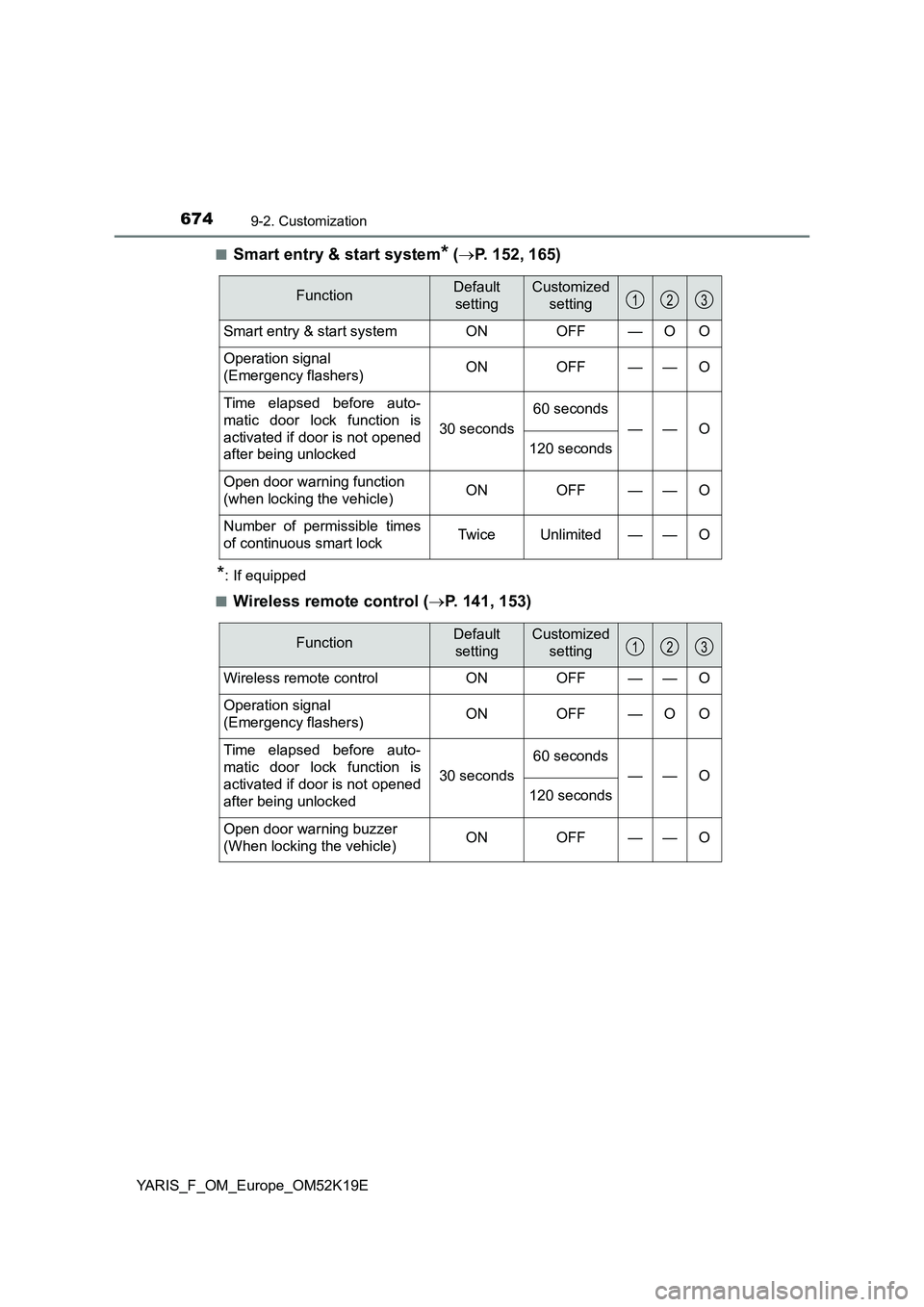
6749-2. Customization
YARIS_F_OM_Europe_OM52K19E
■Smart entry & start system* ( P. 152, 165)
*: If equipped
■Wireless remote control ( P. 141, 153)
FunctionDefault
setting
Customized
setting
Smart entry & start system ON OFF — O O
Operation signal
(Emergency flashers) ON OFF — — O
Time elapsed before auto-
matic door lock function is
activated if door is not opened
after being unlocked
30 seconds
60 seconds
——O
120 seconds
Open door warning function
(when locking the vehicle) ON OFF — — O
Number of permissible times
of continuous smart lock Twice Unlimited — — O
123
FunctionDefault
setting
Customized
setting
Wireless remote control ON OFF — — O
Operation signal
(Emergency flashers) ON OFF — O O
Time elapsed before auto-
matic door lock function is
activated if door is not opened
after being unlocked
30 seconds
60 seconds
——O
120 seconds
Open door warning buzzer
(When locking the vehicle) ON OFF — — O
123
Page 687 of 700
687Alphabetical index
YARIS_F_OM_Europe_OM52K19E
Dimensions .............................. 646
Display
Drive information ........... 121, 127
Fuel consumption
information .......................... 135
Multi-information
display ........................ 120, 125
RSA (Road Sign Assist) ........ 322
Warning messages ............... 576
Do-it-yourself maintenance .... 480
Door lock
Back door .............................. 159
Side doors ............................. 152
Smart entry & start system.... 165
Wireless remote control ........ 141
Doors
Back door .............................. 159
Door glasses ......................... 214
Door lock ....................... 152, 159
Open door warning buzzer.... 166
Open door warning light ........ 580
Outside rear view mirrors ...... 211
Rear door child-protector ...... 157
Side doors ............................. 152
Side windows ........................ 214
Double locking system............ 102
Driver’s seat belt reminder
light ......................................... 580
Driving ...................................... 220
Break-in tips .......................... 223
Correct driving posture............ 34
Procedures............................ 220
Winter drive tips .................... 355
Eco Driving Indicator Light..... 112
Electric Power Steering
(EPS)....................................... 348
Function ................................ 348
Warning light ......................... 577
Electronic key .......................... 140
Battery-saving function ......... 167
If the electronic key does not
operate properly ................. 627
Replacing the battery ............ 532
Emergency brake signal ......... 348
Emergency flashers ................ 564
Emergency, in case of
If a warning message
is displayed......................... 576
If the electronic key does
not operate properly ........... 627
If the engine will not start ...... 625
If the vehicle battery is
discharged .......................... 630
If the warning buzzer
sounds................................ 576
If the warning light
turns on .............................. 576
If you have a flat tire ..... 592, 610
If you lose your keys ............. 143
If you run out of fuel and
the engine stalls ................. 641
If you think something is
wrong.................................. 574
If your vehicle becomes
stuck ................................... 643
E