Power TOYOTA YARIS 2019 Service Manual
[x] Cancel search | Manufacturer: TOYOTA, Model Year: 2019, Model line: YARIS, Model: TOYOTA YARIS 2019Pages: 700, PDF Size: 65.2 MB
Page 397 of 700
3975-6. Using Bluetooth® devices
5
Audio system
YARIS_F_OM_Europe_OM52K19E
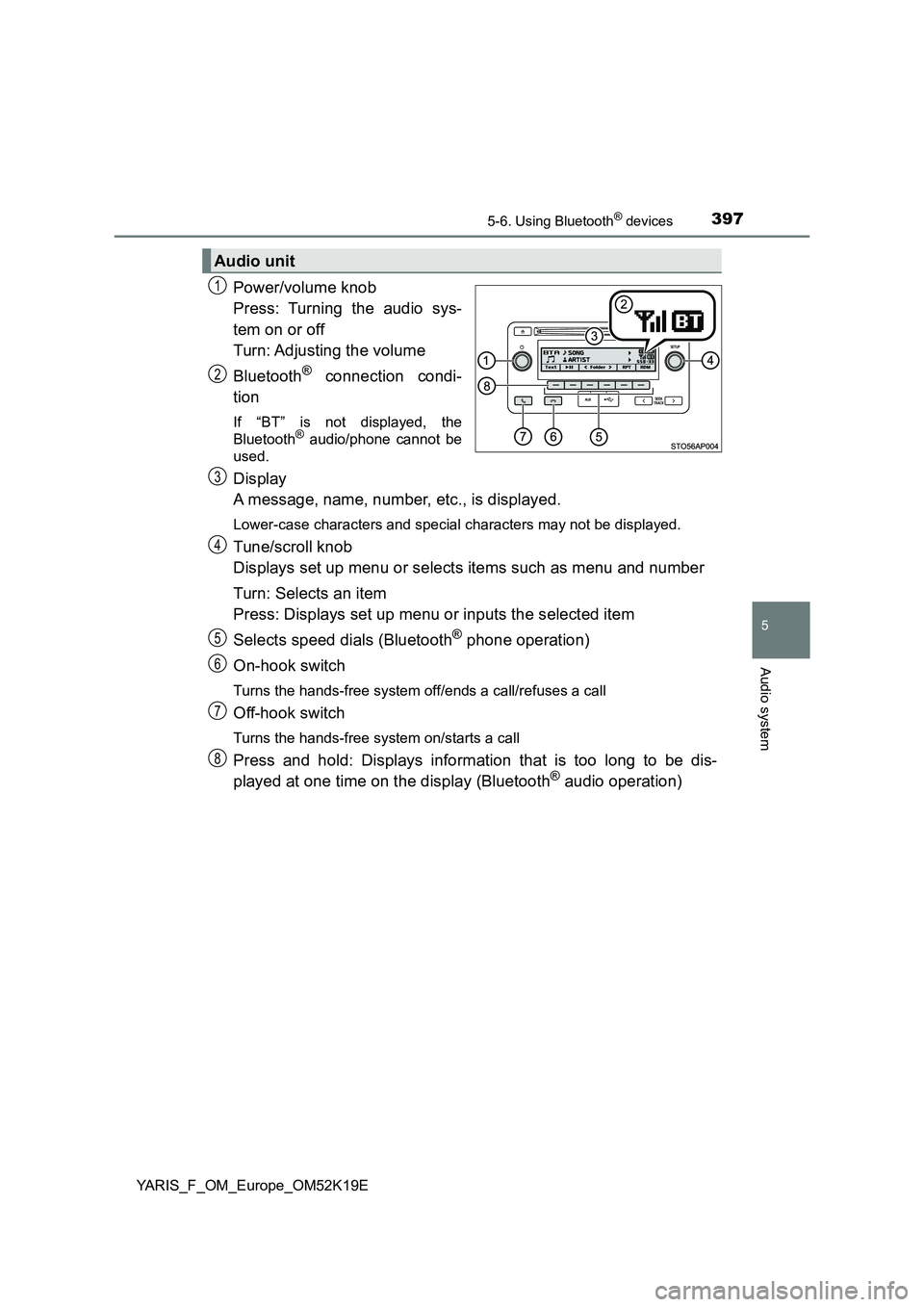
Power/volume knob
Press: Turning the audio sys-
tem on or off
Turn: Adjusting the volume
Bluetooth® connection condi-
tion
If “BT” is not displayed, the
Bluetooth® audio/phone cannot be
used.
Display
A message, name, number, etc., is displayed.
Lower-case characters and special characters may not be displayed.
Tune/scroll knob
Displays set up menu or selects items such as menu and number
Turn: Selects an item
Press: Displays set up menu or inputs the selected item
Selects speed dials (Bluetooth® phone operation)
On-hook switch
Turns the hands-free system off/ends a call/refuses a call
Off-hook switch
Turns the hands-free system on/starts a call
Press and hold: Displays information that is too long to be dis-
played at one time on the display (Bluetooth® audio operation)
Audio unit
1
2
3
4
5
6
7
8
Page 399 of 700
3995-6. Using Bluetooth® devices
5
Audio system
YARIS_F_OM_Europe_OM52K19E
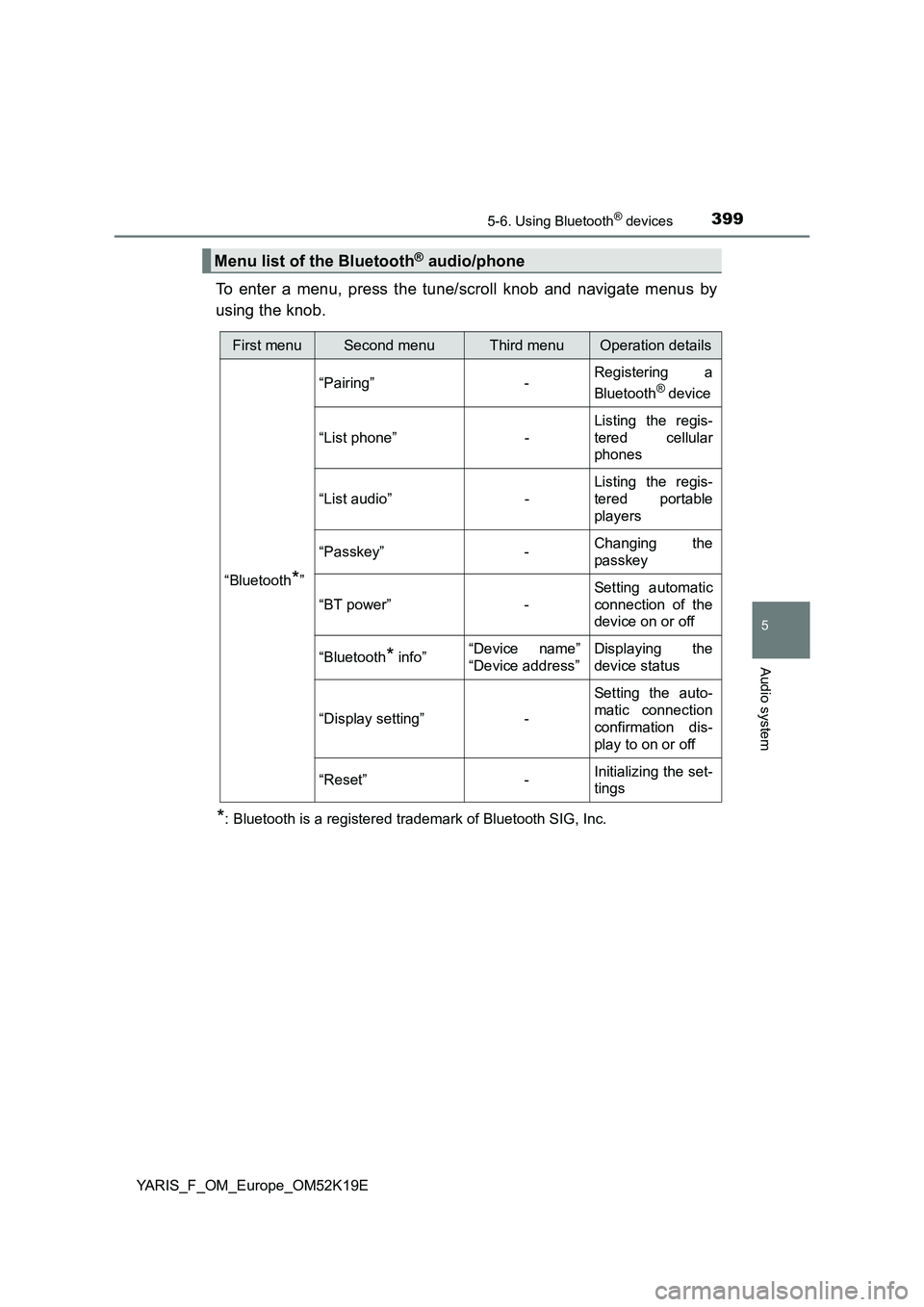
To enter a menu, press the tune/scroll knob and navigate menus by
using the knob.
*: Bluetooth is a registered trademark of Bluetooth SIG, Inc.
Menu list of the Bluetooth® audio/phone
First menuSecond menuThird menuOperation details
“Bluetooth*”
“Pairing” - Registering a
Bluetooth® device
“List phone” -
Listing the regis-
tered cellular
phones
“List audio” -
Listing the regis-
tered portable
players
“Passkey” - Changing the
passkey
“BT power” -
Setting automatic
connection of the
device on or off
“Bluetooth* info” “Device name”
“Device address”
Displaying the
device status
“Display setting” -
Setting the auto-
matic connection
confirmation dis-
play to on or off
“Reset” - Initializing the set-
tings
Page 406 of 700
4065-7. “SETUP” menu
YARIS_F_OM_Europe_OM52K19E
If “BT power” is set to on, the registered device will be connected
automatically when the engine switch is turned to the “ACC” position
(vehicles without a smart entry & start system) or ACCESSORY mode
(vehicles with a smart entry & start system).
Select “BT power” using the tune/scroll knob. ( P. 399)
Select “On” or “Off” using the knob.
Select “Bluetooth* info” using the tune/scroll knob. ( P. 399)
● Displaying the device name
Select “Device name” using the tune/scroll knob.
● Displaying the device address
Select “Device address” using the tune/scroll knob.
*: Bluetooth is a registered trademark of Bluetooth SIG, Inc.
If the “Display setting” is set to on, the Bluetooth phone/portable
player connection status will be displayed when the engine switch is
turned to the “ACC” or “ON” position (vehicles without a smart entry &
start system), or ACCESSORY or IGNITION ON mode (vehicles with
a smart entry & start system).
Select “Display setting” using the tune/scroll knob. ( P. 399)
Select “On” or “Off” using the knob.
Setting automatic connection of the device on or off
Displaying the device status
Setting the automatic connection confirmation display to on or off
1
2
1
2
Page 412 of 700
4125-8. Bluetooth® Audio
YARIS_F_OM_Europe_OM52K19E
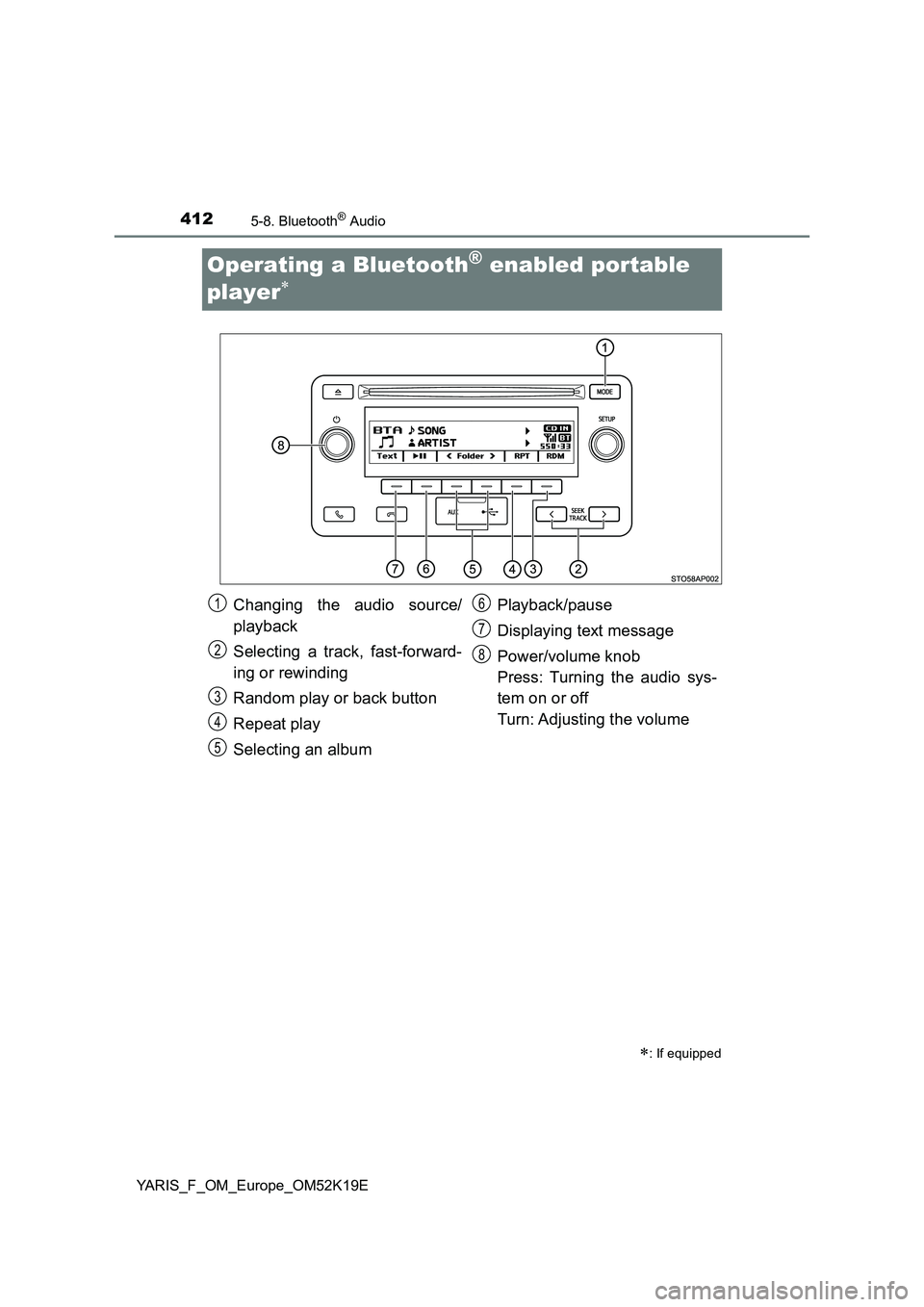
Operating a Bluetooth® enabled portable
player
: If equipped
Changing the audio source/
playback
Selecting a track, fast-forward-
ing or rewinding
Random play or back button
Repeat play
Selecting an album
Playback/pause
Displaying text message
Power/volume knob
Press: Turning the audio sys-
tem on or off
Turn: Adjusting the volume
1
2
3
4
5
6
7
8
Page 417 of 700
4175-9. Bluetooth® Phone
5
Audio system
YARIS_F_OM_Europe_OM52K19E
Receiving a phone call
Press the off-hook switch.
Press the on-hook switch.
Press the off-hook switch.
Pressing the off-hook switch again returns you to the previous call.
To decrease the volume: Turn the power/volume knob counterclock-
wise.
To increase the volume: Turn the power/volume knob clockwise.
: If equipped
Answering the phone
Refusing the call
Receiving a call when on another call
Adjusting the ring tone volume when receiving a call
Page 418 of 700
4185-9. Bluetooth® Phone
YARIS_F_OM_Europe_OM52K19E
Speaking on the phone
A call can be transferred between the cellular phone and system while
dialing, receiving a call, or during a call. Use one of the following
methods:
a. Operate the cellular phone.
Refer to the manual that comes with the cellular phone for the operation
of the phone.
b. Press the * (“Phone”).
*: This operation can be performed only when transferring a call from the
cellular phone to the system during a call.
Press (“Mute”).
Press [0-9] and using the tune/scroll knob input the desired
digits.
To decrease the volume: Turn the power/volume knob counterclock-
wise.
To increase the volume: Turn the power/volume knob clockwise.
: If equipped
Transferring a call
Muting your voice
Inputting digits
Setting call volume
Page 431 of 700
431
6Interior features
YARIS_F_OM_Europe_OM52K19E
6-1. Using the air conditioning
system and defogger
Manual air conditioning
system ............................. 432
Automatic air conditioning
system ............................. 440
Seat heaters ...................... 450
6-2. Using the interior lights
Interior lights list................. 452
• Interior light.................... 452
• Personal lights ............... 453
6-3. Using the storage features
List of storage features ...... 454
• Glove box ...................... 455
• Cup holders ................... 456
• Bottle holders ................ 457
• Auxiliary box .................. 458
Luggage compartment
features............................ 459
6-4. Using the other interior
features
Other interior features ........ 462
• Sun visors...................... 462
• Vanity mirrors ................ 462
• Portable ashtray ............ 464
• Cigarette lighter ............. 465
• Power outlet .................. 466
• Armrest .......................... 467
• Panoramic roof shade ... 467
• Assist grips .................... 468
Page 466 of 700
4666-4. Using the other interior features
YARIS_F_OM_Europe_OM52K19E
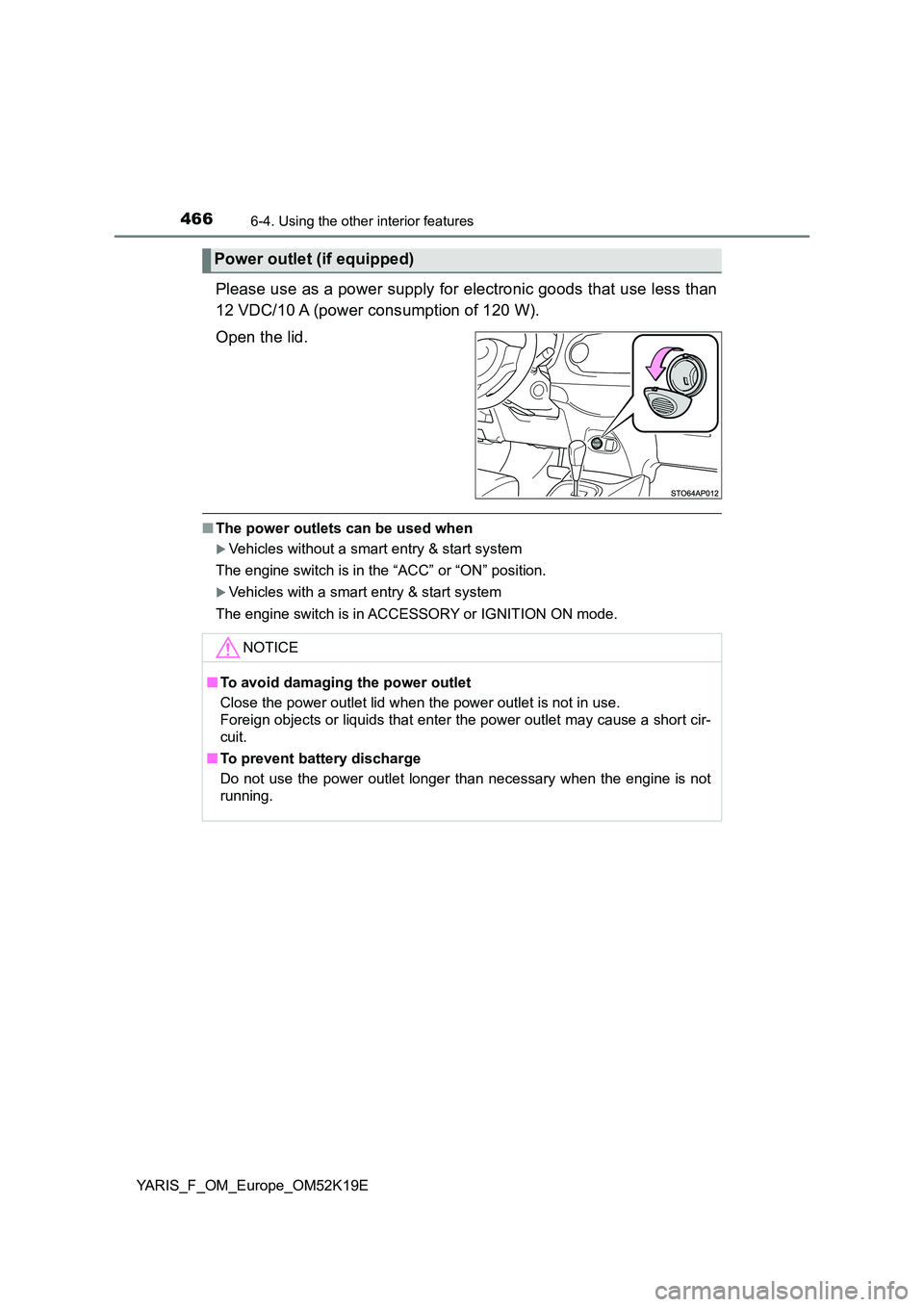
Please use as a power supply for electronic goods that use less than
12 VDC/10 A (power consumption of 120 W).
Open the lid.
■ The power outlets can be used when
Vehicles without a smart entry & start system
The engine switch is in the “ACC” or “ON” position.
Vehicles with a smart entry & start system
The engine switch is in ACCESSORY or IGNITION ON mode.
Power outlet (if equipped)
NOTICE
■ To avoid damaging the power outlet
Close the power outlet lid when the power outlet is not in use.
Foreign objects or liquids that enter the power outlet may cause a short cir-
cuit.
■ To prevent battery discharge
Do not use the power outlet longer than necessary when the engine is not
running.
Page 478 of 700
4787-2. Maintenance
YARIS_F_OM_Europe_OM52K19E
■Where to go for the maintenance service?
In order to maintain your vehicle in the best possible condition, Toyota recom-
mends that all repairs and service operations be carried out by authorized
Toyota retailers or Toyota authorized repairers, or any reliable repairers. For
repairs and services covered by your warranty, please visit an authorized
Toyota retailer or repairer, who will use genuine Toyota parts in repairing any
difficulties you may encounter. There can also be advantages in utilizing
authorized Toyota retailers or repairers for non-warranty repairs and services,
as members of the Toyota network will be able to expertly assist you with any
difficulties you may encounter.
Your Toyota retailer or Toyota authoriz ed repairer, or any reliable repairer will
perform all of the scheduled maintenance on your vehicle reliably and eco-
nomically due to their experience with Toyota vehicles.
■ Does your vehicle need repairs?
Be on the alert for changes in performance and sounds, and visual tip-offs
that indicate service is needed. Some important clues are:
● Engine misfire, stumbling or pinging
● Appreciable loss of power
● Strange engine noises
● A fluid leak under the vehicle (However, water dripping from the air condi-
tioning system after use is normal.)
● Change in exhaust sound (This may indicate a dangerous carbon monoxide
leak. Drive with the windows open and have the exhaust system checked
immediately.)
● Flat-looking tires, excessive tire squeal when cornering, uneven tire wear
● Vehicle pulls to one side when driven straight on a level road
● Strange noises related to suspension movement
● Loss of brake effectiveness, spongy feeling brake pedal or clutch pedal
(vehicles with a manual transmission), pedal almost touches the floor, vehi-
cle pulls to one side when braking
● Engine coolant temperature continually higher than normal
If you notice any of these clues, take your vehicle to any authorized Toyota
retailer or Toyota authorized repairer, or any reliable repairer as soon as pos-
sible. Your vehicle may need adjustment or repair.
Page 499 of 700
4997-3. Do-it-yourself maintenance
7
Maintenance and care
YARIS_F_OM_Europe_OM52K19E
■Before recharging
When recharging, the battery produces hydrogen gas which is flammable and
explosive. Therefore, observe the following before recharging:
● If recharging with the battery installed on the vehicle, be sure to disconnect
the ground cable.
● Make sure the power switch on the charger is off when connecting and dis-
connecting the charger cables to the battery.
■ After recharging/reconnecting the battery (vehicles with a smart entry &
start system)
● Unlocking the doors using the smart entry & start system may not be possi-
ble immediately after reconnecting the battery. If this happens, use the wire-
less remote control or the mechanical key to lock/unlock the doors.
● Start the engine with the engine switch in ACCESSORY mode. The engine
may not start with the engine switch turned off. However, the engine will
operate normally from the second attempt.
● The engine switch mode is recorded by the vehicle. If the battery is recon-
nected, the vehicle will return the engine switch mode to the status it was in
before the battery was disconnected. Make sure to turn off the engine
before disconnect the battery. Take extra care when connecting the battery
if the engine switch mode prior to discharge is unknown.
If the engine will not start even after multiple attempts, contact any authorized
Toyota retailer or Toyota authorized repairer, or any reliable repairer.
WARNING
■ Chemicals in the battery
Batteries contain poisonous and corrosive sulfuric acid and may produce
hydrogen gas which is flammable and explosive. To reduce the risk of death
or serious injury, take the following precautions while working on or near the
battery:
● Do not cause sparks by touching the battery terminals with tools.
● Do not smoke or light a match near the battery.
● Avoid contact with eyes, skin and clothes.
● Never inhale or swallow electrolyte.
● Wear protective safety glasses when working near the battery.
● Keep children away from the battery.