engine TOYOTA YARIS 2019 Service Manual
[x] Cancel search | Manufacturer: TOYOTA, Model Year: 2019, Model line: YARIS, Model: TOYOTA YARIS 2019Pages: 700, PDF Size: 65.2 MB
Page 167 of 700
1673-2. Opening, closing and locking the doors
3
Operation of each component
YARIS_F_OM_Europe_OM52K19E
*: Vehicles with a Multidrive and monochrome display only
■ When the smart entry & start system indicator flashes in yellow (vehicles
with monochrome display) or “Check entry & start system.” is displayed
on the multi-information displ ay (vehicles with color display)
The system may be malfunctioning. Have the vehicle inspected by any autho-
rized Toyota retailer or Toyota authorized repairer, or any reliable repairer
immediately.
■ Battery-saving function
The battery-saving function will be activated in order to prevent the electronic
key battery and the vehicle battery from being discharged while the vehicle is
not in operation for a long time.
● In the following situations, the smart entry & start system may take some
time to unlock the doors.
• The electronic key has been left in an area of approximately 2 m (6 ft.) of
the outside of the vehicle for 10 minutes or longer.
• The smart entry & start system has not been used for 5 days or longer.
● If the smart entry & start system has not been used for 14 days or longer,
the doors cannot be unlocked at any doors except the driver’s door.
In this case, take hold of the driver’s door handle, or use the wireless remote
control or the mechanical key, to unlock the doors.
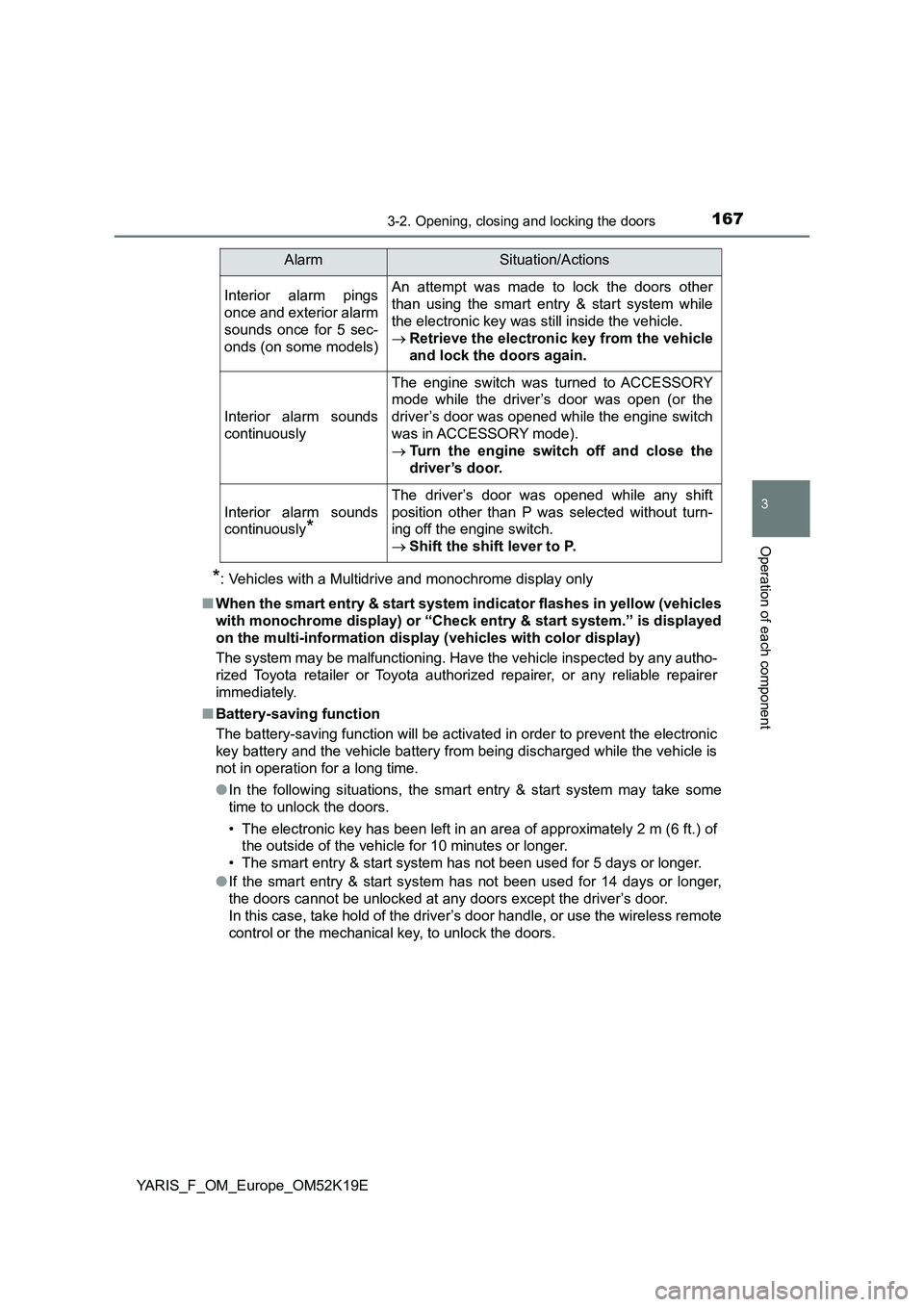
Interior alarm pings
once and exterior alarm
sounds once for 5 sec-
onds (on some models)
An attempt was made to lock the doors other
than using the smart entry & start system while
the electronic key was still inside the vehicle.
Retrieve the electronic key from the vehicle
and lock the doors again.
Interior alarm sounds
continuously
The engine switch was turned to ACCESSORY
mode while the driver’s door was open (or the
driver’s door was opened while the engine switch
was in ACCESSORY mode).
Turn the engine switch off and close the
driver’s door.
Interior alarm sounds
continuously*
The driver’s door was opened while any shift
position other than P was selected without turn-
ing off the engine switch.
Shift the shift lever to P.
AlarmSituation/Actions
Page 168 of 700
1683-2. Opening, closing and locking the doors
YARIS_F_OM_Europe_OM52K19E
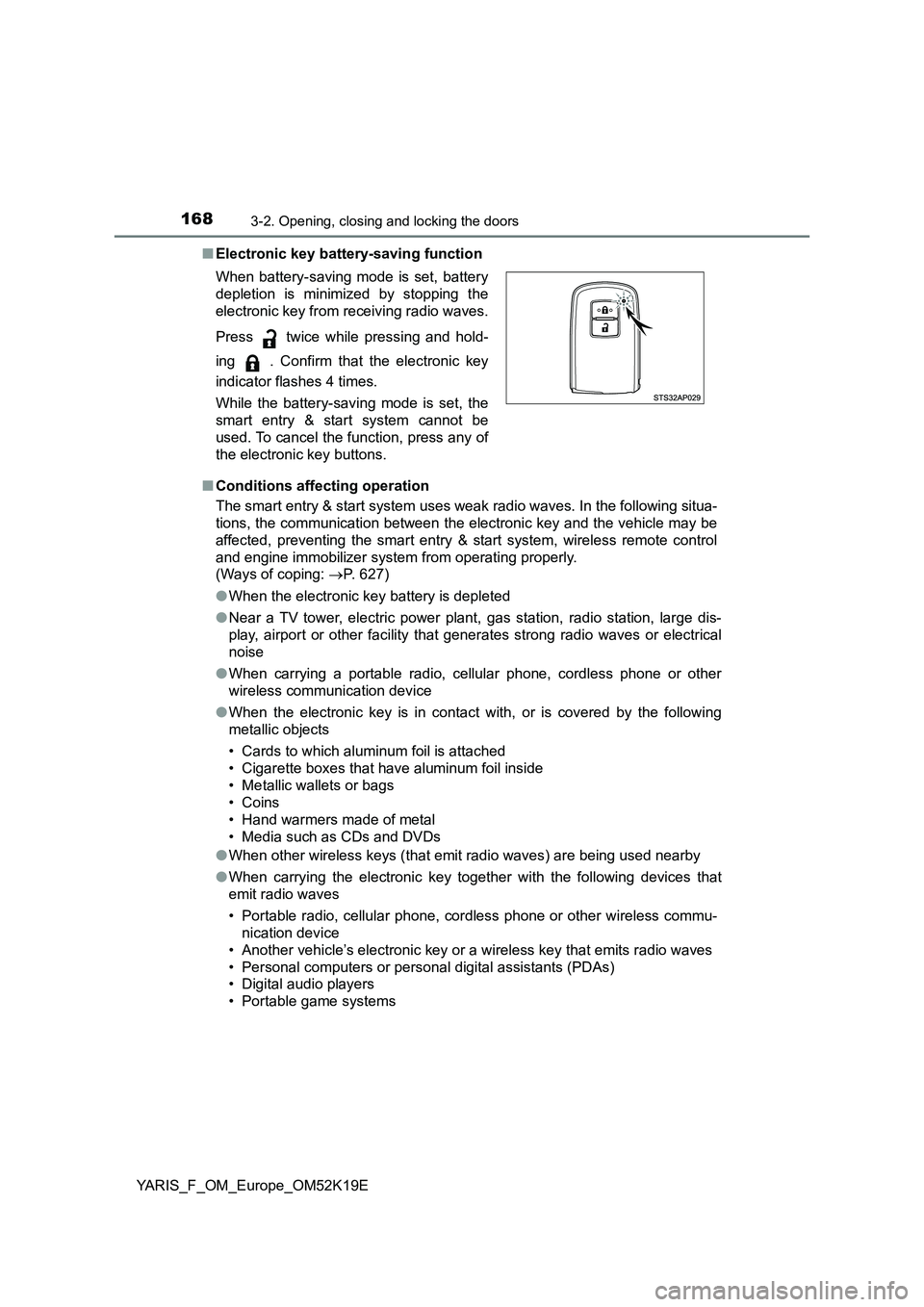
■ Electronic key battery-saving function
■ Conditions affecting operation
The smart entry & start system uses weak radio waves. In the following situa-
tions, the communication between the electronic key and the vehicle may be
affected, preventing the smart entry & start system, wireless remote control
and engine immobilizer system from operating properly.
(Ways of coping: P. 627)
● When the electronic key battery is depleted
● Near a TV tower, electric power plant, gas station, radio station, large dis-
play, airport or other facility that generates strong radio waves or electrical
noise
● When carrying a portable radio, cellular phone, cordless phone or other
wireless communication device
● When the electronic key is in contact with, or is covered by the following
metallic objects
• Cards to which aluminum foil is attached
• Cigarette boxes that have aluminum foil inside
• Metallic wallets or bags
• Coins
• Hand warmers made of metal
• Media such as CDs and DVDs
● When other wireless keys (that emit radio waves) are being used nearby
● When carrying the electronic key together with the following devices that
emit radio waves
• Portable radio, cellular phone, cordless phone or other wireless commu-
nication device
• Another vehicle’s electronic key or a wireless key that emits radio waves
• Personal computers or pers onal digital assistants (PDAs)
• Digital audio players
• Portable game systems
When battery-saving mode is set, battery
depletion is minimized by stopping the
electronic key from receiving radio waves.
Press twice while pressing and hold-
ing . Confirm that the electronic key
indicator flashes 4 times.
While the battery-saving mode is set, the
smart entry & start system cannot be
used. To cancel the function, press any of
the electronic key buttons.
Page 169 of 700
1693-2. Opening, closing and locking the doors
3
Operation of each component
YARIS_F_OM_Europe_OM52K19E
● If window tint with a metallic content or metallic objects are attached to the
rear window
● When the electronic key is placed near a battery charger or electronic
devices
■ Notes for the entry function
● Even when the electronic key is within the effective range (detection areas),
the system may not operate properly in the following cases:
• The electronic key is too close to the window or outside door handle, near
the ground, or in a high place w hen the doors are locked or unlocked.
• The electronic key is near the ground or in a high place, or too close to
the rear bumper center when the back door is opened.
• The electronic key is on the instrument panel, luggage cover (if equipped)
or floor, or in the door pockets, glove box, accessory box of the instru-
ment panel, or in/near the front cup holder when the engine is started or
engine switch modes are changed.
● Do not leave the electronic key on top of the instrument panel or near the
door pockets when exiting the vehicle. Depending on the radio wave recep-
tion conditions, it may be detected by the antenna outside the cabin and the
door will become lockable from the out side, possibly trapping the electronic
key inside the vehicle.
● As long as the electronic key is within the effective range, the doors may be
locked or unlocked by anyone.
● Even if the electronic key is not inside the vehicle, it may be possible to start
the engine if the electronic key is near the window.
● The doors may unlock if a large amount of water splashes on the door han-
dle, such as in the rain or in a car wash when the electronic key is within the
effective range. (The door will automatically be locked after approximately
30 seconds if the doors are not opened and closed.)
● If the wireless remote control is used to lock the doors when the electronic
key is near the vehicle, there is a possibility that the door may not be
unlocked by the entry function. (Use the wireless remote control to unlock
the doors.)
● Touching the door lock or unlock sensor while wearing gloves may prevent
lock or unlock operation.
● When the lock operation is performed using the lock sensor, recognition sig-
nals will be shown up to two consecutive times. After this, no recognition
signals will be given.
● If the door handle becomes wet while the electronic key is within the effec-
tive range, the door may lock and unlock repeatedly. In that case, follow the
following correction procedures to wash the vehicle:
• Place the electronic key in a location 2 m (6 ft.) or more away from the
vehicle. (Take care to ensure that the key is not stolen.)
• Set the electronic key to battery-saving mode to disable the smart entry &
start system. ( →P. 168)
Page 171 of 700

1713-2. Opening, closing and locking the doors
3
Operation of each component
YARIS_F_OM_Europe_OM52K19E
■ To operate the system properly
Make sure to carry the electronic key when operating the system. Do not get
the electronic key too close to the vehicle when operating the system from the
outside of the vehicle.
Depending on the position and holding condition of the electronic key, the key
may not be detected correctly and the system may not operate properly. (The
alarm may go off accidentally, or the door lock prevention function may not
operate.)
■ If the smart entry & start system does not operate properly
● Locking and unlocking the doors: Use the mechanical key. (P. 627)
● Starting the engine: P. 627
■ Customization
Settings (e. g. smart entry & start system) can be changed.
(Customizable features: P. 671)
■ If the smart entry & start system has been deactivated in a customized
setting
● Locking and unlocking the doors:
Use the wireless remote control or mechanical key. ( P. 153, 627)
● Starting the engine and changing engine switch modes: P. 627
● Stopping the engine: P. 248
Page 210 of 700
2103-4. Adjusting the steering wheel and mirrors
YARIS_F_OM_Europe_OM52K19E
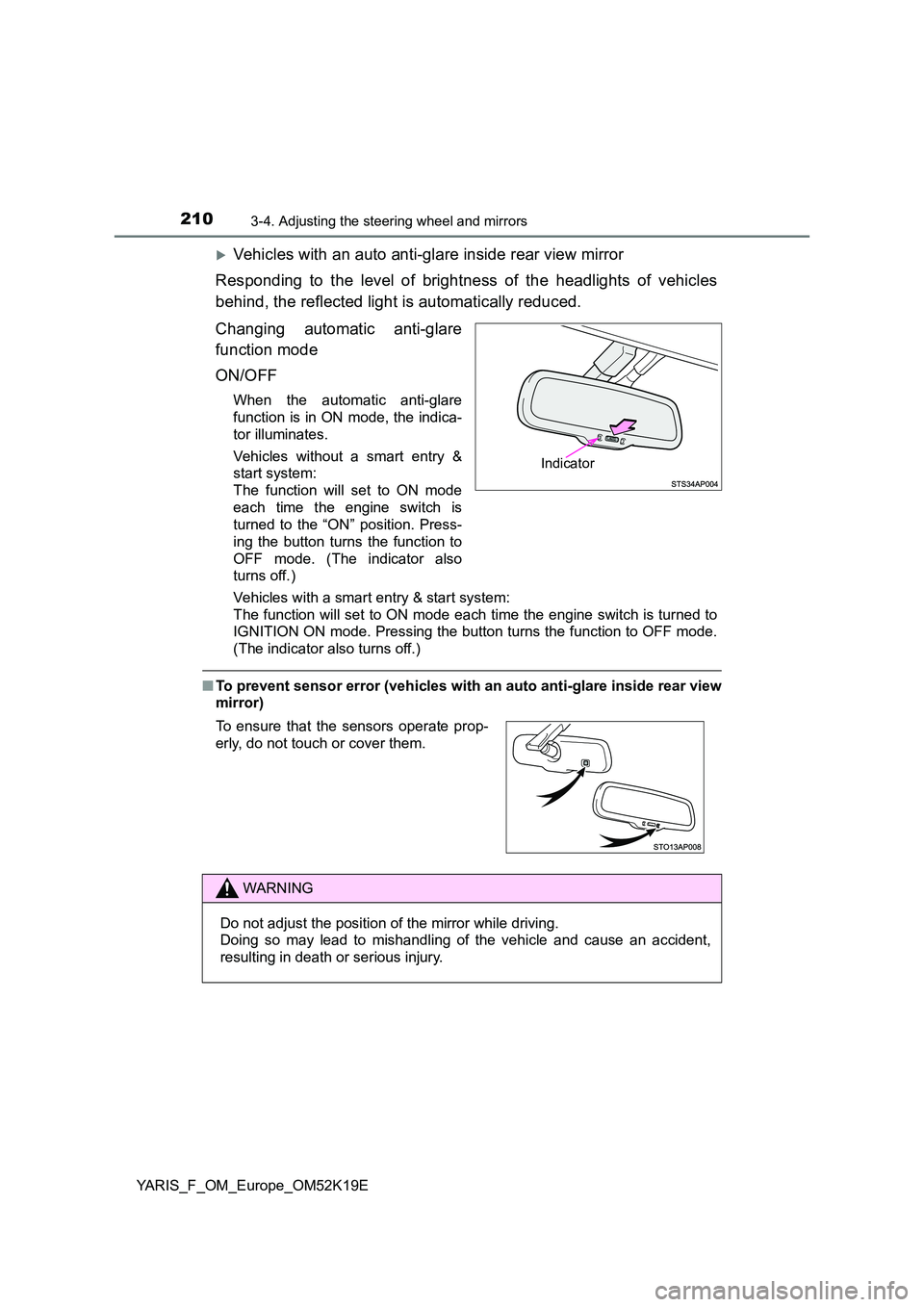
Vehicles with an auto anti-glare inside rear view mirror
Responding to the level of brightness of the headlights of vehicles
behind, the reflected light is automatically reduced.
Changing automatic anti-glare
function mode
ON/OFF
When the automatic anti-glare
function is in ON mode, the indica-
tor illuminates.
Vehicles without a smart entry &
start system:
The function will set to ON mode
each time the engine switch is
turned to the “ON” position. Press-
ing the button turns the function to
OFF mode. (The indicator also
turns off.)
Vehicles with a smart entry & start system:
The function will set to ON mode each time the engine switch is turned to
IGNITION ON mode. Pressing the button turns the function to OFF mode.
(The indicator also turns off.)
■ To prevent sensor error (vehicles with an auto anti-glare inside rear view
mirror)
Indicator
To ensure that the sensors operate prop-
erly, do not touch or cover them.
WARNING
Do not adjust the position of the mirror while driving.
Doing so may lead to mishandling of the vehicle and cause an accident,
resulting in death or serious injury.
Page 212 of 700
2123-4. Adjusting the steering wheel and mirrors
YARIS_F_OM_Europe_OM52K19E
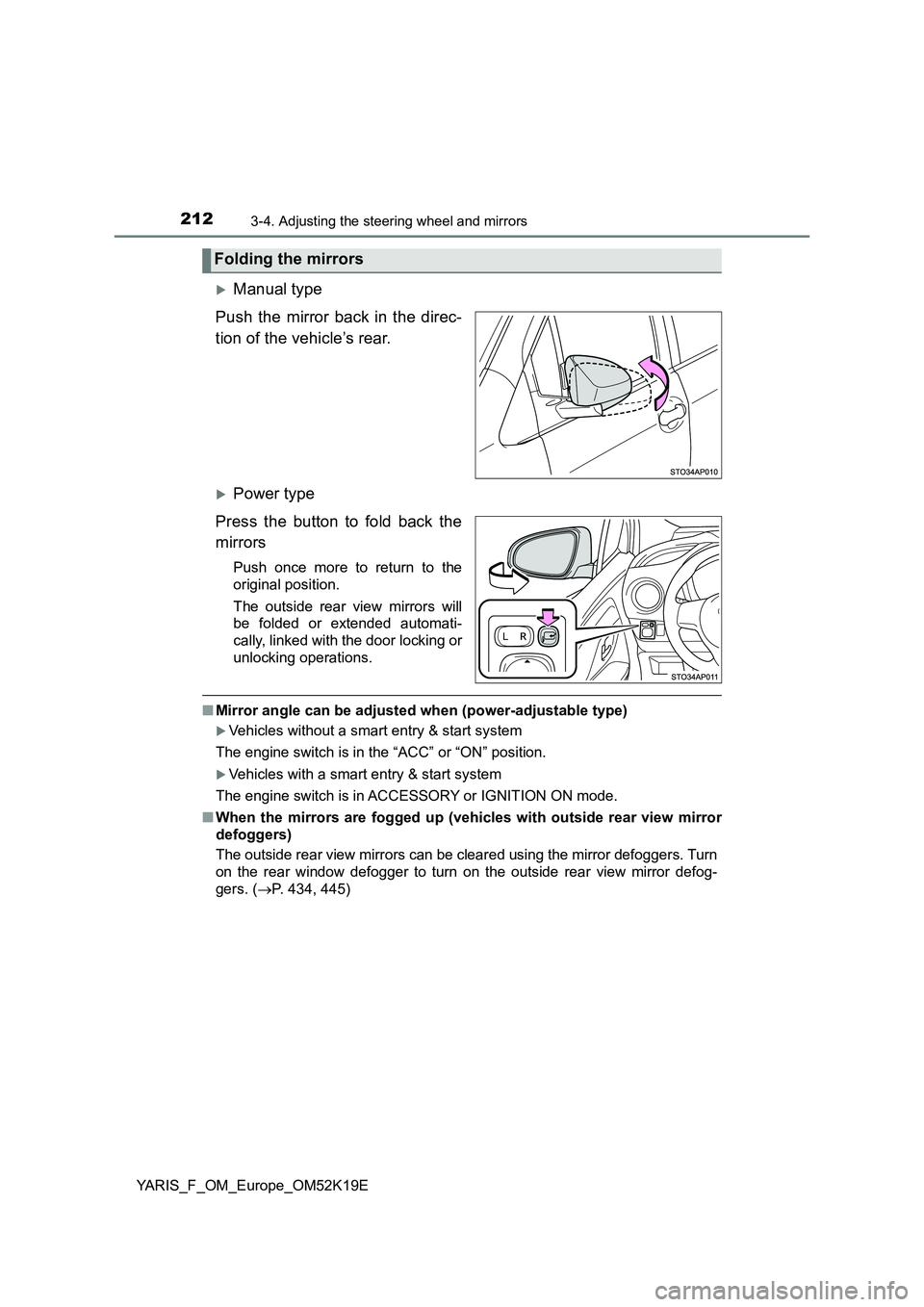
Manual type
Push the mirror back in the direc-
tion of the vehicle’s rear.
Power type
Press the button to fold back the
mirrors
Push once more to return to the
original position.
The outside rear view mirrors will
be folded or extended automati-
cally, linked with the door locking or
unlocking operations.
■ Mirror angle can be adjusted when (power-adjustable type)
Vehicles without a smart entry & start system
The engine switch is in the “ACC” or “ON” position.
Vehicles with a smart entry & start system
The engine switch is in ACCESSORY or IGNITION ON mode.
■ When the mirrors are fogged up (vehicles with outside rear view mirror
defoggers)
The outside rear view mirrors can be cleared using the mirror defoggers. Turn
on the rear window defogger to turn on the outside rear view mirror defog-
gers. ( P. 434, 445)
Folding the mirrors
Page 215 of 700
2153-5. Opening and closing the windows
3
Operation of each component
YARIS_F_OM_Europe_OM52K19E
■The power windows can be operated when
Vehicles without a smart entry & start system
The engine switch is in the “ON” position.
Vehicles with a smart entry & start system
The engine switch is in IGNITION ON mode.
■ Operating the power windows after turning the engine off
Vehicles without a smart entry & start system
The power windows can be operated for approximately 45 seconds even
after the engine switch is turned to the “ACC” or “LOCK” position. They can-
not, however, be operated once either front door is opened.
Vehicles with a smart entry & start system
The power windows can be operated for approximately 45 seconds even
after the engine switch is turned to ACCESSORY mode or turned off. They
cannot, however, be operated once either front door is opened.
■ Jam protection function (driver’s window only)
If an object becomes caught between the window and the window frame, win-
dow travel is stopped and the window is opened slightly.
Page 216 of 700
2163-5. Opening and closing the windows
YARIS_F_OM_Europe_OM52K19E
■ When the power window does not close normally
If the jam protection function is operating abnormally and a window cannot be
closed, perform the following operations using the power window switch on
the driver’s door.
● After stopping the vehicle, the window can be closed by holding the power
window switch in the one-touch closing position while the engine switch is
turned to the “ON” position (vehicles without a smart entry & start system) or
IGNITION ON mode (vehicles with a smart entry & start system).
● If the window still cannot be closed even by carrying out the operation as
explained above, initialize the function by performing the following proce-
dure.
Hold the power window switch in the one-touch closing position. Continue
holding the switch for a further 6 seconds after the window has closed.
Hold the power window switch in the one-touch opening position. Con-
tinue holding the switch for a further 2 seconds after the window has
opened completely.
Hold the power window switch in the one-touch closing position once
again. Continue holding the switch for a further 2 seconds after the win-
dow has closed.
If you release the switch while the window is moving, start again from the
beginning.
If the window continues to close but then re-open slightly even after perform-
ing the above procedure correctly, have the vehicle inspected by any autho-
rized Toyota retailer or Toyota authorized repairer, or any reliable repairer.
1
2
3
Page 217 of 700
2173-5. Opening and closing the windows
3
Operation of each component
YARIS_F_OM_Europe_OM52K19E
WARNING
Observe the following precautions.
Failure to do so may result in death or serious injury.
■ Closing the windows
● The driver is responsible for all the power window operations, including the
operation for the passengers. In order to prevent accidental operation,
especially by a child, do not let a child operate the power windows. It is
possible for children and other passengers to have body parts caught in
the power window. Also, when riding with a child, it is recommended to use
the window lock switch. ( P. 214)
● Check to make sure that all passengers do not have any part of their body
in a position where it could be caught when a window is being operated.
● When exiting the vehicle, turn the engine switch off, carry the key and exit
the vehicle along with the child. T here may be accidental operation, due to
mischief, etc., that may possibly lead to an accident.
■ Jam protection function (driver’s window only)
● Never use any part of your body to intentionally activate the jam protection
function.
● The jam protection function may not work if something gets caught just
before the window fully closes.
Page 219 of 700
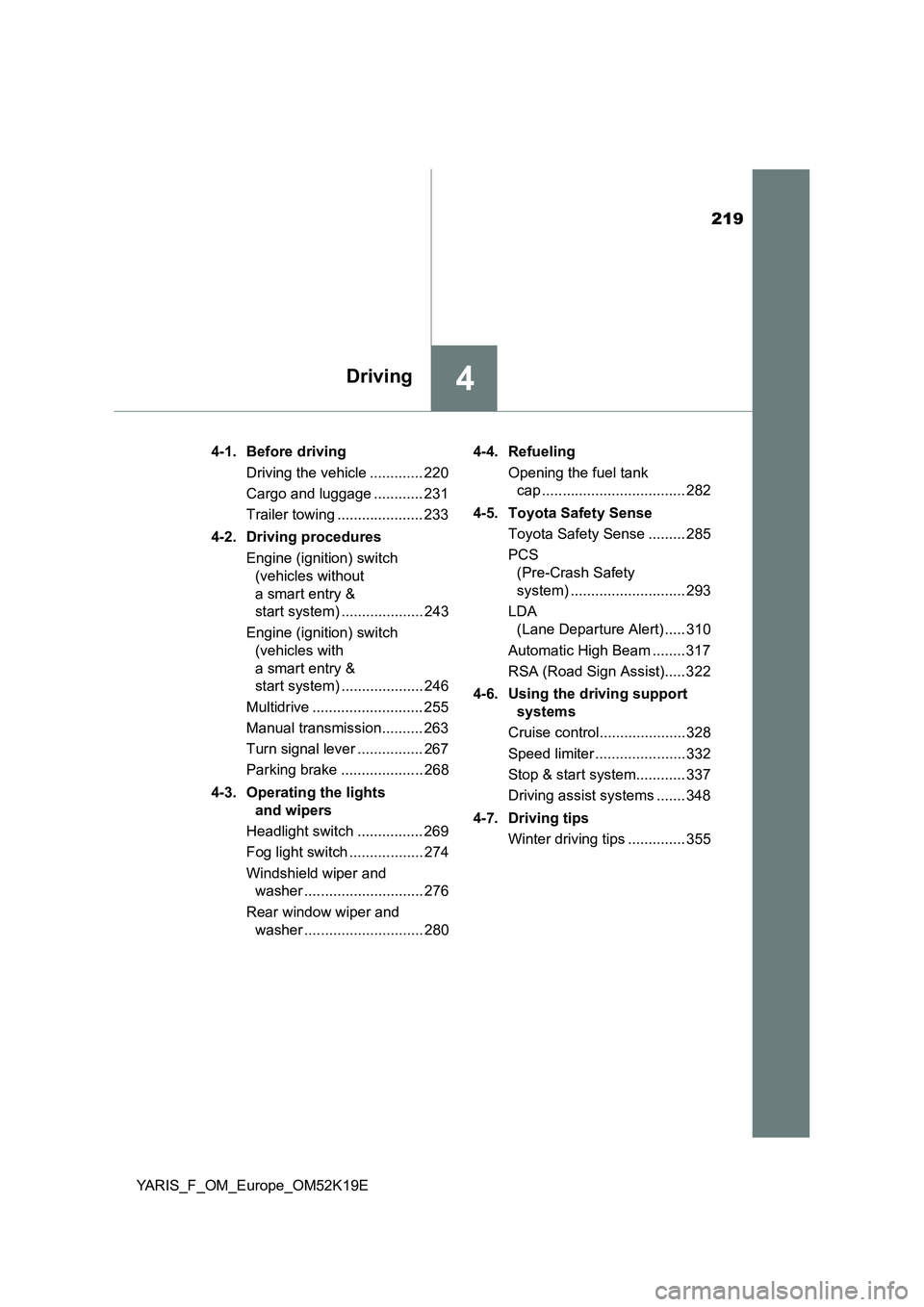
219
4Driving
YARIS_F_OM_Europe_OM52K19E
4-1. Before driving
Driving the vehicle ............. 220
Cargo and luggage ............ 231
Trailer towing ..................... 233
4-2. Driving procedures
Engine (ignition) switch
(vehicles without
a smart entry &
start system) .................... 243
Engine (ignition) switch
(vehicles with
a smart entry &
start system) .................... 246
Multidrive ........................... 255
Manual transmission.......... 263
Turn signal lever ................ 267
Parking brake .................... 268
4-3. Operating the lights
and wipers
Headlight switch ................ 269
Fog light switch .................. 274
Windshield wiper and
washer ............................. 276
Rear window wiper and
washer ............................. 280
4-4. Refueling
Opening the fuel tank
cap ................................... 282
4-5. Toyota Safety Sense
Toyota Safety Sense ......... 285
PCS
(Pre-Crash Safety
system) ............................ 293
LDA
(Lane Departure Alert) ..... 310
Automatic High Beam ........ 317
RSA (Road Sign Assist)..... 322
4-6. Using the driving support
systems
Cruise control..................... 328
Speed limiter ...................... 332
Stop & start system............ 337
Driving assist systems ....... 348
4-7. Driving tips
Winter driving tips .............. 355