service TOYOTA YARIS 2020 (in English) User Guide
[x] Cancel search | Manufacturer: TOYOTA, Model Year: 2020, Model line: YARIS, Model: TOYOTA YARIS 2020Pages: 572, PDF Size: 7.94 MB
Page 357 of 572
YARIS_YARIS HATCHBACK_OM_OM99V59z_(U)
3574-3. Bluetooth®
4
Interior Features
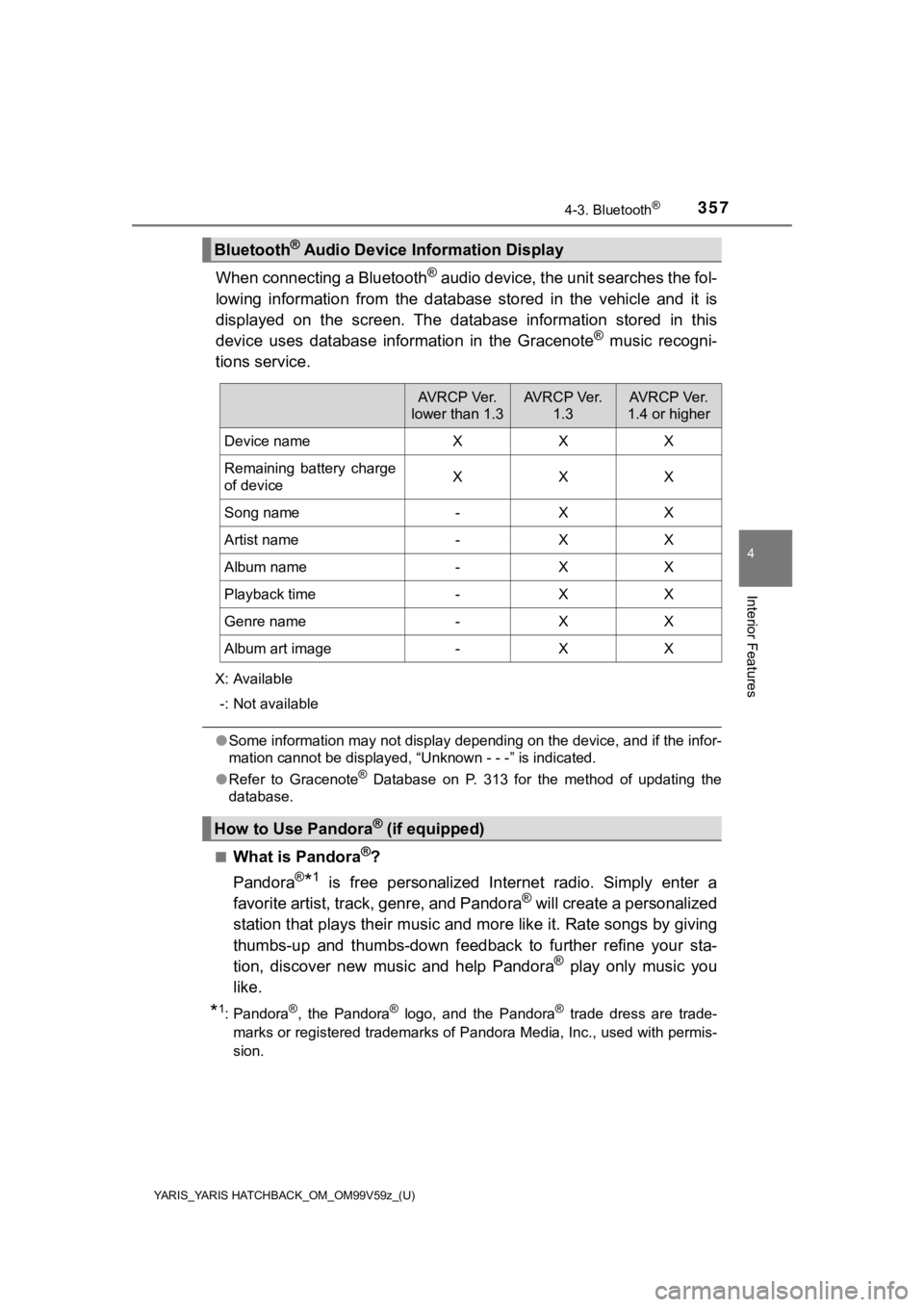
When connecting a Bluetooth® audio device, the unit searches the fol-
lowing information from the database stored in the vehicle and it is
displayed on the screen. The database information stored in thi s
device uses database information in the Gracenote
® music recogni-
tions service.
X: Available
-: Not available
● Some information may not display depending on the device, and i f the infor-
mation cannot be displayed, “Unknown - - -” is indicated.
● Refer to Gracenote
® Database on P. 313 for the method of updating the
database.
■
What is Pandora®?
Pandora
®*1 is free personalized Internet radio. Simply enter a
favorite artist, track, genre, and Pandora® will create a personalized
station that plays their music an d more like it. Rate songs by giving
thumbs-up and thumbs-down feedbac k to further refine your sta-
tion, discover new music and help Pandora
® play only music you
like.
*1: Pandora®, the Pandora® logo, and the Pandora® trade dress are trade-
marks or registered trademarks of Pandora Media, Inc., used wit h permis-
sion.
Bluetooth® Audio Device Information Display
AV R C P Ve r.
lower than 1.3AV R C P Ve r. 1.3AV R C P Ve r.
1.4 or higher
Device nameXXX
Remaining battery charge
of deviceXXX
Song name-XX
Artist name-XX
Album name-XX
Playback time-XX
Genre name-XX
Album art image-XX
How to Use Pandora® (if equipped)
Page 360 of 572
360
YARIS_YARIS HATCHBACK_OM_OM99V59z_(U)
4-3. Bluetooth®
Aha*1 is an application which can be used to enjoy various Internet
content such as Interne t radio and podcasts.
Stay connected to your friends act ivities by getting updates from
Facebook and Twitter. Using the location-based service, nearby ser-
vices and destinations can be searched or real-time local infor mation
can be obtained.
For details on Aha, refer to “http://www.aharadio.com/”.
*1: Aha, the Aha logo, and the Aha trade dress are trademarks or registered
trademarks of Harman International Industries, Inc., used with permission.
■
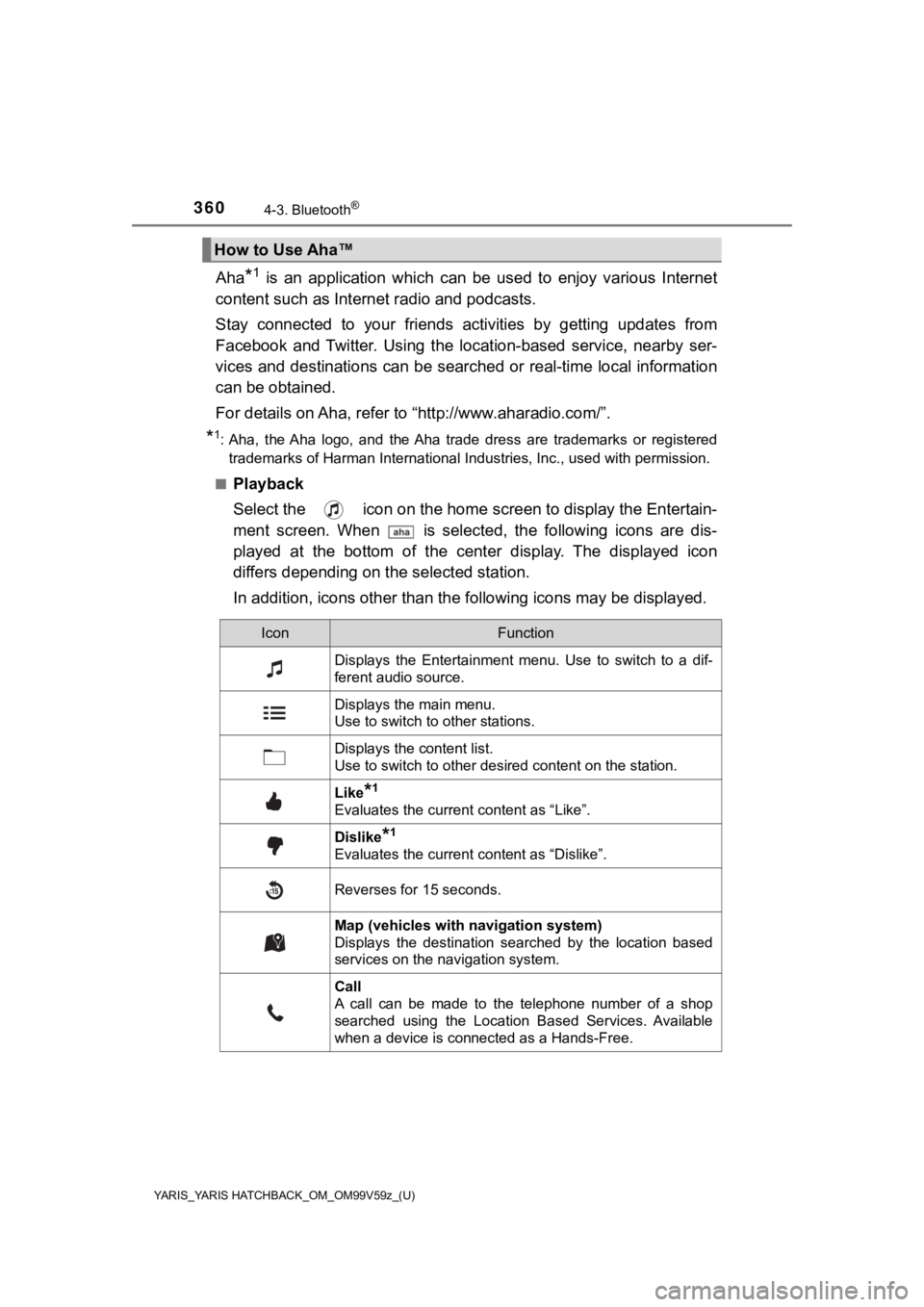
Playback
Select the icon on the home scr een to display the Entertain-
ment screen. When is selected, the following icons are dis-
played at the bottom of the center display. The displayed icon
differs depending on t he selected station.
In addition, icons other than the following icons may be displayed.
How to Use Aha™
IconFunction
Displays the Entertainment menu. Use to switch to a dif-
ferent audio source.
Displays the main menu.
Use to switch to other stations.
Displays the content list.
Use to switch to other desired content on the station.
Like*1
Evaluates the current content as “Like”.
Dislike*1
Evaluates the current content as “Dislike”.
Reverses for 15 seconds.
Map (vehicles with navigation system)
Displays the destination searched by the location based
services on the navigation system.
Call
A call can be made to the telephone number of a shop
searched using the Location Based Services. Available
when a device is connected as a Hands-Free.
Page 362 of 572
362
YARIS_YARIS HATCHBACK_OM_OM99V59z_(U)
4-3. Bluetooth®
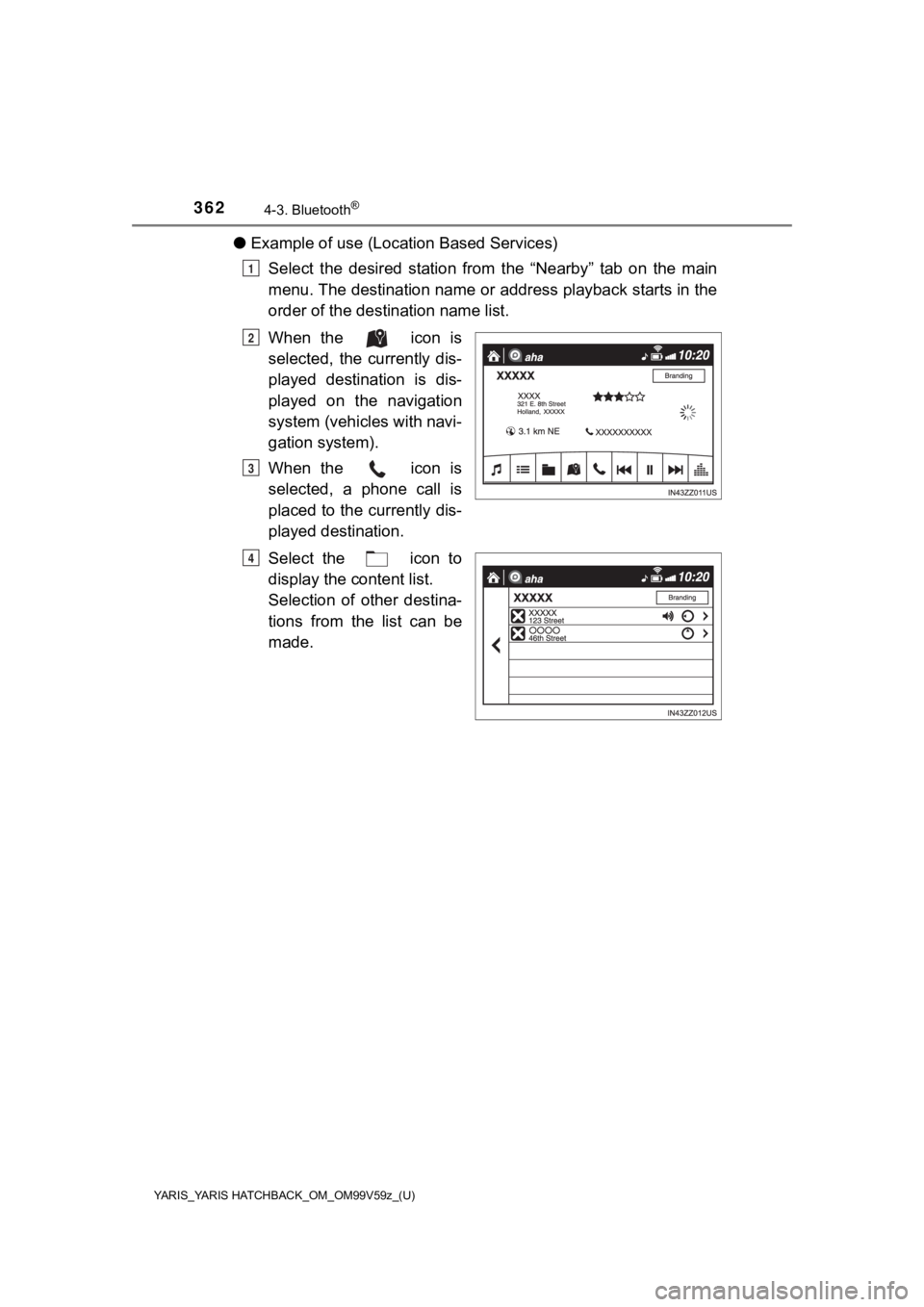
●Example of use (Location Based Services)
Select the desired station from the “Nearby” tab on the main
menu. The destination name or address playback starts in the
order of the destination name list.
When the icon is
selected, the currently dis-
played destination is dis-
played on the navigation
system (vehicles with navi-
gation system).
When the icon is
selected, a phone call is
placed to the currently dis-
played destination.
Select the icon to
display the content list.
Selection of other destina-
tions from the list can be
made.
1
2
3
4
Page 363 of 572
YARIS_YARIS HATCHBACK_OM_OM99V59z_(U)
3634-3. Bluetooth®
4
Interior Features
■How to Use Aha
●The service content provided by Aha varies depending on the cou ntry in
which the user resides. In addition, the service is not available in some
countries.
● To operate Aha from your Bluetooth
® device, perform the following in
advance:
• Install the Aha application to your device.
• Create an Aha account for your device.
• Log onto Aha using your device.
• Select the preset station on your device.
● If the Applications screen is not displayed on the device, Aha™ may not
play on the center display.
■ Playback
The available Location Based Services may differ because the se rvices
depend on the content provided by Aha™.
■ Shout
●Recordable time varies depending on the station (Max. 30 second s).
● Recording stops automatically when the recordable time has elapsed. You
can then post or delete the recording.
Page 366 of 572
366
YARIS_YARIS HATCHBACK_OM_OM99V59z_(U)
4-3. Bluetooth®
Troubleshooting
If you have any problems with Bluetooth®, contact our toll-free cus-
tomer service center.
● U.S.A.
Toyota Customer Experience Center
Phone: 1-800-331-4331 (Toll-free)
Web: http://www.toyota.com/entune
● Canada
Toyota Canada Customer Interaction Centre
Phone: 1-888-TOYOTA-8 or 1-888-869-6828 (Toll-free)
Web: http://www.toyota.ca
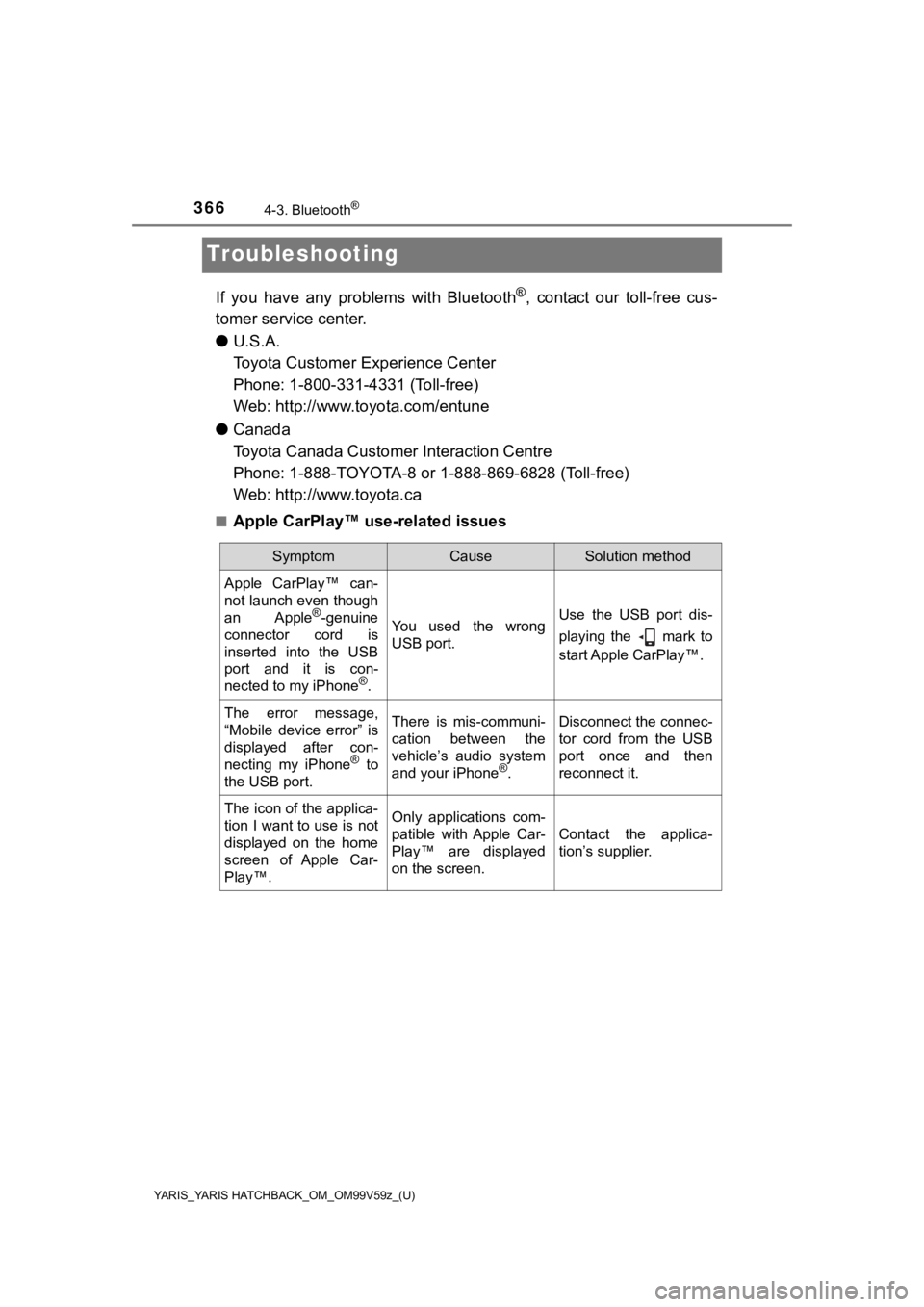
■Apple CarPlay™ use-related issues
SymptomCauseSolution method
Apple CarPlay™ can-
not launch even though
an Apple
®-genuine
connector cord is
inserted into the USB
port and it is con-
nected to my iPhone
®.
You used the wrong
USB port.Use the USB port dis-
playing the mark to
start Apple CarPlay™.
The error message,
“Mobile device error” is
displayed after con-
necting my iPhone
® to
the USB port.
There is mis-communi-
cation between the
vehicle’s audio system
and your iPhone
®.
Disconnect the connec-
tor cord from the USB
port once and then
reconnect it.
The icon of the applica-
tion I want to use is not
displayed on the home
screen of Apple Car-
Play™.Only applications com-
patible with Apple Car-
Play™ are displayed
on the screen.
Contact the applica-
tion’s supplier.
Page 386 of 572

386
YARIS_YARIS HATCHBACK_OM_OM99V59z_(U)
5-1. Essential Information
Introduction
Be careful not to hurt yourself when inspecting your vehicle, replacing
a tire, or doing some kind of maintenance such as car washing. In par-
ticular, wear thick work gloves such as cotton gloves when touc hing
areas that are difficult to see while inspecting or working on your vehi-
cle. Doing inspections or procedur es with your bare hands could
cause injury.
If you are unsure about any pro cedure this manual describes, we
strongly urge you to have a reliable and qualified service shop per-
form the work, preferably your Toyota dealer.
Factory-trained Toyota technicians and genuine Toyota parts are best
for your vehicle. Without this expertise and the parts that hav e been
designed and made especially for your Toyota, inadequate, incom-
plete, and insufficient servicing may result in problems. This could
lead to vehicle damage or an accident and injuries.
For expert advice and quality serv ice, consult your Toyota dealer.
To continue warranty eligibility and to protect your investment , it is
your responsibility to properly maintain your vehicle according to fac-
tory recommended schedules outli ned in this manual. Keep a copy of
the repair order. It proves that the maintenance that has been per-
formed is under warranty coverage. If any problem should arise while
your vehicle is under warranty, your Toyota dealer will promptl y take
care of it.
This evidence may consist of the following: • The Maintenance Log, found with in the Warranty and Maintenance
Guide, must be completely filled out showing mileage, repair order
number, date for each service, and signed by a qualified automo tive
service technician w ho service vehicles.
• Original copies of repair orders or other receipts that includ e the
mileage and date the vehicle was serviced. Each receipt should be
signed by a qualified automot ive service technician.
• For self maintenance, a statemen t that you completed the mainte-
nance yourself, displaying mileage and the date the work was per-
formed. Also, receipts for the replacement parts (fluid, filters, etc.)
indicating the date and mileage mu st accompany this statement.
Page 387 of 572
YARIS_YARIS HATCHBACK_OM_OM99V59z_(U)
3875-1. Essential Information
5
Maintenance and Care
Claims against the warranty resulting from lack of maintenance, as
opposed to defective materials o r authorized Toyota workmanship , will
not be honored.
Any auto repair shop using parts equivalent to your Toyota’s or iginal
equipment may perform maintenance. But we recommend that it
always be done by your Toyota dealer using genuine Toyota parts .
Selecting “Maintenance Monitor” enables the system to notify yo u of
your vehicle’s approaching ins pection/servicing period (P. 388).
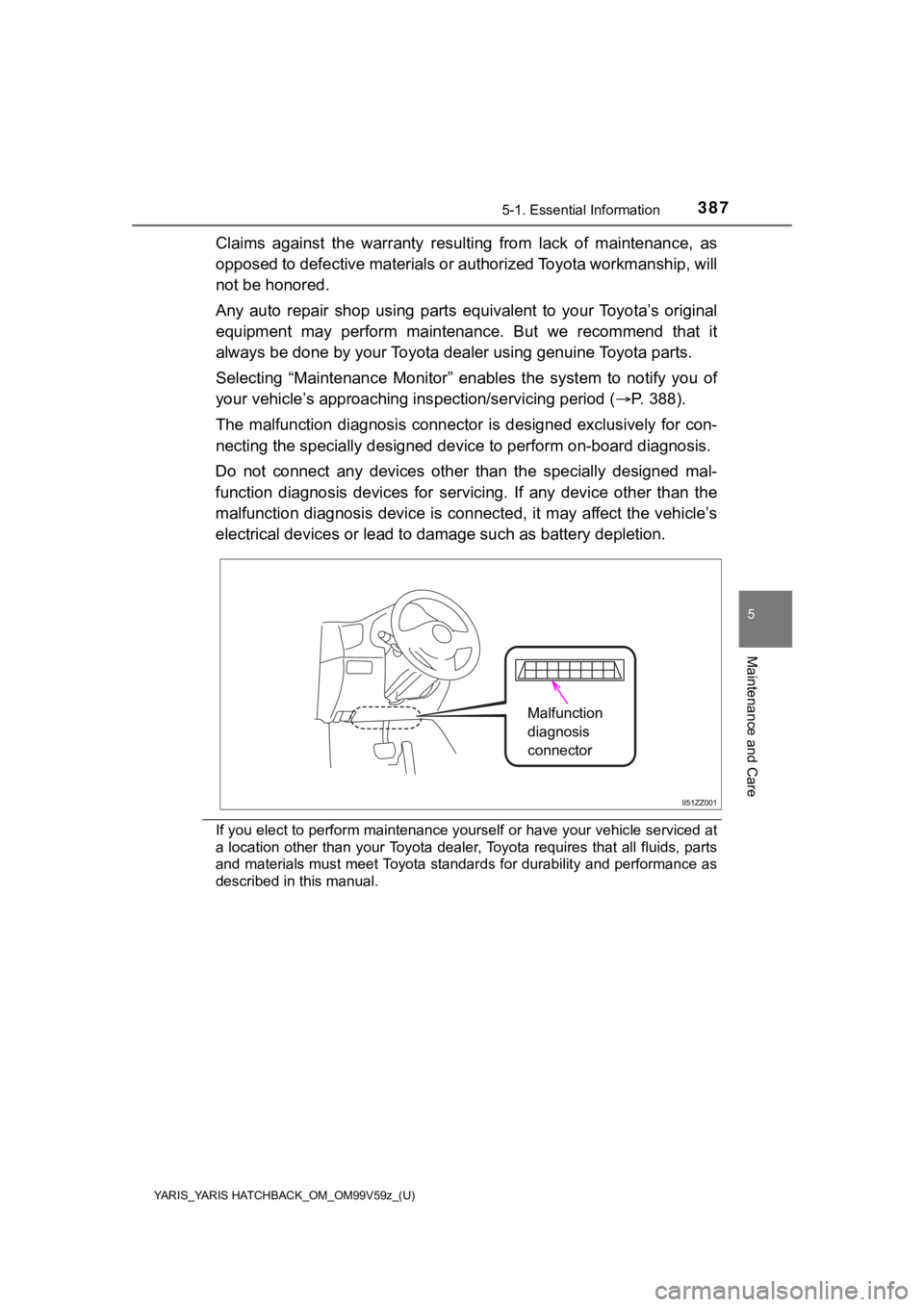
The malfunction diagnosis connec tor is designed exclusively for con-
necting the specially designed de vice to perform on-board diagnosis.
Do not connect any devices other than the specially designed ma l-
function diagnosis devices for s ervicing. If any device other than the
malfunction diagnosis device is c onnected, it may affect the vehicle’s
electrical devices or lead to da mage such as battery depletion.
If you elect to perform maintenance yourself or have your vehic le serviced at
a location other than your Toyota dealer, Toyota requires that all fluids, parts
and materials must meet Toyota standards for durability and per formance as
described in this manual.
Malfunction
diagnosis
connector
Page 390 of 572
390
YARIS_YARIS HATCHBACK_OM_OM99V59z_(U)
5-3. Owner Maintenance
Owner Maintenance Precautions
The owner or a qualified service technician should make these vehicle
inspections at the indicated intervals to ensure safe and depen dable
operation.
Bring any problem to the attention of your Toyota dealer or qua lified
service technician a s soon as possible.
■When Refueling
• Brake and clutch fluid level ( P. 401)
• Engine coolant level ( P. 3 9 8 )
• Engine oil level ( P. 397)
• Washer fluid level ( P. 402)
■At Least Monthly
• Tire inflation pressures ( P. 413)
■At Least Twice a Year (For Exam ple, Every Spring and Fall)
You can do the following scheduled maintenance items if you hav e
some mechanical ability and a few basic tools and if you closel y fol-
low the directions in this manual.
• Engine coolant ( P. 398)
• Engine oil ( P. 395)
Improper or incomplete service may result in problems. This sec tion
gives instructions only for it ems that are easy to perform.
As explained in the Introduction ( P. 386), several procedures can be
done only by a qualifi ed service technician with special tools.
Improper owner maintenance during the warranty period may affec t
warranty coverage. Refer to Introduction ( P. 386) for owner’s
responsibility in protecting your investment. For details, read the sep-
arate Toyota Warranty and Maintenance Guide provided with the v ehi-
cle. If you are unsure about any servicing or maintenance proce dure,
have it done by your Toyota dealer.
There are strict environmental laws regarding the disposal of w aste oil
and fluids. Please dispose of your waste properly and with due regard
to the environment.
We recommend that you entrust the oil and fluid changes of your vehi-
cle to your Toyota dealer.
Page 395 of 572
395
YARIS_YARIS HATCHBACK_OM_OM99V59z_(U)
5-3. Owner Maintenance
5
Maintenance and Care
Engine Oil
Changing the engine oil should be performed by your Toyota dealer.
Refer to Introduction ( P. 386) for owner’s responsibility in protecting
your investment.
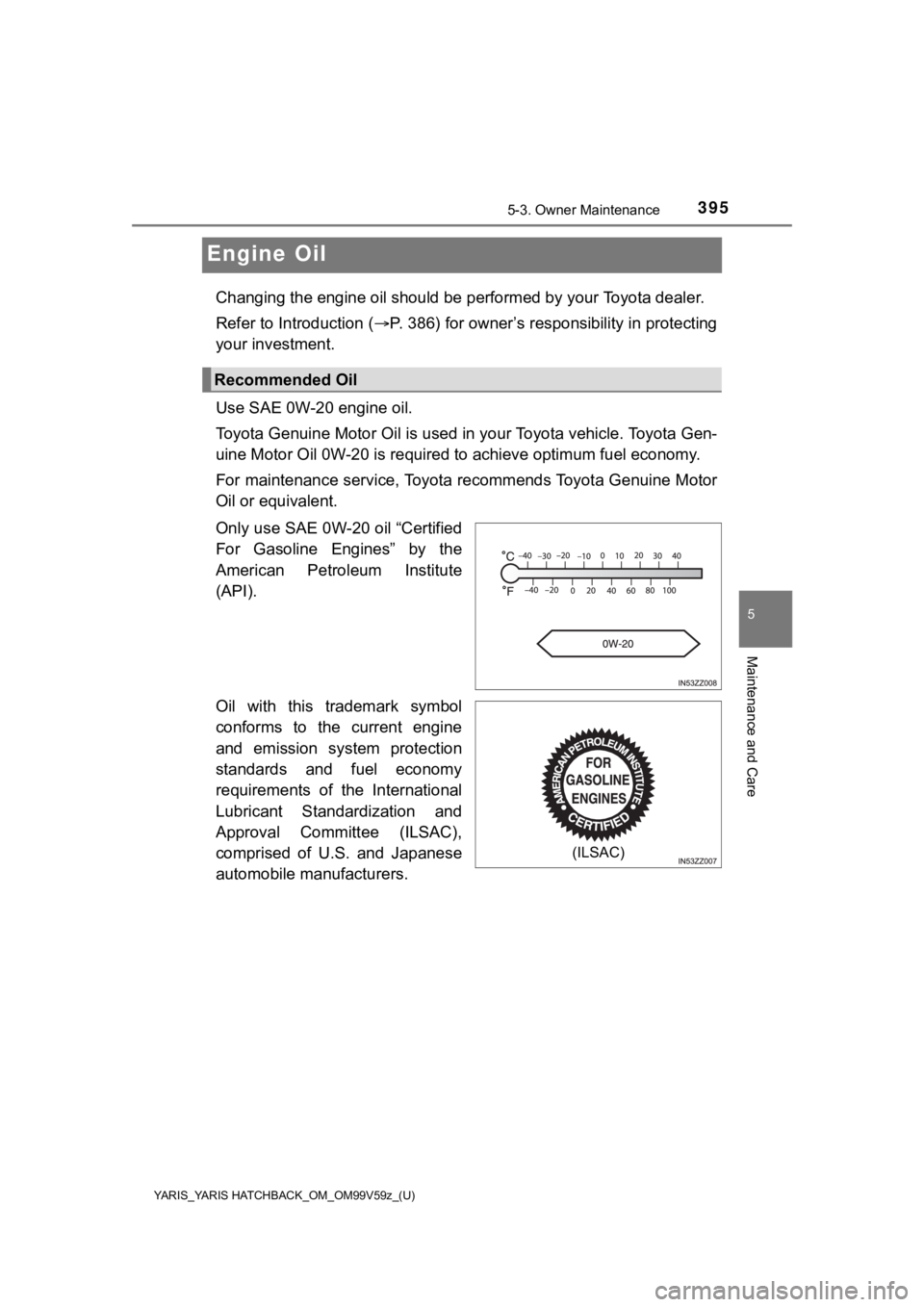
Use SAE 0W-20 engine oil.
Toyota Genuine Motor Oil is used in your Toyota vehicle. Toyota Gen-
uine Motor Oil 0W-20 is required to achieve optimum fuel econom y.
For maintenance service, Toyota recommends Toyota Genuine Motor
Oil or equivalent.
Only use SAE 0W-20 oil “Certified
For Gasoline Engines” by the
American Petroleum Institute
(API).
Oil with this trademark symbol
conforms to the current engine
and emission system protection
standards and fuel economy
requirements of the International
Lubricant Standardization and
Approval Committee (ILSAC),
comprised of U.S. and Japanese
automobile manufacturers.
Recommended Oil
(ILSAC)
Page 409 of 572
YARIS_YARIS HATCHBACK_OM_OM99V59z_(U)
4095-3. Owner Maintenance
5
Maintenance and Care
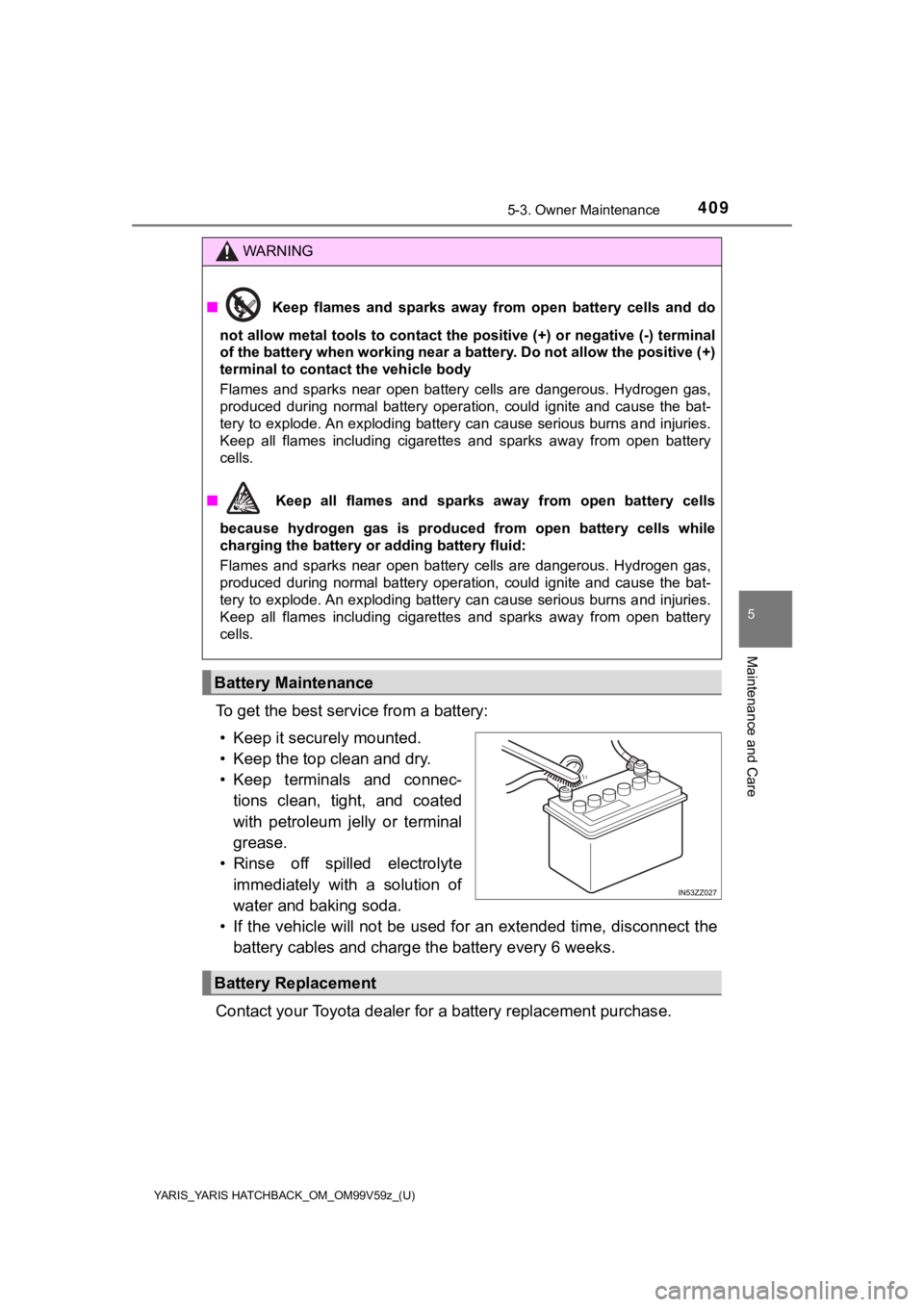
To get the best service from a battery:
• Keep it securely mounted.
• Keep the top clean and dry.
• Keep terminals and connec- tions clean, tight, and coated
with petroleum jelly or terminal
grease.
• Rinse off spilled electrolyte immediately with a solution of
water and baking soda.
• If the vehicle will not be use d for an extended time, disconne ct the
battery cables and charge the battery every 6 weeks.
Contact your Toyota dealer for a battery replacement purchase.
WARNING
■ Keep flames and sparks away from open battery cells and do
not allow metal tools to contact the positive (+) or negative ( -) terminal
of the battery when working near a battery. Do not allow the positive (+)
terminal to contact the vehicle body
Flames and sparks near open battery cells are dangerous. Hydrog en gas,
produced during normal battery operation, could ignite and cause the bat-
tery to explode. An exploding battery can cause serious burns a nd injuries.
Keep all flames including cigarettes and sparks away from open battery
cells.
■ Keep all flames and sparks away from open battery cells
because hydrogen gas is produced from open battery cells while
charging the battery or adding battery fluid:
Flames and sparks near open battery cells are dangerous. Hydrog en gas,
produced during normal battery operation, could ignite and cause the bat-
tery to explode. An exploding battery can cause serious burns a nd injuries.
Keep all flames including cigarettes and sparks away from open battery
cells.
Battery Maintenance
Battery Replacement