Custom TOYOTA YARIS 2020 User Guide
[x] Cancel search | Manufacturer: TOYOTA, Model Year: 2020, Model line: YARIS, Model: TOYOTA YARIS 2020Pages: 692, PDF Size: 68.71 MB
Page 319 of 692
319
4
4-5. Toyota Safety Sense
Driving
YARIS_F_OM_Europe_OM52A54E
RSA (Road Sign Assist)
RSA recognizes specific road signs using the front sensor and pro-
vides information to the driver via the multi-information display.
If the system judges that the vehicle is being driven over the speed
limit, performing prohibited actions, etc., in relation to the recognized
road signs, it alerts the driver using a warning display and warning
buzzer*.
*: This setting needs to be customized.
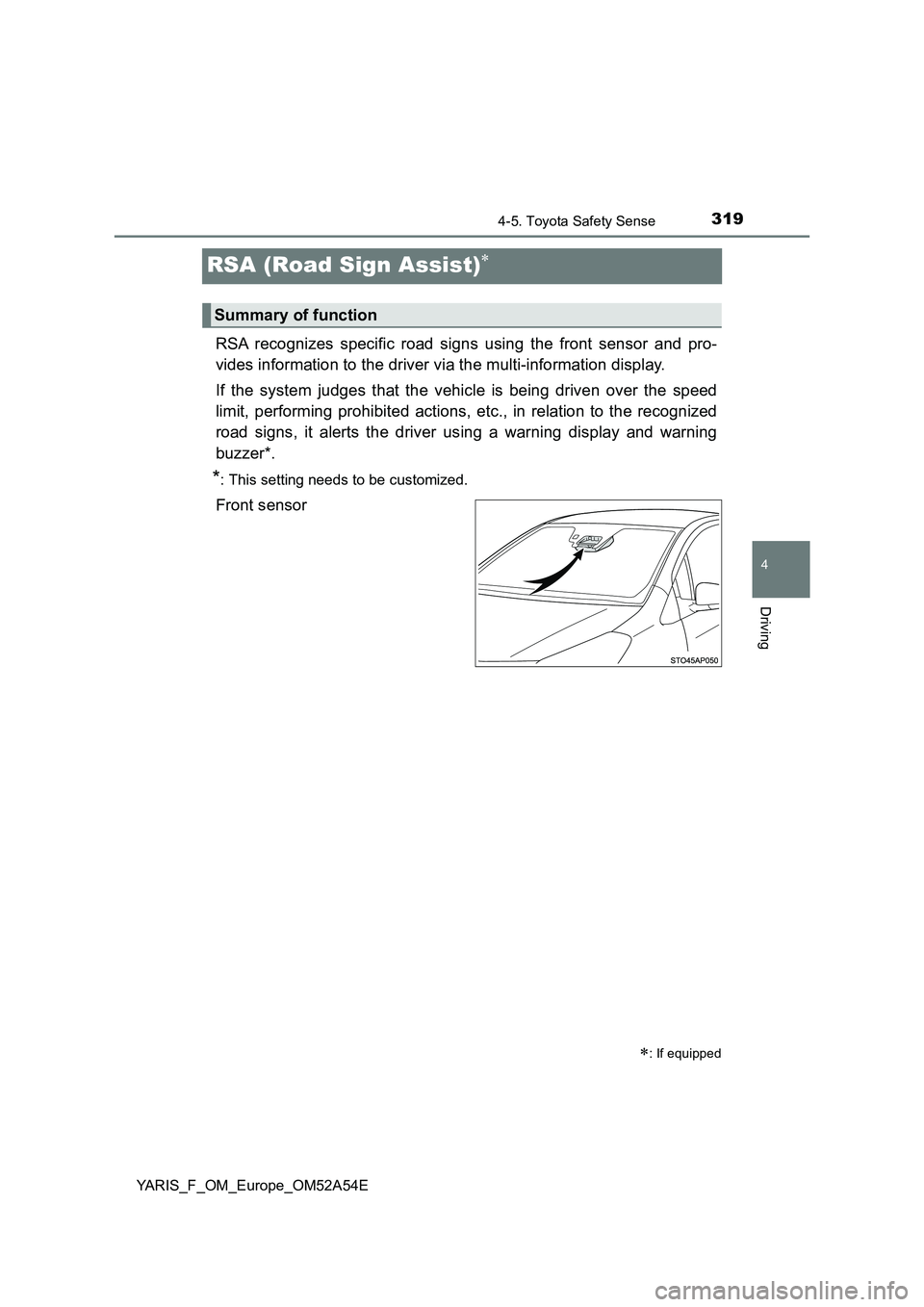
Front sensor
: If equipped
Summary of function
Page 324 of 692
3244-5. Toyota Safety Sense
YARIS_F_OM_Europe_OM52A54E
■ When driving vehicle in country with different speed unit
Since RSA recognizes signs based on the set unit of the meter, it is neces-
sary to change the set unit of the meter. Adjust the set unit of the meter to the
speed unit of signs in the current location. ( P. 671)
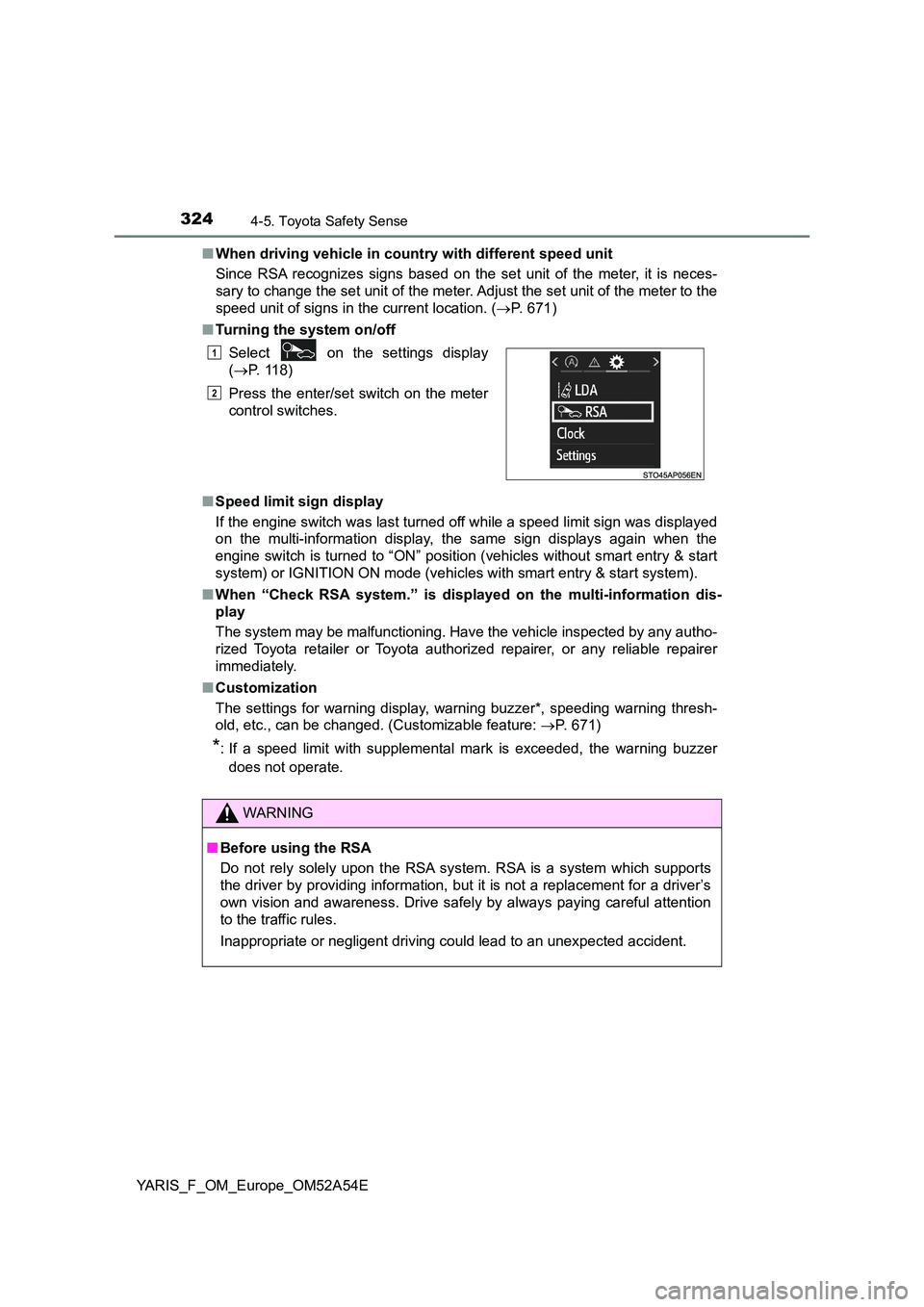
■ Turning the system on/off
■ Speed limit sign display
If the engine switch was last turned off while a speed limit sign was displayed
on the multi-information display, the same sign displays again when the
engine switch is turned to “ON” position (vehicles without smart entry & start
system) or IGNITION ON mode (vehicles with smart entry & start system).
■ When “Check RSA system.” is displayed on the multi-information dis-
play
The system may be malfunctioning. Have the vehicle inspected by any autho-
rized Toyota retailer or Toyota authorized repairer, or any reliable repairer
immediately.
■ Customization
The settings for warning display, warning buzzer*, speeding warning thresh-
old, etc., can be changed. (Customizable feature: P. 671)
*: If a speed limit with supplemental mark is exceeded, the warning buzzer
does not operate.
Select on the settings display
( P. 118)
Press the enter/set switch on the meter
control switches.
WARNING
■ Before using the RSA
Do not rely solely upon the RSA system. RSA is a system which supports
the driver by providing information, but it is not a replacement for a driver’s
own vision and awareness. Drive safely by always paying careful attention
to the traffic rules.
Inappropriate or negligent driving could lead to an unexpected accident.
1
2
Page 461 of 692
4616-2. Using the interior lights
6
Interior features
YARIS_F_OM_Europe_OM52A54E
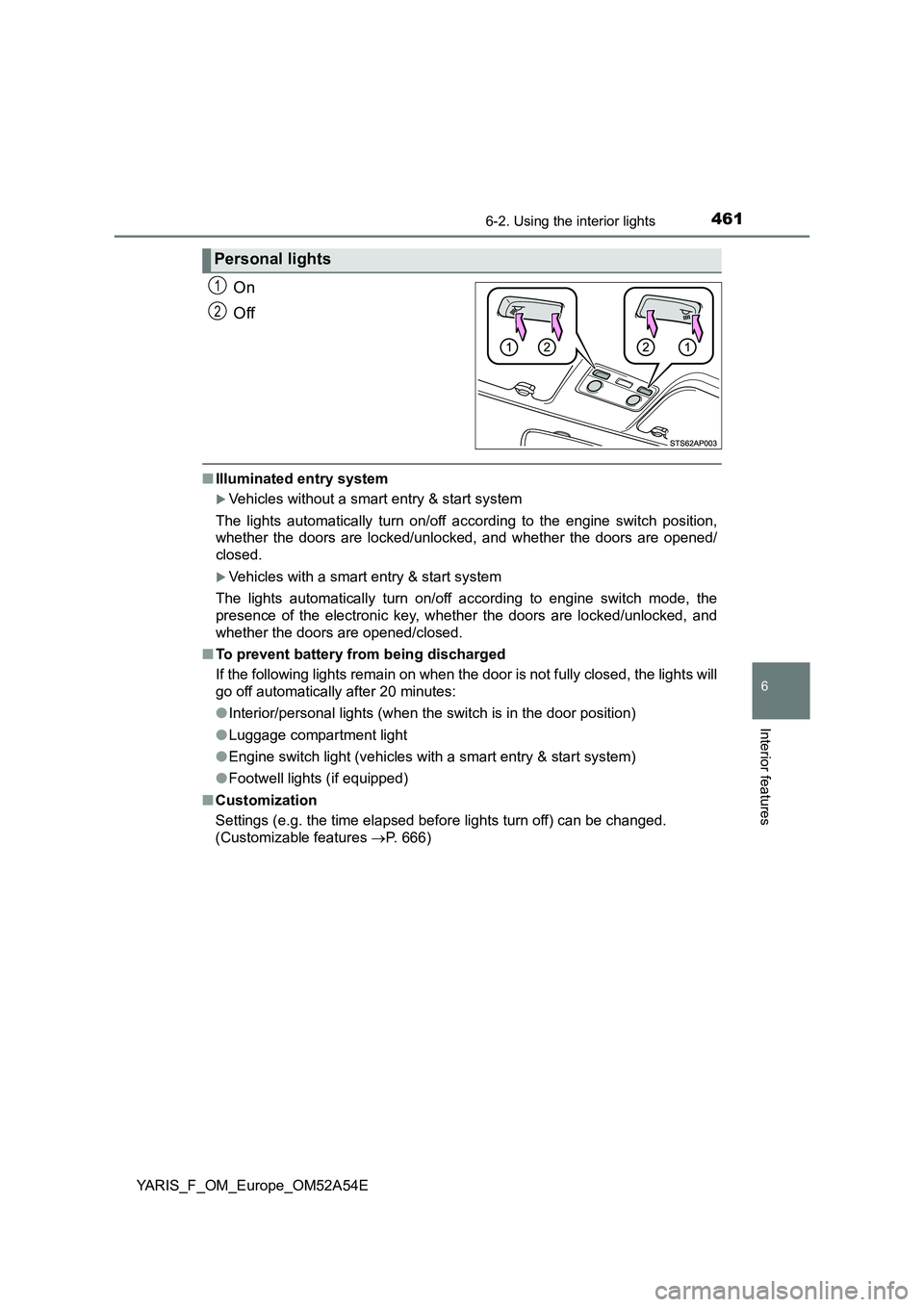
On
Off
■Illuminated entry system
Vehicles without a smart entry & start system
The lights automatically turn on/off according to the engine switch position,
whether the doors are locked/unlocked, and whether the doors are opened/
closed.
Vehicles with a smart entry & start system
The lights automatically turn on/off according to engine switch mode, the
presence of the electronic key, whether the doors are locked/unlocked, and
whether the doors are opened/closed.
■To prevent battery from being discharged
If the following lights remain on when the door is not fully closed, the lights will
go off automatically after 20 minutes:
●Interior/personal lights (when the switch is in the door position)
●Luggage compartment light
●Engine switch light (vehicles with a smart entry & start system)
●Footwell lights (if equipped)
■Customization
Settings (e.g. the time elapsed before lights turn off) can be changed.
(Customizable features P. 666)
Personal lights
1
2
Page 632 of 692
6328-2. Steps to take in an emergency
YARIS_F_OM_Europe_OM52A54E
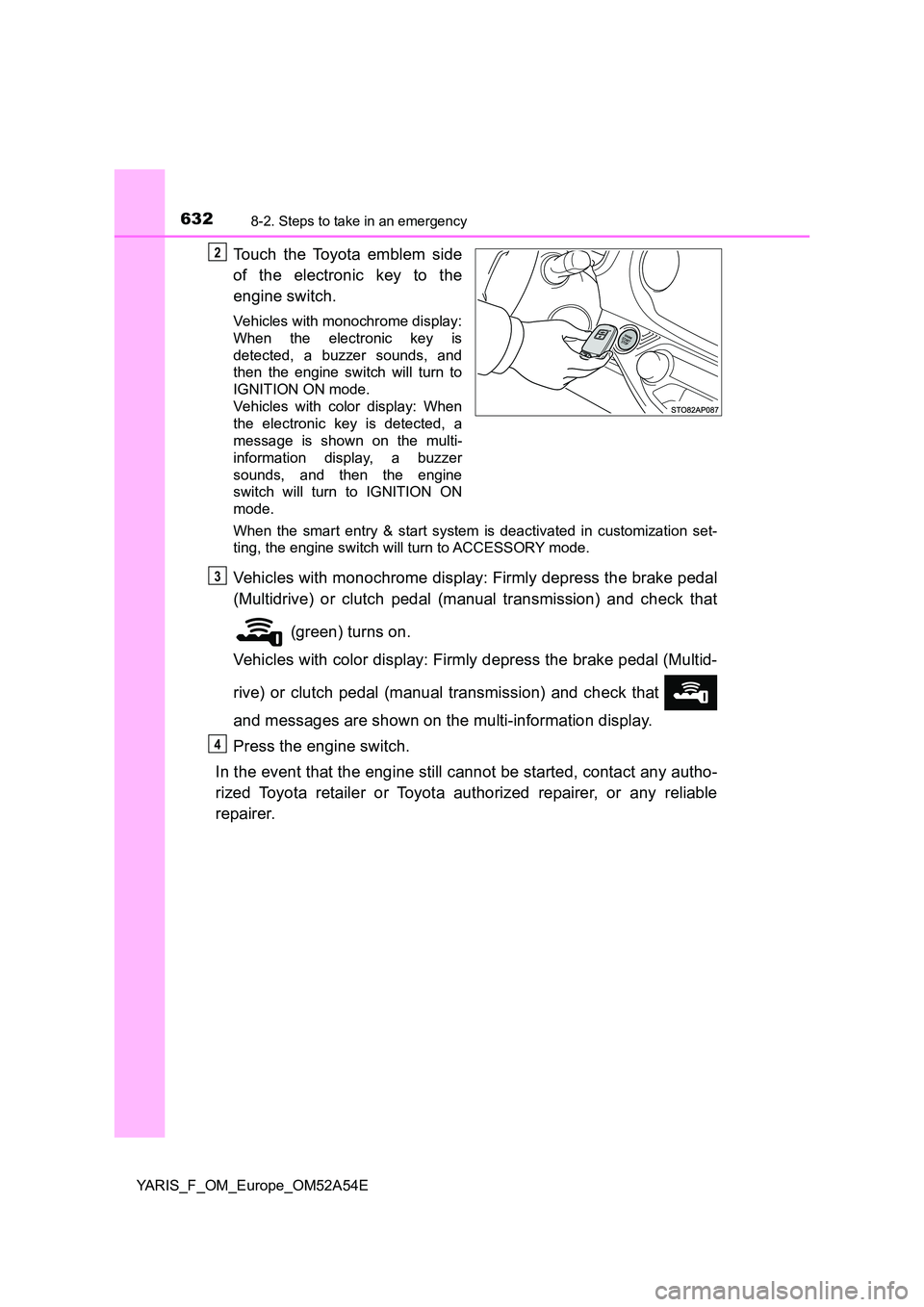
Touch the Toyota emblem side
of the electronic key to the
engine switch.
Vehicles with monochrome display:
When the electronic key is
detected, a buzzer sounds, and
then the engine switch will turn to
IGNITION ON mode.
Vehicles with color display: When
the electronic key is detected, a
message is shown on the multi-
information display, a buzzer
sounds, and then the engine
switch will turn to IGNITION ON
mode.
When the smart entry & start system is deactivated in customization set-
ting, the engine switch will turn to ACCESSORY mode.
Vehicles with monochrome display: Firmly depress the brake pedal
(Multidrive) or clutch pedal (manual transmission) and check that
(green) turns on.
Vehicles with color display: Firmly depress the brake pedal (Multid-
rive) or clutch pedal (manual transmission) and check that
and messages are shown on the multi-information display.
Press the engine switch.
In the event that the engine still cannot be started, contact any autho-
rized Toyota retailer or Toyota authorized repairer, or any reliable
repairer.
2
3
4
Page 633 of 692
6338-2. Steps to take in an emergency
8
When trouble arises
YARIS_F_OM_Europe_OM52A54E
■Stopping the engine
Shift the shift lever to P (Multidrive) or N (manual transmission) and press the
engine switch as you normally do when stopping the engine.
■ Replacing the key battery
As the above procedure is a temporary measure, it is recommended that the
electronic key battery be replaced immediately when the battery is depleted.
( P. 537)
■ Changing engine switch modes
Release the brake pedal (Multidrive) or clutch pedal (manual transmission)
and press the engine switch in step above.
The engine does not start and modes will be changed each time the switch is
pressed. ( P. 245)
■ When the electronic key does not work properly
● Make sure that the smart entry & start system has not been deactivated in
the customization setting. If it is off, turn the function on.
(Customizable features: P. 666)
● Check if battery-saving mode is set. If it is set, cancel the function.
( P. 170)
3
Page 645 of 692
645
9Vehicle specifications
YARIS_F_OM_Europe_OM52A54E9-1. Specifications
Maintenance data
(fuel, oil level, etc.)........... 646
Fuel information ................. 664
9-2. Customization
Customizable features ....... 666
9-3. Items to initialize
Items to initialize ................ 673
Page 666 of 692
6669-2. Customization
YARIS_F_OM_Europe_OM52A54E
Customizable features
When customizing vehicle features, ensure that the vehicle is parked
in a safe place with the shift lever in P (Multidrive) or N (manual trans-
mission) and the parking brake set.
Various setting can be changed. Refer to the list of settings that can be
changed for details.
■
Changing using the multi-information display (vehicles with
color display)
Press or of the meter control switches and select
on the multi-information display.
Press or of the meter control switches and then press .
Press or of the meter control switches, and select the
desired setting, and then press .
■Changing on the navigation or multimedia system screen
(vehicles with a navigation or multimedia system)
Press .
Select “Vehicle” on the “Setup” screen.
Select the desired item.
Various settings can be changed. Refer to the list of settings that can
be changed for details.
Your vehicle includes a variety of electronic features that can be
personalized to suit your preferences. The settings of these fea-
tures can be changed using the multi-information display, on the
navigation/multimedia system, or at any authorized Toyota
retailer or Toyota authorized repairer, or any reliable repairer.
Some function settings are changed simultaneously with other func-
tions being customized. Contact any authorized Toyota retailer or
Toyota authorized repairer, or any reliable repairer for further details.
Customizing vehicle features
1
2
3
1
2
Page 667 of 692
6679-2. Customization
9
Vehicle specifications
YARIS_F_OM_Europe_OM52A54E
Some function settings are changed simultaneously with other func-
tions being customized. Contact any authorized Toyota retailer or Toy-
ota authorized repairer, or any reliable repairer for further details.
Vehicles with color display: Settings that can be changed using the
multi-information display
Vehicles with a Navigation/Multimedia system: Settings that can be
changed using the Navigation/Multimedia system
(For further information on customizing settings using the Naviga-
tion/Multimedia system, refer to the “Navigation and multimedia
system Owner’s manual”.)
Settings that can be changed by any authorized Toyota retailer or
Toyota authorized repairer, or any reliable repairer
Definition of symbols: O = Available, — = Not available
Customizable features
1
2
3
Page 668 of 692
6689-2. Customization
YARIS_F_OM_Europe_OM52A54E■
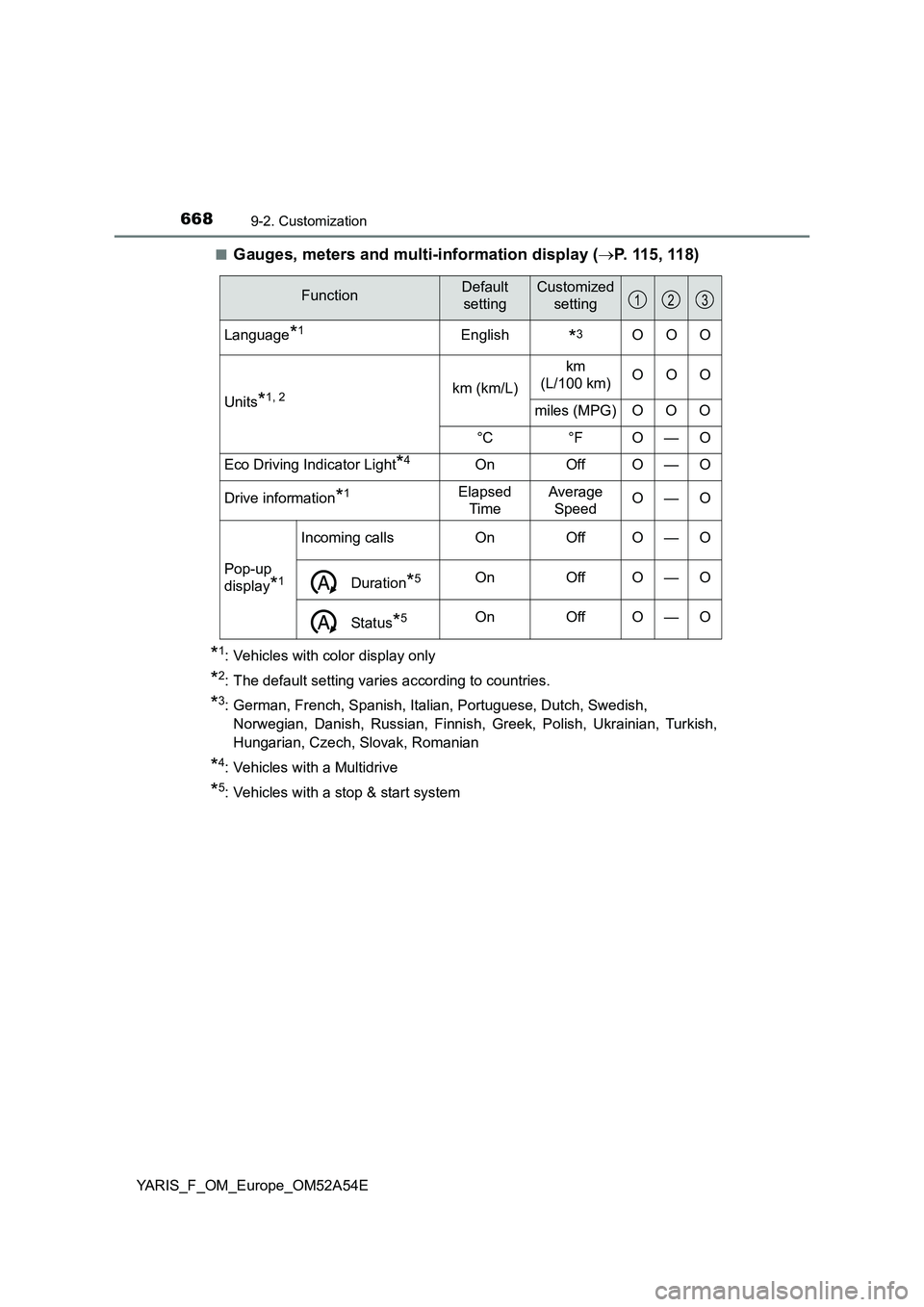
Gauges, meters and multi-information display (P. 115 , 11 8)
*1: Vehicles with color display only
*2: The default setting varies according to countries.
*3: German, French, Spanish, Italian, Portuguese, Dutch, Swedish,
Norwegian, Danish, Russian, Finnish, Greek, Polish, Ukrainian, Turkish,
Hungarian, Czech, Slovak, Romanian
*4: Vehicles with a Multidrive
*5: Vehicles with a stop & start system
FunctionDefault
settingCustomized
setting
Language*1English*3OOO
Units
*1, 2km (km/L)km
(L/100 km)OOO
miles (MPG) O O O
°C °F O — O
Eco Driving Indicator Light
*4On Off O — O
Drive information
*1Elapsed
TimeAverage
SpeedO—O
Pop-up
display
*1
Incoming callsOnOffO—O
Duration*5OnOffO—O
Status*5OnOffO—O
123
Page 669 of 692
6699-2. Customization
9
Vehicle specifications
YARIS_F_OM_Europe_OM52A54E■
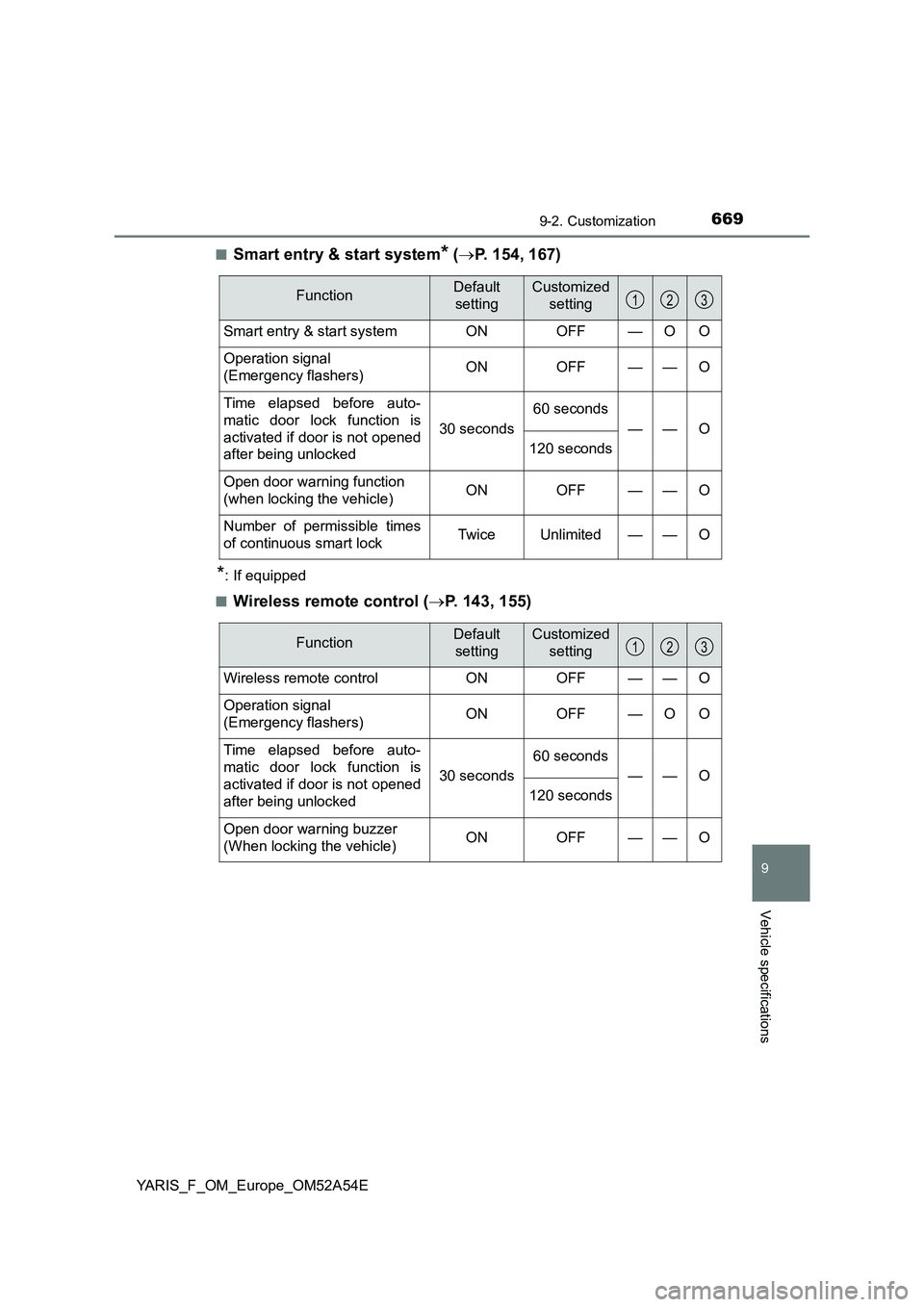
Smart entry & start system* (P. 154, 167)
*: If equipped
■
Wireless remote control (P. 143, 155)
FunctionDefault
settingCustomized
setting
Smart entry & start system ON OFF — O O
Operation signal
(Emergency flashers)ON OFF — — O
Time elapsed before auto-
matic door lock function is
activated if door is not opened
after being unlocked
30 seconds
60 seconds
——O
120 seconds
Open door warning function
(when locking the vehicle) ON OFF — — O
Number of permissible times
of continuous smart lockTwice Unlimited — — O
123
FunctionDefault
settingCustomized
setting
Wireless remote control ON OFF — — O
Operation signal
(Emergency flashers)ON OFF — O O
Time elapsed before auto-
matic door lock function is
activated if door is not opened
after being unlocked
30 seconds
60 seconds
——O
120 seconds
Open door warning buzzer
(When locking the vehicle)ON OFF — — O
123