time change TOYOTA YARIS 2020 User Guide
[x] Cancel search | Manufacturer: TOYOTA, Model Year: 2020, Model line: YARIS, Model: TOYOTA YARIS 2020Pages: 692, PDF Size: 68.71 MB
Page 255 of 692
2554-2. Driving procedures
4
Driving
YARIS_F_OM_Europe_OM52A54E
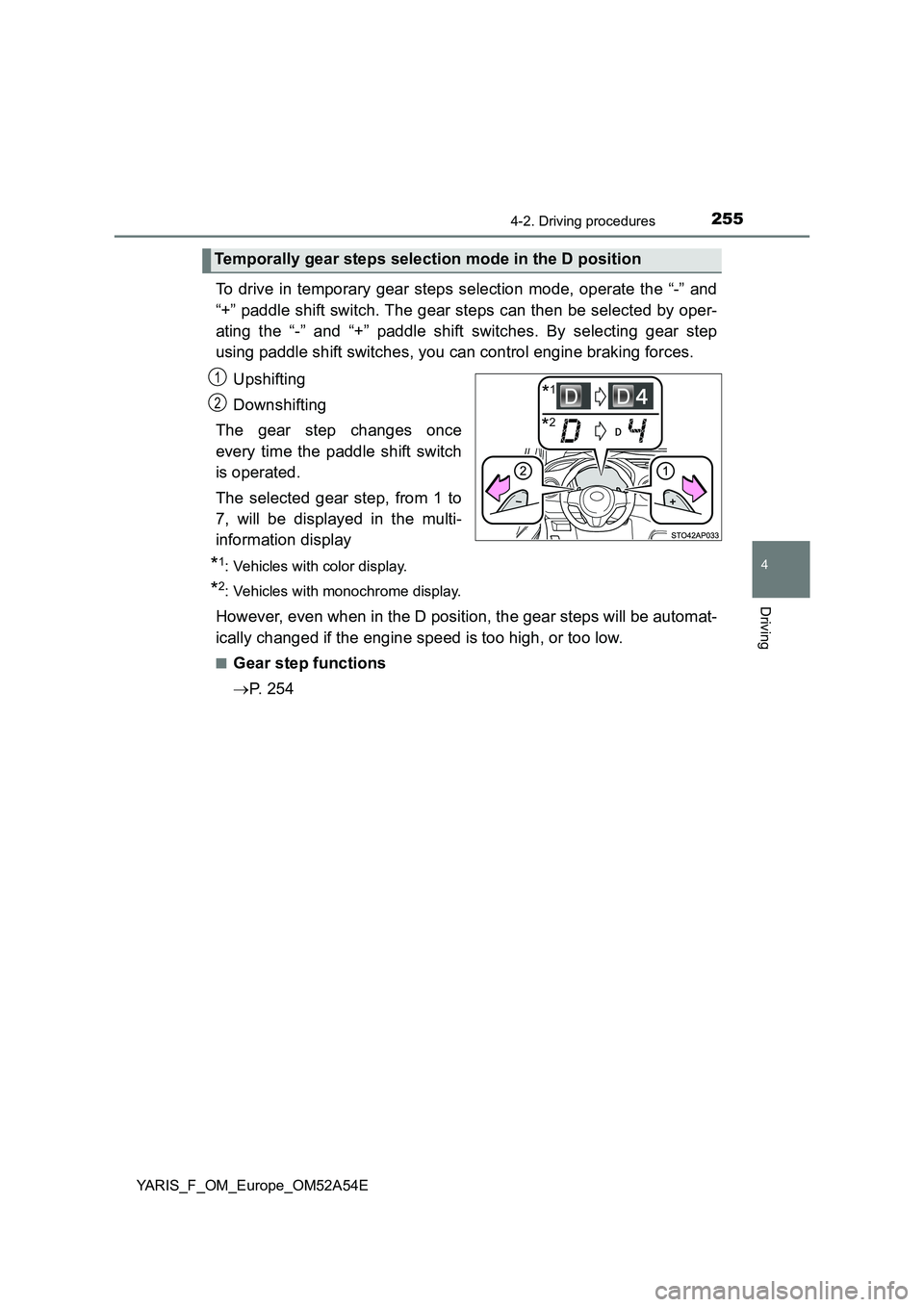
To drive in temporary gear steps selection mode, operate the “-” and
“+” paddle shift switch. The gear steps can then be selected by oper-
ating the “-” and “+” paddle shift switches. By selecting gear step
using paddle shift switches, you can control engine braking forces.
Upshifting
Downshifting
The gear step changes once
every time the paddle shift switch
is operated.
The selected gear step, from 1 to
7, will be displayed in the multi-
information display
*1: Vehicles with color display.
*2: Vehicles with monochrome display.
However, even when in the D position, the gear steps will be automat-
ically changed if the engine speed is too high, or too low.
■Gear step functions
P. 2 5 4
Temporally gear steps selection mode in the D position
*2
*11
2
Page 295 of 692
2954-5. Toyota Safety Sense
4
Driving
YARIS_F_OM_Europe_OM52A54E■
Changing the pre-crash warning timing
Vehicles with monochrome display
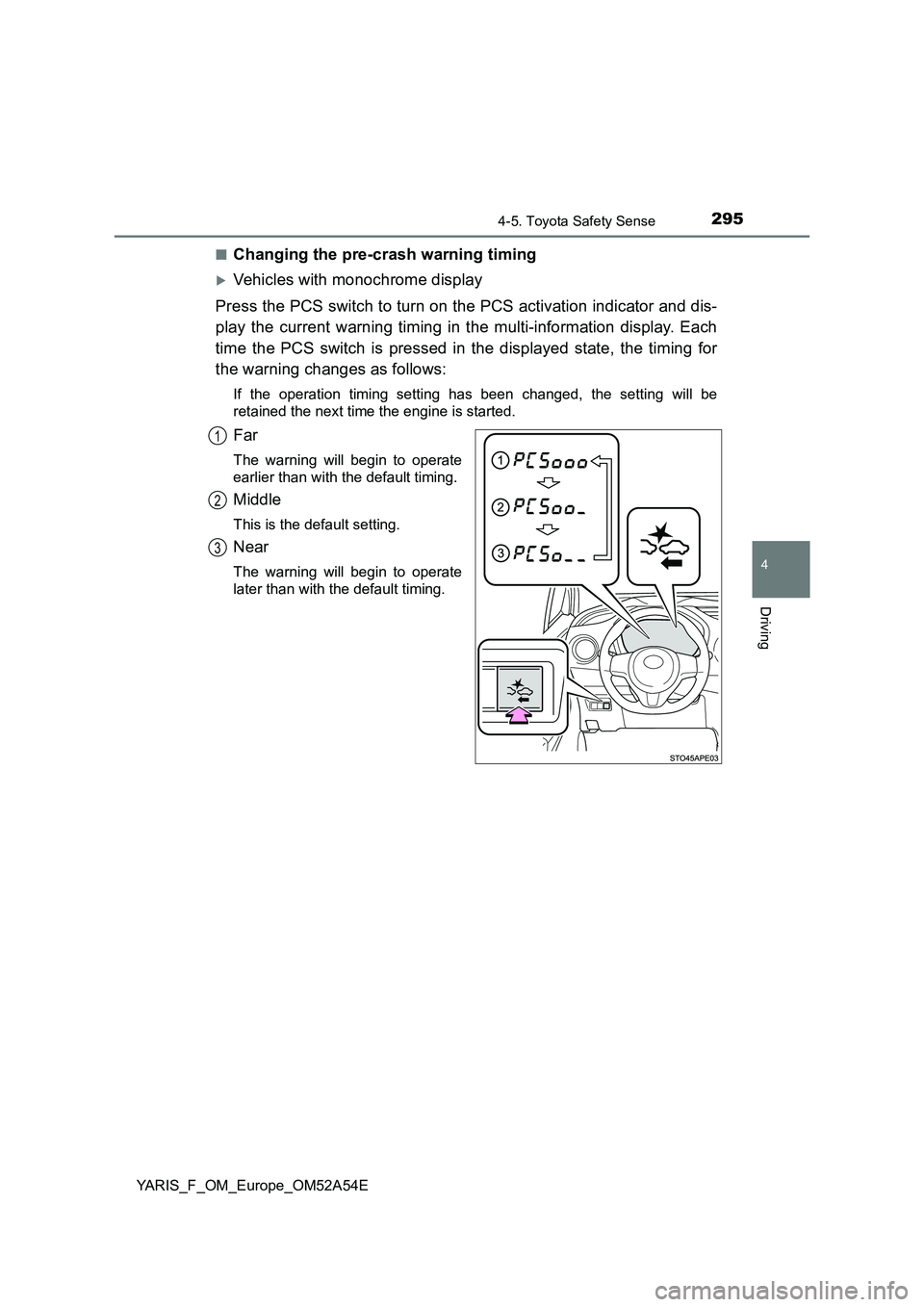
Press the PCS switch to turn on the PCS activation indicator and dis-
play the current warning timing in the multi-information display. Each
time the PCS switch is pressed in the displayed state, the timing for
the warning changes as follows:
If the operation timing setting has been changed, the setting will be
retained the next time the engine is started.
Far
The warning will begin to operate
earlier than with the default timing.
Middle
This is the default setting.
Near
The warning will begin to operate
later than with the default timing.
1
2
3
Page 296 of 692
2964-5. Toyota Safety Sense
YARIS_F_OM_Europe_OM52A54E
Vehicles with color display
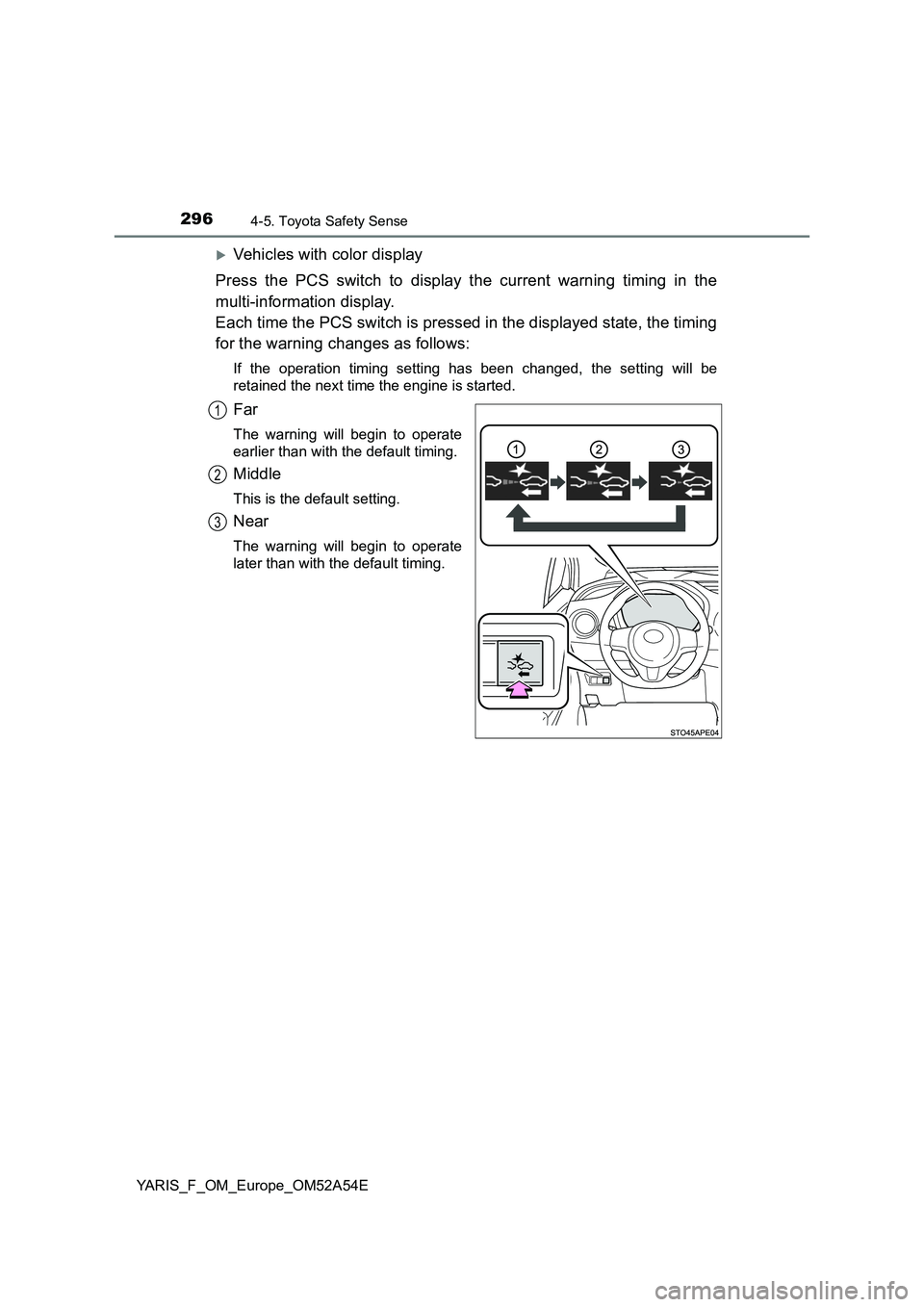
Press the PCS switch to display the current warning timing in the
multi-information display.
Each time the PCS switch is pressed in the displayed state, the timing
for the warning changes as follows:
If the operation timing setting has been changed, the setting will be
retained the next time the engine is started.
Far
The warning will begin to operate
earlier than with the default timing.
Middle
This is the default setting.
Near
The warning will begin to operate
later than with the default timing.
1
2
3
Page 303 of 692
3034-5. Toyota Safety Sense
4
Driving
YARIS_F_OM_Europe_OM52A54E
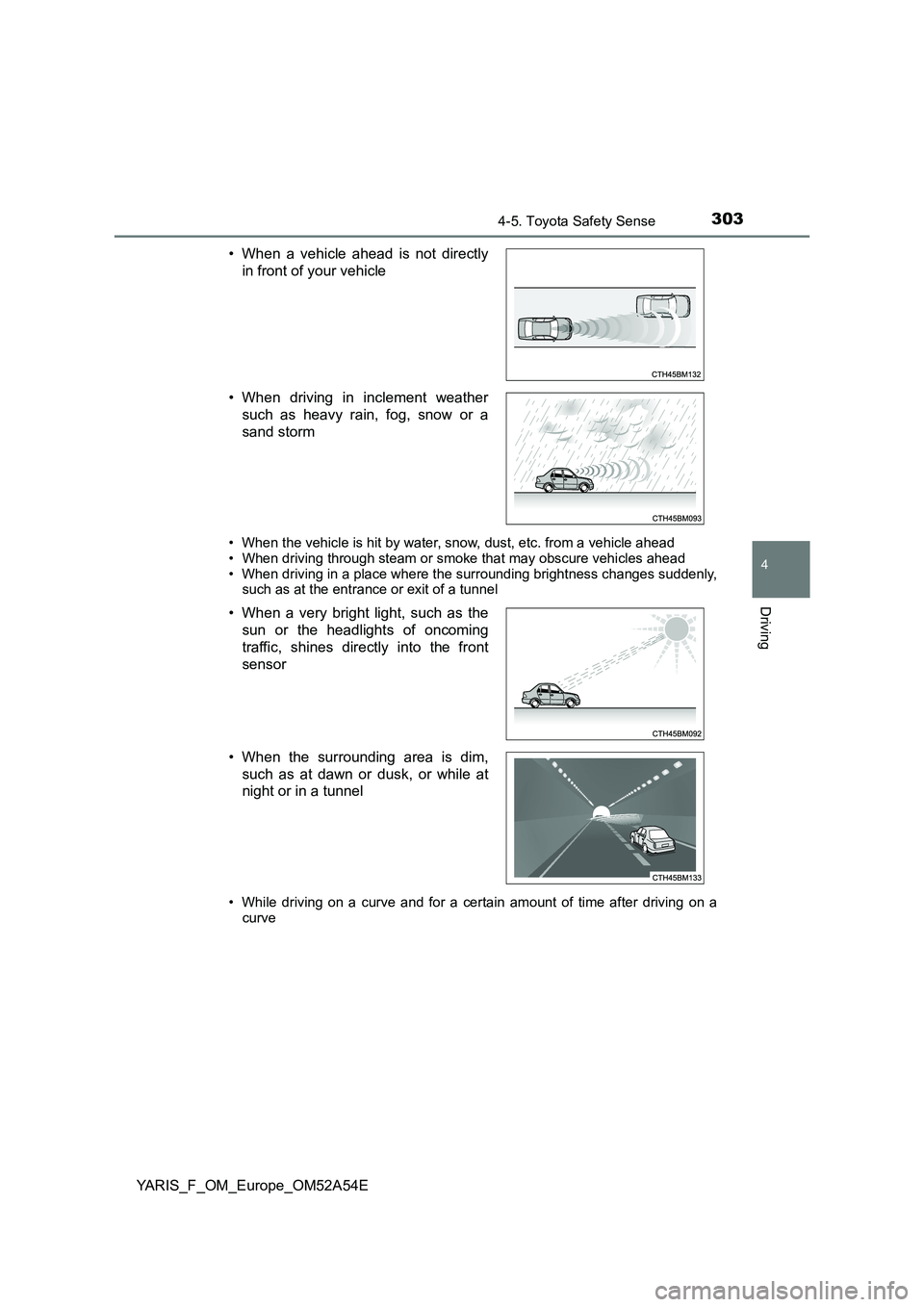
• When the vehicle is hit by water, snow, dust, etc. from a vehicle ahead
• When driving through steam or smoke that may obscure vehicles ahead • When driving in a place where the surrounding brightness changes suddenly,such as at the entrance or exit of a tunnel
• While driving on a curve and for a certain amount of time after driving on a
curve
• When a vehicle ahead is not directly
in front of your vehicle
• When driving in inclement weather
such as heavy rain, fog, snow or a
sand storm
• When a very bright light, such as the
sun or the headlights of oncoming
traffic, shines directly into the front
sensor
• When the surrounding area is dim,
such as at dawn or dusk, or while at
night or in a tunnel
Page 312 of 692
3124-5. Toyota Safety Sense
YARIS_F_OM_Europe_OM52A54E●When the lane markers are yellow (These may be more difficult for the sys-
tem to recognize compared to white markers.)
●When the lane markers are broken, Botts’ dots (raised pavement markers)
or stones
●When the lane markers are on a curb etc.
●When lane markers are obscured or partially obscured by sand, dirt, etc.
●When there are shadows on the road running parallel with lane markers, or
if a shadow covers the lane markers
●When driving on a particularly bright road surface, such as concrete
●When driving on a road surface that is bright due to reflected light
●When driving in a location where the light level changes rapidly, such as the
entrance to or exit from a tunnel
●When sunlight or the headlights of oncoming vehicles are shining directly
into the camera lens
●When driving on roads that are branching or merging
●When driving on a road surface that is wet due to rain, previous rainfall,
standing water, etc.
●When the vehicle experiences strong up-and-down motion such as when
driving on an extremely rough road or on a seam in the pavement
●When headlight brightness at nighttime is reduced due to dirt on the lenses,
or when the headlights are misaligned
●When driving on winding roads or roads that are uneven
●When driving on rough or unpaved roads
●When the windshield is dirty, or if raindrops, condensation or ice are adher-
ing to the windshield
●When the heater is blowing to the feet, the upper part of the windshield may
get fogged up and have a negative effect
●When cleaning the inside of the windshield, touching the lens or getting
glass cleaner on the lens may have a negative effect
■When changing the tires
Depending on the tires used, sufficient performance may not be maintainable.
Page 323 of 692
3234-5. Toyota Safety Sense
4
Driving
YARIS_F_OM_Europe_OM52A54E■Conditions in which the function may not operate or detect correctly
In the following situations, RSA does not operate normally and may not rec-
ognize signs, display the incorrect sign, etc. However, this does not indicate a
malfunction.
●The front sensor is misaligned due to a strong impact being applied to the
sensor, etc.
●Dirt, snow, stickers, etc., are on the windshield near the front sensor.
●In inclement weather such as heavy rain, fog, snow or sand storms
●Light from an oncoming vehicle, the sun, etc., enters the front sensor.
●The sign is small, dirty, faded, tilted or bent, and if an electronic sign, the
contrast is poor.
●All or part of the sign is hidden by the leaves of a tree, a pole, etc.
●The sign is only visible to the front sensor for a short amount of time.
●The driving scene (turning, lane change, etc.) is judged incorrectly.
●Even if it is a sign not appropriate for the currently traveled lane, such a sign
exists directly after a freeway branches, or in an adjacent lane just before
merging.
●Stickers are attached to the rear of the preceding vehicle.
●A sign resembling a system compatible sign is recognized.
●The vehicle is driven in a country with a different direction of traffic.
●Side road speed signs may be detected and displayed (if positioned in sight
of the front sensor) while the vehicle is traveling on the main road.
●Roundabout exit road speed signs may be detected and displayed (if posi-
tioned in sight of the front sensor) while traveling on a roundabout.
●The speed information displayed on the meter and that displayed on the
Navigation system (if equipped) may be different due to the Navigation sys-
tem using map data.
Page 326 of 692
3264-6. Using the driving support systems
YARIS_F_OM_Europe_OM52A54E
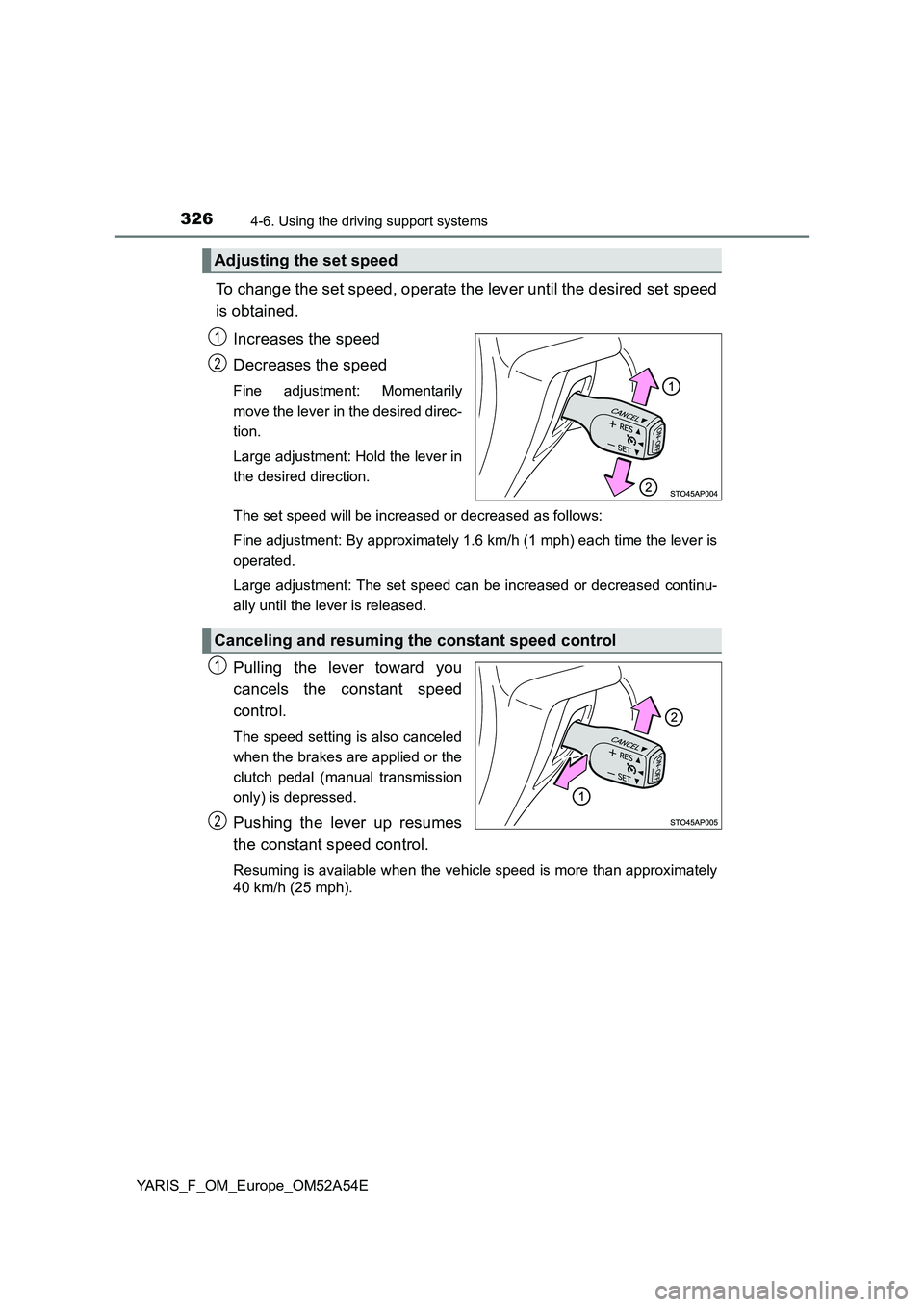
To change the set speed, operate the lever until the desired set speed
is obtained.
Increases the speed
Decreases the speed
Fine adjustment: Momentarily
move the lever in the desired direc-
tion.
Large adjustment: Hold the lever in
the desired direction.
The set speed will be increased or decreased as follows:
Fine adjustment: By approximately 1.6 km/h (1 mph) each time the lever is
operated.
Large adjustment: The set speed can be increased or decreased continu-
ally until the lever is released.
Pulling the lever toward you
cancels the constant speed
control.
The speed setting is also canceled
when the brakes are applied or the
clutch pedal (manual transmission
only) is depressed.
Pushing the lever up resumes
the constant speed control.
Resuming is available when the vehicle speed is more than approximately
40 km/h (25 mph).
Adjusting the set speed
1
2
Canceling and resuming the constant speed control
1
2
Page 331 of 692
3314-6. Using the driving support systems
4
Driving
YARIS_F_OM_Europe_OM52A54E
■Speed limiter can be set when
The speed limiter can be set at any vehicle speed. However, if the
speed limiter is set while the vehicle speed is below 30 km/h
(18 mph), the speed limiter will be set to 30 km/h (18 mph).
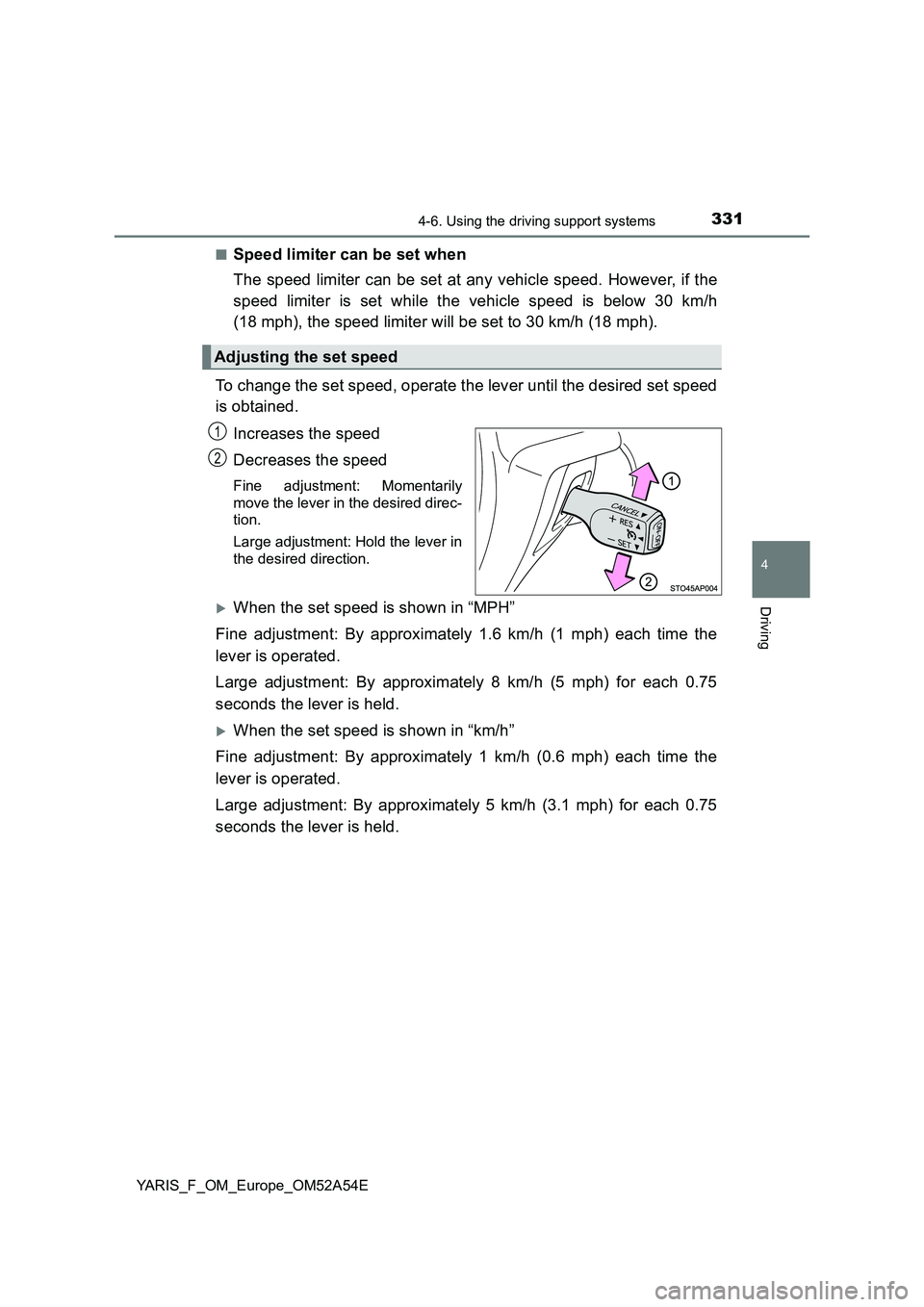
To change the set speed, operate the lever until the desired set speed
is obtained.
Increases the speed
Decreases the speed
Fine adjustment: Momentarily
move the lever in the desired direc-
tion.
Large adjustment: Hold the lever in
the desired direction.
When the set speed is shown in “MPH”
Fine adjustment: By approximately 1.6 km/h (1 mph) each time the
lever is operated.
Large adjustment: By approximately 8 km/h (5 mph) for each 0.75
seconds the lever is held.
When the set speed is shown in “km/h”
Fine adjustment: By approximately 1 km/h (0.6 mph) each time the
lever is operated.
Large adjustment: By approximately 5 km/h (3.1 mph) for each 0.75
seconds the lever is held.
Adjusting the set speed
1
2
Page 346 of 692
3464-6. Using the driving support systems
YARIS_F_OM_Europe_OM52A54E■
If the Stop & Start cancel switch is pressed while the vehicle is
stopped
●When the engine is stopped by the Stop & Start system, pressing
the Stop & Start cancel switch will restart the engine.
From the next time the vehicle is stopped (after Stop & Start sys-
tem has been turned off), the engine will not be stopped.
●With the Stop & Start system disabled, pressing the Stop & Start
cancel switch will re-enable the system but not stop the engine.
From the next time the vehicle is stopped (after Stop & Start sys-
tem has been turned on), the engine will be stopped.
After the engine is stopped by the Stop & Start system when the vehi-
cle is on an incline, brake force is temporarily maintained to prevent
rolling backwards until the engine is restarted and drive force is gener-
ated.
When drive force is generated, the maintained brake force is automat-
ically canceled.
●This function operates on flat surfaces as well as steep inclines.
●Sound may be generated from the brakes, but this is not a malfunc-
tion.
●Brake pedal response may change and vibration may occur, but
these are not malfunctions.
Hill-start assist control (vehicles with a Multidrive)
Page 353 of 692
3534-6. Using the driving support systems
4
Driving
YARIS_F_OM_Europe_OM52A54E
■ Air conditioning system operation while the engine is stopped by the
Stop & Start system
● If the air conditioning system is being used in automatic mode, the fan
speed may be reduced or the fan may be stopped while the engine is
stopped by the Stop & Start system in order to reduce changes in the cabin
temperature.
● To ensure air conditioning system performance when the vehicle is stopped,
disable the Stop & Start system by pressing the Stop & Start cancel switch.
■ The Stop & Start system operation time and Stop & Start system total
operation time display
P. 123
■ When replacing the battery
P. 637
WARNING
■When the Stop & Start system is operating
● Keep the shift lever in N (manual transmission) and apply the brake pedal
or parking brake for safety while the engine is stopped due to the Stop &
Start system (while the Stop & Start indicator is on).
Unexpected accidents may occur due to the automatic engine start func-
tion.
● Do not leave the vehicle while the engine is stopped due to the Stop &
Start system (while the Stop & Start indicator is on).
Unexpected accidents may occur due to the automatic engine start func-
tion.
● Ensure that the engine is not stopped by the Stop & Start system while the
vehicle is in a poorly ventilated area. The engine may restart due to the
automatic engine start function, causing exhaust gases to collect and
enter the vehicle and resulting in death or a serious health hazard.