display TOYOTA YARIS 2020 Manual Online
[x] Cancel search | Manufacturer: TOYOTA, Model Year: 2020, Model line: YARIS, Model: TOYOTA YARIS 2020Pages: 692, PDF Size: 68.71 MB
Page 338 of 692
3384-6. Using the driving support systems
YARIS_F_OM_Europe_OM52A54E
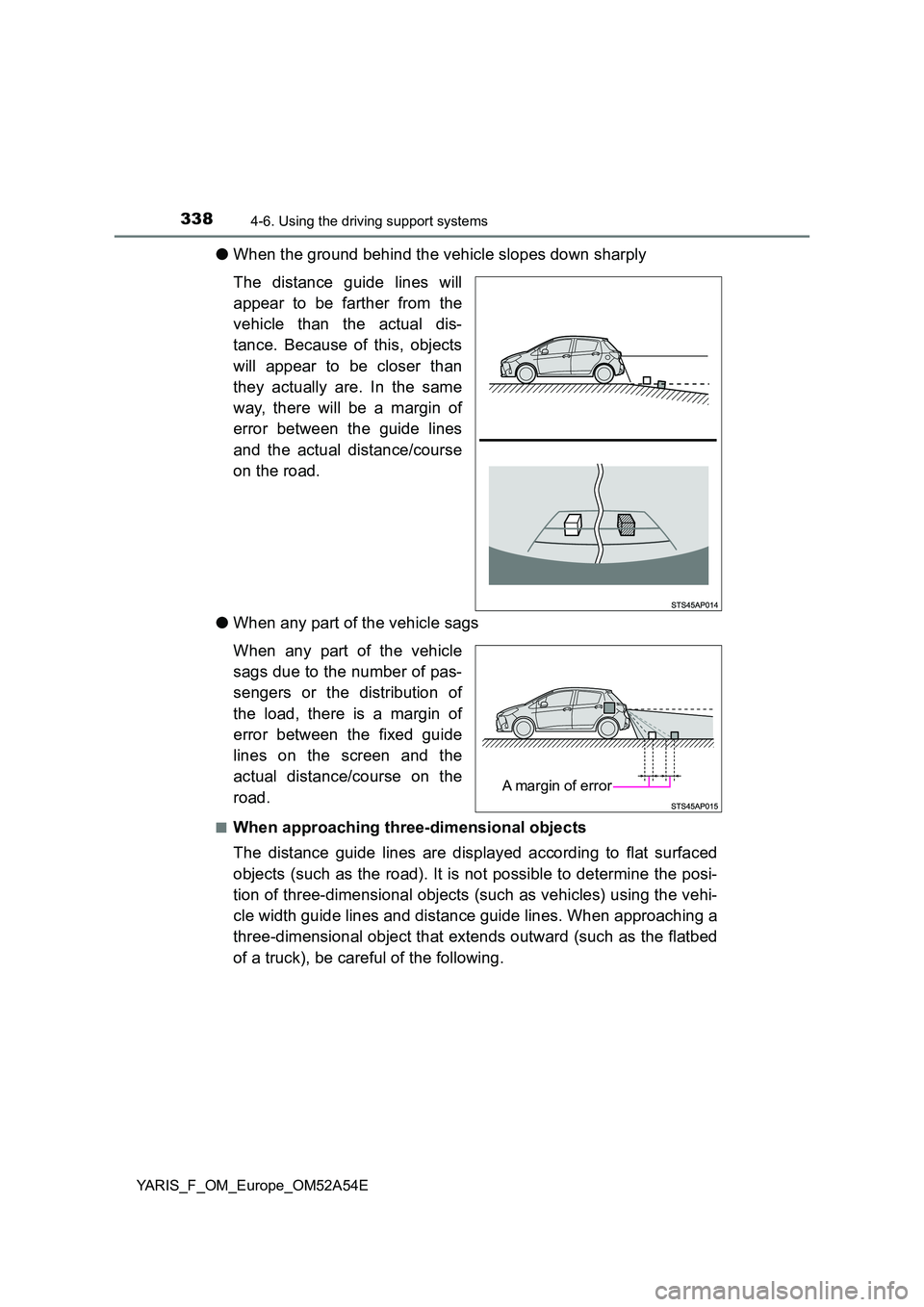
●When the ground behind the vehicle slopes down sharply
The distance guide lines will
appear to be farther from the
vehicle than the actual dis-
tance. Because of this, objects
will appear to be closer than
they actually are. In the same
way, there will be a margin of
error between the guide lines
and the actual distance/course
on the road.
● When any part of the vehicle sags
When any part of the vehicle
sags due to the number of pas-
sengers or the distribution of
the load, there is a margin of
error between the fixed guide
lines on the screen and the
actual distance/course on the
road.
■When approaching three-dimensional objects
The distance guide lines are displayed according to flat surfaced
objects (such as the road). It is not possible to determine the posi-
tion of three-dimensional objects (such as vehicles) using the vehi-
cle width guide lines and distance guide lines. When approaching a
three-dimensional object that extends outward (such as the flatbed
of a truck), be careful of the following.
A margin of error
Page 342 of 692
3424-6. Using the driving support systems
YARIS_F_OM_Europe_OM52A54E
WARNING
■When using the rear view monitor system
The rear view monitor system is a supplemental device intended to assist
the driver when backing up. When backing up, be sure to visually check all
around the vehicle both directly and using the mirrors before proceeding.
Observe the following precautions to avoid an accident that could result in
death or serious injuries.
● Never depend on the rear view monitor system entirely when backing up.
The image and the position of the guide lines displayed on the screen may
differ from the actual state.
Use caution, just as you would when backing up any vehicle.
● Be sure to back up slowly, depressing the brake pedal to control vehicle
speed.
● The instructions given are only guide lines.
When and how much to turn the steering wheel will vary according to traf-
fic conditions, road surface conditions , vehicle condition, etc. when park-
ing. It is necessary to be fully aware of this before using the rear view
monitor system.
● When parking, be sure to check that the parking space will accommodate
your vehicle before maneuvering into it.
● Do not use the rear view monitor system in the following cases:
• On icy or slick road surfaces, or in snow
• When using tire chains or emergency tires
• When the back door is not closed completely
• On roads that are not flat or straight, such as curves or slopes.
● In low temperatures, the screen may darken or the image may become
faint. The image could distort when the vehicle is moving, or you may
become unable to see the image on the screen. Be sure to visually check
all around the vehicle both directly and using the mirrors before proceed-
ing.
● If the tire sizes are changed, the position of the fixed guide lines displayed
on the screen may change.
● The camera uses a special lens. The distances between objects and
pedestrians that appear in the image displayed on the screen will differ
from the actual distances. ( P. 337)
Page 349 of 692
3494-6. Using the driving support systems
4
Driving
YARIS_F_OM_Europe_OM52A54E■The Stop & Start system protection feature
Vehicles without a smart entry & start system
When an excessively loud sound is being projected by the audio system, the
audio system may be automatically cut off in order to maintain power for the
Stop & Start system function.
If this occurs, turning the engine switch to the “LOCK” position then to the
“ACC” or “ON” position re-enables the audio system.
Vehicles with a smart entry & start system
When an excessively loud sound is being projected by the audio system, the
audio system may be automatically cut off in order to maintain power for the
Stop & Start system function.
If this occurs, turning the engine switch off then to ACCESSORY mode or
IGNITION ON mode re-enables the audio system.
■Hood
Even if the hood is closed after the engine is started with the hood open, the
Stop & Start system will not operate. Close the hood, turn the engine switch
off, wait 30 seconds or more, and then start the engine. (P. 241, 243)
Vehicles with a Multidrive: If the hood is opened while the engine is stopped
by the Stop & Start system and the shift lever is in N or P, the engine will
restart.
■When to use the Stop & Start system
When the system does not operate, is canceled, or is malfunctioning, warning
messages (vehicles with color display only) and a warning buzzer are used to
inform the driver. (P. 350)
■Stop & Start system warning buzzer
If the engine is stopped by the Stop & Start system and either of the following
actions is performed, a buzzer will sound and the Stop & Start indicator will
flash (Multidrive), or a buzzer will sound (manual transmission). This indi-
cates that the engine is only stopped by the Stop & Start system, not that the
engine has been turned off completely.
Vehicles with a Multidrive
The driver’s door is opened when the shift lever is in D or M.
Vehicles with a manual transmission
The shift lever is shifted into a position other than N with the clutch pedal
released.
Page 350 of 692
3504-6. Using the driving support systems
YARIS_F_OM_Europe_OM52A54E■Multi-information display messages (vehicles with color display)
If the following situations, and a message may be displayed on the
multi-information display.
●When the engine cannot be stopped by the Stop & Start system
MessageDetails
“For climate con-
trol.”
• The air conditioning system is being
used when the ambient temperature is
high or low.
If the difference between the set tempera-
ture and cabin temperature is small, the
system will be enabled.
• The windshield defogger is turned on.
“Battery charging.”
• The battery charge amount may be low.
Engine stop is temporarily prohibited to
prioritize charging of the battery, but if the
engine is operated for a short while,
engine stop is allowed.
• A refresh charge may be occurring
such as when the battery is undergoing
a periodic recharge, for a while after the
battery terminals have been discon-
nected and reconnected, for a while
after the battery has been replaced, etc.
After a refresh charge of approximately 5
to 60 minutes completes, the system can
be operated.
• The engine may have been started with
the hood opened.
Close the hood, turn the engine switch off,
wait 30 seconds or more, and then start
the engine.
●If the message is displayed continuously
(60 minutes or more), the battery may
have deteriorated. Contact any authorized
Toyota retailer or Toyota authorized
repairer, or any reliable repairer.
“For brake sys-
tem.”
• The vehicle is being driven in a high
altitude area.
• The brake booster vacuum is low.
When the brake booster vacuum reaches
a predetermined level, the system will be
enabled.
Page 353 of 692
3534-6. Using the driving support systems
4
Driving
YARIS_F_OM_Europe_OM52A54E
■ Air conditioning system operation while the engine is stopped by the
Stop & Start system
● If the air conditioning system is being used in automatic mode, the fan
speed may be reduced or the fan may be stopped while the engine is
stopped by the Stop & Start system in order to reduce changes in the cabin
temperature.
● To ensure air conditioning system performance when the vehicle is stopped,
disable the Stop & Start system by pressing the Stop & Start cancel switch.
■ The Stop & Start system operation time and Stop & Start system total
operation time display
P. 123
■ When replacing the battery
P. 637
WARNING
■When the Stop & Start system is operating
● Keep the shift lever in N (manual transmission) and apply the brake pedal
or parking brake for safety while the engine is stopped due to the Stop &
Start system (while the Stop & Start indicator is on).
Unexpected accidents may occur due to the automatic engine start func-
tion.
● Do not leave the vehicle while the engine is stopped due to the Stop &
Start system (while the Stop & Start indicator is on).
Unexpected accidents may occur due to the automatic engine start func-
tion.
● Ensure that the engine is not stopped by the Stop & Start system while the
vehicle is in a poorly ventilated area. The engine may restart due to the
automatic engine start function, causing exhaust gases to collect and
enter the vehicle and resulting in death or a serious health hazard.
Page 354 of 692
3544-6. Using the driving support systems
YARIS_F_OM_Europe_OM52A54E
NOTICE
■To ensure the system operates correctly
If any one of the following situations occurs, the Stop & Start system may
not operate correctly, thus, please have your vehicle checked by any autho-
rized Toyota retailer or Toyota authorized repairer, or any reliable repairer.
● While the driver’s seat belt is fastened, the driver’s and front passenger’s
seat belt reminder light flashes.
● Even when the driver’s seat belt is not fastened, the driver’s and front pas-
senger’s seat belt reminder light remains off.
● Vehicles with monochrome display: Even though the driver’ door is closed,
the open door warning light is illuminated or the interior light is illuminated
when the interior light switch is in the door position.
● Vehicles with color display: Even though the driver’ door is closed, the
open door warning is displayed on the multi-information display or the inte-
rior light is illuminated when the interior light switch is in the door position.
● Vehicles with monochrome display: Even though the driver’ door is open,
the open door warning light does not illuminate or the interior light does not
illuminate when the interior light switch is in the door position.
● Vehicles with color display: Even though the driver’ door is open, the open
door warning is not displayed on the multi-information display or the inte-
rior light does not illuminate when the interior light switch is in the door
position.
Page 356 of 692
3564-6. Using the driving support systems
YARIS_F_OM_Europe_OM52A54E
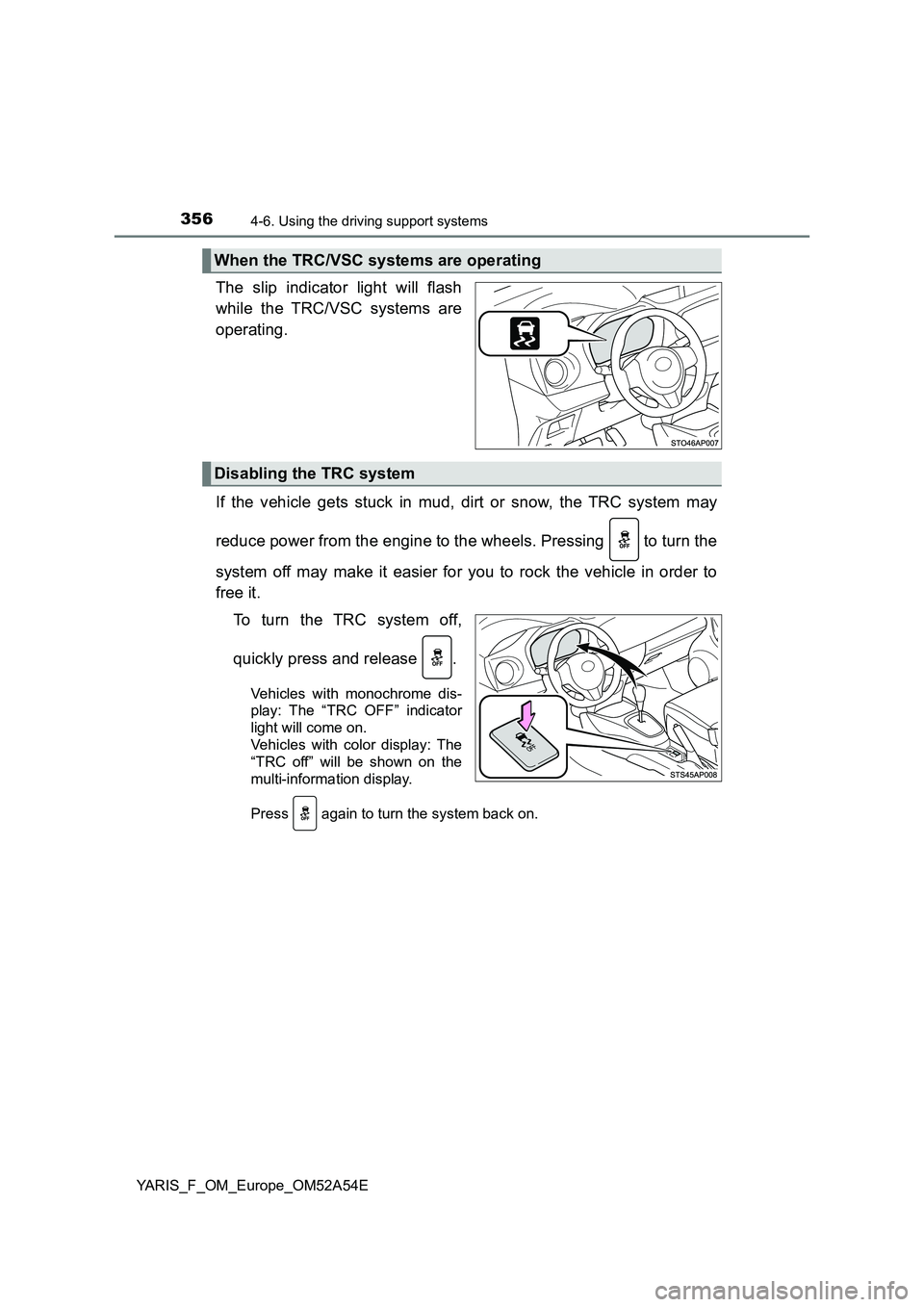
The slip indicator light will flash
while the TRC/VSC systems are
operating.
If the vehicle gets stuck in mud, dirt or snow, the TRC system may
reduce power from the engine to the wheels. Pressing to turn the
system off may make it easier for you to rock the vehicle in order to
free it.
To turn the TRC system off,
quickly press and release .
Vehicles with monochrome dis-
play: The “TRC OFF” indicator
light will come on.
Vehicles with color display: The
“TRC off” will be shown on the
multi-information display.
Press again to turn the system back on.
When the TRC/VSC systems are operating
Disabling the TRC system
Page 357 of 692
3574-6. Using the driving support systems
4
Driving
YARIS_F_OM_Europe_OM52A54E
■Turning off both TRC and VSC systems
Vehicles with monochrome display
To turn the TRC and VSC systems off, press and hold
for more than 3
seconds while the vehicle is stopped.
The “TRC OFF” indicator light and the VSC OFF indicator light will come on.
Press
again to turn the systems back on.
Vehicles with color display
To turn TRC and VSC systems off, press and hold
for more than 3 sec-
onds while the vehicle is stopped.
The VSC OFF indicator light will come on and the “TRC off” will be shown on
the multi-information display.*
Press
again to turn the systems back on.
*: On vehicles with pre-crash safety system, pre-crash brake assist and pre-
crash braking will also be disabled. The PCS warning light will come on.
(P. 306)
■When the “TRC OFF” indicator light comes on even if
has not been
pressed (vehicles with monochrome display)
TRC is temporary deactivated. If the indicator light continues to remain on,
contact any authorized Toyota retailer or Toyota authorized repairer, or any
reliable repairer.
■When the message is displayed on the multi-information display show-
ing that TRC has been disabled even if
has not been pressed (vehi-
cles with color display)
TRC is temporary deactivated. If the information continues to show, contact
any authorized Toyota retailer or Toyota authorized repairer, or any reliable
repairer.
Page 372 of 692
3725-2. Using the audio system
YARIS_F_OM_Europe_OM52A54E
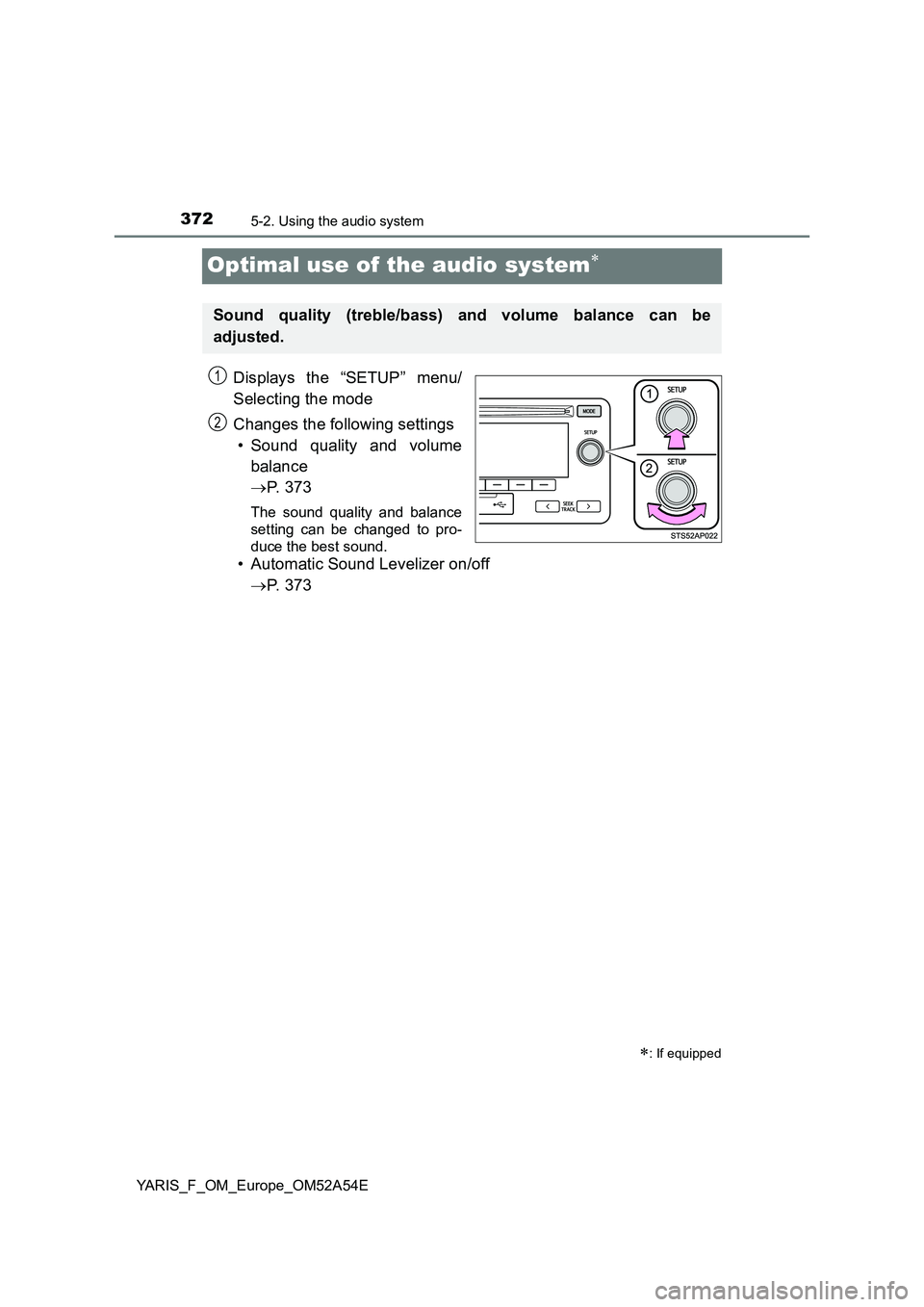
Optimal use of the audio system
Displays the “SETUP” menu/
Selecting the mode
Changes the following settings
• Sound quality and volume
balance
P. 3 7 3
The sound quality and balance
setting can be changed to pro-
duce the best sound.
• Automatic Sound Levelizer on/off
P. 3 7 3
: If equipped
Sound quality (treble/bass) and volume balance can be
adjusted.
1
2
Page 373 of 692
3735-2. Using the audio system
5
Audio system
YARIS_F_OM_Europe_OM52A54E■
Changing sound quality modes
Press the tune/scroll knob.
Turn the knob to select “Sound settings”.
Press the knob.
Turn the knob as corresponds to the desired mode.
“Bass”, “Treble”, “Fader”, “Balance”, or “ASL” can be selected.
Press the knob.
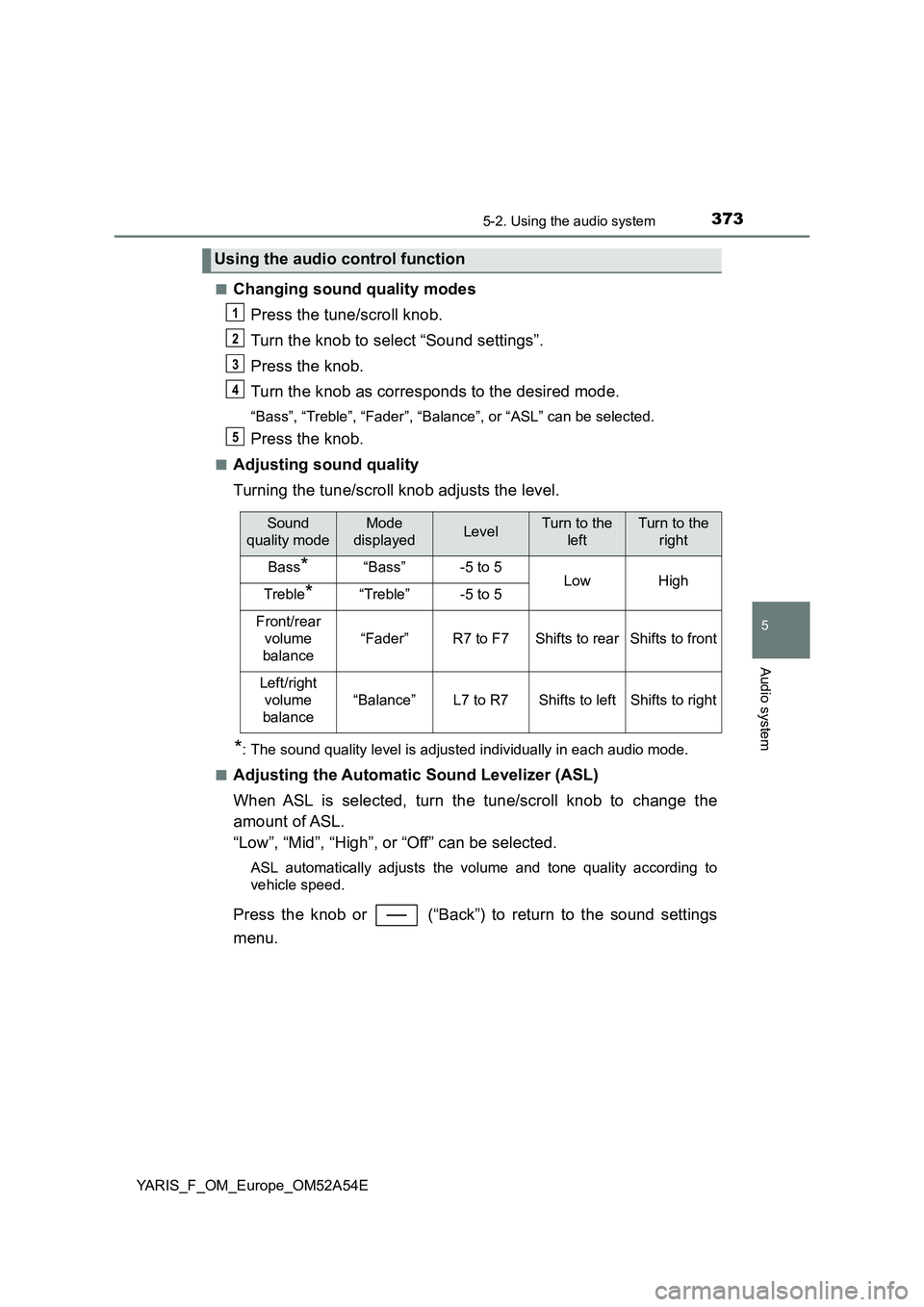
■Adjusting sound quality
Turning the tune/scroll knob adjusts the level.
*: The sound quality level is adjusted individually in each audio mode.
■
Adjusting the Automatic Sound Levelizer (ASL)
When ASL is selected, turn the tune/scroll knob to change the
amount of ASL.
“Low”, “Mid”, “High”, or “Off” can be selected.
ASL automatically adjusts the volume and tone quality according to
vehicle speed.
Press the knob or (“Back”) to return to the sound settings
menu.
Using the audio control function
1
2
3
4
5
Sound
quality modeMode
displayedLevelTurn to the
leftTurn to the
right
Bass*“Bass”-5 to 5LowHighTreble*“Treble”-5 to 5
Front/rear
volume
balance
“Fader”R7 to F7Shifts to rearShifts to front
Left/right
volume
balance
“Balance”L7 to R7Shifts to leftShifts to right