Time TOYOTA YARIS CROSS 2021 User Guide
[x] Cancel search | Manufacturer: TOYOTA, Model Year: 2021, Model line: YARIS CROSS, Model: TOYOTA YARIS CROSS 2021Pages: 650, PDF Size: 132.86 MB
Page 67 of 650
65
1
YARIS CROSS Owner's Manual_Europe_M52K60_en
1-3. Emergency assistance
For safety and security
1-3.Emerg ency as sista nce
*1: If equipped
*2: Operates within the eCall coverage.
The system name differs depending
on the country.
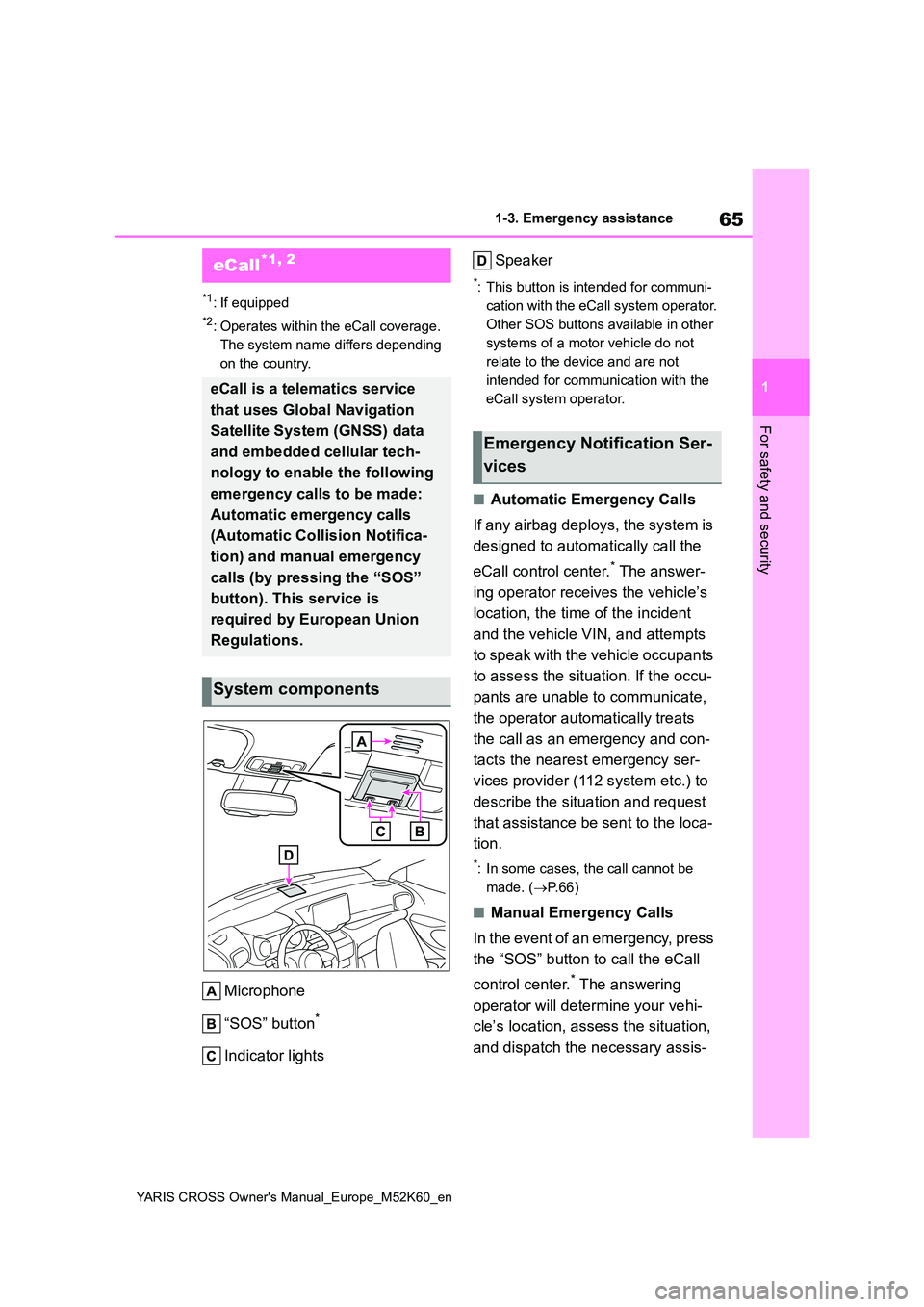
Microphone
“SOS” button*
Indicator lights
Speaker
*: This button is intended for communi-
cation with the eCall system operator.
Other SOS buttons available in other
systems of a motor vehicle do not
relate to the device and are not
intended for communication with the
eCall system operator.
■Automatic Emergency Calls
If any airbag deploys, the system is
designed to automatically call the
eCall control center.* The answer-
ing operator receives the vehicle’s
location, the time of the incident
and the vehicle VIN, and attempts
to speak with the vehicle occupants
to assess the situation. If the occu-
pants are unable to communicate,
the operator automatically treats
the call as an emergency and con-
tacts the nearest emergency ser-
vices provider (112 system etc.) to
describe the situation and request
that assistance be sent to the loca-
tion.
*: In some cases, the call cannot be
made. ( P. 6 6 )
■Manual Emergency Calls
In the event of an emergency, press
the “SOS” button to call the eCall
control center.* The answering
operator will determine your vehi-
cle’s location, assess the situation,
and dispatch the necessary assis-
eCall*1, 2
eCall is a telematics service
that uses Global Navigation
Satellite System (GNSS) data
and embedded cellular tech-
nology to enable the following
emergency calls to be made:
Automatic emergency calls
(Automatic Collision Notifica-
tion) and manual emergency
calls (by pressing the “SOS”
button). This service is
required by European Union
Regulations.
System components
Emergency Notification Ser-
vices
Page 68 of 650
66
YARIS CROSS Owner's Manual_Europe_M52K60_en
1-3. Emergency assistance
tance required.
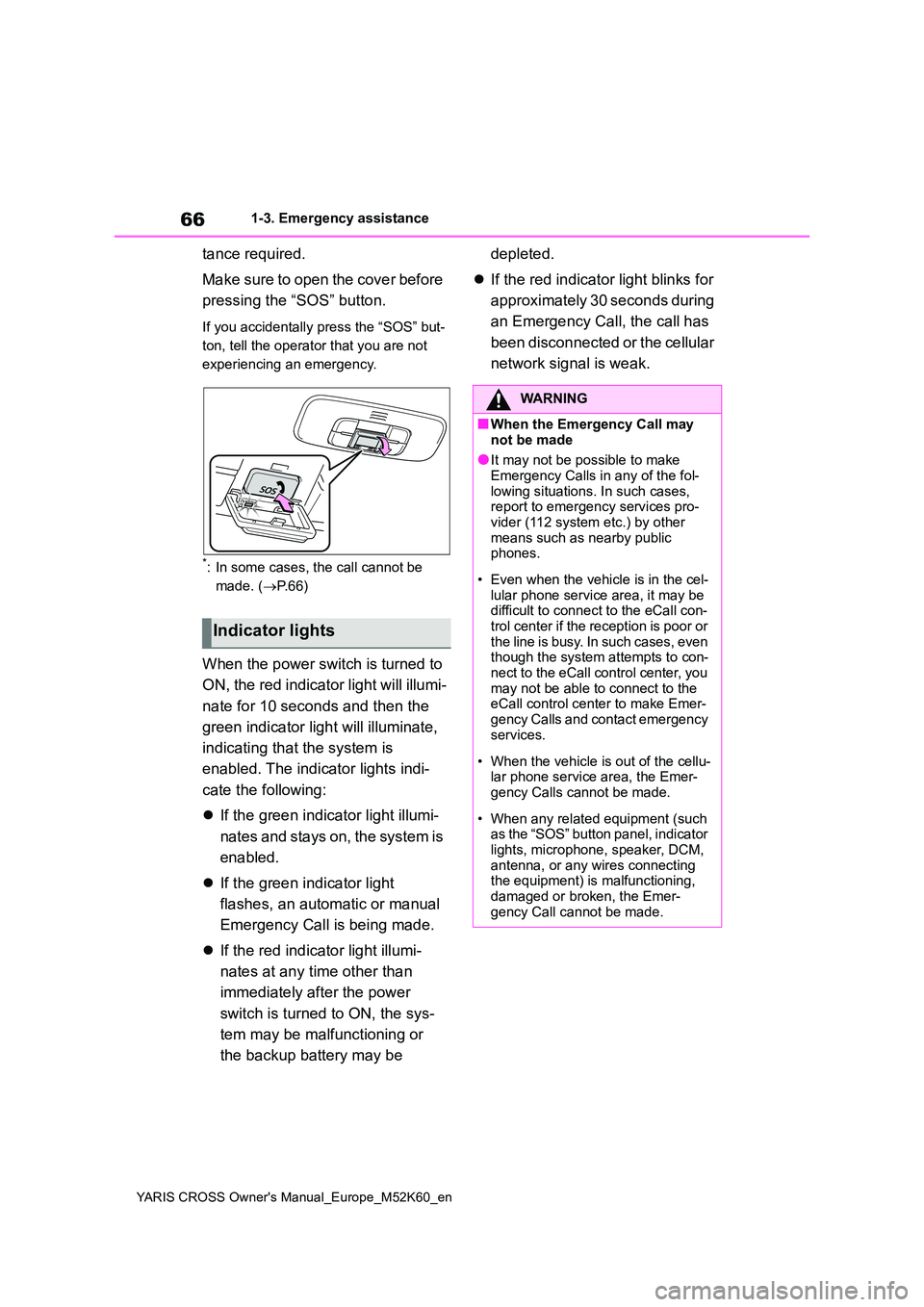
Make sure to open the cover before
pressing the “SOS” button.
If you accidentally press the “SOS” but-
ton, tell the operator that you are not
experiencing an emergency.
*: In some cases, the call cannot be
made. ( P. 6 6 )
When the power switch is turned to
ON, the red indicator light will illumi-
nate for 10 seconds and then the
green indicator light will illuminate,
indicating that the system is
enabled. The indicator lights indi-
cate the following:
If the green indicator light illumi-
nates and stays on, the system is
enabled.
If the green indicator light
flashes, an automatic or manual
Emergency Call is being made.
If the red indicator light illumi-
nates at any time other than
immediately after the power
switch is turned to ON, the sys-
tem may be malfunctioning or
the backup battery may be
depleted.
If the red indicator light blinks for
approximately 30 seconds during
an Emergency Call, the call has
been disconnected or the cellular
network signal is weak.
Indicator lights
WARNING
■When the Emergency Call may
not be made
●It may not be possible to make Emergency Calls in any of the fol-
lowing situations. In such cases, report to emergency services pro-vider (112 system etc.) by other
means such as nearby public phones.
• Even when the vehicle is in the cel- lular phone service area, it may be difficult to connect to the eCall con-
trol center if the reception is poor or the line is busy. In such cases, even though the system attempts to con-
nect to the eCall control center, you may not be able to connect to the eCall control center to make Emer-
gency Calls and contact emergency services.
• When the vehicle is out of the cellu- lar phone service area, the Emer-gency Calls cannot be made.
• When any related equipment (such as the “SOS” button panel, indicator
lights, microphone, speaker, DCM, antenna, or any wires connecting the equipment) is malfunctioning,
damaged or broken, the Emer- gency Call cannot be made.
Page 72 of 650
70
YARIS CROSS Owner's Manual_Europe_M52K60_en
1-3. Emergency assistance
2. INFORMATION ON DATA PROCESSING
2.1.
Any processing of personal data through the 112-
based eCall in-vehicle system shall comply with
the personal data protection rules provided for in
Directives 95/46/EC and 2002/58/EC, and in par-
ticular, shall be based on the necessity to protect
the vital interests of the individuals in accordance
with Article 7(d) of Directive 95/46/EC.
O
2.2.
Processing of such data is strictly limited to the
purpose of handling the emergency eCall to the
single European emergency number 112.
O
2.3. Types of data and its recipients
2.3.1.
The 112-based eCall in-vehicle system may col-
lect and process only the following data: Vehicle
Identification Number, Vehicle type (passenger
vehicle or light commercial vehicle), Vehicle pro-
pulsion storage type (gasoline/die-
sel/CNG/LPG/electric/hydrogen), Vehicle last
three locations and direction of travel, Log file of
the automatic activation of the system and its
timestamp, Any additional data (if applicable)
O
2.3.2.
Recipients of data processed by the 112-based
eCall in-vehicle system are the relevant public
safety answering points designated by the
respective public authorities of the country on
which territory they are located, to first receive
and handle eCalls to the single European emer-
gency number 112. Additional information (if
available):
O
Implementing Regulation Annex1 PART3 User InformationConformity
Page 78 of 650
76
YARIS CROSS Owner's Manual_Europe_M52K60_en
1-4. Hybrid system
motor) drives the vehicle. At slow
speeds or when traveling down a
gentle slope, the engine is stopped*
and the electric motor (traction
motor) is used.
When the shift lever is in N, the
hybrid battery (traction battery) is
not being charged.
*: When the hybrid battery (traction bat-
tery) requires charging or the engine
is warming up, etc., the gasoline
engine will not automatically stop.
( P. 7 6 )
■During normal driving
The gasoline engine is predomi-
nantly used. The electric motor
(traction motor) charges the hybrid
battery (traction battery) as neces-
sary.
■When accelerating sharply
When the accelerator pedal is
depressed heavily, the power of the
hybrid battery (traction battery) is
added to that of the gasoline engine
via the electric motor (traction
motor).
■When braking (regenerative
braking)
The wheels operate the electric
motor (traction motor) as a power
generator, and the hybrid battery
(traction battery) is charged.
■Regenerative braking
●In the following situations, kinetic
energy is converted to electric energy and deceleration force can be obtained in conjunction with the
recharging of the hybrid battery (trac-
tion battery). • The accelerator pedal is released while driving with the shift lever in D or
B. • The brake pedal is depressed while driving with the shift lever in D or B.
●Vehicles with GPF system: While the GPF system ( P.335) is operating to
regenerate the exhaust gas filter, the hybrid battery (traction battery) may not be recharged.
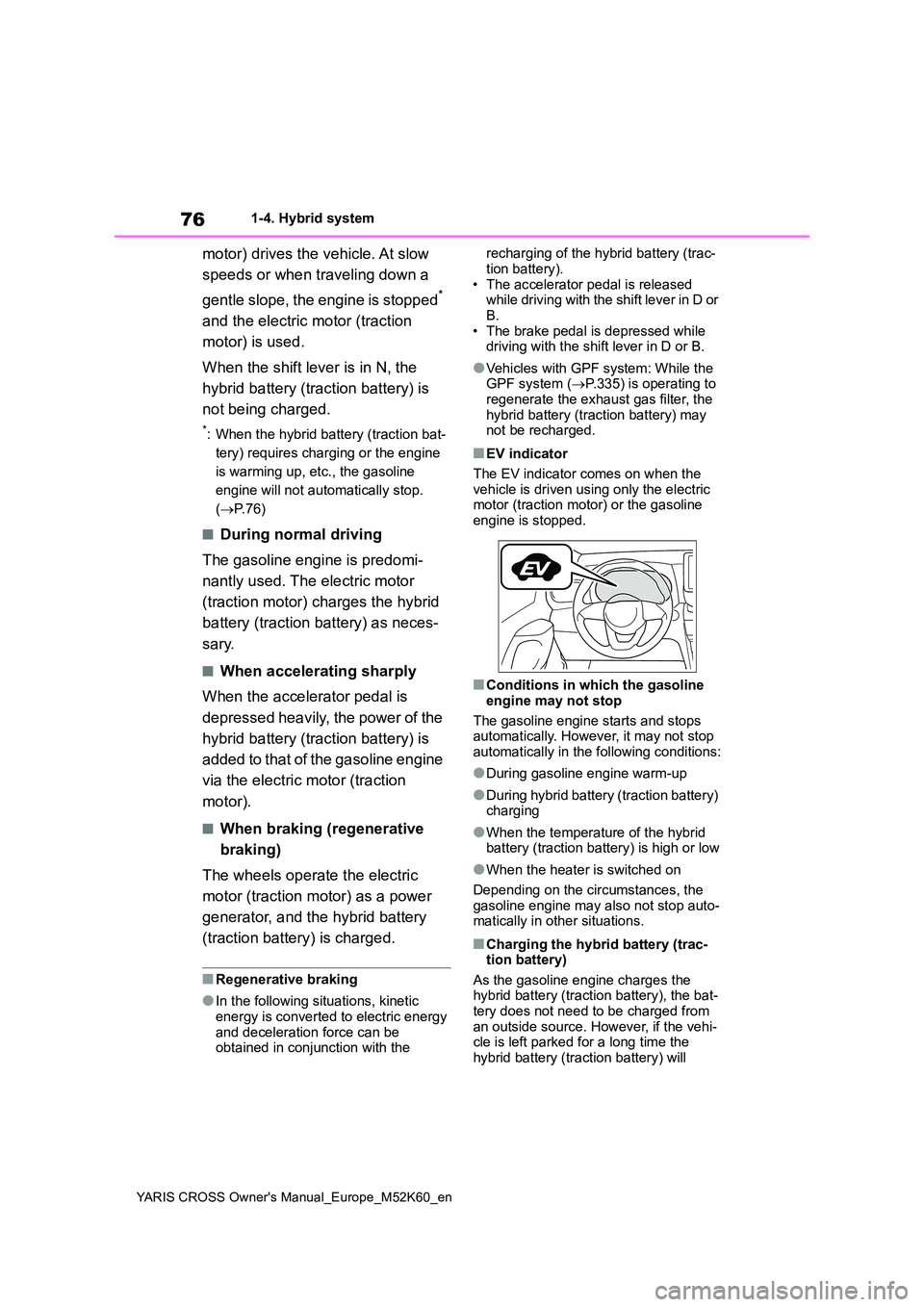
■EV indicator
The EV indicator comes on when the vehicle is driven using only the electric motor (traction motor) or the gasoline
engine is stopped.
■Conditions in which the gasoline
engine may not stop
The gasoline engine starts and stops automatically. However, it may not stop
automatically in the following conditions:
●During gasoline engine warm-up
●During hybrid battery (traction battery) charging
●When the temperature of the hybrid battery (traction battery) is high or low
●When the heater is switched on
Depending on the circumstances, the
gasoline engine may also not stop auto- matically in other situations.
■Charging the hybrid battery (trac-tion battery)
As the gasoline engine charges the hybrid battery (traction battery), the bat-tery does not need to be charged from
an outside source. However, if the vehi- cle is left parked for a long time the hybrid battery (traction battery) will
Page 98 of 650
96
YARIS CROSS Owner's Manual_Europe_M52K60_en
2-1. Instrument cluster
• When stopped on a hill or other slope
• When driving on a slope or around a curve
Odometer and trip meter display ( P. 9 7 )
Outside temperature
Displays the outside temperature within the range of -40°C (-40 °F) to 60°C (140°F)
Display change button (P. 9 7 )
Shift position indicator ( P.197)
■Engine speed
On hybrid vehicles, engine speed is pre- cisely controlled in order to help improve fuel efficiency and reduce exhaust emis-
sions, etc. There are times when the engine speed that is displayed may differ even when
vehicle operation and driving conditions are the same.
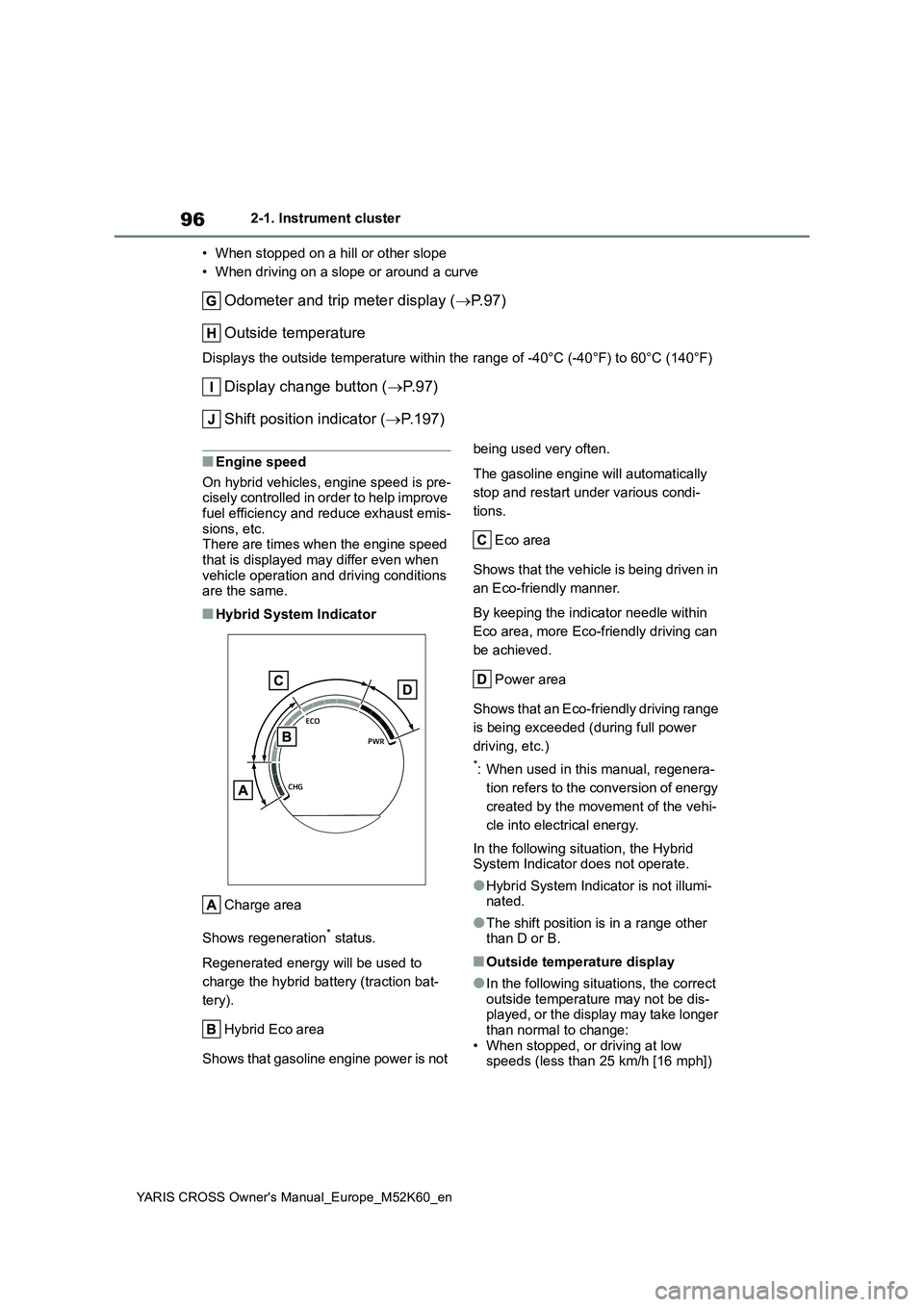
■Hybrid System Indicator
Charge area
Shows regeneration* status.
Regenerated energy will be used to
charge the hybrid battery (traction bat-
tery).
Hybrid Eco area
Shows that gasoline engine power is not
being used very often.
The gasoline engine will automatically
stop and restart under various condi-
tions.
Eco area
Shows that the vehicle is being driven in
an Eco-friendly manner.
By keeping the indicator needle within
Eco area, more Eco-friendly driving can
be achieved.
Power area
Shows that an Eco-friendly driving range
is being exceeded (during full power
driving, etc.)
*: When used in this manual, regenera-
tion refers to the conversion of energy
created by the movement of the vehi-
cle into electrical energy.
In the following situation, the Hybrid System Indicator does not operate.
●Hybrid System Indicator is not illumi-nated.
●The shift position is in a range other than D or B.
■Outside temperature display
●In the following situations, the correct outside temperature may not be dis-played, or the display may take longer
than normal to change: • When stopped, or driving at low speeds (less than 25 km/h [16 mph])
Page 100 of 650
98
YARIS CROSS Owner's Manual_Europe_M52K60_en
2-1. Instrument cluster
■Display items
Odometer
Displays the total distance the vehicle
has been driven.
Trip meter A/Trip meter B
Displays the distance the vehicle has
been driven since the meter was last
reset. Trip meters A and B can be used
to record and display different distances
independently.
To reset, display the desired trip meter
and press and hold the display change
button.
Distance until next engine oil
change
Displays the distance the vehicle can
be driven until an oil change is neces-
sary.
The distance until the next engine oil
change will also be displayed in the fol-
lowing situations:
• When the power switch is turned to
ON.
• When a warning message indicating
that oil maintenance should be per-
formed soon or is required is dis-
played.
• Resetting: P. 3 9 1
■Adjusting the minute to “00”
1 Press or to select of
the multi-information display.
2 Press or to select .
Press the to set the clock to the
beginning of the nearest hour.
e.g.
1:00 to 1:29 1:00
1:30 to 1:59 2:00
■Changing the clock
1 Press or to select of
the multi-information display.
2 Press or to select .
3 Press and hold the .
4 Press or to select an
item to be changed.
5 Press or to change the
setting.
The following can be changed:
12-hour/24-hour format
Hour
Minute
The clocks on the following can be
adjusted on the multimedia system
screen.
Multi-information display
Multimedia system screen
For details, refer to “Navigation and
multimedia system Owner’s man-
Adjusting the clock (vehi-
cles without 7-inch/8-inch
display multimedia system)
Adjusting the clock (vehi-
cles with 7-inch/8-inch dis-
play multimedia system)
Page 101 of 650
99
2
YARIS CROSS Owner's Manual_Europe_M52K60_en
2-1. Instrument cluster
Vehicle status information and indicators
ual”.
■Clock settings screen (vehicles
with 7-inch/8-inch display multime- dia system)
If is displayed when is
selected on the multi-information dis-
play, the system may be malfunctioning.
Have the vehicle inspected by any
authorized Toyota retailer or Toyota
authorized repairer, or any reliable
repairer.
The brightness of the instrument
panel lights can be adjusted on
select to the multi-information
display.
The brightness of the instrument panel
lights can be adjusted separately for
when the tail lights are on and off.
1 Press or to select of
the multi-information display.
2 Press or to select ,
and then press and hold the
.
3 Press or to change the
brightness.
■Instrument cluster brightness adjustment
The instrument cluster brightness levels
when the tail lights are on and off can be adjusted individually.
However, when the surroundings are
bright (daytime, etc.), turning on the tail lights will not change the instrument cluster brightness.
Adjusting the instrument
panel light control
Page 104 of 650
102
YARIS CROSS Owner's Manual_Europe_M52K60_en
2-1. Instrument cluster
• When driving on a slope or around a curve
Engine coolant temperature gauge
Displays the engine coolant temperature
Display change button ( P. 1 0 4 )
Odometer and trip meter display ( P.104)
Outside temperature
Displays the outside temperature within the range of -40°C (-40 °F) to 60°C (140°F)
Shift position indicator (P.197)
Multi-information display
Presents the driver with a variety of vehicle data ( P.112)
Displays warning messages if a malfunction occurs ( P.449)
■When the drive mode is changed
The speed meter display changes color
in accordance to the drive mode selected.( P.330)
■Engine speed
On hybrid vehicles, engine speed is pre-
cisely controlled in order to help improve fuel efficiency and reduce exhaust emis-sions, etc.
There are times when the engine speed that is displayed may differ even when vehicle operation and driving conditions
are the same.
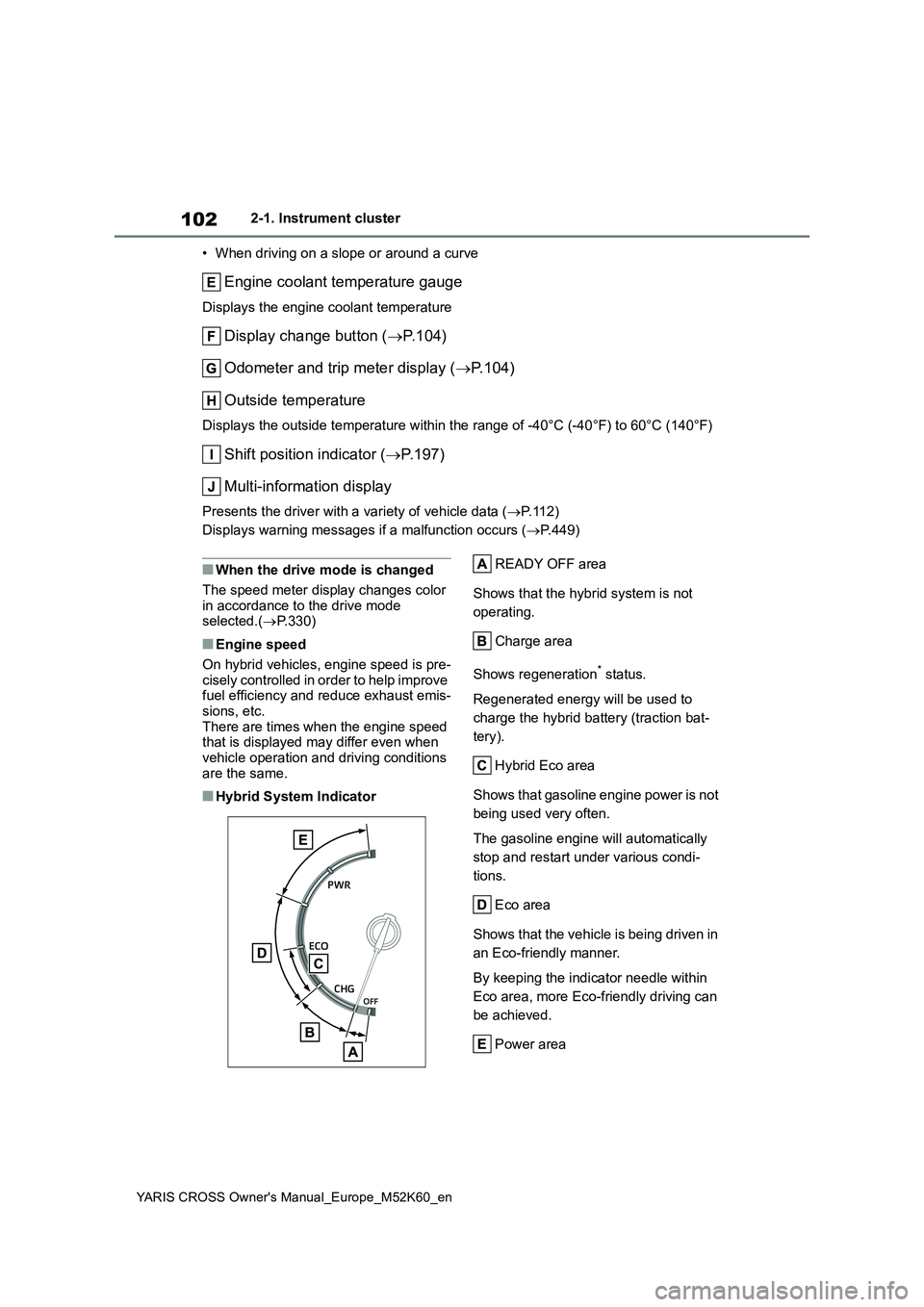
■Hybrid System Indicator
READY OFF area
Shows that the hybrid system is not
operating.
Charge area
Shows regeneration* status.
Regenerated energy will be used to
charge the hybrid battery (traction bat-
tery).
Hybrid Eco area
Shows that gasoline engine power is not
being used very often.
The gasoline engine will automatically
stop and restart under various condi-
tions.
Eco area
Shows that the vehicle is being driven in
an Eco-friendly manner.
By keeping the indicator needle within
Eco area, more Eco-friendly driving can
be achieved.
Power area
Page 106 of 650
104
YARIS CROSS Owner's Manual_Europe_M52K60_en
2-1. Instrument cluster
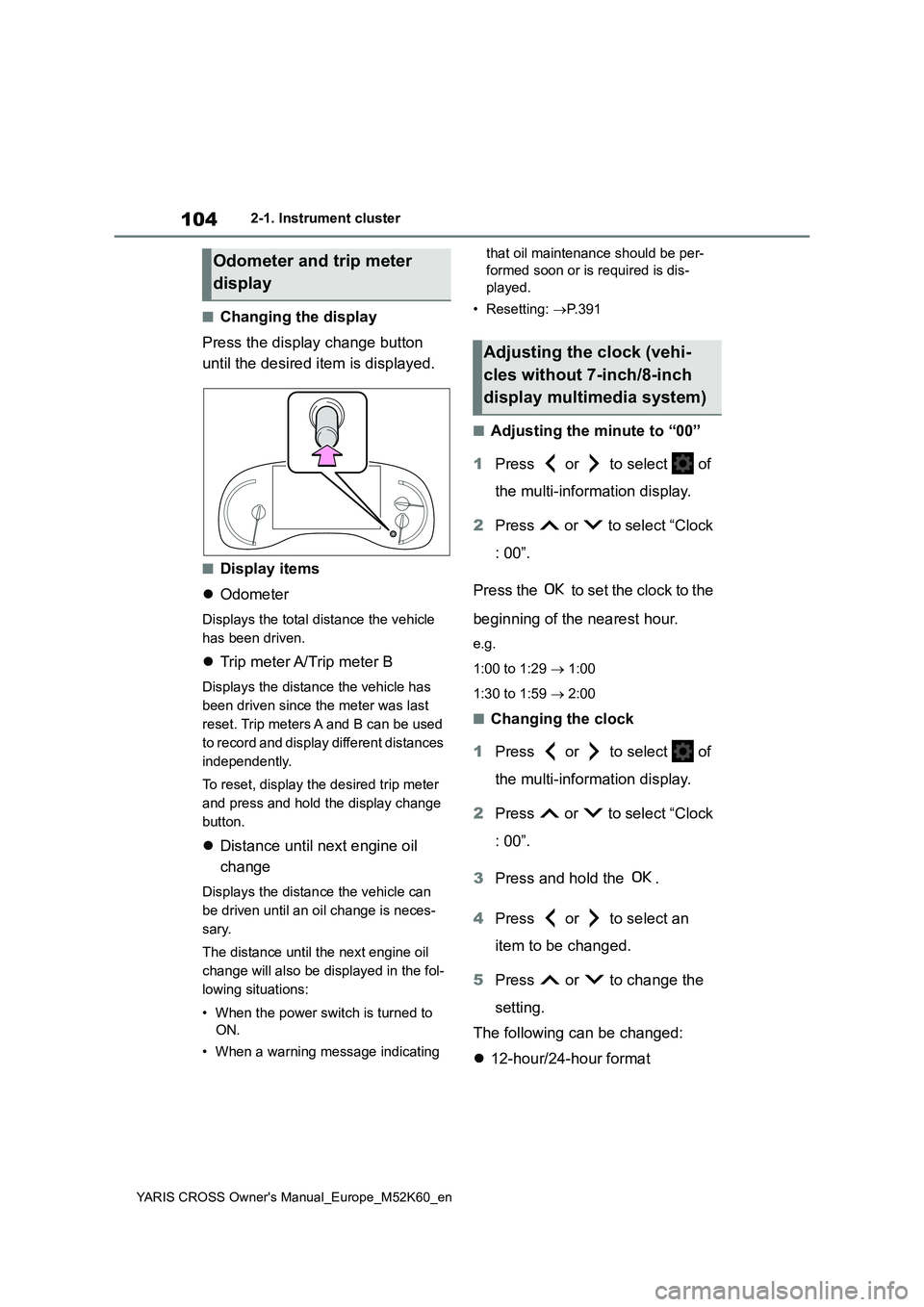
■Changing the display
Press the display change button
until the desired item is displayed.
■Display items
Odometer
Displays the total distance the vehicle
has been driven.
Trip meter A/Trip meter B
Displays the distance the vehicle has
been driven since the meter was last
reset. Trip meters A and B can be used
to record and display different distances
independently.
To reset, display the desired trip meter
and press and hold the display change
button.
Distance until next engine oil
change
Displays the distance the vehicle can
be driven until an oil change is neces-
sary.
The distance until the next engine oil
change will also be displayed in the fol-
lowing situations:
• When the power switch is turned to
ON.
• When a warning message indicating
that oil maintenance should be per-
formed soon or is required is dis-
played.
• Resetting: P. 3 9 1
■Adjusting the minute to “00”
1 Press or to select of
the multi-information display.
2 Press or to select “Clock
: 00”.
Press the to set the clock to the
beginning of the nearest hour.
e.g.
1:00 to 1:29 1:00
1:30 to 1:59 2:00
■Changing the clock
1 Press or to select of
the multi-information display.
2 Press or to select “Clock
: 00”.
3 Press and hold the .
4 Press or to select an
item to be changed.
5 Press or to change the
setting.
The following can be changed:
12-hour/24-hour format
Odometer and trip meter
display
Adjusting the clock (vehi-
cles without 7-inch/8-inch
display multimedia system)
Page 107 of 650
105
2
YARIS CROSS Owner's Manual_Europe_M52K60_en
2-1. Instrument cluster
Vehicle status information and indicators
Hour
Minute
The clocks on the following can be
adjusted on the multimedia system
screen.
Multi-information display
Multimedia system screen
For details, refer to “Navigation and
multimedia system Owner’s man-
ual”.
■Clock settings screen (vehicles with 7-inch/8-inch display multime-
dia system)
If “Clock : 00” is displayed when is
selected on the multi-information dis-
play, the system may be malfunctioning.
Have the vehicle inspected by any
authorized Toyota retailer or Toyota
authorized repairer, or any reliable
repairer.
The brightness of the instrument
panel lights can be adjusted on
select to the multi-information
display.
The brightness of the instrument panel
lights can be adjusted separately for
when the tail lights are on and off.
1 Press or to select of
the multi-information display.
2 Press or to select ,
and then press and hold the
.
3 Press or to change the
brightness.
■Instrument cluster brightness adjustment
The instrument cluster brightness levels
when the tail lights are on and off can be adjusted individually.
However, when the surroundings are
bright (daytime, etc.), turning on the tail lights will not change the instrument cluster brightness.
Adjusting the clock (vehi-
cles with 7-inch/8-inch dis-
play multimedia system)
Adjusting the instrument
panel light control