volume TOYOTA YARIS CROSS 2021 Owners Manual
[x] Cancel search | Manufacturer: TOYOTA, Model Year: 2021, Model line: YARIS CROSS, Model: TOYOTA YARIS CROSS 2021Pages: 650, PDF Size: 132.86 MB
Page 222 of 650
220
YARIS CROSS Owner's Manual_Europe_M52K60_en
4-3. Operating the lights and wipers
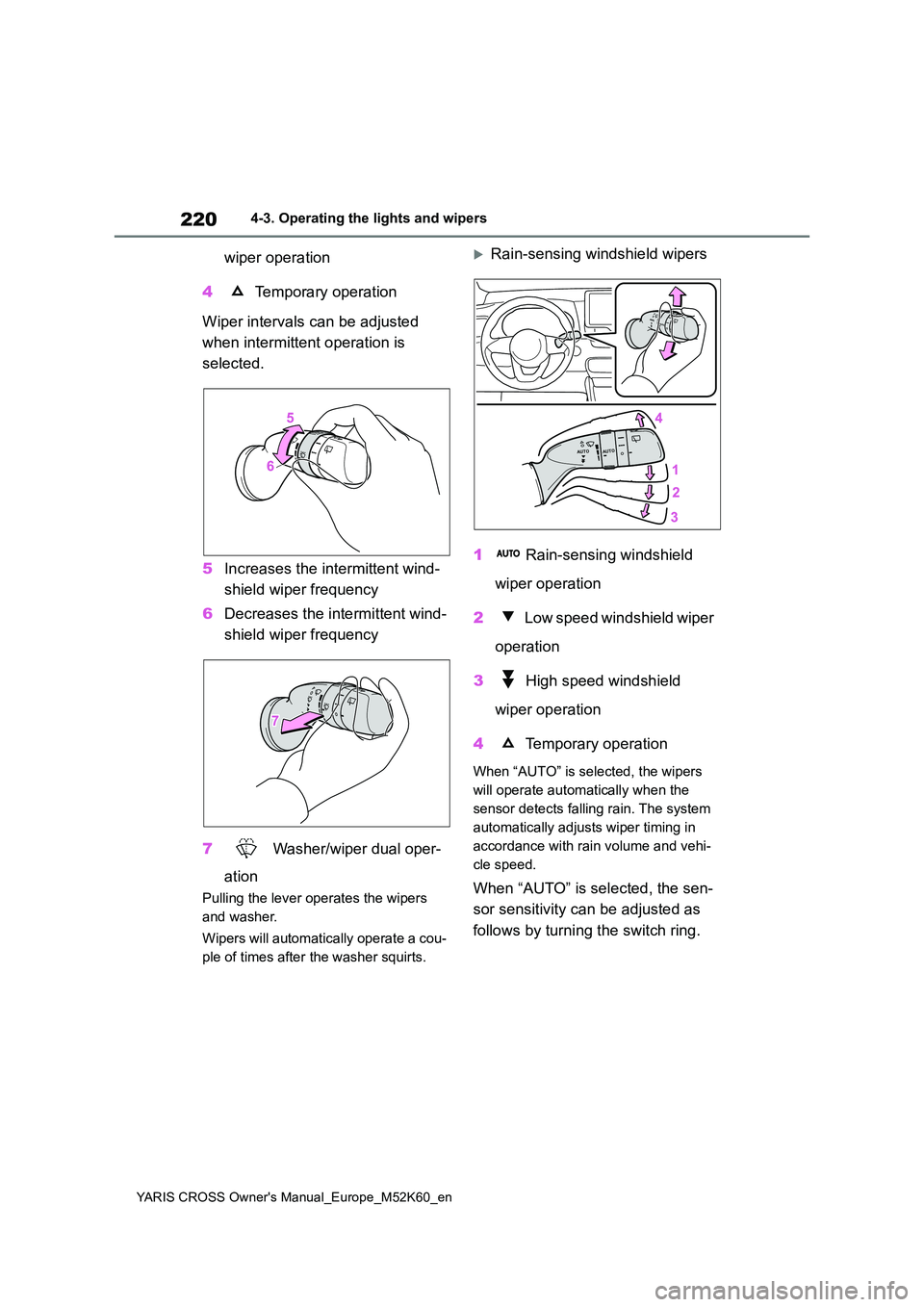
wiper operation
4 Temporary operation
Wiper intervals can be adjusted
when intermittent operation is
selected.
5 Increases the intermittent wind-
shield wiper frequency
6 Decreases the intermittent wind-
shield wiper frequency
7 Washer/wiper dual oper-
ation
Pulling the lever operates the wipers
and washer.
Wipers will automatically operate a cou-
ple of times after the washer squirts.
Rain-sensing windshield wipers
1 Rain-sensing windshield
wiper operation
2 Low speed windshield wiper
operation
3 High speed windshield
wiper operation
4 Temporary operation
When “AUTO” is selected, the wipers
will operate automatically when the
sensor detects falling rain. The system
automatically adjusts wiper timing in
accordance with rain volume and vehi-
cle speed.
When “AUTO” is selected, the sen-
sor sensitivity can be adjusted as
follows by turning the switch ring.
Page 280 of 650
278
YARIS CROSS Owner's Manual_Europe_M52K60_en
4-5. Using the driving support systems
■The system can be operated when
●The power switch is in ON.
●Toyota parking assist-sensor function
is on.
●The vehicle speed is less than about
10 km/h (6 mph).
●The shift lever is in other than P.
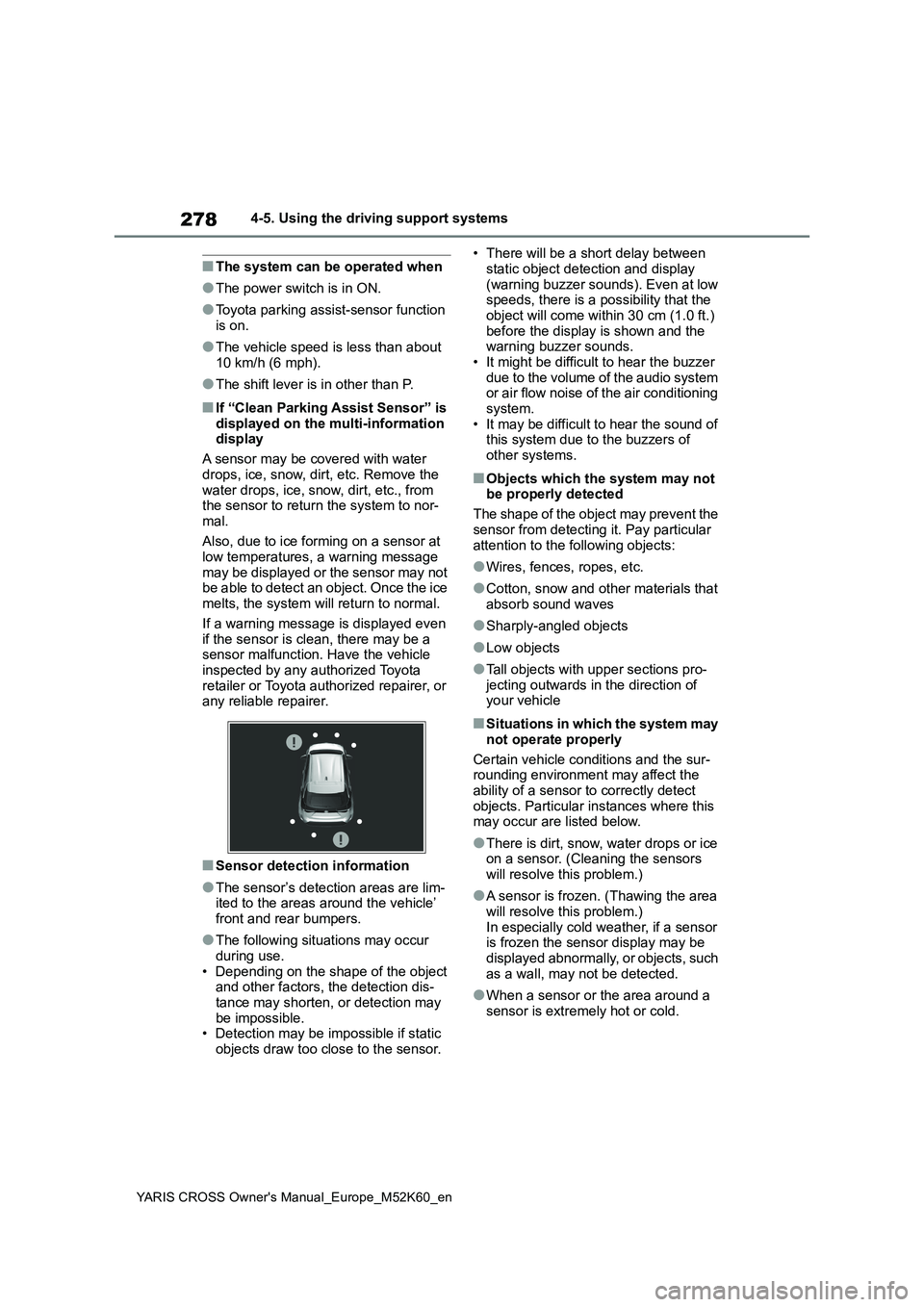
■If “Clean Parking Assist Sensor” is
displayed on the multi-information display
A sensor may be covered with water
drops, ice, snow, dirt, etc. Remove the water drops, ice, snow, dirt, etc., from the sensor to return the system to nor-
mal.
Also, due to ice forming on a sensor at low temperatures, a warning message
may be displayed or the sensor may not be able to detect an object. Once the ice melts, the system will return to normal.
If a warning message is displayed even if the sensor is clean, there may be a sensor malfunction. Have the vehicle
inspected by any authorized Toyota retailer or Toyota authorized repairer, or any reliable repairer.
■Sensor detection information
●The sensor’s detection areas are lim-ited to the areas around the vehicle’
front and rear bumpers.
●The following situations may occur
during use. • Depending on the shape of the object and other factors, the detection dis-
tance may shorten, or detection may be impossible.• Detection may be impossible if static
objects draw too close to the sensor.
• There will be a short delay between
static object detection and display (warning buzzer sounds). Even at low speeds, there is a possibility that the
object will come within 30 cm (1.0 ft.) before the display is shown and the warning buzzer sounds.
• It might be difficult to hear the buzzer due to the volume of the audio system or air flow noise of the air conditioning
system. • It may be difficult to hear the sound of this system due to the buzzers of
other systems.
■Objects which the system may not be properly detected
The shape of the object may prevent the
sensor from detecting it. Pay particular attention to the following objects:
●Wires, fences, ropes, etc.
●Cotton, snow and other materials that
absorb sound waves
●Sharply-angled objects
●Low objects
●Tall objects with upper sections pro- jecting outwards in the direction of your vehicle
■Situations in which the system may
not operate properly
Certain vehicle conditions and the sur- rounding environment may affect the
ability of a sensor to correctly detect objects. Particular instances where this may occur are listed below.
●There is dirt, snow, water drops or ice on a sensor. (Cleaning the sensors
will resolve this problem.)
●A sensor is frozen. (Thawing the area
will resolve this problem.) In especially cold weather, if a sensor is frozen the sensor display may be
displayed abnormally, or objects, such as a wall, may not be detected.
●When a sensor or the area around a sensor is extremely hot or cold.
Page 284 of 650
282
YARIS CROSS Owner's Manual_Europe_M52K60_en
4-5. Using the driving support systems
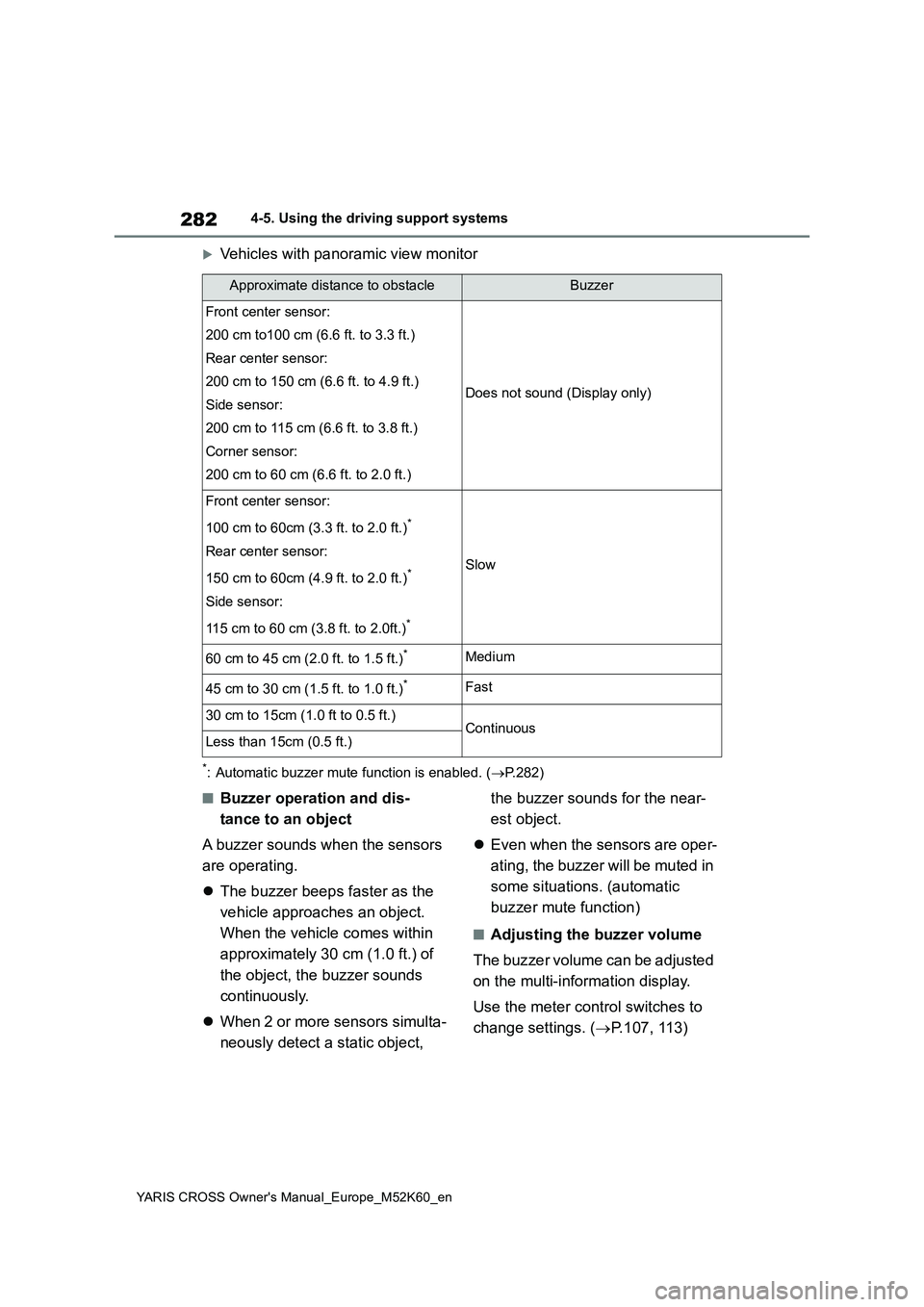
Vehicles with panoramic view monitor
*: Automatic buzzer mute function is enabled. (P.282)
■Buzzer operation and dis-
tance to an object
A buzzer sounds when the sensors
are operating.
The buzzer beeps faster as the
vehicle approaches an object.
When the vehicle comes within
approximately 30 cm (1.0 ft.) of
the object, the buzzer sounds
continuously.
When 2 or more sensors simulta-
neously detect a static object,
the buzzer sounds for the near-
est object.
Even when the sensors are oper-
ating, the buzzer will be muted in
some situations. (automatic
buzzer mute function)
■Adjusting the buzzer volume
The buzzer volume can be adjusted
on the multi-information display.
Use the meter control switches to
change settings. ( P.107, 113)
Approximate distance to obstacleBuzzer
Front center sensor:
200 cm to100 cm (6.6 ft. to 3.3 ft.)
Rear center sensor:
200 cm to 150 cm (6.6 ft. to 4.9 ft.)
Side sensor:
200 cm to 115 cm (6.6 ft. to 3.8 ft.)
Corner sensor:
200 cm to 60 cm (6.6 ft. to 2.0 ft.)
Does not sound (Display only)
Front center sensor:
100 cm to 60cm (3.3 ft. to 2.0 ft.)*
Rear center sensor:
150 cm to 60cm (4.9 ft. to 2.0 ft.)*
Side sensor:
115 cm to 60 cm (3.8 ft. to 2.0ft.)*
Slow
60 cm to 45 cm (2.0 ft. to 1.5 ft.)*Medium
45 cm to 30 cm (1.5 ft. to 1.0 ft.)*Fast
30 cm to 15cm (1.0 ft to 0.5 ft.)ContinuousLess than 15cm (0.5 ft.)
Page 285 of 650
283
4
YARIS CROSS Owner's Manual_Europe_M52K60_en
4-5. Using the driving support systems
Driving
1Press / (4.2-inch display)
or / (7-inch display) of
the meter control switch to
select .
2 Press / (4.2-inch display)
or / (7-inch display) of
the meter control switch to
select and then press and
hold .
3 Select the volume and then
press .
Each time the switch is pressed, the volume level will change between 1, 2,
and 3.
■Muting a buzzer
A mute button will be displayed on
the multi-information display when
an object is detected. To mute the
buzzer, press .
The buzzers for the Toyota parking
assist-sensor and RCTA function (if
equipped) will be muted simultane-
ously.
Mute will be canceled automatically
in the following situations:
When the shift lever is changed.
When the vehicle speed exceeds
a certain speed.
When there is a malfunction in a
sensor or the system is tempo-
rarily unavailable.
When the operating function is
disabled manually.
When the power switch is turned
off.
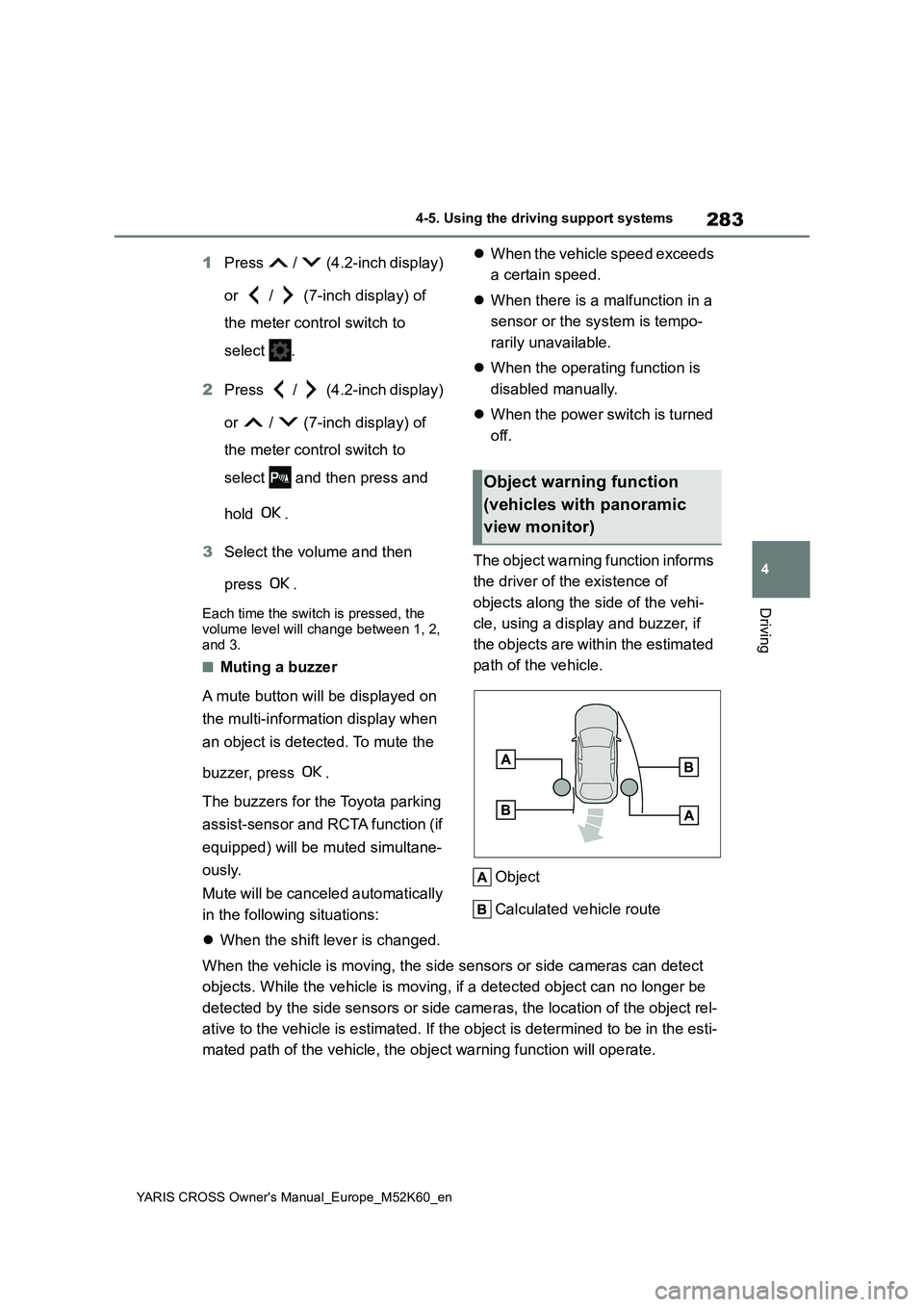
The object warning function informs
the driver of the existence of
objects along the side of the vehi-
cle, using a display and buzzer, if
the objects are within the estimated
path of the vehicle.
Object
Calculated vehicle route
When the vehicle is moving, the side sensors or side cameras ca n detect
objects. While the vehicle is moving, if a detected object can no longer be
detected by the side sensors or side cameras, the location of t he object rel-
ative to the vehicle is estimated. If the object is determined to be in the esti-
mated path of the vehicle, the object warning function will ope rate.
Object warning function
(vehicles with panoramic
view monitor)
Page 288 of 650
286
YARIS CROSS Owner's Manual_Europe_M52K60_en
4-5. Using the driving support systems
Meter control switches
Turn the RCTA function on/off.
Outside rear view mirror indica-
tors
When a vehicle approaching from the
right or left at the rear of the vehicle is
detected, both outside rear view mirror
indicators will flash.
Navigation/multimedia system
display (if equipped)
If a vehicle approaching from the right
or left at the rear of the vehicle is
detected, the RCTA icon ( P.287) for
the detected side will be displayed.
RCTA buzzer
If a vehicle approaching from the right
or left at the rear of the vehicle is
detected, a buzzer will sound.
Use the meter control switches to
turn on/off the function. ( P.107,
11 3 )
1 Press / (4.2-inch display)
or / (7-inch display) of
the meter control switch to
select .
2 Press / (4.2-inch display)
or / (7-inch display) of
the meter control switch to
select “RCTA” and then press
.
When the RCTA function is disabled, the RCTA OFF indicator ( P.92) illumi- nates. (Each time the power switch is
turned off then changed to ON, the RCTA function will be enabled automat-ically.)
■Outside rear view mirror indicator
visibility
When under strong sunlight, the outside rear view mirror indicator may be difficult
to see.
■Hearing the RCTA buzzer
The RCTA buzzer may be difficult to hear over loud noises, such as high
audio volume.
■When “RCTA Unavailable See Owner’s Manual” is shown on the multi-information display
The sensor voltage has become abnor- mal, or water, snow, mud, etc., may be built up in the vicinity of the sensor area
of the position above the rear bumper. ( P.271)
Removing the water, snow, mud, etc.,
from the vicinity of the sensor area should return it to normal. Also, the sen-sor may not function normally when
used in extremely hot or cold weather.
■When “RCTA Malfunction Visit Your Dealer” is shown on the multi-infor-mation display
There may be a sensor malfunction or misaligned. Have the vehicle inspected by any authorized Toyota retailer or
Toyota authorized repairer, or any reli- able repairer.
■Radar sensors
P. 2 7 1
Turning the RCTA function
on/off
Page 290 of 650
288
YARIS CROSS Owner's Manual_Europe_M52K60_en
4-5. Using the driving support systems
●The vehicle speed is less than
approximately 15 km/h (9 mph).
●The approaching vehicle speed is
between approximately 8 km/h (5 mph) and 56 km/h (34 mph).
■Adjusting the buzzer volume
The buzzer volume can be adjusted on
the multi-information display.
Use the meter control switches to change settings. ( P.107, 113)
1 Press / (4.2-inch display) or
/ (7-inch display) of the
meter control switch to select .
2 Press / (4.2-inch display) or
/ (7-inch display) of the
meter control switch to select
“RCTA” and then press and hold
.
3 Press to select the volume.
Each time the switch is pressed, the vol-
ume level will change between 1, 2, and 3.
When the buzzer volume adjustment is
completed, press to return to the
previous screen.
■Muting a buzzer temporarily
A mute button will be displayed on the
multi-information display when a vehi-
cles or an object is detected. To mute
the buzzer, press .
The buzzers for the RCTA function and
Toyota parking assist-sensor will be
muted simultaneously.
Mute will be canceled automatically in the following situations:
●When the shift lever is changed.
●When the vehicle speed exceeds a certain speed.
●When there is a malfunction in a sen-
sor or the system is temporarily unavailable.
●When the operating function is dis-abled manually.
●When the power switch is turned off.
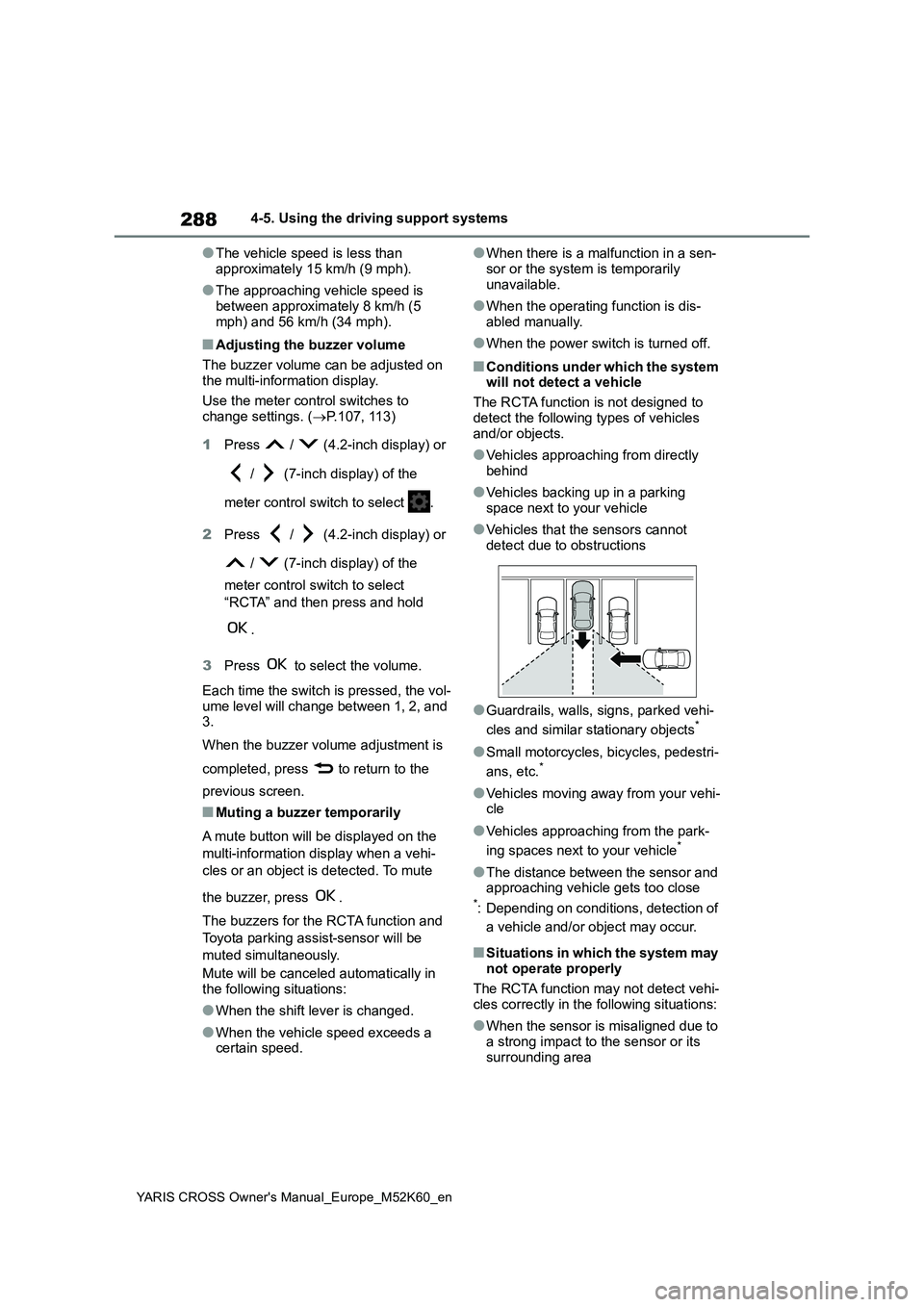
■Conditions under which the system will not detect a vehicle
The RCTA function is not designed to
detect the following types of vehicles and/or objects.
●Vehicles approaching from directly behind
●Vehicles backing up in a parking space next to your vehicle
●Vehicles that the sensors cannot detect due to obstructions
●Guardrails, walls, signs, parked vehi-
cles and similar stationary objects*
●Small motorcycles, bicycles, pedestri-
ans, etc.*
●Vehicles moving away from your vehi- cle
●Vehicles approaching from the park-
ing spaces next to your vehicle*
●The distance between the sensor and approaching vehicle gets too close*: Depending on conditions, detection of
a vehicle and/or object may occur.
■Situations in which the system may
not operate properly
The RCTA function may not detect vehi-
cles correctly in the following situations:
●When the sensor is misaligned due to
a strong impact to the sensor or its surrounding area
Page 357 of 650
355
5
YARIS CROSS Owner's Manual_Europe_M52K60_en
5-1. Using the air conditioning system and defogger
Interior features
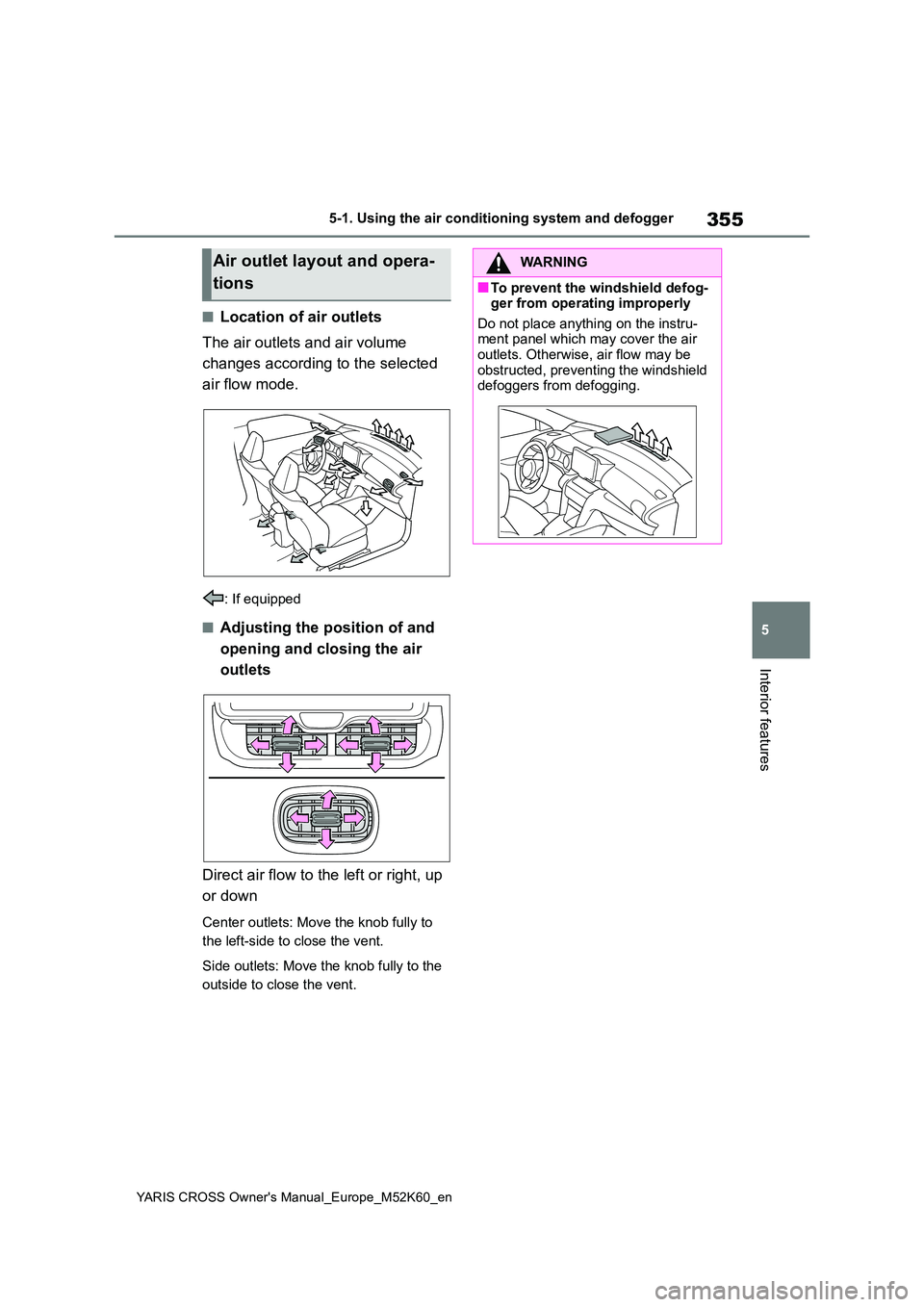
■Location of air outlets
The air outlets and air volume
changes according to the selected
air flow mode.
: If equipped
■Adjusting the position of and
opening and closing the air
outlets
Direct air flow to the left or right, up
or down
Center outlets: Move the knob fully to
the left-side to close the vent.
Side outlets: Move the knob fully to the
outside to close the vent.
Air outlet layout and opera-
tions
WARNING
■To prevent the windshield defog- ger from operating improperly
Do not place anything on the instru- ment panel which may cover the air outlets. Otherwise, air flow may be
obstructed, preventing the windshield defoggers from defogging.
Page 451 of 650
449
7
YARIS CROSS Owner's Manual_Europe_M52K60_en
7-2. Steps to take in an emergency
When trouble arises
■Warning messages
The warning messages explained below
may differ from the actual messages according to operation conditions and vehicle specifications.
■Warning buzzer
A buzzer may sound when a message is displayed. The buzzer may not be audible if the
vehicle is in a noisy location or if the audio system volume is high.
■If “Engine Oil Level Low Add or Replace” is displayed
The engine oil level is low. Check the
level of the engine oil, and add if neces-
sary.
This message may appear if the vehicle is stopped on a slope. Move the vehicle
to a level surface and check to see if the message disappears.
■If “Hybrid System Stopped Steering Power Low” is displayed
This message is displayed if the hybrid system is stopped while driving.
When steering wheel operations are
heavier than usual, grip the steering wheel firmly and operate it using more force than usual.
■If “Hybrid System Overheated Out-
put Power Reduced” is displayed
This message may be displayed when driving under severe operating condi-
tions. (For example, when driving up a long steep hill.) Handling method: P. 4 8 1
■If “Traction Battery Needs to be
Protected Refrain from the Use of N Position” is displayed
This message may be displayed when
the shift lever is in N.
As the hybrid battery (traction battery) cannot be charged when the shift lever
is in N, shift the shift lever to P when the vehicle is stopped.
■If “Traction Battery Needs to be Protected Shift into P to Restart” is
displayed
This message is displayed when the hybrid battery (traction battery) charge
has become extremely low because the shift lever has been left in N for a certain amount of time.
When operating the vehicle, shift to P and restart the hybrid system.
■If “Shift to P Before Exiting Vehicle” is shown
Message is displayed when the driver’s door is opened without turning the power switch to OFF with the shift lever
in any position other than P. Shift the shift lever to P.
If a warning message is
displayed
The multi-information display
shows warnings for system
malfunctions and incorrectly
performed operations, and
messages that indicate a need
for maintenance. When a mes-
sage is displayed, perform the
appropriate corrective action
for the message.
If a warning message is dis-
played again after the appro-
priate actions have been
performed, contact any autho-
rized Toyota retailer or Toyota
authorized repairer, or any reli-
able repairer.
Additionally, if a warning light
comes on or flashes at the
same time that a warning mes-
sage is displayed, take the
appropriate corrective action
for the warning light. ( P.439)
Page 474 of 650
472
YARIS CROSS Owner's Manual_Europe_M52K60_en
7-2. Steps to take in an emergency
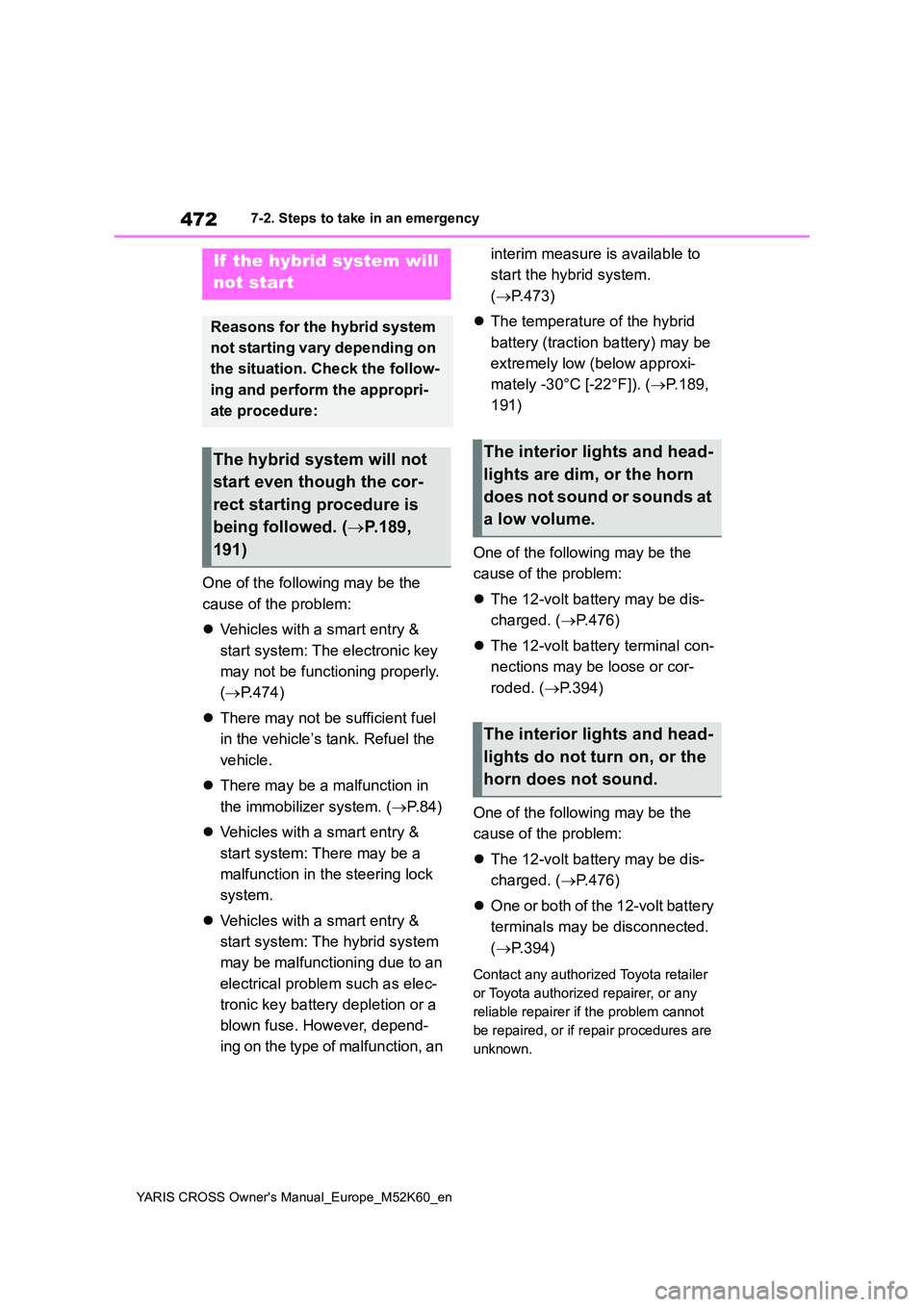
One of the following may be the
cause of the problem:
Vehicles with a smart entry &
start system: The electronic key
may not be functioning properly.
( P.474)
There may not be sufficient fuel
in the vehicle’s tank. Refuel the
vehicle.
There may be a malfunction in
the immobilizer system. ( P.84)
Vehicles with a smart entry &
start system: There may be a
malfunction in the steering lock
system.
Vehicles with a smart entry &
start system: The hybrid system
may be malfunctioning due to an
electrical problem such as elec-
tronic key battery depletion or a
blown fuse. However, depend-
ing on the type of malfunction, an
interim measure is available to
start the hybrid system.
( P.473)
The temperature of the hybrid
battery (traction battery) may be
extremely low (below approxi-
mately -30°C [-22°F]). ( P.189,
191)
One of the following may be the
cause of the problem:
The 12-volt battery may be dis-
charged. ( P.476)
The 12-volt battery terminal con-
nections may be loose or cor-
roded. ( P.394)
One of the following may be the
cause of the problem:
The 12-volt battery may be dis-
charged. ( P.476)
One or both of the 12-volt battery
terminals may be disconnected.
( P.394)
Contact any authorized Toyota retailer
or Toyota authorized repairer, or any
reliable repairer if the problem cannot
be repaired, or if repair procedures are
unknown.
If the hybrid system will
not start
Reasons for the hybrid system
not starting vary depending on
the situation. Check the follow-
ing and perform the appropri-
ate procedure:
The hybrid system will not
start even though the cor-
rect starting procedure is
being followed. ( P.189,
191)
The interior lights and head-
lights are dim, or the horn
does not sound or sounds at
a low volume.
The interior lights and head-
lights do not turn on, or the
horn does not sound.
Page 503 of 650
501
8
YARIS CROSS Owner's Manual_Europe_M52K60_en
8-2. Customization
Vehicle specifications
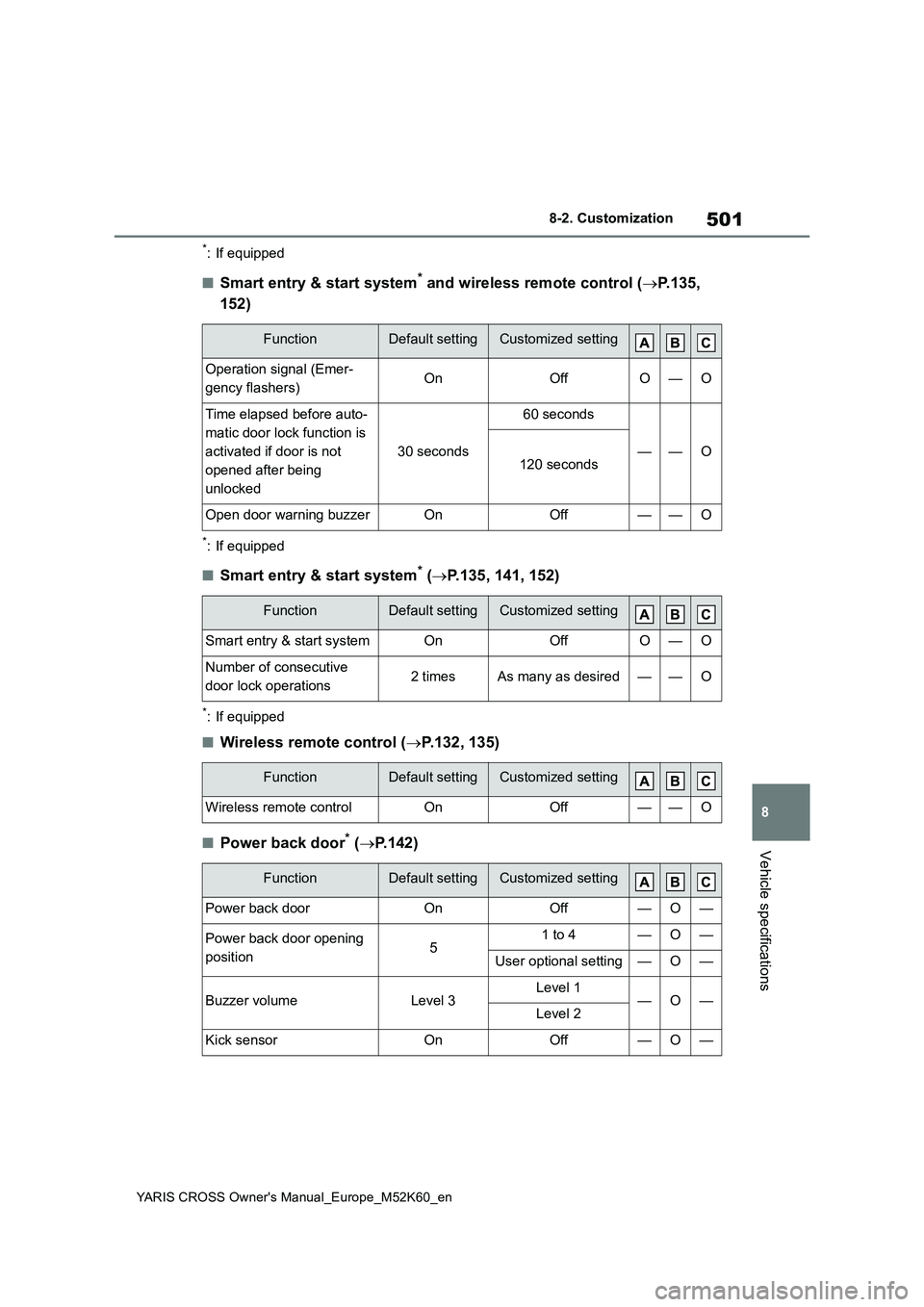
*: If equipped
■Smart entry & start system* and wireless remote control (P.135,
152)
*: If equipped
■Smart entry & start system* ( P.135, 141, 152)
*: If equipped
■Wireless remote control (P.132, 135)
■Power back door* (P.142)
FunctionDefault settingCustomized setting
Operation signal (Emer-
gency flashers)OnOffO—O
Time elapsed before auto-
matic door lock function is
activated if door is not
opened after being
unlocked
30 seconds
60 seconds
——O120 seconds
Open door warning buzzerOnOff——O
FunctionDefault settingCustomized setting
Smart entry & start systemOnOffO—O
Number of consecutive
door lock operations2 timesAs many as desired——O
FunctionDefault settingCustomized setting
Wireless remote controlOnOff——O
FunctionDefault settingCustomized setting
Power back doorOnOff—O—
Power back door opening
position51 to 4—O—
User optional setting—O—
Buzzer volumeLevel 3Level 1—O—Level 2
Kick sensorOnOff—O—