air conditioning TOYOTA YARIS CROSS 2022 User Guide
[x] Cancel search | Manufacturer: TOYOTA, Model Year: 2022, Model line: YARIS CROSS, Model: TOYOTA YARIS CROSS 2022Pages: 618, PDF Size: 130.77 MB
Page 282 of 618
280
CV Owner's Manual_Europe_M52N20_en
4-5. Using the driving support systems
●The following situations may occur
during use. • Depending on the shape of the object and other factors, the detection dis-
tance may shorten, or detection may be impossible.• Detection may be impossible if static
objects draw too close to the sensor. • There will be a short delay between static object detection and display
(warning buzzer sounds). Even at low speeds, there is a possibility that the object will come within 30 cm (1.0 ft.)
before the display is shown and the warning buzzer sounds.• It might be difficult to hear the buzzer
due to the volume of the audio system or air flow noise of the air conditioning system.
• It may be difficult to hear the sound of this system due to the buzzers of other systems.
■Objects which the system may not
be properly detected
The shape of the object may prevent the sensor from detecting it. Pay particular
attention to the following objects:
●Wires, fences, ropes, etc.
●Cotton, snow and other materials that absorb sound waves
●Sharply-angled objects
●Low objects
●Tall objects with upper sections pro-
jecting outwards in the direction of your vehicle
■Situations in which the system may not operate properly
Certain vehicle conditions and the sur- rounding environment may affect the ability of a sensor to correctly detect
objects. Particular instances where this may occur are listed below.
●There is dirt, snow, water drops or ice on a sensor. (Cleaning the sensors will resolve this problem.)
●A sensor is frozen. (Thawing the area will resolve this problem.)
In especially cold weather, if a sensor
is frozen the sensor display may be
displayed abnormally, or objects, such as a wall, may not be detected.
●When a sensor or the area around a sensor is extremely hot or cold.
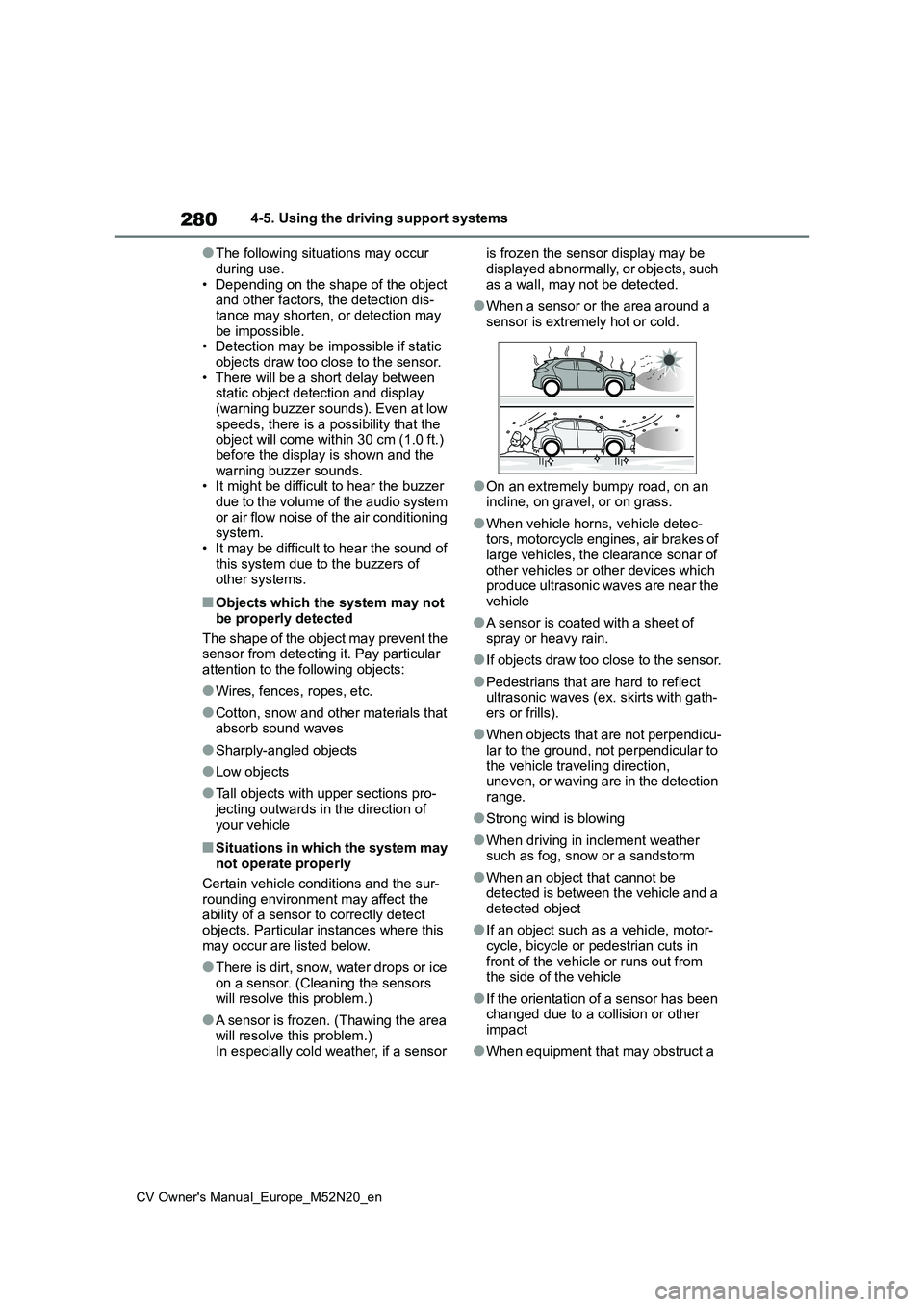
●On an extremely bumpy road, on an incline, on gravel, or on grass.
●When vehicle horns, vehicle detec-tors, motorcycle engines, air brakes of large vehicles, the clearance sonar of
other vehicles or other devices which produce ultrasonic waves are near the vehicle
●A sensor is coated with a sheet of spray or heavy rain.
●If objects draw too close to the sensor.
●Pedestrians that are hard to reflect ultrasonic waves (ex. skirts with gath-ers or frills).
●When objects that are not perpendicu-lar to the ground, not perpendicular to
the vehicle traveling direction, uneven, or waving are in the detection range.
●Strong wind is blowing
●When driving in inclement weather such as fog, snow or a sandstorm
●When an object that cannot be detected is between the vehicle and a detected object
●If an object such as a vehicle, motor-cycle, bicycle or pedestrian cuts in
front of the vehicle or runs out from the side of the vehicle
●If the orientation of a sensor has been changed due to a collision or other impact
●When equipment that may obstruct a
Page 291 of 618
289
4
CV Owner's Manual_Europe_M52N20_en
4-5. Using the driving support systems
Driving
●When there are spinning objects near
your vehicle such as the fan of an air conditioning unit
●When water is splashed or sprayed toward the rear bumper, such as from a sprinkler
●Moving objects (flags, exhaust fumes, large rain droplets or snowflakes, rain
water on the road surface, etc.)
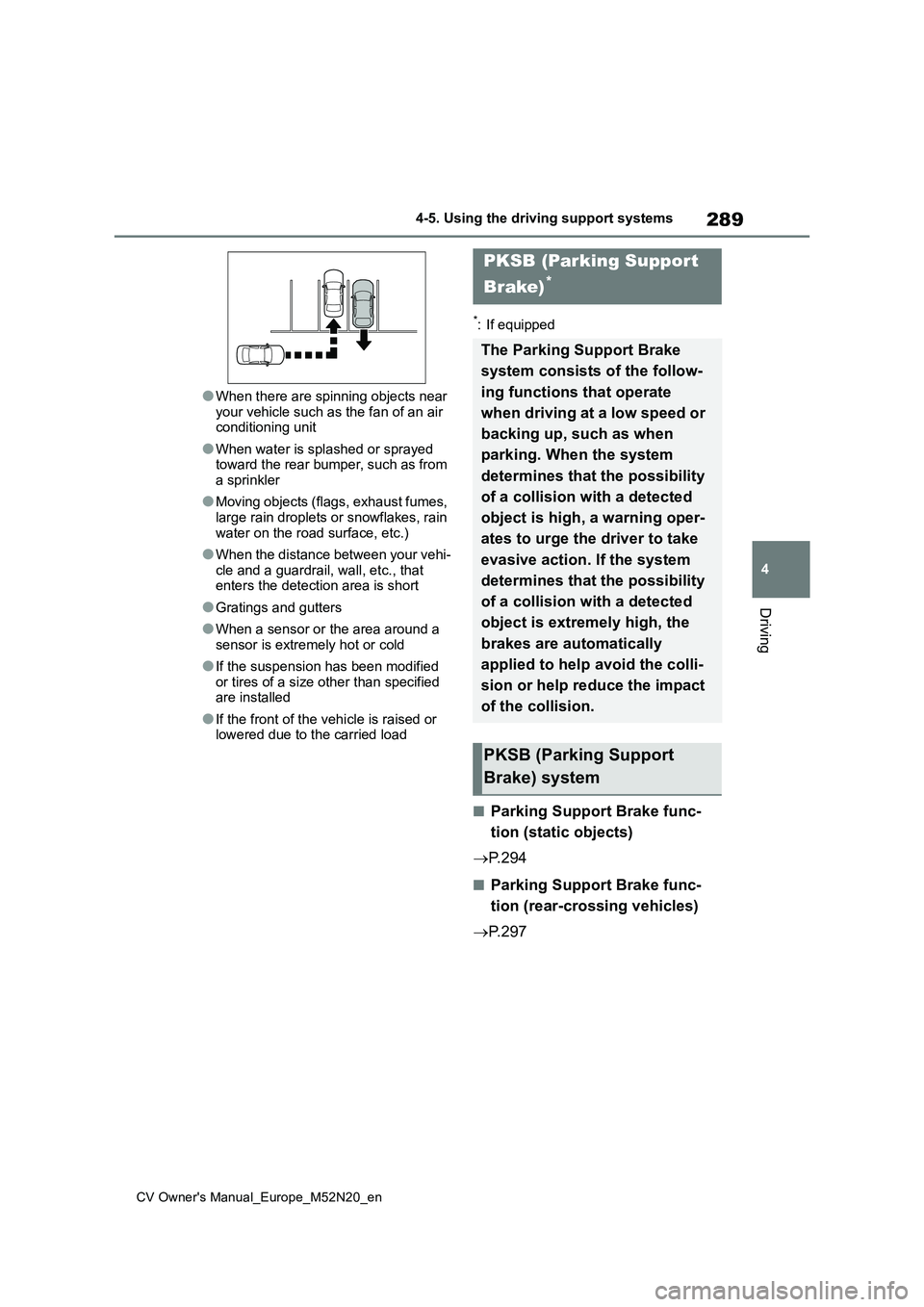
●When the distance between your vehi-
cle and a guardrail, wall, etc., that enters the detection area is short
●Gratings and gutters
●When a sensor or the area around a
sensor is extremely hot or cold
●If the suspension has been modified
or tires of a size other than specified are installed
●If the front of the vehicle is raised or lowered due to the carried load
*: If equipped
■Parking Support Brake func-
tion (static objects)
P. 2 9 4
■Parking Support Brake func-
tion (rear-crossing vehicles)
P. 2 9 7
PKSB (Parking Support
Brake)*
The Parking Support Brake
system consists of the follow-
ing functions that operate
when driving at a low speed or
backing up, such as when
parking. When the system
determines that the possibility
of a collision with a detected
object is high, a warning oper-
ates to urge the driver to take
evasive action. If the system
determines that the possibility
of a collision with a detected
object is extremely high, the
brakes are automatically
applied to help avoid the colli-
sion or help reduce the impact
of the collision.
PKSB (Parking Support
Brake) system
Page 301 of 618
299
4
CV Owner's Manual_Europe_M52N20_en
4-5. Using the driving support systems
Driving
*: If equipped
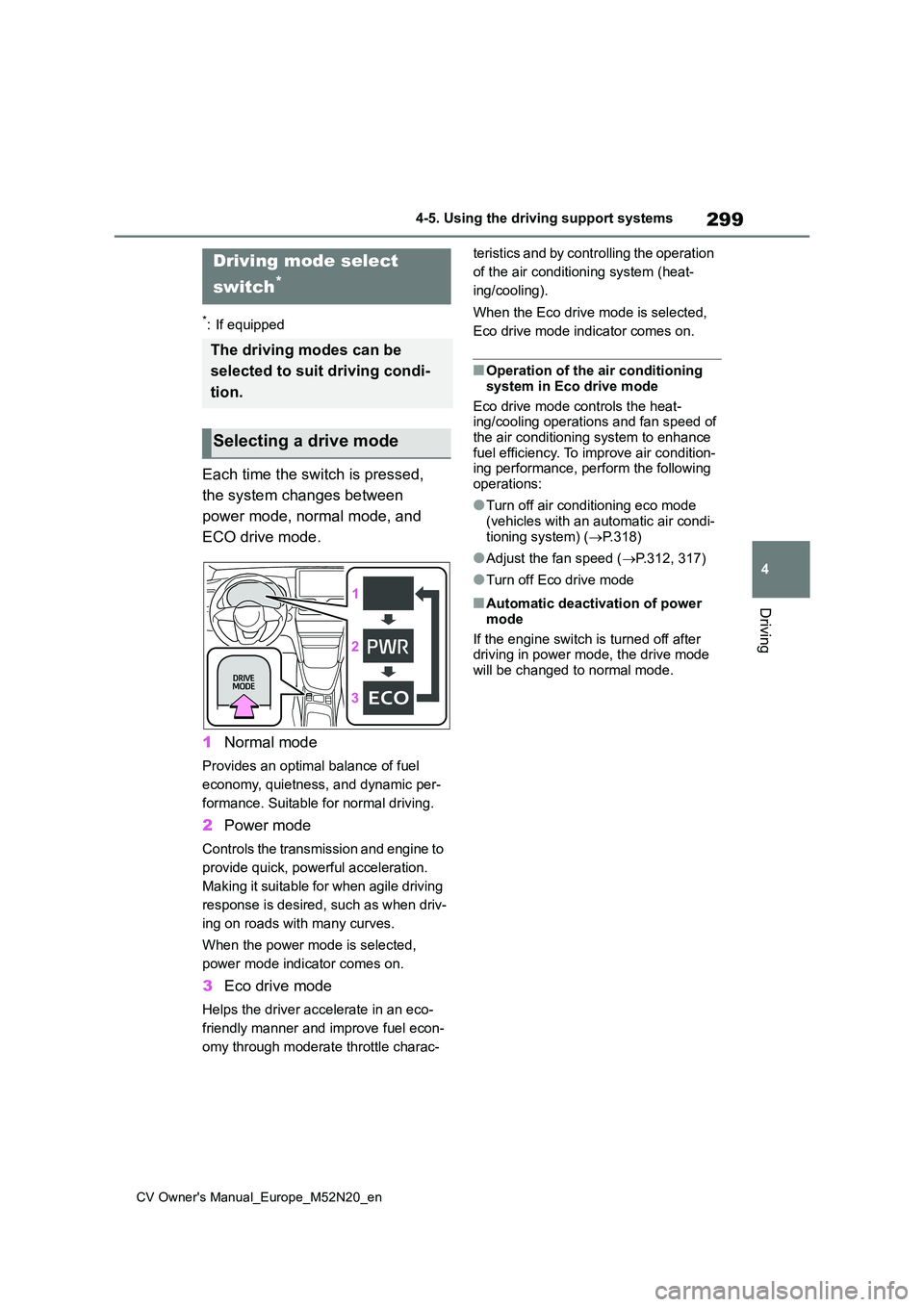
Each time the switch is pressed,
the system changes between
power mode, normal mode, and
ECO drive mode.
1 Normal mode
Provides an optimal balance of fuel
economy, quietness, and dynamic per-
formance. Suitable for normal driving.
2 Power mode
Controls the transmission and engine to
provide quick, powerful acceleration.
Making it suitable for when agile driving
response is desired, such as when driv-
ing on roads with many curves.
When the power mode is selected,
power mode indicator comes on.
3 Eco drive mode
Helps the driver accelerate in an eco-
friendly manner and improve fuel econ-
omy through moderate throttle charac-
teristics and by controlling the operation
of the air conditioning system (heat-
ing/cooling).
When the Eco drive mode is selected,
Eco drive mode indicator comes on.
■Operation of the air conditioning
system in Eco drive mode
Eco drive mode controls the heat- ing/cooling operations and fan speed of
the air conditioning system to enhance fuel efficiency. To improve air condition-ing performance, perform the following
operations:
●Turn off air conditioning eco mode
(vehicles with an automatic air condi- tioning system) ( P.318)
●Adjust the fan speed (P.312, 317)
●Turn off Eco drive mode
■Automatic deactivation of power
mode
If the engine switch is turned off after driving in power mode, the drive mode
will be changed to normal mode.
Driving mode select
switch*
The driving modes can be
selected to suit driving condi-
tion.
Selecting a drive mode
Page 313 of 618
5
311
CV Owner's Manual_Europe_M52N20_en
5
Interior features
Interior features
5-1. Using the air conditioning
system and defogger
Manual air conditioning system
....................................... 312
Automatic air conditioning sys-
tem ................................. 316
Heated steering wheel/seat
heaters ........................... 322
5-2. Using the interior lights
Interior lights list................ 324
5-3. Using the storage features
List of storage features ..... 326
Luggage compartment features
....................................... 329
5-4. Other interior features
Other interior features....... 333
Page 314 of 618
312
CV Owner's Manual_Europe_M52N20_en
5-1. Using the air conditioning system and defogger
5-1.Using the a ir c onditioning sys te m and de fog ger
*: If equipped
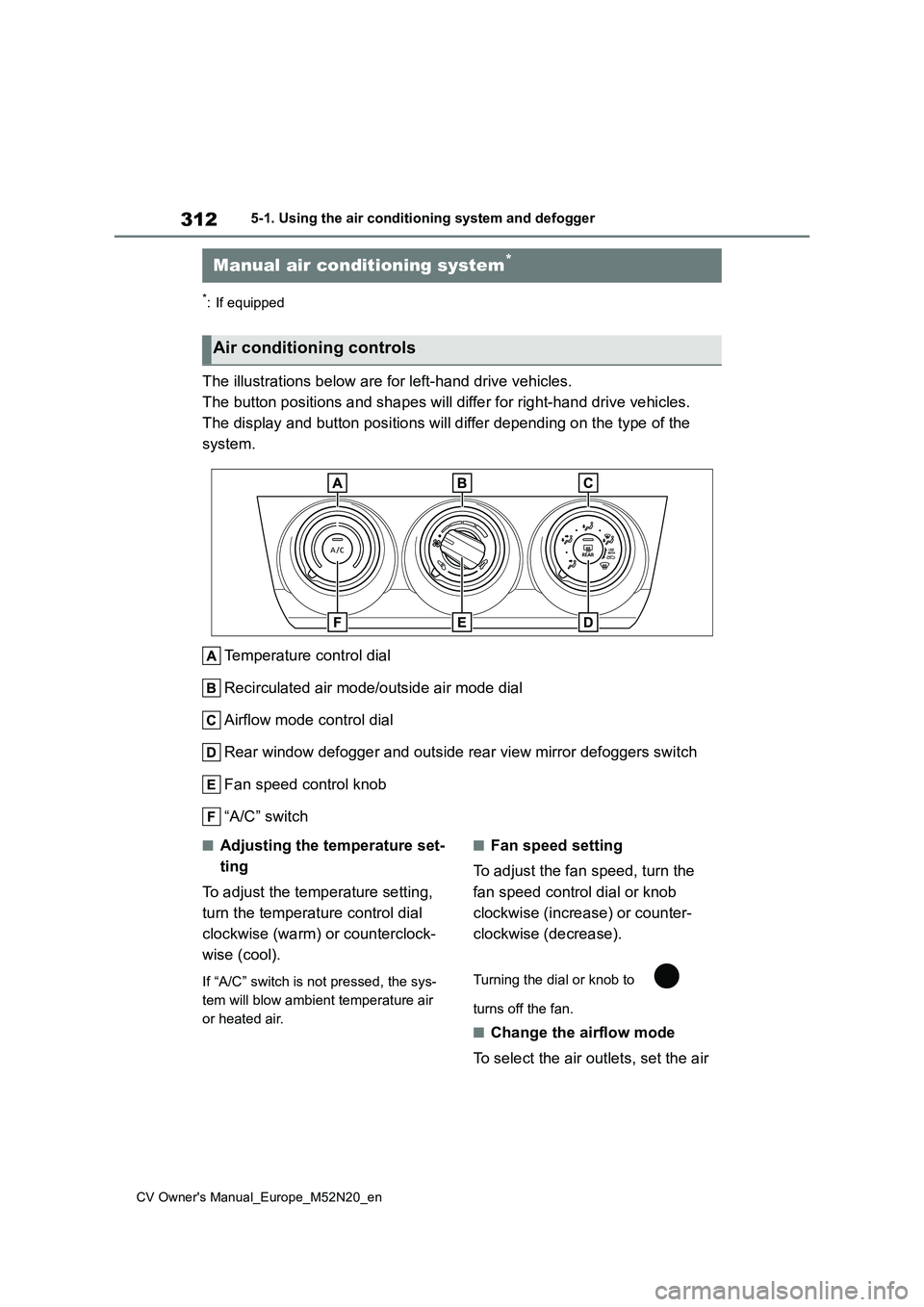
The illustrations below are for left-hand drive vehicles.
The button positions and shapes will differ for right-hand driv e vehicles.
The display and button positions will differ depending on the t ype of the
system.
Temperature control dial
Recirculated air mode/outside air mode dial
Airflow mode control dial
Rear window defogger and outside rear view mirror defoggers swi tch
Fan speed control knob
“A/C” switch
■Adjusting the temperature set-
ting
To adjust the temperature setting,
turn the temperature control dial
clockwise (warm) or counterclock-
wise (cool).
If “A/C” switch is not pressed, the sys-
tem will blow ambient temperature air
or heated air.
■Fan speed setting
To adjust the fan speed, turn the
fan speed control dial or knob
clockwise (increase) or counter-
clockwise (decrease).
Turning the dial or knob to
turns off the fan.
■Change the airflow mode
To select the air outlets, set the air
Manual air conditioning system*
Air conditioning controls
Page 315 of 618
313
5
CV Owner's Manual_Europe_M52N20_en
5-1. Using the air conditioning system and defogger
Interior features
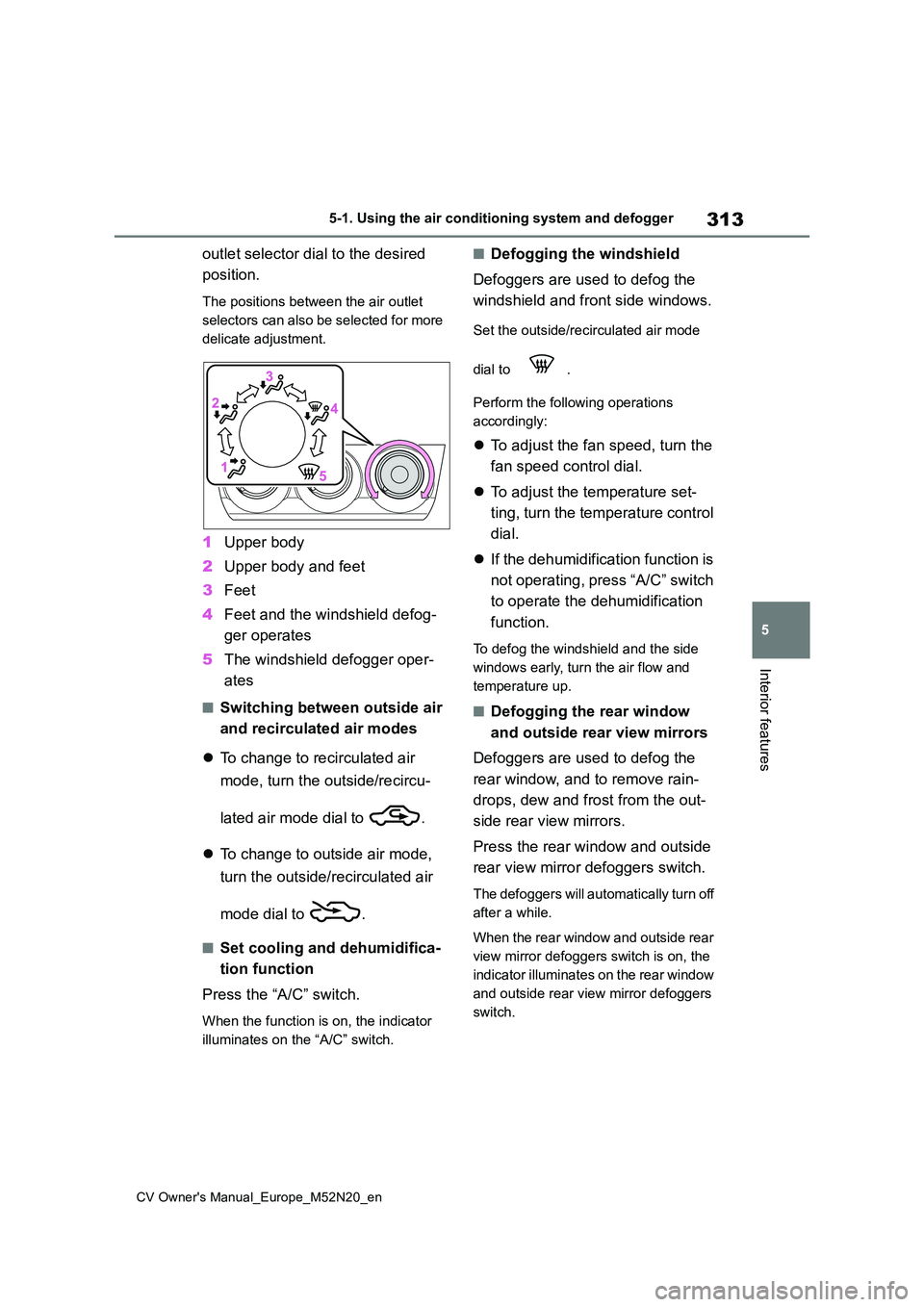
outlet selector dial to the desired
position.
The positions between the air outlet
selectors can also be selected for more
delicate adjustment.
1 Upper body
2 Upper body and feet
3 Feet
4 Feet and the windshield defog-
ger operates
5 The windshield defogger oper-
ates
■Switching between outside air
and recirculated air modes
To change to recirculated air
mode, turn the outside/recircu-
lated air mode dial to .
To change to outside air mode,
turn the outside/recirculated air
mode dial to .
■Set cooling and dehumidifica-
tion function
Press the “A/C” switch.
When the function is on, the indicator
illuminates on the “A/C” switch.
■Defogging the windshield
Defoggers are used to defog the
windshield and front side windows.
Set the outside/recirculated air mode
dial to .
Perform the following operations
accordingly:
To adjust the fan speed, turn the
fan speed control dial.
To adjust the temperature set-
ting, turn the temperature control
dial.
If the dehumidification function is
not operating, press “A/C” switch
to operate the dehumidification
function.
To defog the windshield and the side
windows early, turn the air flow and
temperature up.
■Defogging the rear window
and outside rear view mirrors
Defoggers are used to defog the
rear window, and to remove rain-
drops, dew and frost from the out-
side rear view mirrors.
Press the rear window and outside
rear view mirror defoggers switch.
The defoggers will automatically turn off
after a while.
When the rear window and outside rear
view mirror defoggers switch is on, the
indicator illuminates on the rear window
and outside rear view mirror defoggers
switch.
Page 316 of 618
314
CV Owner's Manual_Europe_M52N20_en
5-1. Using the air conditioning system and defogger
■Fogging up of the windows
●The windows will easily fog up when the humidity in the vehicle is high. Turning “A/C” switch is on will dehu-
midify the air from the outlets and defog the windshield effectively.
●If you turn “A/C” switch is off, the win-dows may fog up more easily.
●The windows may fog up if the recir-culated air mode is used.
■When driving on dusty roads
Close all windows. If dust thrown up by
the vehicle is still drawn into the vehicle after closing the windows, it is recom-mended that the air intake mode be set
to outside air mode and the fan speed to any setting except off.
■Outside/recirculated air mode
●Setting to the recirculated air mode temporarily is recommended in pre-venting dirty air from entering the
vehicle interior and helping to cool the vehicle when the outside air tempera-ture is high.
●During cooling operation, setting the recirculated air mode will also cool the
vehicle interior effectively.
■When the outside temperature falls to nearly 0°C (32°F)
The dehumidification function may not operate even when “A/C” switch is pressed.
■Ventilation and air conditioning
odors
●To let fresh air in, set the air condition-
ing system to the outside air mode.
●During use, various odors from inside
and outside the vehicle may enter into and accumulate in the air conditioning system. This may then cause odor to
be emitted from the vents.
●It is recommended that the air condi-
tioning system be set to outside air mode prior to turning the vehicle off.
■Air conditioning filter
P. 3 7 6
This feature is used to prevent ice
from building up on the windshield
and wiper blades.
Press the switch to turn the system
on/off.
The indicator comes on when the sys-
tem is on.
The windshield wiper de-icer will auto-
matically turn off after approximately 15
minutes.
WARNING
■To prevent the windshield from fogging up
Do not use the windshield defogger switch during cool air operation in extremely humid weather. The differ-
ence between the temperature of the outside air and that of the windshield can cause the outer surface of the
windshield to fog up, blocking your vision.
■When the outside rear view mir-ror defoggers are operating (if equipped)
Do not touch the outside rear view mirror surfaces, as they can become very hot and burn you.
NOTICE
■To prevent battery discharge
Do not leave the air conditioning sys-
tem on longer than necessary when the engine is off.
Windshield wiper de-icer (if
equipped)
Page 317 of 618
315
5
CV Owner's Manual_Europe_M52N20_en
5-1. Using the air conditioning system and defogger
Interior features
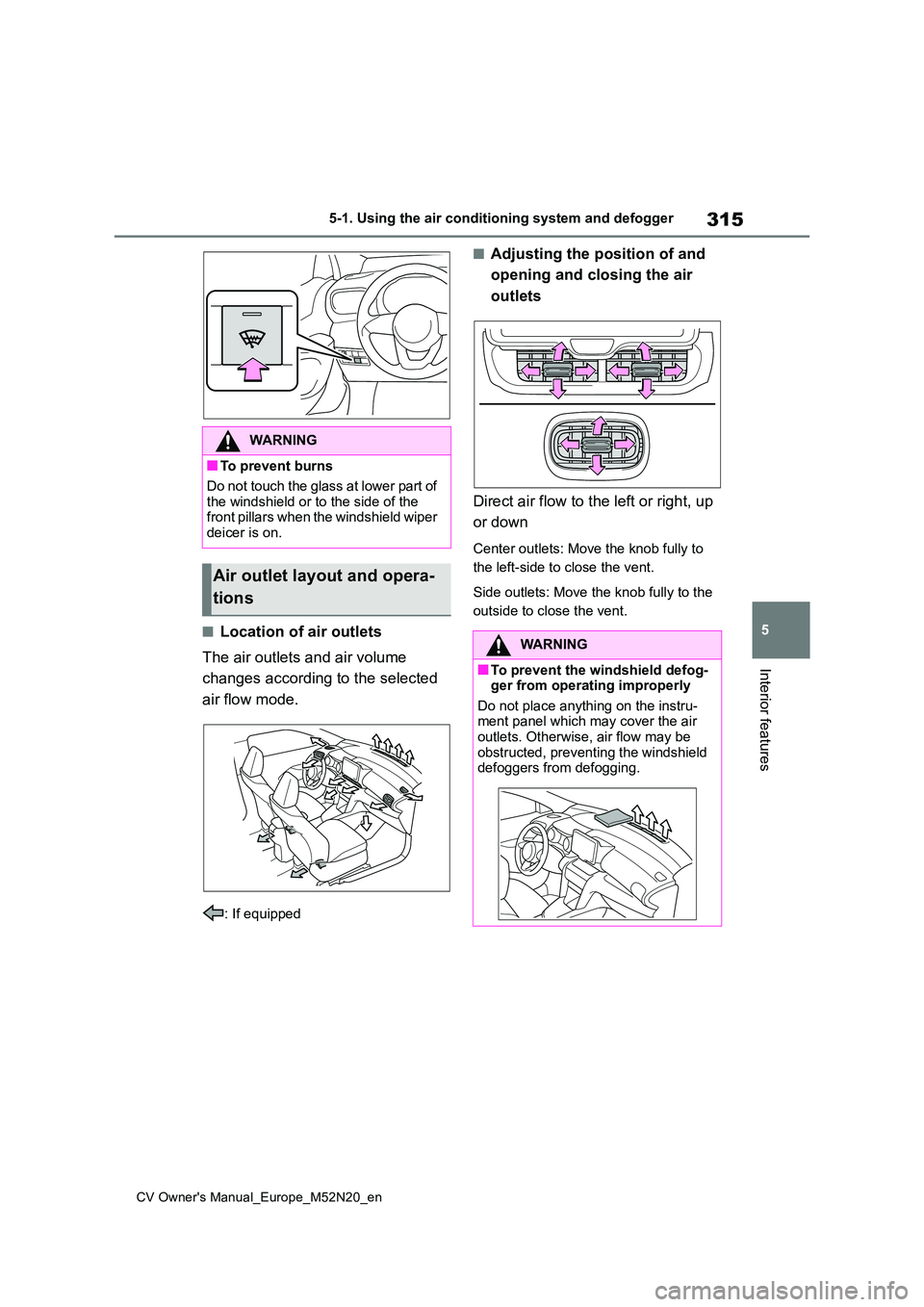
■Location of air outlets
The air outlets and air volume
changes according to the selected
air flow mode.
: If equipped
■Adjusting the position of and
opening and closing the air
outlets
Direct air flow to the left or right, up
or down
Center outlets: Move the knob fully to
the left-side to close the vent.
Side outlets: Move the knob fully to the
outside to close the vent.
WARNING
■To prevent burns
Do not touch the glass at lower part of
the windshield or to the side of the front pillars when the windshield wiper deicer is on.
Air outlet layout and opera-
tions
WARNING
■To prevent the windshield defog- ger from operating improperly
Do not place anything on the instru- ment panel which may cover the air outlets. Otherwise, air flow may be
obstructed, preventing the windshield defoggers from defogging.
Page 318 of 618
316
CV Owner's Manual_Europe_M52N20_en
5-1. Using the air conditioning system and defogger
*: If equipped
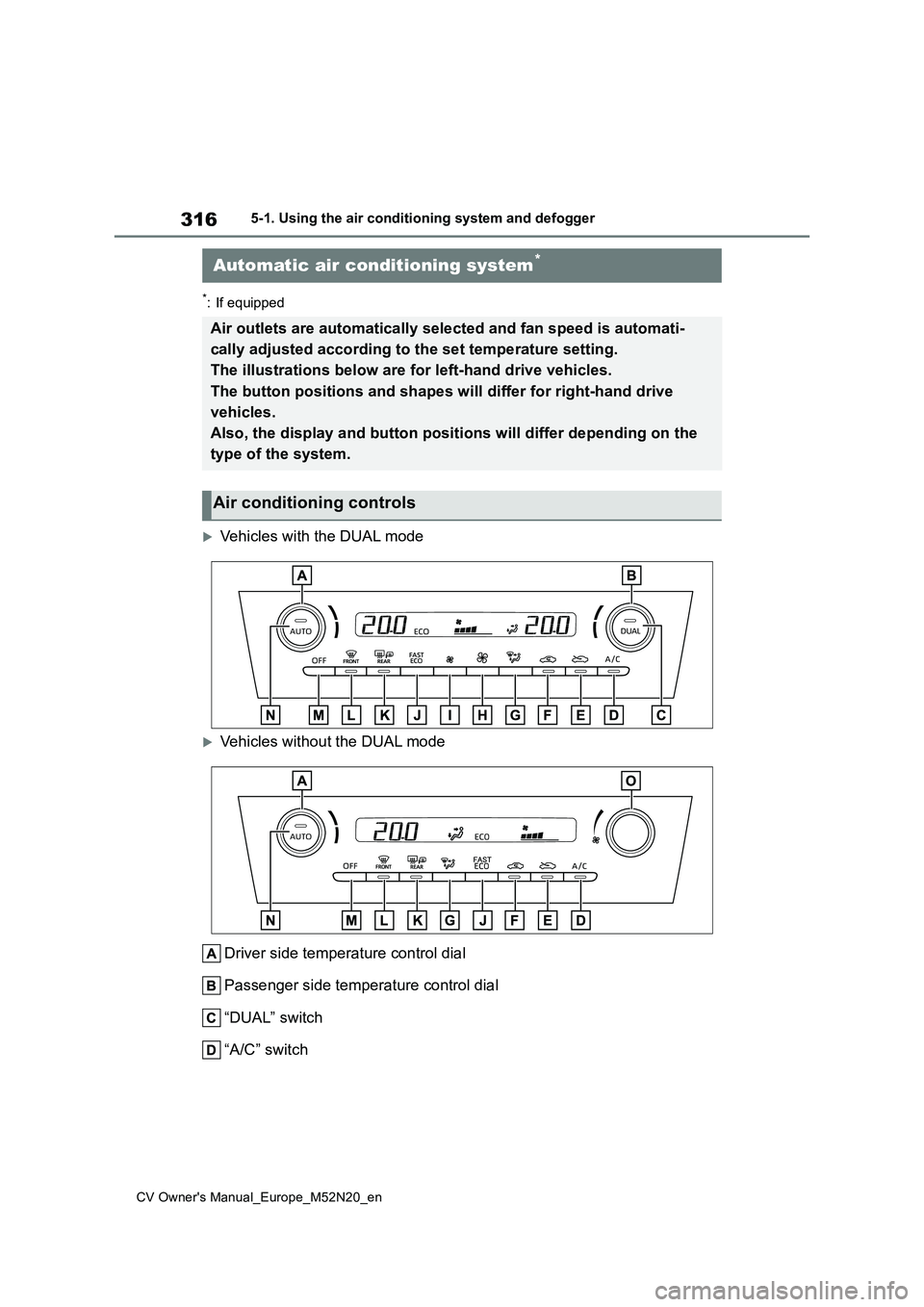
Vehicles with the DUAL mode
Vehicles without the DUAL mode
Driver side temperature control dial
Passenger side temperature control dial
“DUAL” switch
“A/C” switch
Automatic air conditioning system*
Air outlets are automatically selected and fan speed is automat i-
cally adjusted according to the set temperature setting.
The illustrations below are for left-hand drive vehicles.
The button positions and shapes w ill differ for right-hand drive
vehicles.
Also, the display and button positions will differ depending on the
type of the system.
Air conditioning controls
Page 319 of 618
317
5
CV Owner's Manual_Europe_M52N20_en
5-1. Using the air conditioning system and defogger
Interior features
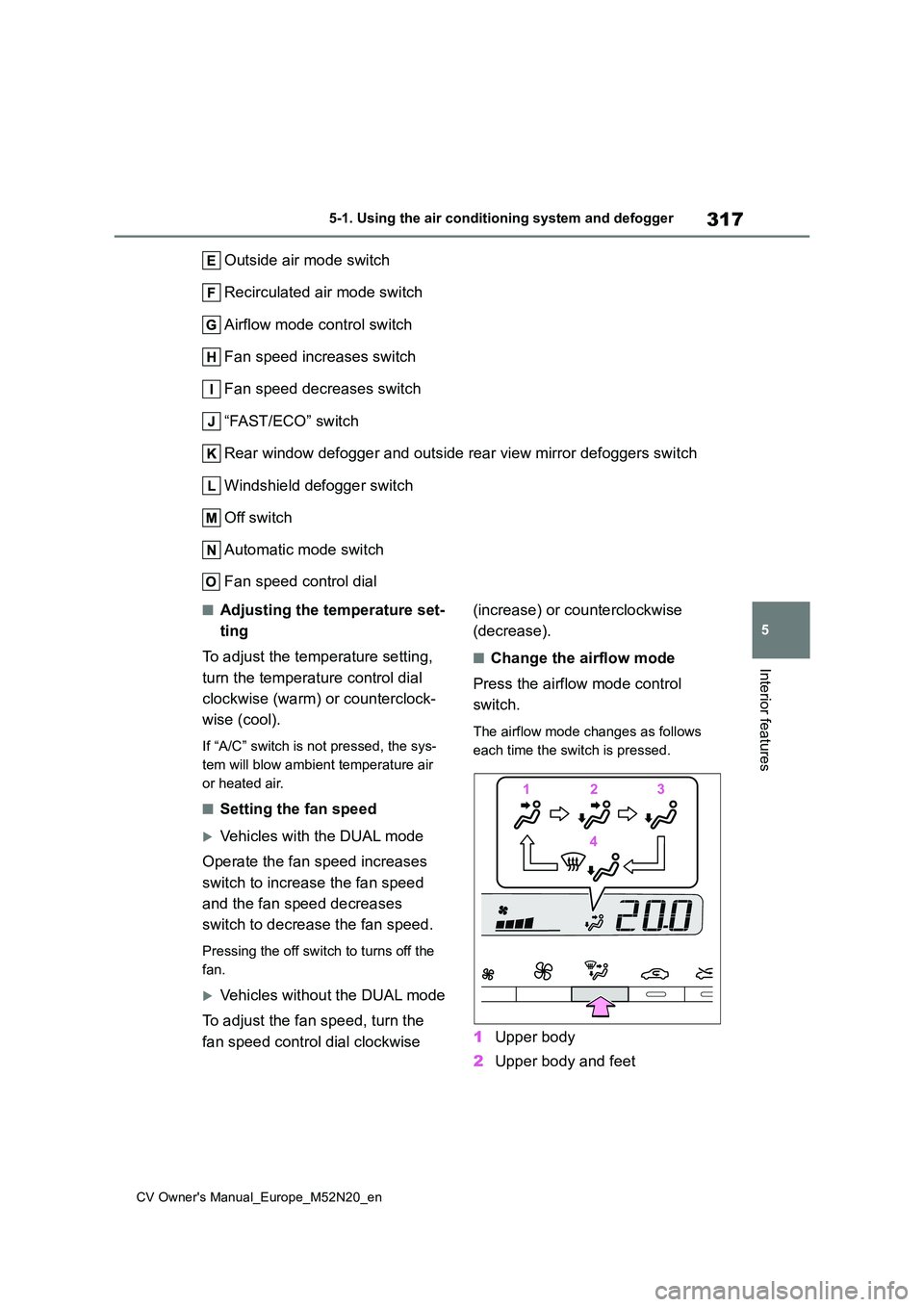
Outside air mode switch
Recirculated air mode switch
Airflow mode control switch
Fan speed increases switch
Fan speed decreases switch
“FAST/ECO” switch
Rear window defogger and outside rear view mirror defoggers swi tch
Windshield defogger switch
Off switch
Automatic mode switch
Fan speed control dial
■Adjusting the temperature set-
ting
To adjust the temperature setting,
turn the temperature control dial
clockwise (warm) or counterclock-
wise (cool).
If “A/C” switch is not pressed, the sys-
tem will blow ambient temperature air
or heated air.
■Setting the fan speed
Vehicles with the DUAL mode
Operate the fan speed increases
switch to increase the fan speed
and the fan speed decreases
switch to decrease the fan speed.
Pressing the off switch to turns off the
fan.
Vehicles without the DUAL mode
To adjust the fan speed, turn the
fan speed control dial clockwise
(increase) or counterclockwise
(decrease).
■Change the airflow mode
Press the airflow mode control
switch.
The airflow mode changes as follows
each time the switch is pressed.
1 Upper body
2 Upper body and feet