eco drive TOYOTA YARIS CROSS 2022 User Guide
[x] Cancel search | Manufacturer: TOYOTA, Model Year: 2022, Model line: YARIS CROSS, Model: TOYOTA YARIS CROSS 2022Pages: 618, PDF Size: 130.77 MB
Page 94 of 618
92
CV Owner's Manual_Europe_M52N20_en
2-1. Instrument cluster
play. ( P.457)
■Changing the display
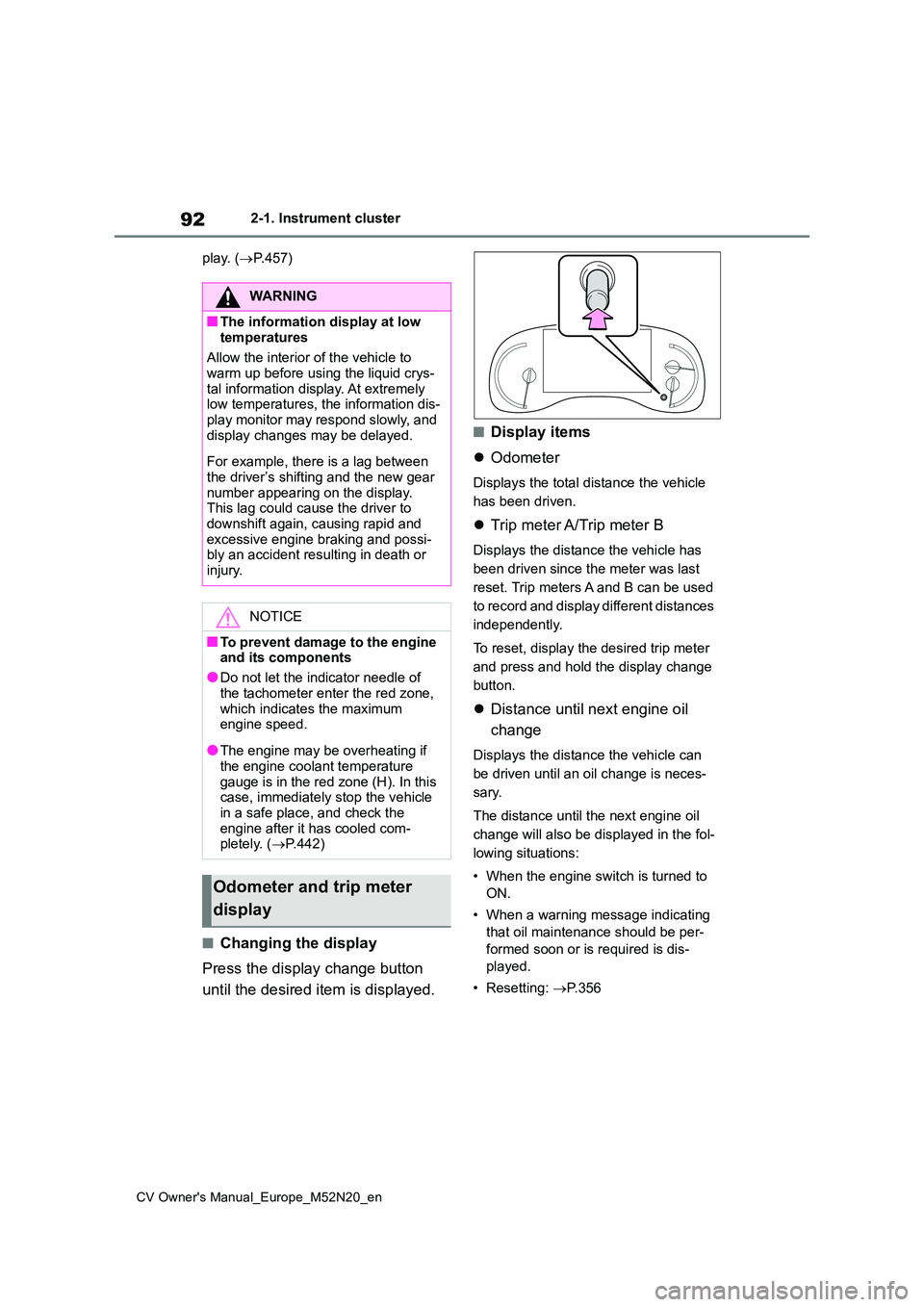
Press the display change button
until the desired item is displayed.
■Display items
Odometer
Displays the total distance the vehicle
has been driven.
Trip meter A/Trip meter B
Displays the distance the vehicle has
been driven since the meter was last
reset. Trip meters A and B can be used
to record and display different distances
independently.
To reset, display the desired trip meter
and press and hold the display change
button.
Distance until next engine oil
change
Displays the distance the vehicle can
be driven until an oil change is neces-
sary.
The distance until the next engine oil
change will also be displayed in the fol-
lowing situations:
• When the engine switch is turned to
ON.
• When a warning message indicating
that oil maintenance should be per-
formed soon or is required is dis-
played.
• Resetting: P. 3 5 6
WARNING
■The information display at low
temperatures
Allow the interior of the vehicle to warm up before using the liquid crys-
tal information display. At extremely low temperatures, the information dis-play monitor may respond slowly, and
display changes may be delayed.
For example, there is a lag between
the driver’s shifting and the new gear number appearing on the display. This lag could cause the driver to
downshift again, causing rapid and excessive engine braking and possi-bly an accident resulting in death or
injury.
NOTICE
■To prevent damage to the engine and its components
●Do not let the indicator needle of
the tachometer enter the red zone, which indicates the maximum engine speed.
●The engine may be overheating if the engine coolant temperature
gauge is in the red zone (H). In this case, immediately stop the vehicle in a safe place, and check the
engine after it has cooled com- pletely. ( P.442)
Odometer and trip meter
display
Page 98 of 618
96
CV Owner's Manual_Europe_M52N20_en
2-1. Instrument cluster
For details regarding the hands-free
system, refer to the “Navigation and
multimedia system Owner’s manual”.
■Display items
Fuel economy
Eco Driving Indicator/Driving
range (if equipped)
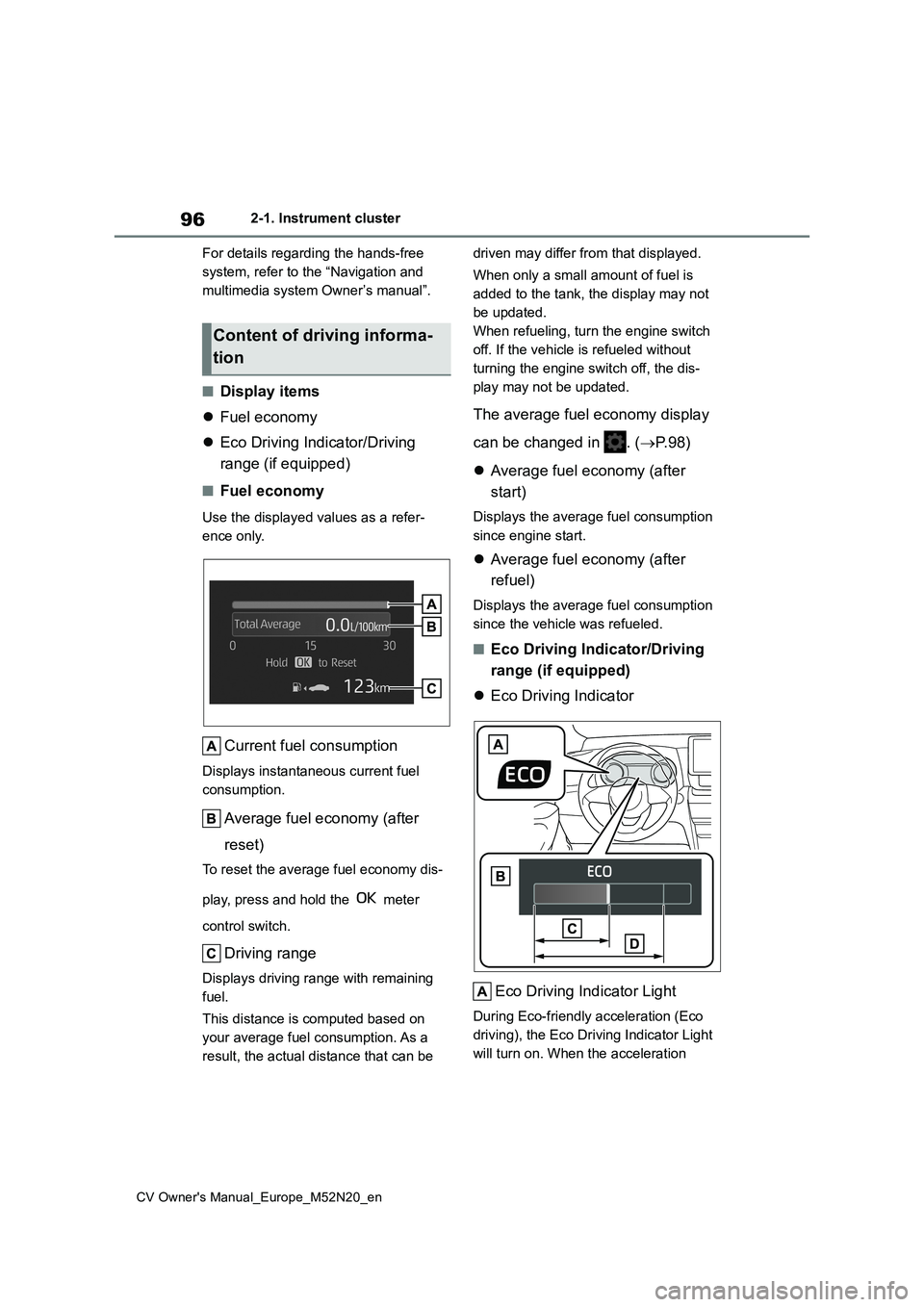
■Fuel economy
Use the displayed values as a refer-
ence only.
Current fuel consumption
Displays instantaneous current fuel
consumption.
Average fuel economy (after
reset)
To reset the average fuel economy dis-
play, press and hold the meter
control switch.
Driving range
Displays driving range with remaining
fuel.
This distance is computed based on
your average fuel consumption. As a
result, the actual distance that can be
driven may differ from that displayed.
When only a small amount of fuel is
added to the tank, the display may not
be updated.
When refueling, turn the engine switch
off. If the vehicle is refueled without
turning the engine switch off, the dis-
play may not be updated.
The average fuel economy display
can be changed in . ( P. 9 8 )
Average fuel economy (after
start)
Displays the average fuel consumption
since engine start.
Average fuel economy (after
refuel)
Displays the average fuel consumption
since the vehicle was refueled.
■Eco Driving Indicator/Driving
range (if equipped)
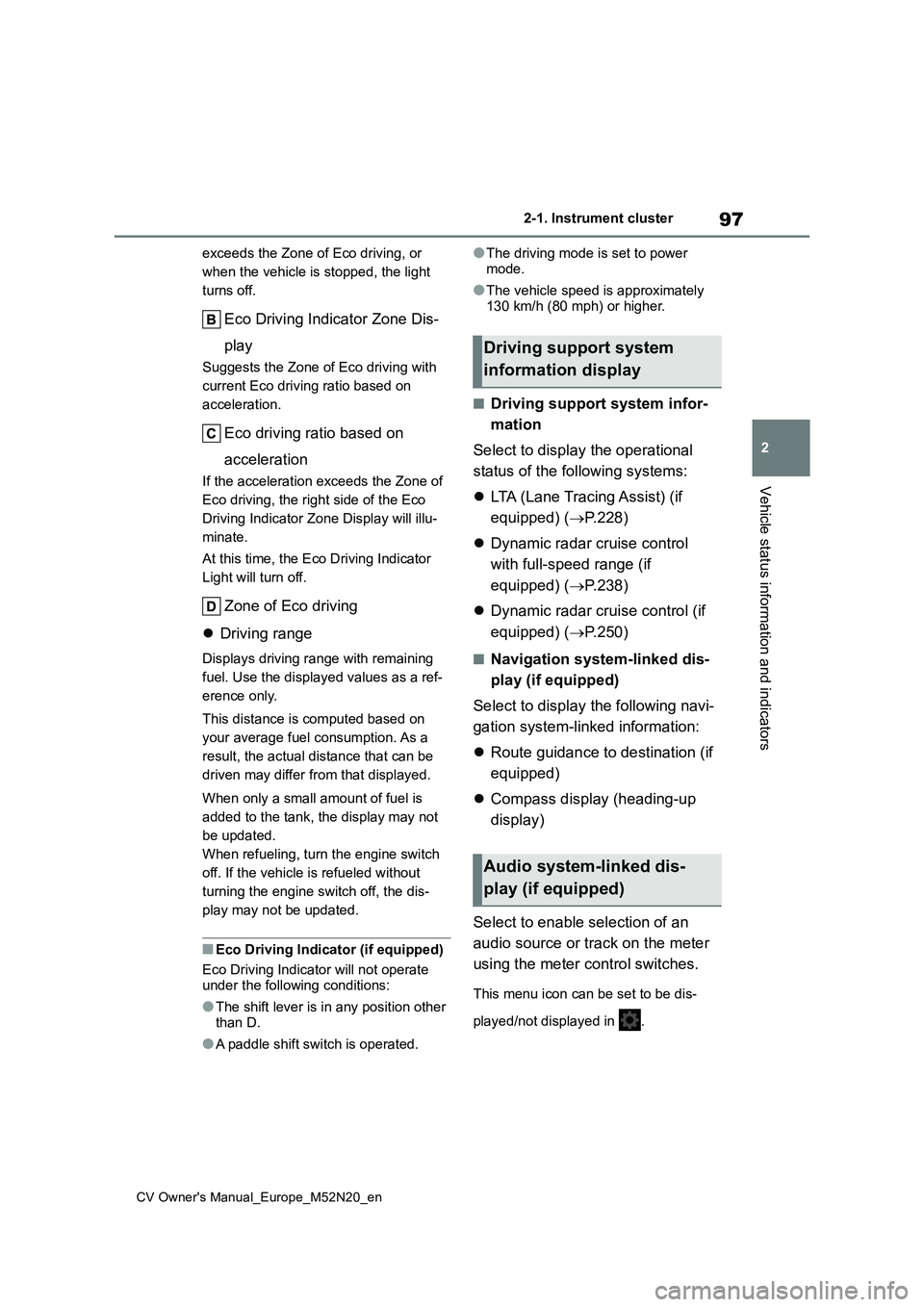
Eco Driving Indicator
Eco Driving Indicator Light
During Eco-friendly acceleration (Eco
driving), the Eco Driving Indicator Light
will turn on. When the acceleration
Content of driving informa-
tion
Page 99 of 618
97
2
CV Owner's Manual_Europe_M52N20_en
2-1. Instrument cluster
Vehicle status information and indicators
exceeds the Zone of Eco driving, or
when the vehicle is stopped, the light
turns off.
Eco Driving Indicator Zone Dis-
play
Suggests the Zone of Eco driving with
current Eco driving ratio based on
acceleration.
Eco driving ratio based on
acceleration
If the acceleration exceeds the Zone of
Eco driving, the right side of the Eco
Driving Indicator Zone Display will illu-
minate.
At this time, the Eco Driving Indicator
Light will turn off.
Zone of Eco driving
Driving range
Displays driving range with remaining
fuel. Use the displayed values as a ref-
erence only.
This distance is computed based on
your average fuel consumption. As a
result, the actual distance that can be
driven may differ from that displayed.
When only a small amount of fuel is
added to the tank, the display may not
be updated.
When refueling, turn the engine switch
off. If the vehicle is refueled without
turning the engine switch off, the dis-
play may not be updated.
■Eco Driving Indicator (if equipped)
Eco Driving Indicator will not operate under the following conditions:
●The shift lever is in any position other
than D.
●A paddle shift switch is operated.
●The driving mode is set to power
mode.
●The vehicle speed is approximately
130 km/h (80 mph) or higher.
■Driving support system infor-
mation
Select to display the operational
status of the following systems:
LTA (Lane Tracing Assist) (if
equipped) ( P.228)
Dynamic radar cruise control
with full-speed range (if
equipped) ( P.238)
Dynamic radar cruise control (if
equipped) ( P.250)
■Navigation system-linked dis-
play (if equipped)
Select to display the following navi-
gation system-linked information:
Route guidance to destination (if
equipped)
Compass display (heading-up
display)
Select to enable selection of an
audio source or track on the meter
using the meter control switches.
This menu icon can be set to be dis-
played/not displayed in .
Driving support system
information display
Audio system-linked dis-
play (if equipped)
Page 100 of 618
98
CV Owner's Manual_Europe_M52N20_en
2-1. Instrument cluster
■Drive information
2 items that are selected using the
“Drive Info. Items” setting (average
speed, distance and total time) can
be displayed vertically.
The displayed information changes
according to the “Drive Info. Type”
setting (since the system was
started or between resets). ( P. 9 8 )
Use the displayed information as a ref-
erence only.
Following items will be displayed.
“Trip”
• “Average Speed”: Displays the aver-
age vehicle speed since engine start*
• “Distance”: Displays the distance
driven since engine start*
• “Total Time”: Displays the elapsed
time since engine start*
*: These items are reset each time the
engine stops.
“Total”
• “Average Speed”: Displays the aver-
age vehicle speed since the display
was reset*
• “Distance”: Displays the distance
driven since the display was reset*
• “Total Time”: Displays the elapsed
time since the display was reset*
*: To reset, display the desired item and
press and hold the meter control
switch.
■Tire inflation pressure
Displays inflation pressure of each
tire.
■Meter display settings that can
be changed
Clock setting (vehicles without
navigation/multimedia system)
P. 8 7
Language
Select to change the language dis-
played.
Units
Select to change the units of measure
displayed.
Eco Driving Indicator Light (if
equipped)
Select to enable/disable the Eco Driv-
ing Indicator Light.
• Fuel economy display
Select to change the average fuel con-
sumption display between after
start/after reset/after refuel. ( P. 9 6 )
(if equipped)
Select to display/not display the audio
system linked display.
Select to change the displayed content
of the following:
• Drive information type
Select to change the drive information
type display between after start/after
reset.
• Drive information items
Select to set the first and second items
Vehicle information display
Settings display
Page 103 of 618
101
2
CV Owner's Manual_Europe_M52N20_en
2-1. Instrument cluster
Vehicle status information and indicators
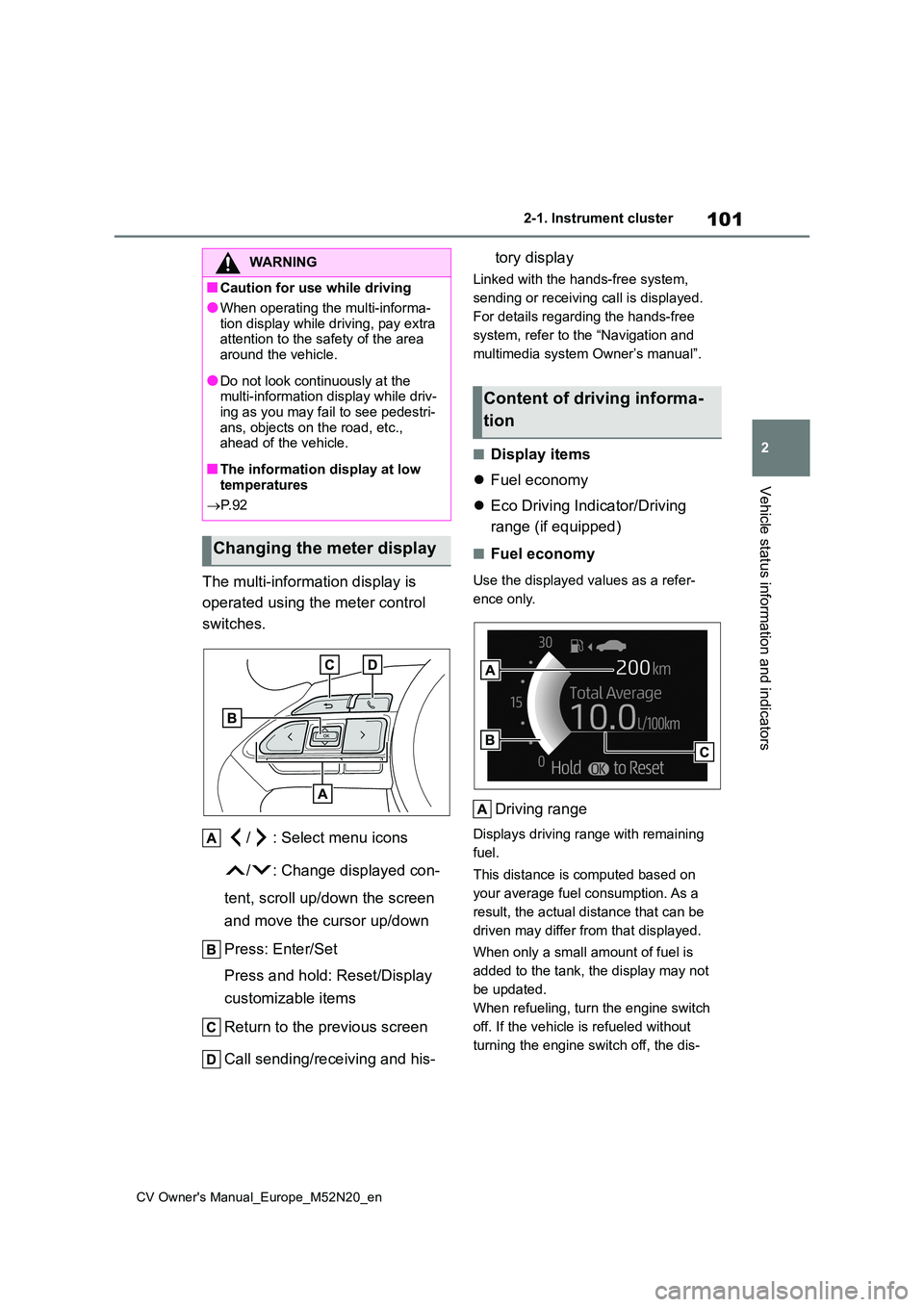
The multi-information display is
operated using the meter control
switches.
/ : Select menu icons
/ : Change displayed con-
tent, scroll up/down the screen
and move the cursor up/down
Press: Enter/Set
Press and hold: Reset/Display
customizable items
Return to the previous screen
Call sending/receiving and his-
tory display
Linked with the hands-free system,
sending or receiving call is displayed.
For details regarding the hands-free
system, refer to the “Navigation and
multimedia system Owner’s manual”.
■Display items
Fuel economy
Eco Driving Indicator/Driving
range (if equipped)
■Fuel economy
Use the displayed values as a refer-
ence only.
Driving range
Displays driving range with remaining
fuel.
This distance is computed based on
your average fuel consumption. As a
result, the actual distance that can be
driven may differ from that displayed.
When only a small amount of fuel is
added to the tank, the display may not
be updated.
When refueling, turn the engine switch
off. If the vehicle is refueled without
turning the engine switch off, the dis-
WARNING
■Caution for use while driving
●When operating the multi-informa-
tion display while driving, pay extra attention to the safety of the area around the vehicle.
●Do not look continuously at the multi-information display while driv-
ing as you may fail to see pedestri- ans, objects on the road, etc., ahead of the vehicle.
■The information display at low temperatures
P. 9 2
Changing the meter display
Content of driving informa-
tion
Page 104 of 618
102
CV Owner's Manual_Europe_M52N20_en
2-1. Instrument cluster
play may not be updated.
Current fuel consumption
Displays instantaneous current fuel
consumption.
Average fuel economy (after
reset)
To reset the average fuel economy dis-
play, press and hold the meter
control switch.
The average fuel economy display
can be changed in . ( P.104)
Average fuel economy (after
start)
Displays the average fuel consumption
since engine start.
Average fuel economy (after
refuel)
Displays the average fuel consumption
since the vehicle was refueled.
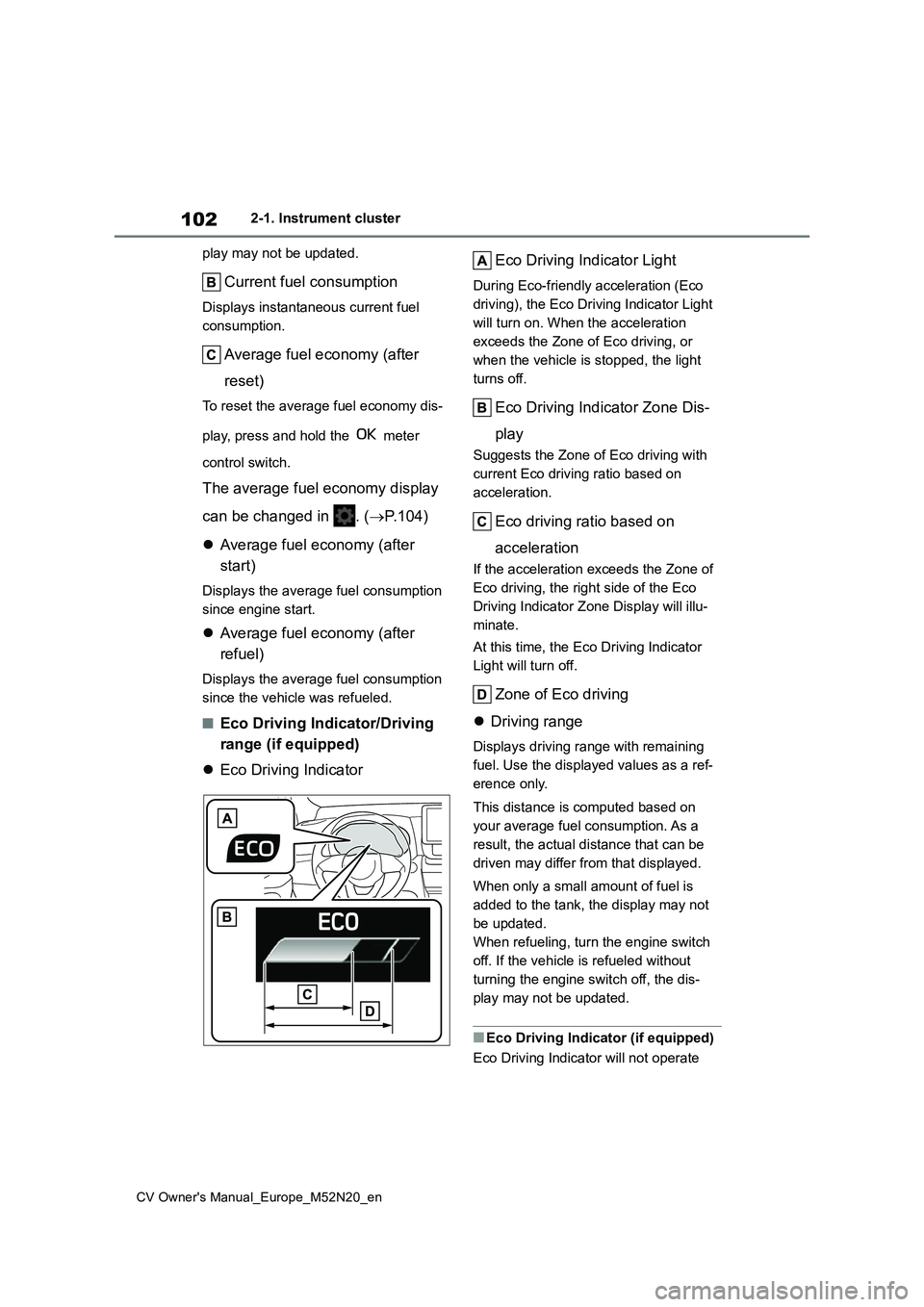
■Eco Driving Indicator/Driving
range (if equipped)
Eco Driving Indicator
Eco Driving Indicator Light
During Eco-friendly acceleration (Eco
driving), the Eco Driving Indicator Light
will turn on. When the acceleration
exceeds the Zone of Eco driving, or
when the vehicle is stopped, the light
turns off.
Eco Driving Indicator Zone Dis-
play
Suggests the Zone of Eco driving with
current Eco driving ratio based on
acceleration.
Eco driving ratio based on
acceleration
If the acceleration exceeds the Zone of
Eco driving, the right side of the Eco
Driving Indicator Zone Display will illu-
minate.
At this time, the Eco Driving Indicator
Light will turn off.
Zone of Eco driving
Driving range
Displays driving range with remaining
fuel. Use the displayed values as a ref-
erence only.
This distance is computed based on
your average fuel consumption. As a
result, the actual distance that can be
driven may differ from that displayed.
When only a small amount of fuel is
added to the tank, the display may not
be updated.
When refueling, turn the engine switch
off. If the vehicle is refueled without
turning the engine switch off, the dis-
play may not be updated.
■Eco Driving Indicator (if equipped)
Eco Driving Indicator will not operate
Page 106 of 618
104
CV Owner's Manual_Europe_M52N20_en
2-1. Instrument cluster
press and hold the meter control
switch.
■Tire inflation pressure
Displays inflation pressure of each
tire.
■Meter display settings that can
be changed
Clock setting (vehicles without
navigation/multimedia system)
P. 9 3
Language
Select to change the language dis-
played.
Units
Select to change the units of measure
displayed.
Meter Type
The speed meter display method can
be changed.
Eco Driving Indicator Light (if
equipped)
Select to enable/disable the Eco Driv-
ing Indicator Light.
• Fuel economy display
Select to change the average fuel con-
sumption display between after
start/after reset/after refuel. ( P.101)
(if equipped)
Select to display/not display the audio
system linked display.
Select to change the displayed content
of the following:
• Drive information type
Select to change the drive information
type display between after start/after
reset.
• Drive information items
Select to set the first and second items
of the drive information display to any of
the following: average vehicle
speed/distance/elapsed time.
Pop-up display
Select to enable/disable pop-up dis-
plays for each relevant system.
Multi-information display off
Select to turn the multi-information dis-
play off.
To turn the multi-information display on
again, press any of the following meter
control switches
//// /.
Default setting
Select to reset the meter display set-
tings to the default setting.
■Vehicle functions and settings
that can be changed
P. 4 5 7
■Suspension of the settings display
●Some settings cannot be changed while driving. When changing set-tings, park the vehicle in a safe place.
●If a warning message is displayed, operation of the settings display will
be suspended.
Settings display
Page 108 of 618
106
CV Owner's Manual_Europe_M52N20_en
2-1. Instrument cluster
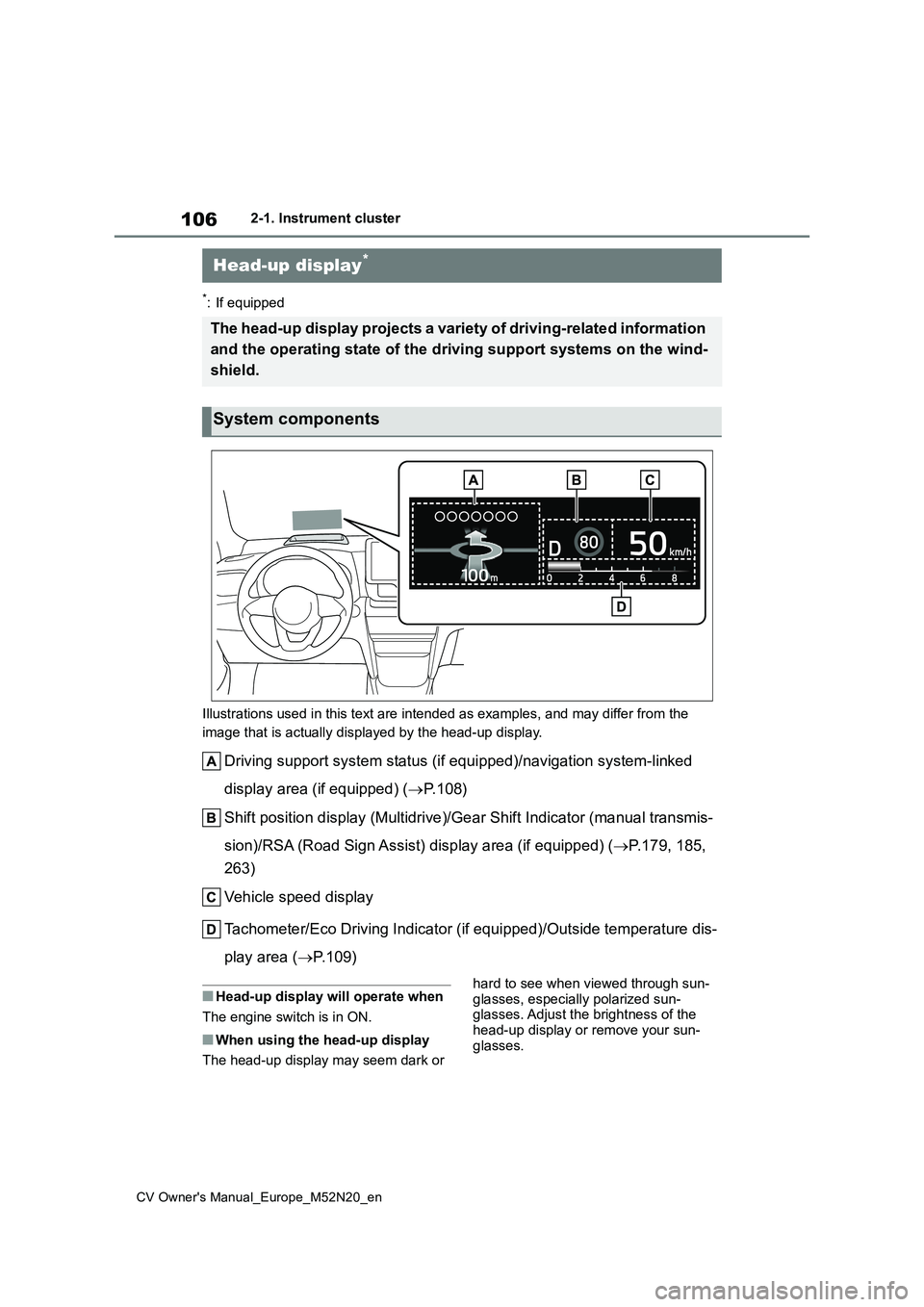
*: If equipped
Illustrations used in this text are intended as examples, and m ay differ from the
image that is actually displayed by the head-up display.
Driving support system status (if equipped)/navigation system-l inked
display area (if equipped) ( P. 1 0 8 )
Shift position display (Multidrive)/Gear Shift Indicator (manua l transmis-
sion)/RSA (Road Sign Assist) display area (if equipped) ( P.179, 185,
263)
Vehicle speed display
Tachometer/Eco Driving Indicator (if equipped)/Outside temperat ure dis-
play area ( P.109)
■Head-up display will operate when
The engine switch is in ON.
■When using the head-up display
The head-up display may seem dark or
hard to see when viewed through sun-
glasses, especially polarized sun- glasses. Adjust the brightness of the head-up display or remove your sun-
glasses.
Head-up display*
The head-up display projects a variety of driving-related infor mation
and the operating state of the d riving support systems on the wind-
shield.
System components
Page 109 of 618
107
2
CV Owner's Manual_Europe_M52N20_en
2-1. Instrument cluster
Vehicle status information and indicators
■Street name display (vehicles with
navigation system)
Only street names which are included in the map data will be displayed.Select on the multi-information
display ( P.457) and then “HUD
Main”.
■Enabling/disabling the head-
up display
Press the meter control switch
to enable/disable the head-up dis-
play.
■Changing the head-up display
settings
Press and hold the meter con-
trol switch to change the following
settings:
Brightness and vertical position
of the head-up display
Select to adjust the brightness or verti-
cal position of the head-up display.
Display content
Select to change the display between
the following:
• No content
• Eco Driving Indicator (if equipped)
• Tachometer
Select to enable/disable the fol-
lowing items:
• Route guidance to destination (if
equipped)
• Driving support system display (if
equipped)
• Compass (heading-up display) (if
equipped)
• Audio system operation status (if
equipped)
WARNING
■When using the head-up display
●Check that the position and bright- ness of the head-up display image
does not interfere with safe driving. Incorrect adjustment of the image’s position or brightness may obstruct
the driver’s view and lead to an accident, resulting in death or seri-ous injury.
●Do not continuously look at the head-up display while driving as
you may fail to see pedestrians, objects on the road, etc., ahead of the vehicle.
NOTICE
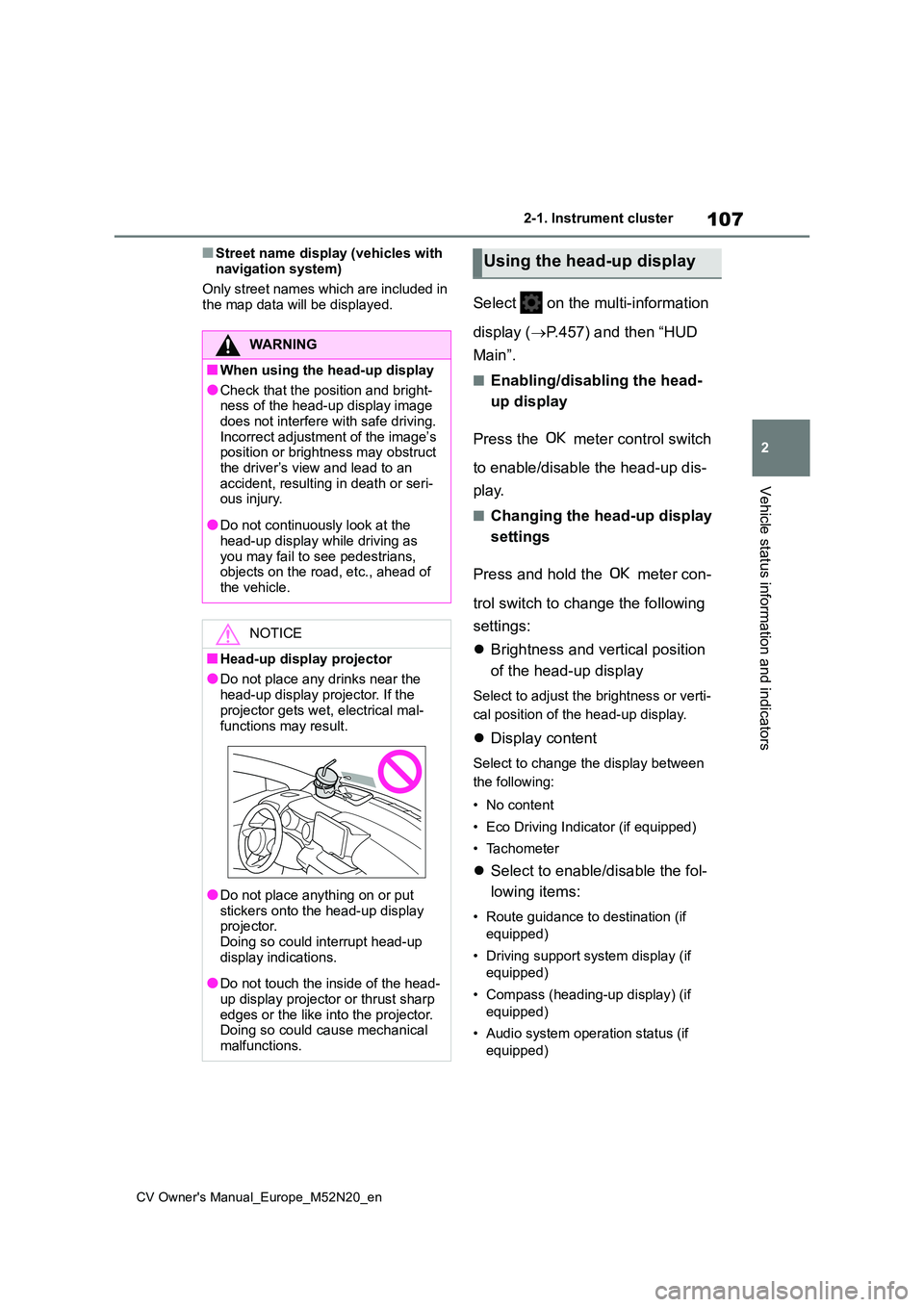
■Head-up display projector
●Do not place any drinks near the
head-up display projector. If the projector gets wet, electrical mal-
functions may result.
●Do not place anything on or put
stickers onto the head-up display projector.Doing so could interrupt head-up
display indications.
●Do not touch the inside of the head-
up display projector or thrust sharp edges or the like into the projector.Doing so could cause mechanical
malfunctions.
Using the head-up display
Page 111 of 618
109
2
CV Owner's Manual_Europe_M52N20_en
2-1. Instrument cluster
Vehicle status information and indicators
ing state of a relevant system.
PCS (Pre-Collision System) (if
equipped) ( P.217)
LTA (Lane Tracing Assist) (if
equipped) ( P.228)
PKSB (Parking Support Brake)
(if equipped) ( P.289)
Brake Override System
( P.160)
Drive-Start Control (if equipped)
( P.165)
Details of content displayed on the
head-up display may differ from that
displayed on the multi-information dis-
play. For details, refer to the explana-
tion of each system.
■ icon
Displayed when a warning mes-
sage is displayed on the multi-infor-
mation display. ( P.413)
■Warning message
Some warning messages are dis-
played when necessary, according
to certain conditions.
Details of content displayed on the
head-up display may differ from that
displayed on the multi-information dis-
play.
■Audio system operation status
(if equipped)
Displayed when an audio remote
control switch on the steering wheel
is operated.
■Hands-free system status (if
equipped)
Displayed when the hands-free
system is operated.
■When a pop-up display is displayed
When a pop-up display is displayed, a current display may no longer be dis-played. In this case, the display will
return after the pop-up display disap- pears.
■Tachometer
Displays the engine speed in revo-
lutions per minute.
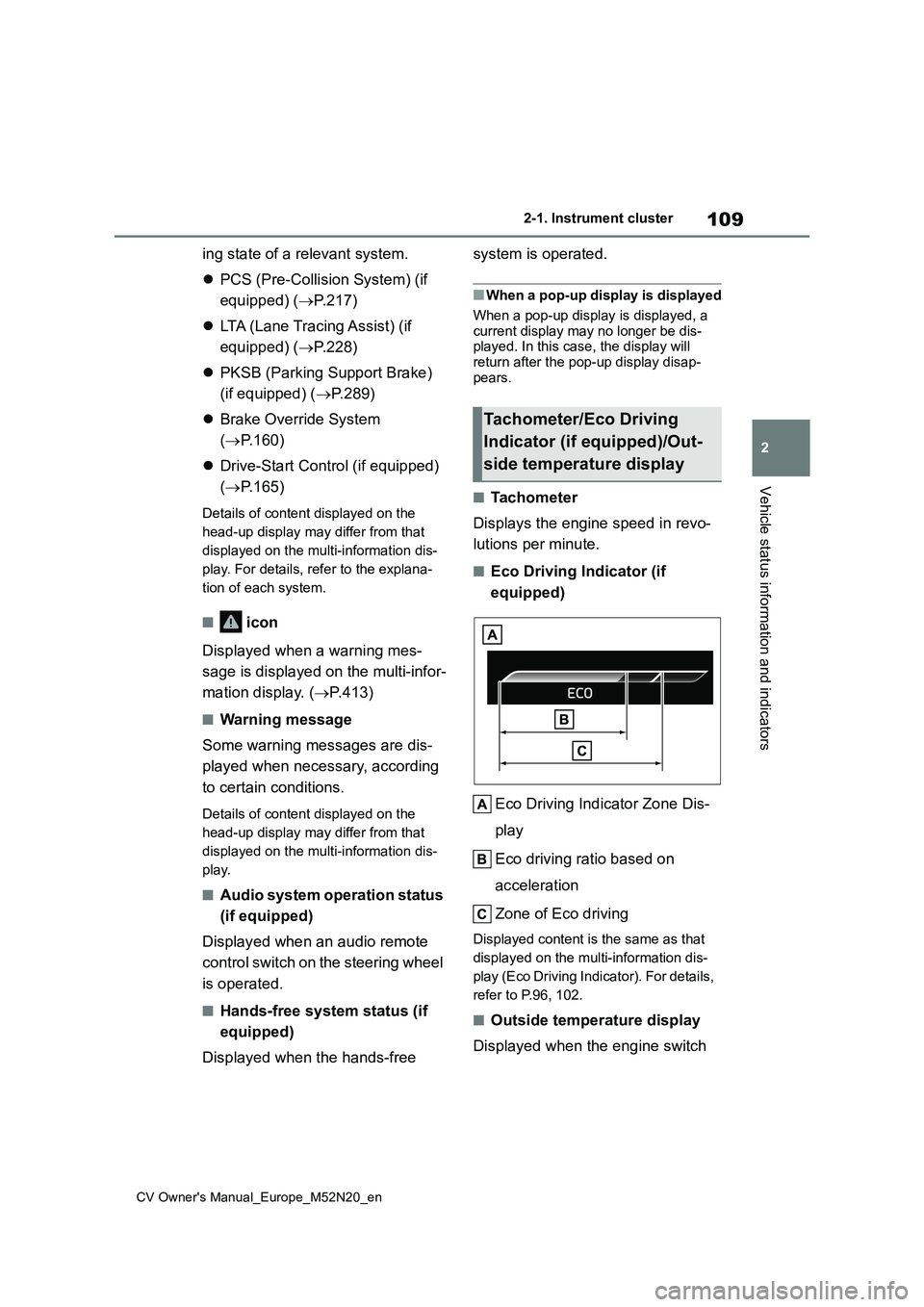
■Eco Driving Indicator (if
equipped)
Eco Driving Indicator Zone Dis-
play
Eco driving ratio based on
acceleration
Zone of Eco driving
Displayed content is the same as that
displayed on the multi-information dis-
play (Eco Driving Indicator). For details,
refer to P.96, 102.
■Outside temperature display
Displayed when the engine switch
Tachometer/Eco Driving
Indicator (if equipped)/Out-
side temperature display