engine TOYOTA YARIS CROSS 2022 Owner's Manual
[x] Cancel search | Manufacturer: TOYOTA, Model Year: 2022, Model line: YARIS CROSS, Model: TOYOTA YARIS CROSS 2022Pages: 618, PDF Size: 130.77 MB
Page 85 of 618
83
2
CV Owner's Manual_Europe_M52N20_en
2-1. Instrument cluster
Vehicle status information and indicators
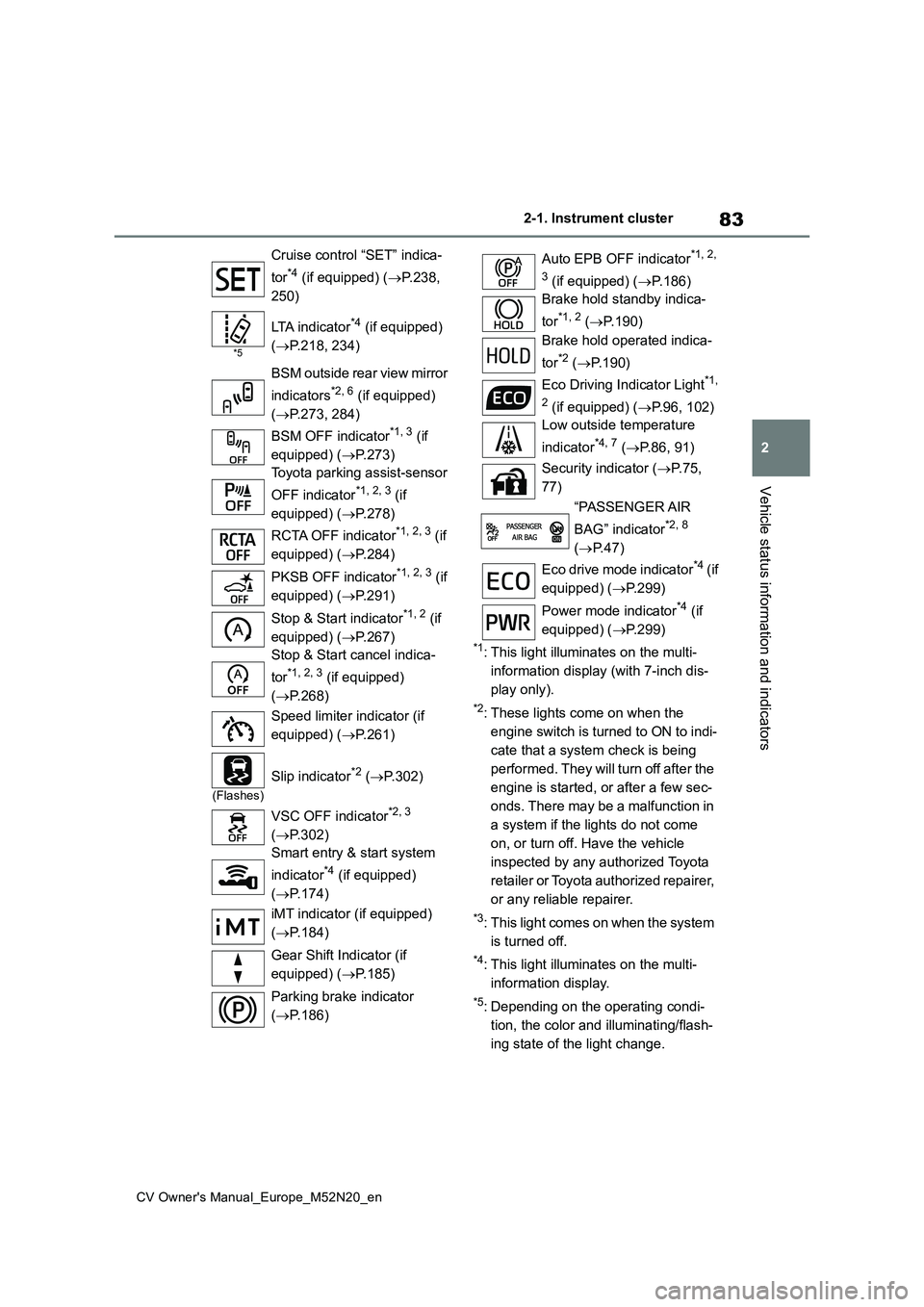
*1: This light illuminates on the multi-
information display (with 7-inch dis-
play only).
*2: These lights come on when the
engine switch is turned to ON to indi-
cate that a system check is being
performed. They will turn off after the
engine is started, or after a few sec-
onds. There may be a malfunction in
a system if the lights do not come
on, or turn off. Have the vehicle
inspected by any authorized Toyota
retailer or Toyota authorized repairer,
or any reliable repairer.
*3: This light comes on when the system
is turned off.
*4: This light illuminates on the multi-
information display.
*5: Depending on the operating condi-
tion, the color and illuminating/flash-
ing state of the light change.
Cruise control “SET” indica-
tor*4 (if equipped) ( P.238,
250)
*5
LTA indicator*4 (if equipped)
( P.218, 234)
BSM outside rear view mirror
indicators*2, 6 (if equipped)
( P.273, 284)
BSM OFF indicator*1, 3 (if
equipped) ( P.273)
Toyota parking assist-sensor
OFF indicator*1, 2, 3 (if
equipped) ( P.278)
RCTA OFF indicator*1, 2, 3 (if
equipped) ( P.284)
PKSB OFF indicator*1, 2, 3 (if
equipped) ( P.291)
Stop & Start indicator*1, 2 (if
equipped) ( P.267)
Stop & Start cancel indica-
tor*1, 2, 3 (if equipped)
( P.268)
Speed limiter indicator (if
equipped) ( P.261)
(Flashes)
Slip indicator*2 (P.302)
VSC OFF indicator*2, 3
( P.302)
Smart entry & start system
indicator*4 (if equipped)
( P.174)
iMT indicator (if equipped)
( P.184)
Gear Shift Indicator (if
equipped) ( P.185)
Parking brake indicator
( P.186)
Auto EPB OFF indicator*1, 2,
3 (if equipped) ( P.186)
Brake hold standby indica-
tor*1, 2 ( P.190)
Brake hold operated indica-
tor*2 ( P.190)
Eco Driving Indicator Light*1,
2 (if equipped) ( P.96, 102)
Low outside temperature
indicator*4, 7 ( P.86, 91)
Security indicator ( P. 7 5 ,
77)
“PASSENGER AIR
BAG” indicator*2, 8
( P.47)
Eco drive mode indicator*4 ( i f
equipped) ( P.299)
Power mode indicator*4 (if
equipped) ( P.299)
Page 87 of 618
85
2
CV Owner's Manual_Europe_M52N20_en
2-1. Instrument cluster
Vehicle status information and indicators
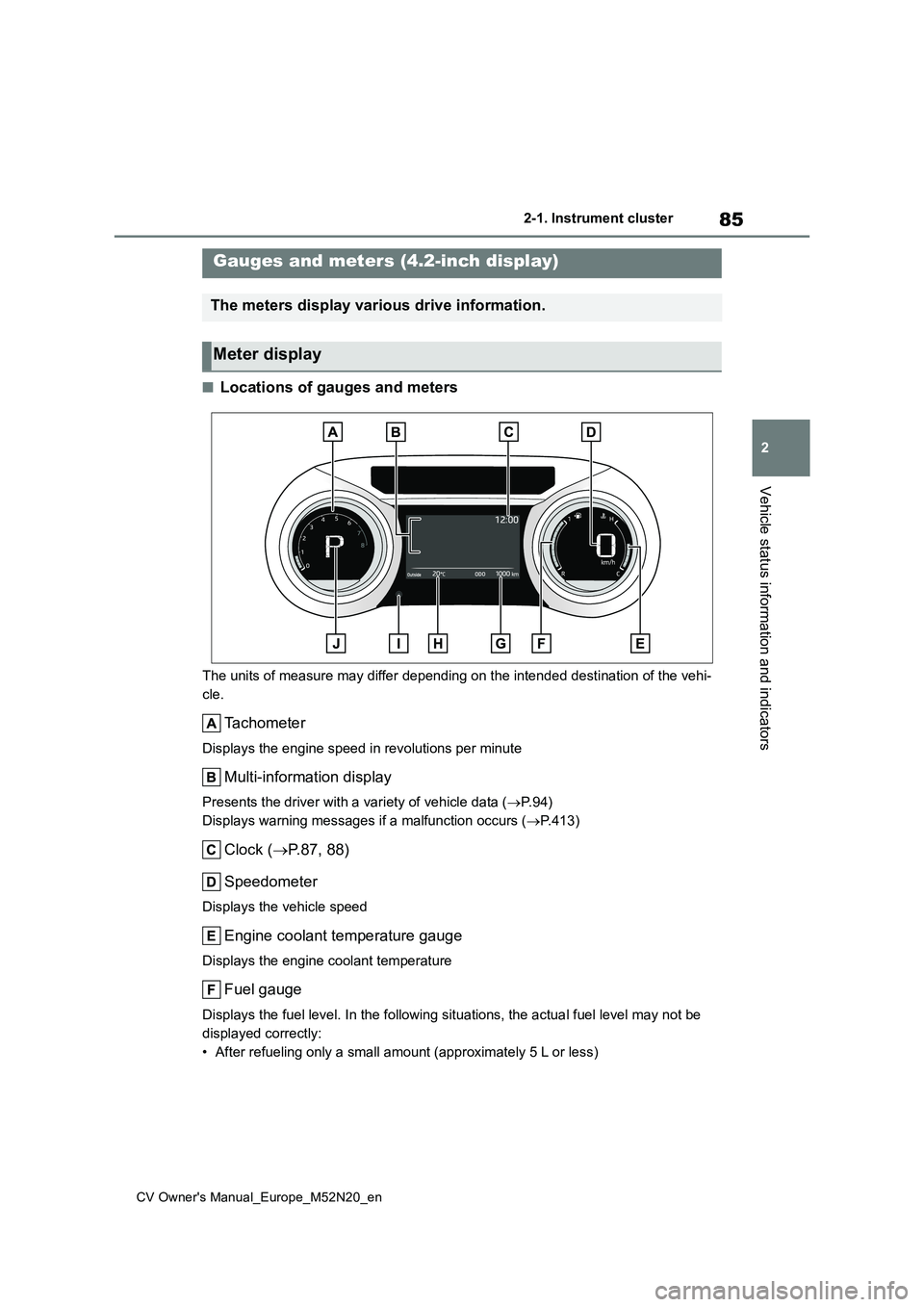
■Locations of gauges and meters
The units of measure may differ depending on the intended destination of the vehi-
cle.
Tachometer
Displays the engine speed in revolutions per minute
Multi-information display
Presents the driver with a variety of vehicle data ( P. 9 4 )
Displays warning messages if a malfunction occurs ( P.413)
Clock (P.87, 88)
Speedometer
Displays the vehicle speed
Engine coolant temperature gauge
Displays the engine coolant temperature
Fuel gauge
Displays the fuel level. In the following situations, the actua l fuel level may not be
displayed correctly:
• After refueling only a small amount (approximately 5 L or less )
Gauges and meters (4.2-inch display)
The meters display various drive information.
Meter display
Page 88 of 618
86
CV Owner's Manual_Europe_M52N20_en
2-1. Instrument cluster
• When stopped on a hill or other slope
• When driving on a slope or around a curve
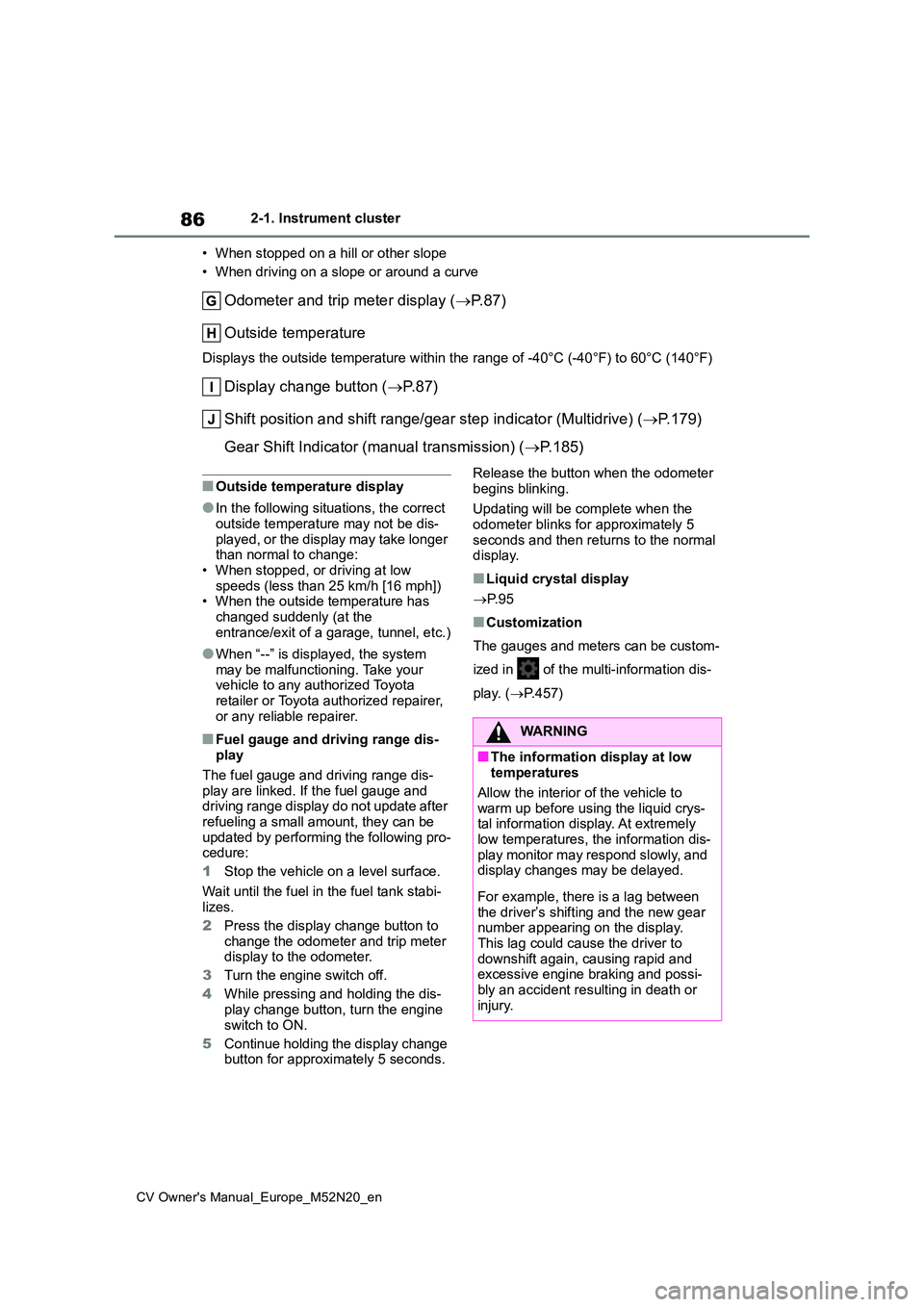
Odometer and trip meter display ( P. 8 7 )
Outside temperature
Displays the outside temperature within the range of -40°C (-40 °F) to 60°C (140°F)
Display change button (P. 8 7 )
Shift position and shift range/gear step indicator (Multidrive) (P.179)
Gear Shift Indicator (manual transmission) ( P.185)
■Outside temperature display
●In the following situations, the correct outside temperature may not be dis-
played, or the display may take longer than normal to change:• When stopped, or driving at low
speeds (less than 25 km/h [16 mph]) • When the outside temperature has changed suddenly (at the
entrance/exit of a garage, tunnel, etc.)
●When “--” is displayed, the system
may be malfunctioning. Take your vehicle to any authorized Toyota retailer or Toyota authorized repairer,
or any reliable repairer.
■Fuel gauge and driving range dis- play
The fuel gauge and driving range dis-
play are linked. If the fuel gauge and driving range display do not update after refueling a small amount, they can be
updated by performing the following pro- cedure:
1 Stop the vehicle on a level surface.
Wait until the fuel in the fuel tank stabi-
lizes.
2 Press the display change button to change the odometer and trip meter display to the odometer.
3 Turn the engine switch off.
4 While pressing and holding the dis-
play change button, turn the engine switch to ON.
5 Continue holding the display change button for approximately 5 seconds.
Release the button when the odometer
begins blinking.
Updating will be complete when the
odometer blinks for approximately 5 seconds and then returns to the normal display.
■Liquid crystal display
P. 9 5
■Customization
The gauges and meters can be custom-
ized in of the multi-information dis-
play. ( P.457)
WARNING
■The information display at low temperatures
Allow the interior of the vehicle to
warm up before using the liquid crys- tal information display. At extremely low temperatures, the information dis-
play monitor may respond slowly, and display changes may be delayed.
For example, there is a lag between the driver’s shifting and the new gear number appearing on the display.
This lag could cause the driver to downshift again, causing rapid and excessive engine braking and possi-
bly an accident resulting in death or injury.
Page 89 of 618
87
2
CV Owner's Manual_Europe_M52N20_en
2-1. Instrument cluster
Vehicle status information and indicators
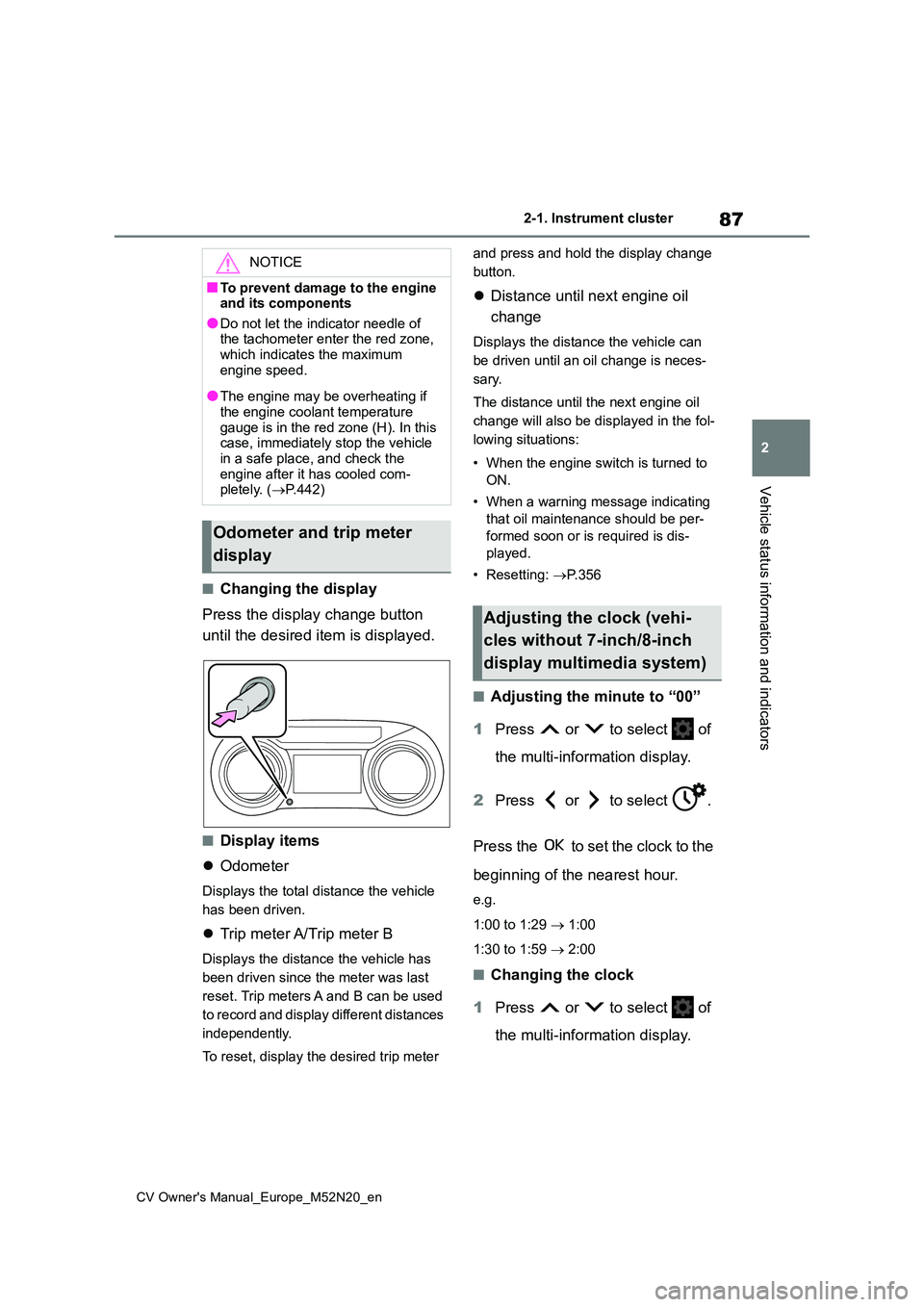
■Changing the display
Press the display change button
until the desired item is displayed.
■Display items
Odometer
Displays the total distance the vehicle
has been driven.
Trip meter A/Trip meter B
Displays the distance the vehicle has
been driven since the meter was last
reset. Trip meters A and B can be used
to record and display different distances
independently.
To reset, display the desired trip meter
and press and hold the display change
button.
Distance until next engine oil
change
Displays the distance the vehicle can
be driven until an oil change is neces-
sary.
The distance until the next engine oil
change will also be displayed in the fol-
lowing situations:
• When the engine switch is turned to
ON.
• When a warning message indicating
that oil maintenance should be per-
formed soon or is required is dis-
played.
• Resetting: P. 3 5 6
■Adjusting the minute to “00”
1 Press or to select of
the multi-information display.
2 Press or to select .
Press the to set the clock to the
beginning of the nearest hour.
e.g.
1:00 to 1:29 1:00
1:30 to 1:59 2:00
■Changing the clock
1 Press or to select of
the multi-information display.
NOTICE
■To prevent damage to the engine and its components
●Do not let the indicator needle of the tachometer enter the red zone, which indicates the maximum
engine speed.
●The engine may be overheating if
the engine coolant temperature gauge is in the red zone (H). In this case, immediately stop the vehicle
in a safe place, and check the engine after it has cooled com-pletely. ( P.442)
Odometer and trip meter
display
Adjusting the clock (vehi-
cles without 7-inch/8-inch
display multimedia system)
Page 91 of 618
89
2
CV Owner's Manual_Europe_M52N20_en
2-1. Instrument cluster
Vehicle status information and indicators
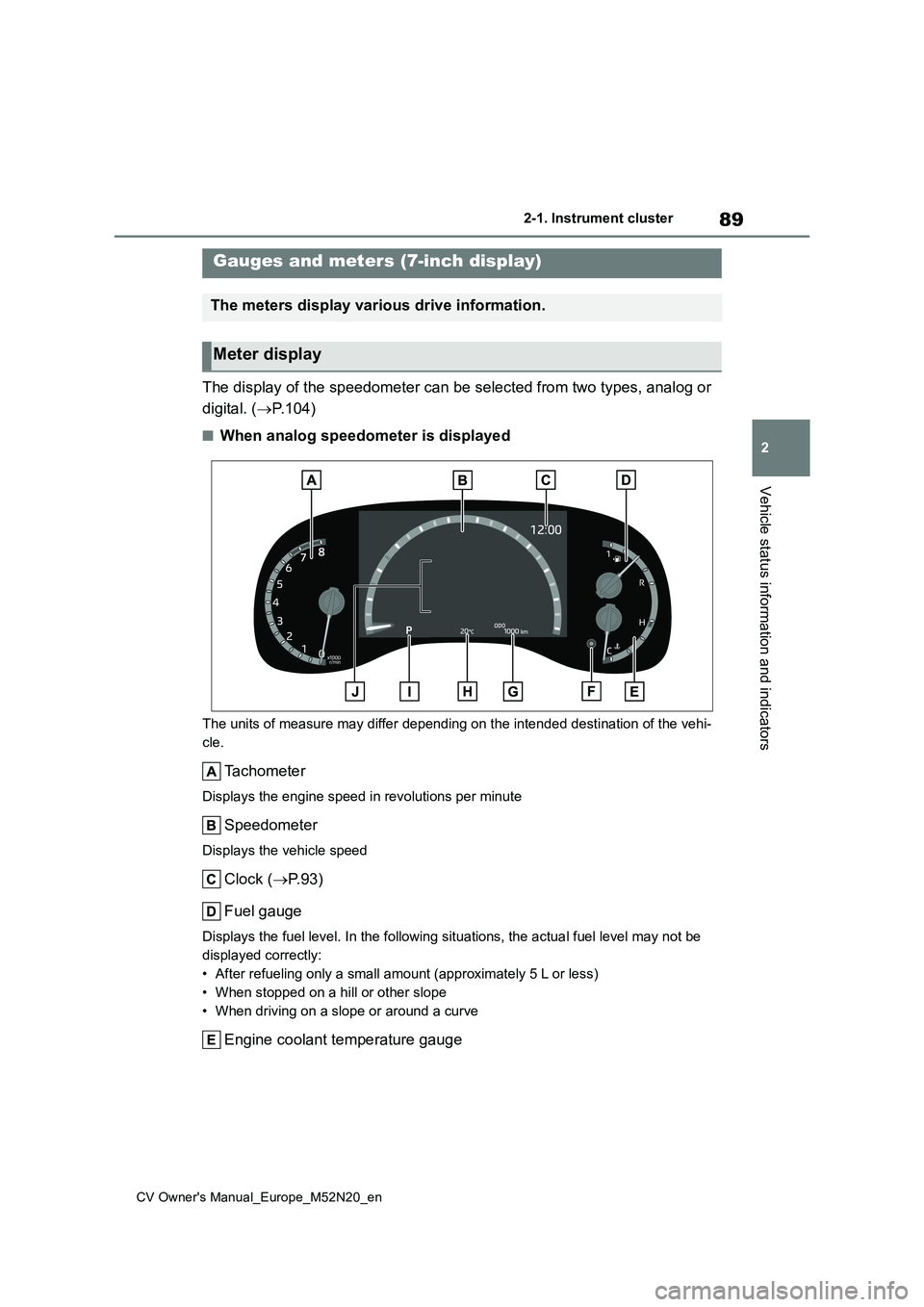
The display of the speedometer can be selected from two types, analog or
digital. ( P.104)
■When analog speedometer is displayed
The units of measure may differ depending on the intended destination of the vehi-
cle.
Tachometer
Displays the engine speed in revolutions per minute
Speedometer
Displays the vehicle speed
Clock ( P.93)
Fuel gauge
Displays the fuel level. In the following situations, the actua l fuel level may not be
displayed correctly:
• After refueling only a small amount (approximately 5 L or less )
• When stopped on a hill or other slope
• When driving on a slope or around a curve
Engine coolant temperature gauge
Gauges and meters (7-inch display)
The meters display various drive information.
Meter display
Page 92 of 618
90
CV Owner's Manual_Europe_M52N20_en
2-1. Instrument cluster
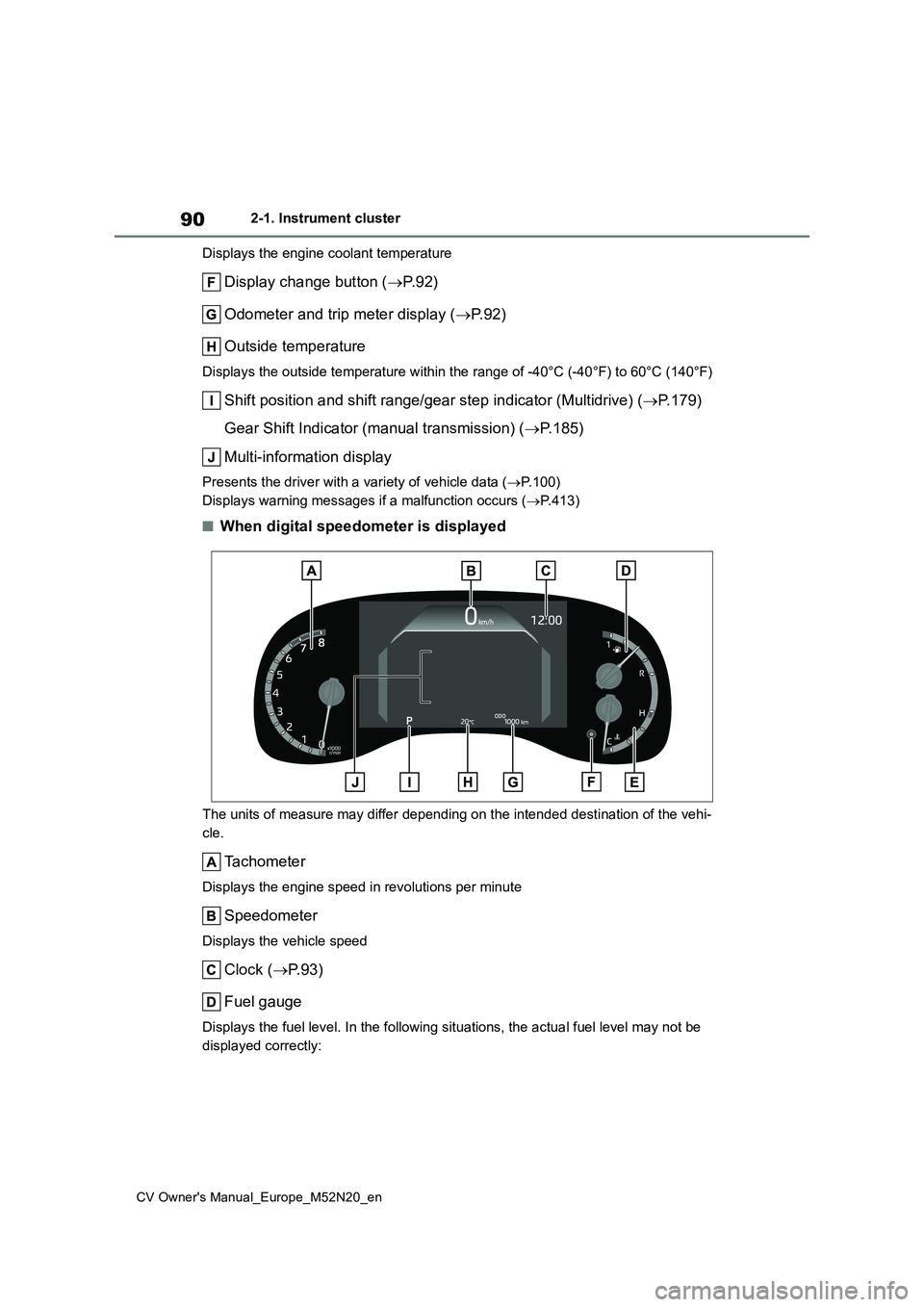
Displays the engine coolant temperature
Display change button ( P. 9 2 )
Odometer and trip meter display ( P. 9 2 )
Outside temperature
Displays the outside temperature within the range of -40°C (-40 °F) to 60°C (140°F)
Shift position and shift range/gear step indicator (Multidrive) (P.179)
Gear Shift Indicator (manual transmission) ( P.185)
Multi-information display
Presents the driver with a variety of vehicle data ( P.100)
Displays warning messages if a malfunction occurs ( P.413)
■When digital speedometer is displayed
The units of measure may differ depending on the intended destination of the vehi-
cle.
Tachometer
Displays the engine speed in revolutions per minute
Speedometer
Displays the vehicle speed
Clock ( P.93)
Fuel gauge
Displays the fuel level. In the following situations, the actua l fuel level may not be
displayed correctly:
Page 93 of 618
91
2
CV Owner's Manual_Europe_M52N20_en
2-1. Instrument cluster
Vehicle status information and indicators
• After refueling only a small amount (approximately 5 L or less)
• When stopped on a hill or other slope
• When driving on a slope or around a curve
Engine coolant temperature gauge
Displays the engine coolant temperature
Display change button ( P. 9 2 )
Odometer and trip meter display ( P. 9 2 )
Outside temperature
Displays the outside temperature within the range of -40°C (-40 °F) to 60°C (140°F)
Shift position and shift range/gear step indicator (Multidrive) (P.179)
Gear Shift Indicator (manual transmission) ( P.185)
Multi-information display
Presents the driver with a variety of vehicle data ( P.100)
Displays warning messages if a malfunction occurs ( P.413)
■When the drive mode is changed
The speed meter display changes color
in accordance to the drive mode selected. ( P.299)
■Outside temperature display
●In the following situations, the correct outside temperature may not be dis-played, or the display may take longer
than normal to change: • When stopped, or driving at low speeds (less than 25 km/h [16 mph])
• When the outside temperature has changed suddenly (at the entrance/exit of a garage, tunnel, etc.)
●When “--” is displayed, the system may be malfunctioning. Take your
vehicle to any authorized Toyota retailer or Toyota authorized repairer, or any reliable repairer.
■Fuel gauge and driving range dis-
play
The fuel gauge and driving range dis-
play are linked. If the fuel gauge and driving range display do not update after refueling a small amount, they can be
updated by performing the following pro-
cedure:
1 Stop the vehicle on a level surface.
Wait until the fuel in the fuel tank stabi- lizes.
2 Press the display change button to change the odometer and trip meter
display to the odometer.
3 Turn the engine switch off.
4 While pressing and holding the dis- play change button, turn the engine switch to ON.
5 Continue holding the display change
button for approximately 5 seconds.
Release the button when the odometer begins blinking.
Updating will be complete when the odometer blinks for approximately 5 seconds and then returns to the normal
display.
■Liquid crystal display
P. 1 0 0
■Customization
The gauges and meters can be custom-
ized in of the multi-information dis-
Page 94 of 618
92
CV Owner's Manual_Europe_M52N20_en
2-1. Instrument cluster
play. ( P.457)
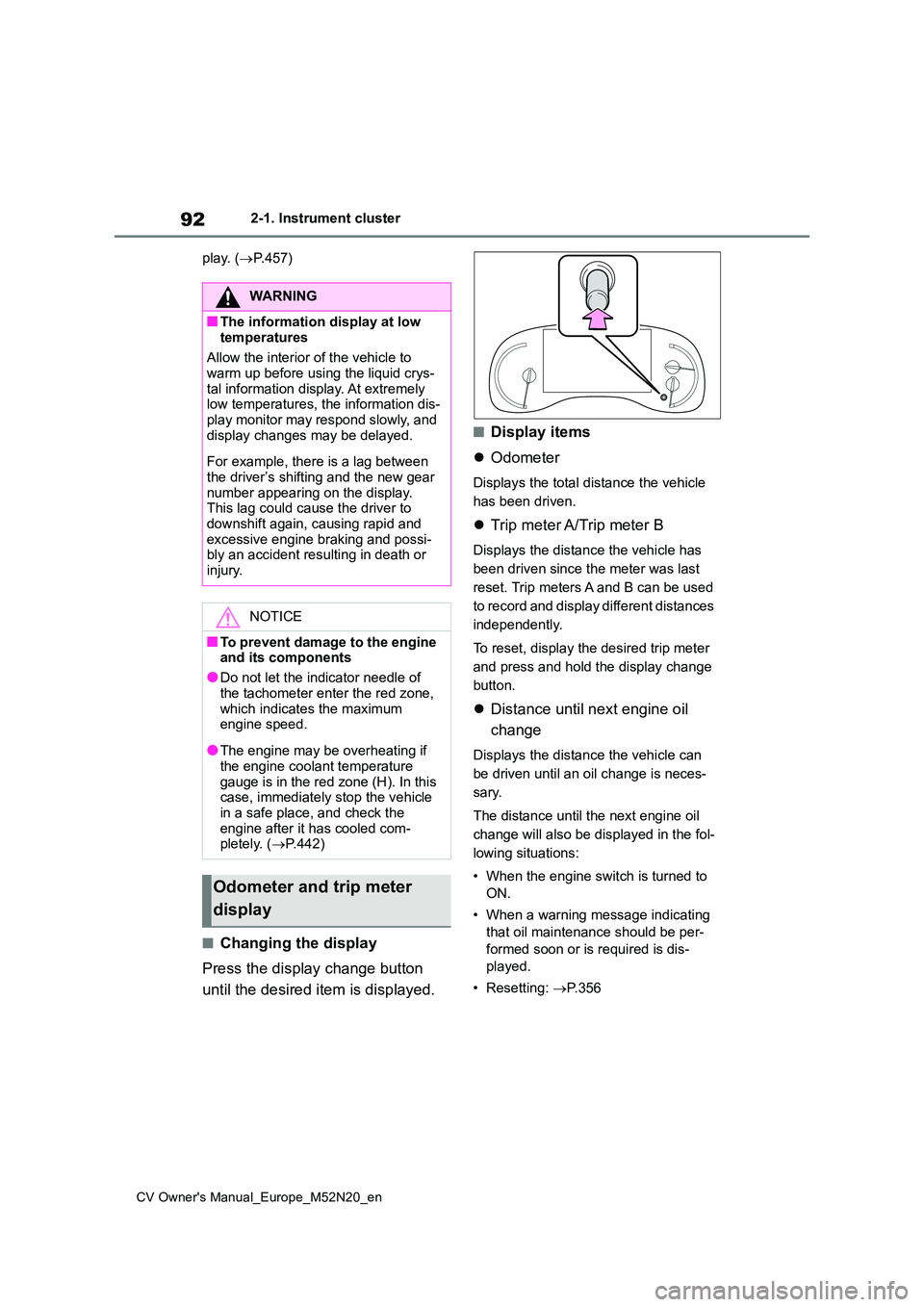
■Changing the display
Press the display change button
until the desired item is displayed.
■Display items
Odometer
Displays the total distance the vehicle
has been driven.
Trip meter A/Trip meter B
Displays the distance the vehicle has
been driven since the meter was last
reset. Trip meters A and B can be used
to record and display different distances
independently.
To reset, display the desired trip meter
and press and hold the display change
button.
Distance until next engine oil
change
Displays the distance the vehicle can
be driven until an oil change is neces-
sary.
The distance until the next engine oil
change will also be displayed in the fol-
lowing situations:
• When the engine switch is turned to
ON.
• When a warning message indicating
that oil maintenance should be per-
formed soon or is required is dis-
played.
• Resetting: P. 3 5 6
WARNING
■The information display at low
temperatures
Allow the interior of the vehicle to warm up before using the liquid crys-
tal information display. At extremely low temperatures, the information dis-play monitor may respond slowly, and
display changes may be delayed.
For example, there is a lag between
the driver’s shifting and the new gear number appearing on the display. This lag could cause the driver to
downshift again, causing rapid and excessive engine braking and possi-bly an accident resulting in death or
injury.
NOTICE
■To prevent damage to the engine and its components
●Do not let the indicator needle of
the tachometer enter the red zone, which indicates the maximum engine speed.
●The engine may be overheating if the engine coolant temperature
gauge is in the red zone (H). In this case, immediately stop the vehicle in a safe place, and check the
engine after it has cooled com- pletely. ( P.442)
Odometer and trip meter
display
Page 98 of 618
96
CV Owner's Manual_Europe_M52N20_en
2-1. Instrument cluster
For details regarding the hands-free
system, refer to the “Navigation and
multimedia system Owner’s manual”.
■Display items
Fuel economy
Eco Driving Indicator/Driving
range (if equipped)
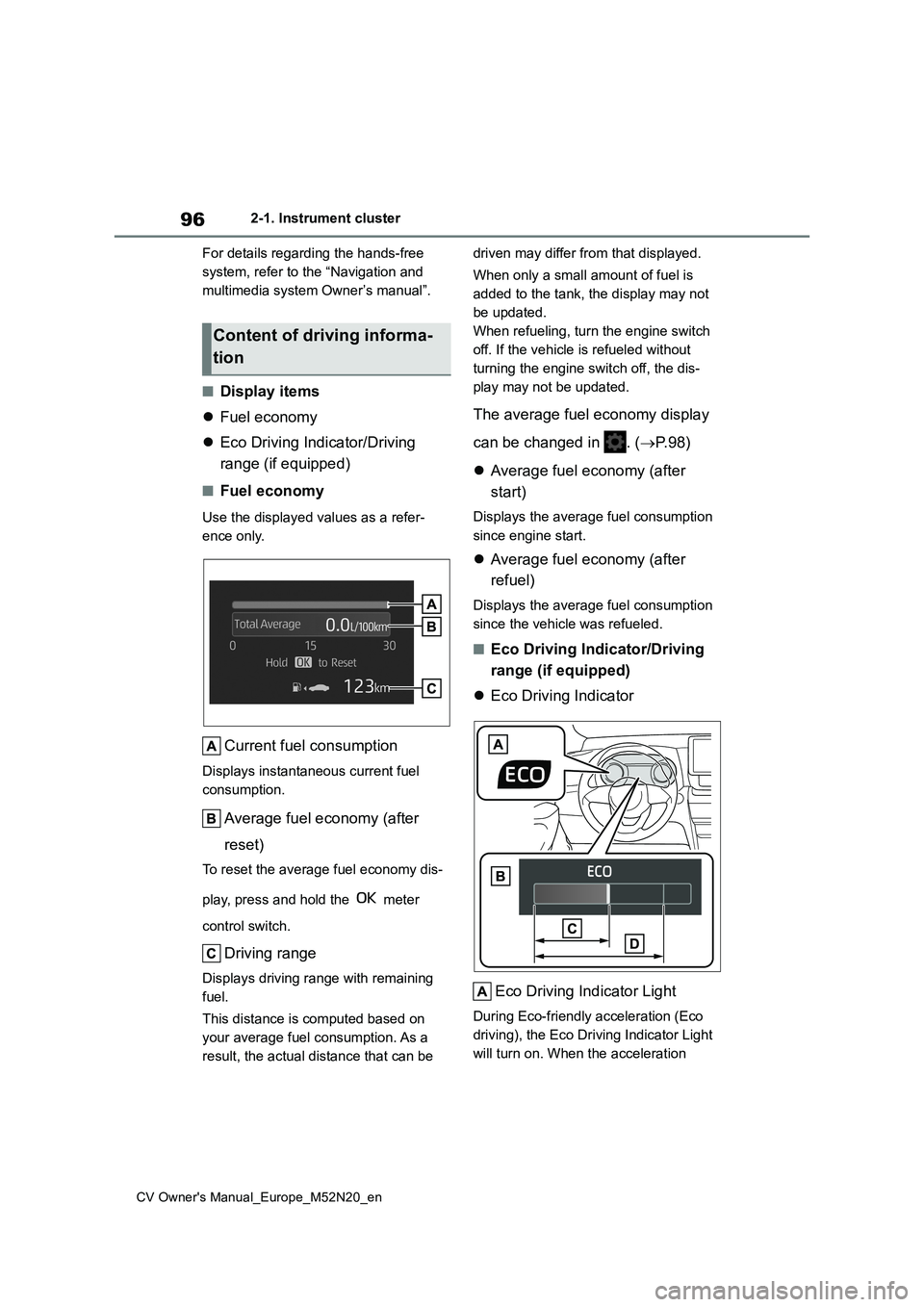
■Fuel economy
Use the displayed values as a refer-
ence only.
Current fuel consumption
Displays instantaneous current fuel
consumption.
Average fuel economy (after
reset)
To reset the average fuel economy dis-
play, press and hold the meter
control switch.
Driving range
Displays driving range with remaining
fuel.
This distance is computed based on
your average fuel consumption. As a
result, the actual distance that can be
driven may differ from that displayed.
When only a small amount of fuel is
added to the tank, the display may not
be updated.
When refueling, turn the engine switch
off. If the vehicle is refueled without
turning the engine switch off, the dis-
play may not be updated.
The average fuel economy display
can be changed in . ( P. 9 8 )
Average fuel economy (after
start)
Displays the average fuel consumption
since engine start.
Average fuel economy (after
refuel)
Displays the average fuel consumption
since the vehicle was refueled.
■Eco Driving Indicator/Driving
range (if equipped)
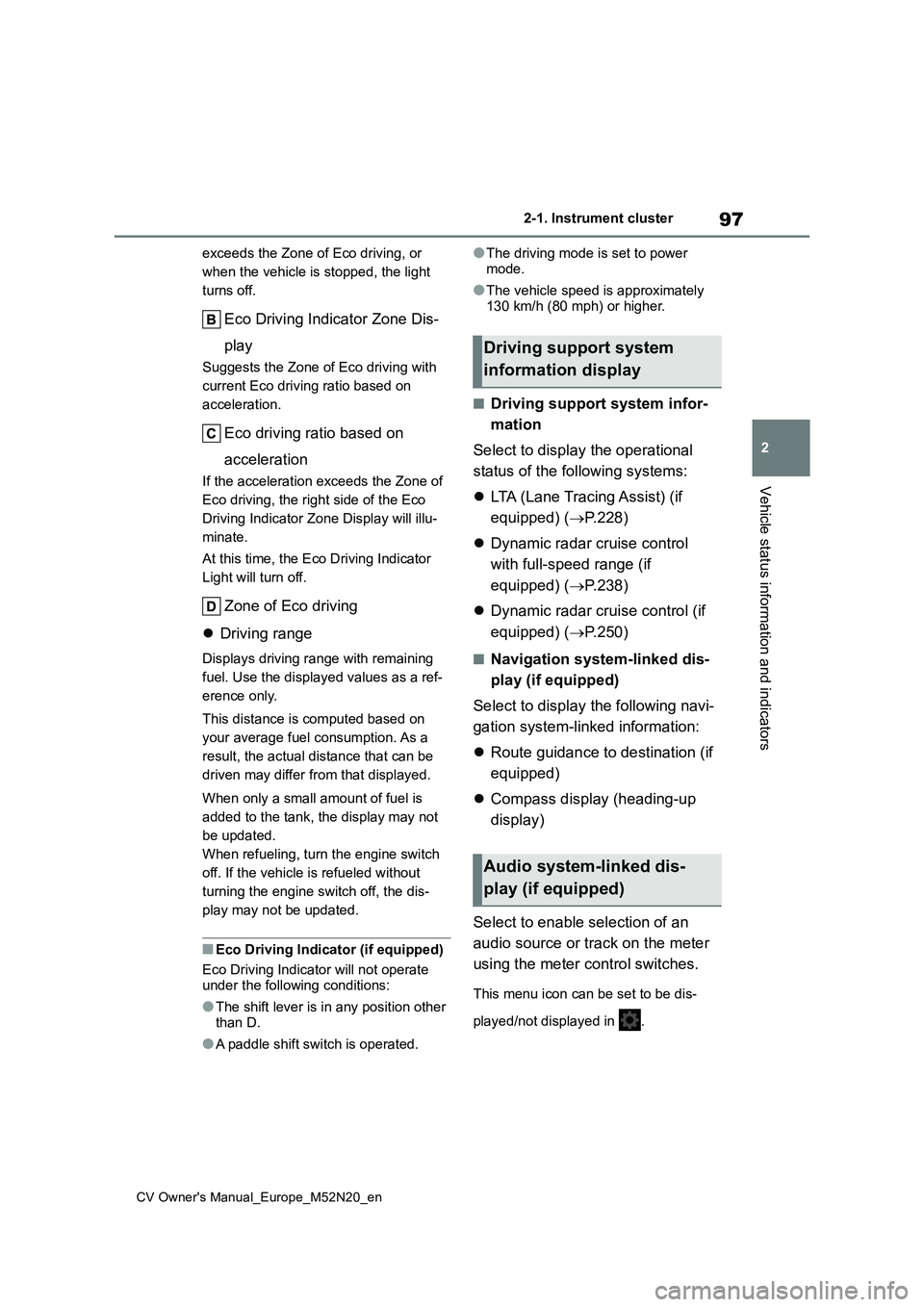
Eco Driving Indicator
Eco Driving Indicator Light
During Eco-friendly acceleration (Eco
driving), the Eco Driving Indicator Light
will turn on. When the acceleration
Content of driving informa-
tion
Page 99 of 618
97
2
CV Owner's Manual_Europe_M52N20_en
2-1. Instrument cluster
Vehicle status information and indicators
exceeds the Zone of Eco driving, or
when the vehicle is stopped, the light
turns off.
Eco Driving Indicator Zone Dis-
play
Suggests the Zone of Eco driving with
current Eco driving ratio based on
acceleration.
Eco driving ratio based on
acceleration
If the acceleration exceeds the Zone of
Eco driving, the right side of the Eco
Driving Indicator Zone Display will illu-
minate.
At this time, the Eco Driving Indicator
Light will turn off.
Zone of Eco driving
Driving range
Displays driving range with remaining
fuel. Use the displayed values as a ref-
erence only.
This distance is computed based on
your average fuel consumption. As a
result, the actual distance that can be
driven may differ from that displayed.
When only a small amount of fuel is
added to the tank, the display may not
be updated.
When refueling, turn the engine switch
off. If the vehicle is refueled without
turning the engine switch off, the dis-
play may not be updated.
■Eco Driving Indicator (if equipped)
Eco Driving Indicator will not operate under the following conditions:
●The shift lever is in any position other
than D.
●A paddle shift switch is operated.
●The driving mode is set to power
mode.
●The vehicle speed is approximately
130 km/h (80 mph) or higher.
■Driving support system infor-
mation
Select to display the operational
status of the following systems:
LTA (Lane Tracing Assist) (if
equipped) ( P.228)
Dynamic radar cruise control
with full-speed range (if
equipped) ( P.238)
Dynamic radar cruise control (if
equipped) ( P.250)
■Navigation system-linked dis-
play (if equipped)
Select to display the following navi-
gation system-linked information:
Route guidance to destination (if
equipped)
Compass display (heading-up
display)
Select to enable selection of an
audio source or track on the meter
using the meter control switches.
This menu icon can be set to be dis-
played/not displayed in .
Driving support system
information display
Audio system-linked dis-
play (if equipped)