door lock TOYOTA YARIS CROSS 2022 Workshop Manual
[x] Cancel search | Manufacturer: TOYOTA, Model Year: 2022, Model line: YARIS CROSS, Model: TOYOTA YARIS CROSS 2022Pages: 618, PDF Size: 130.77 MB
Page 397 of 618
395
7
CV Owner's Manual_Europe_M52N20_en
7-1. Essential information
When trouble arises
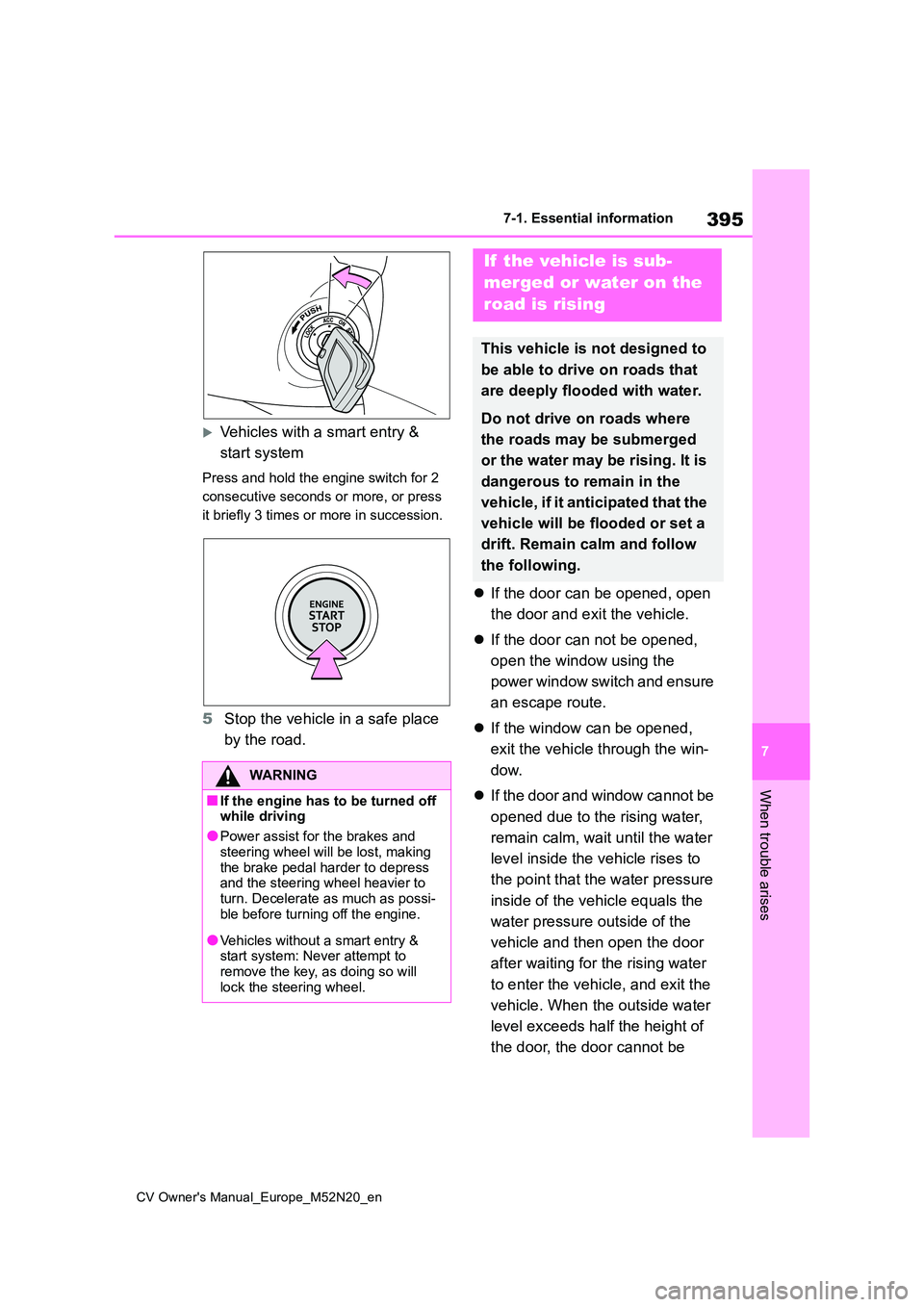
Vehicles with a smart entry &
start system
Press and hold the engine switch for 2
consecutive seconds or more, or press
it briefly 3 times or more in succession.
5 Stop the vehicle in a safe place
by the road.
If the door can be opened, open
the door and exit the vehicle.
If the door can not be opened,
open the window using the
power window switch and ensure
an escape route.
If the window can be opened,
exit the vehicle through the win-
dow.
If the door and window cannot be
opened due to the rising water,
remain calm, wait until the water
level inside the vehicle rises to
the point that the water pressure
inside of the vehicle equals the
water pressure outside of the
vehicle and then open the door
after waiting for the rising water
to enter the vehicle, and exit the
vehicle. When the outside water
level exceeds half the height of
the door, the door cannot be
WARNING
■If the engine has to be turned off while driving
●Power assist for the brakes and
steering wheel will be lost, making the brake pedal harder to depress and the steering wheel heavier to
turn. Decelerate as much as possi- ble before turning off the engine.
●Vehicles without a smart entry & start system: Never attempt to remove the key, as doing so will
lock the steering wheel.
If the vehicle is sub-
merged or water on the
road is rising
This vehicle is not designed to
be able to drive on roads that
are deeply flooded with water.
Do not drive on roads where
the roads may be submerged
or the water may be rising. It is
dangerous to remain in the
vehicle, if it anticipated that the
vehicle will be flooded or set a
drift. Remain calm and follow
the following.
Page 439 of 618
437
7
CV Owner's Manual_Europe_M52N20_en
7-2. Steps to take in an emergency
When trouble arises
■When the electronic key does not work properly
●Make sure that the smart entry & start system has not been deactivated in
the customization setting. If it is off, turn the function on. (Customizable features: P.457)
●Check if battery-saving mode is set. If it is set, cancel the function. ( P.137)
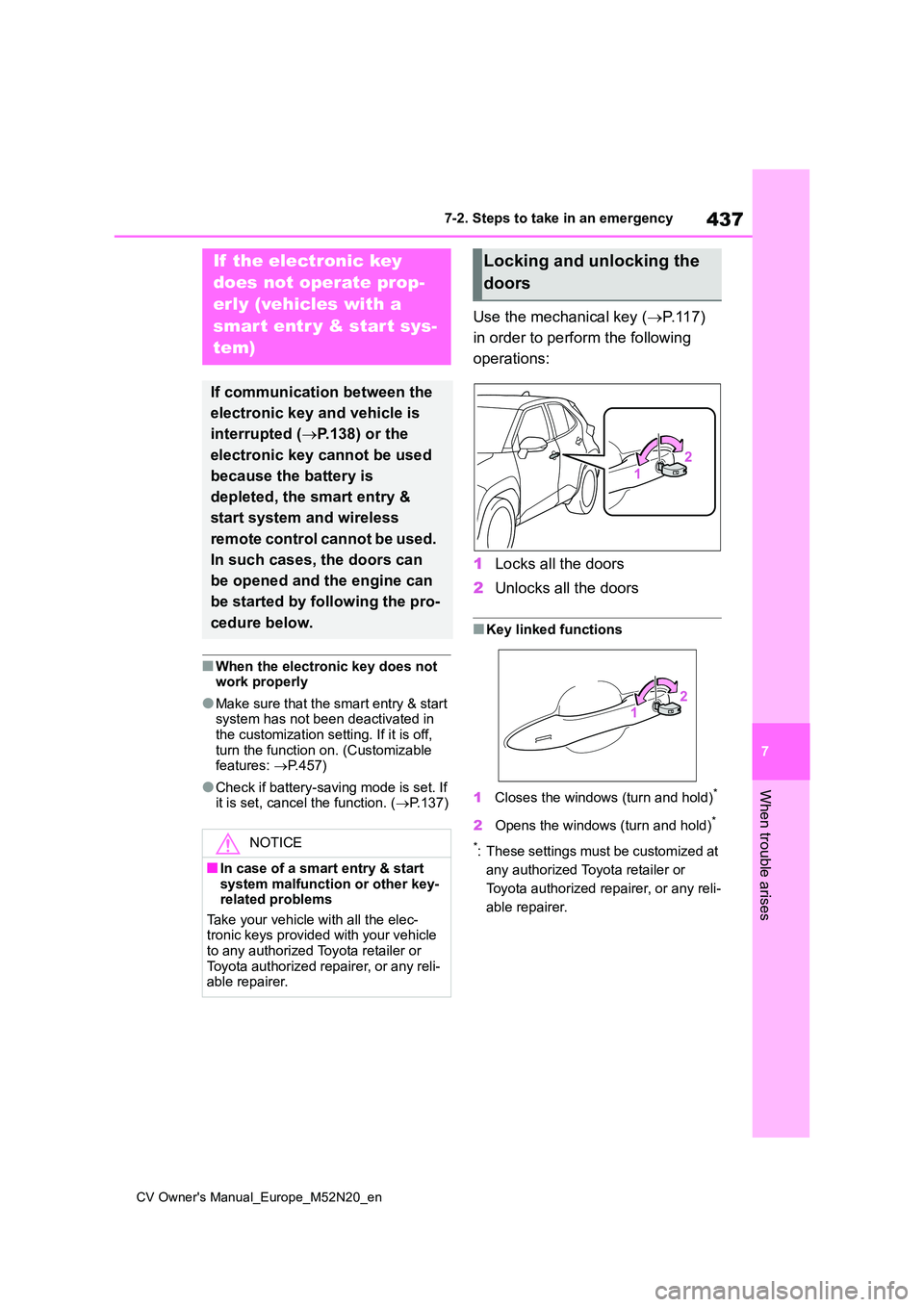
Use the mechanical key (P. 1 1 7 )
in order to perform the following
operations:
1 Locks all the doors
2 Unlocks all the doors
■Key linked functions
1 Closes the windows (turn and hold)*
2Opens the windows (turn and hold)*
*: These settings must be customized at
any authorized Toyota retailer or
Toyota authorized repairer, or any reli-
able repairer.
If the electronic key
does not operate prop-
erly (vehicles with a
smart entr y & start sys-
tem)
If communication between the
electronic key and vehicle is
interrupted ( P.138) or the
electronic key cannot be used
because the battery is
depleted, the smart entry &
start system and wireless
remote control cannot be used.
In such cases, the doors can
be opened and the engine can
be started by following the pro-
cedure below.
NOTICE
■In case of a smart entry & start system malfunction or other key-related problems
Take your vehicle with all the elec- tronic keys provided with your vehicle to any authorized Toyota retailer or
Toyota authorized repairer, or any reli- able repairer.
Locking and unlocking the
doors
Page 440 of 618
438
CV Owner's Manual_Europe_M52N20_en
7-2. Steps to take in an emergency
1Vehicles with a Multidrive:
Ensure that the shift lever is in P
and depress the brake pedal.
Vehicles with a manual trans-
mission: Shift the shift lever to N
and depress the clutch pedal.
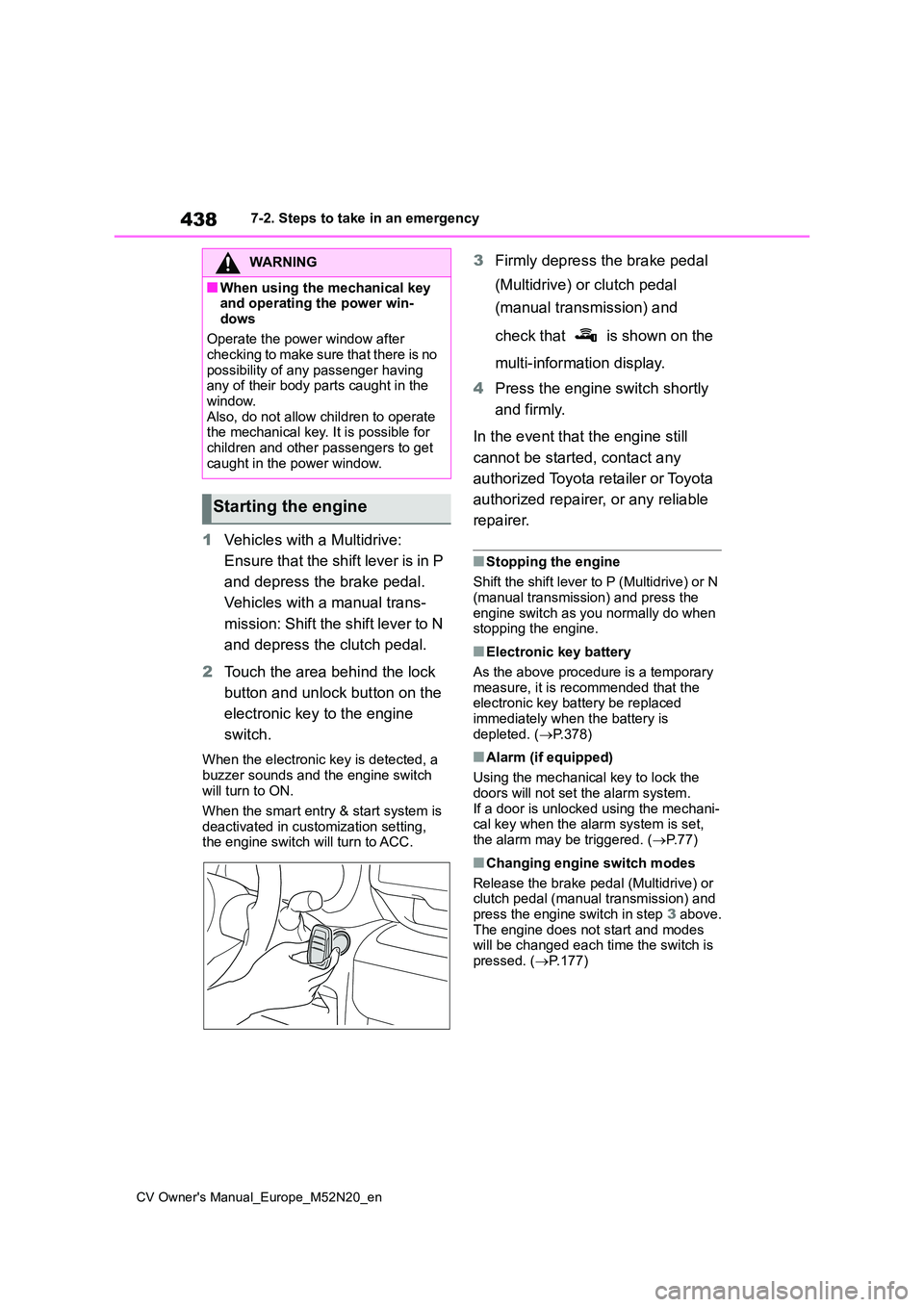
2 Touch the area behind the lock
button and unlock button on the
electronic key to the engine
switch.
When the electronic key is detected, a
buzzer sounds and the engine switch will turn to ON.
When the smart entry & start system is
deactivated in customization setting, the engine switch will turn to ACC.
3 Firmly depress the brake pedal
(Multidrive) or clutch pedal
(manual transmission) and
check that is shown on the
multi-information display.
4 Press the engine switch shortly
and firmly.
In the event that the engine still
cannot be started, contact any
authorized Toyota retailer or Toyota
authorized repairer, or any reliable
repairer.
■Stopping the engine
Shift the shift lever to P (Multidrive) or N
(manual transmission) and press the engine switch as you normally do when stopping the engine.
■Electronic key battery
As the above procedure is a temporary measure, it is recommended that the electronic key battery be replaced
immediately when the battery is depleted. ( P.378)
■Alarm (if equipped)
Using the mechanical key to lock the
doors will not set the alarm system. If a door is unlocked using the mechani-cal key when the alarm system is set,
the alarm may be triggered. ( P. 7 7 )
■Changing engine switch modes
Release the brake pedal (Multidrive) or clutch pedal (manual transmission) and
press the engine switch in step 3 above. The engine does not start and modes will be changed each time the switch is
pressed. ( P.177)
WARNING
■When using the mechanical key and operating the power win-
dows
Operate the power window after checking to make sure that there is no
possibility of any passenger having any of their body parts caught in the window.
Also, do not allow children to operate the mechanical key. It is possible for children and other passengers to get
caught in the power window.
Starting the engine
Page 441 of 618
439
7
CV Owner's Manual_Europe_M52N20_en
7-2. Steps to take in an emergency
When trouble arises
If you have a set of jumper (or
booster) cables and a second vehi-
cle with a 12-volt battery, you can
jump start your vehicle by following
the steps below.
1 Vehicles with an alarm (P. 7 7 ) :
Confirm that the key is being
carried.
When connecting the jumper (or
booster) cables, depending on the situ- ation, the alarm may activate and doors locked. ( P. 7 8 )
2Open the hood. (P.351)
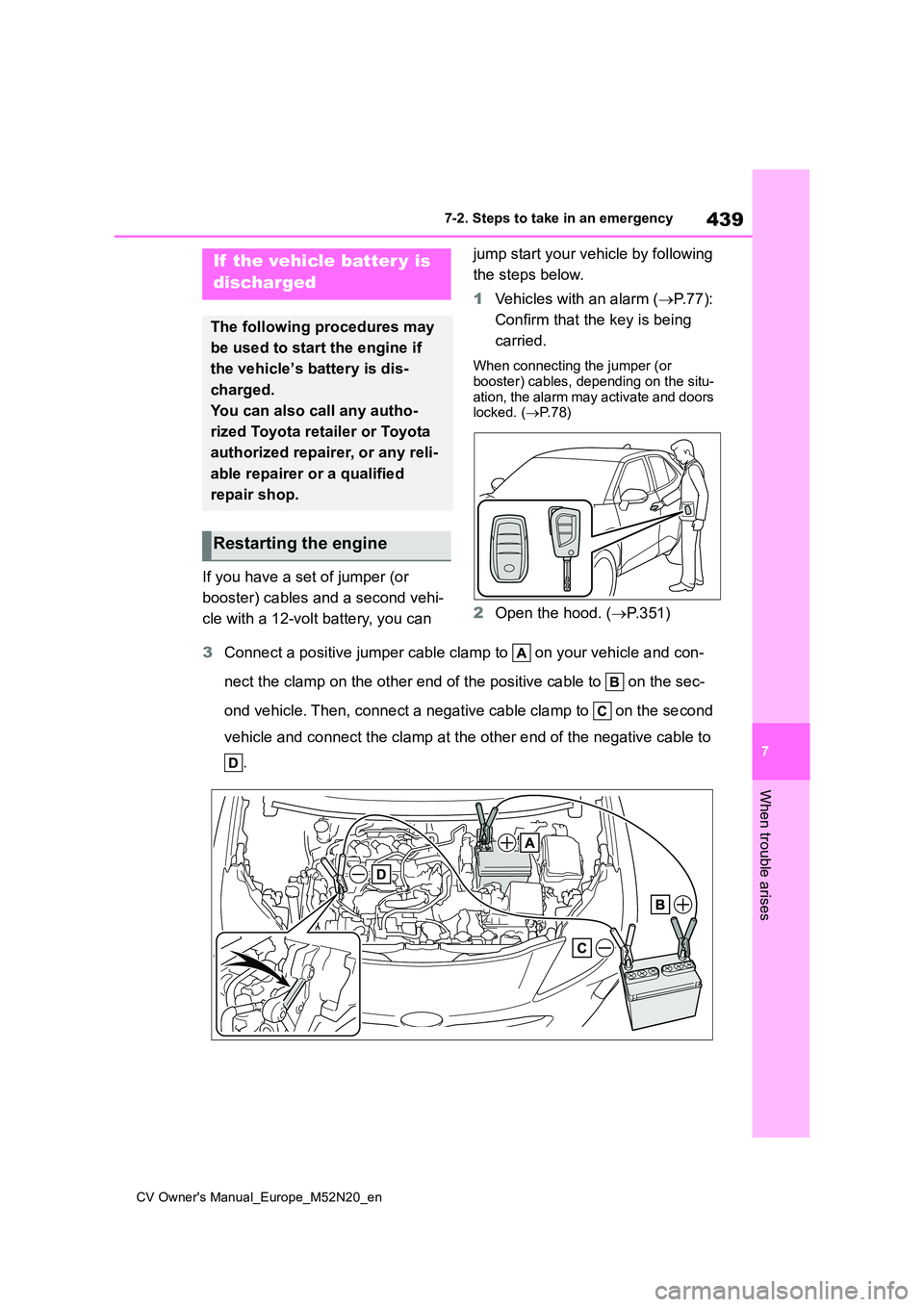
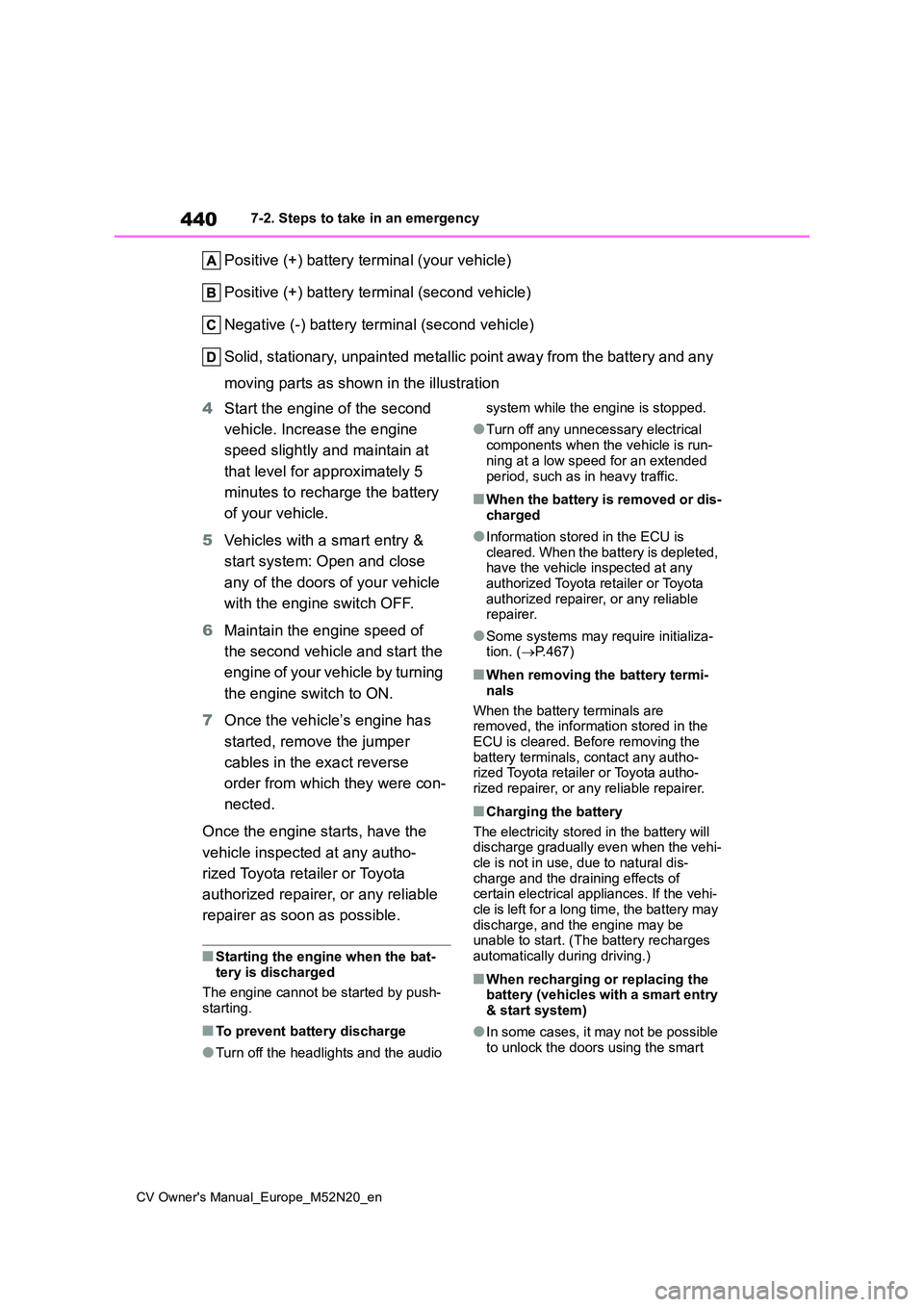
3 Connect a positive jumper cable clamp to on your vehicle and con-
nect the clamp on the other end of the positive cable to on th e sec-
ond vehicle. Then, connect a negative cable clamp to on the se cond
vehicle and connect the clamp at the other end of the negative cable to
.
If the vehicle batter y is
discharged
The following procedures may
be used to start the engine if
the vehicle’s battery is dis-
charged.
You can also call any autho-
rized Toyota retailer or Toyota
authorized repairer, or any reli-
able repairer or a qualified
repair shop.
Restarting the engine
Page 442 of 618
440
CV Owner's Manual_Europe_M52N20_en
7-2. Steps to take in an emergency
Positive (+) battery terminal (your vehicle)
Positive (+) battery terminal (second vehicle)
Negative (-) battery terminal (second vehicle)
Solid, stationary, unpainted metallic point away from the batte ry and any
moving parts as shown in the illustration
4 Start the engine of the second
vehicle. Increase the engine
speed slightly and maintain at
that level for approximately 5
minutes to recharge the battery
of your vehicle.
5 Vehicles with a smart entry &
start system: Open and close
any of the doors of your vehicle
with the engine switch OFF.
6 Maintain the engine speed of
the second vehicle and start the
engine of your vehicle by turning
the engine switch to ON.
7 Once the vehicle’s engine has
started, remove the jumper
cables in the exact reverse
order from which they were con-
nected.
Once the engine starts, have the
vehicle inspected at any autho-
rized Toyota retailer or Toyota
authorized repairer, or any reliable
repairer as soon as possible.
■Starting the engine when the bat- tery is discharged
The engine cannot be started by push-
starting.
■To prevent battery discharge
●Turn off the headlights and the audio
system while the engine is stopped.
●Turn off any unnecessary electrical
components when the vehicle is run- ning at a low speed for an extended
period, such as in heavy traffic.
■When the battery is removed or dis- charged
●Information stored in the ECU is cleared. When the battery is depleted, have the vehicle inspected at any
authorized Toyota retailer or Toyota authorized repairer, or any reliable repairer.
●Some systems may require initializa-tion. ( P.467)
■When removing the battery termi-
nals
When the battery terminals are removed, the information stored in the
ECU is cleared. Before removing the battery terminals, contact any autho-rized Toyota retailer or Toyota autho-
rized repairer, or any reliable repairer.
■Charging the battery
The electricity stored in the battery will discharge gradually even when the vehi-
cle is not in use, due to natural dis- charge and the draining effects of certain electrical appliances. If the vehi-
cle is left for a long time, the battery may discharge, and the engine may be unable to start. (The battery recharges
automatically during driving.)
■When recharging or replacing the battery (vehicles with a smart entry & start system)
●In some cases, it may not be possible to unlock the doors using the smart
Page 443 of 618
441
7
CV Owner's Manual_Europe_M52N20_en
7-2. Steps to take in an emergency
When trouble arises
entry & start system when the battery
is discharged. Use the wireless remote control or the mechanical key to lock or unlock the doors.
●The engine may not start on the first attempt after the battery has
recharged but will start normally after the second attempt. This is not a mal-function.
●The engine switch mode is memo-rized by the vehicle. When the battery
is reconnected, the system will return to the mode it was in before the bat-tery was discharged. Before discon-
necting the battery, turn the engine switch off.If you are unsure what mode the
engine switch was in before the bat- tery discharged, be especially careful when reconnecting the battery.
●The Stop & Start system may not automatically stop the engine for up to
an hour.
■When replacing the battery
●Use a battery that conforms to Euro-
pean regulations.
●Use a battery that the case size is
same as the previous one, 20 hour rate capacity (20HR) is equivalent or greater, and performance rating
(CCA) is equivalent or greater. Check the label on top of the battery for the battery size and specifications (ex.
LN2, 60Ah, 345A). • If the sizes differ, the battery cannot be properly secured.
• If the 20 hour rate capacity is low, even if the time period where the vehi-cle is not used is a short time, the bat-
tery may discharge and the engine may not be able to start.
●For details, consult any authorized Toyota retailer or Toyota authorized repairer, or any reliable repairer.
WARNING
■When removing the battery ter-minals
Always remove the negative (-) termi- nal first. If the positive (+) terminal contacts any metal in the surrounding
area when the positive (+) terminal is removed, a spark may occur, leading to a fire in addition to electrical shocks
and death or serious injury.
■Avoiding battery fires or explo-
sions
Observe the following precautions to prevent accidentally igniting the flam-
mable gas that may be emitted from the battery:
●Make sure each jumper cable is connected to the correct terminal and that it is not unintentionally in
contact with any other than the intended terminal.
●Do not allow the other end of the jumper cable connected to the “+” terminal to come into contact with
any other parts or metal surfaces in the area, such as brackets or unpainted metal.
●Do not allow the + and - clamps of the jumper cables to come into con-
tact with each other.
●Do not smoke, use matches, ciga-
rette lighters or allow open flame near the battery.
■Battery precautions
The battery contains poisonous and corrosive acidic electrolyte, while
related parts contain lead and lead compounds. Observe the following precautions when handling the bat-
tery:
Page 460 of 618
458
CV Owner's Manual_Europe_M52N20_en
8-2. Customization
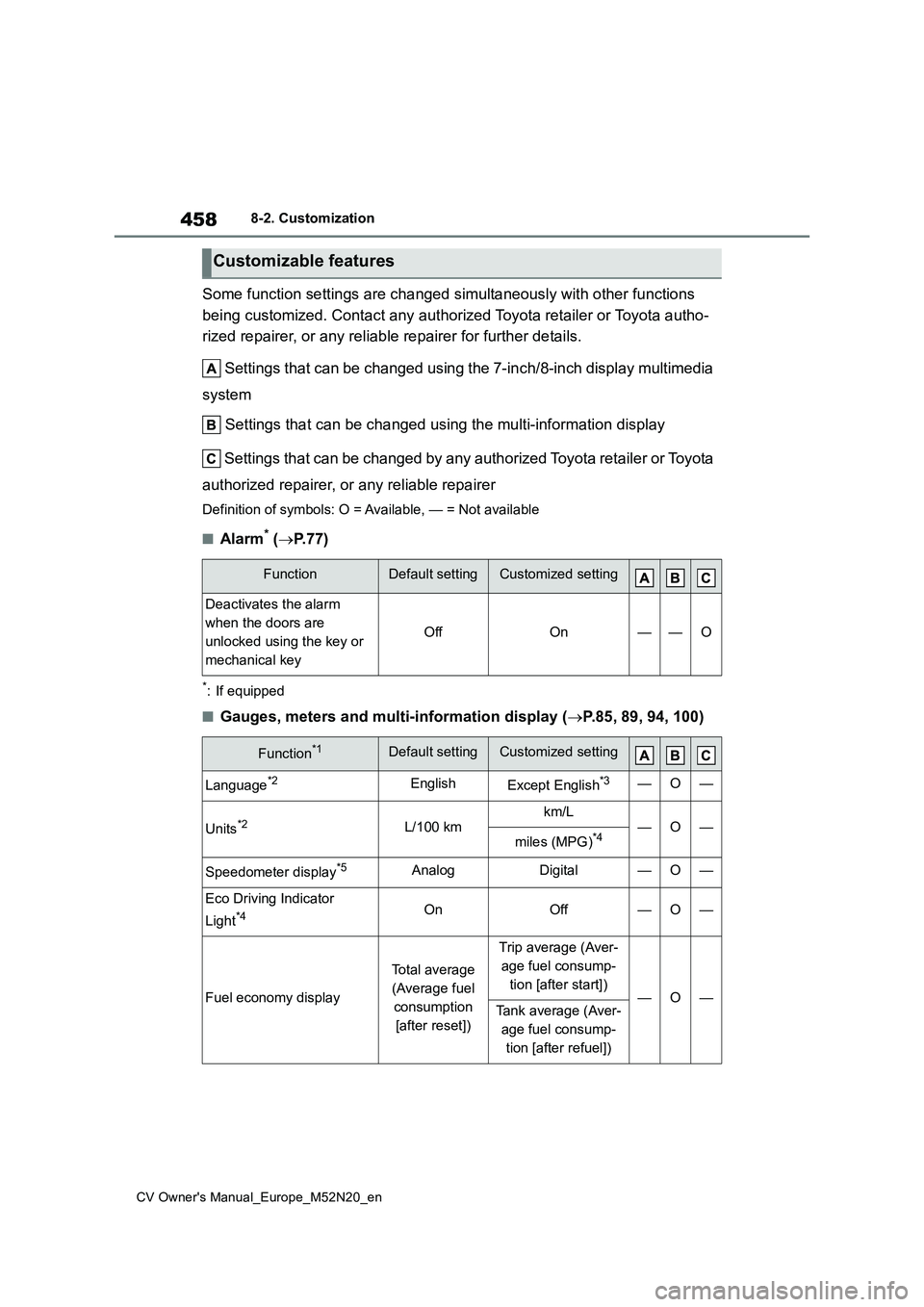
Some function settings are changed simultaneously with other functions
being customized. Contact any authorized Toyota retailer or Toy ota autho-
rized repairer, or any reliable repairer for further details.
Settings that can be changed using the 7-inch/8-inch display m ultimedia
system
Settings that can be changed using the multi-information displ ay
Settings that can be changed by any authorized Toyota retailer or Toy ota
authorized repairer, or any reliable repairer
Definition of symbols: O = Available, — = Not available
■Alarm* ( P.77)
*: If equipped
■Gauges, meters and multi-information display (P.85, 89, 94, 100)
Customizable features
FunctionDefault settingCustomized setting
Deactivates the alarm
when the doors are
unlocked using the key or
mechanical key
OffOn——O
Function*1Default settingCustomized setting
Language*2EnglishExcept English*3—O—
Units*2L/100 kmkm/L—O—miles (MPG)*4
Speedometer display*5AnalogDigital—O—
Eco Driving Indicator
Light*4OnOff—O—
Fuel economy display
Total average
(Average fuel
consumption
[after reset])
Trip average (Aver-
age fuel consump-
tion [after start])—O—Tank average (Aver-
age fuel consump-
tion [after refuel])
Page 462 of 618
460
CV Owner's Manual_Europe_M52N20_en
8-2. Customization
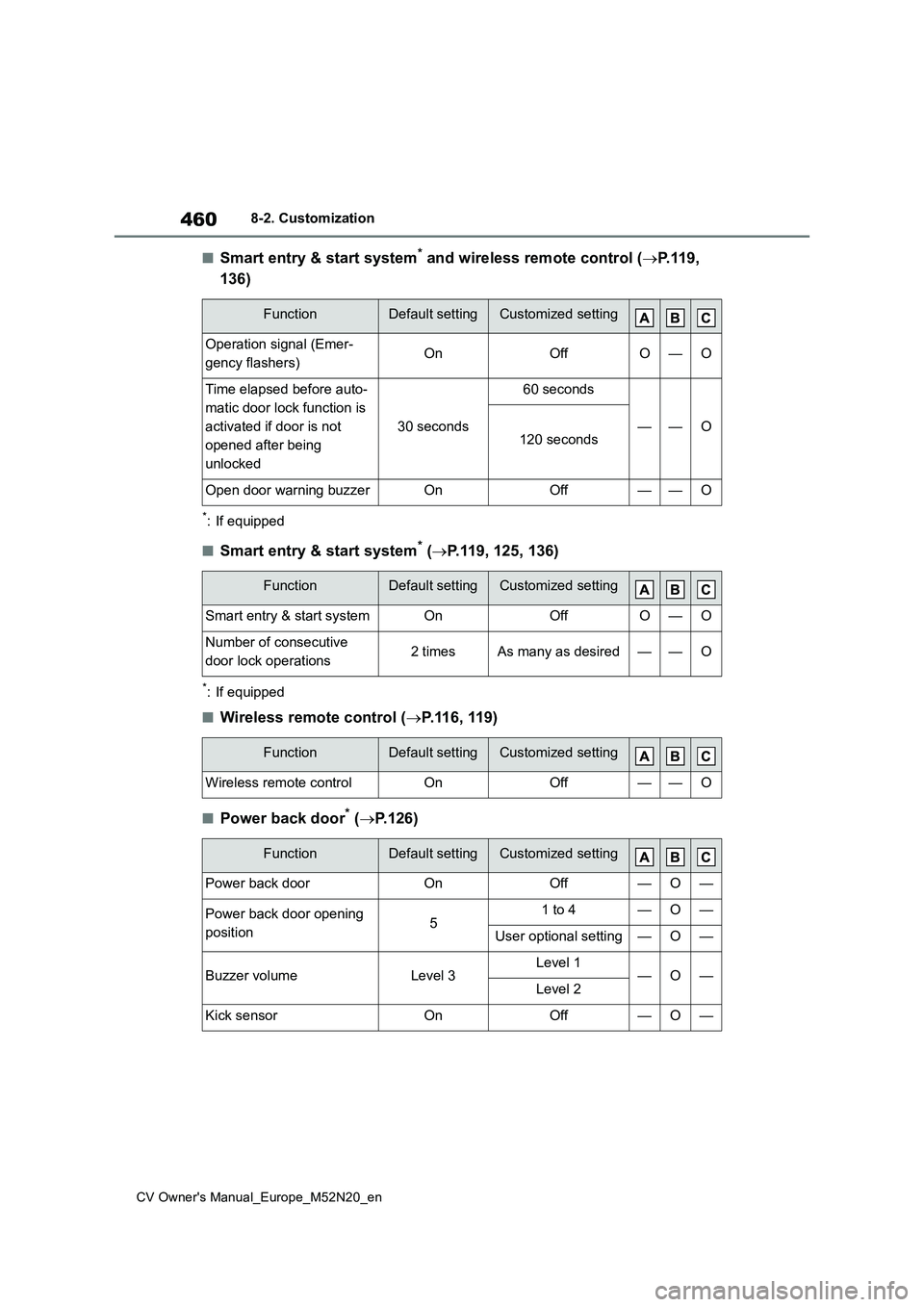
■Smart entry & start system* and wireless remote control (P.119,
136)
*: If equipped
■Smart entry & start system* ( P.119, 125, 136)
*: If equipped
■Wireless remote control (P.116, 119)
■Power back door* (P.126)
FunctionDefault settingCustomized setting
Operation signal (Emer-
gency flashers)OnOffO—O
Time elapsed before auto-
matic door lock function is
activated if door is not
opened after being
unlocked
30 seconds
60 seconds
——O120 seconds
Open door warning buzzerOnOff——O
FunctionDefault settingCustomized setting
Smart entry & start systemOnOffO—O
Number of consecutive
door lock operations2 timesAs many as desired——O
FunctionDefault settingCustomized setting
Wireless remote controlOnOff——O
FunctionDefault settingCustomized setting
Power back doorOnOff—O—
Power back door opening
position51 to 4—O—
User optional setting—O—
Buzzer volumeLevel 3Level 1—O—Level 2
Kick sensorOnOff—O—
Page 463 of 618
461
8
CV Owner's Manual_Europe_M52N20_en
8-2. Customization
Vehicle specifications
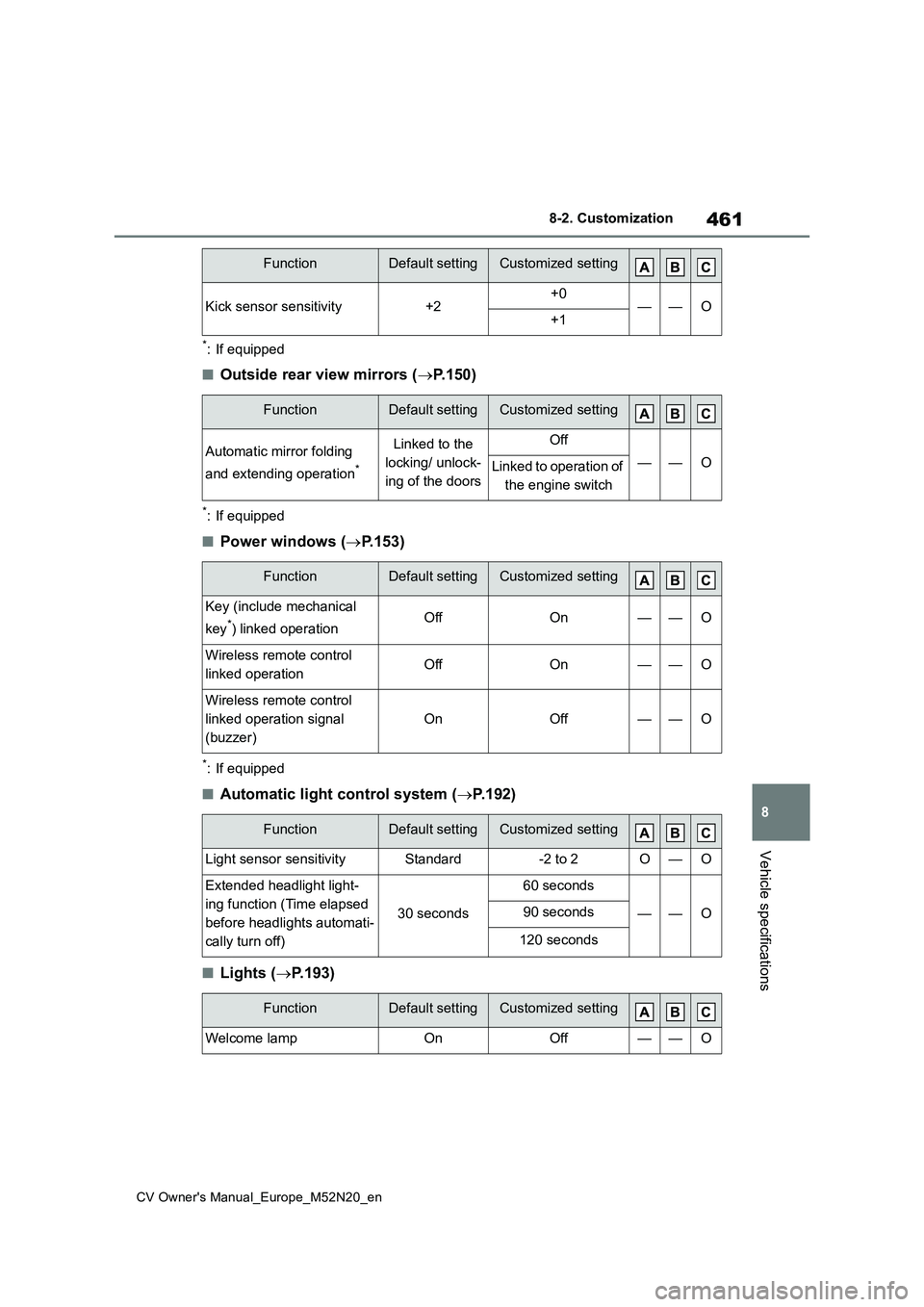
*: If equipped
■Outside rear view mirrors (P.150)
*: If equipped
■Power windows (P.153)
*: If equipped
■Automatic light control system (P.192)
■Lights (P.193)
Kick sensor sensitivity+2+0——O+1
FunctionDefault settingCustomized setting
Automatic mirror folding
and extending operation*
Linked to the
locking/ unlock-
ing of the doors
Off
——OLinked to operation of
the engine switch
FunctionDefault settingCustomized setting
Key (include mechanical
key*) linked operationOffOn——O
Wireless remote control
linked operationOffOn——O
Wireless remote control
linked operation signal
(buzzer)
OnOff——O
FunctionDefault settingCustomized setting
Light sensor sensitivityStandard-2 to 2O—O
Extended headlight light-
ing function (Time elapsed
before headlights automati-
cally turn off)
30 seconds
60 seconds
——O90 seconds
120 seconds
FunctionDefault settingCustomized setting
Welcome lampOnOff——O
FunctionDefault settingCustomized setting
Page 468 of 618
466
CV Owner's Manual_Europe_M52N20_en
8-2. Customization
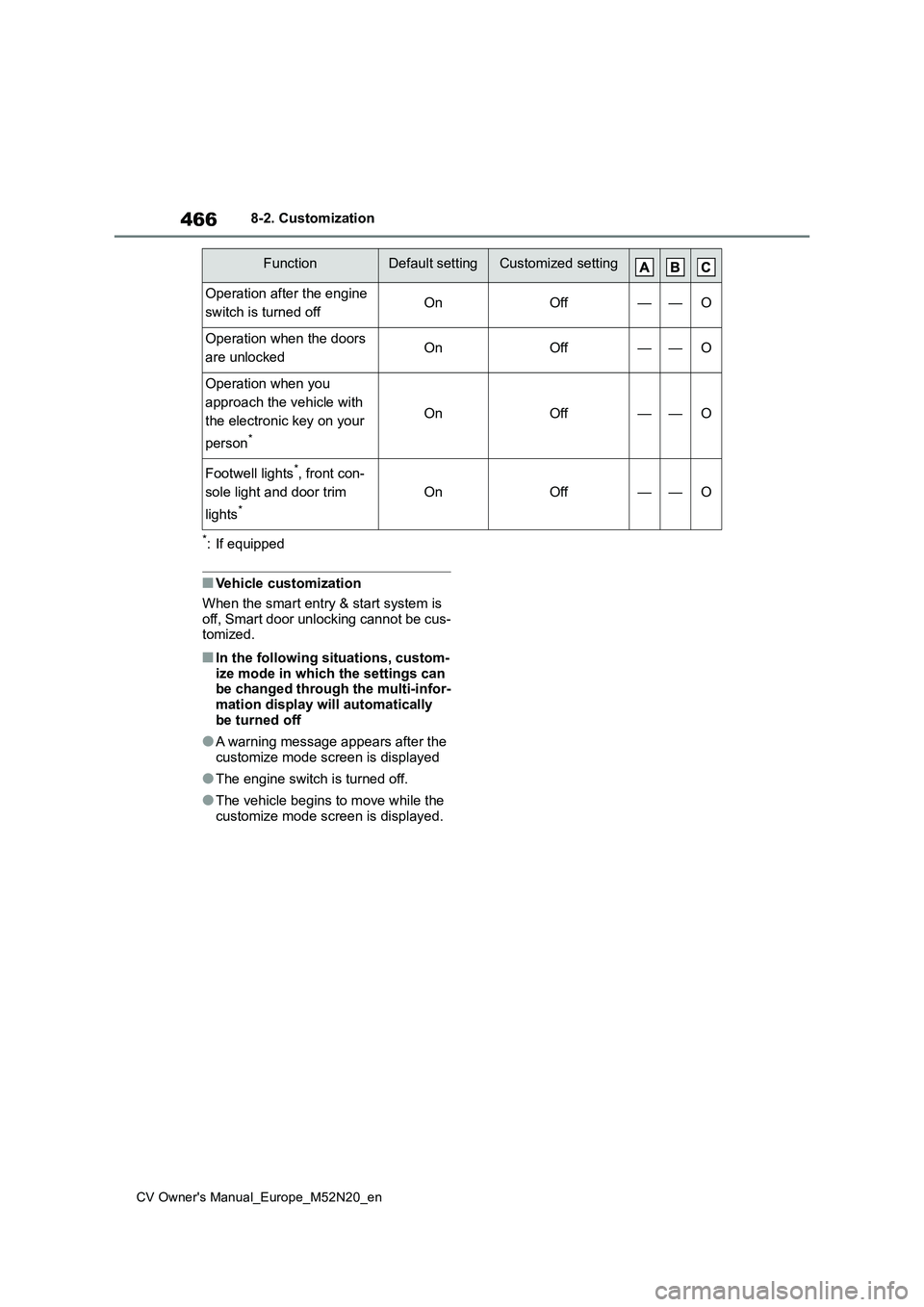
*: If equipped
■Vehicle customization
When the smart entry & start system is off, Smart door unlocking cannot be cus-tomized.
■In the following situations, custom-
ize mode in which the settings can be changed through the multi-infor-mation display will automatically
be turned off
●A warning message appears after the
customize mode screen is displayed
●The engine switch is turned off.
●The vehicle begins to move while the customize mode screen is displayed.
Operation after the engine
switch is turned offOnOff——O
Operation when the doors
are unlockedOnOff——O
Operation when you
approach the vehicle with
the electronic key on your
person*
OnOff——O
Footwell lights*, front con-
sole light and door trim
lights*
OnOff——O
FunctionDefault settingCustomized setting