door lock TOYOTA YARIS CROSS 2022 Service Manual
[x] Cancel search | Manufacturer: TOYOTA, Model Year: 2022, Model line: YARIS CROSS, Model: TOYOTA YARIS CROSS 2022Pages: 618, PDF Size: 130.77 MB
Page 190 of 618
188
CV Owner's Manual_Europe_M52N20_en
4-2. Driving procedures
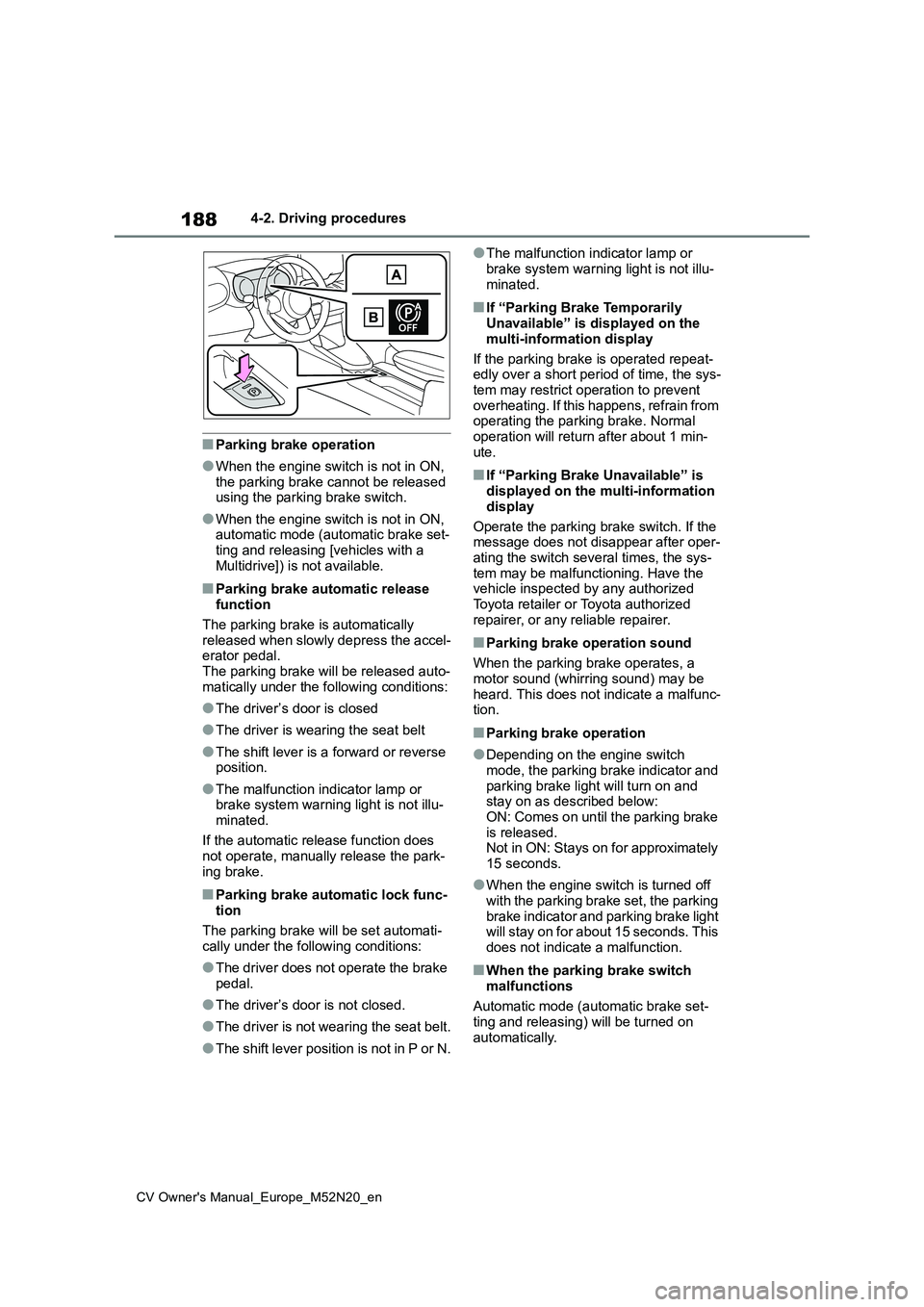
■Parking brake operation
●When the engine switch is not in ON, the parking brake cannot be released using the parking brake switch.
●When the engine switch is not in ON, automatic mode (automatic brake set-
ting and releasing [vehicles with a Multidrive]) is not available.
■Parking brake automatic release function
The parking brake is automatically released when slowly depress the accel-erator pedal.
The parking brake will be released auto- matically under the following conditions:
●The driver’s door is closed
●The driver is wearing the seat belt
●The shift lever is a forward or reverse position.
●The malfunction indicator lamp or brake system warning light is not illu-
minated.
If the automatic release function does not operate, manually release the park-
ing brake.
■Parking brake automatic lock func- tion
The parking brake will be set automati- cally under the following conditions:
●The driver does not operate the brake pedal.
●The driver’s door is not closed.
●The driver is not wearing the seat belt.
●The shift lever position is not in P or N.
●The malfunction indicator lamp or
brake system warning light is not illu- minated.
■If “Parking Brake Temporarily Unavailable” is displayed on the
multi-information display
If the parking brake is operated repeat- edly over a short period of time, the sys-
tem may restrict operation to prevent overheating. If this happens, refrain from operating the parking brake. Normal
operation will return after about 1 min- ute.
■If “Parking Brake Unavailable” is displayed on the multi-information
display
Operate the parking brake switch. If the message does not disappear after oper-
ating the switch several times, the sys- tem may be malfunctioning. Have the vehicle inspected by any authorized
Toyota retailer or Toyota authorized repairer, or any reliable repairer.
■Parking brake operation sound
When the parking brake operates, a
motor sound (whirring sound) may be heard. This does not indicate a malfunc-tion.
■Parking brake operation
●Depending on the engine switch mode, the parking brake indicator and
parking brake light will turn on and stay on as described below:ON: Comes on until the parking brake
is released. Not in ON: Stays on for approximately 15 seconds.
●When the engine switch is turned off with the parking brake set, the parking
brake indicator and parking brake light will stay on for about 15 seconds. This does not indicate a malfunction.
■When the parking brake switch
malfunctions
Automatic mode (automatic brake set- ting and releasing) will be turned on
automatically.
Page 195 of 618
193
4
CV Owner's Manual_Europe_M52N20_en
4-3. Operating the lights and wipers
Driving
headlight switch in the or posi-
tion. Daytime running lights are not
designed for use at night.
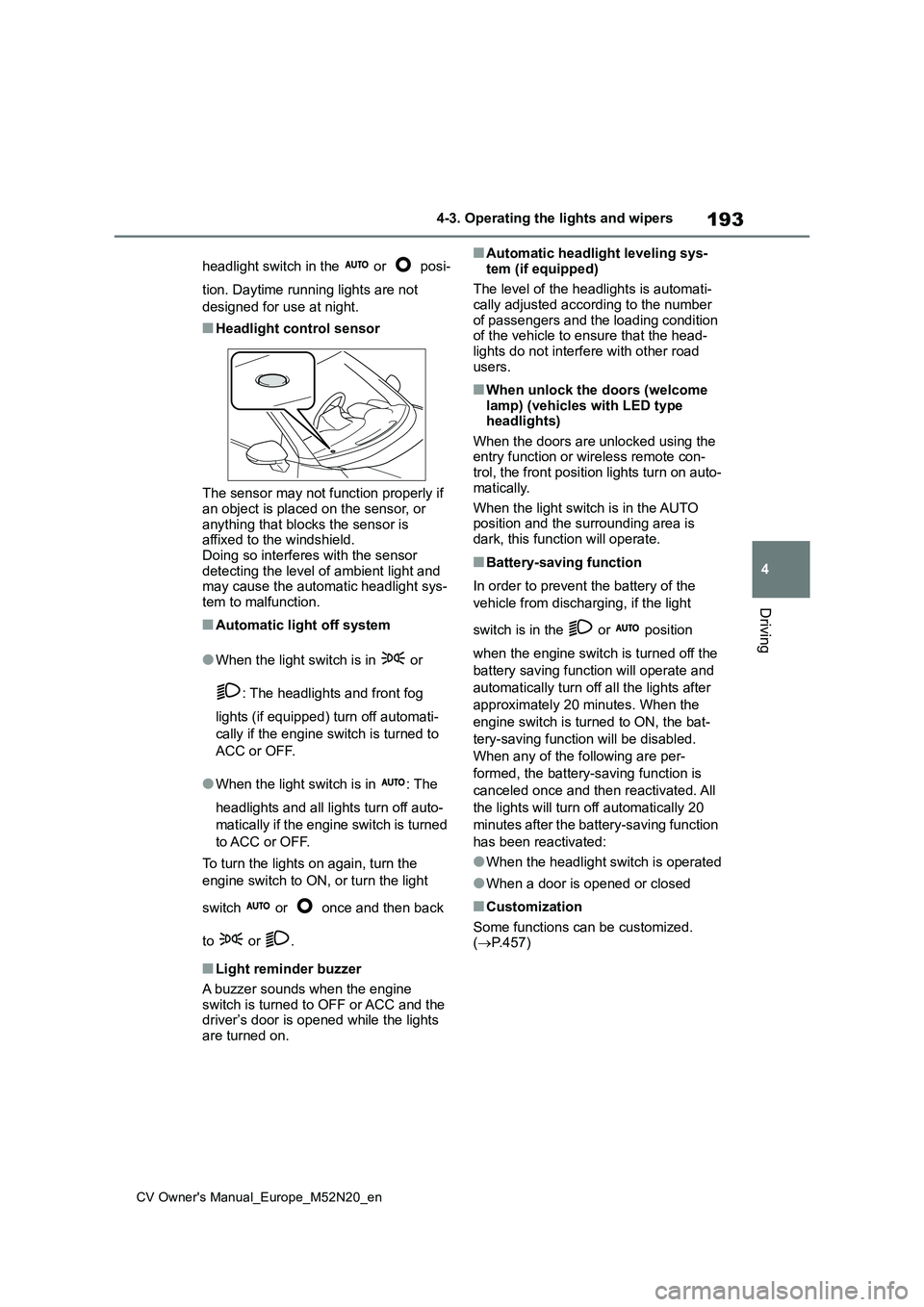
■Headlight control sensor
The sensor may not function properly if an object is placed on the sensor, or
anything that blocks the sensor is affixed to the windshield.Doing so interferes with the sensor
detecting the level of ambient light and may cause the automatic headlight sys-tem to malfunction.
■Automatic light off system
●When the light switch is in or
: The headlights and front fog
lights (if equipped) turn off automati-
cally if the engine switch is turned to
ACC or OFF.
●When the light switch is in : The
headlights and all lights turn off auto-
matically if the engine switch is turned
to ACC or OFF.
To turn the lights on again, turn the
engine switch to ON, or turn the light
switch or once and then back
to or .
■Light reminder buzzer
A buzzer sounds when the engine
switch is turned to OFF or ACC and the driver’s door is opened while the lights are turned on.
■Automatic headlight leveling sys-
tem (if equipped)
The level of the headlights is automati- cally adjusted according to the number
of passengers and the loading condition of the vehicle to ensure that the head-lights do not interfere with other road
users.
■When unlock the doors (welcome lamp) (vehicles with LED type headlights)
When the doors are unlocked using the entry function or wireless remote con-trol, the front position lights turn on auto-
matically.
When the light switch is in the AUTO position and the surrounding area is
dark, this function will operate.
■Battery-saving function
In order to prevent the battery of the
vehicle from discharging, if the light
switch is in the or position
when the engine switch is turned off the
battery saving function will operate and
automatically turn off all the lights after
approximately 20 minutes. When the
engine switch is turned to ON, the bat-
tery-saving function will be disabled.
When any of the following are per-
formed, the battery-saving function is
canceled once and then reactivated. All
the lights will turn off automatically 20
minutes after the battery-saving function
has been reactivated:
●When the headlight switch is operated
●When a door is opened or closed
■Customization
Some functions can be customized. ( P.457)
Page 210 of 618
208
CV Owner's Manual_Europe_M52N20_en
4-3. Operating the lights and wipers
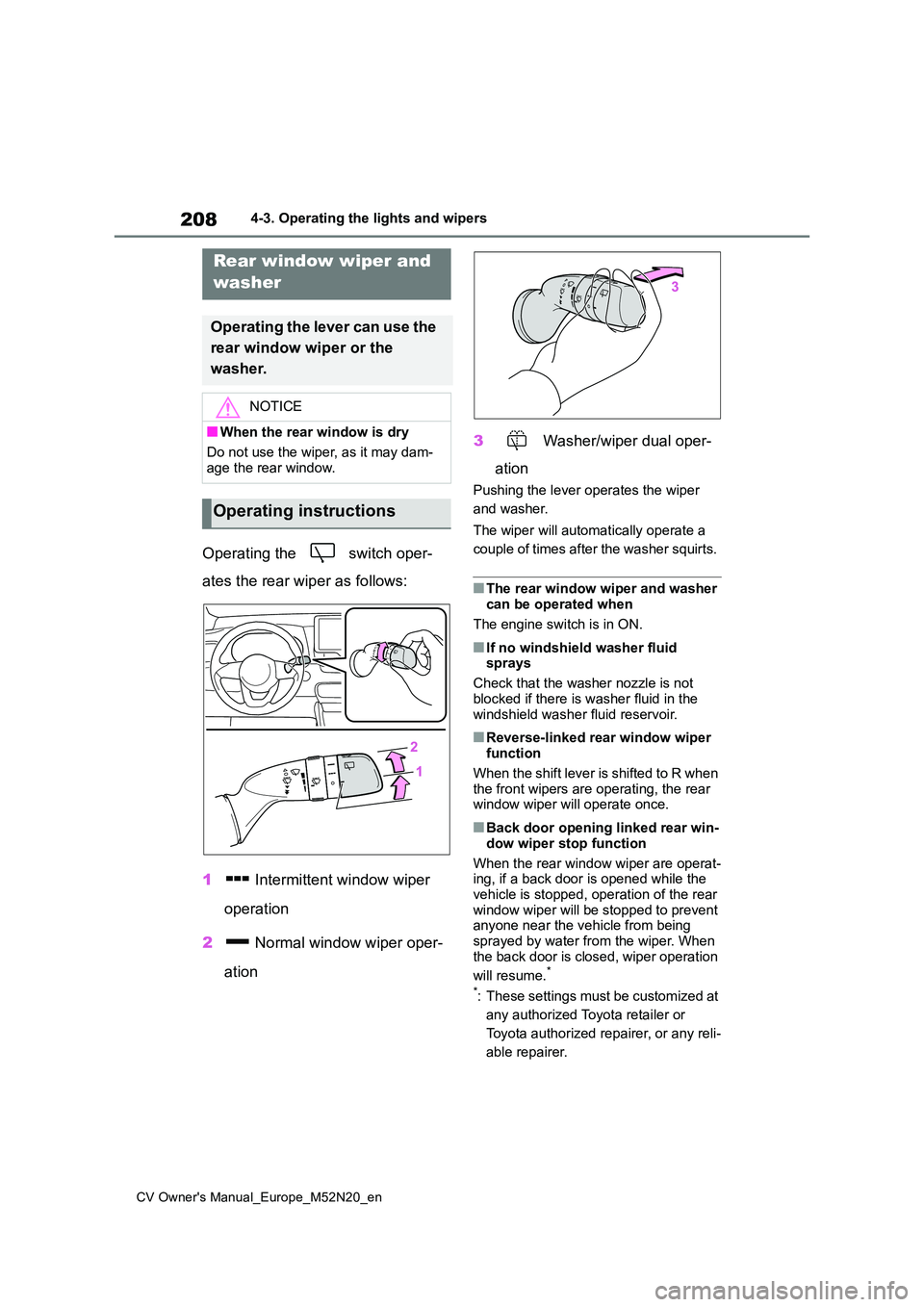
Operating the switch oper-
ates the rear wiper as follows:
1 Intermittent window wiper
operation
2 Normal window wiper oper-
ation
3 Washer/wiper dual oper-
ation
Pushing the lever operates the wiper
and washer.
The wiper will automatically operate a
couple of times after the washer squirts.
■The rear window wiper and washer can be operated when
The engine switch is in ON.
■If no windshield washer fluid sprays
Check that the washer nozzle is not
blocked if there is washer fluid in the windshield washer fluid reservoir.
■Reverse-linked rear window wiper function
When the shift lever is shifted to R when the front wipers are operating, the rear window wiper will operate once.
■Back door opening linked rear win-
dow wiper stop function
When the rear window wiper are operat- ing, if a back door is opened while the
vehicle is stopped, operation of the rear window wiper will be stopped to prevent anyone near the vehicle from being
sprayed by water from the wiper. When the back door is closed, wiper operation
will resume.*
*: These settings must be customized at
any authorized Toyota retailer or
Toyota authorized repairer, or any reli-
able repairer.
Rear window wiper and
washer
Operating the lever can use the
rear window wiper or the
washer.
NOTICE
■When the rear window is dry
Do not use the wiper, as it may dam-
age the rear window.
Operating instructions
Page 327 of 618
325
5
CV Owner's Manual_Europe_M52N20_en
5-2. Using the interior lights
Interior features
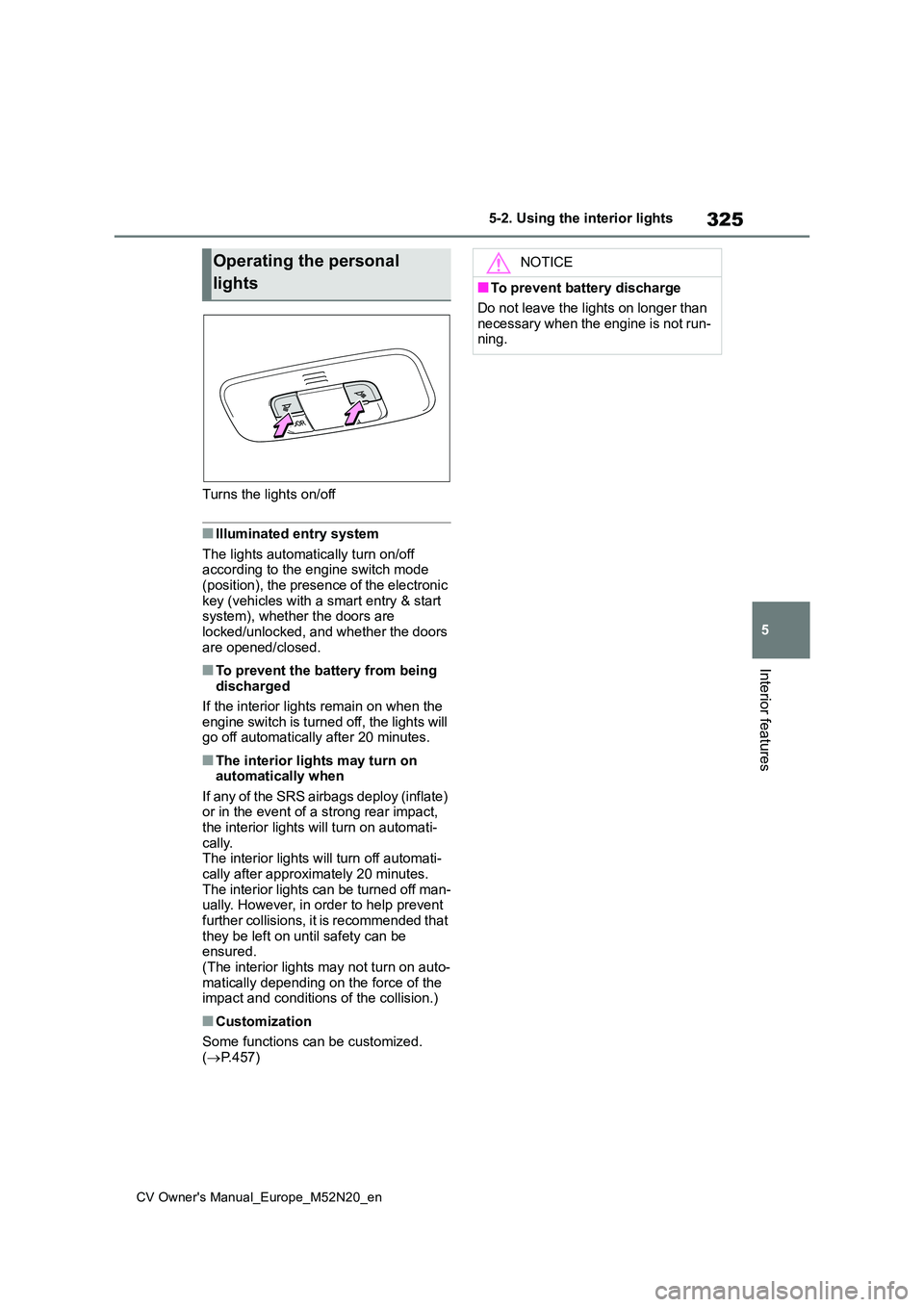
Turns the lights on/off
■Illuminated entry system
The lights automatically turn on/off according to the engine switch mode (position), the presence of the electronic
key (vehicles with a smart entry & start system), whether the doors are locked/unlocked, and whether the doors
are opened/closed.
■To prevent the battery from being discharged
If the interior lights remain on when the
engine switch is turned off, the lights will go off automatically after 20 minutes.
■The interior lights may turn on automatically when
If any of the SRS airbags deploy (inflate) or in the event of a strong rear impact, the interior lights will turn on automati-
cally. The interior lights will turn off automati-cally after approximately 20 minutes.
The interior lights can be turned off man- ually. However, in order to help prevent further collisions, it is recommended that
they be left on until safety can be ensured.(The interior lights may not turn on auto-
matically depending on the force of the impact and conditions of the collision.)
■Customization
Some functions can be customized.
( P.457)
Operating the personal
lights
NOTICE
■To prevent battery discharge
Do not leave the lights on longer than
necessary when the engine is not run- ning.
Page 344 of 618
342
CV Owner's Manual_Europe_M52N20_en
6-1. Maintenance and care
6-1.Mainte nance a nd care
Working from top to bottom, lib-
erally apply water to the vehicle
body, wheel wells and underside
of the vehicle to remove any dirt
and dust.
Wash the vehicle body using a
sponge or soft cloth, such as a
chamois.
For hard-to-remove marks, use
car wash soap and rinse thor-
oughly with water.
Wipe away any water.
Wax the vehicle when the water-
proof coating deteriorates.
If water does not bead on a clean sur-
face, apply wax when the vehicle body
is cool.
■Automatic car washes
●Before washing the vehicle: • Fold the mirrors.
Start washing from the front of the vehi-
cle. Extend the mirrors before driving.
●Turn off the power back door (if equipped).
●Brushes used in automatic car washes may scratch the vehicle sur-
face, parts (wheel, etc.) and harm your vehicle’s paint.
●In certain automatic car washes, the
rear spoiler may interfere with
machine operation. This may prevent the vehicle from being cleaned prop-erly or result in damage to the rear
spoiler.
■High pressure car washes
As water may enter the cabin, do not bring the nozzle tip near the gaps
around the doors or perimeter of the windows, or spray these areas continu-ously.
■When using a car wash (vehicles
with a smart entry & start system)
If the door handle becomes wet while the electronic key is within the effective
range, the door may lock and unlock repeatedly. In that case, follow the fol-lowing correction procedures to wash
the vehicle:
●Place the key in a position 2 m (6 ft.)
or more separate from the vehicle while the vehicle is being washed. (Take care to ensure that the key is
not stolen.)
●Set the electronic key to battery-sav-
ing mode to disable the smart entry & start system. ( P.137)
■Wheels and wheel ornaments (if equipped)
●Remove any dirt immediately by using a neutral detergent.
●Wash detergent off with water immedi-ately after use.
●To protect the paint from damage, make sure to observe the following
precautions. • Do not use acidic, alkaline or abrasive detergent
• Do not use hard brushes • Do not use detergent on the wheels when they are hot, such as after driv-
ing or parking in hot weather
■Bumpers
Do not scrub with abrasive cleaners.
■Plated portions (if equipped)
If dirt cannot be removed, clean the
parts as follows:
Cleaning and protecting
the vehicle exterior
Perform cleaning in a manner
appropriate to each compo-
nent and its material.
Cleaning instructions
Page 361 of 618
359
6
CV Owner's Manual_Europe_M52N20_en
6-3. Do-it-yourself maintenance
Maintenance and care
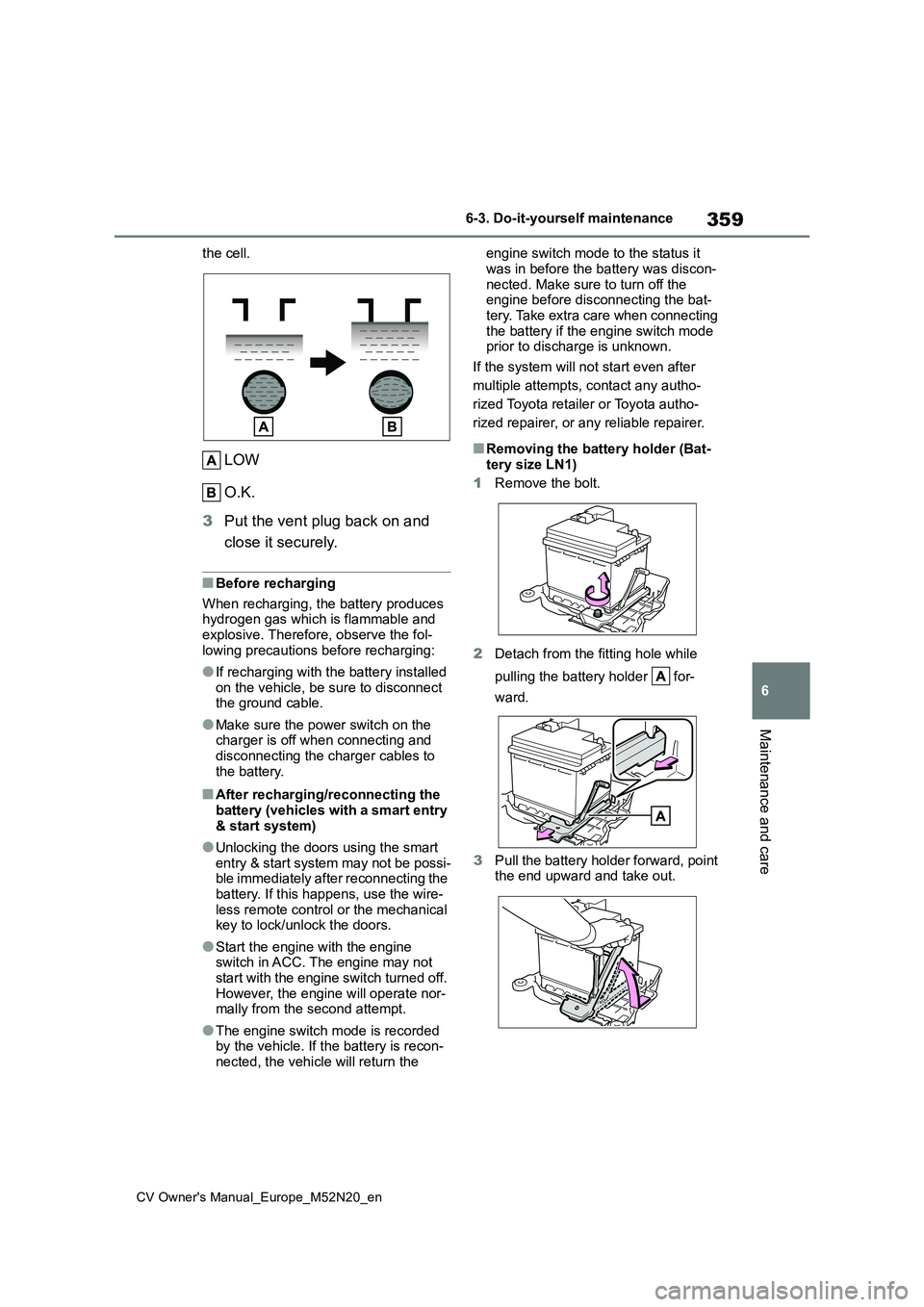
the cell.
LOW
O.K.
3 Put the vent plug back on and
close it securely.
■Before recharging
When recharging, the battery produces hydrogen gas which is flammable and explosive. Therefore, observe the fol-
lowing precautions before recharging:
●If recharging with the battery installed
on the vehicle, be sure to disconnect the ground cable.
●Make sure the power switch on the charger is off when connecting and
disconnecting the charger cables to the battery.
■After recharging/reconnecting the battery (vehicles with a smart entry
& start system)
●Unlocking the doors using the smart
entry & start system may not be possi- ble immediately after reconnecting the battery. If this happens, use the wire-
less remote control or the mechanical key to lock/unlock the doors.
●Start the engine with the engine switch in ACC. The engine may not start with the engine switch turned off.
However, the engine will operate nor- mally from the second attempt.
●The engine switch mode is recorded by the vehicle. If the battery is recon-nected, the vehicle will return the
engine switch mode to the status it
was in before the battery was discon- nected. Make sure to turn off the engine before disconnecting the bat-
tery. Take extra care when connecting the battery if the engine switch mode prior to discharge is unknown.
If the system will not start even after
multiple attempts, contact any autho-
rized Toyota retailer or Toyota autho-
rized repairer, or any reliable repairer.
■Removing the battery holder (Bat-
tery size LN1)
1 Remove the bolt.
2 Detach from the fitting hole while
pulling the battery holder for-
ward.
3 Pull the battery holder forward, point the end upward and take out.
Page 382 of 618
380
CV Owner's Manual_Europe_M52N20_en
6-3. Do-it-yourself maintenance
6Operate the or switch
and check that the doors can be
locked/unlocked.
Vehicles with a smart entry &
start system
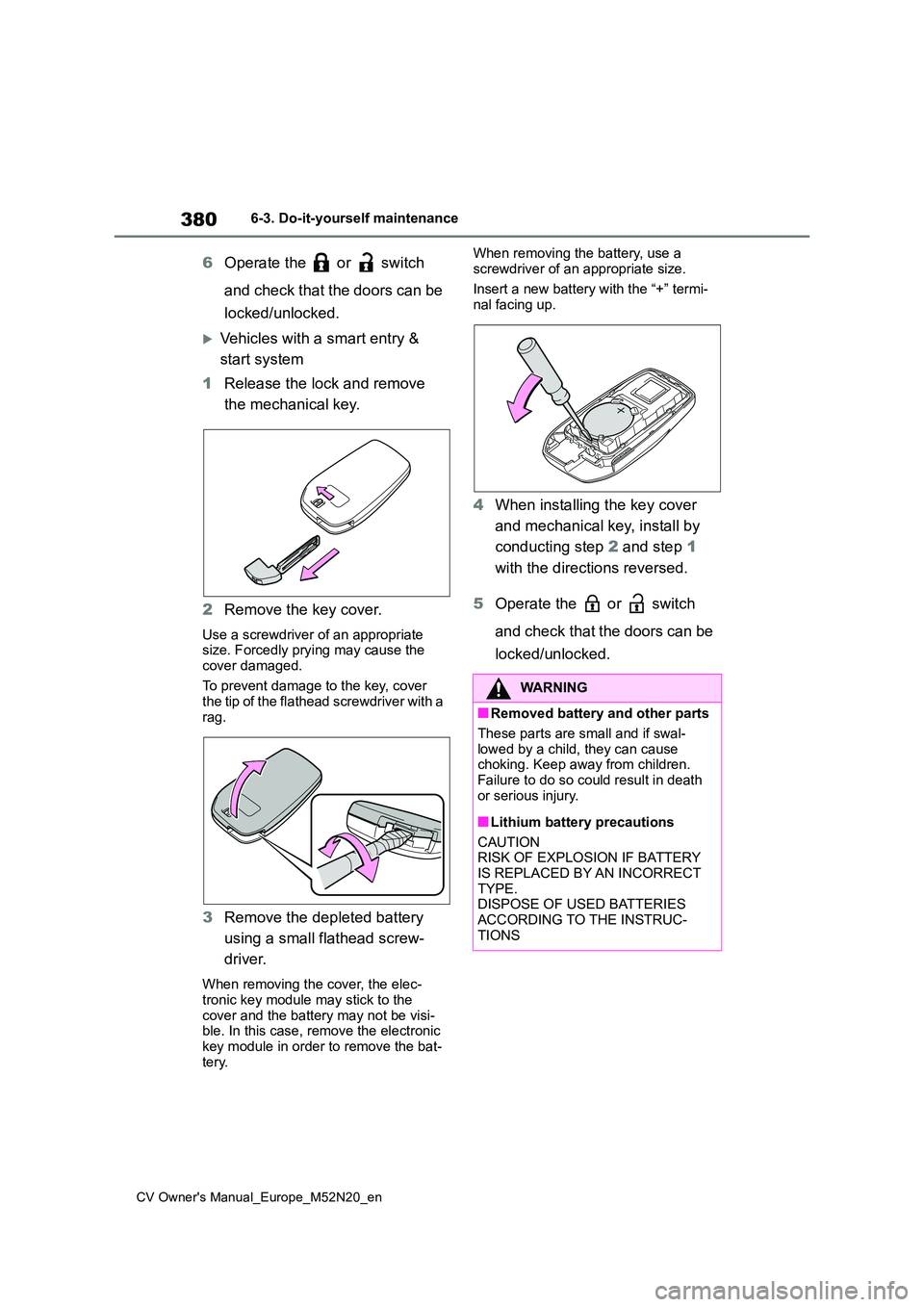
1 Release the lock and remove
the mechanical key.
2 Remove the key cover.
Use a screwdriver of an appropriate size. Forcedly prying may cause the
cover damaged.
To prevent damage to the key, cover the tip of the flathead screwdriver with a
rag.
3 Remove the depleted battery
using a small flathead screw-
driver.
When removing the cover, the elec- tronic key module may stick to the
cover and the battery may not be visi- ble. In this case, remove the electronic key module in order to remove the bat-
tery.
When removing the battery, use a
screwdriver of an appropriate size.
Insert a new battery with the “+” termi- nal facing up.
4 When installing the key cover
and mechanical key, install by
conducting step 2 and step 1
with the directions reversed.
5 Operate the or switch
and check that the doors can be
locked/unlocked.
WARNING
■Removed battery and other parts
These parts are small and if swal-
lowed by a child, they can cause choking. Keep away from children.
Failure to do so could result in death or serious injury.
■Lithium battery precautions
CAUTION RISK OF EXPLOSION IF BATTERY
IS REPLACED BY AN INCORRECT TYPE.DISPOSE OF USED BATTERIES
ACCORDING TO THE INSTRUC- TIONS
Page 390 of 618
388
CV Owner's Manual_Europe_M52N20_en
6-3. Do-it-yourself maintenance
light is leaking through the mounting.
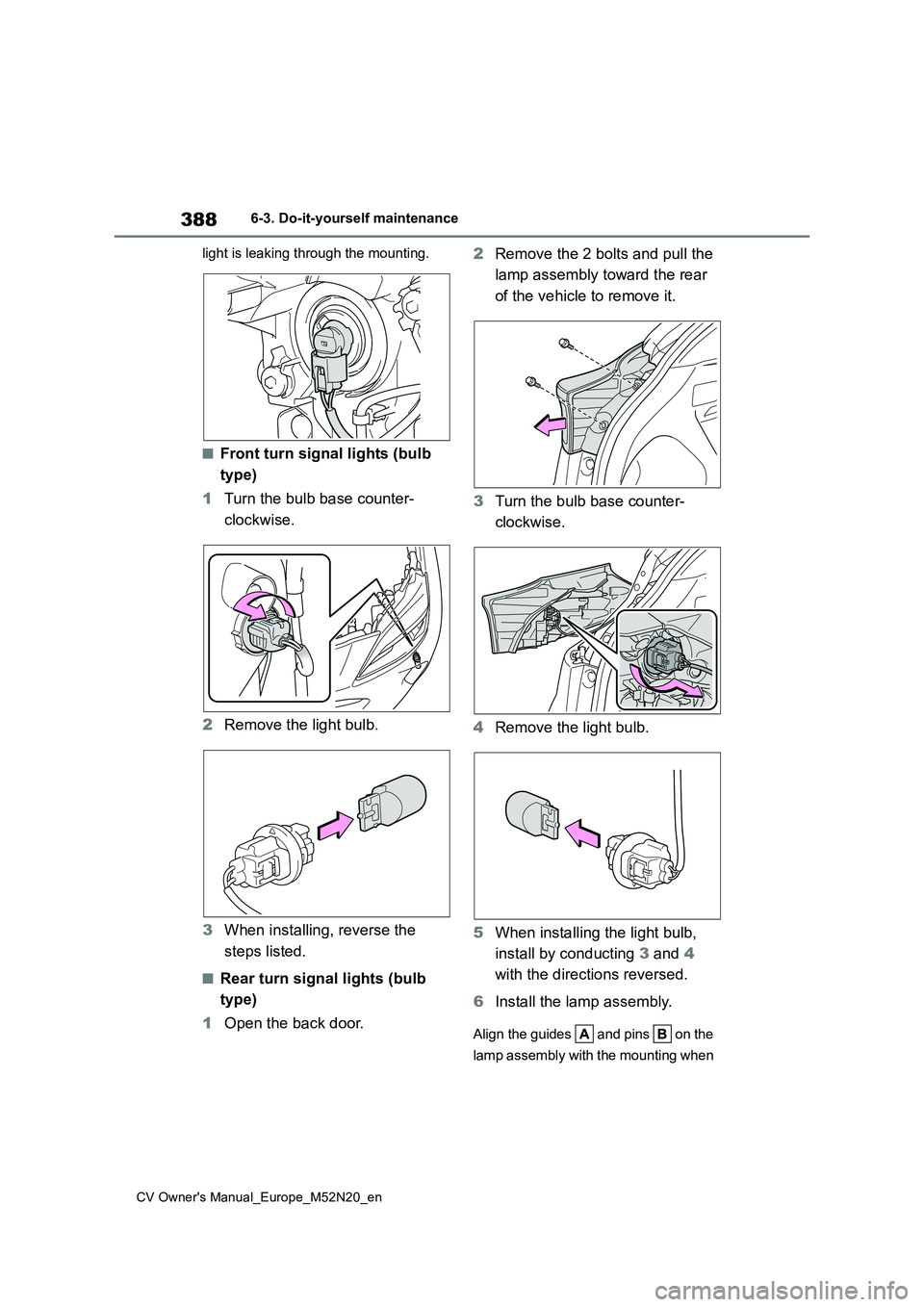
■Front turn signal lights (bulb
type)
1 Turn the bulb base counter-
clockwise.
2 Remove the light bulb.
3 When installing, reverse the
steps listed.
■Rear turn signal lights (bulb
type)
1 Open the back door.
2 Remove the 2 bolts and pull the
lamp assembly toward the rear
of the vehicle to remove it.
3 Turn the bulb base counter-
clockwise.
4 Remove the light bulb.
5 When installing the light bulb,
install by conducting 3 and 4
with the directions reversed.
6 Install the lamp assembly.
Align the guides and pins on the
lamp assembly with the mounting when
Page 392 of 618
390
CV Owner's Manual_Europe_M52N20_en
6-3. Do-it-yourself maintenance
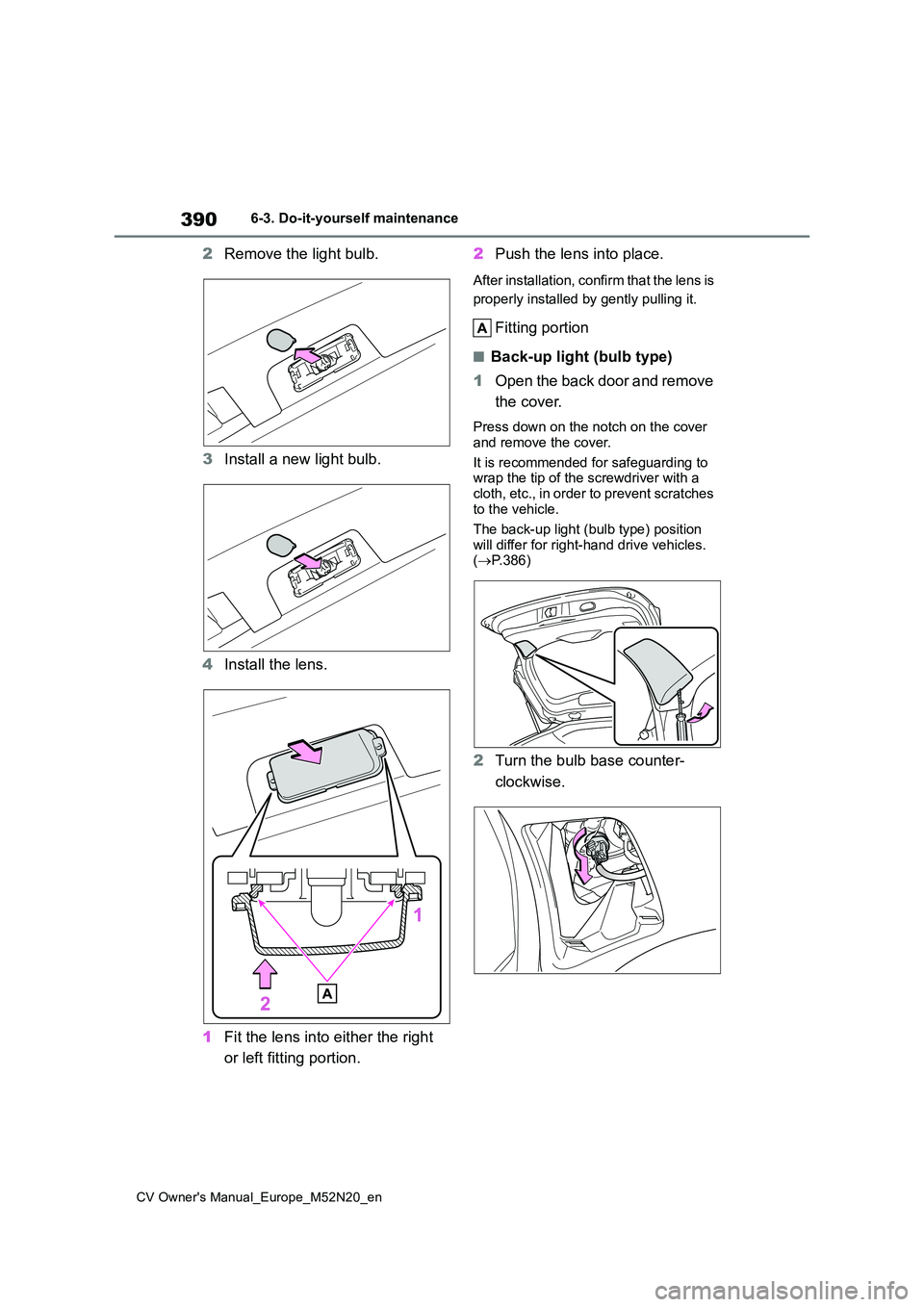
2Remove the light bulb.
3 Install a new light bulb.
4 Install the lens.
1 Fit the lens into either the right
or left fitting portion.
2 Push the lens into place.
After installation, confirm that the lens is
properly installed by gently pulling it.
Fitting portion
■Back-up light (bulb type)
1 Open the back door and remove
the cover.
Press down on the notch on the cover
and remove the cover.
It is recommended for safeguarding to wrap the tip of the screwdriver with a
cloth, etc., in order to prevent scratches to the vehicle.
The back-up light (bulb type) position
will differ for right-hand drive vehicles. ( P.386)
2Turn the bulb base counter-
clockwise.
Page 393 of 618
391
6
CV Owner's Manual_Europe_M52N20_en
6-3. Do-it-yourself maintenance
Maintenance and care
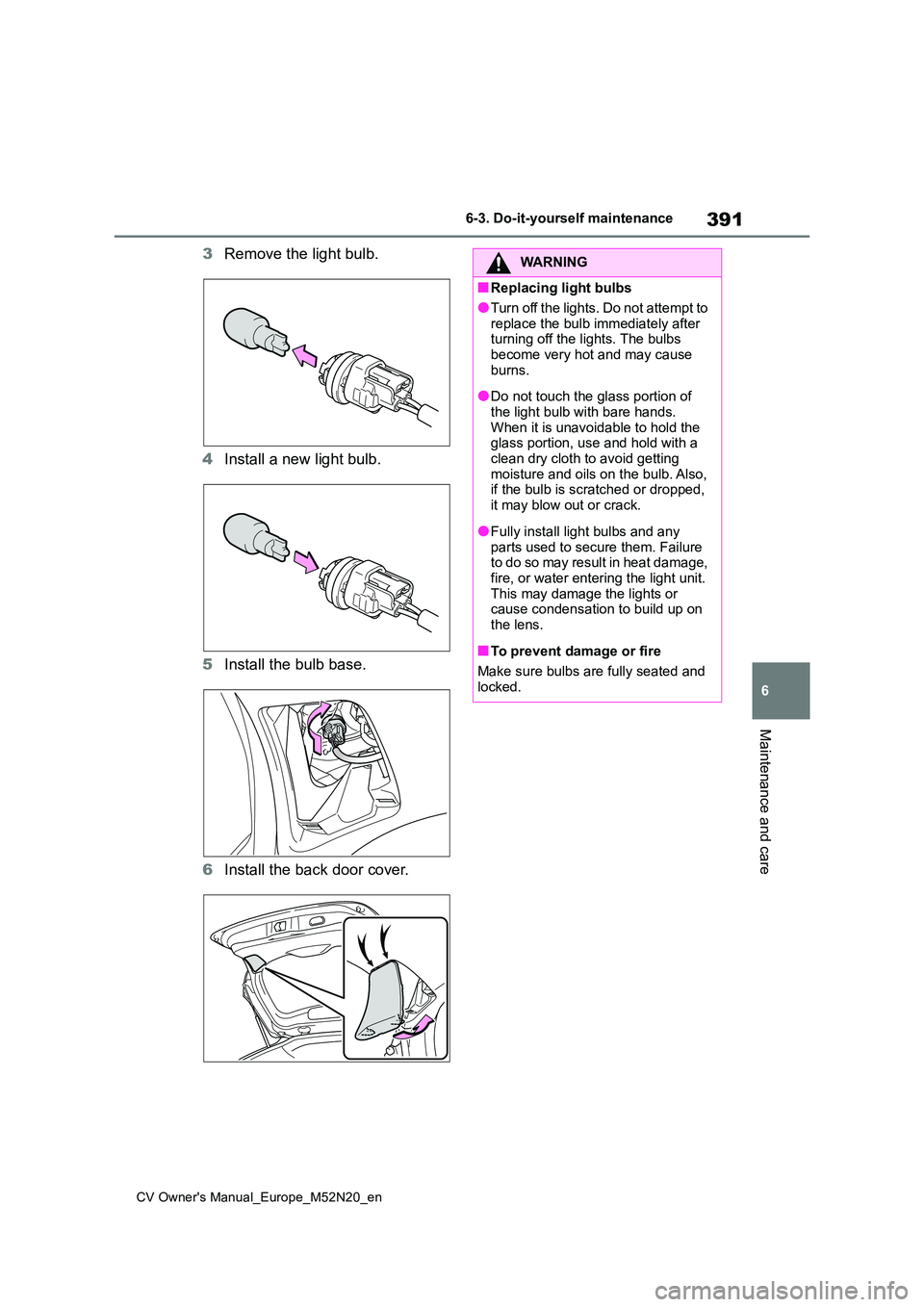
3Remove the light bulb.
4 Install a new light bulb.
5 Install the bulb base.
6 Install the back door cover.
WARNING
■Replacing light bulbs
●Turn off the lights. Do not attempt to
replace the bulb immediately after turning off the lights. The bulbs become very hot and may cause
burns.
●Do not touch the glass portion of
the light bulb with bare hands. When it is unavoidable to hold the glass portion, use and hold with a
clean dry cloth to avoid getting moisture and oils on the bulb. Also, if the bulb is scratched or dropped,
it may blow out or crack.
●Fully install light bulbs and any
parts used to secure them. Failure to do so may result in heat damage, fire, or water entering the light unit.
This may damage the lights or cause condensation to build up on the lens.
■To prevent damage or fire
Make sure bulbs are fully seated and
locked.