Auto lock TOYOTA YARIS CROSS 2022 Owners Manual
[x] Cancel search | Manufacturer: TOYOTA, Model Year: 2022, Model line: YARIS CROSS, Model: TOYOTA YARIS CROSS 2022Pages: 618, PDF Size: 130.77 MB
Page 19 of 618
17
CV Owner's Manual_Europe_M52N20_en
Pictorial index
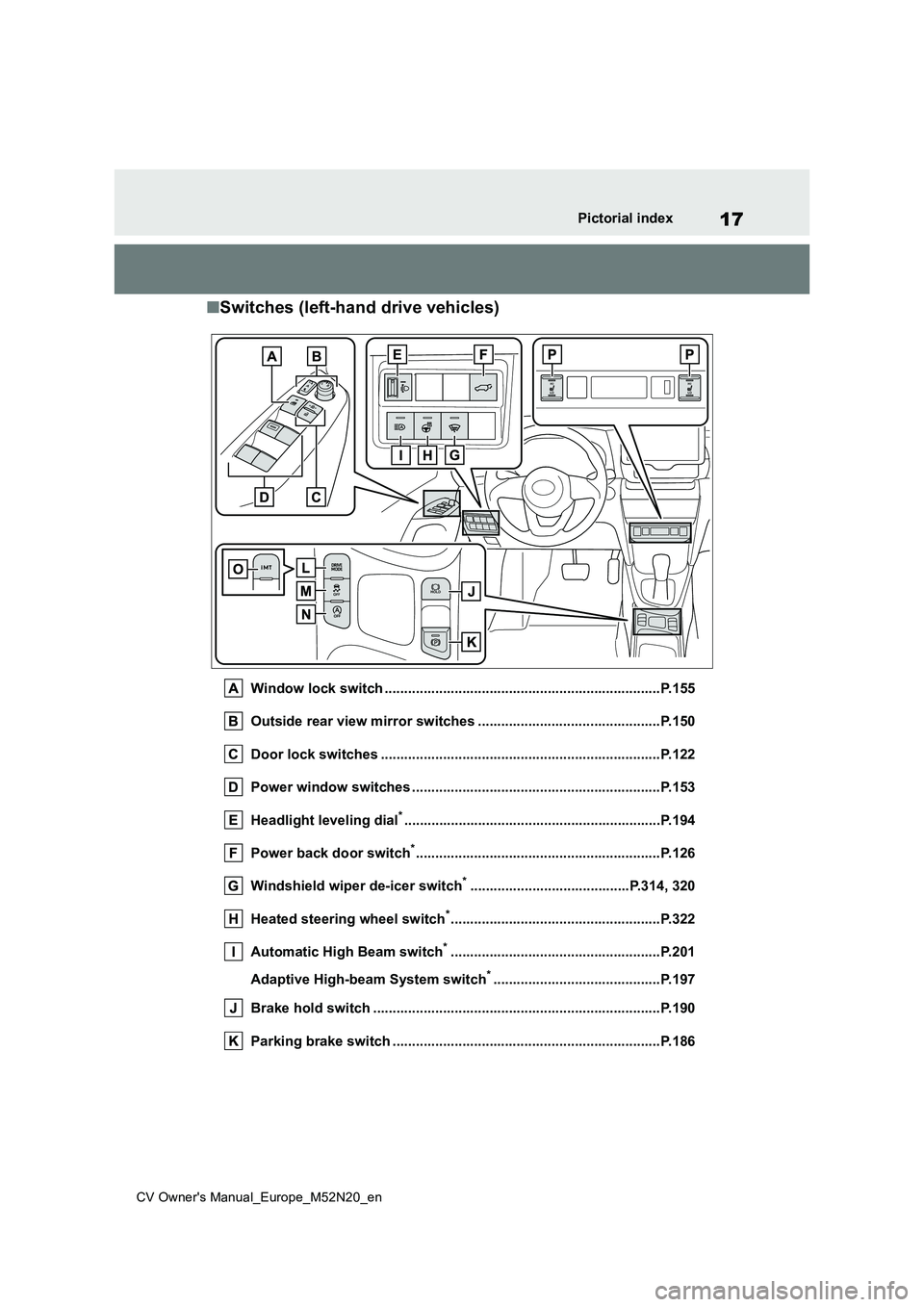
■Switches (left-hand drive vehicles)
Window lock switch .......................................................................P.155
Outside rear view mirror switches .............................. .................P.150
Door lock switches ............................................. ...........................P.122
Power window switches .......................................... ......................P.153
Headlight leveling dial*............................................................... ...P.194
Power back door switch*............................................................... P. 1 2 6
Windshield wiper de-icer switch*.........................................P.314, 320
Heated steering wheel switch*......................................................P.322
Automatic High Beam switch*......................................................P.201
Adaptive High-beam System switch*...........................................P.197
Brake hold switch .............................................. ............................P.190
Parking brake switch ........................................... ..........................P.186
Page 27 of 618
25
CV Owner's Manual_Europe_M52N20_en
Pictorial index
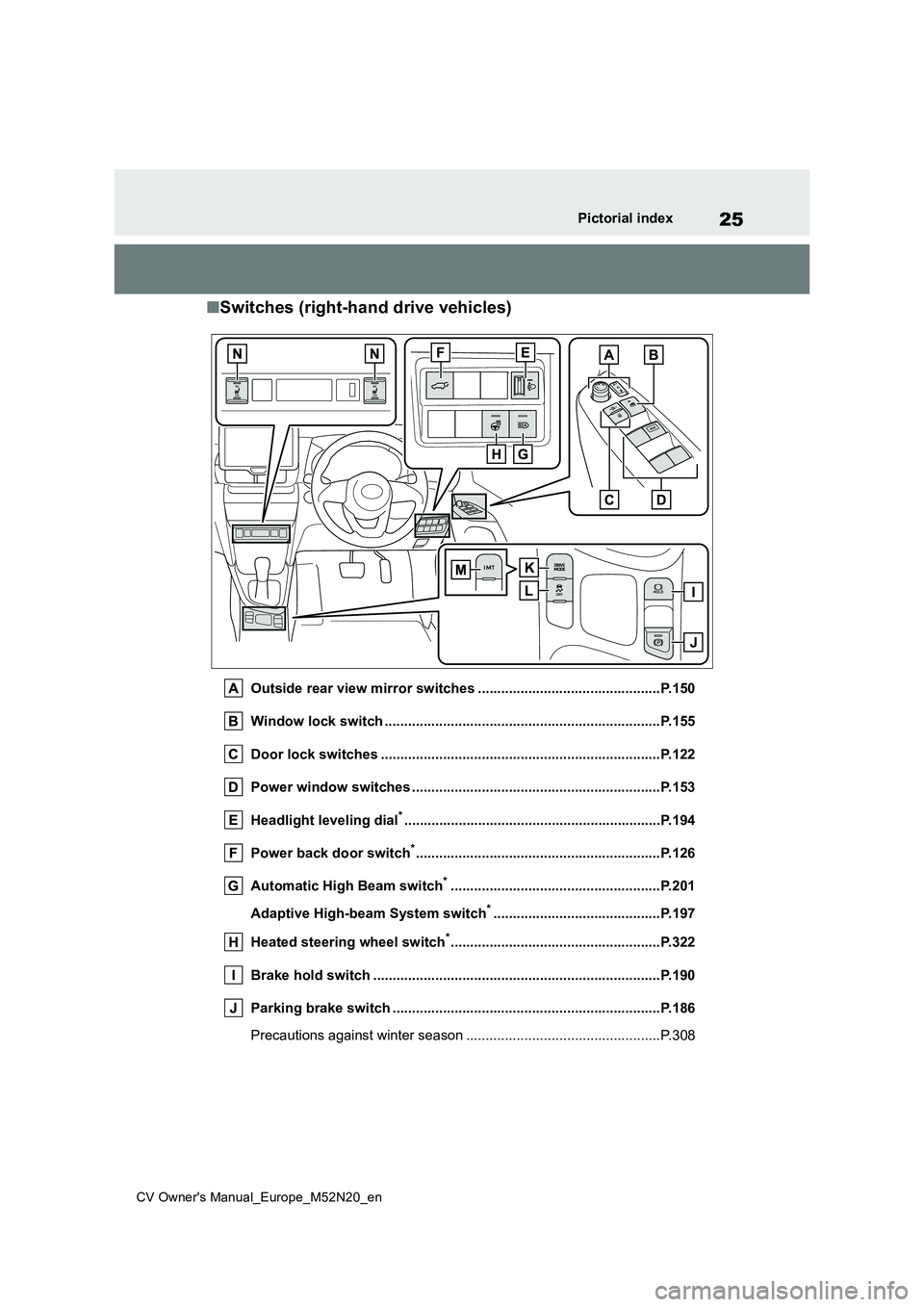
■Switches (right-hand drive vehicles)
Outside rear view mirror switches ...............................................P.150
Window lock switch ............................................. ..........................P.155
Door lock switches ............................................. ...........................P.122
Power window switches .......................................... ......................P.153
Headlight leveling dial*............................................................... ...P.194
Power back door switch*............................................................... P. 1 2 6
Automatic High Beam switch*......................................................P.201
Adaptive High-beam System switch*...........................................P.197
Heated steering wheel switch*......................................................P.322
Brake hold switch .............................................. ............................P.190
Parking brake switch ........................................... ..........................P.186
Precautions against winter season .............................. ....................P.308
Page 63 of 618
61
1
CV Owner's Manual_Europe_M52N20_en
1-2. Child safety
For safety and security
is not in the table), refer to the
“Vehicle List” provided by the child
restraint system maker for various
possible installation positions, or
check the compatibility after asking
the retailer of the child seat.
( P.53, 54)
1 If installing the child restraint
system to the front passenger
seat is unavoidable, refer to
P.50 for the front passenger seat
adjustment.
2 If the head restraint interferes
with your child restraint system,
and the head restraint can be
removed, remove the head
restraint. Otherwise, put the
head restraint in the upper most
position. ( P.144)
3 Run the seat belt through the
child restraint system and insert
the plate into the buckle. Make
sure that the belt is not twisted.
Securely fix the seat belt to the
child restraint system in accor-
dance to the directions enclosed
with the child restraint system.
4 If your child restraint system is
not equipped with a lock-off (a
seat belt locking feature),
s e c u r e t h e c h i l d r e s t r a i n t s y s t e m
using a locking clip.
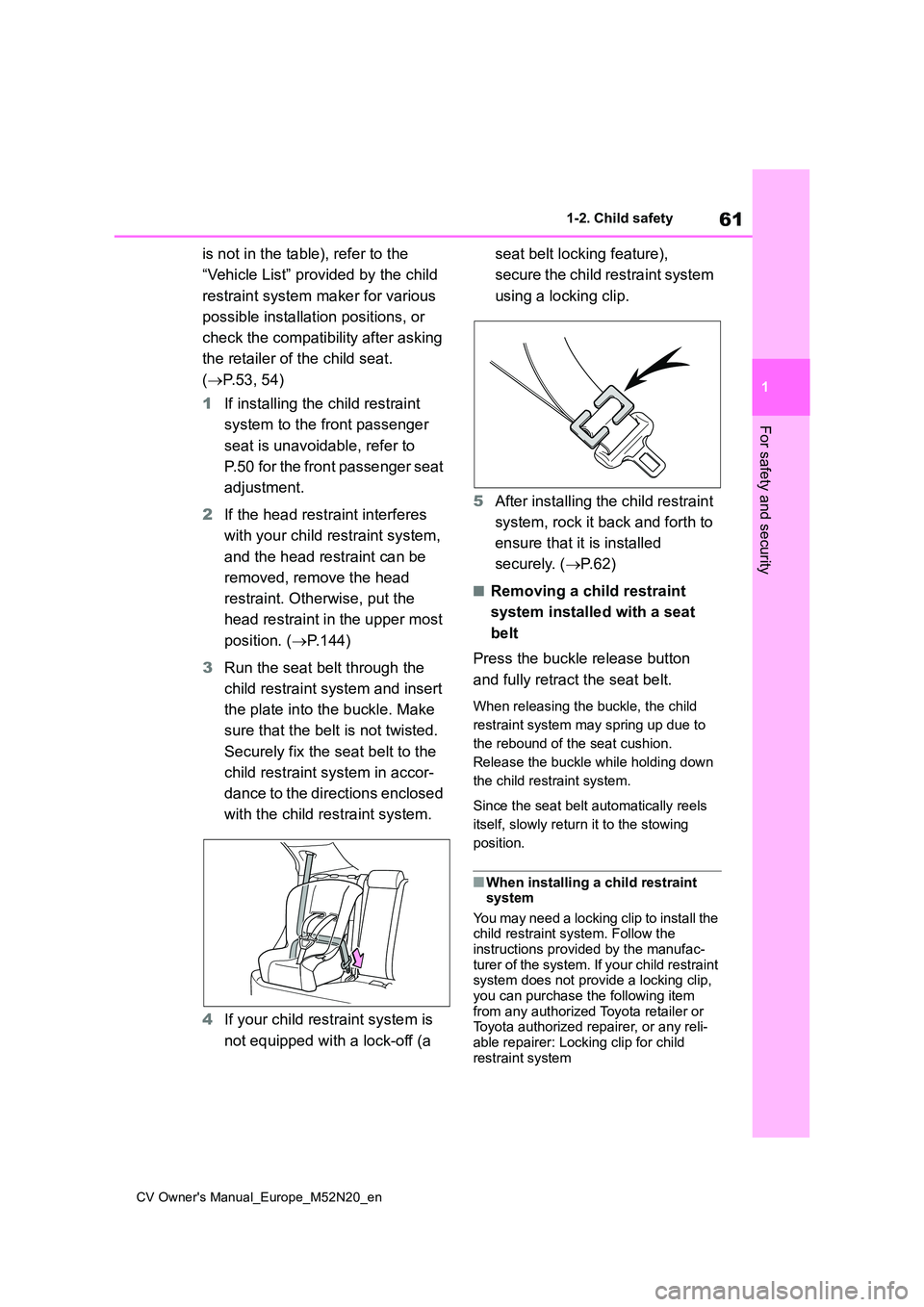
5 After installing the child restraint
system, rock it back and forth to
ensure that it is installed
securely. ( P. 6 2 )
■Removing a child restraint
system installed with a seat
belt
Press the buckle release button
and fully retract the seat belt.
When releasing the buckle, the child
restraint system may spring up due to
the rebound of the seat cushion.
Release the buckle while holding down
the child restraint system.
Since the seat belt automatically reels
itself, slowly return it to the stowing
position.
■When installing a child restraint system
You may need a locking clip to install the child restraint system. Follow the
instructions provided by the manufac- turer of the system. If your child restraint system does not provide a locking clip,
you can purchase the following item from any authorized Toyota retailer or Toyota authorized repairer, or any reli-
able repairer: Locking clip for child restraint system
Page 79 of 618
77
1
CV Owner's Manual_Europe_M52N20_en
1-4. Theft deterrent system
For safety and security
*: If equipped
■Items to check before locking
the vehicle
To prevent unexpected triggering of
the alarm and vehicle theft, make
sure of the following:
Nobody is in the vehicle.
The windows are closed before
the alarm is set.
No valuables or other personal
items are left in the vehicle.
■Setting
Close the door and hood, and lock
all the doors using the entry func-
tion (if equipped) or wireless
remote control. The system will set
automatically after 30 seconds.
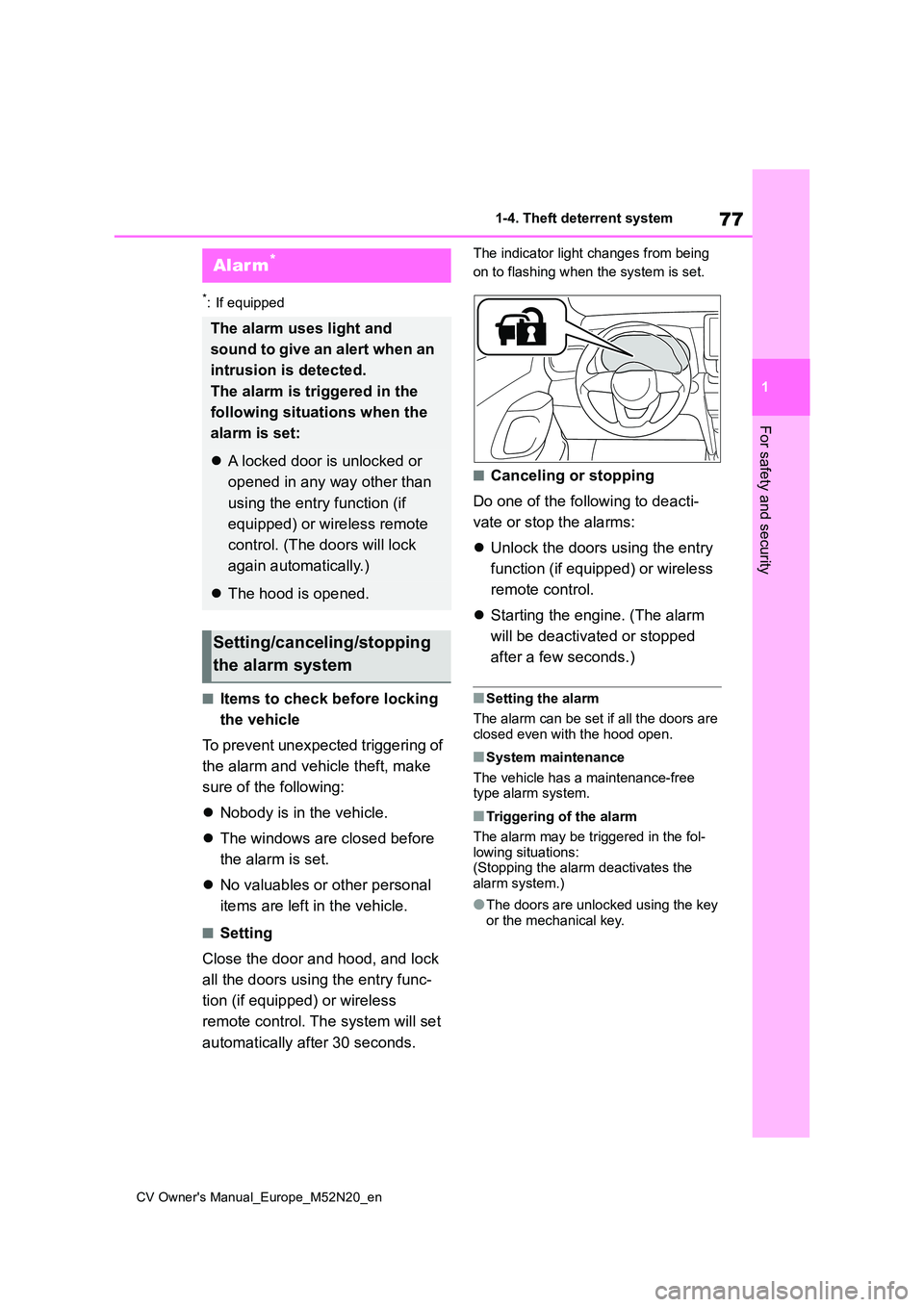
The indicator light changes from being
on to flashing when the system is set.
■Canceling or stopping
Do one of the following to deacti-
vate or stop the alarms:
Unlock the doors using the entry
function (if equipped) or wireless
remote control.
Starting the engine. (The alarm
will be deactivated or stopped
after a few seconds.)
■Setting the alarm
The alarm can be set if all the doors are closed even with the hood open.
■System maintenance
The vehicle has a maintenance-free type alarm system.
■Triggering of the alarm
The alarm may be triggered in the fol-
lowing situations: (Stopping the alarm deactivates the alarm system.)
●The doors are unlocked using the key or the mechanical key.
Alarm*
The alarm uses light and
sound to give an alert when an
intrusion is detected.
The alarm is triggered in the
following situations when the
alarm is set:
A locked door is unlocked or
opened in any way other than
using the entry function (if
equipped) or wireless remote
control. (The doors will lock
again automatically.)
The hood is opened.
Setting/canceling/stopping
the alarm system
Page 80 of 618
78
CV Owner's Manual_Europe_M52N20_en
1-4. Theft deterrent system
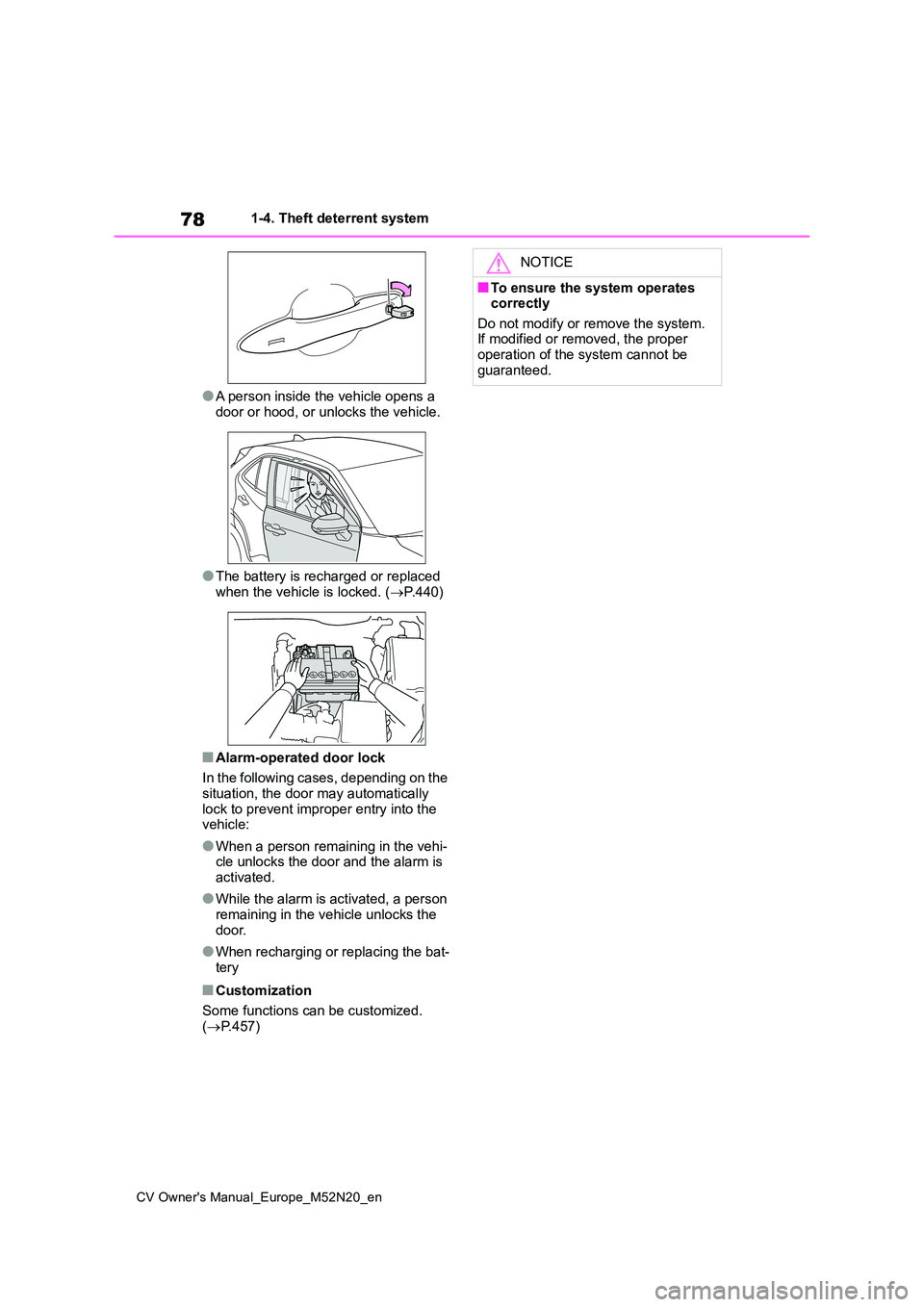
●A person inside the vehicle opens a
door or hood, or unlocks the vehicle.
●The battery is recharged or replaced
when the vehicle is locked. ( P.440)
■Alarm-operated door lock
In the following cases, depending on the situation, the door may automatically
lock to prevent improper entry into the vehicle:
●When a person remaining in the vehi-cle unlocks the door and the alarm is activated.
●While the alarm is activated, a person remaining in the vehicle unlocks the
door.
●When recharging or replacing the bat-
tery
■Customization
Some functions can be customized. ( P.457)
NOTICE
■To ensure the system operates correctly
Do not modify or remove the system. If modified or removed, the proper operation of the system cannot be
guaranteed.
Page 122 of 618
120
CV Owner's Manual_Europe_M52N20_en
3-2. Opening, closing and locking the doors
■Key
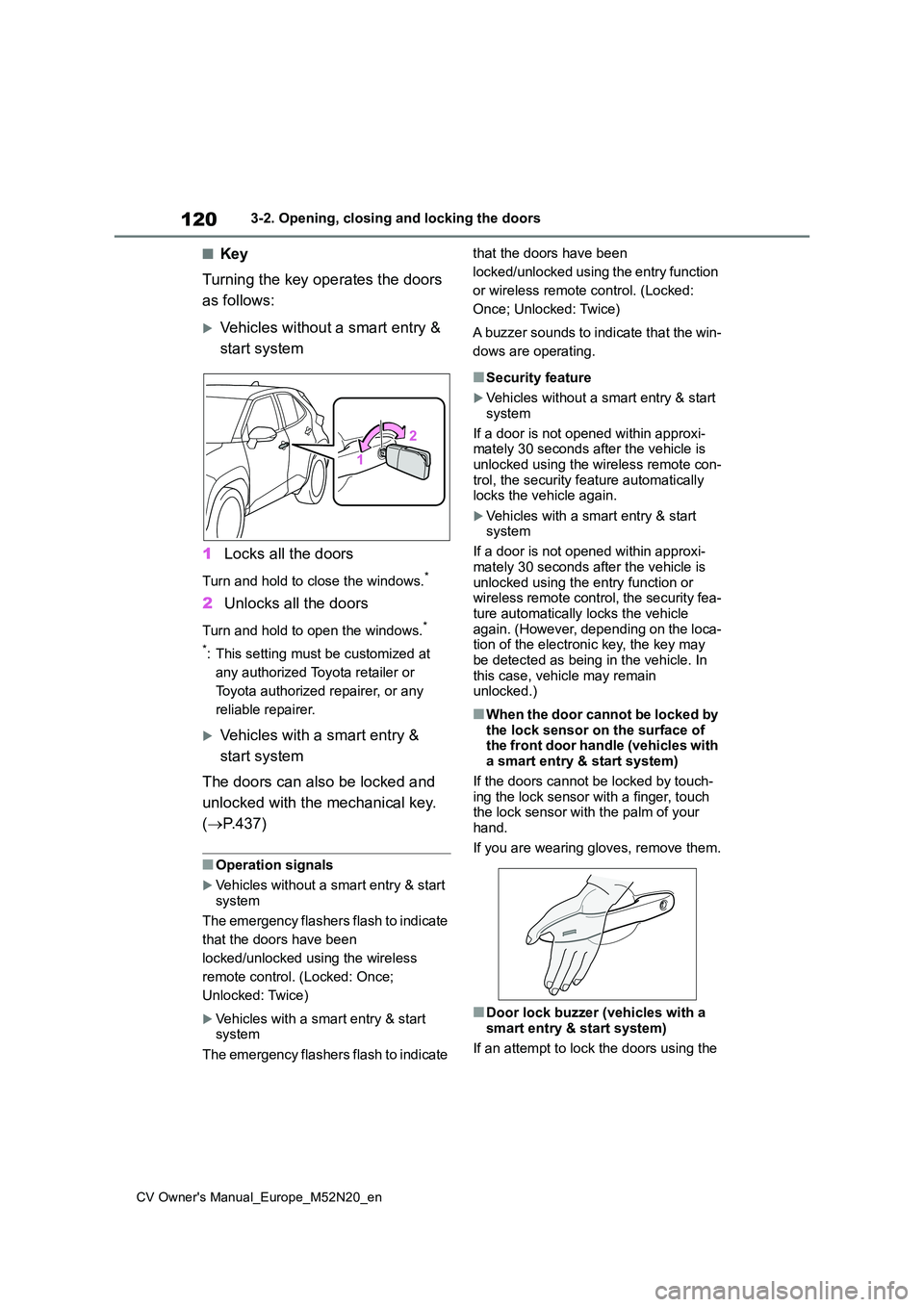
Turning the key operates the doors
as follows:
Vehicles without a smart entry &
start system
1 Locks all the doors
Turn and hold to close the windows.*
2Unlocks all the doors
Turn and hold to open the windows.*
*: This setting must be customized at
any authorized Toyota retailer or
Toyota authorized repairer, or any
reliable repairer.
Vehicles with a smart entry &
start system
The doors can also be locked and
unlocked with the mechanical key.
( P.437)
■Operation signals
Vehicles without a smart entry & start system
The emergency flashers flash to indicate
that the doors have been
locked/unlocked using the wireless
remote control. (Locked: Once;
Unlocked: Twice)
Vehicles with a smart entry & start system
The emergency flashers flash to indicate
that the doors have been
locked/unlocked using the entry function
or wireless remote control. (Locked:
Once; Unlocked: Twice)
A buzzer sounds to indicate that the win-
dows are operating.
■Security feature
Vehicles without a smart entry & start
system
If a door is not opened within approxi- mately 30 seconds after the vehicle is
unlocked using the wireless remote con- trol, the security feature automatically locks the vehicle again.
Vehicles with a smart entry & start system
If a door is not opened within approxi-
mately 30 seconds after the vehicle is unlocked using the entry function or wireless remote control, the security fea-
ture automatically locks the vehicle again. (However, depending on the loca-tion of the electronic key, the key may
be detected as being in the vehicle. In this case, vehicle may remain unlocked.)
■When the door cannot be locked by
the lock sensor on the surface of the front door handle (vehicles with a smart entry & start system)
If the doors cannot be locked by touch- ing the lock sensor with a finger, touch the lock sensor with the palm of your
hand.
If you are wearing gloves, remove them.
■Door lock buzzer (vehicles with a smart entry & start system)
If an attempt to lock the doors using the
Page 128 of 618
126
CV Owner's Manual_Europe_M52N20_en
3-2. Opening, closing and locking the doors
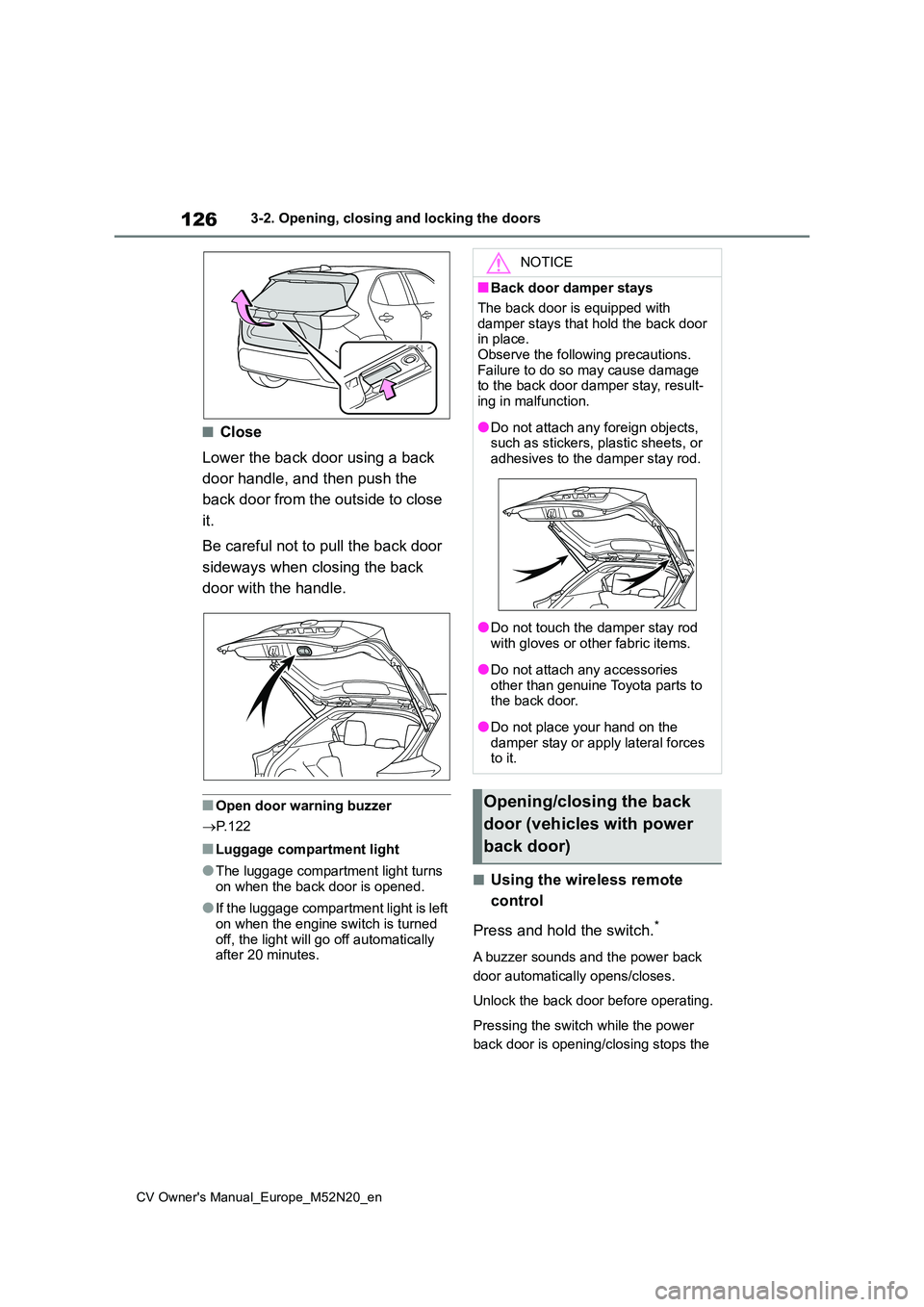
■Close
Lower the back door using a back
door handle, and then push the
back door from the outside to close
it.
Be careful not to pull the back door
sideways when closing the back
door with the handle.
■Open door warning buzzer
P. 1 2 2
■Luggage compartment light
●The luggage compartment light turns
on when the back door is opened.
●If the luggage compartment light is left
on when the engine switch is turned off, the light will go off automatically after 20 minutes.
■Using the wireless remote
control
Press and hold the switch.*
A buzzer sounds and the power back
door automatically opens/closes.
Unlock the back door before operating.
Pressing the switch while the power
back door is opening/closing stops the
NOTICE
■Back door damper stays
The back door is equipped with
damper stays that hold the back door in place.Observe the following precautions.
Failure to do so may cause damage to the back door damper stay, result-ing in malfunction.
●Do not attach any foreign objects, such as stickers, plastic sheets, or
adhesives to the damper stay rod.
●Do not touch the damper stay rod
with gloves or other fabric items.
●Do not attach any accessories
other than genuine Toyota parts to the back door.
●Do not place your hand on the damper stay or apply lateral forces to it.
Opening/closing the back
door (vehicles with power
back door)
Page 129 of 618
127
3
CV Owner's Manual_Europe_M52N20_en
3-2. Opening, closing and locking the doors
Before driving
operation. When the switch is pressed
again during the halted operation, the
back door will perform the reverse
operation.
*: This setting must be customized at
any authorized Toyota retailer or
Toyota authorized repairer, or any
reliable repairer.
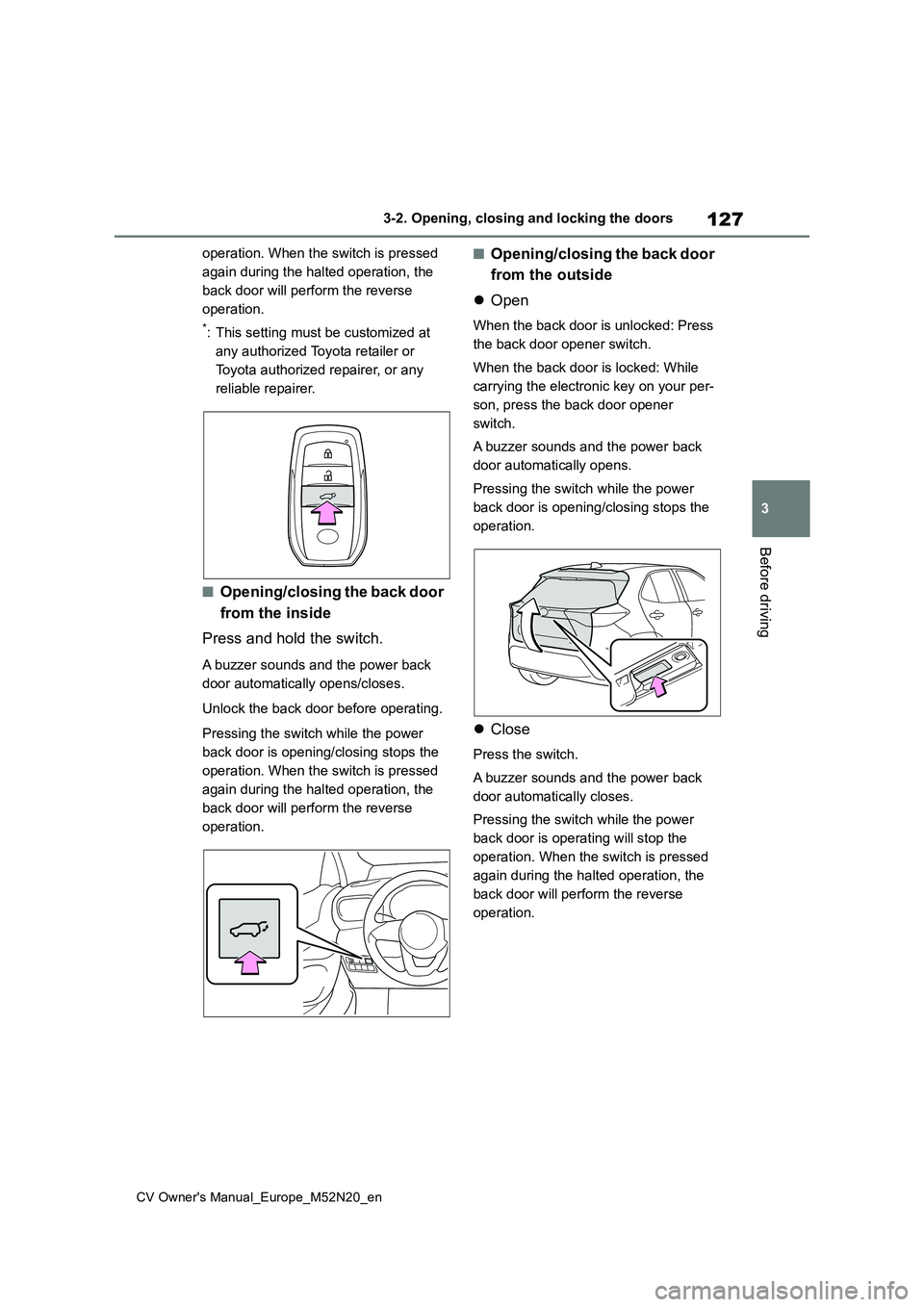
■Opening/closing the back door
from the inside
Press and hold the switch.
A buzzer sounds and the power back
door automatically opens/closes.
Unlock the back door before operating.
Pressing the switch while the power
back door is opening/closing stops the
operation. When the switch is pressed
again during the halted operation, the
back door will perform the reverse
operation.
■Opening/closing the back door
from the outside
Open
When the back door is unlocked: Press
the back door opener switch.
When the back door is locked: While
carrying the electronic key on your per-
son, press the back door opener
switch.
A buzzer sounds and the power back
door automatically opens.
Pressing the switch while the power
back door is opening/closing stops the
operation.
Close
Press the switch.
A buzzer sounds and the power back
door automatically closes.
Pressing the switch while the power
back door is operating will stop the
operation. When the switch is pressed
again during the halted operation, the
back door will perform the reverse
operation.
Page 130 of 618
128
CV Owner's Manual_Europe_M52N20_en
3-2. Opening, closing and locking the doors
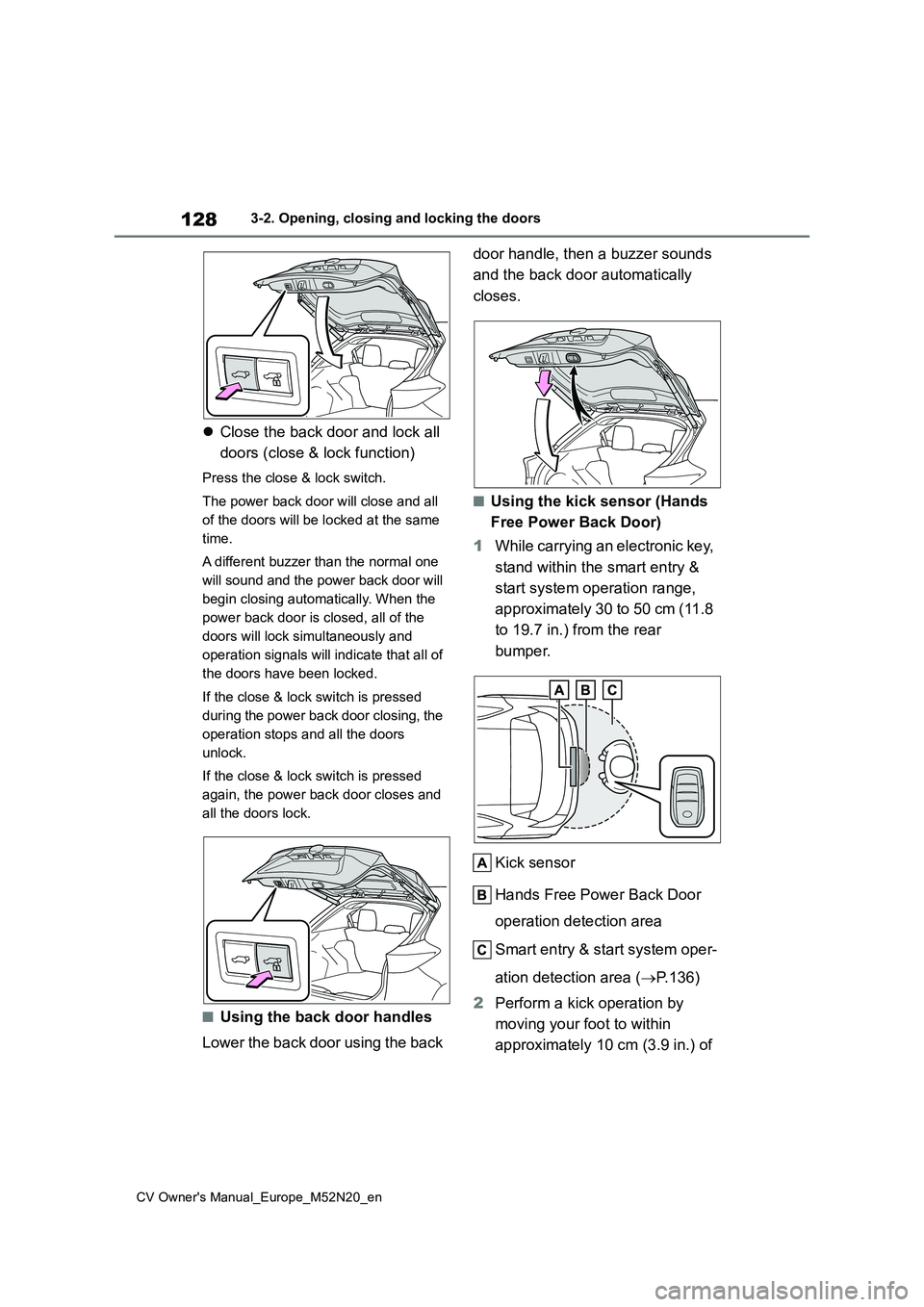
Close the back door and lock all
doors (close & lock function)
Press the close & lock switch.
The power back door will close and all
of the doors will be locked at the same
time.
A different buzzer than the normal one
will sound and the power back door will
begin closing automatically. When the
power back door is closed, all of the
doors will lock simultaneously and
operation signals will indicate that all of
the doors have been locked.
If the close & lock switch is pressed
during the power back door closing, the
operation stops and all the doors
unlock.
If the close & lock switch is pressed
again, the power back door closes and
all the doors lock.
■Using the back door handles
Lower the back door using the back
door handle, then a buzzer sounds
and the back door automatically
closes.
■Using the kick sensor (Hands
Free Power Back Door)
1 While carrying an electronic key,
stand within the smart entry &
start system operation range,
approximately 30 to 50 cm (11.8
to 19.7 in.) from the rear
bumper.
Kick sensor
Hands Free Power Back Door
operation detection area
Smart entry & start system oper-
ation detection area ( P.136)
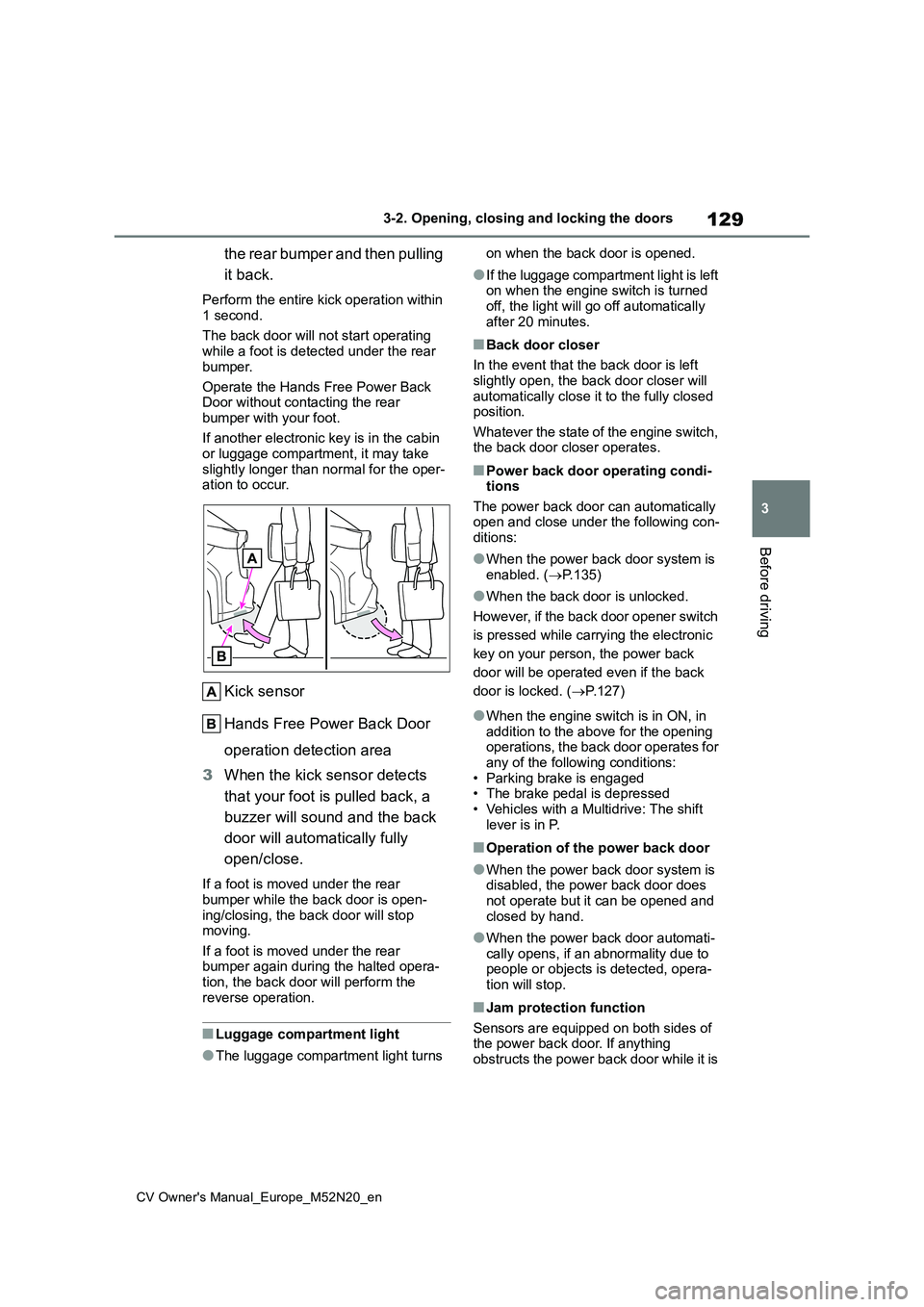
2 Perform a kick operation by
moving your foot to within
approximately 10 cm (3.9 in.) of
Page 131 of 618
129
3
CV Owner's Manual_Europe_M52N20_en
3-2. Opening, closing and locking the doors
Before driving
the rear bumper and then pulling
it back.
Perform the entire kick operation within
1 second.
The back door will not start operating while a foot is detected under the rear
bumper.
Operate the Hands Free Power Back Door without contacting the rear
bumper with your foot.
If another electronic key is in the cabin or luggage compartment, it may take
slightly longer than normal for the oper- ation to occur.
Kick sensor
Hands Free Power Back Door
operation detection area
3 When the kick sensor detects
that your foot is pulled back, a
buzzer will sound and the back
door will automatically fully
open/close.
If a foot is moved under the rear
bumper while the back door is open- ing/closing, the back door will stop moving.
If a foot is moved under the rear bumper again during the halted opera-tion, the back door will perform the
reverse operation.
■Luggage compartment light
●The luggage compartment light turns
on when the back door is opened.
●If the luggage compartment light is left on when the engine switch is turned
off, the light will go off automatically after 20 minutes.
■Back door closer
In the event that the back door is left
slightly open, the back door closer will automatically close it to the fully closed position.
Whatever the state of the engine switch, the back door closer operates.
■Power back door operating condi-tions
The power back door can automatically open and close under the following con-ditions:
●When the power back door system is enabled. ( P.135)
●When the back door is unlocked.
However, if the back door opener switch
is pressed while carrying the electronic
key on your person, the power back
door will be operated even if the back
door is locked. ( P.127)
●When the engine switch is in ON, in addition to the above for the opening operations, the back door operates for
any of the following conditions: • Parking brake is engaged• The brake pedal is depressed
• Vehicles with a Multidrive: The shift lever is in P.
■Operation of the power back door
●When the power back door system is disabled, the power back door does not operate but it can be opened and
closed by hand.
●When the power back door automati-
cally opens, if an abnormality due to people or objects is detected, opera-tion will stop.
■Jam protection function
Sensors are equipped on both sides of the power back door. If anything obstructs the power back door while it is