parking TOYOTA YARIS CROSS 2022 Owners Manual
[x] Cancel search | Manufacturer: TOYOTA, Model Year: 2022, Model line: YARIS CROSS, Model: TOYOTA YARIS CROSS 2022Pages: 618, PDF Size: 130.77 MB
Page 5 of 618
3
CV Owner's Manual_Europe_M52N20_en
TABLE OF CONTENTS
1
6
5
4
3
2
8
7
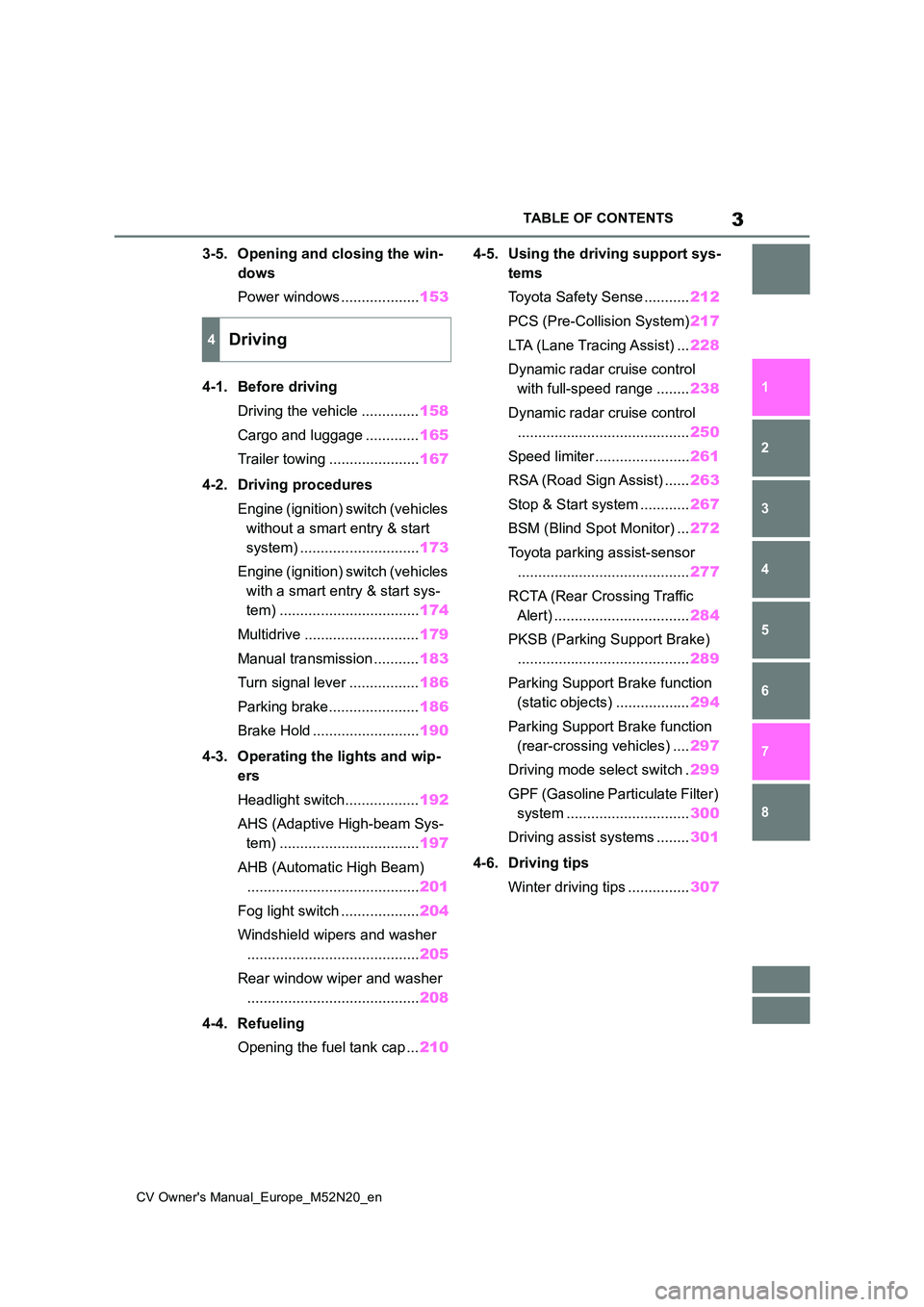
3-5. Opening and closing the win-
dows
Power windows ................... 153
4-1. Before driving
Driving the vehicle .............. 158
Cargo and luggage ............. 165
Trailer towing ...................... 167
4-2. Driving procedures
Engine (ignition) switch (vehicles
without a smart entry & start
system) ............................. 173
Engine (ignition) switch (vehicles
with a smart entry & start sys-
tem) .................................. 174
Multidrive ............................ 179
Manual transmission ........... 183
Turn signal lever ................. 186
Parking brake...................... 186
Brake Hold .......................... 190
4-3. Operating the lights and wip-
ers
Headlight switch.................. 192
AHS (Adaptive High-beam Sys-
tem) .................................. 197
AHB (Automatic High Beam)
.......................................... 201
Fog light switch ................... 204
Windshield wipers and washer
.......................................... 205
Rear window wiper and washer
.......................................... 208
4-4. Refueling
Opening the fuel tank cap ... 210
4-5. Using the driving support sys-
tems
Toyota Safety Sense ........... 212
PCS (Pre-Collision System) 217
LTA (Lane Tracing Assist) ... 228
Dynamic radar cruise control
with full-speed range ........ 238
Dynamic radar cruise control
.......................................... 250
Speed limiter ....................... 261
RSA (Road Sign Assist) ...... 263
Stop & Start system ............ 267
BSM (Blind Spot Monitor) ... 272
Toyota parking assist-sensor
.......................................... 277
RCTA (Rear Crossing Traffic
Alert) ................................. 284
PKSB (Parking Support Brake)
.......................................... 289
Parking Support Brake function
(static objects) .................. 294
Parking Support Brake function
(rear-crossing vehicles) .... 297
Driving mode select switch . 299
GPF (Gasoline Particulate Filter)
system .............................. 300
Driving assist systems ........ 301
4-6. Driving tips
Winter driving tips ............... 307
4Driving
Page 19 of 618
17
CV Owner's Manual_Europe_M52N20_en
Pictorial index
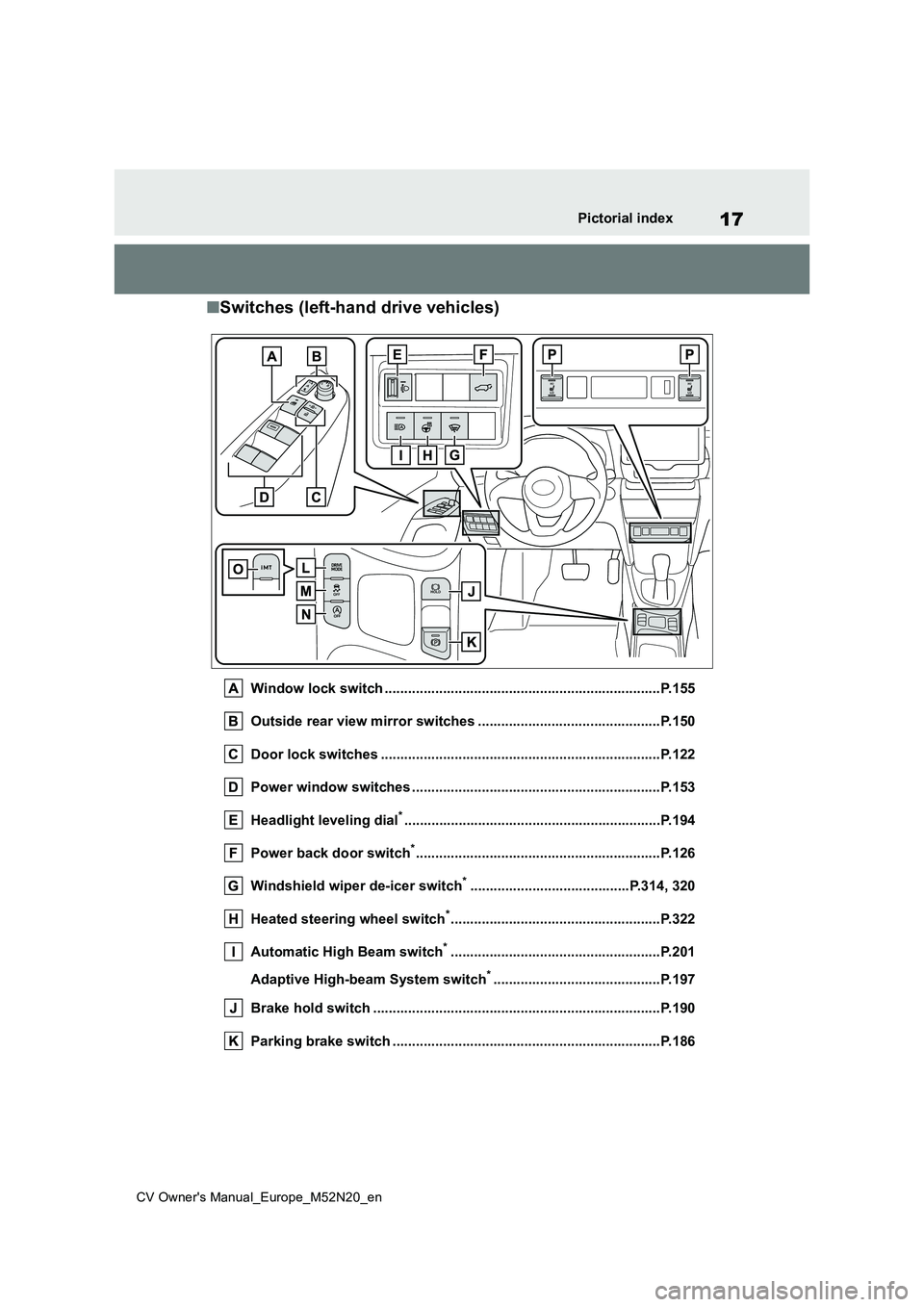
■Switches (left-hand drive vehicles)
Window lock switch .......................................................................P.155
Outside rear view mirror switches .............................. .................P.150
Door lock switches ............................................. ...........................P.122
Power window switches .......................................... ......................P.153
Headlight leveling dial*............................................................... ...P.194
Power back door switch*............................................................... P. 1 2 6
Windshield wiper de-icer switch*.........................................P.314, 320
Heated steering wheel switch*......................................................P.322
Automatic High Beam switch*......................................................P.201
Adaptive High-beam System switch*...........................................P.197
Brake hold switch .............................................. ............................P.190
Parking brake switch ........................................... ..........................P.186
Page 27 of 618
25
CV Owner's Manual_Europe_M52N20_en
Pictorial index
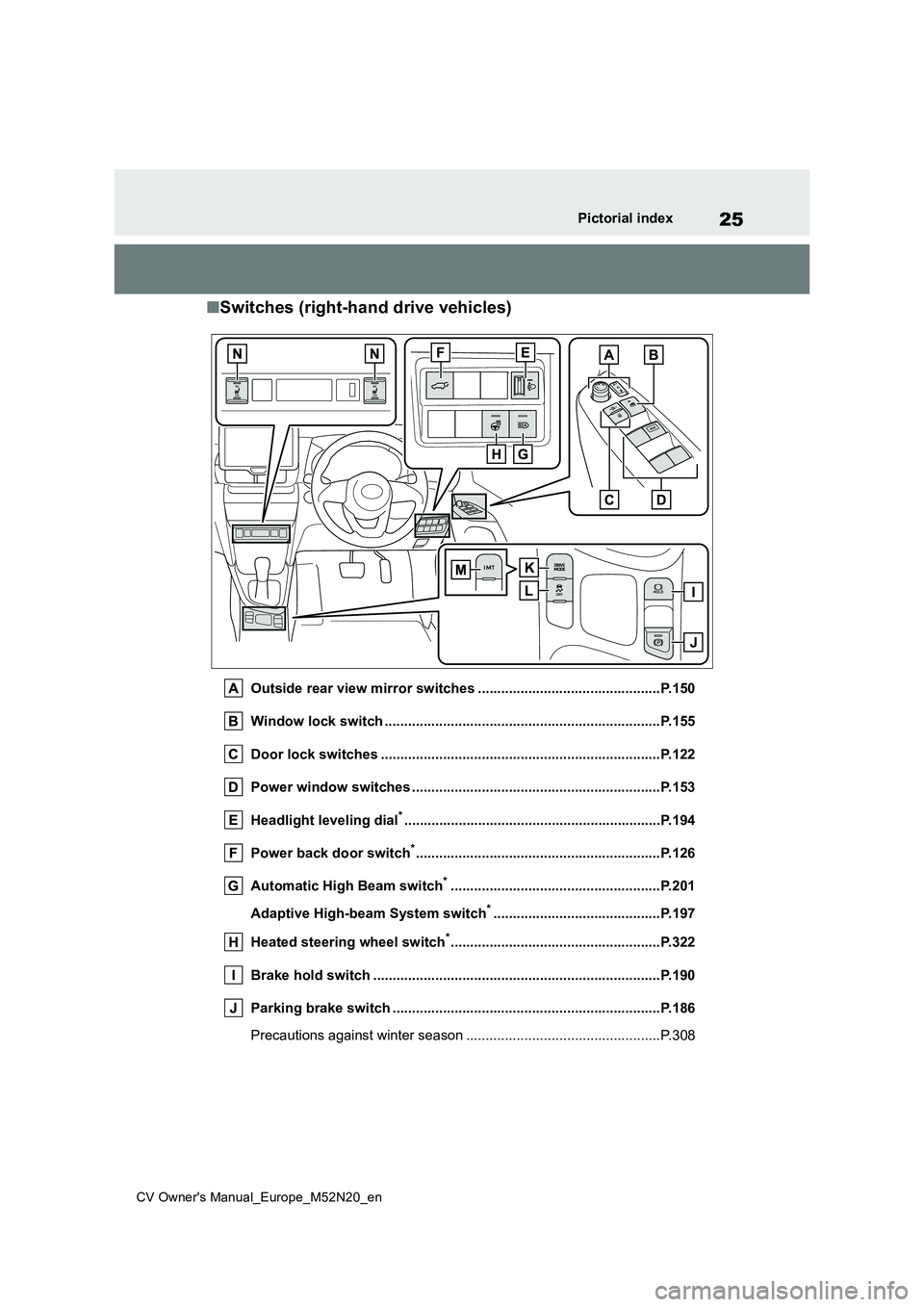
■Switches (right-hand drive vehicles)
Outside rear view mirror switches ...............................................P.150
Window lock switch ............................................. ..........................P.155
Door lock switches ............................................. ...........................P.122
Power window switches .......................................... ......................P.153
Headlight leveling dial*............................................................... ...P.194
Power back door switch*............................................................... P. 1 2 6
Automatic High Beam switch*......................................................P.201
Adaptive High-beam System switch*...........................................P.197
Heated steering wheel switch*......................................................P.322
Brake hold switch .............................................. ............................P.190
Parking brake switch ........................................... ..........................P.186
Precautions against winter season .............................. ....................P.308
Page 48 of 618
46
CV Owner's Manual_Europe_M52N20_en
1-1. For safe use
Exhaust gas precautions
Harmful substance to the
human body is included in
exhaust gases if inhaled.
WARNING
Exhaust gases include harmful car-
bon monoxide (CO), which is color- less and odorless. Observe the following precautions.
Failure to do so may cause exhaust gases enter the vehicle and may lead to an accident caused by light-
headedness, or may lead to death or a serious health hazard.
■Important points while driving
●Keep the back door closed.
●If you smell exhaust gases in the vehicle even when the back door is closed, open the windows and have
the vehicle inspected at any autho- rized Toyota retailer or Toyota authorized repairer, or any reliable
repairer as soon as possible.
■When parking
●If the vehicle is in a poorly venti- lated area or a closed area, such as a garage, stop the engine.
●Do not leave the vehicle with the engine on for a long time.
If such a situation cannot be avoided, park the vehicle in an open space and ensure that
exhaust fumes do not enter the vehicle interior.
●Do not leave the engine running in an area with snow build-up, or where it is snowing. If snowbanks
build up around the vehicle while the engine is running, exhaust gases may collect and enter the
vehicle.
■Exhaust pipe
The exhaust system needs to be checked periodically. If there is a hole
or crack caused by corrosion, dam- age to a joint or abnormal exhaust noise, be sure to have the vehicle
inspected and repaired by any autho- rized Toyota retailer or Toyota autho-rized repairer, or any reliable repairer.
Page 83 of 618
81
2
CV Owner's Manual_Europe_M52N20_en
2-1. Instrument cluster
Vehicle status information and indicators
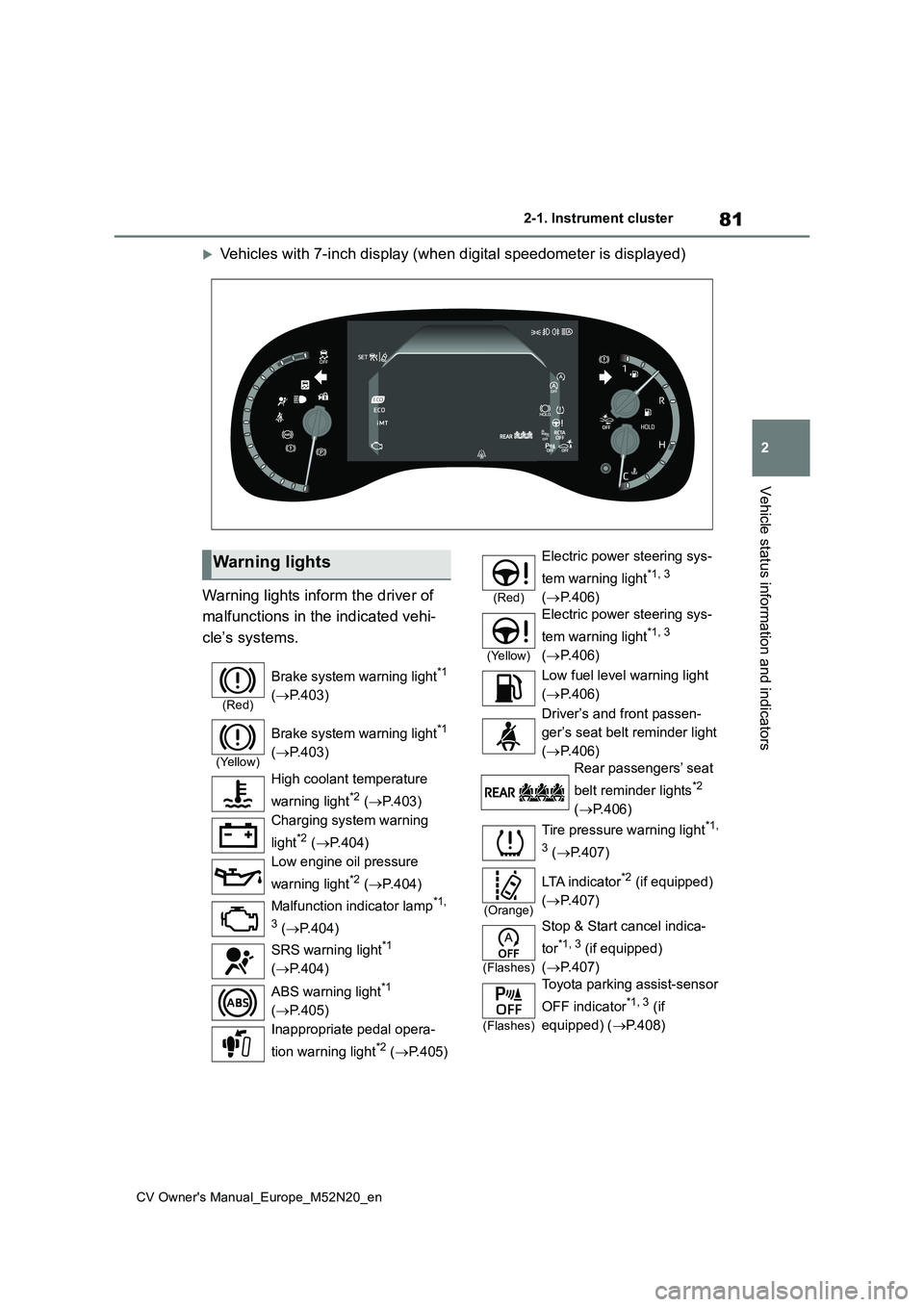
Vehicles with 7-inch display (when digital speedometer is displayed)
Warning lights inform the driver of
malfunctions in the indicated vehi-
cle’s systems.
Warning lights
(Red)
Brake system warning light*1
( P.403)
(Yellow)
Brake system warning light*1
( P.403)
High coolant temperature
warning light*2 ( P.403)
Charging system warning
light*2 ( P.404)
Low engine oil pressure
warning light*2 ( P.404)
Malfunction indicator lamp*1,
3 ( P.404)
SRS warning light*1
( P.404)
ABS warning light*1
( P.405)
Inappropriate pedal opera-
tion warning light*2 ( P.405)
(Red)
Electric power steering sys-
tem warning light*1, 3
( P.406)
(Yellow)
Electric power steering sys-
tem warning light*1, 3
( P.406)
Low fuel level warning light
( P.406)
Driver’s and front passen-
ger’s seat belt reminder light
( P.406)
Rear passengers’ seat
belt reminder lights*2
( P.406)
Tire pressure warning light*1,
3 ( P.407)
(Orange)
LTA i n d i c a t o r*2 (if equipped)
( P.407)
(Flashes)
Stop & Start cancel indica-
tor*1, 3 (if equipped)
( P.407)
(Flashes)
Toyota parking assist-sensor
OFF indicator*1, 3 (if
equipped) ( P.408)
Page 84 of 618
82
CV Owner's Manual_Europe_M52N20_en
2-1. Instrument cluster
*1: These lights come on when the
engine switch is turned to ON to indi-
cate that a system check is being
performed. They will turn off after the
engine is started, or after a few sec-
onds. There may be a malfunction in
a system if the lights do not come
on, or turn off. Have the vehicle
inspected by any authorized Toyota
retailer or Toyota authorized repairer,
or any reliable repairer.
*2: This light illuminates on the multi-
information display.
*3: This light illuminates on the multi-
information display (with 7-inch dis-
play only).
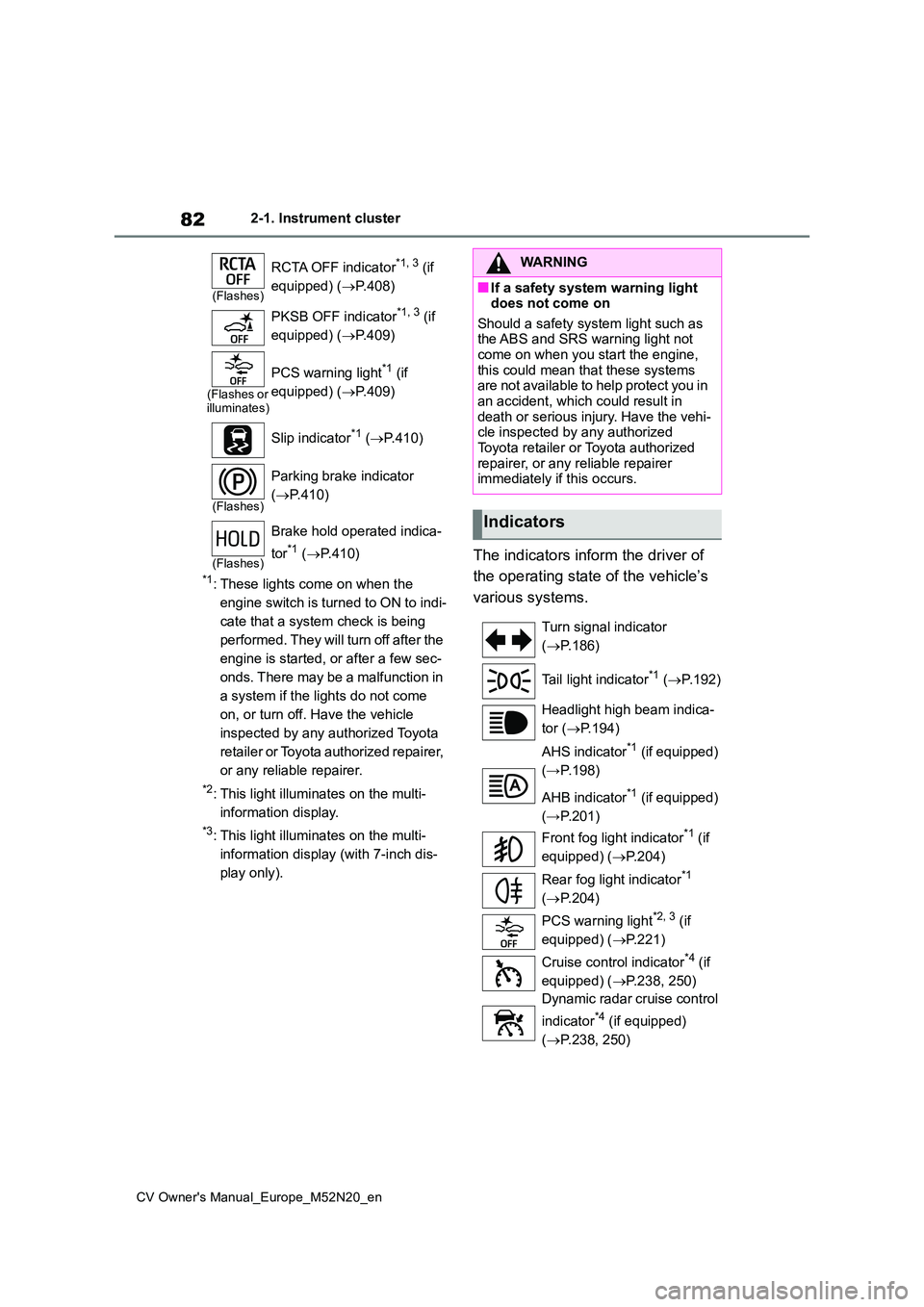
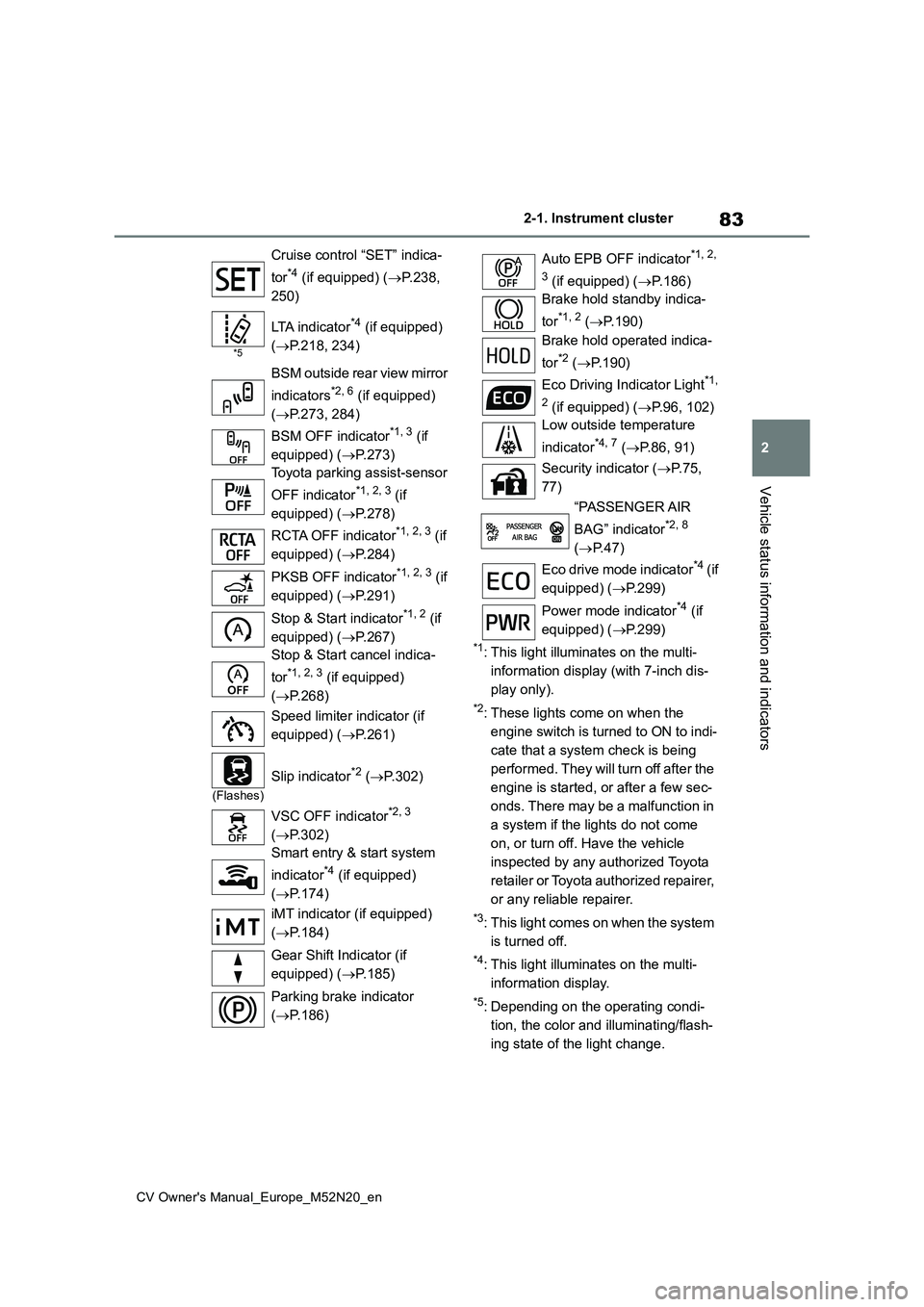
The indicators inform the driver of
the operating state of the vehicle’s
various systems.
(Flashes)
RCTA OFF indicator*1, 3 (if
equipped) ( P.408)
PKSB OFF indicator*1, 3 (if
equipped) ( P.409)
(Flashes or illuminates)
PCS warning light*1 (if
equipped) ( P.409)
Slip indicator*1 ( P.410)
(Flashes)
Parking brake indicator
( P.410)
(Flashes)
Brake hold operated indica-
tor*1 ( P.410)
WARNING
■If a safety system warning light does not come on
Should a safety system light such as the ABS and SRS warning light not come on when you start the engine,
this could mean that these systems are not available to help protect you in an accident, which could result in
death or serious injury. Have the vehi- cle inspected by any authorized Toyota retailer or Toyota authorized
repairer, or any reliable repairer immediately if this occurs.
Indicators
Turn signal indicator
( P.186)
Tail light indicator*1 ( P.192)
Headlight high beam indica-
tor ( P.194)
AHS indicator*1 (if equipped)
(→P.198)
AHB indicator*1 (if equipped)
(→P.201)
Front fog light indicator*1 (if
equipped) ( P.204)
Rear fog light indicator*1
( P.204)
PCS warning light*2, 3 (if
equipped) ( P.221)
Cruise control indicator*4 (if
equipped) ( P.238, 250)
Dynamic radar cruise control
indicator*4 (if equipped)
( P.238, 250)
Page 85 of 618
83
2
CV Owner's Manual_Europe_M52N20_en
2-1. Instrument cluster
Vehicle status information and indicators
*1: This light illuminates on the multi-
information display (with 7-inch dis-
play only).
*2: These lights come on when the
engine switch is turned to ON to indi-
cate that a system check is being
performed. They will turn off after the
engine is started, or after a few sec-
onds. There may be a malfunction in
a system if the lights do not come
on, or turn off. Have the vehicle
inspected by any authorized Toyota
retailer or Toyota authorized repairer,
or any reliable repairer.
*3: This light comes on when the system
is turned off.
*4: This light illuminates on the multi-
information display.
*5: Depending on the operating condi-
tion, the color and illuminating/flash-
ing state of the light change.
Cruise control “SET” indica-
tor*4 (if equipped) ( P.238,
250)
*5
LTA indicator*4 (if equipped)
( P.218, 234)
BSM outside rear view mirror
indicators*2, 6 (if equipped)
( P.273, 284)
BSM OFF indicator*1, 3 (if
equipped) ( P.273)
Toyota parking assist-sensor
OFF indicator*1, 2, 3 (if
equipped) ( P.278)
RCTA OFF indicator*1, 2, 3 (if
equipped) ( P.284)
PKSB OFF indicator*1, 2, 3 (if
equipped) ( P.291)
Stop & Start indicator*1, 2 (if
equipped) ( P.267)
Stop & Start cancel indica-
tor*1, 2, 3 (if equipped)
( P.268)
Speed limiter indicator (if
equipped) ( P.261)
(Flashes)
Slip indicator*2 (P.302)
VSC OFF indicator*2, 3
( P.302)
Smart entry & start system
indicator*4 (if equipped)
( P.174)
iMT indicator (if equipped)
( P.184)
Gear Shift Indicator (if
equipped) ( P.185)
Parking brake indicator
( P.186)
Auto EPB OFF indicator*1, 2,
3 (if equipped) ( P.186)
Brake hold standby indica-
tor*1, 2 ( P.190)
Brake hold operated indica-
tor*2 ( P.190)
Eco Driving Indicator Light*1,
2 (if equipped) ( P.96, 102)
Low outside temperature
indicator*4, 7 ( P.86, 91)
Security indicator ( P. 7 5 ,
77)
“PASSENGER AIR
BAG” indicator*2, 8
( P.47)
Eco drive mode indicator*4 ( i f
equipped) ( P.299)
Power mode indicator*4 (if
equipped) ( P.299)
Page 111 of 618
109
2
CV Owner's Manual_Europe_M52N20_en
2-1. Instrument cluster
Vehicle status information and indicators
ing state of a relevant system.
PCS (Pre-Collision System) (if
equipped) ( P.217)
LTA (Lane Tracing Assist) (if
equipped) ( P.228)
PKSB (Parking Support Brake)
(if equipped) ( P.289)
Brake Override System
( P.160)
Drive-Start Control (if equipped)
( P.165)
Details of content displayed on the
head-up display may differ from that
displayed on the multi-information dis-
play. For details, refer to the explana-
tion of each system.
■ icon
Displayed when a warning mes-
sage is displayed on the multi-infor-
mation display. ( P.413)
■Warning message
Some warning messages are dis-
played when necessary, according
to certain conditions.
Details of content displayed on the
head-up display may differ from that
displayed on the multi-information dis-
play.
■Audio system operation status
(if equipped)
Displayed when an audio remote
control switch on the steering wheel
is operated.
■Hands-free system status (if
equipped)
Displayed when the hands-free
system is operated.
■When a pop-up display is displayed
When a pop-up display is displayed, a current display may no longer be dis-played. In this case, the display will
return after the pop-up display disap- pears.
■Tachometer
Displays the engine speed in revo-
lutions per minute.
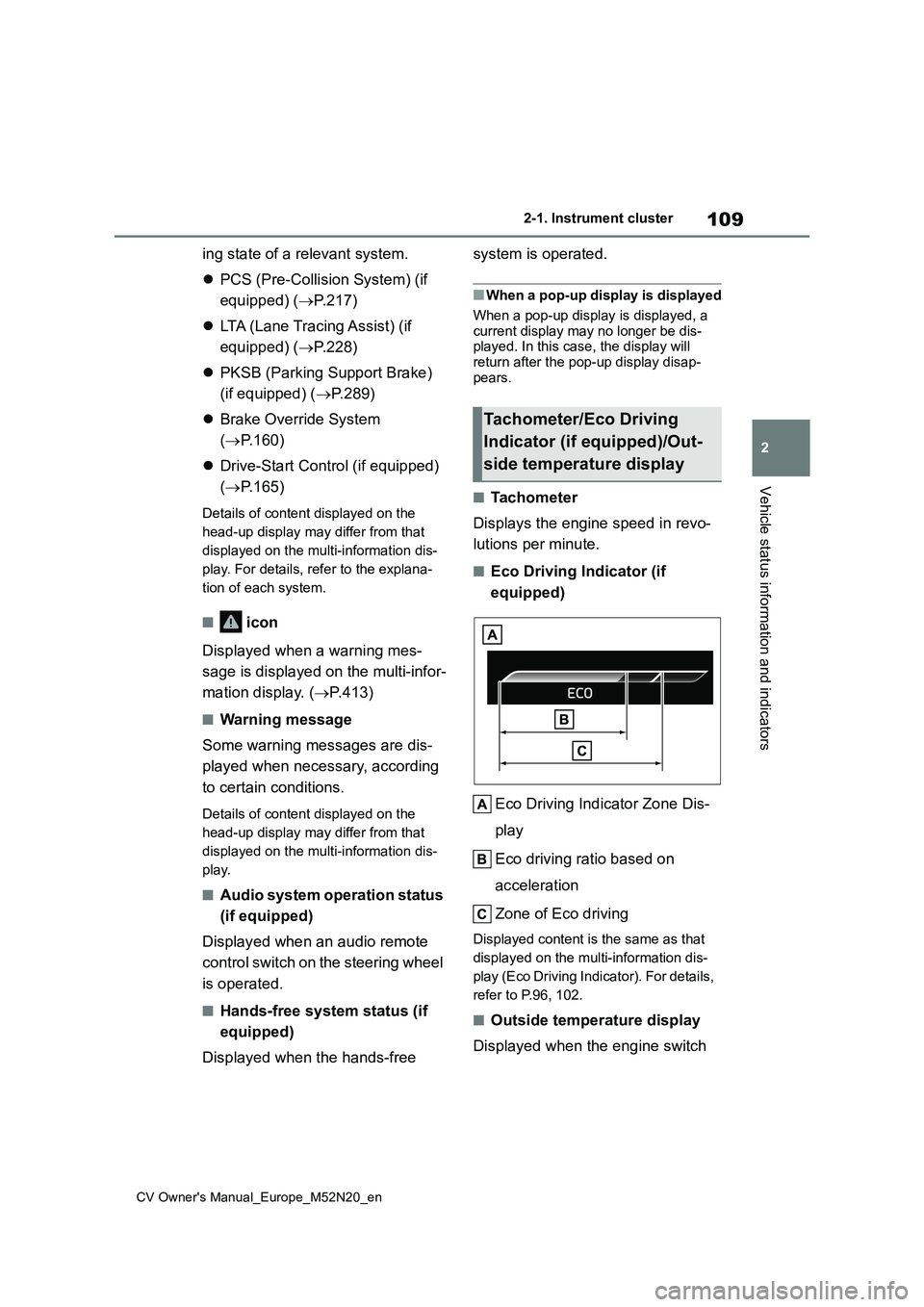
■Eco Driving Indicator (if
equipped)
Eco Driving Indicator Zone Dis-
play
Eco driving ratio based on
acceleration
Zone of Eco driving
Displayed content is the same as that
displayed on the multi-information dis-
play (Eco Driving Indicator). For details,
refer to P.96, 102.
■Outside temperature display
Displayed when the engine switch
Tachometer/Eco Driving
Indicator (if equipped)/Out-
side temperature display
Page 131 of 618
129
3
CV Owner's Manual_Europe_M52N20_en
3-2. Opening, closing and locking the doors
Before driving
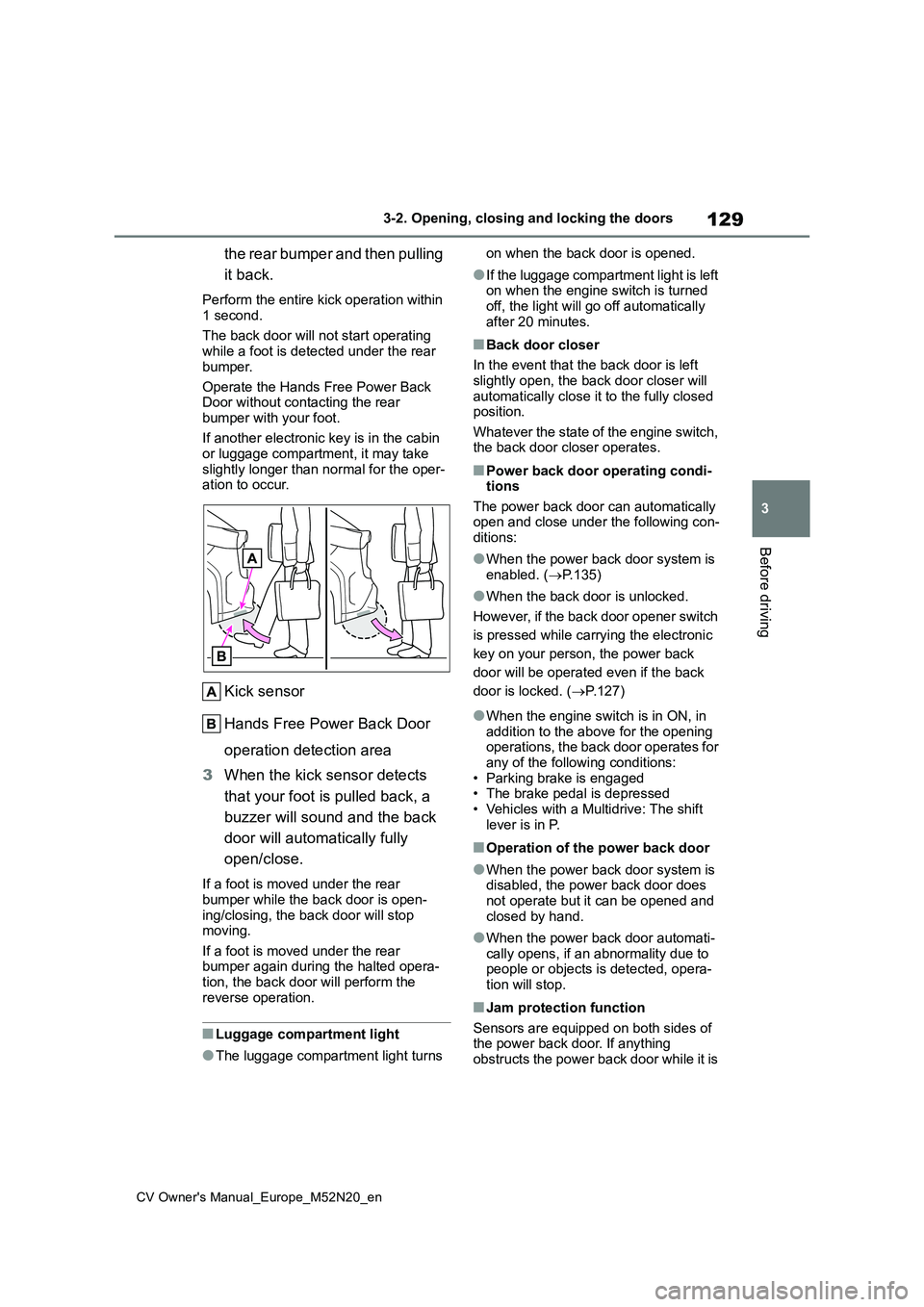
the rear bumper and then pulling
it back.
Perform the entire kick operation within
1 second.
The back door will not start operating while a foot is detected under the rear
bumper.
Operate the Hands Free Power Back Door without contacting the rear
bumper with your foot.
If another electronic key is in the cabin or luggage compartment, it may take
slightly longer than normal for the oper- ation to occur.
Kick sensor
Hands Free Power Back Door
operation detection area
3 When the kick sensor detects
that your foot is pulled back, a
buzzer will sound and the back
door will automatically fully
open/close.
If a foot is moved under the rear
bumper while the back door is open- ing/closing, the back door will stop moving.
If a foot is moved under the rear bumper again during the halted opera-tion, the back door will perform the
reverse operation.
■Luggage compartment light
●The luggage compartment light turns
on when the back door is opened.
●If the luggage compartment light is left on when the engine switch is turned
off, the light will go off automatically after 20 minutes.
■Back door closer
In the event that the back door is left
slightly open, the back door closer will automatically close it to the fully closed position.
Whatever the state of the engine switch, the back door closer operates.
■Power back door operating condi-tions
The power back door can automatically open and close under the following con-ditions:
●When the power back door system is enabled. ( P.135)
●When the back door is unlocked.
However, if the back door opener switch
is pressed while carrying the electronic
key on your person, the power back
door will be operated even if the back
door is locked. ( P.127)
●When the engine switch is in ON, in addition to the above for the opening operations, the back door operates for
any of the following conditions: • Parking brake is engaged• The brake pedal is depressed
• Vehicles with a Multidrive: The shift lever is in P.
■Operation of the power back door
●When the power back door system is disabled, the power back door does not operate but it can be opened and
closed by hand.
●When the power back door automati-
cally opens, if an abnormality due to people or objects is detected, opera-tion will stop.
■Jam protection function
Sensors are equipped on both sides of the power back door. If anything obstructs the power back door while it is
Page 140 of 618
138
CV Owner's Manual_Europe_M52N20_en
3-2. Opening, closing and locking the doors
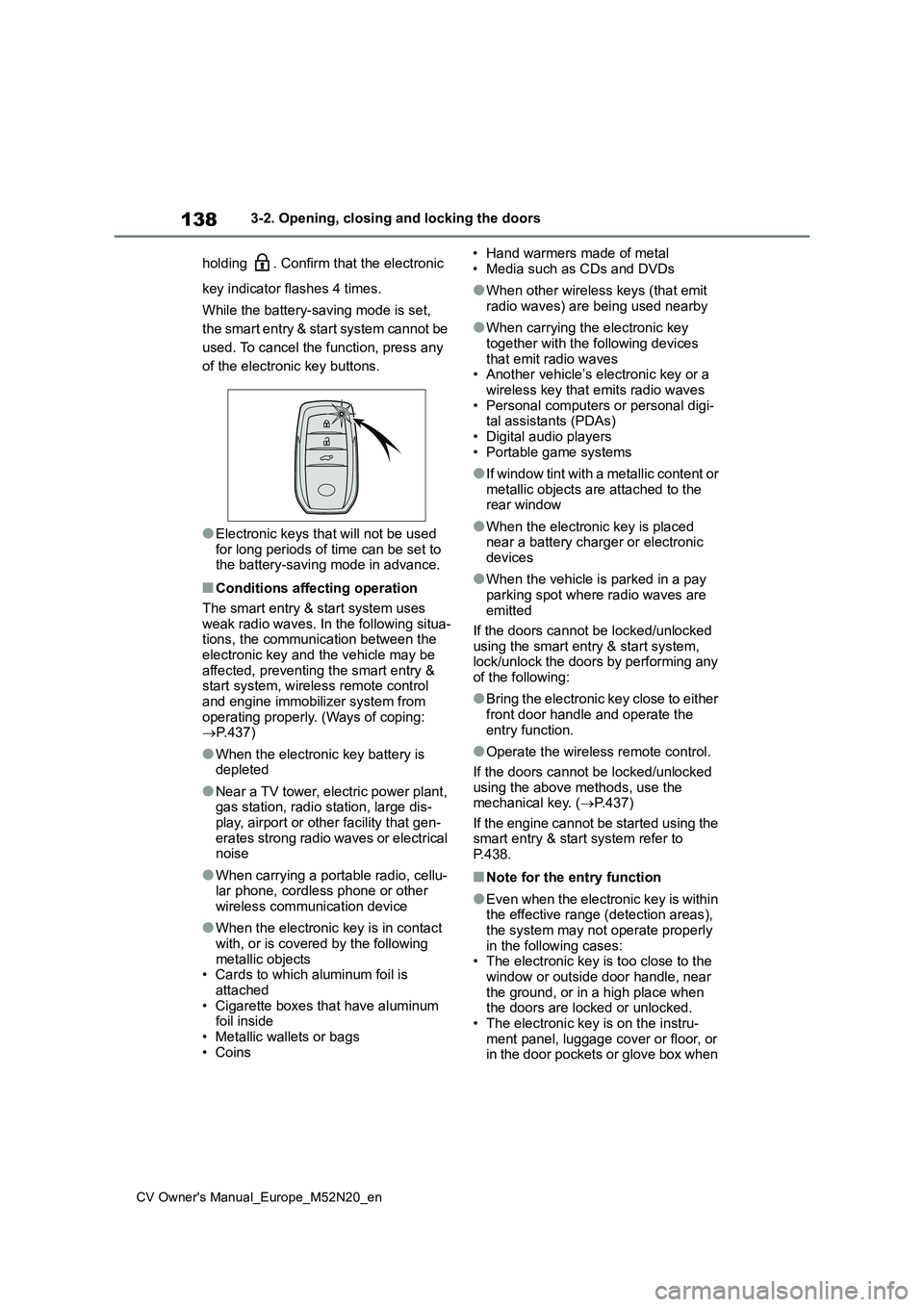
holding . Confirm that the electronic
key indicator flashes 4 times.
While the battery-saving mode is set,
the smart entry & start system cannot be
used. To cancel the function, press any
of the electronic key buttons.
●Electronic keys that will not be used for long periods of time can be set to the battery-saving mode in advance.
■Conditions affecting operation
The smart entry & start system uses weak radio waves. In the following situa-tions, the communication between the
electronic key and the vehicle may be affected, preventing the smart entry & start system, wireless remote control
and engine immobilizer system from operating properly. (Ways of coping: P.437)
●When the electronic key battery is depleted
●Near a TV tower, electric power plant, gas station, radio station, large dis-
play, airport or other facility that gen- erates strong radio waves or electrical noise
●When carrying a portable radio, cellu-lar phone, cordless phone or other
wireless communication device
●When the electronic key is in contact
with, or is covered by the following metallic objects• Cards to which aluminum foil is
attached • Cigarette boxes that have aluminum foil inside
• Metallic wallets or bags • Coins
• Hand warmers made of metal
• Media such as CDs and DVDs
●When other wireless keys (that emit
radio waves) are being used nearby
●When carrying the electronic key
together with the following devices that emit radio waves• Another vehicle’s electronic key or a
wireless key that emits radio waves • Personal computers or personal digi-tal assistants (PDAs)
• Digital audio players • Portable game systems
●I f w i n d o w t i n t w i t h a m e t a l l i c c o n t e n t o r metallic objects are attached to the rear window
●When the electronic key is placed near a battery charger or electronic
devices
●When the vehicle is parked in a pay
parking spot where radio waves are emitted
If the doors cannot be locked/unlocked
using the smart entry & start system, lock/unlock the doors by performing any of the following:
●Bring the electronic key close to either front door handle and operate the
entry function.
●Operate the wireless remote control.
If the doors cannot be locked/unlocked using the above methods, use the mechanical key. ( P.437)
If the engine cannot be started using the smart entry & start system refer to P.438.
■Note for the entry function
●Even when the electronic key is within the effective range (detection areas),
the system may not operate properly in the following cases:• The electronic key is too close to the
window or outside door handle, near the ground, or in a high place when the doors are locked or unlocked.
• The electronic key is on the instru- ment panel, luggage cover or floor, or in the door pockets or glove box when