AUX TOYOTA YARIS HATCHBACK 2010 Owners Manual
[x] Cancel search | Manufacturer: TOYOTA, Model Year: 2010, Model line: YARIS HATCHBACK, Model: TOYOTA YARIS HATCHBACK 2010Pages: 406, PDF Size: 8.14 MB
Page 16 of 406
14
FEATURES/OPERATIONS
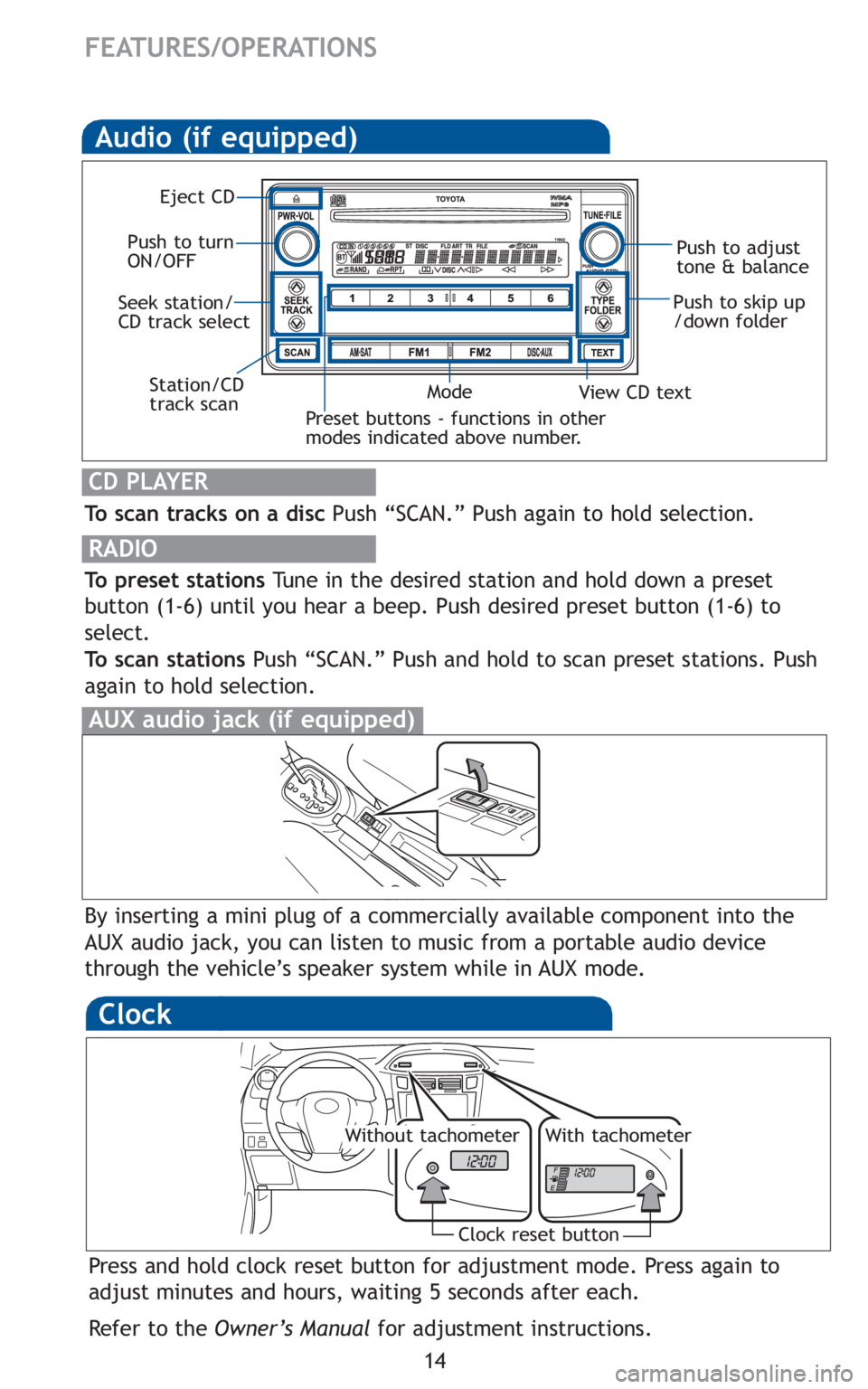
Audio (if equipped)
To scan tracks on a discPush “SCAN.” Push again to hold selection.
RADIO
To preset stationsTune in the desired station and hold down a preset
button (1-6) until you hear a beep. Push desired preset button (1-6) to
select.
To scan stations Push “SCAN.” Push and hold to scan preset stations. Push
again to hold selection.
CD PLAYER
Preset buttons - functions in other
modes indicated above number.
View CD text
Push to skip up
/down folder
Eject CD
Push to turn
ON/OFF Push to adjust
tone & balance
Mode
Seek station/
CD track select
Station/CD
track scan
By inserting a mini plug of a commercially available component into the
AUX audio jack, you can listen to music from a portable audio device
through the vehicle’s speaker system while in AUX mode.
AUX audio jack (if equipped)
Clock
Press and hold clock reset button for adjustment mode. Press again to
adjust minutes and hours, waiting 5 seconds after each.
Refer to the Owner’s Manual for adjustment instructions.
Clock reset button
Without tachometerWith tachometer
Page 34 of 406
14
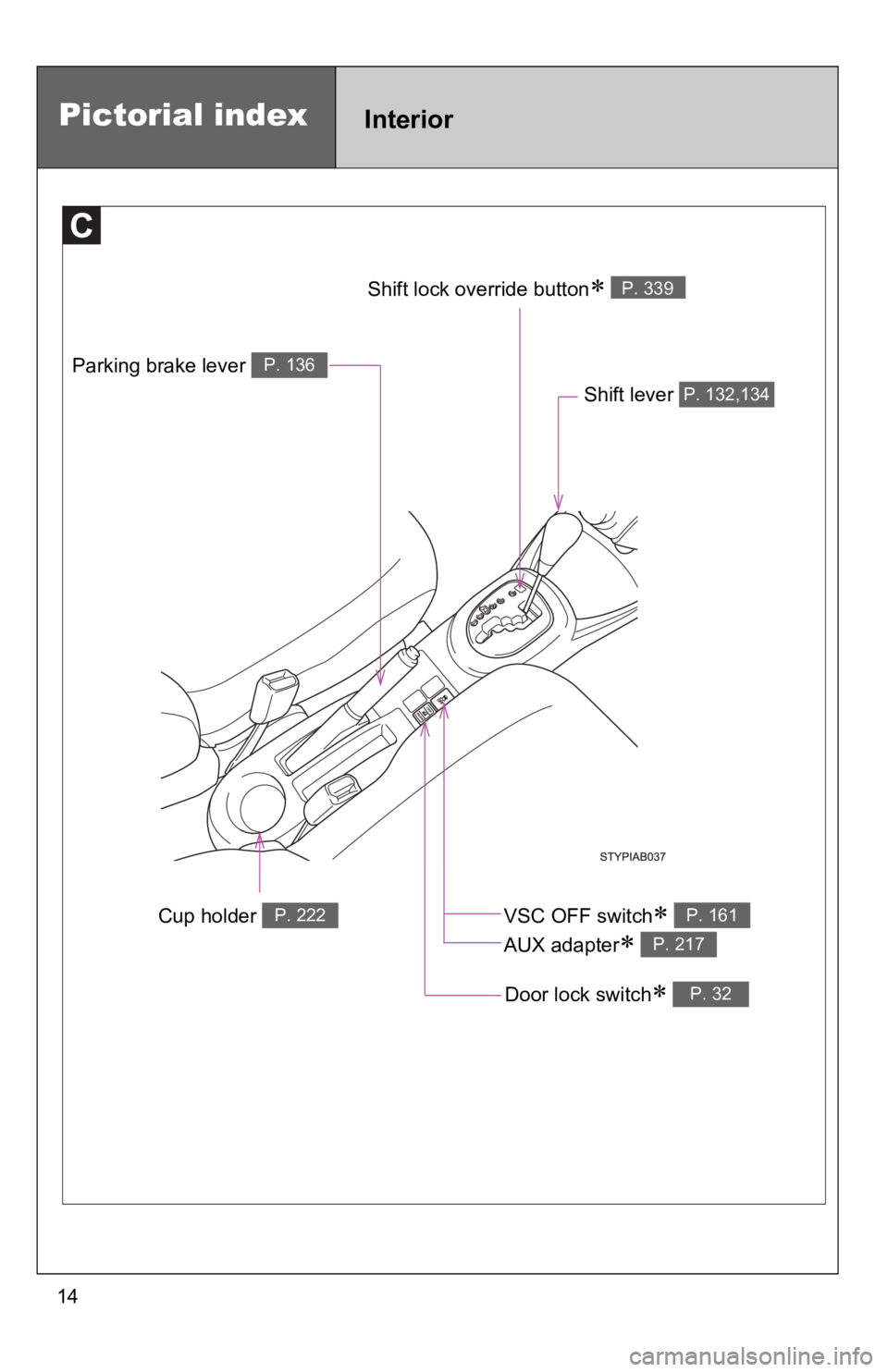
Cup holder P. 222
Parking brake lever P. 136
Shift lever P. 132,134
Door lock switch∗ P. 32
Shift lock override button∗ P. 339
Pictorial indexInterior
VSC OFF switch∗
AUX adapter
∗
P. 161
P. 217
Page 35 of 406
15
Pictorial indexInstrument panel
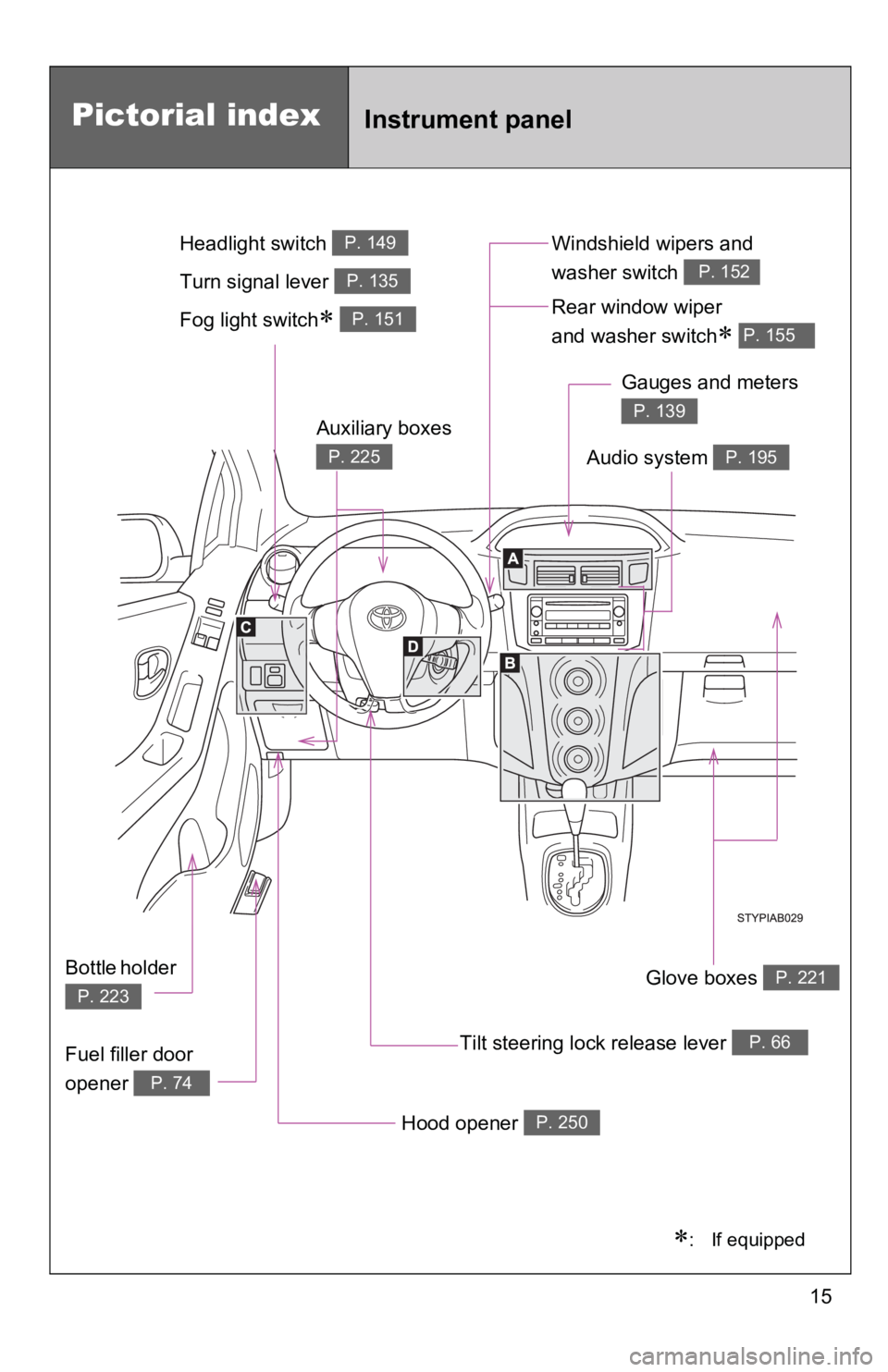
Fog light switch∗ P. 151Rear window wiper
and washer switch
∗ P. 155
Tilt steering lock release lever P. 66
Hood opener P. 250
Gauges and meters
P. 139
Audio system P. 195
Glove boxes P. 221
Fuel filler door
opener
P. 74
Auxiliary boxes
P. 225
Bottle holder
P. 223
Windshield wipers and
washer switch
P. 152Turn signal lever P. 135
Headlight switch P. 149
∗: If equipped
Page 127 of 406
113
1-7. Safety information
1
Before driving
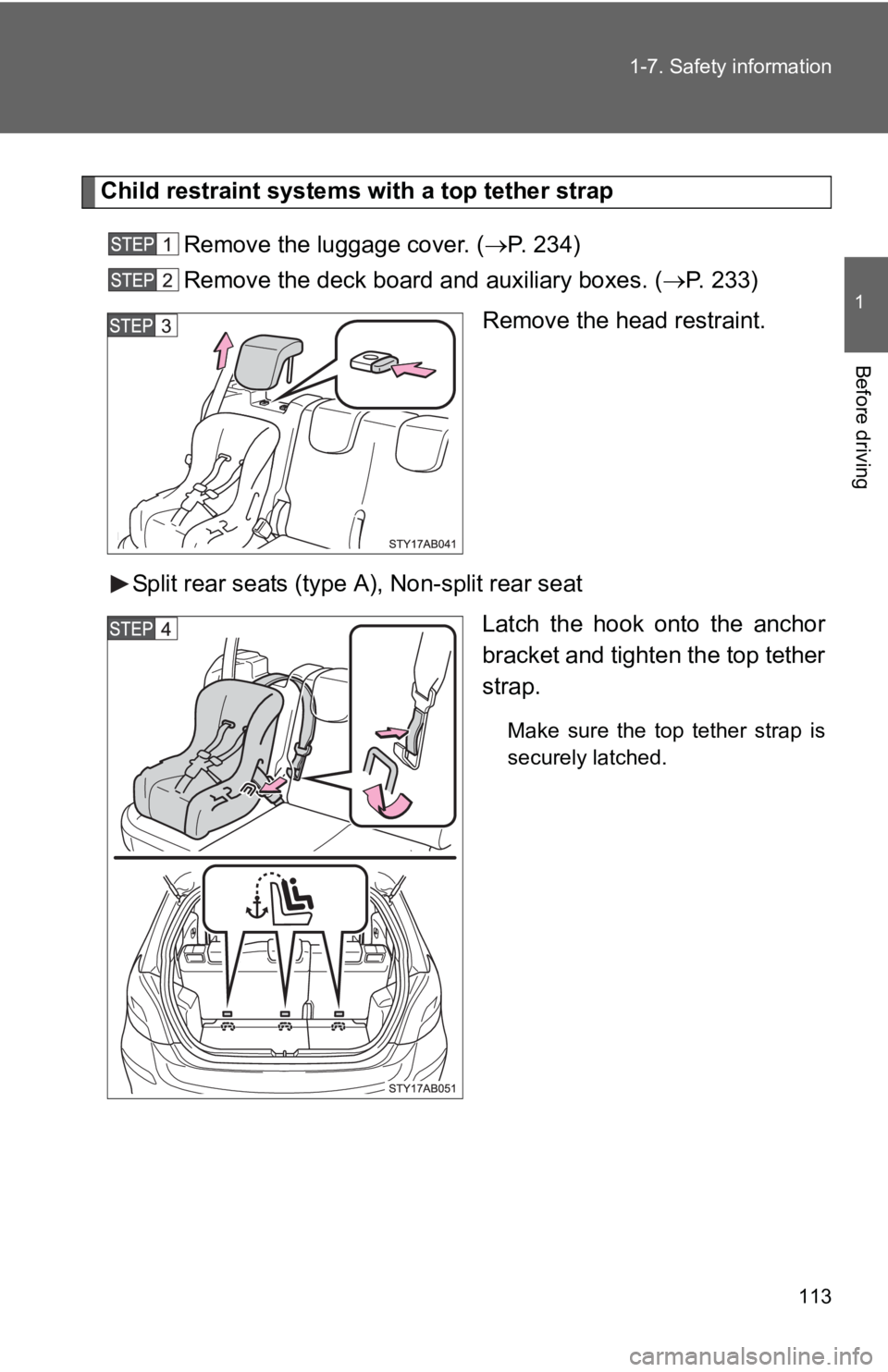
Child restraint systems with a top tether strap
Remove the luggage cover. ( →P. 234)
Remove the deck board and auxiliary boxes. ( →P. 233)
Remove the head restraint.
Split rear seats (type A), Non-split rear seat Latch the hook onto the anchor
bracket and tighten the top tether
strap.
Make sure the top tether strap is
securely latched.
Page 128 of 406
114 1-7. Safety information
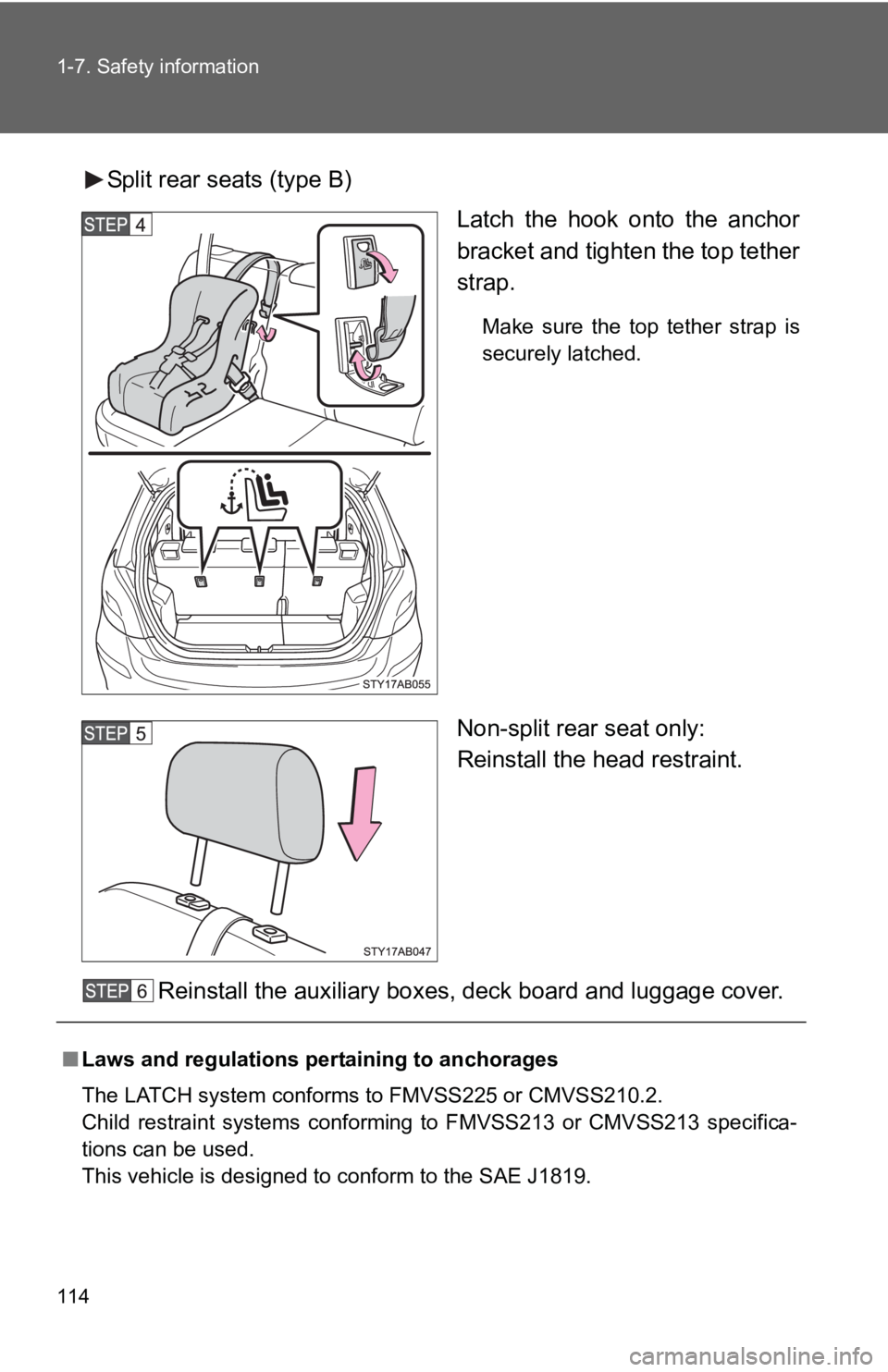
Split rear seats (type B)Latch the hook onto the anchor
bracket and tighten the top tether
strap.
Make sure the top tether strap is
securely latched.
Non-split rear seat only:
Reinstall the head restraint.
Reinstall the auxiliary boxes, deck board and luggage cover.
■ Laws and regulations pertaining to anchorages
The LATCH system conforms to FMVSS225 or CMVSS210.2.
Child restraint systems conforming to FMVSS213 or CMVSS213 specifica-
tions can be used.
This vehicle is designed to conform to the SAE J1819.
Page 180 of 406
167
2-5. Driving information
2
When driving
CAUTION
■Things that must not be carried in the luggage compartment
The following things may cause a fire if loaded in the luggage compart-
ment.
●Receptacles containing gasoline
●Aerosol cans
■Storage precautions
Observe the following precautions.
Failing to do so may result in death or serious injury.
●Do not place cargo or luggage in or on the following locations as the
item may get under the clutch, brake or accelerator pedal and prevent
the pedals from being depressed properly, block the driver’s vision, or
hit the driver or passengers, causing an accident.
• Driver’s feet
• Front passenger or rear seats (when stacking items)
• Luggage cover
• Instrument panel
• Dashboard
• Auxiliary box or tray that has no lid
●
Secure all items in the occupant compartment, as they may shift and
injure someone during emergency braking, sudden swerving or an
accident.
●Never allow anyone to ride in the luggage compartment. It is not
designed for passengers. They should ride in their seats with their seat
belts properly fastened. Otherwise, they are much more likely to suffer
serious bodily injury, in the event of emergency braking, sudden
swerving or an accident.
■Capacity and distribution
●Do not exceed the maximum axle weight rating or the total vehicle
weight rating.
●Even if the total load of occupant’s weight and the cargo load is less
than the total load capacity, do no t apply the load unevenly. Improper
loading may cause deterioration of st eering or braking control which
may cause death or serious injury.
Page 207 of 406
195
3
Interior features
3-2. Using the audio system
Audio system type
■Using cellular phones
Interference may be heard through the audio system's speakers if a cellular
phone is being used inside or close to the vehicle while the audio syste\
m is
operating.
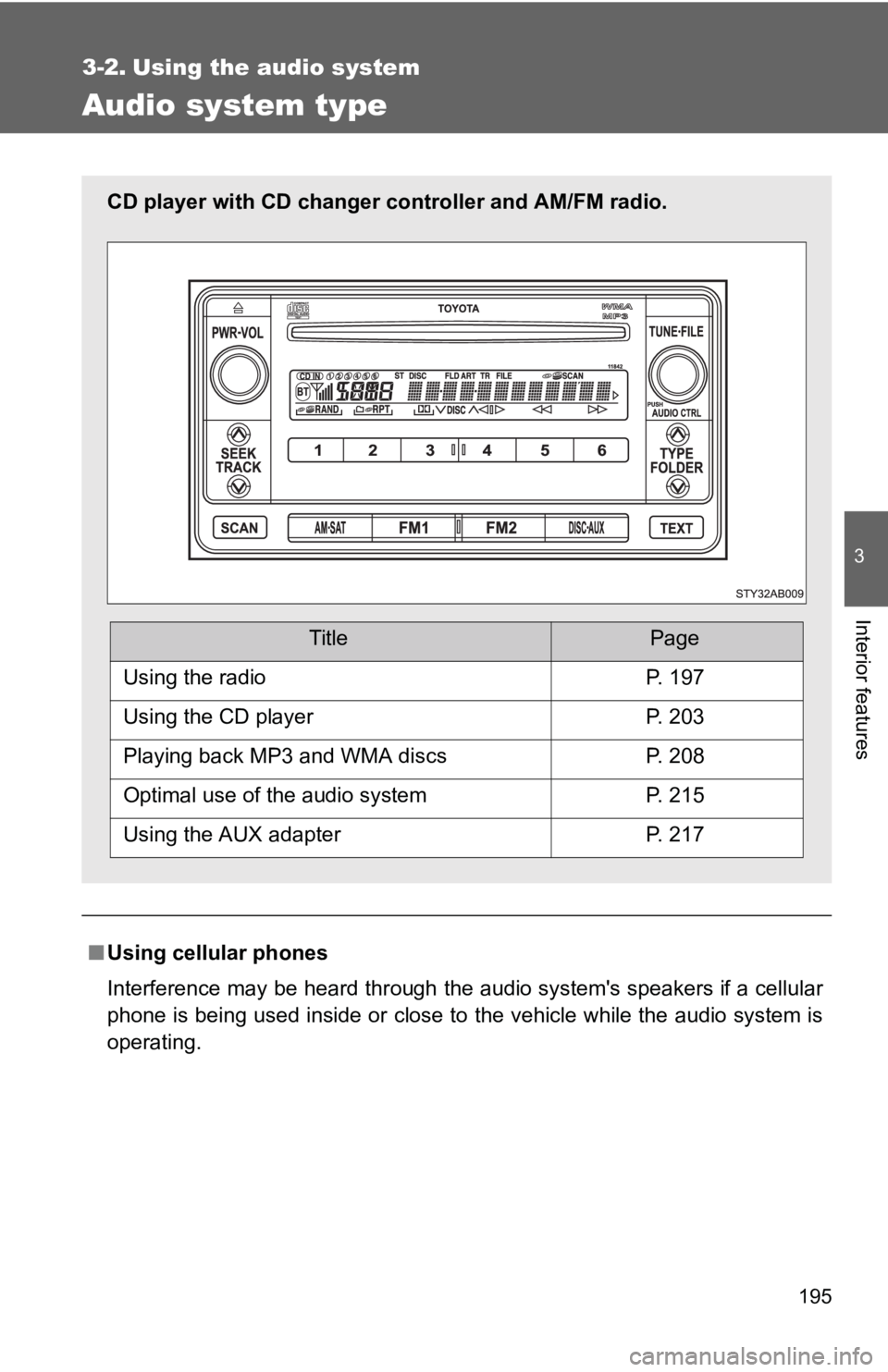
CD player with CD changer controller and AM/FM radio.
TitlePage
Using the radioP. 197
Using the CD playerP. 203
Playing back MP3 and WMA discsP. 208
Optimal use of the audio systemP. 215
Using the AUX adapterP. 217
Page 229 of 406
217
3-2. Using the audio system
3
Interior features
Using the AUX adapter∗
∗: If equipped
■Operating portable audio devices connected to the audio system
The volume can be adjusted using the vehicle’s audio controls. All other
adjustments must be made on the portable audio device itself.
■ When using a portable audio devi ce connected to the power outlet
Noise may occur during playback. Use the power source of the portable
audio device.
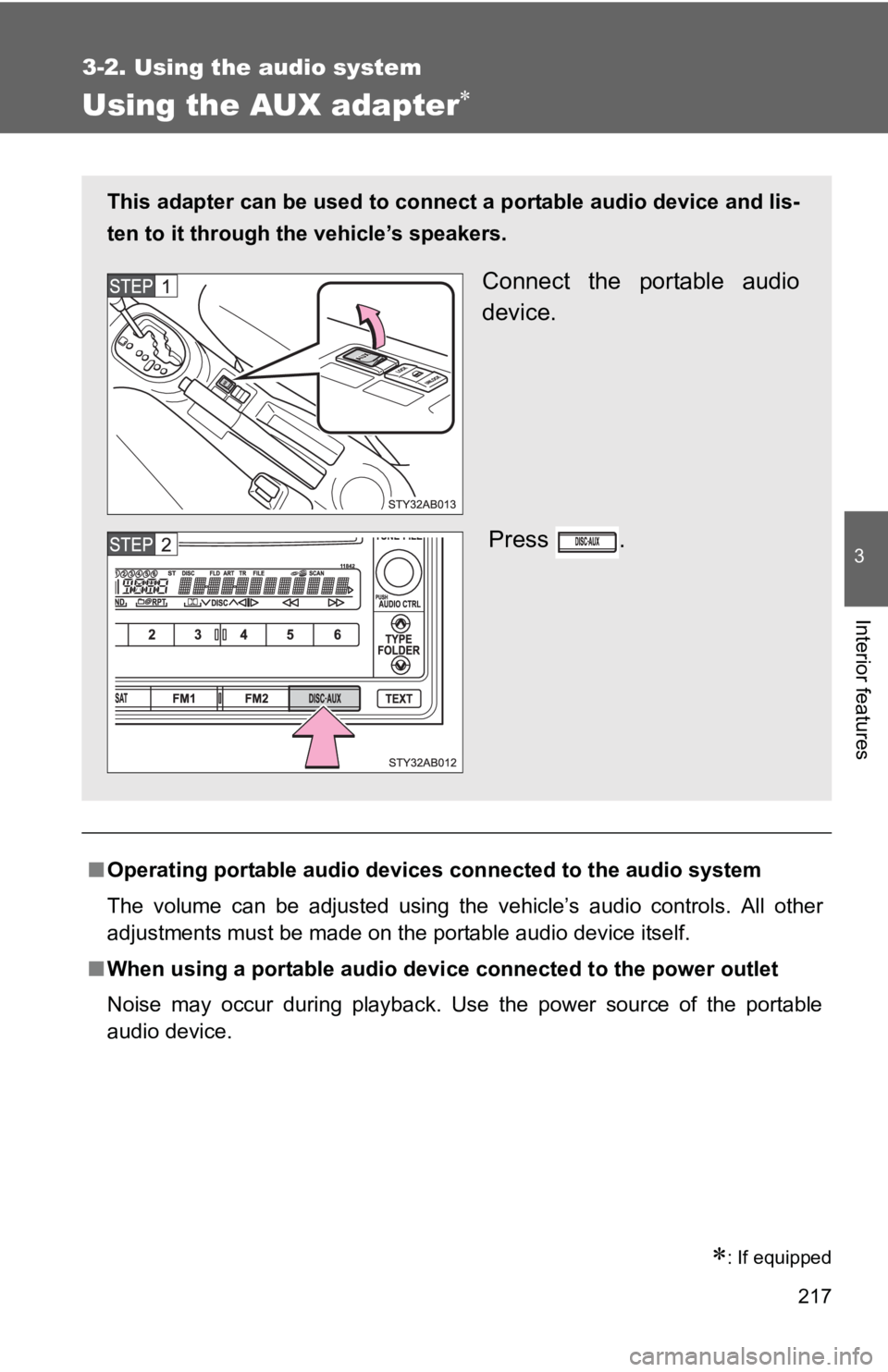
This adapter can be used to connect a portable audio device and lis-
ten to it through the vehicle’s speakers.
Connect the portable audio
device.
Press .
Page 232 of 406
220
3-4. Using the storage features
List of storage features
CAUTION
■Items that should not be left in the storage spaces
Do not leave glasses, lighters or spray cans in the storage spaces, as this
may cause the following when cabin temperature becomes high:
● Glasses may be deformed by heat or cracked if they come into contact
with other stored items.
● Lighters or spray cans may explode. If they come into contact with other
stored items, the lighter may catch fire or the spray can may release gas,
causing a fire hazard.
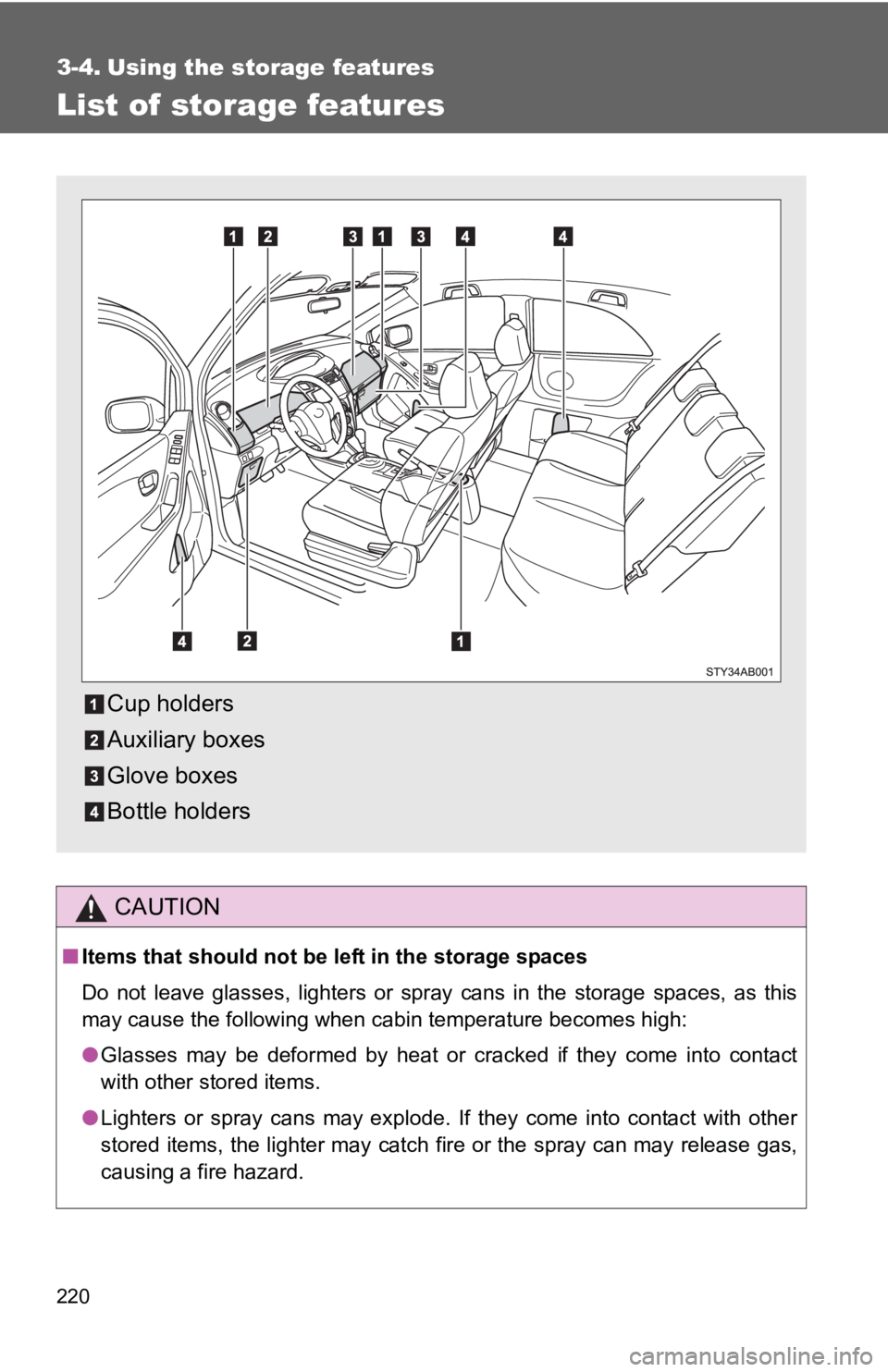
Cup holders
Auxiliary boxes
Glove boxes
Bottle holders
Page 237 of 406
225
3-4. Using the
storage features
3
Interior features
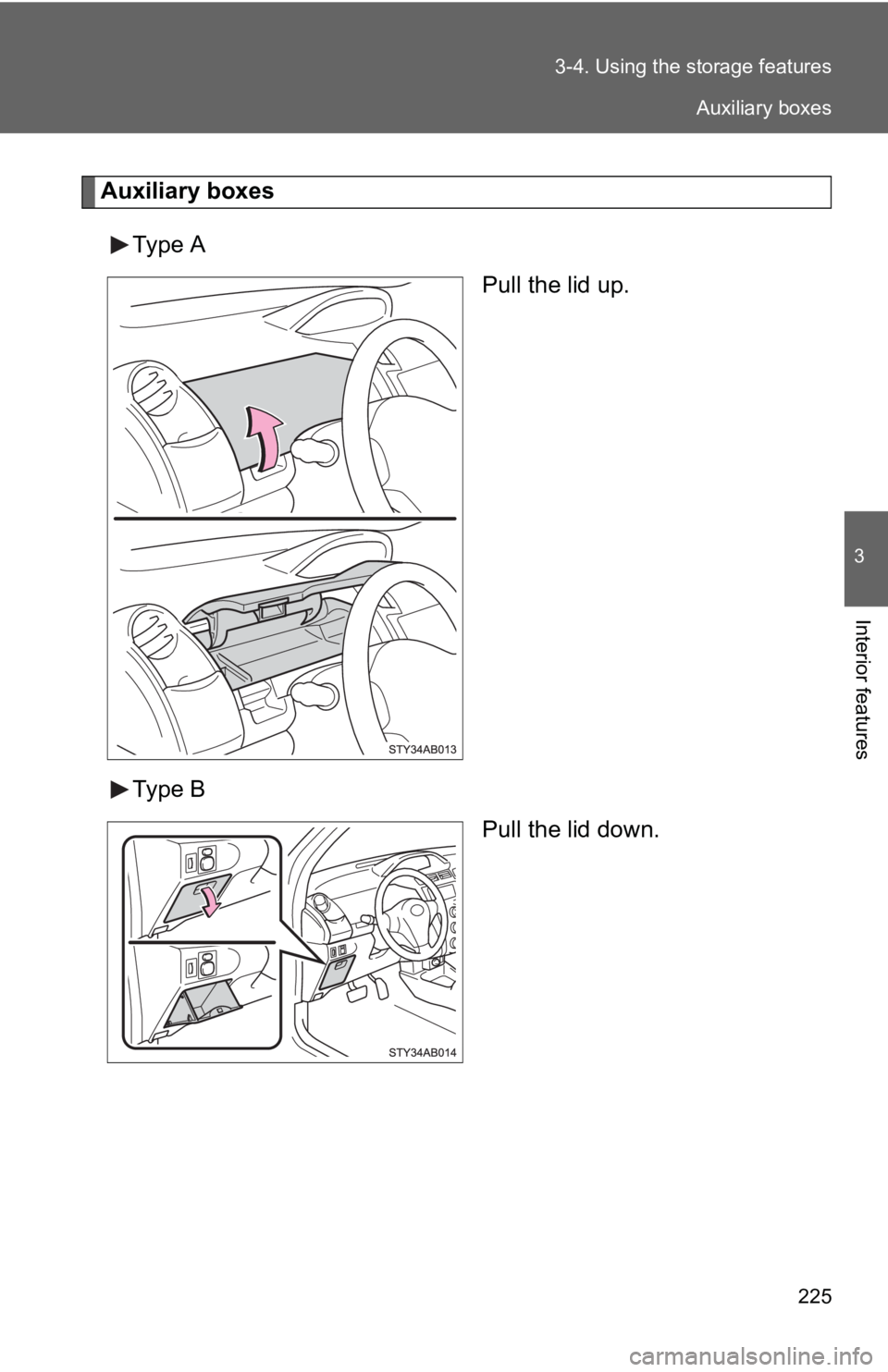
Auxiliary boxes
Type A Pull the lid up.
Type B Pull the lid down.
Auxiliary boxes