door lock TOYOTA YARIS HATCHBACK 2010 Owners Manual
[x] Cancel search | Manufacturer: TOYOTA, Model Year: 2010, Model line: YARIS HATCHBACK, Model: TOYOTA YARIS HATCHBACK 2010Pages: 406, PDF Size: 8.14 MB
Page 3 of 406
1
OVERVIEW
FEATURES/OPERATIONS
SAFETY AND EMERGENCY FEATURES
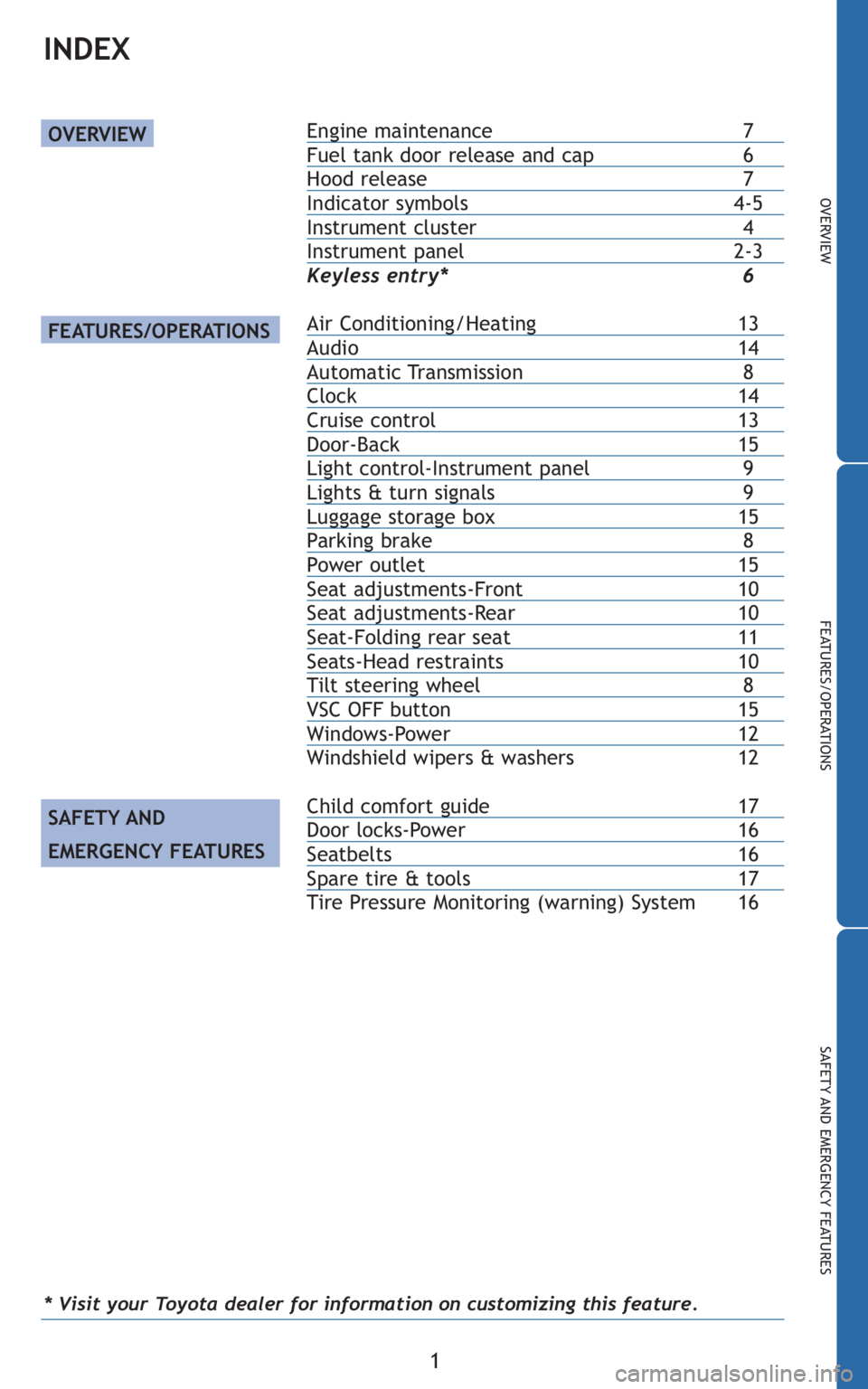
Engine maintenance7Fuel tank door release and cap 6Hood release 7Indicator symbols4-5Instrument cluster 4Instrument panel2-3
Keyless entry* 6
Air Conditioning/Heating13Audio 14Automatic Transmission 8Clock14Cruise control13Door-Back 15Light control-Instrument panel 9Lights & turn signals 9Luggage storage box15Parking brake 8Power outlet15Seat adjustments-Front10Seat adjustments-Rear10Seat-Folding rear seat11Seats-Head restraints10Tilt steering wheel 8VSC OFF button15Windows-Power 12
Windshield wipers & washers 12
Child comfort guide 17Door locks-Power 16Seatbelts16Spare tire & tools 17
Tire Pressure Monitoring (warning) System 16
OVERVIEW
FEATURES/OPERATIONS
SAFETY AND
EMERGENCY FEATURES
INDEX
* Visit your Toyota dealer for information on customizing this feature.
Page 7 of 406
5
OVERVIEW
FEATURES/OPERATIONS
SAFETY AND EMERGENCY FEATURES
2For details, refer to “If a warning light turns on or a warning buzzer sounds,” Section
5-2, 2010 Owner’s Manual.
3For details, refer to “If your vehicle overheats,” Section 5-2, 2010 Owner’s Manual.
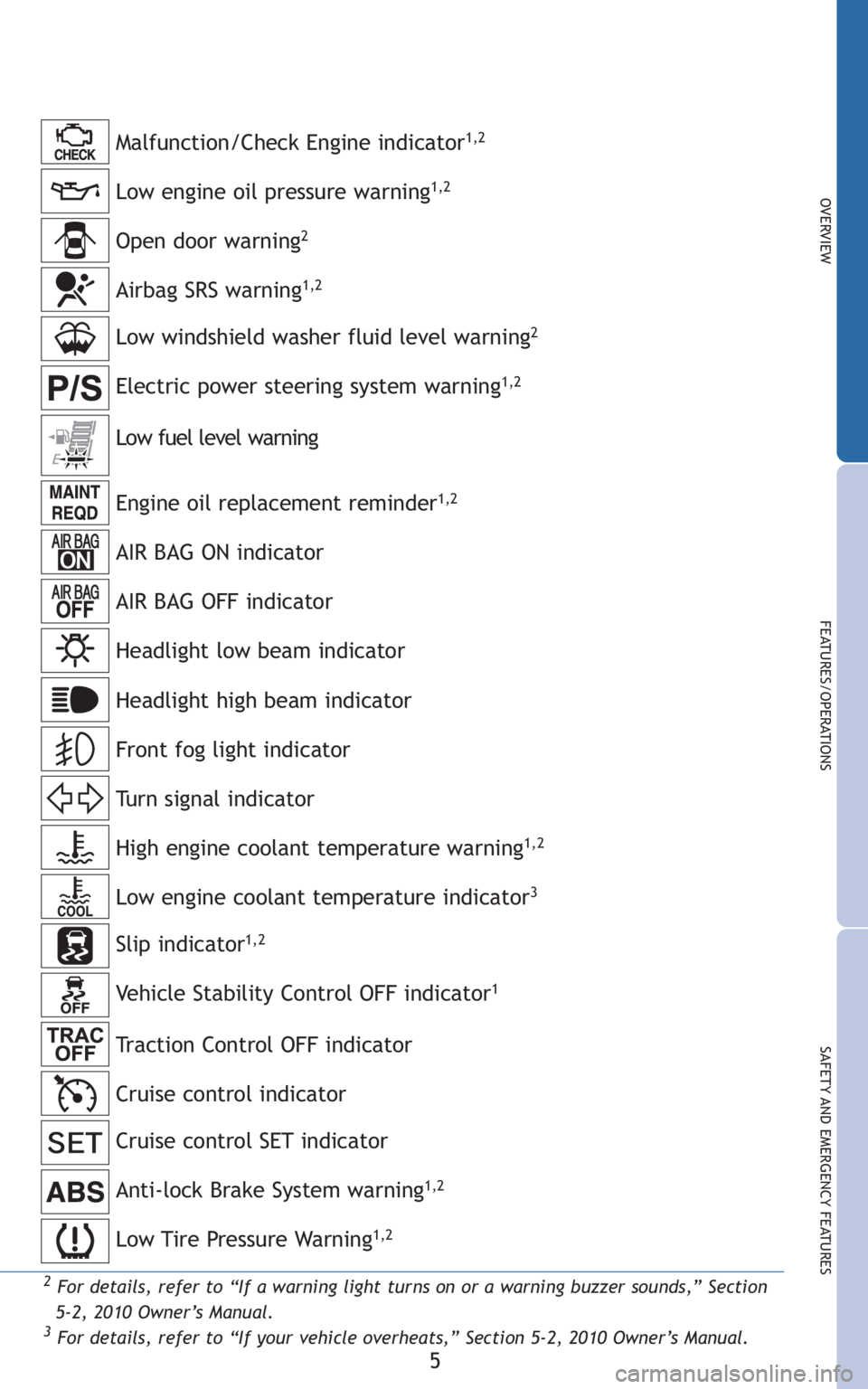
Low engine oil pressure warning1,2
Anti-lock Brake System warning1,2
Malfunction/Check Engine indicator1,2
Open door warning2
Low windshield washer fluid level warning2
Engine oil replacement reminder1,2
AIR BAG ON indicator
AIR BAG OFF indicator
Headlight low beam indicator
Turn signal indicator
Low fuel level warning
Headlight high beam indicator
High engine coolant temperature warning
1,2
Airbag SRS warning1,2
Electric power steering system warning1,2
Low engine coolant temperature indicator3
Front fog light indicator
Low Tire Pressure Warning1,2
Cruise control SET indicator
Cruise control indicator Slip indicator
1,2
Vehicle Stability Control OFF indicator1
Traction Control OFF indicator
Page 8 of 406
6
OVERVIEW
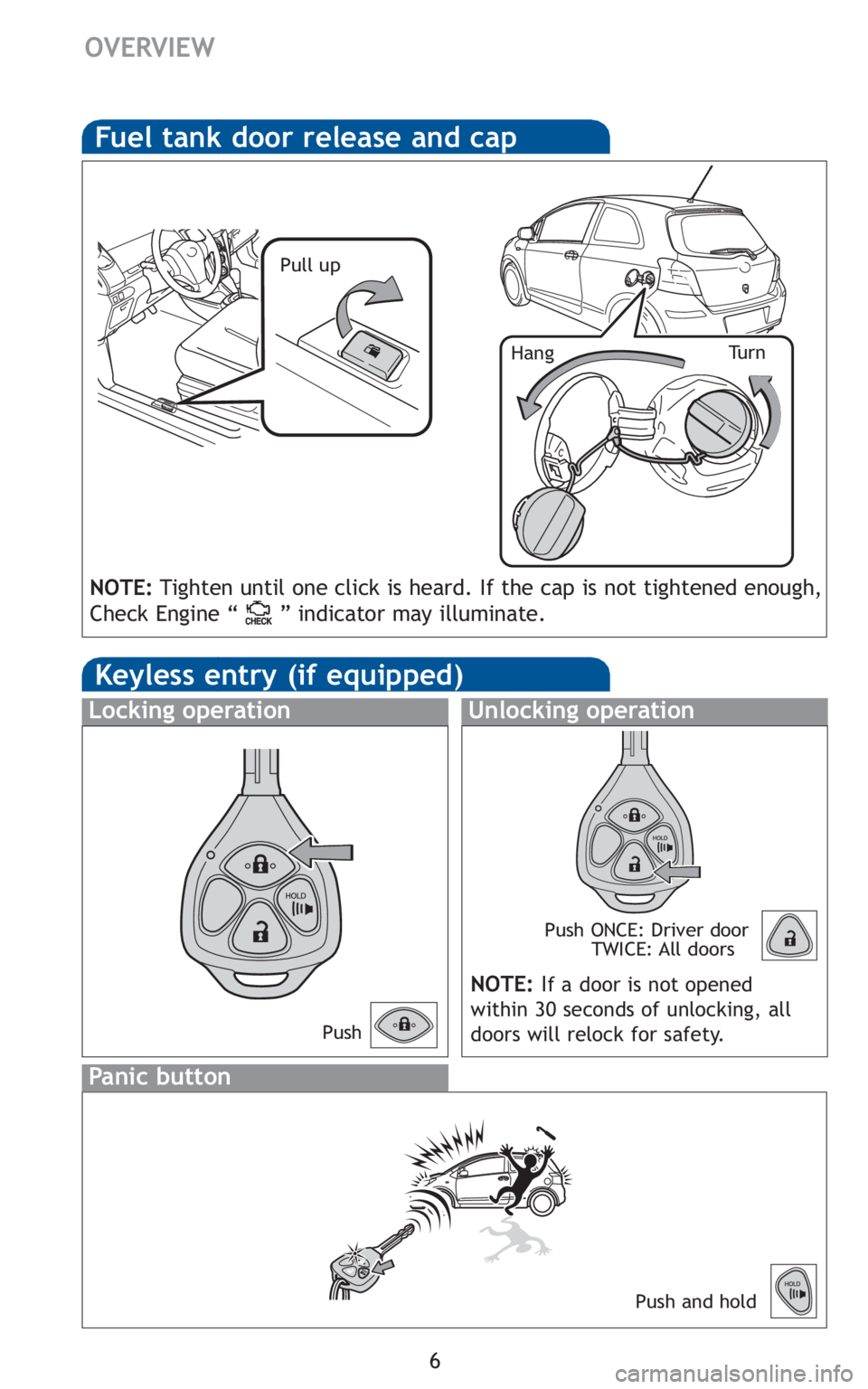
Fuel tank door release and cap
Pull up
Tu r n
Hang
NOTE: Tighten until one click is heard. If the cap is not tightened enough,
Check Engine “ ” indicator may illuminate.
Keyless entry (if equipped)
Unlocking operation
Panic button
Push ONCE: Driver door TWICE: All doors
Locking operation
Push and hold
NOTE: If a door is not opened
within 30 seconds of unlocking, all
doors will relock for safety.
Push
Page 17 of 406
15
OVERVIEW
FEATURES/OPERATIONS
SAFETY AND EMERGENCY FEATURES
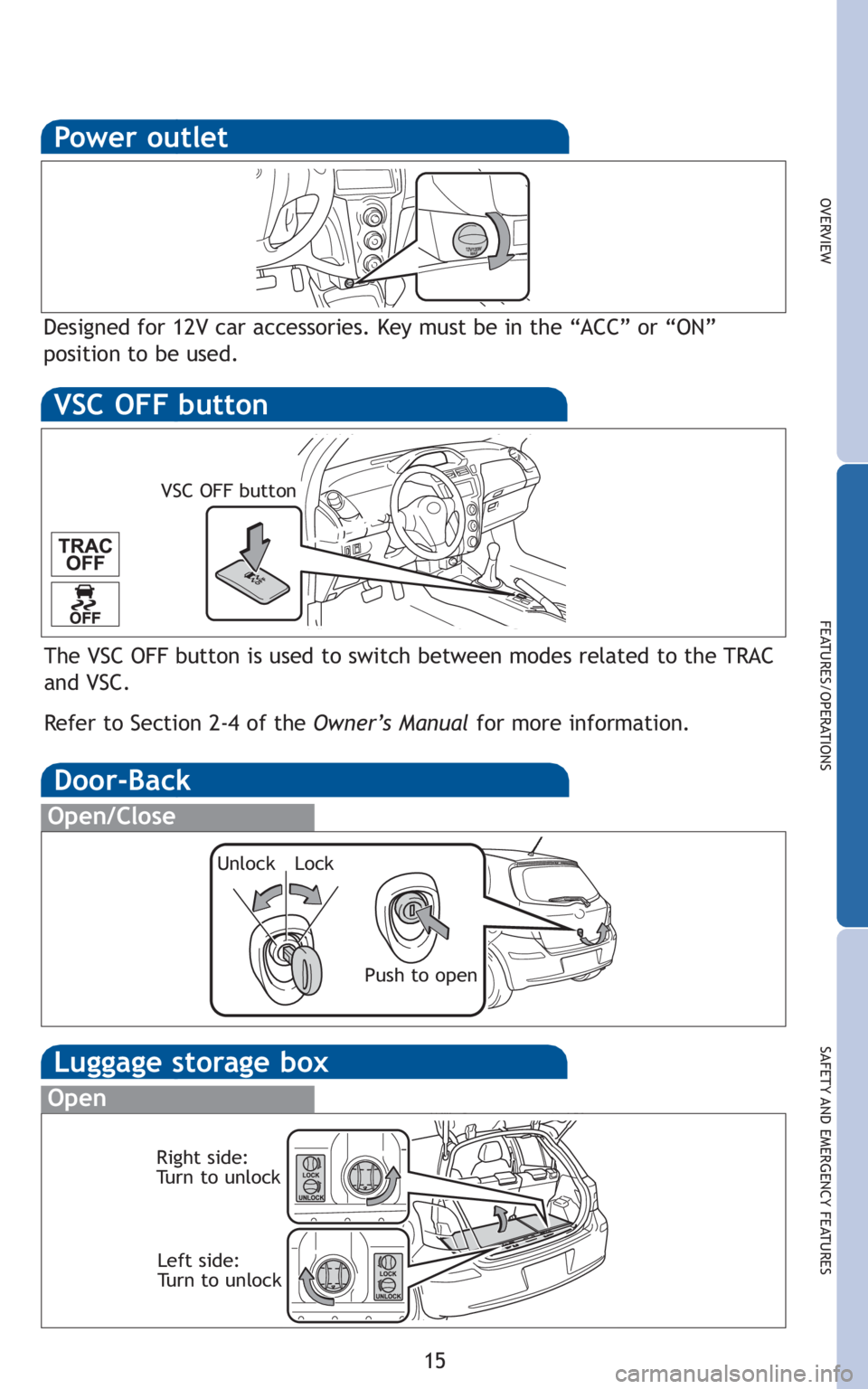
Luggage storage box
Open
Right side:
Turn to unlockLeft side:
Turn to unlock
Power outlet
Designed for 12V car accessories. Key must be in the “ACC” or “ON”
position to be used.
Door-Back
Open/Close
Unlock Lock
Push to open
The VSC OFF button is used to switch between modes related to the TRAC
and VSC.
Refer to Section 2-4 of the Owner’s Manualfor more information.
VSC OFF button
VSC OFF button
Page 18 of 406
16
SAFETY AND EMERGENCY FEATURES
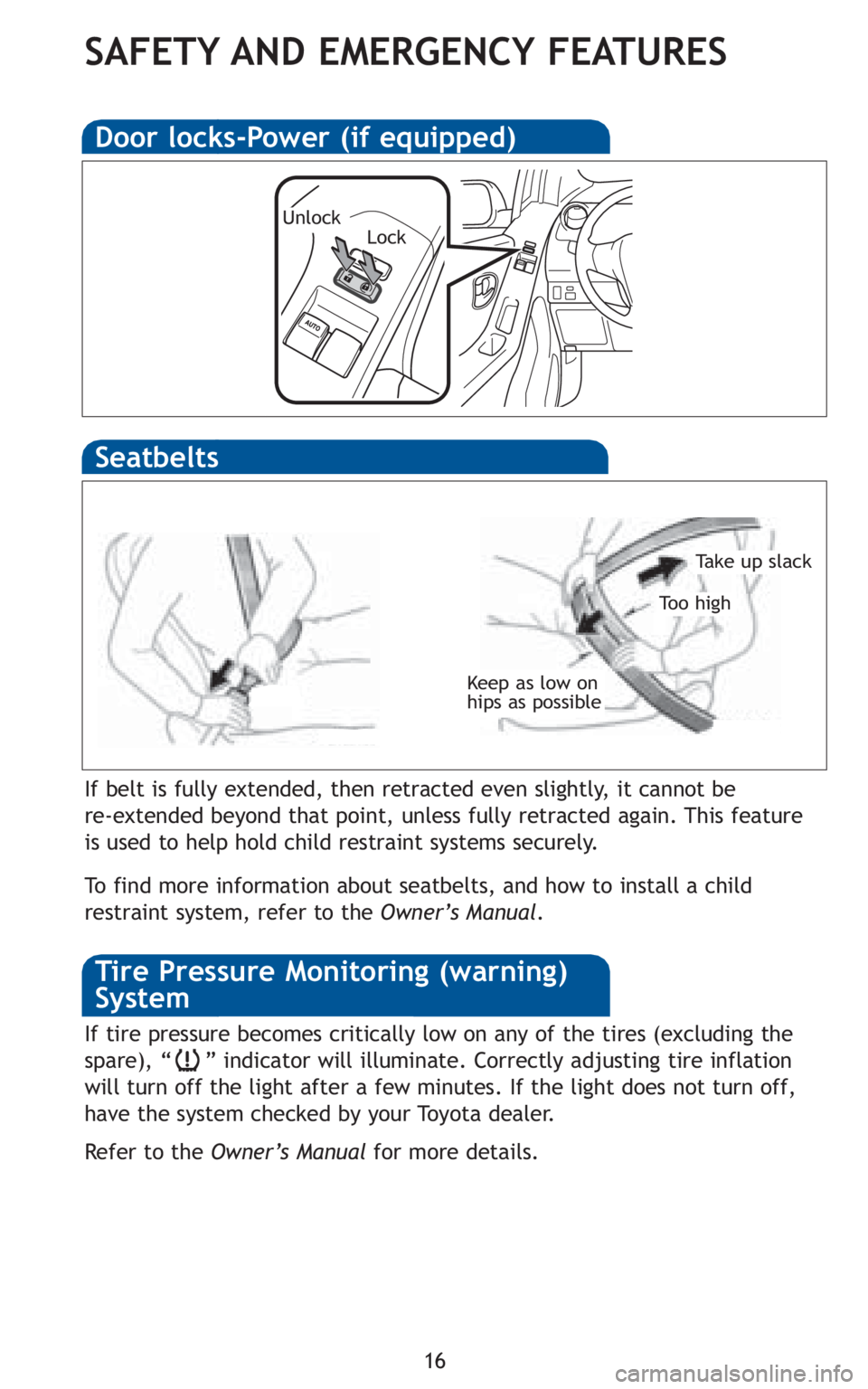
Keep as low on
hips as possible
Take up slack
To o h i g h
Seatbelts
If belt is fully extended, then retracted even slightly, it cannot be
re-extended beyond that point, unless fully retracted again. This feature
is used to help hold child restraint systems securely.
To find more information about seatbelts, and how to install a child
restraint system, refer to theOwner’s Manual.
Door locks-Power (if equipped)
UnlockLock
If tire pressure becomes critically low on any of the tires (excluding the
spare), “ ” indicator will illuminate. Correctly adjusting tire inflation
will turn off the light after a few minutes. If the light does not turn off,
have the system checked by your Toyota dealer.
RefertotheOwner’s Manual for more details.
Tire Pressure Monitoring (warning)
System
Page 25 of 406

TABLE OF CONTENTS
1
1Before drivingAdjusting and operating features such as door locks,
mirrors, and steering column.
2When drivingDriving, stopping and safe-driving information.
3Interior
featuresAir conditioning and audio systems, as well as other in-
terior features for a comfortable driving experience.
4Maintenance
and careCleaning and protecting your vehicle, performing do-it-
yourself maintenance, and maintenance information.
5When trouble
arisesWhat to do if the vehicle needs to be towed, gets a flat
tire, or is involved in an accident.
6Vehicle
specificationsDetailed vehicle information.
7For ownersReporting safety defects for U.S. owners and seat belt
instructions for Canadian owners
IndexAlphabetical listing of information contained in this
manual.
Page 33 of 406
13
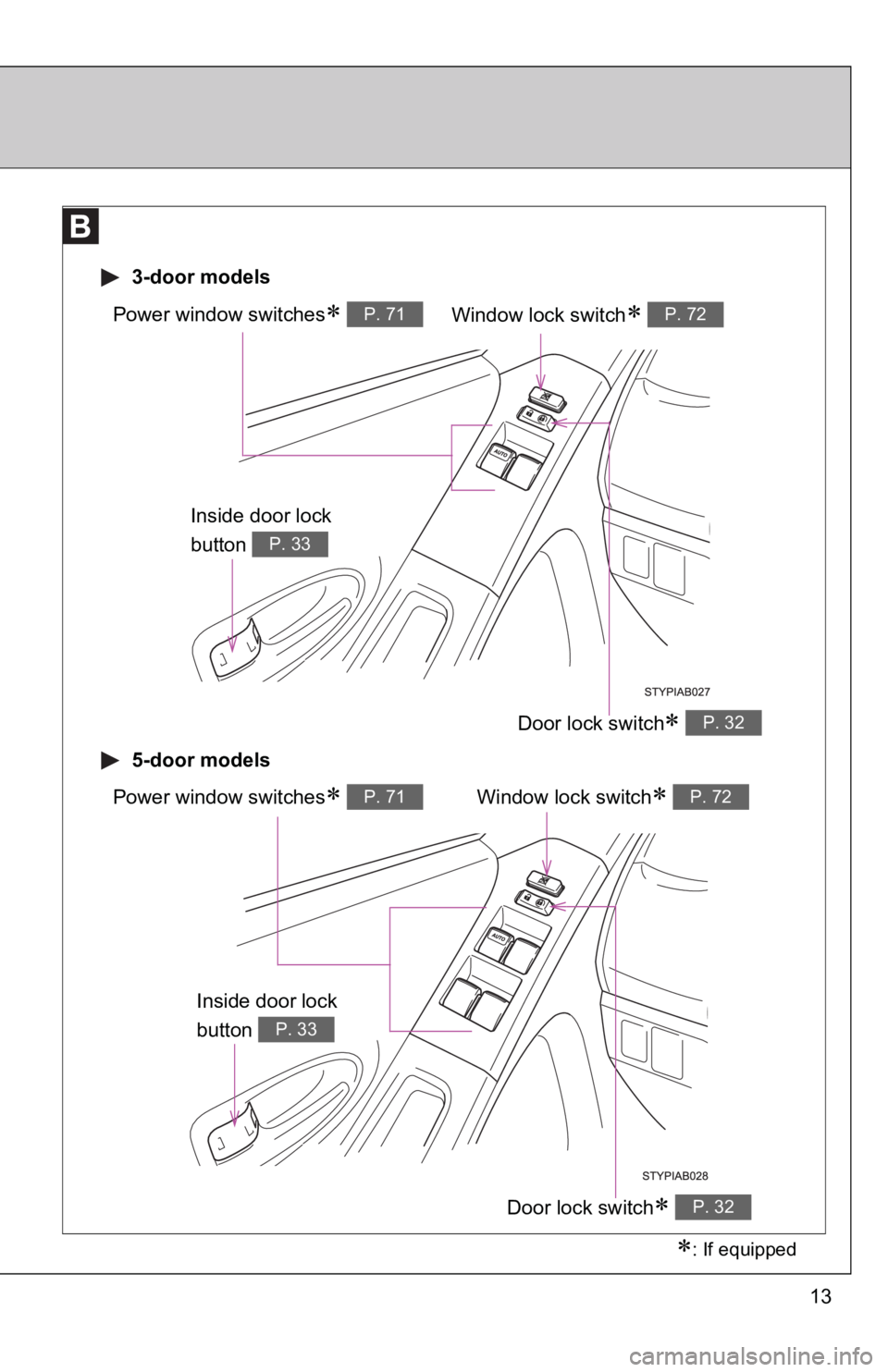
Window lock switch∗ P. 72Power window switches∗ P. 71
Door lock switch∗ P. 32
3-door models
5-door models
Window lock switch∗ P. 72Power window switches∗ P. 71
Door lock switch∗ P. 32
∗: If equipped
Inside door lock
button
P. 33
Inside door lock
button
P. 33
Page 34 of 406
14
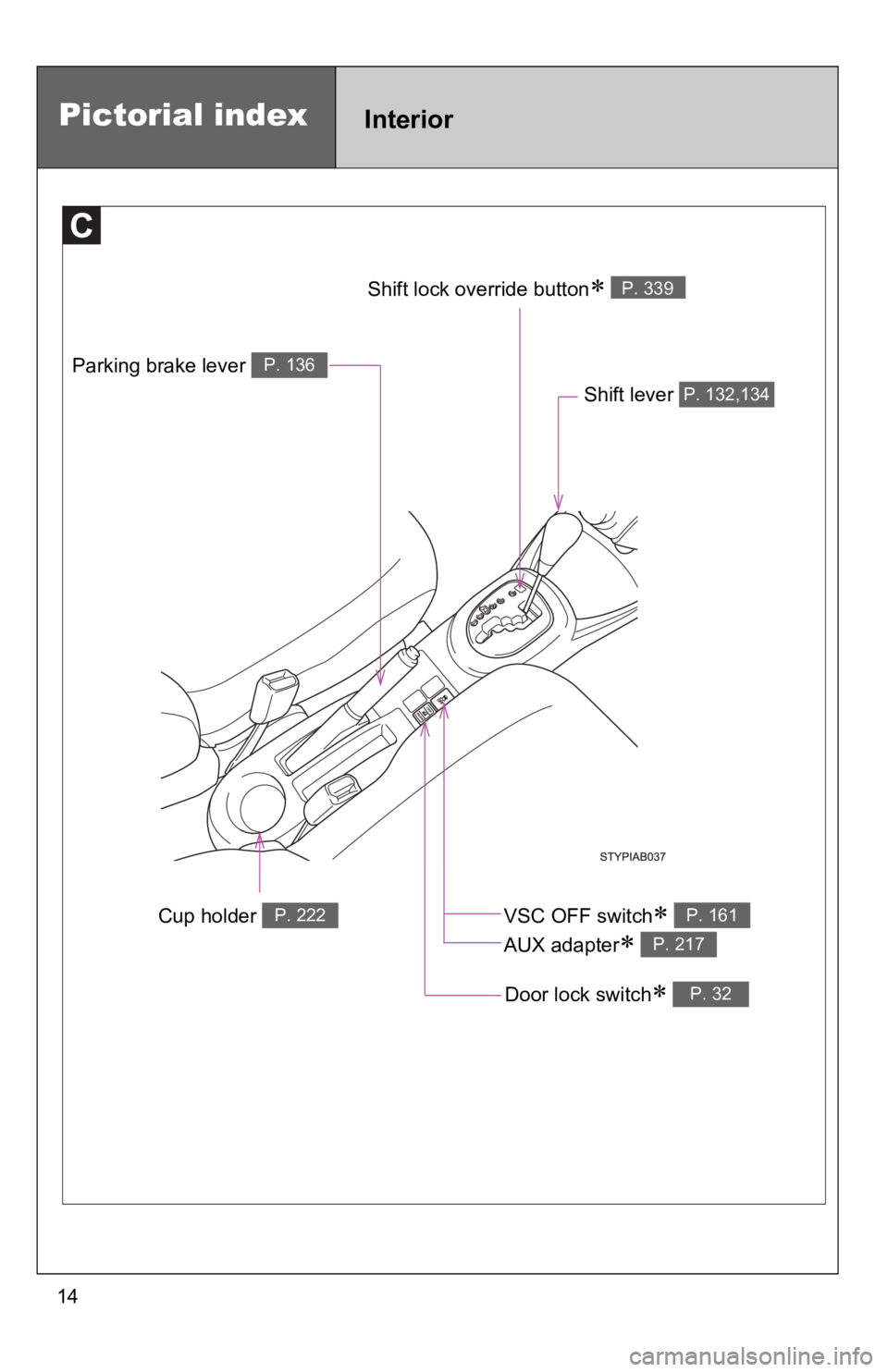
Cup holder P. 222
Parking brake lever P. 136
Shift lever P. 132,134
Door lock switch∗ P. 32
Shift lock override button∗ P. 339
Pictorial indexInterior
VSC OFF switch∗
AUX adapter
∗
P. 161
P. 217
Page 35 of 406
15
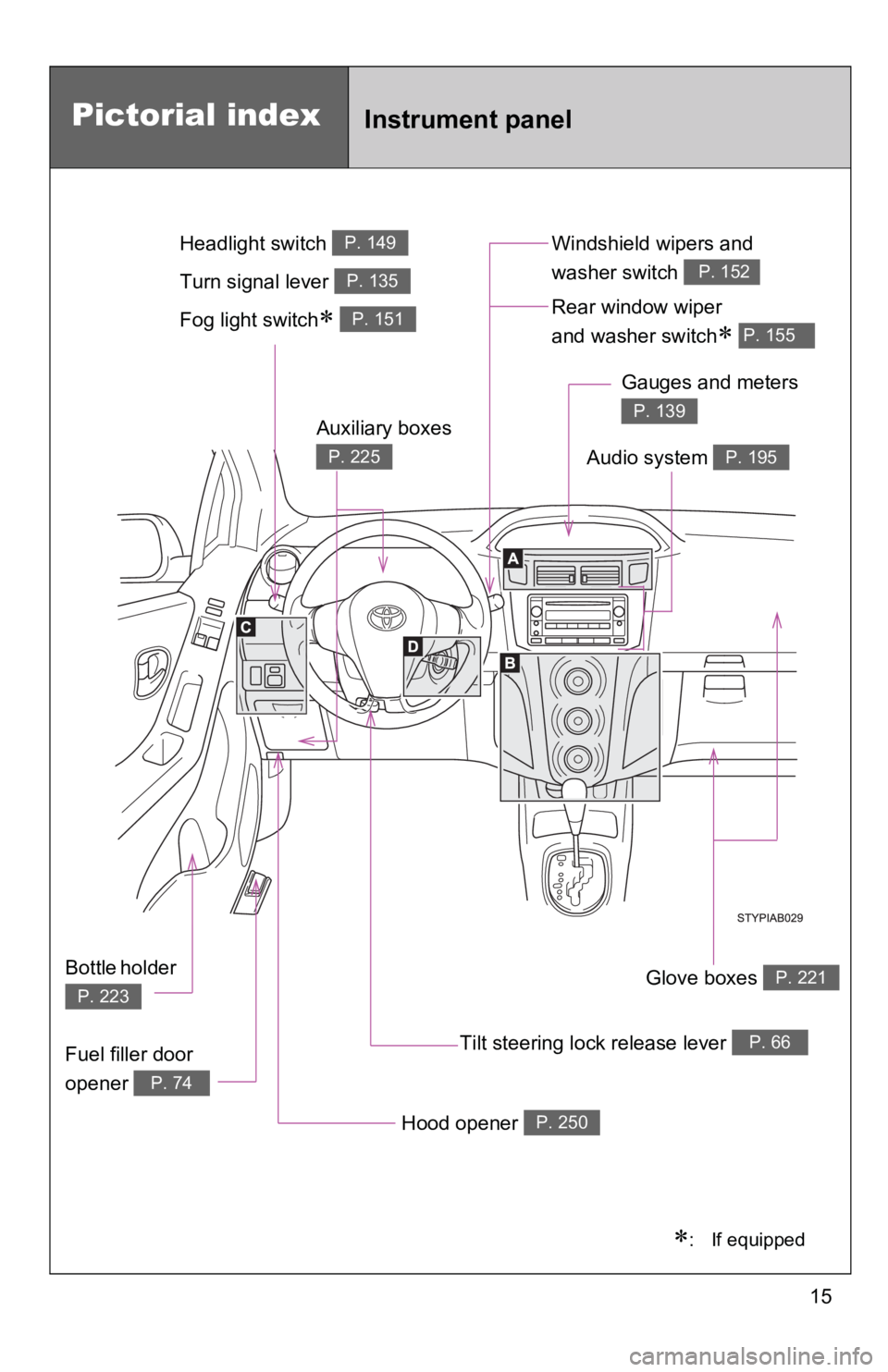
Pictorial indexInstrument panel
Fog light switch∗ P. 151Rear window wiper
and washer switch
∗ P. 155
Tilt steering lock release lever P. 66
Hood opener P. 250
Gauges and meters
P. 139
Audio system P. 195
Glove boxes P. 221
Fuel filler door
opener
P. 74
Auxiliary boxes
P. 225
Bottle holder
P. 223
Windshield wipers and
washer switch
P. 152Turn signal lever P. 135
Headlight switch P. 149
∗: If equipped
Page 42 of 406
28
1-2. Opening, closing and locking the doors
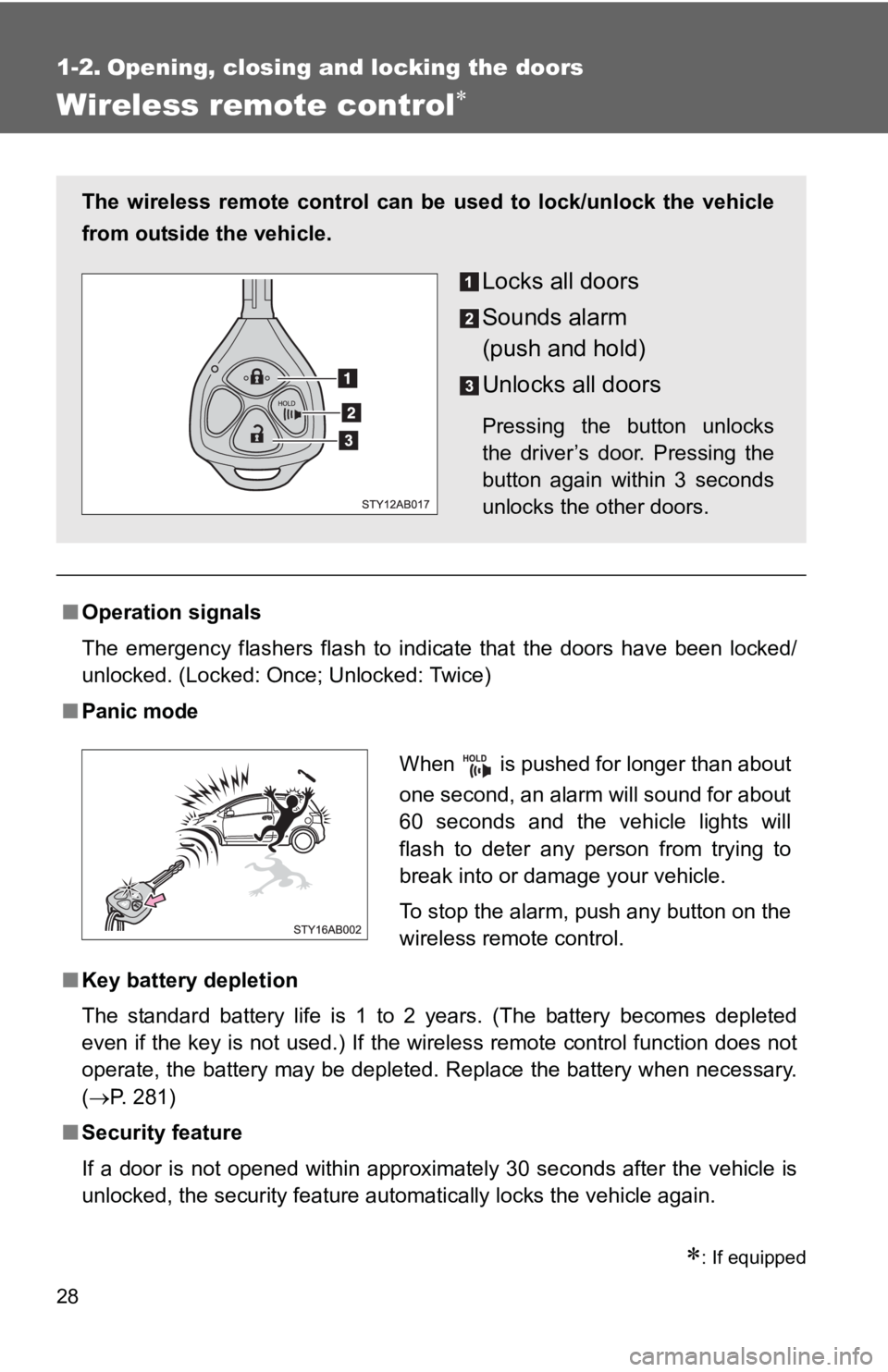
Wireless remote control∗
∗: If equipped
■Operation signals
The emergency flashers flash to indicate that the doors have been locked/
unlocked. (Locked: Once; Unlocked: Twice)
■Panic mode
■Key battery depletion
The standard battery life is 1 to 2 years. (The battery becomes depleted
even if the key is not used.) If the wireless remote control function does not
operate, the battery may be depleted. Replace the battery when necessary.
(→P. 281)
■ Security feature
If a door is not opened within approximately 30 seconds after the vehicle is
unlocked, the security feature automatically locks the vehicle again.
The wireless remote control can be used to lock/unlock the vehicle
from outside the vehicle.
Locks all doors
Sounds alarm
(push and hold)
Unlocks all doors
Pressing the button unlocks
the driver’s door. Pressing the
button again within 3 seconds
unlocks the other doors.
When is pushed for longer than about
one second, an alarm will sound for about
60 seconds and the vehicle lights will
flash to deter any person from trying to
break into or damage your vehicle.
To stop the alarm, push any button on the
wireless remote control.