audio TOYOTA YARIS HATCHBACK 2017 Owners Manual
[x] Cancel search | Manufacturer: TOYOTA, Model Year: 2017, Model line: YARIS HATCHBACK, Model: TOYOTA YARIS HATCHBACK 2017Pages: 400, PDF Size: 23.17 MB
Page 5 of 400
3
1
8 7 5 4
3
2
9
YARIS_HB_OM_USA_OM52G64U
6
4-2. Driving proceduresEngine (ignition) switch ..... 136
Automatic transmission ..... 139
Manual transmission ......... 142
Turn signal lever................ 143
Parking brake .................... 144
4-3. Operating the lights and wipers
Headlight switch ................ 145
Fog light switch ................. 148
Windshield wipers and washer ..................... 150
Rear window wiper and washer ..................... 153
4-4. Refueling
Opening the fuel tank cap .................................. 156
4-5. Toyota Safety Sense C
Toyota Safety Sense C ..... 159
PCS (Pre-Collision System) .... 165
LDA (Lane Departure Alert) .... 178
Automatic High Beam ....... 183
4-6. Using the driving support systems
Cruise control .................... 188
Driving assist systems....... 192
4-7. Driving tips
Winter driving tips.............. 197 5-1. Using the air conditioning
system and defogger
Air conditioning system...... 202
5-2. Using the audio system Steering wheel audio switches........................... 210
AUX port/USB port ............ 211
5-3. Using the interior lights Interior lights list................. 212• Interior light ................... 212
• Personal lights............... 213
5-4. Using the storage features List of storage features ...... 214• Glove box ...................... 215
• Cup holders ................... 215
• Bottle holders ................ 216
• Auxiliary box .................. 217
Luggage compartment features ........................... 218
5-5. Using the other interior features
Other interior features........ 220 • Sun visors ..................... 220
• Vanity mirrors ................ 220
• Power outlet .................. 221
• Assist grips .................... 2225Interior features
TABLE OF CONTENTS.fm 3 ページ 2016年2月17日 水曜日 午前11時34分
Page 20 of 400
18Pictorial index
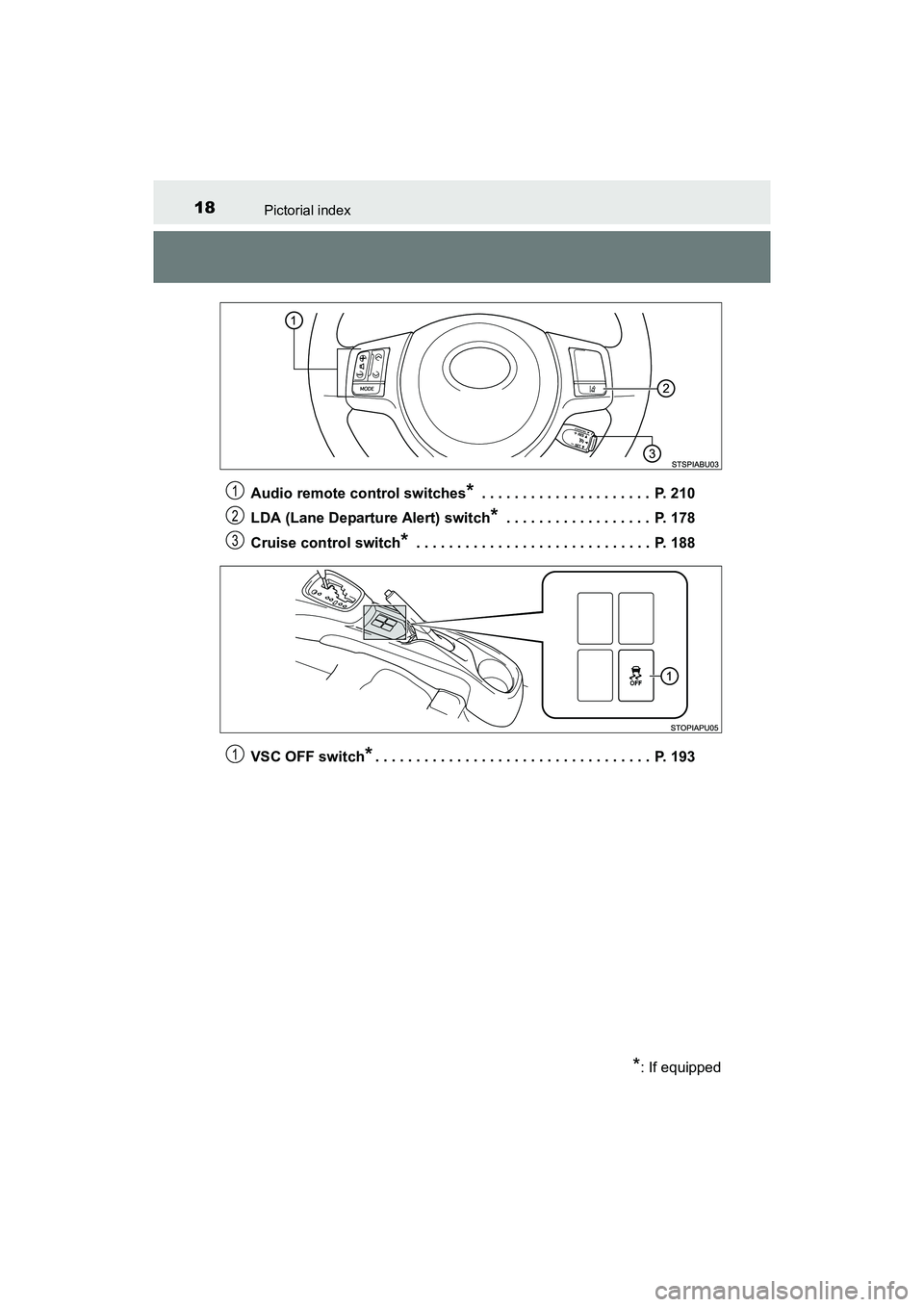
YARIS_HB_OM_USA_OM52G64UAudio remote control switches
* . . . . . . . . . . . . . . . . . . . . . P. 210
LDA (Lane Departure Alert) switch
* . . . . . . . . . . . . . . . . . . P. 178
Cruise control switch
* . . . . . . . . . . . . . . . . . . . . . . . . . . . . . P. 188
VSC OFF switch
*. . . . . . . . . . . . . . . . . . . . . . . . . . . . . . . . . . P. 193
*: If equipped
1
2
3
1
YARIS_HB_OM_USA_OM52G64U.book 18 ページ 2016年2月16日 火曜日 午後3時20分
Page 136 of 400
1344-1. Before driving
YARIS_HB_OM_USA_OM52G64U
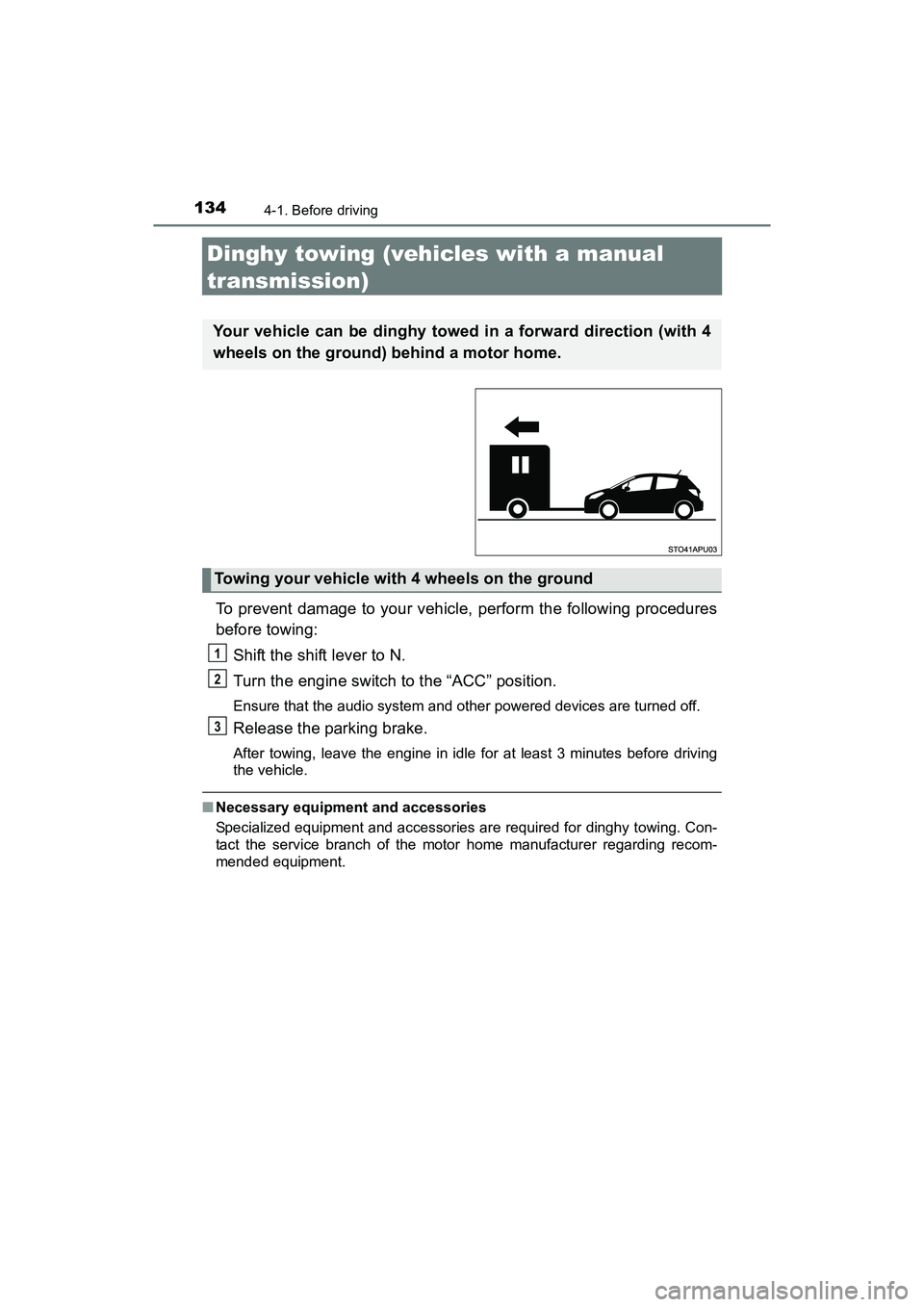
Dinghy towing (vehicles with a manual
transmission)
To prevent damage to your vehicle, perform the following procedures
before towing:Shift the shift lever to N.
Turn the engine switch to the “ACC” position.
Ensure that the audio system and other powered devices are turned off.
Release the parking brake.
After towing, leave the engine in idle for at least 3 minutes before driving
the vehicle.
■ Necessary equipment and accessories
Specialized equipment and accessories are required for dinghy towing. Con-
tact the service branch of the motor home manufacturer regarding recom-
mended equipment.
Your vehicle can be dinghy towed in a forward direction (with 4
wheels on the ground) behind a motor home.
Towing your vehicle with 4 wheels on the ground
1
2
3
YARIS_HB_OM_USA_OM52G64U.book 134 ページ 2016年2月16日 火曜日 午後3時20分
Page 138 of 400
1364-2. Driving procedures
YARIS_HB_OM_USA_OM52G64U
Engine (ignition) switch
Check that the parking brake is set.
Check that the shift lever is set in P (automatic transmission) or N
(manual transmission).
Firmly depress the brake pedal (automatic transmission) or brake
pedal and clutch pedal (manual transmission).
Turn the engine switch to the “START” position to start the engine.
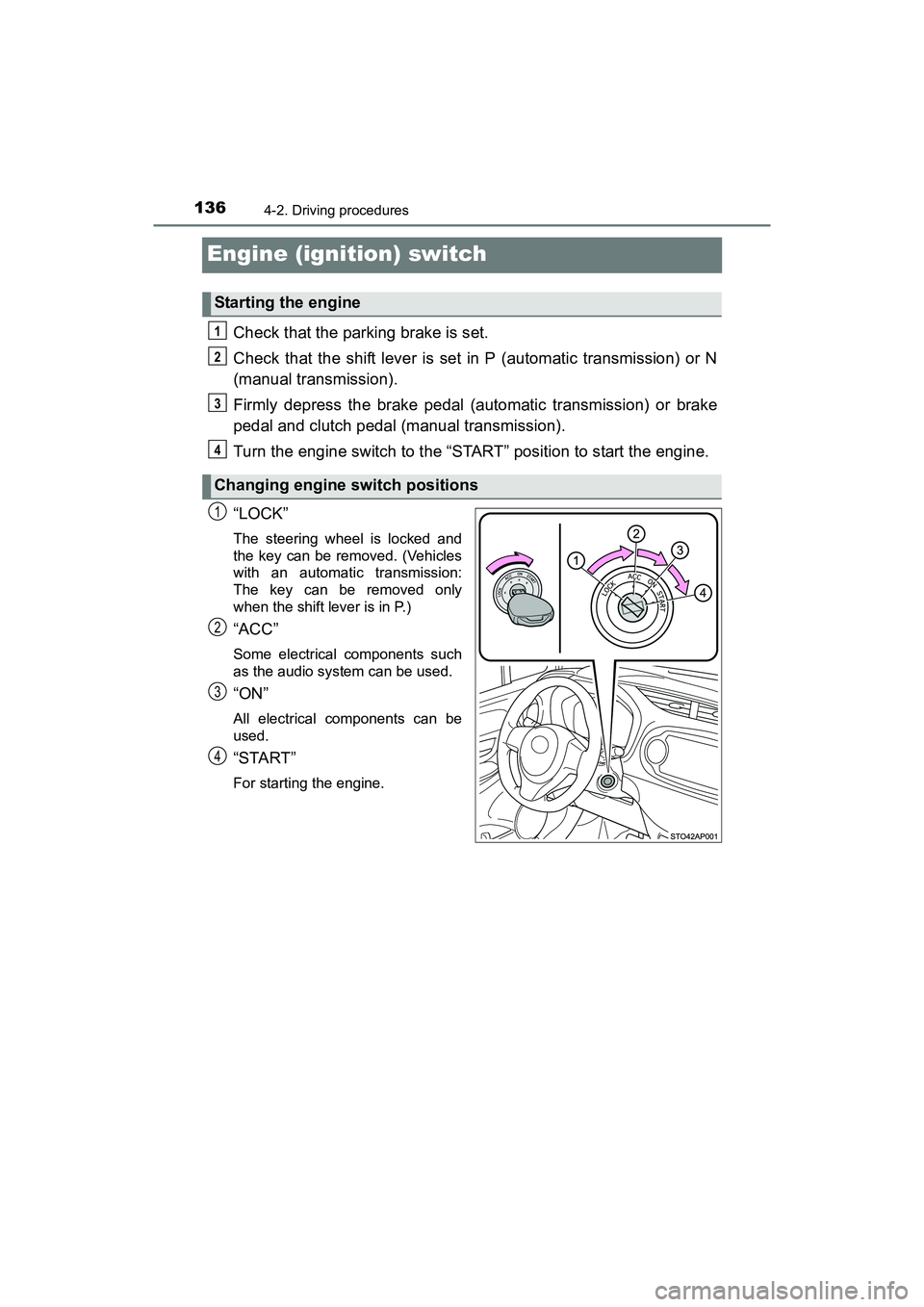
“LOCK”
The steering wheel is locked and
the key can be removed. (Vehicles
with an automatic transmission:
The key can be removed only
when the shift lever is in P.)
“ACC”
Some electrical components such
as the audio system can be used.
“ON”
All electrical components can be
used.
“START”
For starting the engine.
Starting the engine
Changing engine switch positions
1
2
3
4
1
2
3
4
YARIS_HB_OM_USA_OM52G64U.book 136 ページ 2016年2月16日 火曜日 午後3時20分
Page 182 of 400
1804-5. Toyota Safety Sense C
YARIS_HB_OM_USA_OM52G64U
■Temporary cancelation of the LDA system functions
If any of the following occurs, the LDA system functions will be temporarily
canceled. The functions will resume after the necessary operating conditions
have returned.
●The turn signal lever is operated.
● The vehicle speed deviates from the operating range of the LDA system
functions.
● When the lane lines cannot be recognized while driving.
● When the lane departure warning sounds.
The lane departure warning function will not operate again for a several sec-
onds after it has been activated, even if the vehicle leaves the lane again.
■ The lane departure warning
Depending on the audio system sound le vel or air conditioning fan noise
while the audio system or air conditioning system is in use, it may be difficult
to hear the warning sound.
■ After the vehicle has been parked in the sun
The LDA system may not be immediately available. When the temperature in
the cabin decreases and the temperature around the front sensor ( P. 161)
becomes suitable for its operation, the functions will begin to operate.
■ If there are lane markers on only one side of the vehicle
The lane departure warning will not operate for the side on which lane mark-
ers could not be recognized.
■ Conditions in which the function may not operate correctly
In the following situations, the front sensor may be unable to recognize lane
markers causing the lane departure warning function to operate incorrectly.
However, this does not indicate a malfunction.
●When driving through an area, such as a tollbooth, a crossing or before a
ticket checkpoint
● When driving on a sharp curve
● When lane markers are extremel y narrow or extremely wide
● When the vehicle leans to one side an unusual amount due to a heavy load
or improper tire inflation pressure
● When the following distance between your vehicle and the vehicle ahead is
extremely short
● When the lane markers are yellow (These may be more difficult for the sys-
tem to recognize compared to white markers.)
● When the lane markers are broken, Botts’ dots (raised pavement markers)
or stones
sec_04-05.fm 180 ページ 2016年2月17日 水曜日 午前11時35分
Page 203 of 400
201
5Interior features
YARIS_HB_OM_USA_OM52G64U5-1. Using the air conditioning
system and defogger
Air conditioning system ..... 202
5-2. Using the audio system Steering wheel audio switches .......................... 210
AUX port/USB port ............ 211
5-3. Using the interior lights Interior lights list ................ 212• Interior light ................... 212
• Personal lights .............. 213
5-4. Using the storage features List of storage features ..... 214• Glove box...................... 215
• Cup holders .................. 215
• Bottle holders ................ 216
• Auxiliary box ................. 217
Luggage compartment features ........................... 218
5-5. Using the other interior features
Other interior features ....... 220 • Sun visors ..................... 220
• Vanity mirrors................ 220
• Power outlet .................. 221
• Assist grips ................... 222
YARIS_HB_OM_USA_OM52G64U.book 201 ページ 2016年2月16日 火曜日 午後3時20分
Page 212 of 400
2105-2. Using the audio system
YARIS_HB_OM_USA_OM52G64U
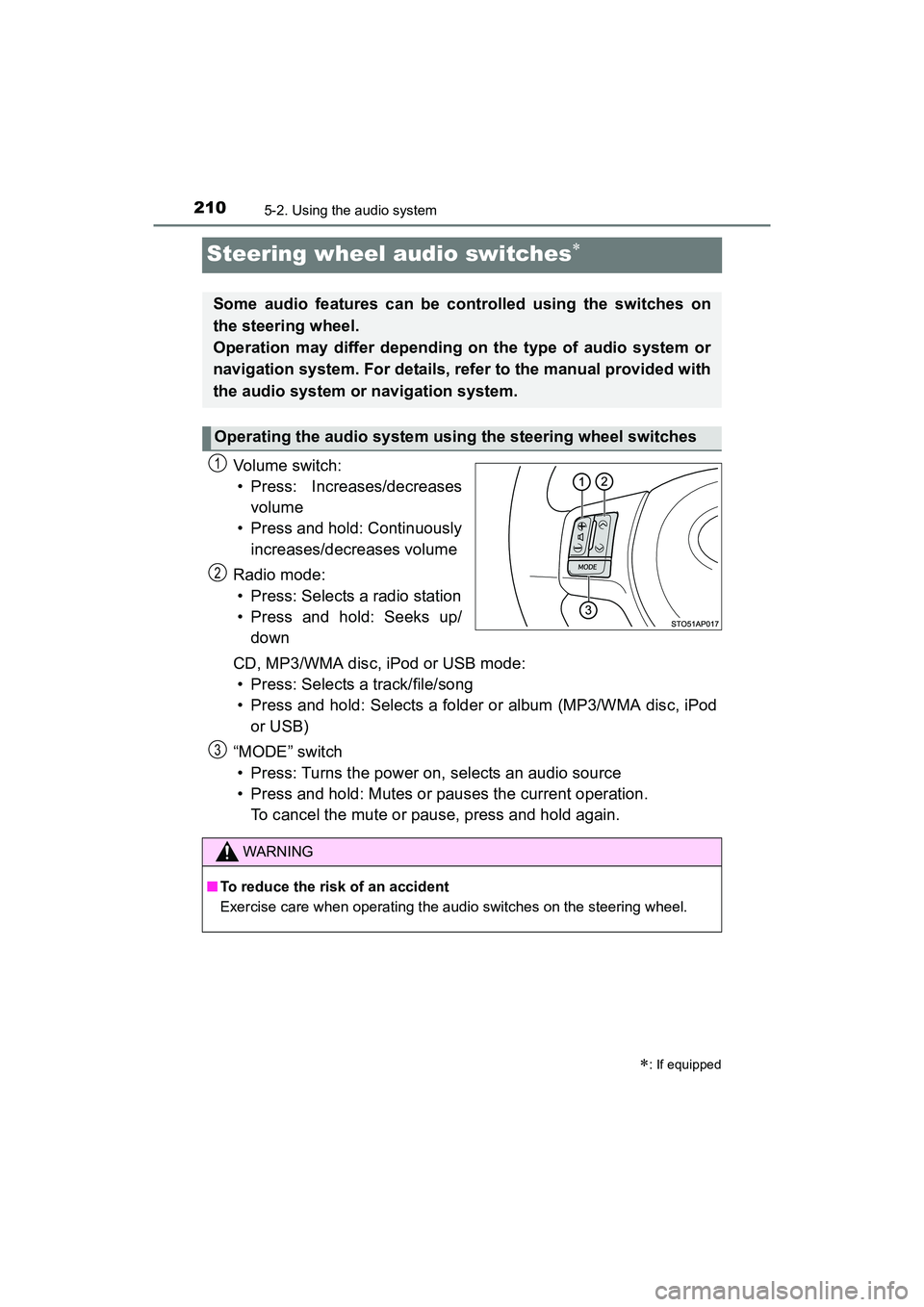
Steering wheel audio switches
Vol um e s wit ch :• Press: Increases/decreases
volume
• Press and hold: Continuously
increases/decreases volume
Radio mode: • Press: Selects a radio station
• Press and hold: Seeks up/ down
CD, MP3/WMA disc, iPod or USB mode: • Press: Selects a track/file/song
• Press and hold: Selects a folder or album (MP3/WMA disc, iPod or USB)
“MODE” switch • Press: Turns the power on, selects an audio source
• Press and hold: Mutes or pauses the current operation. To cancel the mute or pause, press and hold again.
: If equipped
Some audio features can be controlled using the switches on
the steering wheel.
Operation may differ depending on the type of audio system or
navigation system. For details, refer to the manual provided with
the audio system or navigation system.
Operating the audio system using the steering wheel switches
1
2
WARNING
■ To reduce the risk of an accident
Exercise care when operating the audio switches on the steering wheel.
3
YARIS_HB_OM_USA_OM52G64U.book 210 ページ 2016年2月16日 火曜日 午後3時20分
Page 213 of 400
2115-2. Using the audio system
5
Interior features
YARIS_HB_OM_USA_OM52G64U
AUX port/USB port
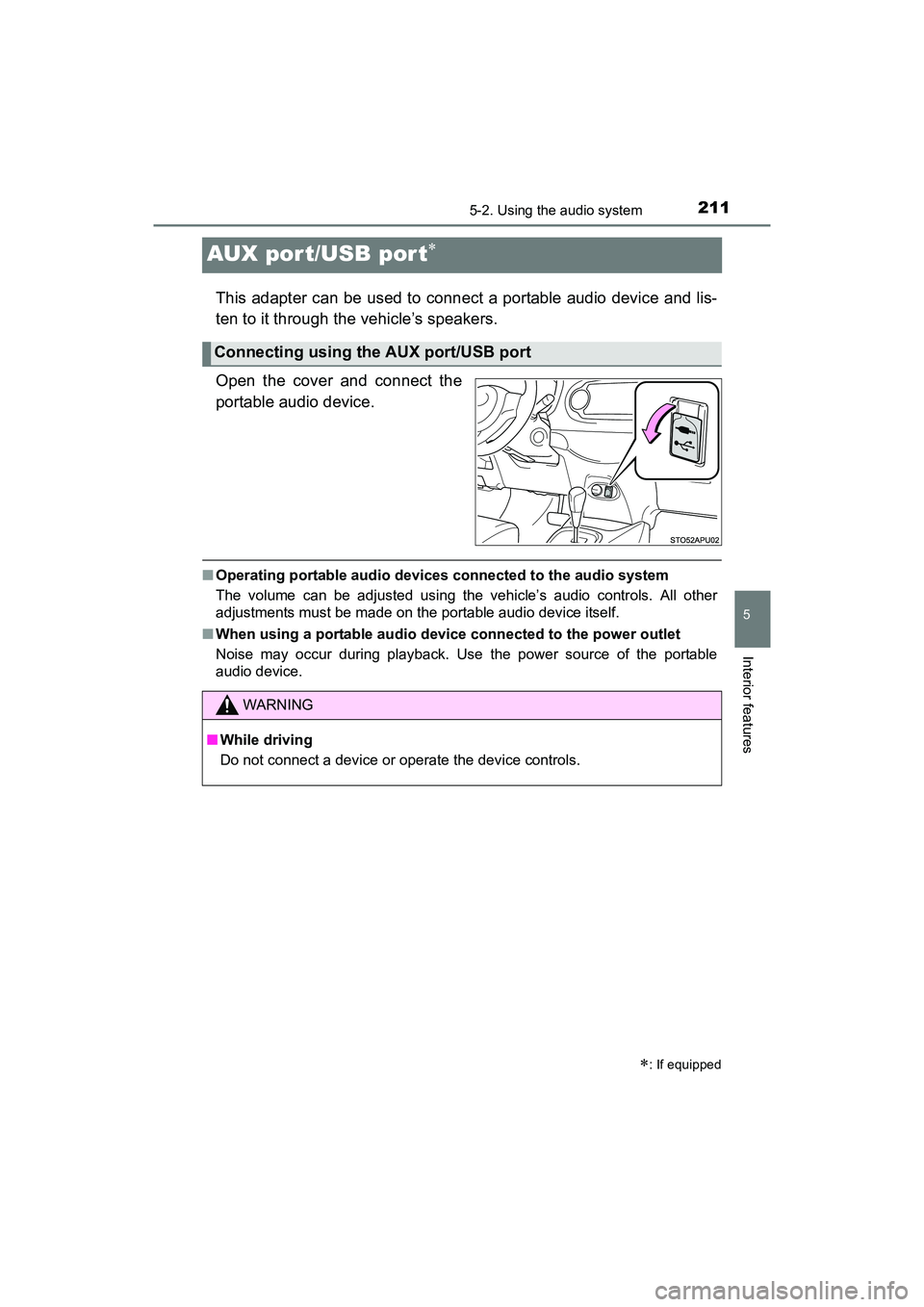
This adapter can be used to connect a portable audio device and lis-
ten to it through the vehicle’s speakers.
Open the cover and connect the
portable audio device.
■Operating portable audio devices connected to the audio system
The volume can be adjusted using the vehicle’s audio controls. All other
adjustments must be made on the portable audio device itself.
■ When using a portable audio device connected to the power outlet
Noise may occur during playback. Use the power source of the portable
audio device.
: If equipped
Connecting using the AUX port/USB port
WARNING
■While driving
Do not connect a device or operate the device controls.
YARIS_HB_OM_USA_OM52G64U.book 211 ページ 2016年2月16日 火曜日 午後3時20分
Page 231 of 400
2296-1. Maintenance and care
6
Maintenance and care
YARIS_HB_OM_USA_OM52G64U
NOTICE
■Cleaning detergents
●Do not use the following types of detergent, as they may discolor the vehi-
cle interior or cause streaks or damage to painted surfaces:
• Non-seat portions: Organic substances such as benzene or gasoline,
alkaline or acidic solutions, dye, and bleach
• Seats: Alkaline or acidic solutions, such as thinner, benzene, and alco- hol
● Do not use a polish wax or polish cleaner. The instrument panel’s or other
interior part’s painted surface may be damaged.
■ Preventing damage to leather surfaces
Observe the following precautions to avoid damage to and deterioration of
leather surfaces:
● Remove any dust or dirt from leather surfaces immediately.
● Do not expose the vehicle to direct sunlight for extended periods of time.
Park the vehicle in the shade, especially during summer.
● Do not place items made of vinyl, pl astic, or containing wax on the uphol-
stery, as they may stick to the leather surface if the vehicle interior heats
up significantly.
■ Water on the floor
Do not wash the vehicle floor with water.
Vehicle systems such as the audio system may be damaged if water comes
into contact with electrical components such as the audio system above or
under the floor of the vehicle. Water may also cause the body to rust.
■ When cleaning the inside of the windshield (vehicles with front sensor)
Be careful not to touch the front sensor ( P. 161).
If the camera is accidentally scratched or hit, PCS, LDA and Automatic High
Beam may not operate properly or may cause a malfunction.
■ Cleaning the inside of the rear window
●Do not use glass cleaner to clean the rear window, as this may cause
damage to the rear window defogger heater wires. Use a cloth dampened
with lukewarm water to gently wipe the window clean. Wipe the window in
strokes running parallel to the heater wires.
● Be careful not to scratch or damage the heater wires.
YARIS_HB_OM_USA_OM52G64U.book 229 ページ 2016年2月16日 火曜日 午後3時20分
Page 330 of 400
3287-2. Steps to take in an emergency
YARIS_HB_OM_USA_OM52G64U
Start the engine of the second vehicle. Increase the engine speed
slightly and maintain at that level for approximately 5 minutes to
recharge the battery of your vehicle.
Maintain the engine speed of the second vehicle and start the
engine of your vehicle.
Once the vehicle’s engine has started, remove the jumper cables in
the exact reverse order from which they were connected.
Once the engine starts, have the vehicle inspected at your Toyota
dealer as soon as possible.
■ Starting the engine when the battery is discharged (vehicles with an
automatic transmission)
The engine cannot be started by push-starting.
■ To prevent battery discharge
●Turn off the headlights and the audio system while the engine is not running.
● Turn off any unnecessary electrical components when the vehicle is running
at a low speed for an extended period, such as in heavy traffic.
■ Charging the battery
The electricity stored in the battery will discharge gradually even when the
vehicle is not in use, due to natural discharge and the draining effects of cer-
tain electrical appliances. If the vehicle is left for a long time, the battery may
discharge, and the engine may be unable to start. (The battery recharges
automatically during driving.)
3
4
5
YARIS_HB_OM_USA_OM52G64U.book 328 ページ 2016年2月16日 火曜日 午後3時20分