tow TOYOTA YARIS HATCHBACK 2018 Owner's Manual
[x] Cancel search | Manufacturer: TOYOTA, Model Year: 2018, Model line: YARIS HATCHBACK, Model: TOYOTA YARIS HATCHBACK 2018Pages: 520, PDF Size: 8.69 MB
Page 158 of 520
1584-3. Operating the lights and wipers
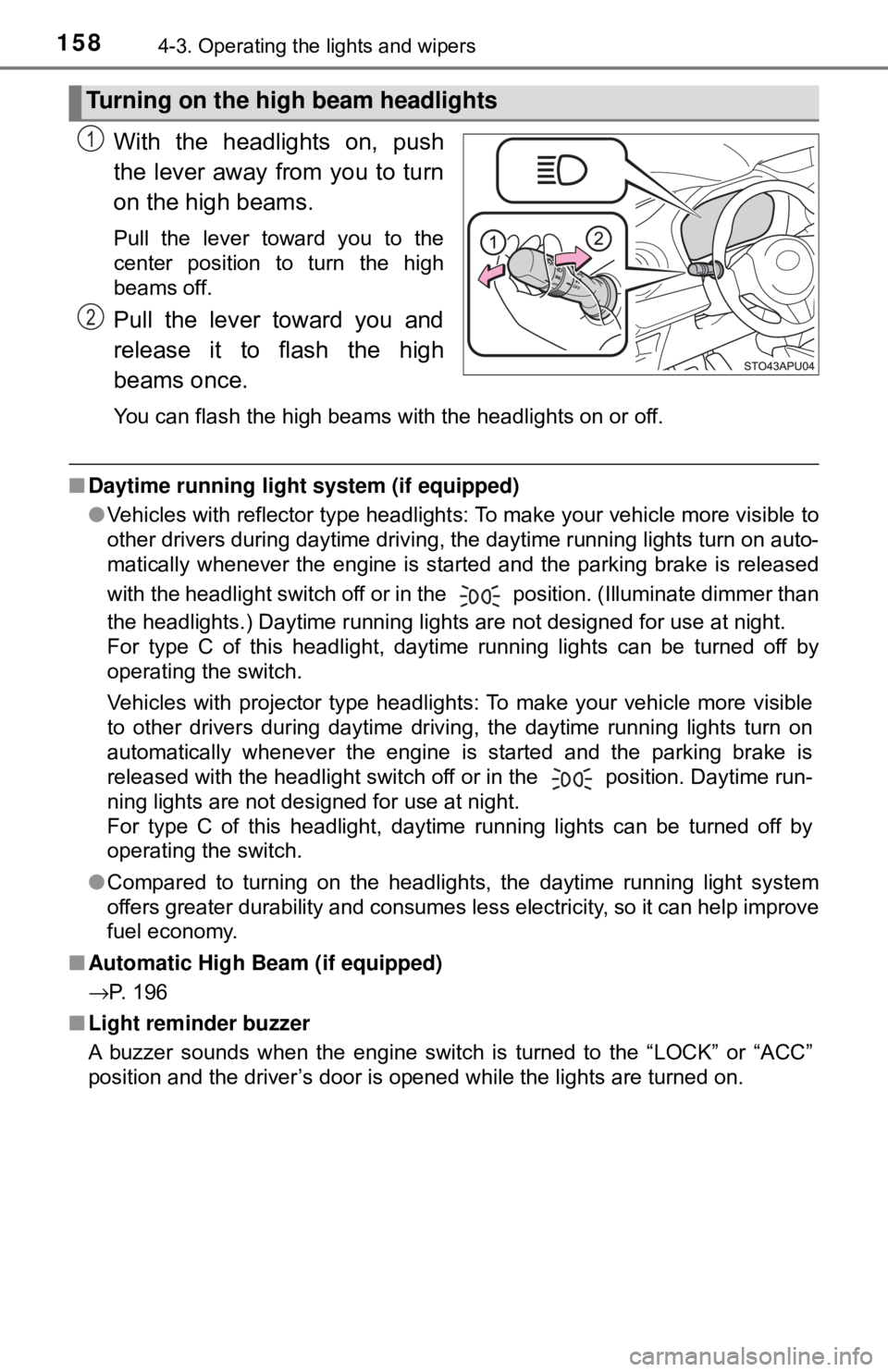
With the headlights on, push
the lever away from you to turn
on the high beams.
Pull the lever toward you to the
center position to turn the high
beams off.
Pull the lever toward you and
release it to flash the high
beams once.
You can flash the high beams with the headlights on or off.
■Daytime running light system (if equipped)
●Vehicles with reflector type headlights: To make your vehicle more visible to
other drivers during daytime driving, the daytime running lights turn on auto-
matically whenever the engine is started and the parking brake is released
with the headlight switch off or in the position. (Illuminate dimmer than
the headlights.) Daytime running lights are not designed for use at night.
For type C of this headlight, daytime running lights can be turned off by
operating the switch.
Vehicles with projector type headlights: To make your vehicle more visible
to other drivers during daytime driving, the daytime running lights turn on
automatically whenever the engine is started and the parking brake is
released with the headlight switch off or in the position. Daytime run-
ning lights are not designed for use at night.
For type C of this headlight, daytime running lights can be turned off by
operating the switch.
● Compared to turning on the headlights, the daytime running light system
offers greater durability and consumes less electricity, so it can help improve
fuel economy.
■ Automatic High Beam (if equipped)
→P. 196
■ Light reminder buzzer
A buzzer sounds when the engine switch is turned to the “LOCK” or “ACC”
position and the driver’s door is opened while the lights are turned on.
Turning on the high beam headlights
1
2
Page 179 of 520
1794-5. Toyota Safety Sense C
4
Driving
WARNING
●While driving, such as when driving through a railway crossing, the system
may determine that the possibility of a collision with an object, such as rail-
way crossing barrier, is high and operate the pre-collision braking function.
To move the vehicle in an emergency, such as if the system operates in a
railway crossing, perform the following operations and then take the nec-
essary measures to ensure your safety.
• If the vehicle has been stopped, depress the accelerator pedal.
• If the vehicle is decelerating, fully depress the accelerator pedal.
(→P. 182)
• Disable the pre-collision system. ( →P. 180)
■ When to disable the pre-collision system
In the following situations, disable the system, as it may not operate prop-
erly, possibly leading to an accident resulting in death or serious injury:
● When the vehicle is being towed
● When your vehicle is towing another vehicle
● When transporting the vehicle via truck, boat, train or similar means of
transportation
● When the vehicle is raised on a lift with the engine running on and the tires
are allowed to rotate freely
● When inspecting the vehicle using a drum tester such as a chassis dyna-
mometer or speedometer tester, or when using an on vehicle wheel bal-
ancer
● If the vehicle cannot be driven in a stable manner, such as when the vehi-
cle has been in an accident or is malfunctioning
● When the vehicle is driven in a sporty manner or off-road
● When the condition of the tires is poor and they do not perform well
(→P. 370)
● When tires of a size other than specified are installed
● When tire chains are installed
● When a compact spare tire or an emergency tire puncture repair kit is used
Page 199 of 520

1994-5. Toyota Safety Sense C
4
Driving
●High beam may be turned on or off when unexpected by the driver.
● In the situations below, the system may not be able to correctly detect the
surrounding brightness levels, and may flash or expose nearby pedestrians
to the high beam. Therefore, you should consider turning the high beams on
or off manually rather than relying on the Automatic High Beam system.
• In bad weather (rain, snow, fog, sandstorms, etc.)
• The windshield is obscured by fog, mist, ice, dirt, etc.
• The windshield is cracked or damaged.
• The front sensor is deformed or dirty.
• The front sensor temperature is extremely high.
• Surrounding brightness levels are equal to those of headlights, tail lights
or fog lights.
• Vehicles ahead have headlights or tail lights that are either switched off, dirty, are changing color, or are not aimed properly.
• When driving through an area of in termittently changing brightness and
darkness.
• When frequently and repeatedly driving ascending/descending roads, or
roads with rough, bumpy or uneven surfaces (such as stone-paved
roads, gravel tracks, etc.).
• When frequently and repeatedly taking curves or driving on a winding
road.
• There is a highly reflective object ahead of the vehicle, such as a sign or a mirror.
• The back of a vehicle ahead is highly reflective, such as a container on a truck.
• The vehicle’s headlights are damaged or dirty.
• The vehicle is listing or titling, due to a flat tire, a trailer being towed, etc.
• The driver believes that the high beam may be causing problems or dis- tress to other drivers or pedestrians nearby.
■ If the Automatic High Beam indicator comes on in yellow
It may indicate a malfunction in the system. Contact your Toyota dealer.
Page 202 of 520
2024-6. Using the driving support systems
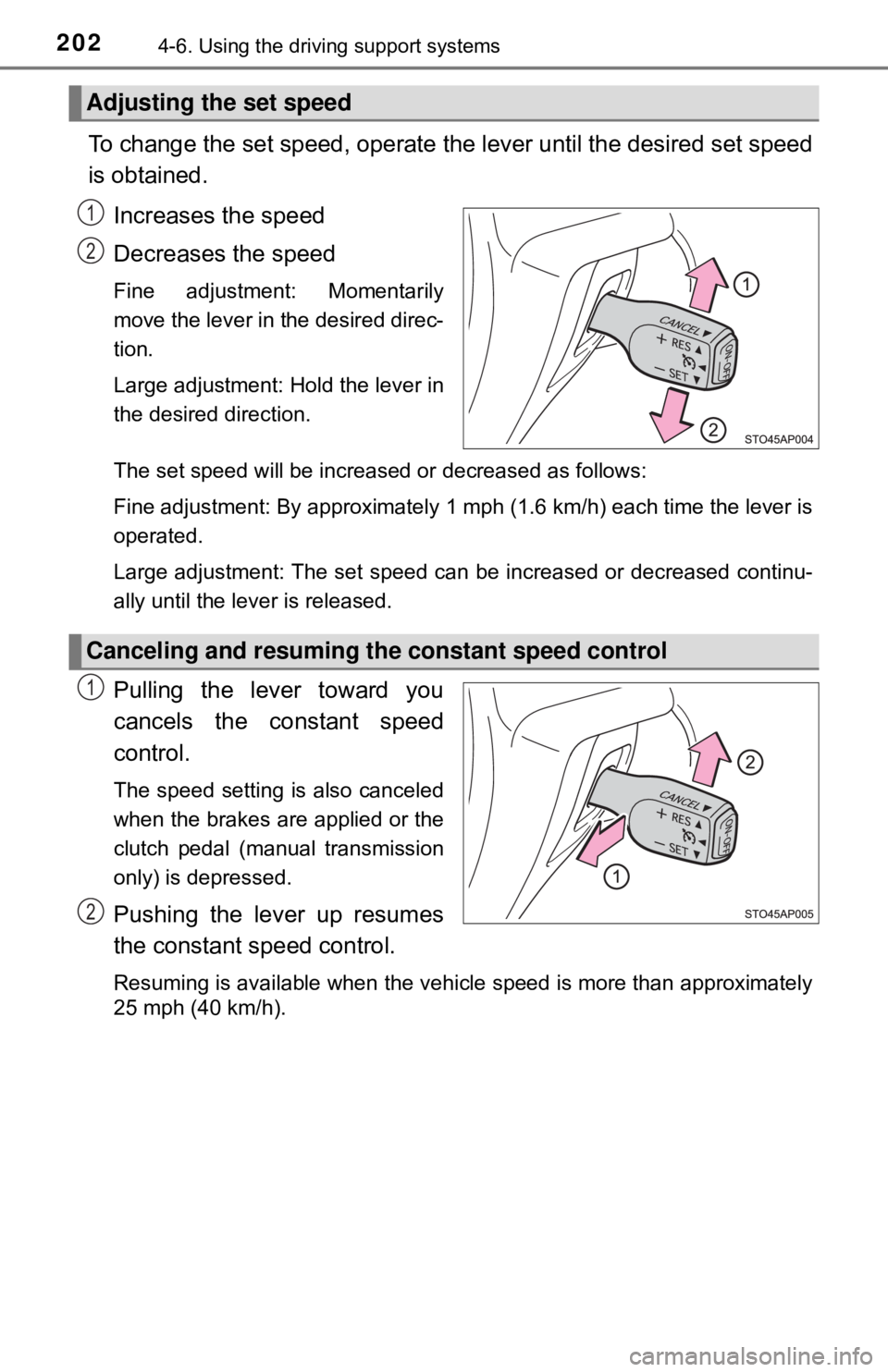
To change the set speed, operate the lever until the desired set speed
is obtained.
Increases the speed
Decreases the speed
Fine adjustment: Momentarily
move the lever in the desired direc-
tion.
Large adjustment: Hold the lever in
the desired direction.
The set speed will be increased or decreased as follows:
Fine adjustment: By approximately 1 mph (1.6 km/h) each time the lever is
operated.
Large adjustment: The set speed can be increased or decreased continu-
ally until the lever is released.
Pulling the lever toward you
cancels the c onstant speed
control.
The speed setting is also canceled
when the brakes are applied or the
clutch pedal (manual transmission
only) is depressed.
Pushing the lever up resumes
the constant speed control.
Resuming is available when the vehicle speed is more than approximately
25 mph (40 km/h).
Adjusting the set speed
1
2
Canceling and resuming the constant speed control
1
2
Page 204 of 520

2044-6. Using the driving support systems
WARNING
■To avoid operating the cruise control by mistake
Switch the cruise control off using the “ON-OFF” button when not in use.
■ Situations unsuitable for cruise control
Do not use cruise control in any of the following situations.
Doing so may result in loss of control and could cause an accident resulting
in death or serious injury.
● In heavy traffic
● On roads with sharp bends
● On winding roads
● On slippery roads, such as those covered with rain, ice or snow
● On steep hills
Vehicle speed may exceed the set speed when driving down a steep hill.
● During emergency towing
Page 312 of 520
3125-11. Using the voice command system
■Microphone
→P. 278
■ When using the microphone
●It is unnecessary to speak directly into the microphone when giving a com-
mand.
● Voice commands may not be recognized if:
• Spoken too quickly.
• Spoken at a low or high volume.
• The roof or windows are open.
• Passengers are talking while voice commands are spoken.
• The air conditioning speed is set high.
• The air conditioning vents are turned towards the microphone.
● In the following conditions, the system may not recognize the command
properly and using voice commands may not be possible:
• The command is incorrect or unclear. Note that certain words, accents or
speech patterns may be difficult for the system to recognize.
• There is excessive background noise, such as wind noise.
Due to natural language speech recognition technology, this system
enables recognition of a command when spoken naturally. However,
the system cannot recognize ev ery variation of each command.
In some situations, it is possibl e to omit the command for the proce-
dure and directly state the desired operation.
Not all voice commands are displayed in the short cut menu.
This function is available in English, Spanish and French.
■Expression examples for each function
Casual speech recognization
CommandExpression examples
“Call
Call
“Dial
Get me <3334445555>
Page 332 of 520
3326-3. Using the storage features
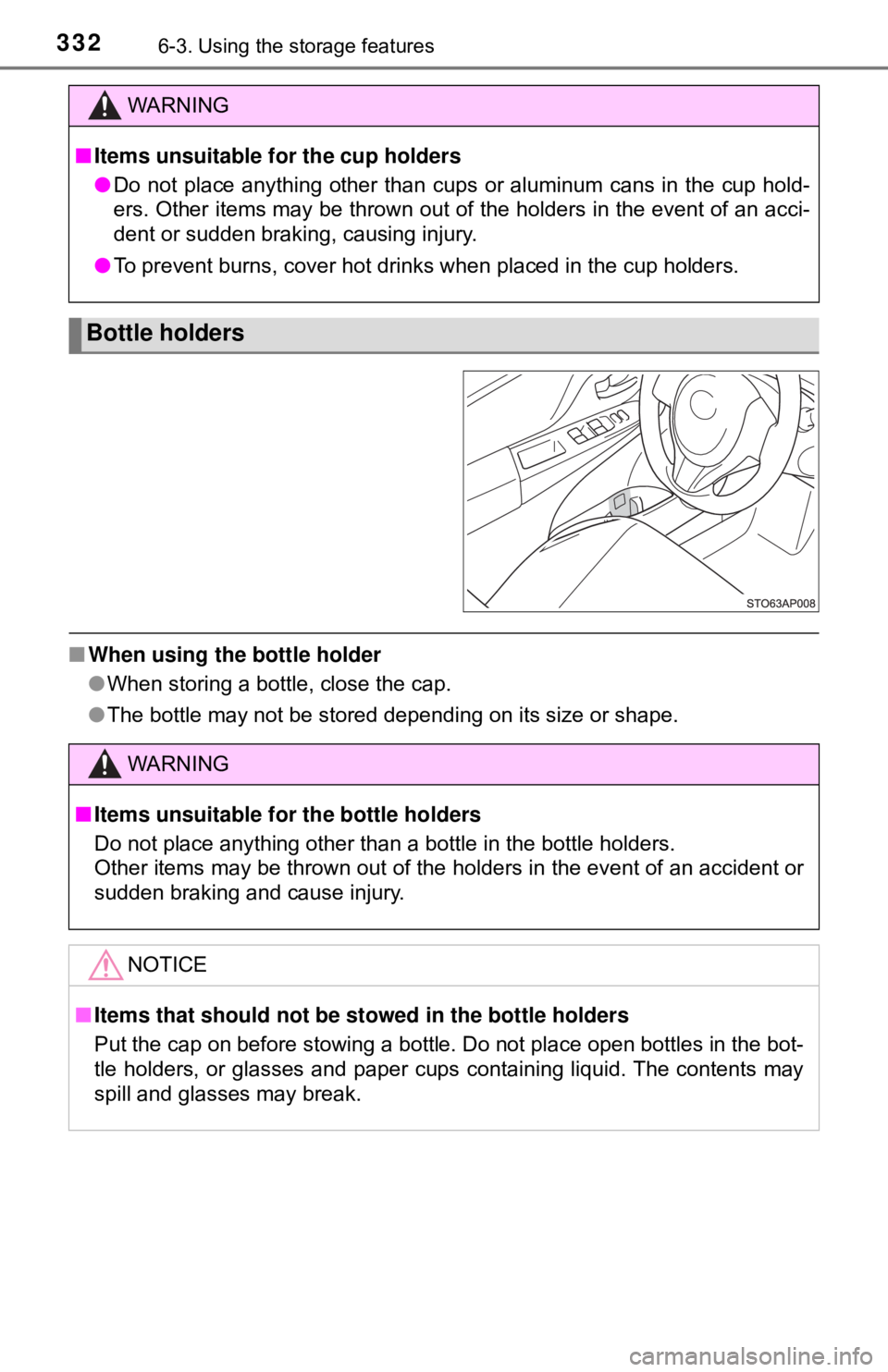
■When using the bottle holder
●When storing a bottle, close the cap.
● The bottle may not be stored depending on its size or shape.
WARNING
■Items unsuitable for the cup holders
● Do not place anything other than cups or aluminum cans in the cup hold-
ers. Other items may be thrown out of the holders in the event of an acci-
dent or sudden braking, causing injury.
● To prevent burns, cover hot drinks when placed in the cup holders.
Bottle holders
WARNING
■Items unsuitable for the bottle holders
Do not place anything other than a bottle in the bottle holders.
Other items may be thrown out of the holders in the event of an accident or
sudden braking and cause injury.
NOTICE
■Items that should not be st owed in the bottle holders
Put the cap on before stowing a bottle. Do not place open bottles in the bot-
tle holders, or glasses and paper cups containing liquid. The contents may
spill and glasses may break.
Page 334 of 520
3346-3. Using the storage features
Luggage compartment features
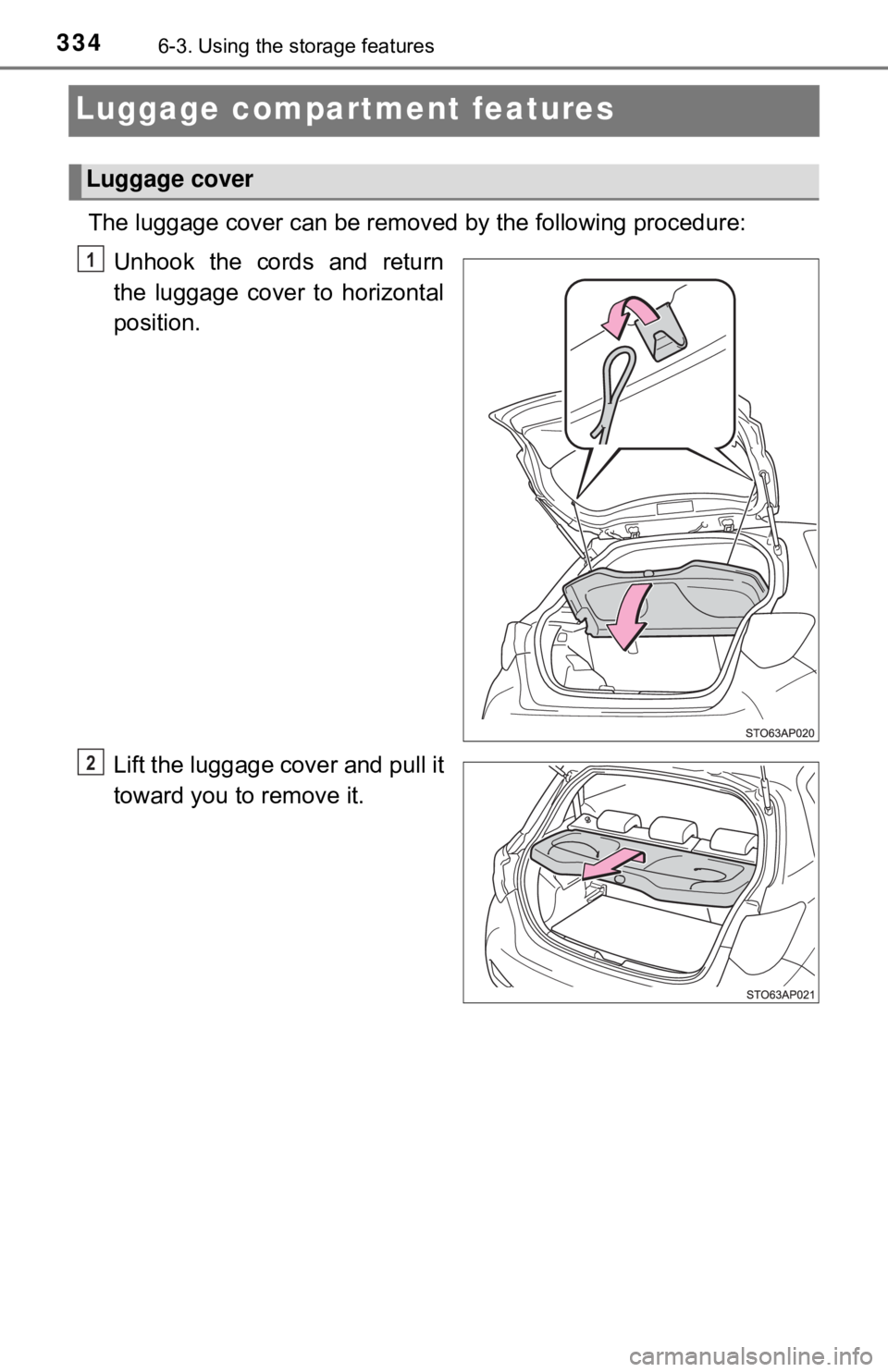
The luggage cover can be removed by the following procedure:
Unhook the cords and return
the luggage cover to horizontal
position.
Lift the luggage cover and pull it
toward you to remove it.
Luggage cover
1
2
Page 335 of 520
3356-3. Using the storage features
6
Interior features
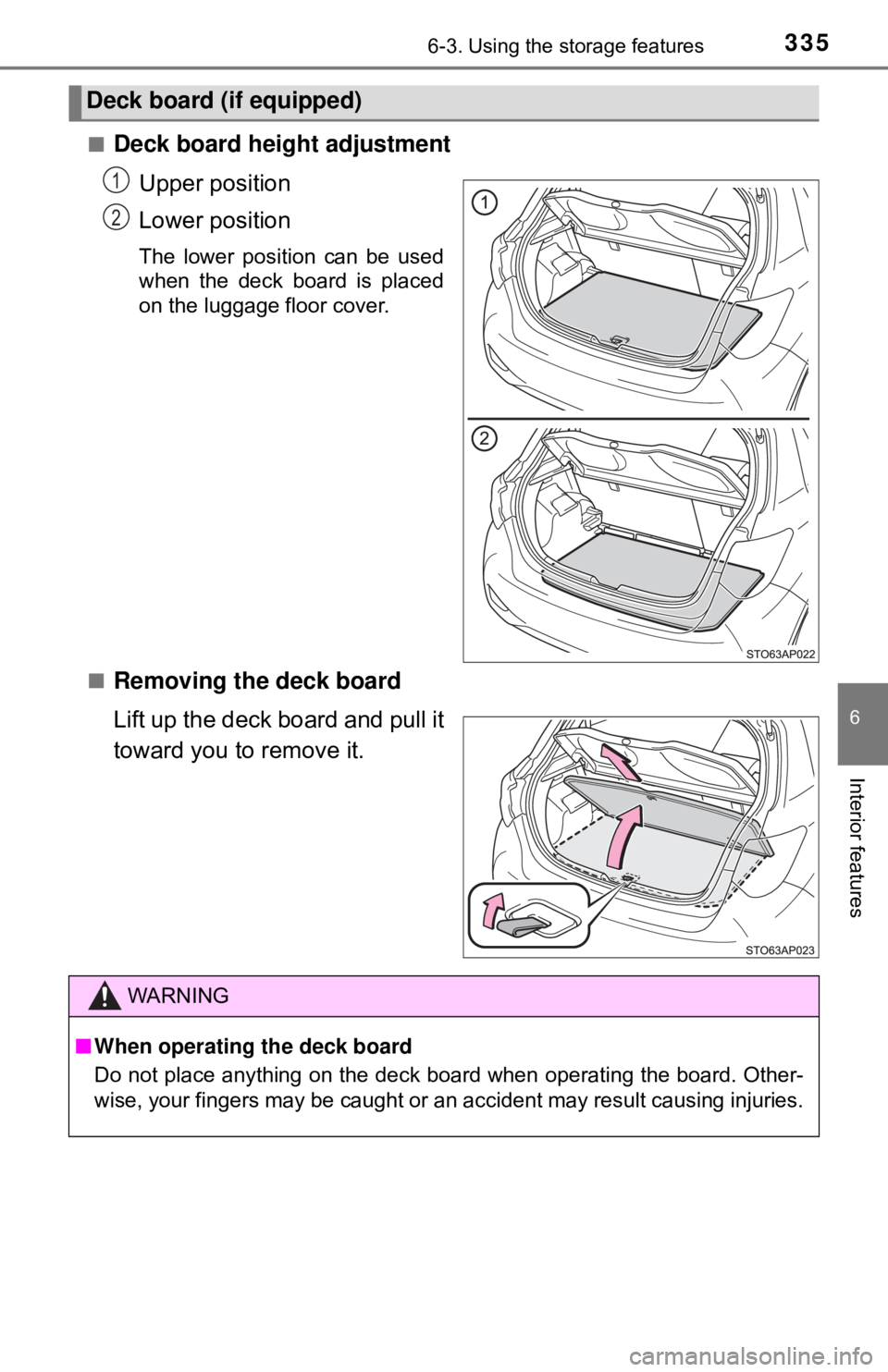
■Deck board height adjustmentUpper position
Lower position
The lower position can be used
when the deck board is placed
on the luggage floor cover.
■
Removing the deck board
Lift up the deck board and pull it
toward you to remove it.
Deck board (if equipped)
1
2
WARNING
■ When operating the deck board
Do not place anything on the deck board when operating the board. Other-
wise, your fingers may be caught or an accident may result causing injuries.
Page 353 of 520
3537-3. Do-it-yourself maintenance
7
Maintenance and care
Do-it-yourself service precautions
If you perform maintenance by yourself, be sure to follow the
correct procedure as given in these sections.
ItemsParts and tools
Battery condition
(→ P. 367)• Warm water• Baking soda• Grease
• Conventional wrench (for terminal clamp bolts)
• Distilled water
Brake fluid level
(→ P. 366)
• FMVSS No.116 DOT 3 or SAE J1703;
FMVSS No.116 DOT 4 or SAE J1704 brake fluid
• Rag or paper towel
• Funnel (used only for adding brake fluid)
Engine coolant
level ( →P. 364)
• “Toyota Super Long Life Coolant” or a similar high
quality ethylene glycol-based non-silicate, non-
amine, non-nitrite and non-borate coolant with long-
life hybrid organic acid technology
Except Canada
“Toyota Super Long Life Coolant” is pre-mixed with
50% coolant and 50% deionized water.
Canada
“Toyota Super Long Life Coolant” is pre-mixed with
55% coolant and 45% deionized water.
• Funnel (used only for adding engine coolant)
Engine oil level
( → P. 361)• “Toyota Genuine Motor Oil” or equivalent
• Rag or paper towel
• Funnel (used only for adding engine oil)